Compare commits
| Author | SHA1 | Date | |
|---|---|---|---|
 SkalskiP |
ccb32f8aa1 | ||
|
Piotr Skalski
|
97b9edcbec | ||
|
SkalskiP
|
6b52863c9f | ||
|
SkalskiP
|
2fcc035413 | ||
|
Piotr Skalski
|
7c8f16bf0f | ||
|
SkalskiP
|
1870670c77 | ||
|
SkalskiP
|
802347f4d8 | ||
|
Piotr Skalski
|
920019c887 | ||
|
SkalskiP
|
477b9a8f38 | ||
|
SkalskiP
|
14f62deacf | ||
|
SkalskiP
|
08eb513594 | ||
|
SkalskiP
|
a1615fd275 | ||
|
SkalskiP
|
ce979216f2 | ||
|
SkalskiP
|
95f94319f8 | ||
|
SkalskiP
|
98f60c24d3 | ||
|
Piotr Skalski
|
1c043d6cc7 | ||
|
Piotr Skalski
|
86aee5ed98 | ||
|
SkalskiP
|
0d38b95da7 | ||
|
SkalskiP
|
97892e3138 | ||
|
Piotr Skalski
|
17a42bc728 | ||
|
Stephen Lomnes
|
be65ba7370 | ||
|
Hardik Dava
|
72d86ba180 | ||
|
Hardik Dava
|
fba83ec371 | ||
|
Hardik Dava
|
4a81a17ddb | ||
|
Hardik Dava
|
30d253d5cc | ||
|
Hardik Dava
|
08ae0b2fc7 | ||
|
Piotr Skalski
|
0261bec2ce | ||
|
Piotr Skalski
|
5a4cb1b302 | ||
|
Piotr Skalski
|
91655f9609 | ||
|
Piotr Skalski
|
42d4079b23 | ||
|
Piotr Skalski
|
f03a47a5df | ||
|
Piotr Skalski
|
c01efeaaca | ||
|
SkalskiP
|
5489d405c6 | ||
|
SkalskiP
|
5f97eac9a9 | ||
|
SkalskiP
|
30f105f267 | ||
|
SkalskiP
|
a34e64866e | ||
|
Piotr Skalski
|
c02f69428e | ||
|
SkalskiP
|
55f4f00c0c | ||
|
SkalskiP
|
91100e8393 | ||
|
Hardik Dava
|
b474a47065 | ||
|
Piotr Skalski
|
83d357d973 | ||
|
SkalskiP
|
b536c6c889 | ||
|
SkalskiP
|
df579c866c | ||
|
SkalskiP
|
f224bceb6f | ||
|
SkalskiP
|
bd3503e7d5 | ||
|
SkalskiP
|
f63f5acb2f | ||
|
SkalskiP
|
2f5b1b0f0d | ||
|
SkalskiP
|
3af32800d3 | ||
|
SkalskiP
|
8222bee9dd | ||
|
SkalskiP
|
06ea737336 | ||
|
SkalskiP
|
f616bda40f | ||
|
SkalskiP
|
0e835f1b0a | ||
|
SkalskiP
|
4c024214b2 | ||
|
SkalskiP
|
6a15093277 | ||
|
SkalskiP
|
abcf453119 | ||
|
SkalskiP
|
ba2926688f | ||
|
SkalskiP
|
3da433f90f | ||
|
Piotr Skalski
|
a911cbd554 | ||
|
SkalskiP
|
d10618a8b3 | ||
|
Piotr Skalski
|
eaf5b7e95f | ||
|
Piotr Skalski
|
4ae8ac1db0 | ||
|
SkalskiP
|
74efca7c22 | ||
|
SkalskiP
|
3063dfb1f5 | ||
|
SkalskiP
|
6c81d21a03 | ||
|
SkalskiP
|
f4b91d0175 | ||
|
SkalskiP
|
45fdb1e805 | ||
|
SkalskiP
|
8c0a294ca1 | ||
|
SkalskiP
|
cf7f003133 | ||
|
SkalskiP
|
1bebbb14a6 | ||
|
SkalskiP
|
3d0aec03e0 | ||
|
SkalskiP
|
306d7bd27e | ||
|
SkalskiP
|
43fc5d6205 | ||
|
SkalskiP
|
d13238bc42 | ||
|
SkalskiP
|
77243f1752 | ||
|
SkalskiP
|
e16cca4349 | ||
|
Piotr Skalski
|
e592a44bea | ||
|
SkalskiP
|
c2833bc8ca | ||
|
SkalskiP
|
feb08d10b2 | ||
|
Piotr Skalski
|
74bd403dc0 | ||
|
SkalskiP
|
6a013382d3 | ||
|
Piotr Skalski
|
92290979c7 | ||
|
Hardik Dava
|
696b6f9276 | ||
|
iPoe
|
ac61598ad4 |
@@ -10,6 +10,213 @@
|
||||
|
||||
<br>
|
||||
|
||||
[](https://badge.fury.io/py/supervision)
|
||||
[](https://pypistats.org/packages/supervision)
|
||||
[](https://github.com/roboflow/supervision/blob/main/LICENSE.md)
|
||||
[](https://badge.fury.io/py/supervision)
|
||||
[](https://colab.research.google.com/github/roboflow-ai/notebooks/blob/main/notebooks/how-to-detect-and-count-objects-in-polygon-zone.ipynb)
|
||||
|
||||
</div>
|
||||
|
||||
## 👋 hello
|
||||
|
||||
**We write your reusable computer vision tools.** Whether you need to load your dataset from your hard drive, draw detections on an image or video, or count how many detections are in a zone. You can count on us! 🤝
|
||||
|
||||
## 💻 install
|
||||
|
||||
Pip install the supervision package in a
|
||||
[**3.11>=Python>=3.7**](https://www.python.org/) environment.
|
||||
|
||||
```bash
|
||||
pip install supervision
|
||||
```
|
||||
|
||||
<details close>
|
||||
<summary>👉 install from source</summary>
|
||||
|
||||
```bash
|
||||
# clone repository and navigate to root directory
|
||||
git clone https://github.com/roboflow/supervision.git
|
||||
cd supervision
|
||||
|
||||
# setup python environment and activate it
|
||||
python3 -m venv venv
|
||||
source venv/bin/activate
|
||||
|
||||
# install
|
||||
pip install -e ".[dev]"
|
||||
```
|
||||
|
||||
</details>
|
||||
|
||||
## 🔥 quickstart
|
||||
|
||||
### [detections processing](https://roboflow.github.io/supervision/detection/core/)
|
||||
|
||||
```python
|
||||
>>> import supervision as sv
|
||||
>>> from ultralytics import YOLO
|
||||
|
||||
>>> model = YOLO('yolov8s.pt')
|
||||
>>> result = model(IMAGE)[0]
|
||||
>>> detections = sv.Detections.from_yolov8(result)
|
||||
|
||||
>>> len(detections)
|
||||
5
|
||||
```
|
||||
|
||||
<details close>
|
||||
<summary>👉 more detections utils</summary>
|
||||
|
||||
- Easily switch inference pipeline between supported object detection / instance segmentation models
|
||||
|
||||
```python
|
||||
>>> import supervision as sv
|
||||
>>> from segment_anything import sam_model_registry, SamAutomaticMaskGenerator
|
||||
|
||||
>>> sam = sam_model_registry[MODEL_TYPE](checkpoint=CHECKPOINT_PATH).to(device=DEVICE)
|
||||
>>> mask_generator = SamAutomaticMaskGenerator(sam)
|
||||
>>> sam_result = mask_generator.generate(IMAGE)
|
||||
>>> detections = sv.Detections.from_sam(sam_result=sam_result)
|
||||
```
|
||||
|
||||
- [Advanced filtering](https://roboflow.github.io/supervision/quickstart/detections/)
|
||||
|
||||
```python
|
||||
>>> detections = detections[detections.class_id == 0]
|
||||
>>> detections = detections[detections.confidence > 0.5]
|
||||
>>> detections = detections[detections.area > 1000]
|
||||
```
|
||||
|
||||
- Image annotation
|
||||
|
||||
```python
|
||||
>>> import supervision as sv
|
||||
|
||||
>>> box_annotator = sv.BoxAnnotator()
|
||||
>>> annotated_frame = box_annotator.annotate(
|
||||
... scene=IMAGE,
|
||||
... detections=detections
|
||||
... )
|
||||
```
|
||||
|
||||
</details>
|
||||
|
||||
### [datasets processing](https://roboflow.github.io/supervision/dataset/core/)
|
||||
|
||||
```python
|
||||
>>> import supervision as sv
|
||||
|
||||
>>> dataset = sv.DetectionDataset.from_yolo(
|
||||
... images_directory_path='...',
|
||||
... annotations_directory_path='...',
|
||||
... data_yaml_path='...'
|
||||
... )
|
||||
|
||||
>>> dataset.classes
|
||||
['dog', 'person']
|
||||
|
||||
>>> len(dataset)
|
||||
1000
|
||||
```
|
||||
|
||||
<details close>
|
||||
<summary>👉 more dataset utils</summary>
|
||||
|
||||
- Load object detection / instance segmentation datasets in one of supported formats
|
||||
|
||||
```python
|
||||
>>> dataset = sv.DetectionDataset.from_yolo(
|
||||
... images_directory_path='...',
|
||||
... annotations_directory_path='...',
|
||||
... data_yaml_path='...'
|
||||
... )
|
||||
|
||||
>>> dataset = sv.DetectionDataset.from_pascal_voc(
|
||||
... images_directory_path='...',
|
||||
... annotations_directory_path='...'
|
||||
... )
|
||||
```
|
||||
|
||||
- Loop over dataset entries
|
||||
|
||||
```python
|
||||
>>> for name, image, labels in dataset:
|
||||
... print(labels.xyxy)
|
||||
|
||||
array([[404. , 719. , 538. , 884.5 ],
|
||||
[155. , 497. , 404. , 833.5 ],
|
||||
[ 20.154999, 347.825 , 416.125 , 915.895 ]], dtype=float32)
|
||||
```
|
||||
|
||||
- Split dataset for training, testing and validation
|
||||
|
||||
```python
|
||||
>>> train_dataset, test_dataset = dataset.split(split_ratio=0.7)
|
||||
>>> test_dataset, valid_dataset = test_dataset.split(split_ratio=0.5)
|
||||
|
||||
>>> len(train_dataset), len(test_dataset), len(valid_dataset)
|
||||
(700, 150, 150)
|
||||
```
|
||||
|
||||
- Save object detection / instance segmentation datasets in one of supported formats
|
||||
|
||||
```python
|
||||
>>> dataset.as_yolo(
|
||||
... images_directory_path='...',
|
||||
... annotations_directory_path='...',
|
||||
... data_yaml_path='...'
|
||||
... )
|
||||
|
||||
>>> dataset.as_pascal_voc(
|
||||
... images_directory_path='...',
|
||||
... annotations_directory_path='...'
|
||||
... )
|
||||
```
|
||||
|
||||
- Convert labels between suppoted formats
|
||||
|
||||
```python
|
||||
>>> sv.DetectionDataset.from_yolo(
|
||||
... images_directory_path='...',
|
||||
... annotations_directory_path='...',
|
||||
... data_yaml_path='...'
|
||||
... ).as_pascal_voc(
|
||||
... images_directory_path='...',
|
||||
... annotations_directory_path='...'
|
||||
... )
|
||||
```
|
||||
|
||||
</details>
|
||||
|
||||
## 🎬 tutorials
|
||||
|
||||
<p align="left">
|
||||
<a href="https://youtu.be/oEQYStnF2l8" title="Accelerate Image Annotation with SAM and Grounding DINO"><img src="https://github.com/SkalskiP/SkalskiP/assets/26109316/ae1ca38e-40b7-4b35-8582-e8ea5de3806e" alt="Accelerate Image Annotation with SAM and Grounding DINO" width="300px" align="left" /></a>
|
||||
<a href="https://youtu.be/oEQYStnF2l8" title="Accelerate Image Annotation with SAM and Grounding DINO"><strong>Accelerate Image Annotation with SAM and Grounding DINO</strong></a>
|
||||
<div><strong>Created: 20 Apr 2023</strong> | <strong>Updated: 20 Apr 2023</strong></div>
|
||||
<br/> Discover how to speed up your image annotation process using Grounding DINO and Segment Anything Model (SAM). Learn how to convert object detection datasets into instance segmentation datasets, and see the potential of using these models to automatically annotate your datasets for real-time detectors like YOLOv8... </p>
|
||||
|
||||
<br/>
|
||||
|
||||
<p align="left">
|
||||
<a href="https://youtu.be/oEQYStnF2l8" title="SAM - Segment Anything Model by Meta AI: Complete Guide"><img src="https://github.com/SkalskiP/SkalskiP/assets/26109316/6913ff11-53c6-4341-8d90-eaff3023c3fd" alt="SAM - Segment Anything Model by Meta AI: Complete Guide" width="300px" align="left" /></a>
|
||||
<a href="https://youtu.be/oEQYStnF2l8" title="SAM - Segment Anything Model by Meta AI: Complete Guide"><strong>SAM - Segment Anything Model by Meta AI: Complete Guide</strong></a>
|
||||
<div><strong>Created: 11 Apr 2023</strong> | <strong>Updated: 11 Apr 2023</strong></div>
|
||||
<br/> Discover the incredible potential of Meta AI's Segment Anything Model (SAM)! We dive into SAM, an efficient and promptable model for image segmentation, which has revolutionized computer vision tasks. With over 1 billion masks on 11M licensed and privacy-respecting images, SAM's zero-shot performance is often competitive with or even superior to prior fully supervised results... </p>
|
||||
|
||||
## 📚 documentation
|
||||
|
||||
Curious how Supervision can help you solve problems on your project? Visit our [documentation](https://roboflow.github.io/supervision) page!
|
||||
|
||||
## 🏆 contribution
|
||||
|
||||
We love your input! Please see our [contributing guide](https://github.com/roboflow/supervision/blob/main/CONTRIBUTING.md) to get started. Thank you 🙏 to all our contributors!
|
||||
|
||||
<br>
|
||||
|
||||
<div align="center">
|
||||
|
||||
<div align="center">
|
||||
<a href="https://youtube.com/roboflow">
|
||||
<img
|
||||
@@ -54,73 +261,4 @@
|
||||
</a>
|
||||
</div>
|
||||
|
||||
<br>
|
||||
|
||||
[](https://colab.research.google.com/github/roboflow-ai/notebooks/blob/main/notebooks/how-to-detect-and-count-objects-in-polygon-zone.ipynb)
|
||||
|
||||
</div>
|
||||
|
||||
## 👋 hello
|
||||
|
||||
A set of easy-to-use utils that will come in handy in any computer vision project. **Supervision is still in
|
||||
pre-release stage. 🚧 Keep your eyes open for potential bugs and be aware that at this stage our API is still fluid
|
||||
and may change.**
|
||||
|
||||
## 💻 install
|
||||
|
||||
Pip install the supervision package in a
|
||||
[**3.10>=Python>=3.7**](https://www.python.org/) environment.
|
||||
|
||||
```bash
|
||||
pip install supervision
|
||||
```
|
||||
|
||||
<details close>
|
||||
<summary>Install from source</summary>
|
||||
|
||||
```bash
|
||||
# clone repository and navigate to root directory
|
||||
git clone https://github.com/roboflow/supervision.git
|
||||
cd supervision
|
||||
|
||||
# setup python environment and activate it
|
||||
python3 -m venv venv
|
||||
source venv/bin/activate
|
||||
|
||||
# install
|
||||
pip install -e ".[dev]"
|
||||
```
|
||||
|
||||
</details>
|
||||
|
||||
## 📖 documentation
|
||||
|
||||
Curious how Supervision can help you solve problems on your project? Visit our [documentation](https://roboflow.github.io/supervision) page!
|
||||
|
||||
## 🎬 tutorials
|
||||
|
||||
🔥 [Subscribe](https://www.youtube.com/@Roboflow) and stay up to date with the latest changes to the Supervision library.
|
||||
|
||||
<p align="center">
|
||||
<a href="https://youtu.be/l_kf9CfZ_8M">
|
||||
<img
|
||||
width="90%"
|
||||
src="https://user-images.githubusercontent.com/26109316/217950212-311de186-1862-4b4c-a86e-89cafd68b233.jpg"
|
||||
alt="count-objects-in-zone"
|
||||
>
|
||||
</a>
|
||||
</p>
|
||||
|
||||
<p align="center">
|
||||
<a href="https://youtu.be/OS5qI9YBkfk">
|
||||
<img
|
||||
width="90%"
|
||||
src="https://user-images.githubusercontent.com/26109316/213702005-ddd568f0-b902-46c2-9af9-e6ff33db23bf.jpg"
|
||||
alt="count-objects-crossing-line"
|
||||
>
|
||||
</a>
|
||||
</p>
|
||||
|
||||
## 🏆 contribution
|
||||
|
||||
We love your input! Please see our [contributing guide](https://github.com/roboflow/supervision/blob/main/CONTRIBUTING.md) to get started. Thank you 🙏 to all our contributors!
|
||||
|
||||
@@ -1,3 +1,117 @@
|
||||
### 0.9.0 <small>June 7, 2023</small>
|
||||
|
||||
- Added [[#118](https://github.com/roboflow/supervision/pull/118)]: ability to select [`sv.Detections`](https://roboflow.github.io/supervision/detection/core/#supervision.detection.core.Detections.__getitem__) by index, list of indexes or slice. Here is an example illustrating the new selection methods.
|
||||
|
||||
```python
|
||||
>>> import supervision as sv
|
||||
|
||||
>>> detections = sv.Detections(...)
|
||||
>>> len(detections[0])
|
||||
1
|
||||
>>> len(detections[[0, 1]])
|
||||
2
|
||||
>>> len(detections[0:2])
|
||||
2
|
||||
```
|
||||
|
||||
- Added [[#101](https://github.com/roboflow/supervision/pull/101)]: ability to extract masks from YOLOv8 result using [`sv.Detections.from_yolov8`](https://roboflow.github.io/supervision/detection/core/#supervision.detection.core.Detections.from_yolov8). Here is an example illustrating how to extract boolean masks from the result of the YOLOv8 model inference.
|
||||
|
||||
```python
|
||||
>>> import cv2
|
||||
>>> from ultralytics import YOLO
|
||||
>>> import supervision as sv
|
||||
|
||||
>>> image = cv2.imread(...)
|
||||
>>> image.shape
|
||||
(640, 640, 3)
|
||||
|
||||
>>> model = YOLO('yolov8s-seg.pt')
|
||||
>>> result = model(image)[0]
|
||||
>>> detections = sv.Detections.from_yolov8(result)
|
||||
>>> detections.mask.shape
|
||||
(2, 640, 640)
|
||||
```
|
||||
|
||||
- Added [[#122](https://github.com/roboflow/supervision/pull/122)]: ability to crop image using [`sv.crop`](https://roboflow.github.io/supervision/utils/image/#crop). Here is an example showing how to get a separate crop for each detection in `sv.Detections`.
|
||||
|
||||
```python
|
||||
>>> import cv2
|
||||
>>> import supervision as sv
|
||||
|
||||
>>> image = cv2.imread(...)
|
||||
>>> detections = sv.Detections(...)
|
||||
>>> len(detections)
|
||||
2
|
||||
>>> crops = [
|
||||
... sv.crop(image=image, xyxy=xyxy)
|
||||
... for xyxy
|
||||
... in detections.xyxy
|
||||
... ]
|
||||
>>> len(crops)
|
||||
2
|
||||
```
|
||||
|
||||
- Added [[#120](https://github.com/roboflow/supervision/pull/120)]: ability to conveniently save multiple images into directory using [`sv.ImageSink`](https://roboflow.github.io/supervision/utils/image/#imagesink). Here is an example showing how to save every tenth video frame as a separate image.
|
||||
|
||||
```python
|
||||
>>> import supervision as sv
|
||||
|
||||
>>> with sv.ImageSink(target_dir_path='target/directory/path') as sink:
|
||||
... for image in sv.get_video_frames_generator(source_path='source_video.mp4', stride=10):
|
||||
... sink.save_image(image=image)
|
||||
```
|
||||
|
||||
- Fixed [[#106](https://github.com/roboflow/supervision/issues/106)]: inconvenient handling of [`sv.PolygonZone`](https://roboflow.github.io/supervision/detection/tools/polygon_zone/#polygonzone) coordinates. Now `sv.PolygonZone` accepts coordinates in the form of `[[x1, y1], [x2, y2], ...]` that can be both integers and floats.
|
||||
|
||||
### 0.8.0 <small>May 17, 2023</small>
|
||||
|
||||
- Added [[#100](https://github.com/roboflow/supervision/pull/100)]: support for dataset inheritance. The current `Dataset` got renamed to `DetectionDataset`. Now [`DetectionDataset`](https://roboflow.github.io/supervision/dataset/core/#detectiondataset) inherits from `BaseDataset`. This change was made to enforce the future consistency of APIs of different types of computer vision datasets.
|
||||
- Added [[#100](https://github.com/roboflow/supervision/pull/100)]: ability to save datasets in YOLO format using [`DetectionDataset.as_yolo`](https://roboflow.github.io/supervision/dataset/core/#supervision.dataset.core.DetectionDataset.as_yolo).
|
||||
|
||||
```python
|
||||
>>> import roboflow
|
||||
>>> from roboflow import Roboflow
|
||||
>>> import supervision as sv
|
||||
|
||||
>>> roboflow.login()
|
||||
|
||||
>>> rf = Roboflow()
|
||||
|
||||
>>> project = rf.workspace(WORKSPACE_ID).project(PROJECT_ID)
|
||||
>>> dataset = project.version(PROJECT_VERSION).download("yolov5")
|
||||
|
||||
>>> ds = sv.DetectionDataset.from_yolo(
|
||||
... images_directory_path=f"{dataset.location}/train/images",
|
||||
... annotations_directory_path=f"{dataset.location}/train/labels",
|
||||
... data_yaml_path=f"{dataset.location}/data.yaml"
|
||||
... )
|
||||
|
||||
>>> ds.classes
|
||||
['dog', 'person']
|
||||
```
|
||||
|
||||
- Added [[#102](https://github.com/roboflow/supervision/pull/103)]: support for [`DetectionDataset.split`](https://roboflow.github.io/supervision/dataset/core/#supervision.dataset.core.DetectionDataset.split) allowing to divide `DetectionDataset` into two parts.
|
||||
|
||||
```python
|
||||
>>> import supervision as sv
|
||||
|
||||
>>> ds = sv.DetectionDataset(...)
|
||||
>>> train_ds, test_ds = ds.split(split_ratio=0.7, random_state=42, shuffle=True)
|
||||
|
||||
>>> len(train_ds), len(test_ds)
|
||||
(700, 300)
|
||||
```
|
||||
|
||||
- Changed [[#100](https://github.com/roboflow/supervision/pull/100)]: default value of `approximation_percentage` parameter from `0.75` to `0.0` in `DetectionDataset.as_yolo` and `DetectionDataset.as_pascal_voc`.
|
||||
|
||||
### 0.7.0 <small>May 11, 2023</small>
|
||||
|
||||
- Added [[#91](https://github.com/roboflow/supervision/pull/91)]: `Detections.from_yolo_nas` to enable seamless integration with [YOLO-NAS](https://github.com/Deci-AI/super-gradients/blob/master/YOLONAS.md) model.
|
||||
- Added [[#86](https://github.com/roboflow/supervision/pull/86)]: ability to load datasets in YOLO format using `Dataset.from_yolo`.
|
||||
- Added [[#84](https://github.com/roboflow/supervision/pull/84)]: `Detections.merge` to merge multiple `Detections` objects together.
|
||||
- Fixed [[#81](https://github.com/roboflow/supervision/pull/81)]: `LineZoneAnnotator.annotate` does not return annotated frame.
|
||||
- Changed [[#44](https://github.com/roboflow/supervision/pull/44)]: `LineZoneAnnotator.annotate` to allow for custom text for the in and out tags.
|
||||
|
||||
### 0.6.0 <small>April 19, 2023</small>
|
||||
|
||||
- Added [[#71](https://github.com/roboflow/supervision/pull/71)]: initial `Dataset` support and ability to save `Detections` in Pascal VOC XML format.
|
||||
|
||||
@@ -1,8 +1,8 @@
|
||||
!!! warning
|
||||
|
||||
`Dataset` API is still fluid and may change. If you use Dataset in your project until further notice, freeze the
|
||||
`supervision` version in your `requirements.txt`.
|
||||
Dataset API is still fluid and may change. If you use Dataset API in your project until further notice, freeze the
|
||||
`supervision` version in your `requirements.txt` or `setup.py`.
|
||||
|
||||
## Dataset
|
||||
## DetectionDataset
|
||||
|
||||
:::supervision.dataset.core.Dataset
|
||||
:::supervision.dataset.core.DetectionDataset
|
||||
+1
-1
@@ -19,7 +19,7 @@ pre-release stage 🚧 Keep your eyes open for potential bugs and be aware that
|
||||
## 💻 How to Install
|
||||
|
||||
You can install `supervision` with pip in a
|
||||
[**3.10>=Python>=3.7**](https://www.python.org/) environment.
|
||||
[**3.11>=Python>=3.7**](https://www.python.org/) environment.
|
||||
|
||||
!!! example "Pip install method (recommended)"
|
||||
|
||||
|
||||
@@ -1,7 +0,0 @@
|
||||
## plot_image
|
||||
|
||||
:::supervision.notebook.utils.plot_image
|
||||
|
||||
## plot_images_grid
|
||||
|
||||
:::supervision.notebook.utils.plot_images_grid
|
||||
@@ -0,0 +1,312 @@
|
||||
## advanced filtering
|
||||
|
||||
|
||||
The advanced filtering capabilities of the `Detections` class offer users a versatile and efficient way to narrow down
|
||||
and refine object detections. This section outlines various filtering methods, including filtering by specific class
|
||||
or a set of classes, confidence, object area, bounding box area, relative area, box dimensions, and designated zones.
|
||||
Each method is demonstrated with concise code examples to provide users with a clear understanding of how to implement
|
||||
the filters in their applications.
|
||||
|
||||
### by specific class
|
||||
|
||||
Allows you to select detections that belong only to one selected class.
|
||||
|
||||
=== "After"
|
||||
|
||||
```python
|
||||
import supervision as sv
|
||||
|
||||
detections = sv.Detections(...)
|
||||
detections = detections[detections.class_id == 0]
|
||||
```
|
||||
|
||||
<div class="result" markdown>
|
||||
|
||||
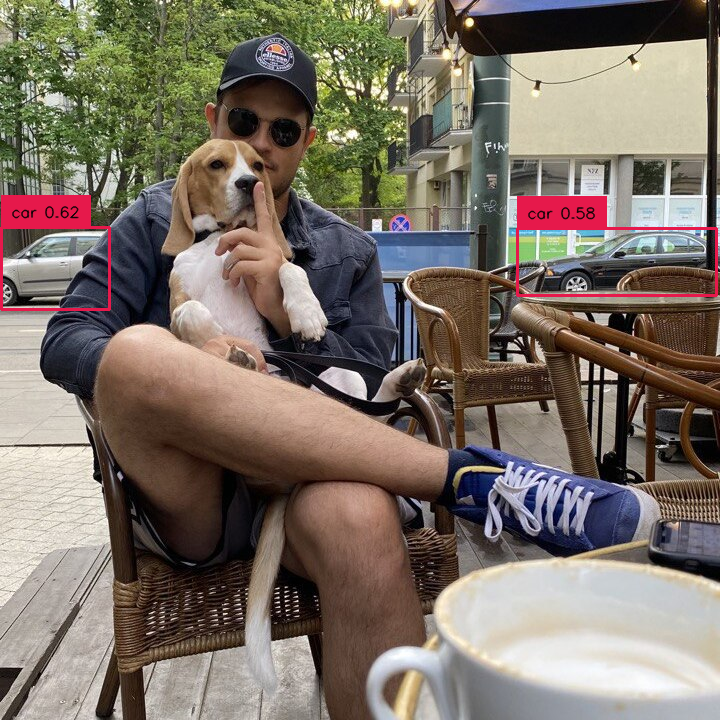{ align=center width="800" }
|
||||
|
||||
</div>
|
||||
|
||||
=== "Before"
|
||||
|
||||
```python
|
||||
import supervision as sv
|
||||
|
||||
detections = sv.Detections(...)
|
||||
detections = detections[detections.class_id == 0]
|
||||
```
|
||||
|
||||
<div class="result" markdown>
|
||||
|
||||
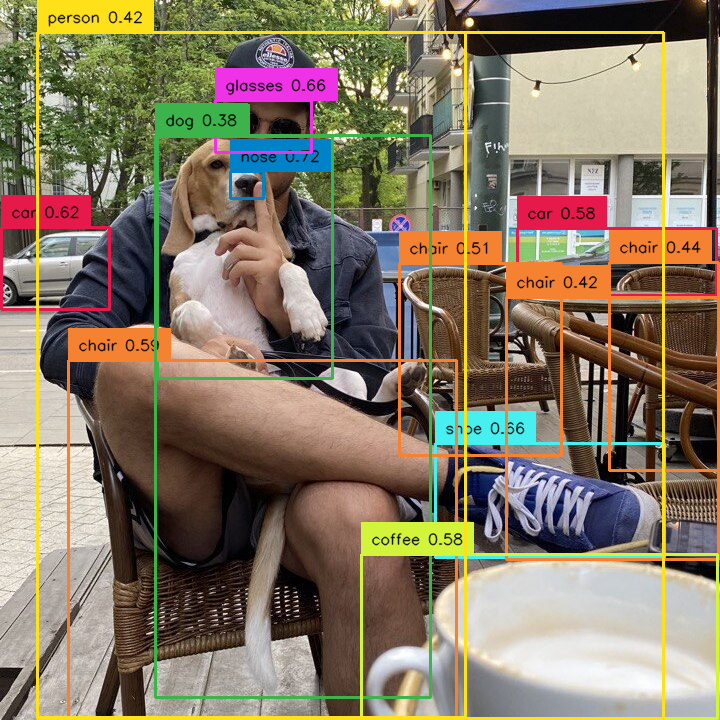{ align=center width="800" }
|
||||
|
||||
</div>
|
||||
|
||||
|
||||
### by set of classes
|
||||
|
||||
Allows you to select detections that belong only to selected set of classes.
|
||||
|
||||
=== "After"
|
||||
|
||||
```python
|
||||
import numpy as np
|
||||
import supervision as sv
|
||||
|
||||
selected_classes = [0, 2, 3]
|
||||
detections = sv.Detections(...)
|
||||
detections = detections[np.isin(detections.class_id, selected_classes)]
|
||||
```
|
||||
|
||||
<div class="result" markdown>
|
||||
|
||||
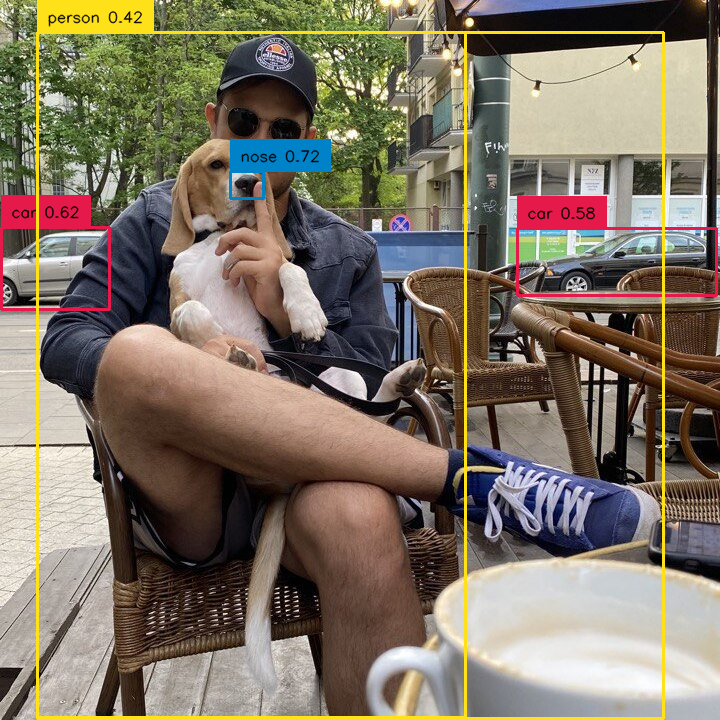{ align=center width="800" }
|
||||
|
||||
</div>
|
||||
|
||||
=== "Before"
|
||||
|
||||
```python
|
||||
import numpy as np
|
||||
import supervision as sv
|
||||
|
||||
class_id = [0, 2, 3]
|
||||
detections = sv.Detections(...)
|
||||
detections = detections[np.isin(detections.class_id, class_id)]
|
||||
```
|
||||
|
||||
<div class="result" markdown>
|
||||
|
||||
{ align=center width="800" }
|
||||
|
||||
</div>
|
||||
|
||||
### by confidence
|
||||
|
||||
Allows you to select detections with specific confidence value, for example higher than selected threshold.
|
||||
|
||||
=== "After"
|
||||
|
||||
```python
|
||||
import supervision as sv
|
||||
|
||||
detections = sv.Detections(...)
|
||||
detections = detections[detections.confidence > 0.5]
|
||||
```
|
||||
|
||||
<div class="result" markdown>
|
||||
|
||||
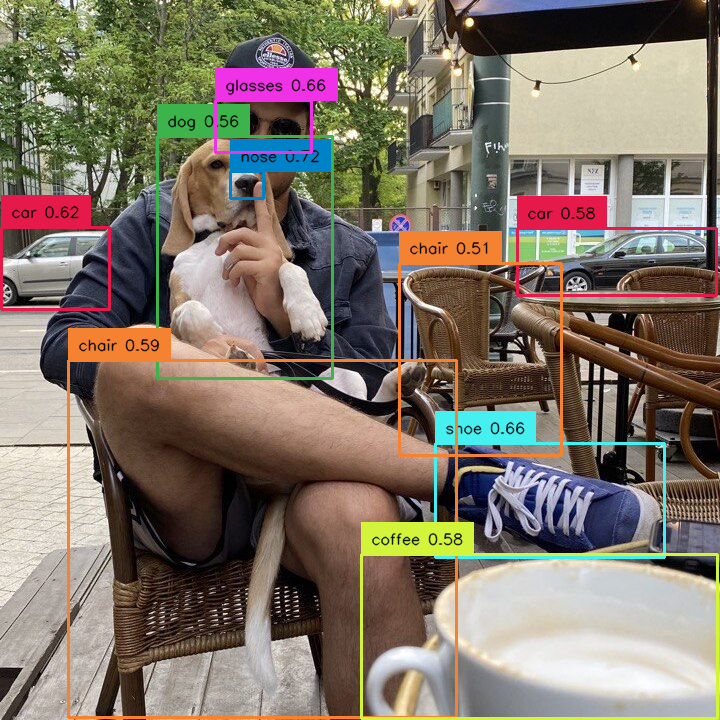{ align=center width="800" }
|
||||
|
||||
</div>
|
||||
|
||||
=== "Before"
|
||||
|
||||
```python
|
||||
import supervision as sv
|
||||
|
||||
detections = sv.Detections(...)
|
||||
detections = detections[detections.confidence > 0.5]
|
||||
```
|
||||
|
||||
<div class="result" markdown>
|
||||
|
||||
{ align=center width="800" }
|
||||
|
||||
</div>
|
||||
|
||||
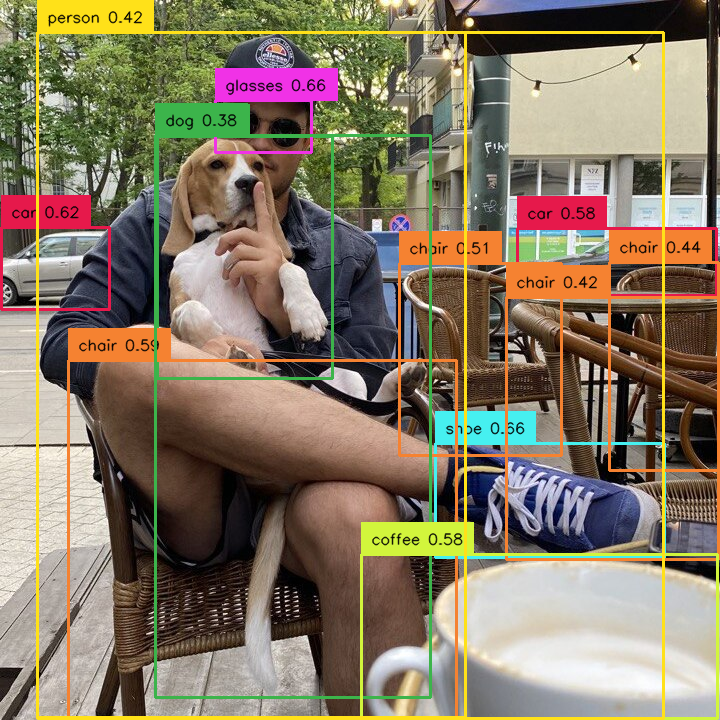
### by area
|
||||
|
||||
Allows you to select detections based on their size. We define the area as the number of pixels occupied by the
|
||||
detection in the image. In the example below, we have sifted out the detections that are too small.
|
||||
|
||||
=== "After"
|
||||
|
||||
```python
|
||||
import supervision as sv
|
||||
|
||||
detections = sv.Detections(...)
|
||||
detections = detections[detections.area > 1000]
|
||||
```
|
||||
|
||||
<div class="result" markdown>
|
||||
|
||||
{ align=center width="800" }
|
||||
|
||||
</div>
|
||||
|
||||
=== "Before"
|
||||
|
||||
```python
|
||||
import supervision as sv
|
||||
|
||||
detections = sv.Detections(...)
|
||||
detections = detections[detections.area > 1000]
|
||||
```
|
||||
|
||||
<div class="result" markdown>
|
||||
|
||||
{ align=center width="800" }
|
||||
|
||||
</div>
|
||||
|
||||
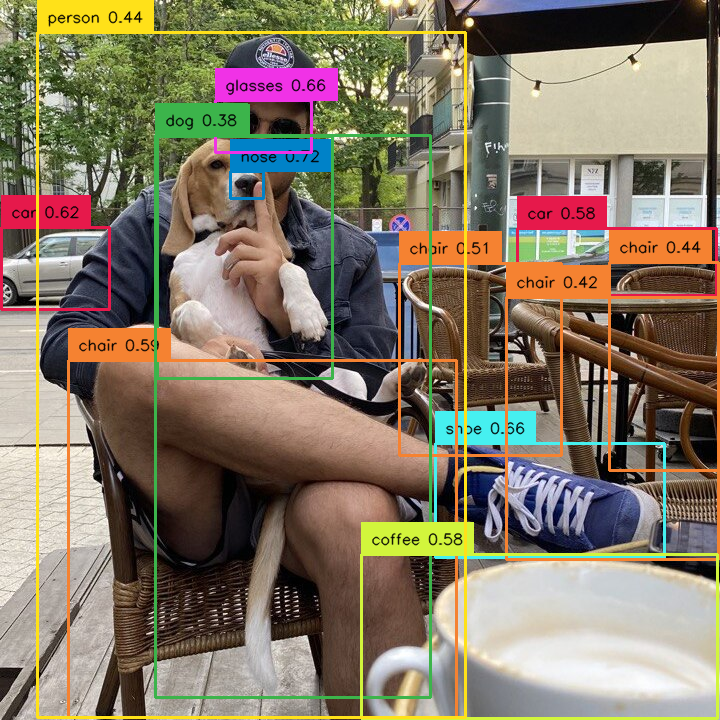
### by relative area
|
||||
|
||||
Allows you to select detections based on their size in relation to the size of whole image. Sometimes the concept of
|
||||
detection size changes depending on the image. Detection occupying 10000 square px can be large on a 1280x720 image
|
||||
but small on a 3840x2160 image. In such cases, we can filter out detections based on the percentage of the image area
|
||||
occupied by them. In the example below, we remove too large detections.
|
||||
|
||||
=== "After"
|
||||
|
||||
```python
|
||||
import supervision as sv
|
||||
|
||||
image = ...
|
||||
height, width, channels = image.shape
|
||||
image_area = height * width
|
||||
|
||||
detections = sv.Detections(...)
|
||||
detections = detections[(detections.area / image_area) < 0.8]
|
||||
```
|
||||
|
||||
<div class="result" markdown>
|
||||
|
||||
{ align=center width="800" }
|
||||
|
||||
</div>
|
||||
|
||||
=== "Before"
|
||||
|
||||
```python
|
||||
import supervision as sv
|
||||
|
||||
image = ...
|
||||
height, width, channels = image.shape
|
||||
image_area = height * width
|
||||
|
||||
detections = sv.Detections(...)
|
||||
detections = detections[(detections.area / image_area) < 0.8]
|
||||
```
|
||||
|
||||
<div class="result" markdown>
|
||||
|
||||
{ align=center width="800" }
|
||||
|
||||
</div>
|
||||
|
||||
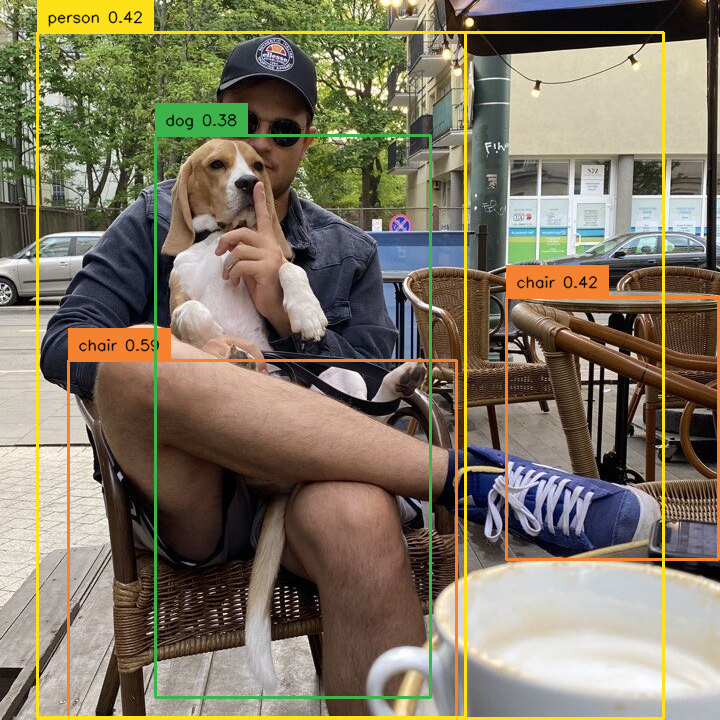
### by box dimensions
|
||||
|
||||
Allows you to select detections based on their dimensions. The size of the bounding box, as well as its coordinates,
|
||||
can be criteria for rejecting detection. Implementing such filtering requires a bit of custom code but is relatively
|
||||
simple and fast.
|
||||
|
||||
=== "After"
|
||||
|
||||
```python
|
||||
import supervision as sv
|
||||
|
||||
detections = sv.Detections(...)
|
||||
w = detections.xyxy[:, 2] - detections.xyxy[:, 0]
|
||||
h = detections.xyxy[:, 3] - detections.xyxy[:, 1]
|
||||
detections = detections[(w > 200) & (h > 200)]
|
||||
```
|
||||
|
||||
<div class="result" markdown>
|
||||
|
||||
{ align=center width="800" }
|
||||
|
||||
</div>
|
||||
|
||||
=== "Before"
|
||||
|
||||
```python
|
||||
import supervision as sv
|
||||
|
||||
detections = sv.Detections(...)
|
||||
w = detections.xyxy[:, 2] - detections.xyxy[:, 0]
|
||||
h = detections.xyxy[:, 3] - detections.xyxy[:, 1]
|
||||
detections = detections[(w > 200) & (h > 200)]
|
||||
```
|
||||
|
||||
<div class="result" markdown>
|
||||
|
||||
{ align=center width="800" }
|
||||
|
||||
</div>
|
||||
|
||||
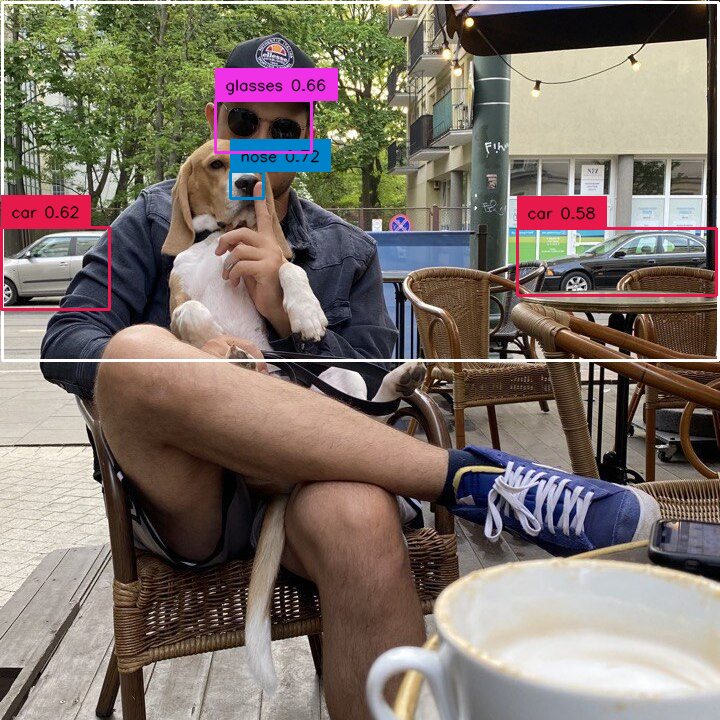
### by `PolygonZone`
|
||||
|
||||
Allows you to use `Detections` in combination with `PolygonZone` to weed out bounding boxes that are in and out of the
|
||||
zone. In the example below you can see how to filter out all detections located in the lower part of the image.
|
||||
|
||||
=== "After"
|
||||
|
||||
```python
|
||||
import supervision as sv
|
||||
|
||||
zone = sv.PolygonZone(...)
|
||||
detections = sv.Detections(...)
|
||||
mask = zone.trigger(detections=detections)
|
||||
detections = detections[mask]
|
||||
```
|
||||
|
||||
<div class="result" markdown>
|
||||
|
||||
{ align=center width="800" }
|
||||
|
||||
</div>
|
||||
|
||||
=== "Before"
|
||||
|
||||
```python
|
||||
import supervision as sv
|
||||
|
||||
zone = sv.PolygonZone(...)
|
||||
detections = sv.Detections(...)
|
||||
mask = zone.trigger(detections=detections)
|
||||
detections = detections[mask]
|
||||
```
|
||||
|
||||
<div class="result" markdown>
|
||||
|
||||
{ align=center width="800" }
|
||||
|
||||
</div>
|
||||
|
||||
### by mixed conditions
|
||||
|
||||
`Detections`' greatest strength, however, is that you can build arbitrarily complex logical conditions by simply combining separate conditions using `&` or `|`.
|
||||
|
||||
=== "After"
|
||||
|
||||
```python
|
||||
import supervision as sv
|
||||
|
||||
zone = sv.PolygonZone(...)
|
||||
detections = sv.Detections(...)
|
||||
mask = zone.trigger(detections=detections)
|
||||
detections = detections[(detections.confidence > 0.7) & mask]
|
||||
```
|
||||
|
||||
<div class="result" markdown>
|
||||
|
||||
{ align=center width="800" }
|
||||
|
||||
</div>
|
||||
|
||||
=== "Before"
|
||||
|
||||
```python
|
||||
import supervision as sv
|
||||
|
||||
zone = sv.PolygonZone(...)
|
||||
detections = sv.Detections(...)
|
||||
mask = zone.trigger(detections=detections)
|
||||
detections = detections[mask]
|
||||
```
|
||||
|
||||
<div class="result" markdown>
|
||||
|
||||
{ align=center width="800" }
|
||||
|
||||
</div>
|
||||
@@ -0,0 +1,4 @@
|
||||
:root {
|
||||
--md-primary-fg-color: #8315F9;
|
||||
--md-accent-fg-color: #00FFCE;
|
||||
}
|
||||
@@ -0,0 +1,3 @@
|
||||
## list_files_with_extensions
|
||||
|
||||
:::supervision.utils.file.list_files_with_extensions
|
||||
@@ -0,0 +1,7 @@
|
||||
## ImageSink
|
||||
|
||||
:::supervision.utils.image.ImageSink
|
||||
|
||||
## crop
|
||||
|
||||
:::supervision.utils.image.crop
|
||||
@@ -0,0 +1,7 @@
|
||||
## plot_image
|
||||
|
||||
:::supervision.utils.notebook.plot_image
|
||||
|
||||
## plot_images_grid
|
||||
|
||||
:::supervision.utils.notebook.plot_images_grid
|
||||
@@ -0,0 +1,15 @@
|
||||
## VideoInfo
|
||||
|
||||
:::supervision.utils.video.VideoInfo
|
||||
|
||||
## VideoSink
|
||||
|
||||
:::supervision.utils.video.VideoSink
|
||||
|
||||
## get_video_frames_generator
|
||||
|
||||
:::supervision.utils.video.get_video_frames_generator
|
||||
|
||||
## process_video
|
||||
|
||||
:::supervision.utils.video.process_video
|
||||
@@ -1,15 +0,0 @@
|
||||
## VideoInfo
|
||||
|
||||
:::supervision.video.VideoInfo
|
||||
|
||||
## VideoSink
|
||||
|
||||
:::supervision.video.VideoSink
|
||||
|
||||
## get_video_frames_generator
|
||||
|
||||
:::supervision.video.get_video_frames_generator
|
||||
|
||||
## process_video
|
||||
|
||||
:::supervision.video.process_video
|
||||
+28
-6
@@ -21,10 +21,15 @@ extra:
|
||||
provider: google
|
||||
property: G-P7ZG0Y19G5
|
||||
|
||||
extra_css:
|
||||
- stylesheets/extra.css
|
||||
|
||||
nav:
|
||||
- Home: index.md
|
||||
- Quickstart:
|
||||
- Detections: quickstart/detections.md
|
||||
- API reference:
|
||||
- Detection:
|
||||
- Detections:
|
||||
- Core: detection/core.md
|
||||
- Annotate: detection/annotate.md
|
||||
- Utils: detection/utils.md
|
||||
@@ -34,9 +39,11 @@ nav:
|
||||
- Core: dataset/core.md
|
||||
- Draw:
|
||||
- Utils: draw/utils.md
|
||||
- Notebook:
|
||||
- Utils: notebook/utils.md
|
||||
- Video: video.md
|
||||
- Utils:
|
||||
- Video: utils/video.md
|
||||
- Image: utils/image.md
|
||||
- Notebook: utils/notebook.md
|
||||
- File: utils/file.md
|
||||
- Changelog: changelog.md
|
||||
|
||||
theme:
|
||||
@@ -44,8 +51,19 @@ theme:
|
||||
logo: https://media.roboflow.com/open-source/supervision/supervision-lenny.png
|
||||
favicon: https://media.roboflow.com/open-source/supervision/supervision-lenny.png
|
||||
palette:
|
||||
primary: 'deep purple'
|
||||
accent: 'teal'
|
||||
# Palette for light mode
|
||||
- scheme: default
|
||||
primary: 'custom'
|
||||
toggle:
|
||||
icon: material/brightness-7
|
||||
name: Switch to dark mode
|
||||
|
||||
# Palette toggle for dark mode
|
||||
- scheme: slate
|
||||
primary: 'custom'
|
||||
toggle:
|
||||
icon: material/brightness-4
|
||||
name: Switch to light mode
|
||||
font:
|
||||
text: Roboto
|
||||
code: Roboto Mono
|
||||
@@ -58,5 +76,9 @@ markdown_extensions:
|
||||
- admonition
|
||||
- pymdownx.details
|
||||
- pymdownx.superfences
|
||||
- attr_list
|
||||
- md_in_html
|
||||
- pymdownx.tabbed:
|
||||
alternate_style: true
|
||||
- toc:
|
||||
permalink: true
|
||||
@@ -26,7 +26,8 @@ setuptools.setup(
|
||||
install_requires=[
|
||||
'numpy>=1.20.0',
|
||||
'opencv-python',
|
||||
'matplotlib'
|
||||
'matplotlib',
|
||||
'pyyaml'
|
||||
],
|
||||
packages=find_packages(exclude=("tests",)),
|
||||
extras_require={
|
||||
@@ -51,6 +52,7 @@ setuptools.setup(
|
||||
'Programming Language :: Python :: 3.8',
|
||||
'Programming Language :: Python :: 3.9',
|
||||
'Programming Language :: Python :: 3.10',
|
||||
'Programming Language :: Python :: 3.11',
|
||||
'Programming Language :: Python :: 3 :: Only',
|
||||
'Topic :: Software Development',
|
||||
'Topic :: Scientific/Engineering',
|
||||
|
||||
@@ -1,6 +1,6 @@
|
||||
__version__ = "0.6.0"
|
||||
__version__ = "0.9.0"
|
||||
|
||||
from supervision.dataset.core import Dataset
|
||||
from supervision.dataset.core import BaseDataset, DetectionDataset
|
||||
from supervision.detection.annotate import BoxAnnotator, MaskAnnotator
|
||||
from supervision.detection.core import Detections
|
||||
from supervision.detection.line_counter import LineZone, LineZoneAnnotator
|
||||
@@ -16,11 +16,12 @@ from supervision.detection.utils import (
|
||||
)
|
||||
from supervision.draw.color import Color, ColorPalette
|
||||
from supervision.draw.utils import draw_filled_rectangle, draw_polygon, draw_text
|
||||
from supervision.file import list_files_with_extensions
|
||||
from supervision.geometry.core import Point, Position, Rect
|
||||
from supervision.geometry.utils import get_polygon_center
|
||||
from supervision.notebook.utils import plot_image, plot_images_grid
|
||||
from supervision.video import (
|
||||
from supervision.utils.file import list_files_with_extensions
|
||||
from supervision.utils.image import ImageSink, crop
|
||||
from supervision.utils.notebook import plot_image, plot_images_grid
|
||||
from supervision.utils.video import (
|
||||
VideoInfo,
|
||||
VideoSink,
|
||||
get_video_frames_generator,
|
||||
|
||||
+212
-8
@@ -1,8 +1,9 @@
|
||||
from __future__ import annotations
|
||||
|
||||
from abc import ABC, abstractmethod
|
||||
from dataclasses import dataclass
|
||||
from pathlib import Path
|
||||
from typing import Dict, List, Optional, Tuple
|
||||
from typing import Dict, Iterator, List, Optional, Tuple
|
||||
|
||||
import cv2
|
||||
import numpy as np
|
||||
@@ -11,14 +12,33 @@ from supervision.dataset.formats.pascal_voc import (
|
||||
detections_to_pascal_voc,
|
||||
load_pascal_voc_annotations,
|
||||
)
|
||||
from supervision.dataset.formats.yolo import (
|
||||
load_yolo_annotations,
|
||||
save_data_yaml,
|
||||
save_yolo_annotations,
|
||||
)
|
||||
from supervision.dataset.ultils import save_dataset_images, train_test_split
|
||||
from supervision.detection.core import Detections
|
||||
from supervision.file import list_files_with_extensions
|
||||
from supervision.utils.file import list_files_with_extensions
|
||||
|
||||
|
||||
@dataclass
|
||||
class Dataset:
|
||||
class BaseDataset(ABC):
|
||||
@abstractmethod
|
||||
def __len__(self) -> int:
|
||||
pass
|
||||
|
||||
@abstractmethod
|
||||
def split(
|
||||
self, split_ratio=0.8, random_state=None, shuffle: bool = True
|
||||
) -> Tuple[BaseDataset, BaseDataset]:
|
||||
pass
|
||||
|
||||
|
||||
@dataclass
|
||||
class DetectionDataset(BaseDataset):
|
||||
"""
|
||||
Dataclass containing information about the dataset.
|
||||
Dataclass containing information about object detection dataset.
|
||||
|
||||
Attributes:
|
||||
classes (List[str]): List containing dataset class names.
|
||||
@@ -30,13 +50,78 @@ class Dataset:
|
||||
images: Dict[str, np.ndarray]
|
||||
annotations: Dict[str, Detections]
|
||||
|
||||
def __len__(self) -> int:
|
||||
"""
|
||||
Return the number of images in the dataset.
|
||||
|
||||
Returns:
|
||||
int: The number of images.
|
||||
"""
|
||||
return len(self.images)
|
||||
|
||||
def __iter__(self) -> Iterator[Tuple[str, np.ndarray, Detections]]:
|
||||
"""
|
||||
Iterate over the images and annotations in the dataset.
|
||||
|
||||
Yields:
|
||||
Iterator[Tuple[str, np.ndarray, Detections]]: An iterator that yields tuples containing the image name,
|
||||
the image data, and its corresponding annotation.
|
||||
"""
|
||||
for image_name, image in self.images.items():
|
||||
yield image_name, image, self.annotations.get(image_name, None)
|
||||
|
||||
def split(
|
||||
self, split_ratio=0.8, random_state=None, shuffle: bool = True
|
||||
) -> Tuple[DetectionDataset, DetectionDataset]:
|
||||
"""
|
||||
Splits the dataset into two parts (training and testing) using the provided split_ratio.
|
||||
|
||||
Args:
|
||||
split_ratio (float, optional): The ratio of the training set to the entire dataset. Default is 0.8.
|
||||
random_state (int, optional): The seed for the random number generator. This is used for reproducibility. Default is None.
|
||||
shuffle (bool, optional): Whether to shuffle the data before splitting. Default is True.
|
||||
|
||||
Returns:
|
||||
Tuple[DetectionDataset, DetectionDataset]: A tuple containing the training and testing datasets.
|
||||
|
||||
Example:
|
||||
```python
|
||||
>>> import supervision as sv
|
||||
|
||||
>>> ds = sv.DetectionDataset(...)
|
||||
>>> train_ds, test_ds = ds.split(split_ratio=0.7, random_state=42, shuffle=True)
|
||||
>>> len(train_ds), len(test_ds)
|
||||
(700, 300)
|
||||
```
|
||||
"""
|
||||
|
||||
image_names = list(self.images.keys())
|
||||
train_names, test_names = train_test_split(
|
||||
data=image_names,
|
||||
train_ratio=split_ratio,
|
||||
random_state=random_state,
|
||||
shuffle=shuffle,
|
||||
)
|
||||
|
||||
train_dataset = DetectionDataset(
|
||||
classes=self.classes,
|
||||
images={name: self.images[name] for name in train_names},
|
||||
annotations={name: self.annotations[name] for name in train_names},
|
||||
)
|
||||
test_dataset = DetectionDataset(
|
||||
classes=self.classes,
|
||||
images={name: self.images[name] for name in test_names},
|
||||
annotations={name: self.annotations[name] for name in test_names},
|
||||
)
|
||||
return train_dataset, test_dataset
|
||||
|
||||
def as_pascal_voc(
|
||||
self,
|
||||
images_directory_path: Optional[str] = None,
|
||||
annotations_directory_path: Optional[str] = None,
|
||||
min_image_area_percentage: float = 0.0,
|
||||
max_image_area_percentage: float = 1.0,
|
||||
approximation_percentage: float = 0.75,
|
||||
approximation_percentage: float = 0.0,
|
||||
) -> None:
|
||||
"""
|
||||
Exports the dataset to PASCAL VOC format. This method saves the images and their corresponding annotations in
|
||||
@@ -86,7 +171,7 @@ class Dataset:
|
||||
@classmethod
|
||||
def from_pascal_voc(
|
||||
cls, images_directory_path: str, annotations_directory_path: str
|
||||
) -> Dataset:
|
||||
) -> DetectionDataset:
|
||||
"""
|
||||
Creates a Dataset instance from PASCAL VOC formatted data.
|
||||
|
||||
@@ -95,7 +180,29 @@ class Dataset:
|
||||
annotations_directory_path (str): The path to the directory containing the PASCAL VOC XML annotations.
|
||||
|
||||
Returns:
|
||||
Dataset: A Dataset instance containing the loaded images and annotations.
|
||||
DetectionDataset: A DetectionDataset instance containing the loaded images and annotations.
|
||||
|
||||
Example:
|
||||
```python
|
||||
>>> import roboflow
|
||||
>>> from roboflow import Roboflow
|
||||
>>> import supervision as sv
|
||||
|
||||
>>> roboflow.login()
|
||||
|
||||
>>> rf = Roboflow()
|
||||
|
||||
>>> project = rf.workspace(WORKSPACE_ID).project(PROJECT_ID)
|
||||
>>> dataset = project.version(PROJECT_VERSION).download("voc")
|
||||
|
||||
>>> ds = sv.DetectionDataset.from_yolo(
|
||||
... images_directory_path=f"{dataset.location}/train/images",
|
||||
... annotations_directory_path=f"{dataset.location}/train/labels"
|
||||
... )
|
||||
|
||||
>>> ds.classes
|
||||
['dog', 'person']
|
||||
```
|
||||
"""
|
||||
image_paths = list_files_with_extensions(
|
||||
directory=images_directory_path, extensions=["jpg", "jpeg", "png"]
|
||||
@@ -125,4 +232,101 @@ class Dataset:
|
||||
annotations = {
|
||||
image_name: detections for image_name, detections, _ in raw_annotations
|
||||
}
|
||||
return Dataset(classes=classes, images=images, annotations=annotations)
|
||||
return DetectionDataset(classes=classes, images=images, annotations=annotations)
|
||||
|
||||
@classmethod
|
||||
def from_yolo(
|
||||
cls,
|
||||
images_directory_path: str,
|
||||
annotations_directory_path: str,
|
||||
data_yaml_path: str,
|
||||
force_masks: bool = False,
|
||||
) -> DetectionDataset:
|
||||
"""
|
||||
Creates a Dataset instance from YOLO formatted data.
|
||||
|
||||
Args:
|
||||
images_directory_path (str): The path to the directory containing the images.
|
||||
annotations_directory_path (str): The path to the directory containing the YOLO annotation files.
|
||||
data_yaml_path (str): The path to the data YAML file containing class information.
|
||||
force_masks (bool, optional): If True, forces masks to be loaded for all annotations, regardless of whether they are present.
|
||||
|
||||
Returns:
|
||||
DetectionDataset: A DetectionDataset instance containing the loaded images and annotations.
|
||||
|
||||
Example:
|
||||
```python
|
||||
>>> import roboflow
|
||||
>>> from roboflow import Roboflow
|
||||
>>> import supervision as sv
|
||||
|
||||
>>> roboflow.login()
|
||||
|
||||
>>> rf = Roboflow()
|
||||
|
||||
>>> project = rf.workspace(WORKSPACE_ID).project(PROJECT_ID)
|
||||
>>> dataset = project.version(PROJECT_VERSION).download("yolov5")
|
||||
|
||||
>>> ds = sv.DetectionDataset.from_yolo(
|
||||
... images_directory_path=f"{dataset.location}/train/images",
|
||||
... annotations_directory_path=f"{dataset.location}/train/labels",
|
||||
... data_yaml_path=f"{dataset.location}/data.yaml"
|
||||
... )
|
||||
|
||||
>>> ds.classes
|
||||
['dog', 'person']
|
||||
```
|
||||
"""
|
||||
classes, images, annotations = load_yolo_annotations(
|
||||
images_directory_path=images_directory_path,
|
||||
annotations_directory_path=annotations_directory_path,
|
||||
data_yaml_path=data_yaml_path,
|
||||
force_masks=force_masks,
|
||||
)
|
||||
return DetectionDataset(classes=classes, images=images, annotations=annotations)
|
||||
|
||||
def as_yolo(
|
||||
self,
|
||||
images_directory_path: Optional[str] = None,
|
||||
annotations_directory_path: Optional[str] = None,
|
||||
data_yaml_path: Optional[str] = None,
|
||||
min_image_area_percentage: float = 0.0,
|
||||
max_image_area_percentage: float = 1.0,
|
||||
approximation_percentage: float = 0.0,
|
||||
) -> None:
|
||||
"""
|
||||
Exports the dataset to YOLO format. This method saves the images and their corresponding
|
||||
annotations in YOLO format, which is a simple text file that describes an object in the image. It also allows
|
||||
for the optional saving of a data.yaml file, used in YOLOv5, that contains metadata about the dataset.
|
||||
|
||||
The method allows filtering the detections based on their area percentage and offers an option for polygon approximation.
|
||||
|
||||
Args:
|
||||
images_directory_path (Optional[str]): The path to the directory where the images should be saved.
|
||||
If not provided, images will not be saved.
|
||||
annotations_directory_path (Optional[str]): The path to the directory where the annotations in
|
||||
YOLO format should be saved. If not provided, annotations will not be saved.
|
||||
data_yaml_path (Optional[str]): The path where the data.yaml file should be saved.
|
||||
If not provided, the file will not be saved.
|
||||
min_image_area_percentage (float): The minimum percentage of detection area relative to
|
||||
the image area for a detection to be included.
|
||||
max_image_area_percentage (float): The maximum percentage of detection area relative to
|
||||
the image area for a detection to be included.
|
||||
approximation_percentage (float): The percentage of polygon points to be removed from the input polygon,
|
||||
in the range [0, 1). This is useful for simplifying the annotations.
|
||||
"""
|
||||
if images_directory_path is not None:
|
||||
save_dataset_images(
|
||||
images_directory_path=images_directory_path, images=self.images
|
||||
)
|
||||
if annotations_directory_path is not None:
|
||||
save_yolo_annotations(
|
||||
annotations_directory_path=annotations_directory_path,
|
||||
images=self.images,
|
||||
annotations=self.annotations,
|
||||
min_image_area_percentage=min_image_area_percentage,
|
||||
max_image_area_percentage=max_image_area_percentage,
|
||||
approximation_percentage=approximation_percentage,
|
||||
)
|
||||
if data_yaml_path is not None:
|
||||
save_data_yaml(data_yaml_path=data_yaml_path, classes=self.classes)
|
||||
|
||||
@@ -4,13 +4,9 @@ from xml.etree.ElementTree import Element, SubElement, parse, tostring
|
||||
|
||||
import numpy as np
|
||||
|
||||
from supervision.dataset.ultils import approximate_mask_with_polygons
|
||||
from supervision.detection.core import Detections
|
||||
from supervision.detection.utils import (
|
||||
approximate_polygon,
|
||||
filter_polygons_by_area,
|
||||
mask_to_polygons,
|
||||
polygon_to_xyxy,
|
||||
)
|
||||
from supervision.detection.utils import polygon_to_xyxy
|
||||
|
||||
|
||||
def object_to_pascal_voc(
|
||||
@@ -67,9 +63,6 @@ def detections_to_pascal_voc(
|
||||
str: An XML string in Pascal VOC format representing the detections.
|
||||
"""
|
||||
height, width, depth = image_shape
|
||||
image_area = height * width
|
||||
minimum_detection_area = min_image_area_percentage * image_area
|
||||
maximum_detection_area = max_image_area_percentage * image_area
|
||||
|
||||
# Create root element
|
||||
annotation = Element("annotation")
|
||||
@@ -104,24 +97,16 @@ def detections_to_pascal_voc(
|
||||
for xyxy, mask, _, class_id, _ in detections:
|
||||
name = classes[class_id]
|
||||
if mask is not None:
|
||||
polygons = mask_to_polygons(mask=mask)
|
||||
if len(polygons) == 1:
|
||||
polygons = filter_polygons_by_area(
|
||||
polygons=polygons, min_area=None, max_area=maximum_detection_area
|
||||
)
|
||||
else:
|
||||
polygons = filter_polygons_by_area(
|
||||
polygons=polygons,
|
||||
min_area=minimum_detection_area,
|
||||
max_area=maximum_detection_area,
|
||||
)
|
||||
polygons = approximate_mask_with_polygons(
|
||||
mask=mask,
|
||||
min_image_area_percentage=min_image_area_percentage,
|
||||
max_image_area_percentage=max_image_area_percentage,
|
||||
approximation_percentage=approximation_percentage,
|
||||
)
|
||||
for polygon in polygons:
|
||||
approx_polygon = approximate_polygon(
|
||||
polygon=polygon, percentage=approximation_percentage
|
||||
)
|
||||
xyxy = polygon_to_xyxy(polygon=approx_polygon)
|
||||
xyxy = polygon_to_xyxy(polygon=polygon)
|
||||
next_object = object_to_pascal_voc(
|
||||
xyxy=xyxy, name=name, polygon=approx_polygon
|
||||
xyxy=xyxy, name=name, polygon=polygon
|
||||
)
|
||||
annotation.append(next_object)
|
||||
else:
|
||||
|
||||
@@ -0,0 +1,260 @@
|
||||
import os
|
||||
from pathlib import Path
|
||||
from typing import Dict, List, Optional, Tuple, Union
|
||||
|
||||
import cv2
|
||||
import numpy as np
|
||||
import yaml
|
||||
|
||||
from supervision.dataset.ultils import approximate_mask_with_polygons
|
||||
from supervision.detection.core import Detections
|
||||
from supervision.detection.utils import polygon_to_mask, polygon_to_xyxy
|
||||
from supervision.utils.file import (
|
||||
list_files_with_extensions,
|
||||
read_txt_file,
|
||||
save_text_file,
|
||||
)
|
||||
|
||||
|
||||
def _parse_box(values: List[str]) -> np.ndarray:
|
||||
x_center, y_center, width, height = values
|
||||
return np.array(
|
||||
[
|
||||
float(x_center) - float(width) / 2,
|
||||
float(y_center) - float(height) / 2,
|
||||
float(x_center) + float(width) / 2,
|
||||
float(y_center) + float(height) / 2,
|
||||
],
|
||||
dtype=np.float32,
|
||||
)
|
||||
|
||||
|
||||
def _box_to_polygon(box: np.ndarray) -> np.ndarray:
|
||||
return np.array(
|
||||
[[box[0], box[1]], [box[2], box[1]], [box[2], box[3]], [box[0], box[3]]]
|
||||
)
|
||||
|
||||
|
||||
def _parse_polygon(values: List[str]) -> np.ndarray:
|
||||
return np.array(values, dtype=np.float32).reshape(-1, 2)
|
||||
|
||||
|
||||
def _polygons_to_masks(
|
||||
polygons: List[np.ndarray], resolution_wh: Tuple[int, int]
|
||||
) -> np.ndarray:
|
||||
return np.array(
|
||||
[
|
||||
polygon_to_mask(polygon=polygon, resolution_wh=resolution_wh)
|
||||
for polygon in polygons
|
||||
],
|
||||
dtype=bool,
|
||||
)
|
||||
|
||||
|
||||
def _pair_image_with_annotation(
|
||||
image_paths: List[Union[str, Path]], annotation_paths: List[Union[str, Path]]
|
||||
) -> List[Tuple[Union[str, Path], Union[str, Path]]]:
|
||||
image_dict = {p.stem: p for p in image_paths}
|
||||
return [
|
||||
(image_dict[annotation_path.stem], annotation_path)
|
||||
for annotation_path in annotation_paths
|
||||
if annotation_path.stem in image_dict
|
||||
]
|
||||
|
||||
|
||||
def _with_mask(lines: List[str]) -> bool:
|
||||
return any([len(line.split()) > 5 for line in lines])
|
||||
|
||||
|
||||
def _extract_class_names(file_path: str) -> List[str]:
|
||||
names = []
|
||||
|
||||
with open(file_path, "r") as file:
|
||||
lines = file.readlines()
|
||||
for line in lines:
|
||||
if line.strip().startswith("names:"):
|
||||
start_index = lines.index(line) + 1
|
||||
break
|
||||
|
||||
for line in lines[start_index:]:
|
||||
if line.strip().startswith("-"):
|
||||
names.append(line.strip().replace("-", "").strip())
|
||||
else:
|
||||
break
|
||||
|
||||
return names
|
||||
|
||||
|
||||
def _image_name_to_annotation_name(image_name: str) -> str:
|
||||
base_name, _ = os.path.splitext(image_name)
|
||||
return base_name + ".txt"
|
||||
|
||||
|
||||
def yolo_annotations_to_detections(
|
||||
lines: List[str], resolution_wh: Tuple[int, int], with_masks: bool
|
||||
) -> Detections:
|
||||
if len(lines) == 0:
|
||||
return Detections.empty()
|
||||
|
||||
class_id, relative_xyxy, relative_polygon = [], [], []
|
||||
w, h = resolution_wh
|
||||
for line in lines:
|
||||
values = line.split()
|
||||
class_id.append(int(values[0]))
|
||||
if len(values) == 5:
|
||||
box = _parse_box(values=values[1:])
|
||||
relative_xyxy.append(box)
|
||||
if with_masks:
|
||||
relative_polygon.append(_box_to_polygon(box=box))
|
||||
elif len(values) > 5:
|
||||
polygon = _parse_polygon(values=values[1:])
|
||||
relative_xyxy.append(polygon_to_xyxy(polygon=polygon))
|
||||
if with_masks:
|
||||
relative_polygon.append(polygon)
|
||||
|
||||
class_id = np.array(class_id, dtype=int)
|
||||
relative_xyxy = np.array(relative_xyxy, dtype=np.float32)
|
||||
xyxy = relative_xyxy * np.array([w, h, w, h], dtype=np.float32)
|
||||
|
||||
if not with_masks:
|
||||
return Detections(class_id=class_id, xyxy=xyxy)
|
||||
|
||||
polygons = [
|
||||
(polygon * np.array(resolution_wh)).astype(int) for polygon in relative_polygon
|
||||
]
|
||||
mask = _polygons_to_masks(polygons=polygons, resolution_wh=resolution_wh)
|
||||
return Detections(class_id=class_id, xyxy=xyxy, mask=mask)
|
||||
|
||||
|
||||
def load_yolo_annotations(
|
||||
images_directory_path: str,
|
||||
annotations_directory_path: str,
|
||||
data_yaml_path: str,
|
||||
force_masks: bool = False,
|
||||
) -> Tuple[List[str], Dict[str, np.ndarray], Dict[str, Detections]]:
|
||||
"""
|
||||
Loads YOLO annotations and returns class names, images, and their corresponding detections.
|
||||
|
||||
Args:
|
||||
images_directory_path (str): The path to the directory containing the images.
|
||||
annotations_directory_path (str): The path to the directory containing the YOLO annotation files.
|
||||
data_yaml_path (str): The path to the data YAML file containing class information.
|
||||
force_masks (bool, optional): If True, forces masks to be loaded for all annotations, regardless of whether they are present.
|
||||
|
||||
Returns:
|
||||
Tuple[List[str], Dict[str, np.ndarray], Dict[str, Detections]]: A tuple containing a list of class names, a dictionary with image names as keys and images as values, and a dictionary with image names as keys and corresponding Detections instances as values.
|
||||
"""
|
||||
image_paths = list_files_with_extensions(
|
||||
directory=images_directory_path, extensions=["jpg", "jpeg", "png"]
|
||||
)
|
||||
annotation_paths = list_files_with_extensions(
|
||||
directory=annotations_directory_path, extensions=["txt"]
|
||||
)
|
||||
path_pairs = _pair_image_with_annotation(
|
||||
image_paths=image_paths, annotation_paths=annotation_paths
|
||||
)
|
||||
classes = _extract_class_names(file_path=data_yaml_path)
|
||||
images = {}
|
||||
annotations = {}
|
||||
for image_path, annotation_path in path_pairs:
|
||||
image = cv2.imread(str(image_path))
|
||||
lines = read_txt_file(str(annotation_path))
|
||||
h, w, _ = image.shape
|
||||
resolution_wh = (w, h)
|
||||
|
||||
with_masks = _with_mask(lines=lines)
|
||||
with_masks = force_masks if force_masks else with_masks
|
||||
annotation = yolo_annotations_to_detections(
|
||||
lines=lines, resolution_wh=resolution_wh, with_masks=with_masks
|
||||
)
|
||||
|
||||
images[image_path.name] = image
|
||||
annotations[image_path.name] = annotation
|
||||
return classes, images, annotations
|
||||
|
||||
|
||||
def object_to_yolo(
|
||||
xyxy: np.ndarray,
|
||||
class_id: int,
|
||||
image_shape: Tuple[int, int, int],
|
||||
polygon: Optional[np.ndarray] = None,
|
||||
) -> str:
|
||||
h, w, _ = image_shape
|
||||
if polygon is None:
|
||||
xyxy_relative = xyxy / np.array([w, h, w, h], dtype=np.float32)
|
||||
x_min, y_min, x_max, y_max = xyxy_relative
|
||||
x_center = (x_min + x_max) / 2
|
||||
y_center = (y_min + y_max) / 2
|
||||
width = x_max - x_min
|
||||
height = y_max - y_min
|
||||
return f"{int(class_id)} {x_center:.5f} {y_center:.5f} {width:.5f} {height:.5f}"
|
||||
else:
|
||||
polygon_relative = polygon / np.array([w, h], dtype=np.float32)
|
||||
polygon_relative = polygon_relative.reshape(-1)
|
||||
polygon_parsed = " ".join([f"{value:.5f}" for value in polygon_relative])
|
||||
return f"{int(class_id)} {polygon_parsed}"
|
||||
|
||||
|
||||
def detections_to_yolo_annotations(
|
||||
detections: Detections,
|
||||
image_shape: Tuple[int, int, int],
|
||||
min_image_area_percentage: float = 0.0,
|
||||
max_image_area_percentage: float = 1.0,
|
||||
approximation_percentage: float = 0.75,
|
||||
) -> List[str]:
|
||||
annotation = []
|
||||
for xyxy, mask, _, class_id, _ in detections:
|
||||
if mask is not None:
|
||||
polygons = approximate_mask_with_polygons(
|
||||
mask=mask,
|
||||
min_image_area_percentage=min_image_area_percentage,
|
||||
max_image_area_percentage=max_image_area_percentage,
|
||||
approximation_percentage=approximation_percentage,
|
||||
)
|
||||
for polygon in polygons:
|
||||
xyxy = polygon_to_xyxy(polygon=polygon)
|
||||
next_object = object_to_yolo(
|
||||
xyxy=xyxy,
|
||||
class_id=class_id,
|
||||
image_shape=image_shape,
|
||||
polygon=polygon,
|
||||
)
|
||||
annotation.append(next_object)
|
||||
else:
|
||||
next_object = object_to_yolo(
|
||||
xyxy=xyxy, class_id=class_id, image_shape=image_shape
|
||||
)
|
||||
annotation.append(next_object)
|
||||
return annotation
|
||||
|
||||
|
||||
def save_yolo_annotations(
|
||||
annotations_directory_path: str,
|
||||
images: Dict[str, np.ndarray],
|
||||
annotations: Dict[str, Detections],
|
||||
min_image_area_percentage: float = 0.0,
|
||||
max_image_area_percentage: float = 1.0,
|
||||
approximation_percentage: float = 0.75,
|
||||
) -> None:
|
||||
Path(annotations_directory_path).mkdir(parents=True, exist_ok=True)
|
||||
for image_name, image in images.items():
|
||||
detections = annotations[image_name]
|
||||
yolo_annotations_name = _image_name_to_annotation_name(image_name=image_name)
|
||||
yolo_annotations_path = os.path.join(
|
||||
annotations_directory_path, yolo_annotations_name
|
||||
)
|
||||
lines = detections_to_yolo_annotations(
|
||||
detections=detections,
|
||||
image_shape=image.shape,
|
||||
min_image_area_percentage=min_image_area_percentage,
|
||||
max_image_area_percentage=max_image_area_percentage,
|
||||
approximation_percentage=approximation_percentage,
|
||||
)
|
||||
save_text_file(lines=lines, file_path=yolo_annotations_path)
|
||||
|
||||
|
||||
def save_data_yaml(data_yaml_path: str, classes: List[str]) -> None:
|
||||
data = {"nc": len(classes), "names": classes}
|
||||
Path(data_yaml_path).parent.mkdir(parents=True, exist_ok=True)
|
||||
with open(data_yaml_path, "w") as outfile:
|
||||
yaml.dump(data, outfile, default_flow_style=False)
|
||||
@@ -0,0 +1,81 @@
|
||||
import os
|
||||
import random
|
||||
from pathlib import Path
|
||||
from typing import Dict, List, Optional, Tuple, TypeVar
|
||||
|
||||
import cv2
|
||||
import numpy as np
|
||||
|
||||
from supervision.detection.utils import (
|
||||
approximate_polygon,
|
||||
filter_polygons_by_area,
|
||||
mask_to_polygons,
|
||||
)
|
||||
|
||||
T = TypeVar("T")
|
||||
|
||||
|
||||
def approximate_mask_with_polygons(
|
||||
mask: np.ndarray,
|
||||
min_image_area_percentage: float = 0.0,
|
||||
max_image_area_percentage: float = 1.0,
|
||||
approximation_percentage: float = 0.75,
|
||||
) -> List[np.ndarray]:
|
||||
height, width = mask.shape
|
||||
image_area = height * width
|
||||
minimum_detection_area = min_image_area_percentage * image_area
|
||||
maximum_detection_area = max_image_area_percentage * image_area
|
||||
|
||||
polygons = mask_to_polygons(mask=mask)
|
||||
if len(polygons) == 1:
|
||||
polygons = filter_polygons_by_area(
|
||||
polygons=polygons, min_area=None, max_area=maximum_detection_area
|
||||
)
|
||||
else:
|
||||
polygons = filter_polygons_by_area(
|
||||
polygons=polygons,
|
||||
min_area=minimum_detection_area,
|
||||
max_area=maximum_detection_area,
|
||||
)
|
||||
return [
|
||||
approximate_polygon(polygon=polygon, percentage=approximation_percentage)
|
||||
for polygon in polygons
|
||||
]
|
||||
|
||||
|
||||
def save_dataset_images(
|
||||
images_directory_path: str, images: Dict[str, np.ndarray]
|
||||
) -> None:
|
||||
Path(images_directory_path).mkdir(parents=True, exist_ok=True)
|
||||
|
||||
for image_name, image in images.items():
|
||||
target_image_path = os.path.join(images_directory_path, image_name)
|
||||
cv2.imwrite(target_image_path, image)
|
||||
|
||||
|
||||
def train_test_split(
|
||||
data: List[T],
|
||||
train_ratio: float = 0.8,
|
||||
random_state: Optional[int] = None,
|
||||
shuffle: bool = True,
|
||||
) -> Tuple[List[T], List[T]]:
|
||||
"""
|
||||
Splits the data into two parts using the provided train_ratio.
|
||||
|
||||
Args:
|
||||
data (List[T]): The data to split.
|
||||
train_ratio (float): The ratio of the training set to the entire dataset.
|
||||
random_state (Optional[int]): The seed for the random number generator.
|
||||
shuffle (bool): Whether to shuffle the data before splitting.
|
||||
|
||||
Returns:
|
||||
Tuple[List[T], List[T]]: The split data.
|
||||
"""
|
||||
if random_state is not None:
|
||||
random.seed(random_state)
|
||||
|
||||
if shuffle:
|
||||
random.shuffle(data)
|
||||
|
||||
split_index = int(len(data) * train_ratio)
|
||||
return data[:split_index], data[split_index:]
|
||||
@@ -47,13 +47,34 @@ class BoxAnnotator:
|
||||
"""
|
||||
Draws bounding boxes on the frame using the detections provided.
|
||||
|
||||
Parameters:
|
||||
Args:
|
||||
scene (np.ndarray): The image on which the bounding boxes will be drawn
|
||||
detections (Detections): The detections for which the bounding boxes will be drawn
|
||||
labels (Optional[List[str]]): An optional list of labels corresponding to each detection. If labels is provided, the confidence score of the detection will be replaced with the label.
|
||||
skip_label (bool): Is set to True, skips bounding box label annotation.
|
||||
labels (Optional[List[str]]): An optional list of labels corresponding to each detection. If `labels` are not provided, corresponding `class_id` will be used as label.
|
||||
skip_label (bool): Is set to `True`, skips bounding box label annotation.
|
||||
Returns:
|
||||
np.ndarray: The image with the bounding boxes drawn on it
|
||||
|
||||
Example:
|
||||
```python
|
||||
>>> import supervision as sv
|
||||
|
||||
>>> classes = ['person', ...]
|
||||
>>> image = ...
|
||||
>>> detections = sv.Detections(...)
|
||||
|
||||
>>> box_annotator = sv.BoxAnnotator()
|
||||
>>> labels = [
|
||||
... f"{classes[class_id]} {confidence:0.2f}"
|
||||
... for _, _, confidence, class_id, _
|
||||
... in detections
|
||||
... ]
|
||||
>>> annotated_frame = box_annotator.annotate(
|
||||
... scene=image.copy(),
|
||||
... detections=detections,
|
||||
... labels=labels
|
||||
... )
|
||||
```
|
||||
"""
|
||||
font = cv2.FONT_HERSHEY_SIMPLEX
|
||||
for i in range(len(detections)):
|
||||
@@ -139,7 +160,7 @@ class MaskAnnotator:
|
||||
"""
|
||||
Overlays the masks on the given image based on the provided detections, with a specified opacity.
|
||||
|
||||
Parameters:
|
||||
Args:
|
||||
scene (np.ndarray): The image on which the masks will be overlaid
|
||||
detections (Detections): The detections for which the masks will be overlaid
|
||||
opacity (float): The opacity of the masks, between 0 and 1, default is 0.5
|
||||
|
||||
+214
-31
@@ -1,12 +1,18 @@
|
||||
from __future__ import annotations
|
||||
|
||||
from dataclasses import dataclass
|
||||
from typing import Any, Iterator, List, Optional, Tuple
|
||||
from dataclasses import astuple, dataclass
|
||||
from typing import Any, Iterator, List, Optional, Tuple, Union
|
||||
|
||||
import cv2
|
||||
import numpy as np
|
||||
|
||||
from supervision.detection.utils import non_max_suppression, xywh_to_xyxy
|
||||
from supervision.detection.utils import (
|
||||
extract_yolov8_masks,
|
||||
non_max_suppression,
|
||||
xywh_to_xyxy,
|
||||
)
|
||||
from supervision.geometry.core import Position
|
||||
from supervision.utils.internal import deprecated
|
||||
|
||||
|
||||
def _validate_xyxy(xyxy: Any, n: int) -> None:
|
||||
@@ -136,7 +142,7 @@ class Detections:
|
||||
@classmethod
|
||||
def from_yolov5(cls, yolov5_results) -> Detections:
|
||||
"""
|
||||
Creates a Detections instance from a YOLOv5 output Detections
|
||||
Creates a Detections instance from a [YOLOv5](https://github.com/ultralytics/yolov5) inference result.
|
||||
|
||||
Args:
|
||||
yolov5_results (yolov5.models.common.Detections): The output Detections instance from YOLOv5
|
||||
@@ -146,12 +152,14 @@ class Detections:
|
||||
|
||||
Example:
|
||||
```python
|
||||
>>> import cv2
|
||||
>>> import torch
|
||||
>>> from supervision import Detections
|
||||
>>> import supervision as sv
|
||||
|
||||
>>> image = cv2.imread(SOURCE_IMAGE_PATH)
|
||||
>>> model = torch.hub.load('ultralytics/yolov5', 'yolov5s')
|
||||
>>> results = model(IMAGE)
|
||||
>>> detections = Detections.from_yolov5(results)
|
||||
>>> result = model(image)
|
||||
>>> detections = sv.Detections.from_yolov5(result)
|
||||
```
|
||||
"""
|
||||
yolov5_detections_predictions = yolov5_results.pred[0].cpu().cpu().numpy()
|
||||
@@ -164,7 +172,7 @@ class Detections:
|
||||
@classmethod
|
||||
def from_yolov8(cls, yolov8_results) -> Detections:
|
||||
"""
|
||||
Creates a Detections instance from a YOLOv8 output Results
|
||||
Creates a Detections instance from a [YOLOv8](https://github.com/ultralytics/ultralytics) inference result.
|
||||
|
||||
Args:
|
||||
yolov8_results (ultralytics.yolo.engine.results.Results): The output Results instance from YOLOv8
|
||||
@@ -174,24 +182,56 @@ class Detections:
|
||||
|
||||
Example:
|
||||
```python
|
||||
>>> import cv2
|
||||
>>> from ultralytics import YOLO
|
||||
>>> from supervision import Detections
|
||||
>>> import supervision as sv
|
||||
|
||||
>>> image = cv2.imread(SOURCE_IMAGE_PATH)
|
||||
>>> model = YOLO('yolov8s.pt')
|
||||
>>> yolov8_results = model(IMAGE)[0]
|
||||
>>> detections = Detections.from_yolov8(yolov8_results)
|
||||
>>> result = model(image)[0]
|
||||
>>> detections = sv.Detections.from_yolov8(result)
|
||||
```
|
||||
"""
|
||||
return cls(
|
||||
xyxy=yolov8_results.boxes.xyxy.cpu().numpy(),
|
||||
confidence=yolov8_results.boxes.conf.cpu().numpy(),
|
||||
class_id=yolov8_results.boxes.cls.cpu().numpy().astype(int),
|
||||
mask=extract_yolov8_masks(yolov8_results),
|
||||
)
|
||||
|
||||
@classmethod
|
||||
def from_yolo_nas(cls, yolo_nas_results) -> Detections:
|
||||
"""
|
||||
Creates a Detections instance from a [YOLO-NAS](https://github.com/Deci-AI/super-gradients/blob/master/YOLONAS.md) inference result.
|
||||
|
||||
Args:
|
||||
yolo_nas_results (super_gradients.training.models.prediction_results.ImageDetectionPrediction): The output Results instance from YOLO-NAS
|
||||
|
||||
Returns:
|
||||
Detections: A new Detections object.
|
||||
|
||||
Example:
|
||||
```python
|
||||
>>> import cv2
|
||||
>>> from super_gradients.training import models
|
||||
>>> import supervision as sv
|
||||
|
||||
>>> image = cv2.imread(SOURCE_IMAGE_PATH)
|
||||
>>> model = models.get('yolo_nas_l', pretrained_weights="coco")
|
||||
>>> result = list(model.predict(image, conf=0.35))[0]
|
||||
>>> detections = sv.Detections.from_yolo_nas(result)
|
||||
```
|
||||
"""
|
||||
return cls(
|
||||
xyxy=yolo_nas_results.prediction.bboxes_xyxy,
|
||||
confidence=yolo_nas_results.prediction.confidence,
|
||||
class_id=yolo_nas_results.prediction.labels.astype(int),
|
||||
)
|
||||
|
||||
@classmethod
|
||||
def from_transformers(cls, transformers_results: dict) -> Detections:
|
||||
"""
|
||||
Creates a Detections instance from Object Detection Transformer output Results
|
||||
Creates a Detections instance from object detection [transformer](https://github.com/huggingface/transformers) inference result.
|
||||
|
||||
Returns:
|
||||
Detections: A new Detections object.
|
||||
@@ -204,6 +244,32 @@ class Detections:
|
||||
|
||||
@classmethod
|
||||
def from_detectron2(cls, detectron2_results) -> Detections:
|
||||
"""
|
||||
Create a Detections object from the [Detectron2](https://github.com/facebookresearch/detectron2) inference result.
|
||||
|
||||
Args:
|
||||
detectron2_results: The output of a Detectron2 model containing instances with prediction data.
|
||||
|
||||
Returns:
|
||||
(Detections): A Detections object containing the bounding boxes, class IDs, and confidences of the predictions.
|
||||
|
||||
Example:
|
||||
```python
|
||||
>>> import cv2
|
||||
>>> from detectron2.engine import DefaultPredictor
|
||||
>>> from detectron2.config import get_cfg
|
||||
>>> import supervision as sv
|
||||
|
||||
>>> image = cv2.imread(SOURCE_IMAGE_PATH)
|
||||
>>> cfg = get_cfg()
|
||||
>>> cfg.merge_from_file("path/to/config.yaml")
|
||||
>>> cfg.MODEL.WEIGHTS = "path/to/model_weights.pth"
|
||||
>>> predictor = DefaultPredictor(cfg)
|
||||
>>> result = predictor(image)
|
||||
|
||||
>>> detections = sv.Detections.from_detectron2(result)
|
||||
```
|
||||
"""
|
||||
return cls(
|
||||
xyxy=detectron2_results["instances"].pred_boxes.tensor.cpu().numpy(),
|
||||
confidence=detectron2_results["instances"].scores.cpu().numpy(),
|
||||
@@ -215,6 +281,38 @@ class Detections:
|
||||
|
||||
@classmethod
|
||||
def from_roboflow(cls, roboflow_result: dict, class_list: List[str]) -> Detections:
|
||||
"""
|
||||
Create a Detections object from the [Roboflow](https://roboflow.com/) API inference result.
|
||||
|
||||
Args:
|
||||
roboflow_result (dict): The result from the Roboflow API containing predictions.
|
||||
class_list (List[str]): A list of class names corresponding to the class IDs in the API result.
|
||||
|
||||
Returns:
|
||||
(Detections): A Detections object containing the bounding boxes, class IDs, and confidences of the predictions.
|
||||
|
||||
Example:
|
||||
```python
|
||||
>>> import supervision as sv
|
||||
|
||||
>>> roboflow_result = {
|
||||
... "predictions": [
|
||||
... {
|
||||
... "x": 0.5,
|
||||
... "y": 0.5,
|
||||
... "width": 0.2,
|
||||
... "height": 0.3,
|
||||
... "class": "person",
|
||||
... "confidence": 0.9
|
||||
... },
|
||||
... # ... more predictions ...
|
||||
... ]
|
||||
... }
|
||||
>>> class_list = ["person", "car", "dog"]
|
||||
|
||||
>>> detections = sv.Detections.from_roboflow(roboflow_result, class_list)
|
||||
```
|
||||
"""
|
||||
xyxy = []
|
||||
confidence = []
|
||||
class_id = []
|
||||
@@ -241,7 +339,7 @@ class Detections:
|
||||
@classmethod
|
||||
def from_sam(cls, sam_result: List[dict]) -> Detections:
|
||||
"""
|
||||
Creates a Detections instance from Segment Anything Model (SAM) by Meta AI.
|
||||
Creates a Detections instance from [Segment Anything Model](https://github.com/facebookresearch/segment-anything) inference result.
|
||||
|
||||
Args:
|
||||
sam_result (List[dict]): The output Results instance from SAM
|
||||
@@ -251,8 +349,8 @@ class Detections:
|
||||
|
||||
Example:
|
||||
```python
|
||||
>>> from segment_anything import sam_model_registry, SamAutomaticMaskGenerator
|
||||
>>> import supervision as sv
|
||||
>>> from segment_anything import sam_model_registry, SamAutomaticMaskGenerator
|
||||
|
||||
>>> sam = sam_model_registry[MODEL_TYPE](checkpoint=CHECKPOINT_PATH).to(device=DEVICE)
|
||||
>>> mask_generator = SamAutomaticMaskGenerator(sam)
|
||||
@@ -270,6 +368,9 @@ class Detections:
|
||||
return Detections(xyxy=xywh_to_xyxy(boxes_xywh=xywh), mask=mask)
|
||||
|
||||
@classmethod
|
||||
@deprecated(
|
||||
"Dataset loading and saving is going to be executed by supervision.dataset.core.Dataset"
|
||||
)
|
||||
def from_coco_annotations(cls, coco_annotation: dict) -> Detections:
|
||||
xyxy, class_id = [], []
|
||||
|
||||
@@ -282,12 +383,74 @@ class Detections:
|
||||
|
||||
@classmethod
|
||||
def empty(cls) -> Detections:
|
||||
"""
|
||||
Create an empty Detections object with no bounding boxes, confidences, or class IDs.
|
||||
|
||||
Returns:
|
||||
(Detections): An empty Detections object.
|
||||
|
||||
Example:
|
||||
```python
|
||||
>>> from supervision import Detections
|
||||
|
||||
>>> empty_detections = Detections.empty()
|
||||
```
|
||||
"""
|
||||
return cls(
|
||||
xyxy=np.empty((0, 4), dtype=np.float32),
|
||||
confidence=np.array([], dtype=np.float32),
|
||||
class_id=np.array([], dtype=int),
|
||||
)
|
||||
|
||||
@classmethod
|
||||
def merge(cls, detections_list: List[Detections]) -> Detections:
|
||||
"""
|
||||
Merge a list of Detections objects into a single Detections object.
|
||||
|
||||
This method takes a list of Detections objects and combines their respective fields (`xyxy`, `mask`,
|
||||
`confidence`, `class_id`, and `tracker_id`) into a single Detections object. If all elements in a field are not
|
||||
`None`, the corresponding field will be stacked. Otherwise, the field will be set to `None`.
|
||||
|
||||
Args:
|
||||
detections_list (List[Detections]): A list of Detections objects to merge.
|
||||
|
||||
Returns:
|
||||
(Detections): A single Detections object containing the merged data from the input list.
|
||||
|
||||
Example:
|
||||
```python
|
||||
>>> from supervision import Detections
|
||||
|
||||
>>> detections_1 = Detections(...)
|
||||
>>> detections_2 = Detections(...)
|
||||
|
||||
>>> merged_detections = Detections.merge([detections_1, detections_2])
|
||||
```
|
||||
"""
|
||||
if len(detections_list) == 0:
|
||||
return Detections.empty()
|
||||
|
||||
detections_tuples_list = [astuple(detection) for detection in detections_list]
|
||||
xyxy, mask, confidence, class_id, tracker_id = [
|
||||
list(field) for field in zip(*detections_tuples_list)
|
||||
]
|
||||
|
||||
all_not_none = lambda l: all(x is not None for x in l)
|
||||
|
||||
xyxy = np.vstack(xyxy)
|
||||
mask = np.vstack(mask) if all_not_none(mask) else None
|
||||
confidence = np.hstack(confidence) if all_not_none(confidence) else None
|
||||
class_id = np.hstack(class_id) if all_not_none(class_id) else None
|
||||
tracker_id = np.hstack(tracker_id) if all_not_none(tracker_id) else None
|
||||
|
||||
return cls(
|
||||
xyxy=xyxy,
|
||||
mask=mask,
|
||||
confidence=confidence,
|
||||
class_id=class_id,
|
||||
tracker_id=tracker_id,
|
||||
)
|
||||
|
||||
def get_anchor_coordinates(self, anchor: Position) -> np.ndarray:
|
||||
"""
|
||||
Returns the bounding box coordinates for a specific anchor.
|
||||
@@ -312,23 +475,43 @@ class Detections:
|
||||
|
||||
raise ValueError(f"{anchor} is not supported.")
|
||||
|
||||
def __getitem__(self, index: np.ndarray) -> Detections:
|
||||
if isinstance(index, np.ndarray) and (
|
||||
index.dtype == bool or index.dtype == int
|
||||
):
|
||||
return Detections(
|
||||
xyxy=self.xyxy[index],
|
||||
mask=self.mask[index] if self.mask is not None else None,
|
||||
confidence=self.confidence[index]
|
||||
if self.confidence is not None
|
||||
else None,
|
||||
class_id=self.class_id[index] if self.class_id is not None else None,
|
||||
tracker_id=self.tracker_id[index]
|
||||
if self.tracker_id is not None
|
||||
else None,
|
||||
)
|
||||
raise TypeError(
|
||||
f"Detections.__getitem__ not supported for index of type {type(index)}."
|
||||
def __getitem__(
|
||||
self, index: Union[int, slice, List[int], np.ndarray]
|
||||
) -> Detections:
|
||||
"""
|
||||
Get a subset of the Detections object.
|
||||
|
||||
Args:
|
||||
index (Union[int, slice, List[int], np.ndarray]): The index or indices of the subset of the Detections
|
||||
|
||||
Returns:
|
||||
(Detections): A subset of the Detections object.
|
||||
|
||||
Example:
|
||||
```python
|
||||
>>> import supervision as sv
|
||||
|
||||
>>> detections = sv.Detections(...)
|
||||
|
||||
>>> first_detection = detections[0]
|
||||
|
||||
>>> first_10_detections = detections[0:10]
|
||||
|
||||
>>> some_detections = detections[[0, 2, 4]]
|
||||
|
||||
>>> class_0_detections = detections[detections.class_id == 0]
|
||||
|
||||
>>> high_confidence_detections = detections[detections.confidence > 0.5]
|
||||
```
|
||||
"""
|
||||
if isinstance(index, int):
|
||||
index = [index]
|
||||
return Detections(
|
||||
xyxy=self.xyxy[index],
|
||||
mask=self.mask[index] if self.mask is not None else None,
|
||||
confidence=self.confidence[index] if self.confidence is not None else None,
|
||||
class_id=self.class_id[index] if self.class_id is not None else None,
|
||||
tracker_id=self.tracker_id[index] if self.tracker_id is not None else None,
|
||||
)
|
||||
|
||||
@property
|
||||
|
||||
@@ -1,4 +1,4 @@
|
||||
from typing import Dict
|
||||
from typing import Dict, Optional
|
||||
|
||||
import cv2
|
||||
import numpy as np
|
||||
@@ -81,6 +81,8 @@ class LineZoneAnnotator:
|
||||
text_scale: float = 0.5,
|
||||
text_offset: float = 1.5,
|
||||
text_padding: int = 10,
|
||||
custom_in_text: Optional[str] = None,
|
||||
custom_out_text: Optional[str] = None,
|
||||
):
|
||||
"""
|
||||
Initialize the LineCounterAnnotator object with default values.
|
||||
@@ -102,6 +104,8 @@ class LineZoneAnnotator:
|
||||
self.text_scale: float = text_scale
|
||||
self.text_offset: float = text_offset
|
||||
self.text_padding: int = text_padding
|
||||
self.custom_in_text: str = custom_in_text
|
||||
self.custom_out_text: str = custom_out_text
|
||||
|
||||
def annotate(self, frame: np.ndarray, line_counter: LineZone) -> np.ndarray:
|
||||
"""
|
||||
@@ -141,8 +145,16 @@ class LineZoneAnnotator:
|
||||
lineType=cv2.LINE_AA,
|
||||
)
|
||||
|
||||
in_text = f"in: {line_counter.in_count}"
|
||||
out_text = f"out: {line_counter.out_count}"
|
||||
in_text = (
|
||||
f"{self.custom_in_text}: {line_counter.in_count}"
|
||||
if self.custom_in_text is not None
|
||||
else f"in: {line_counter.in_count}"
|
||||
)
|
||||
out_text = (
|
||||
f"{self.custom_out_text}: {line_counter.out_count}"
|
||||
if self.custom_out_text is not None
|
||||
else f"out: {line_counter.out_count}"
|
||||
)
|
||||
|
||||
(in_text_width, in_text_height), _ = cv2.getTextSize(
|
||||
in_text, cv2.FONT_HERSHEY_SIMPLEX, self.text_scale, self.text_thickness
|
||||
@@ -219,3 +231,4 @@ class LineZoneAnnotator:
|
||||
self.text_thickness,
|
||||
cv2.LINE_AA,
|
||||
)
|
||||
return frame
|
||||
|
||||
@@ -17,7 +17,7 @@ class PolygonZone:
|
||||
A class for defining a polygon-shaped zone within a frame for detecting objects.
|
||||
|
||||
Attributes:
|
||||
polygon (np.ndarray): A numpy array defining the polygon vertices
|
||||
polygon (np.ndarray): A polygon represented by a numpy array of shape `(N, 2)`, containing the `x`, `y` coordinates of the points.
|
||||
frame_resolution_wh (Tuple[int, int]): The frame resolution (width, height)
|
||||
triggering_position (Position): The position within the bounding box that triggers the zone (default: Position.BOTTOM_CENTER)
|
||||
current_count (int): The current count of detected objects within the zone
|
||||
@@ -30,7 +30,7 @@ class PolygonZone:
|
||||
frame_resolution_wh: Tuple[int, int],
|
||||
triggering_position: Position = Position.BOTTOM_CENTER,
|
||||
):
|
||||
self.polygon = polygon
|
||||
self.polygon = polygon.astype(int)
|
||||
self.frame_resolution_wh = frame_resolution_wh
|
||||
self.triggering_position = triggering_position
|
||||
self.current_count = 0
|
||||
|
||||
@@ -220,7 +220,9 @@ def polygon_to_xyxy(polygon: np.ndarray) -> np.ndarray:
|
||||
return np.array([x_min, y_min, x_max, y_max])
|
||||
|
||||
|
||||
def approximate_polygon(polygon: np.ndarray, percentage: float) -> np.ndarray:
|
||||
def approximate_polygon(
|
||||
polygon: np.ndarray, percentage: float, epsilon_step: float = 0.05
|
||||
) -> np.ndarray:
|
||||
"""
|
||||
Approximates a given polygon by reducing a certain percentage of points.
|
||||
|
||||
@@ -228,11 +230,12 @@ def approximate_polygon(polygon: np.ndarray, percentage: float) -> np.ndarray:
|
||||
while preserving the general shape.
|
||||
|
||||
Parameters:
|
||||
polygon (np.ndarray): A 2D NumPy array of shape (N, 2) containing the x, y coordinates of the input polygon's points.
|
||||
percentage (float): The percentage of points to be removed from the input polygon, in the range [0, 1).
|
||||
polygon (np.ndarray): A 2D NumPy array of shape `(N, 2)` containing the `x`, `y` coordinates of the input polygon's points.
|
||||
percentage (float): The percentage of points to be removed from the input polygon, in the range `[0, 1)`.
|
||||
epsilon_step (float): Approximation accuracy step. Epsilon is the maximum distance between the original curve and its approximation.
|
||||
|
||||
Returns:
|
||||
np.ndarray: A new 2D NumPy array of shape (M, 2), where M <= N * (1 - percentage), containing the x, y coordinates of the
|
||||
np.ndarray: A new 2D NumPy array of shape `(M, 2)`, where `M <= N * (1 - percentage)`, containing the `x`, `y` coordinates of the
|
||||
approximated polygon's points.
|
||||
"""
|
||||
|
||||
@@ -246,8 +249,46 @@ def approximate_polygon(polygon: np.ndarray, percentage: float) -> np.ndarray:
|
||||
|
||||
epsilon = 0
|
||||
approximated_points = polygon
|
||||
while len(approximated_points) > target_points:
|
||||
epsilon += 0.1
|
||||
approximated_points = cv2.approxPolyDP(polygon, epsilon, closed=True)
|
||||
while True:
|
||||
epsilon += epsilon_step
|
||||
new_approximated_points = cv2.approxPolyDP(polygon, epsilon, closed=True)
|
||||
if len(new_approximated_points) > target_points:
|
||||
approximated_points = new_approximated_points
|
||||
else:
|
||||
break
|
||||
|
||||
return np.squeeze(approximated_points, axis=1)
|
||||
|
||||
|
||||
def extract_yolov8_masks(yolov8_results) -> Optional[np.ndarray]:
|
||||
if not yolov8_results.masks:
|
||||
return None
|
||||
|
||||
orig_shape = yolov8_results.orig_shape
|
||||
inference_shape = tuple(yolov8_results.masks.data.shape[1:])
|
||||
|
||||
gain = 0
|
||||
pad = (0, 0)
|
||||
|
||||
if inference_shape != orig_shape:
|
||||
gain = min(
|
||||
inference_shape[0] / orig_shape[0],
|
||||
inference_shape[1] / orig_shape[1],
|
||||
)
|
||||
pad = (
|
||||
(inference_shape[1] - orig_shape[1] * gain) / 2,
|
||||
(inference_shape[0] - orig_shape[0] * gain) / 2,
|
||||
)
|
||||
|
||||
top, left = int(pad[1]), int(pad[0])
|
||||
bottom, right = int(inference_shape[0] - pad[1]), int(inference_shape[1] - pad[0])
|
||||
|
||||
mask_maps = []
|
||||
masks = yolov8_results.masks.data.cpu().numpy()
|
||||
for i in range(masks.shape[0]):
|
||||
mask = masks[i]
|
||||
mask = mask[top:bottom, left:right]
|
||||
mask = cv2.resize(mask, (orig_shape[1], orig_shape[0]))
|
||||
mask_maps.append(mask)
|
||||
|
||||
return np.asarray(mask_maps, dtype=bool)
|
||||
|
||||
@@ -1,22 +0,0 @@
|
||||
from pathlib import Path
|
||||
from typing import List, Optional, Union
|
||||
|
||||
|
||||
def write_text_to_file(content: str, output_path: str) -> None:
|
||||
with open(output_path, "w") as file:
|
||||
file.write(content)
|
||||
|
||||
|
||||
def list_files_with_extensions(
|
||||
directory: Union[str, Path], extensions: Optional[List[str]] = None
|
||||
) -> List[Path]:
|
||||
directory = Path(directory)
|
||||
files_with_extensions = []
|
||||
|
||||
if extensions is not None:
|
||||
for ext in extensions:
|
||||
files_with_extensions.extend(directory.glob(f"*.{ext}"))
|
||||
else:
|
||||
files_with_extensions.extend(directory.glob("*"))
|
||||
|
||||
return files_with_extensions
|
||||
@@ -0,0 +1,68 @@
|
||||
from pathlib import Path
|
||||
from typing import List, Optional, Union
|
||||
|
||||
|
||||
def list_files_with_extensions(
|
||||
directory: Union[str, Path], extensions: Optional[List[str]] = None
|
||||
) -> List[Path]:
|
||||
"""
|
||||
List files in a directory with specified extensions or all files if no extensions are provided.
|
||||
|
||||
Args:
|
||||
directory (Union[str, Path]): The directory path as a string or Path object.
|
||||
extensions (Optional[List[str]]): A list of file extensions to filter. Default is None, which lists all files.
|
||||
|
||||
Returns:
|
||||
(List[Path]): A list of Path objects for the matching files.
|
||||
|
||||
Examples:
|
||||
```python
|
||||
>>> import supervision as sv
|
||||
|
||||
>>> # List all files in the directory
|
||||
>>> files = sv.list_files_with_extensions(directory='my_directory')
|
||||
|
||||
>>> # List only files with '.txt' and '.md' extensions
|
||||
>>> files = sv.list_files_with_extensions(directory='my_directory', extensions=['txt', 'md'])
|
||||
```
|
||||
"""
|
||||
directory = Path(directory)
|
||||
files_with_extensions = []
|
||||
|
||||
if extensions is not None:
|
||||
for ext in extensions:
|
||||
files_with_extensions.extend(directory.glob(f"*.{ext}"))
|
||||
else:
|
||||
files_with_extensions.extend(directory.glob("*"))
|
||||
|
||||
return files_with_extensions
|
||||
|
||||
|
||||
def read_txt_file(file_path: str) -> List[str]:
|
||||
"""
|
||||
Read a text file and return a list of strings without newline characters.
|
||||
|
||||
Args:
|
||||
file_path (str): The path to the text file.
|
||||
|
||||
Returns:
|
||||
List[str]: A list of strings representing the lines in the text file.
|
||||
"""
|
||||
with open(file_path, "r") as file:
|
||||
lines = file.readlines()
|
||||
lines = [line.rstrip("\n") for line in lines]
|
||||
|
||||
return lines
|
||||
|
||||
|
||||
def save_text_file(lines: List[str], file_path: str):
|
||||
"""
|
||||
Write a list of strings to a text file, each string on a new line.
|
||||
|
||||
Args:
|
||||
lines (List[str]): The list of strings to be written to the file.
|
||||
file_path (str): The path to the text file.
|
||||
"""
|
||||
with open(file_path, "w") as file:
|
||||
for line in lines:
|
||||
file.write(line + "\n")
|
||||
@@ -0,0 +1,93 @@
|
||||
import os
|
||||
import shutil
|
||||
from typing import Optional
|
||||
|
||||
import cv2
|
||||
import numpy as np
|
||||
|
||||
|
||||
def crop(image: np.ndarray, xyxy: np.ndarray) -> np.ndarray:
|
||||
"""
|
||||
Crops the given image based on the given bounding box.
|
||||
|
||||
Args:
|
||||
image (np.ndarray): The image to be cropped, represented as a numpy array.
|
||||
xyxy (np.ndarray): A numpy array containing the bounding box coordinates in the format (x1, y1, x2, y2).
|
||||
|
||||
Returns:
|
||||
(np.ndarray): The cropped image as a numpy array.
|
||||
|
||||
Examples:
|
||||
```python
|
||||
>>> import supervision as sv
|
||||
|
||||
>>> detection = sv.Detections(...)
|
||||
>>> with sv.ImageSink(target_dir_path='target/directory/path') as sink:
|
||||
... for xyxy in detection.xyxy:
|
||||
... cropped_image = sv.crop(image=image, xyxy=xyxy)
|
||||
... sink.save_image(image=image)
|
||||
```
|
||||
"""
|
||||
|
||||
xyxy = np.round(xyxy).astype(int)
|
||||
x1, y1, x2, y2 = xyxy
|
||||
cropped_img = image[y1:y2, x1:x2]
|
||||
return cropped_img
|
||||
|
||||
|
||||
class ImageSink:
|
||||
def __init__(
|
||||
self,
|
||||
target_dir_path: str,
|
||||
overwrite: bool = False,
|
||||
image_name_pattern: str = "image_{:05d}.png",
|
||||
):
|
||||
"""
|
||||
Initialize a context manager for saving images.
|
||||
|
||||
Args:
|
||||
target_dir_path (str): The target directory where images will be saved.
|
||||
overwrite (bool, optional): Whether to overwrite the existing directory. Defaults to False.
|
||||
image_name_pattern (str, optional): The image file name pattern. Defaults to "image_{:05d}.png".
|
||||
|
||||
Examples:
|
||||
```python
|
||||
>>> import supervision as sv
|
||||
|
||||
>>> with sv.ImageSink(target_dir_path='target/directory/path', overwrite=True) as sink:
|
||||
... for image in sv.get_video_frames_generator(source_path='source_video.mp4', stride=2):
|
||||
... sink.save_image(image=image)
|
||||
```
|
||||
"""
|
||||
self.target_dir_path = target_dir_path
|
||||
self.overwrite = overwrite
|
||||
self.image_name_pattern = image_name_pattern
|
||||
self.image_count = 0
|
||||
|
||||
def __enter__(self):
|
||||
if os.path.exists(self.target_dir_path):
|
||||
if self.overwrite:
|
||||
shutil.rmtree(self.target_dir_path)
|
||||
os.makedirs(self.target_dir_path)
|
||||
else:
|
||||
os.makedirs(self.target_dir_path)
|
||||
|
||||
return self
|
||||
|
||||
def save_image(self, image: np.ndarray, image_name: Optional[str] = None):
|
||||
"""
|
||||
Save a given image in the target directory.
|
||||
|
||||
Args:
|
||||
image (np.ndarray): The image to be saved.
|
||||
image_name (str, optional): The name to use for the saved image. If not provided, a name will be generated using the `image_name_pattern`.
|
||||
"""
|
||||
if image_name is None:
|
||||
image_name = self.image_name_pattern.format(self.image_count)
|
||||
|
||||
image_path = os.path.join(self.target_dir_path, image_name)
|
||||
cv2.imwrite(image_path, image)
|
||||
self.image_count += 1
|
||||
|
||||
def __exit__(self, exc_type, exc_value, exc_traceback):
|
||||
pass
|
||||
@@ -0,0 +1,18 @@
|
||||
import functools
|
||||
import warnings
|
||||
|
||||
|
||||
def deprecated(reason: str):
|
||||
def decorator(func):
|
||||
@functools.wraps(func)
|
||||
def wrapper(*args, **kwargs):
|
||||
warnings.warn(
|
||||
f"{func.__name__} is deprecated: {reason}",
|
||||
category=DeprecationWarning,
|
||||
stacklevel=2,
|
||||
)
|
||||
return func(*args, **kwargs)
|
||||
|
||||
return wrapper
|
||||
|
||||
return decorator
|
||||
@@ -24,7 +24,7 @@ def plot_image(
|
||||
>>> image = cv2.imread("path/to/image.jpg")
|
||||
|
||||
%matplotlib inline
|
||||
>>> sv.plot_image(image, (16, 16))
|
||||
>>> sv.plot_image(image=image, size=(16, 16))
|
||||
```
|
||||
"""
|
||||
plt.figure(figsize=size)
|
||||
@@ -71,7 +71,7 @@ def plot_images_grid(
|
||||
>>> titles = ["Image 1", "Image 2", "Image 3"]
|
||||
|
||||
%matplotlib inline
|
||||
>>> plot_images_grid(images, grid_size=(2, 2), titles=titles, figsize=(16, 16))
|
||||
>>> plot_images_grid(images, grid_size=(2, 2), titles=titles, size=(16, 16))
|
||||
```
|
||||
"""
|
||||
nrows, ncols = grid_size
|
||||
@@ -20,9 +20,9 @@ class VideoInfo:
|
||||
|
||||
Examples:
|
||||
```python
|
||||
>>> from supervision import VideoInfo
|
||||
>>> import supervision as sv
|
||||
|
||||
>>> video_info = VideoInfo.from_video_path(video_path='video.mp4')
|
||||
>>> video_info = sv.VideoInfo.from_video_path(video_path='video.mp4')
|
||||
|
||||
>>> video_info
|
||||
VideoInfo(width=3840, height=2160, fps=25, total_frames=538)
|
||||
@@ -63,15 +63,15 @@ class VideoSink:
|
||||
target_path (str): The path to the output file where the video will be saved.
|
||||
video_info (VideoInfo): Information about the video resolution, fps, and total frame count.
|
||||
|
||||
Examples:
|
||||
Example:
|
||||
```python
|
||||
>>> from supervision import VideoInfo, VideoSink
|
||||
>>> import supervision as sv
|
||||
|
||||
>>> video_info = VideoInfo.from_video_path(video_path='source_video.mp4')
|
||||
>>> video_info = sv.VideoInfo.from_video_path(video_path='source_video.mp4')
|
||||
|
||||
>>> with VideoSink(target_path='target_video.mp4', video_info=video_info) as s:
|
||||
... frame = ...
|
||||
... s.write_frame(frame=frame)
|
||||
>>> with sv.VideoSink(target_path='target_video.mp4', video_info=video_info) as sink:
|
||||
... for frame in get_video_frames_generator(source_path='source_video.mp4', stride=2):
|
||||
... sink.write_frame(frame=frame)
|
||||
```
|
||||
"""
|
||||
|
||||
@@ -93,35 +93,43 @@ class VideoSink:
|
||||
def write_frame(self, frame: np.ndarray):
|
||||
self.__writer.write(frame)
|
||||
|
||||
def __exit__(self, exc_type, exc_val, exc_tb):
|
||||
def __exit__(self, exc_type, exc_value, exc_traceback):
|
||||
self.__writer.release()
|
||||
|
||||
|
||||
def get_video_frames_generator(source_path: str) -> Generator[np.ndarray, None, None]:
|
||||
def get_video_frames_generator(
|
||||
source_path: str, stride: int = 1
|
||||
) -> Generator[np.ndarray, None, None]:
|
||||
"""
|
||||
Get a generator that yields the frames of the video.
|
||||
|
||||
Args:
|
||||
source_path (str): The path of the video file.
|
||||
stride (int): The number of frames to skip before returning the next one.
|
||||
|
||||
Returns:
|
||||
(Generator[np.ndarray, None, None]): A generator that yields the frames of the video.
|
||||
|
||||
Examples:
|
||||
```python
|
||||
>>> from supervision import get_video_frames_generator
|
||||
>>> import supervision as sv
|
||||
|
||||
>>> for frame in get_video_frames_generator(source_path='source_video.mp4'):
|
||||
>>> for frame in sv.get_video_frames_generator(source_path='source_video.mp4', stride=2):
|
||||
... ...
|
||||
```
|
||||
"""
|
||||
video = cv2.VideoCapture(source_path)
|
||||
if not video.isOpened():
|
||||
raise Exception(f"Could not open video at {source_path}")
|
||||
|
||||
frame_count = 0
|
||||
success, frame = video.read()
|
||||
while success:
|
||||
yield frame
|
||||
if frame_count % stride == 0:
|
||||
yield frame
|
||||
success, frame = video.read()
|
||||
frame_count += 1
|
||||
|
||||
video.release()
|
||||
|
||||
|
||||
@@ -0,0 +1,304 @@
|
||||
from contextlib import ExitStack as DoesNotRaise
|
||||
from typing import List, Tuple, Optional
|
||||
|
||||
import pytest
|
||||
import numpy as np
|
||||
|
||||
from supervision.detection.core import Detections
|
||||
from supervision.dataset.formats.yolo import yolo_annotations_to_detections, _with_mask, _image_name_to_annotation_name, \
|
||||
object_to_yolo
|
||||
|
||||
|
||||
def _mock_simple_mask(resolution_wh: Tuple[int, int], box: List[int]) -> np.array:
|
||||
x_min, y_min, x_max, y_max = box
|
||||
mask = np.full(resolution_wh, False, dtype=bool)
|
||||
mask[y_min:y_max, x_min:x_max] = True
|
||||
return mask
|
||||
|
||||
|
||||
# The result of _mock_simple_mask is a little different from the result produced by cv2.
|
||||
def _arrays_almost_equal(arr1: np.ndarray, arr2: np.ndarray, threshold: float = 0.99) -> bool:
|
||||
equal_elements = np.equal(arr1, arr2)
|
||||
proportion_equal = np.mean(equal_elements)
|
||||
return proportion_equal >= threshold
|
||||
|
||||
|
||||
@pytest.mark.parametrize(
|
||||
'lines, expected_result, exception',
|
||||
[
|
||||
(
|
||||
[],
|
||||
False,
|
||||
DoesNotRaise()
|
||||
), # empty yolo annotation file
|
||||
(
|
||||
[
|
||||
'0 0.5 0.5 0.2 0.2'
|
||||
],
|
||||
False,
|
||||
DoesNotRaise()
|
||||
), # yolo annotation file with single line with box
|
||||
(
|
||||
[
|
||||
'0 0.50 0.50 0.20 0.20',
|
||||
'1 0.11 0.47 0.22 0.30'
|
||||
],
|
||||
False,
|
||||
DoesNotRaise()
|
||||
), # yolo annotation file with two lines with box
|
||||
(
|
||||
[
|
||||
'0 0.5 0.5 0.2 0.2'
|
||||
],
|
||||
False,
|
||||
DoesNotRaise()
|
||||
),
|
||||
(
|
||||
[
|
||||
'0 0.4 0.4 0.6 0.4 0.6 0.6 0.4 0.6'
|
||||
],
|
||||
True,
|
||||
DoesNotRaise()
|
||||
), # yolo annotation file with single line with polygon
|
||||
(
|
||||
[
|
||||
'0 0.4 0.4 0.6 0.4 0.6 0.6 0.4 0.6',
|
||||
'1 0.11 0.47 0.22 0.30'
|
||||
],
|
||||
True,
|
||||
DoesNotRaise()
|
||||
), # yolo annotation file with two lines - one box and one polygon
|
||||
]
|
||||
)
|
||||
def test_with_mask(lines: List[str], expected_result: Optional[bool], exception: Exception) -> None:
|
||||
with exception:
|
||||
result = _with_mask(lines=lines)
|
||||
assert result == expected_result
|
||||
|
||||
|
||||
@pytest.mark.parametrize(
|
||||
'lines, resolution_wh, with_masks, expected_result, exception',
|
||||
[
|
||||
(
|
||||
[],
|
||||
(1000, 1000),
|
||||
False,
|
||||
Detections.empty(),
|
||||
DoesNotRaise()
|
||||
), # empty yolo annotation file
|
||||
(
|
||||
[
|
||||
'0 0.5 0.5 0.2 0.2'
|
||||
],
|
||||
(1000, 1000),
|
||||
False,
|
||||
Detections(
|
||||
xyxy=np.array([
|
||||
[400, 400, 600, 600]
|
||||
], dtype=np.float32),
|
||||
class_id=np.array([0], dtype=int)
|
||||
),
|
||||
DoesNotRaise()
|
||||
), # yolo annotation file with single line with box
|
||||
(
|
||||
[
|
||||
'0 0.50 0.50 0.20 0.20',
|
||||
'1 0.11 0.47 0.22 0.30'
|
||||
],
|
||||
(1000, 1000),
|
||||
False,
|
||||
Detections(
|
||||
xyxy=np.array([
|
||||
[400, 400, 600, 600],
|
||||
[ 0, 320, 220, 620]
|
||||
], dtype=np.float32),
|
||||
class_id=np.array([0, 1], dtype=int)
|
||||
),
|
||||
DoesNotRaise()
|
||||
), # yolo annotation file with two lines with box
|
||||
(
|
||||
[
|
||||
'0 0.5 0.5 0.2 0.2'
|
||||
],
|
||||
(1000, 1000),
|
||||
True,
|
||||
Detections(
|
||||
xyxy=np.array([
|
||||
[400, 400, 600, 600]
|
||||
], dtype=np.float32),
|
||||
class_id=np.array([0], dtype=int),
|
||||
mask=np.array([
|
||||
_mock_simple_mask(resolution_wh=(1000, 1000), box=[400, 400, 600, 600])
|
||||
], dtype=bool)
|
||||
),
|
||||
DoesNotRaise()
|
||||
), # yolo annotation file with single line with box in with_masks mode
|
||||
(
|
||||
[
|
||||
'0 0.4 0.4 0.6 0.4 0.6 0.6 0.4 0.6'
|
||||
],
|
||||
(1000, 1000),
|
||||
True,
|
||||
Detections(
|
||||
xyxy=np.array([
|
||||
[400, 400, 600, 600]
|
||||
], dtype=np.float32),
|
||||
class_id=np.array([0], dtype=int),
|
||||
mask=np.array([
|
||||
_mock_simple_mask(resolution_wh=(1000, 1000), box=[400, 400, 600, 600])
|
||||
], dtype=bool)
|
||||
),
|
||||
DoesNotRaise()
|
||||
), # yolo annotation file with single line with polygon
|
||||
(
|
||||
[
|
||||
'0 0.4 0.4 0.6 0.4 0.6 0.6 0.4 0.6',
|
||||
'1 0.11 0.47 0.22 0.30'
|
||||
],
|
||||
(1000, 1000),
|
||||
True,
|
||||
Detections(
|
||||
xyxy=np.array([
|
||||
[400, 400, 600, 600],
|
||||
[ 0, 320, 220, 620]
|
||||
], dtype=np.float32),
|
||||
class_id=np.array([0, 1], dtype=int),
|
||||
mask=np.array([
|
||||
_mock_simple_mask(resolution_wh=(1000, 1000), box=[400, 400, 600, 600]),
|
||||
_mock_simple_mask(resolution_wh=(1000, 1000), box=[ 0, 320, 220, 620])
|
||||
], dtype=bool)
|
||||
),
|
||||
DoesNotRaise()
|
||||
), # yolo annotation file with two lines - one box and one polygon in with_masks mode
|
||||
(
|
||||
[
|
||||
'0 0.4 0.4 0.6 0.4 0.6 0.6 0.4 0.6',
|
||||
'1 0.11 0.47 0.22 0.30'
|
||||
],
|
||||
(1000, 1000),
|
||||
False,
|
||||
Detections(
|
||||
xyxy=np.array([
|
||||
[400, 400, 600, 600],
|
||||
[ 0, 320, 220, 620]
|
||||
], dtype=np.float32),
|
||||
class_id=np.array([0, 1], dtype=int)
|
||||
),
|
||||
DoesNotRaise()
|
||||
), # yolo annotation file with two lines - one box and one polygon
|
||||
]
|
||||
)
|
||||
def test_yolo_annotations_to_detections(
|
||||
lines: List[str],
|
||||
resolution_wh: Tuple[int, int],
|
||||
with_masks: bool,
|
||||
expected_result: Optional[Detections],
|
||||
exception: Exception
|
||||
) -> None:
|
||||
with exception:
|
||||
result = yolo_annotations_to_detections(
|
||||
lines=lines,
|
||||
resolution_wh=resolution_wh,
|
||||
with_masks=with_masks)
|
||||
assert np.array_equal(result.xyxy, expected_result.xyxy)
|
||||
assert np.array_equal(result.class_id, expected_result.class_id)
|
||||
assert (result.mask is None and expected_result.mask is None) or _arrays_almost_equal(result.mask, expected_result.mask)
|
||||
|
||||
|
||||
@pytest.mark.parametrize(
|
||||
'image_name, expected_result, exception',
|
||||
[
|
||||
(
|
||||
'image.png',
|
||||
'image.txt',
|
||||
DoesNotRaise()
|
||||
), # simple png image
|
||||
(
|
||||
'image.jpeg',
|
||||
'image.txt',
|
||||
DoesNotRaise()
|
||||
), # simple jpeg image
|
||||
(
|
||||
'image.jpg',
|
||||
'image.txt',
|
||||
DoesNotRaise()
|
||||
), # simple jpg image
|
||||
(
|
||||
'image.000.jpg',
|
||||
'image.000.txt',
|
||||
DoesNotRaise()
|
||||
), # jpg image with multiple dots in name
|
||||
]
|
||||
)
|
||||
def test_image_name_to_annotation_name(
|
||||
image_name: str,
|
||||
expected_result: Optional[str],
|
||||
exception: Exception
|
||||
) -> None:
|
||||
with exception:
|
||||
result = _image_name_to_annotation_name(image_name=image_name)
|
||||
assert result == expected_result
|
||||
|
||||
|
||||
@pytest.mark.parametrize(
|
||||
'xyxy, class_id, image_shape, polygon, expected_result, exception',
|
||||
[
|
||||
(
|
||||
np.array([100, 100, 200, 200], dtype=np.float32),
|
||||
1,
|
||||
(1000, 1000, 3),
|
||||
None,
|
||||
'1 0.15000 0.15000 0.10000 0.10000',
|
||||
DoesNotRaise()
|
||||
), # square bounding box on square image
|
||||
(
|
||||
np.array([100, 100, 200, 200], dtype=np.float32),
|
||||
1,
|
||||
(800, 1000, 3),
|
||||
None,
|
||||
'1 0.15000 0.18750 0.10000 0.12500',
|
||||
DoesNotRaise()
|
||||
), # square bounding box on horizontal image
|
||||
(
|
||||
np.array([100, 100, 200, 200], dtype=np.float32),
|
||||
1,
|
||||
(1000, 800, 3),
|
||||
None,
|
||||
'1 0.18750 0.15000 0.12500 0.10000',
|
||||
DoesNotRaise()
|
||||
), # square bounding box on vertical image
|
||||
(
|
||||
np.array([100, 200, 200, 400], dtype=np.float32),
|
||||
1,
|
||||
(1000, 1000, 3),
|
||||
None,
|
||||
'1 0.15000 0.30000 0.10000 0.20000',
|
||||
DoesNotRaise()
|
||||
), # horizontal bounding box on square image
|
||||
(
|
||||
np.array([200, 100, 400, 200], dtype=np.float32),
|
||||
1,
|
||||
(1000, 1000, 3),
|
||||
None,
|
||||
'1 0.30000 0.15000 0.20000 0.10000',
|
||||
DoesNotRaise()
|
||||
), # vertical bounding box on square image
|
||||
(
|
||||
np.array([100, 100, 200, 200], dtype=np.float32),
|
||||
1,
|
||||
(1000, 1000, 3),
|
||||
np.array([
|
||||
[100, 100],
|
||||
[200, 100],
|
||||
[200, 200],
|
||||
[100, 100]
|
||||
], dtype=np.float32),
|
||||
'1 0.10000 0.10000 0.20000 0.10000 0.20000 0.20000 0.10000 0.10000',
|
||||
DoesNotRaise()
|
||||
), # square mask on square image
|
||||
]
|
||||
)
|
||||
def test_object_to_yolo(xyxy: np.ndarray, class_id: int, image_shape: Tuple[int, int, int], polygon: Optional[np.ndarray], expected_result: Optional[str], exception: Exception) -> None:
|
||||
with exception:
|
||||
result = object_to_yolo(xyxy=xyxy, class_id=class_id, image_shape=image_shape, polygon=polygon)
|
||||
assert result == expected_result
|
||||
@@ -0,0 +1,82 @@
|
||||
from typing import List, TypeVar, Optional, Tuple
|
||||
from contextlib import ExitStack as DoesNotRaise
|
||||
|
||||
import pytest
|
||||
|
||||
from supervision.dataset.ultils import train_test_split
|
||||
|
||||
T = TypeVar("T")
|
||||
|
||||
|
||||
@pytest.mark.parametrize(
|
||||
'data, train_ratio, random_state, shuffle, expected_result, exception',
|
||||
[
|
||||
(
|
||||
[],
|
||||
0.5,
|
||||
None,
|
||||
False,
|
||||
([], []),
|
||||
DoesNotRaise()
|
||||
), # empty data
|
||||
(
|
||||
[0, 1, 2, 3, 4, 5, 6, 7, 8, 9],
|
||||
0.5,
|
||||
None,
|
||||
False,
|
||||
([0, 1, 2, 3, 4], [5, 6, 7, 8, 9]),
|
||||
DoesNotRaise()
|
||||
), # data with 10 numbers and 50% train split
|
||||
(
|
||||
[0, 1, 2, 3, 4, 5, 6, 7, 8, 9],
|
||||
1.0,
|
||||
None,
|
||||
False,
|
||||
([0, 1, 2, 3, 4, 5, 6, 7, 8, 9], []),
|
||||
DoesNotRaise()
|
||||
), # data with 10 numbers and 100% train split
|
||||
(
|
||||
[0, 1, 2, 3, 4, 5, 6, 7, 8, 9],
|
||||
0.0,
|
||||
None,
|
||||
False,
|
||||
([], [0, 1, 2, 3, 4, 5, 6, 7, 8, 9]),
|
||||
DoesNotRaise()
|
||||
), # data with 10 numbers and 0% train split
|
||||
(
|
||||
['a', 'b', 'c', 'd', 'e', 'f', 'g', 'h', 'i', 'j'],
|
||||
0.5,
|
||||
None,
|
||||
False,
|
||||
(['a', 'b', 'c', 'd', 'e'], ['f', 'g', 'h', 'i', 'j']),
|
||||
DoesNotRaise()
|
||||
), # data with 10 chars and 50% train split
|
||||
(
|
||||
[0, 1, 2, 3, 4, 5, 6, 7, 8, 9],
|
||||
0.5,
|
||||
23,
|
||||
True,
|
||||
([7, 8, 5, 6, 3], [2, 9, 0, 1, 4]),
|
||||
DoesNotRaise()
|
||||
), # data with 10 numbers and 50% train split with 23 random seed
|
||||
(
|
||||
[0, 1, 2, 3, 4, 5, 6, 7, 8, 9],
|
||||
0.5,
|
||||
32,
|
||||
True,
|
||||
([4, 6, 0, 8, 9], [5, 7, 2, 3, 1]),
|
||||
DoesNotRaise()
|
||||
), # data with 10 numbers and 50% train split with 23 random seed
|
||||
]
|
||||
)
|
||||
def test_train_test_split(
|
||||
data: List[T],
|
||||
train_ratio: float,
|
||||
random_state: int,
|
||||
shuffle: bool,
|
||||
expected_result: Optional[Tuple[List[T], List[T]]],
|
||||
exception: Exception
|
||||
) -> None:
|
||||
with exception:
|
||||
result = train_test_split(data=data, train_ratio=train_ratio, random_state=random_state, shuffle=shuffle)
|
||||
assert result == expected_result
|
||||
+193
-7
@@ -4,7 +4,7 @@ import pytest
|
||||
|
||||
from supervision import Detections
|
||||
|
||||
from typing import Optional, Union
|
||||
from typing import Optional, Union, List
|
||||
|
||||
import numpy as np
|
||||
|
||||
@@ -28,11 +28,13 @@ DETECTIONS = Detections(
|
||||
)
|
||||
|
||||
|
||||
PREDICTIONS = np.array([
|
||||
[ 2254, 906, 2447, 1353, 0.90538, 0],
|
||||
[ 2049, 1133, 2226, 1371, 0.59002, 56],
|
||||
[ 727, 1224, 838, 1601, 0.51119, 39],
|
||||
], dtype=np.float32)
|
||||
def mock_detections(xyxy, confidence = None, class_id = None, tracker_id = None) -> Detections:
|
||||
return Detections(
|
||||
xyxy = np.array(xyxy, dtype=np.float32),
|
||||
confidence = confidence if confidence is None else np.array(confidence, dtype=np.float32),
|
||||
class_id = class_id if class_id is None else np.array(class_id, dtype=int),
|
||||
tracker_id = tracker_id if tracker_id is None else np.array(tracker_id, dtype=int),
|
||||
)
|
||||
|
||||
|
||||
@pytest.mark.parametrize(
|
||||
@@ -92,14 +94,198 @@ PREDICTIONS = np.array([
|
||||
),
|
||||
DoesNotRaise()
|
||||
), # take no detections
|
||||
(
|
||||
DETECTIONS,
|
||||
[0, 2],
|
||||
Detections(
|
||||
xyxy=np.array([
|
||||
[ 2254, 906, 2447, 1353],
|
||||
[ 727, 1224, 838, 1601]
|
||||
], dtype=np.float32),
|
||||
confidence=np.array([
|
||||
0.90538,
|
||||
0.51119
|
||||
], dtype=np.float32),
|
||||
class_id=np.array([
|
||||
0,
|
||||
39
|
||||
], dtype=int)
|
||||
),
|
||||
DoesNotRaise()
|
||||
), # take only first and third detection using List[int] index
|
||||
(
|
||||
DETECTIONS,
|
||||
np.array([0, 2]),
|
||||
Detections(
|
||||
xyxy=np.array([
|
||||
[ 2254, 906, 2447, 1353],
|
||||
[ 727, 1224, 838, 1601]
|
||||
], dtype=np.float32),
|
||||
confidence=np.array([
|
||||
0.90538,
|
||||
0.51119
|
||||
], dtype=np.float32),
|
||||
class_id=np.array([
|
||||
0,
|
||||
39
|
||||
], dtype=int)
|
||||
),
|
||||
DoesNotRaise()
|
||||
), # take only first and third detection using np.ndarray index
|
||||
(
|
||||
DETECTIONS,
|
||||
0,
|
||||
Detections(
|
||||
xyxy=np.array([
|
||||
[ 2254, 906, 2447, 1353]
|
||||
], dtype=np.float32),
|
||||
confidence=np.array([
|
||||
0.90538
|
||||
], dtype=np.float32),
|
||||
class_id=np.array([
|
||||
0
|
||||
], dtype=int)
|
||||
),
|
||||
DoesNotRaise()
|
||||
), # take only first detection by index
|
||||
(
|
||||
DETECTIONS,
|
||||
slice(1, 3),
|
||||
Detections(
|
||||
xyxy=np.array([
|
||||
[ 2049, 1133, 2226, 1371],
|
||||
[ 727, 1224, 838, 1601]
|
||||
], dtype=np.float32),
|
||||
confidence=np.array([
|
||||
0.59002,
|
||||
0.51119
|
||||
], dtype=np.float32),
|
||||
class_id=np.array([
|
||||
56,
|
||||
39
|
||||
], dtype=int)
|
||||
),
|
||||
DoesNotRaise()
|
||||
), # take only first detection by index slice (1, 3)
|
||||
(
|
||||
DETECTIONS,
|
||||
10,
|
||||
None,
|
||||
pytest.raises(IndexError)
|
||||
), # index out of range
|
||||
(
|
||||
DETECTIONS,
|
||||
[0, 2, 10],
|
||||
None,
|
||||
pytest.raises(IndexError)
|
||||
), # index out of range
|
||||
(
|
||||
DETECTIONS,
|
||||
np.array([0, 2, 10]),
|
||||
None,
|
||||
pytest.raises(IndexError)
|
||||
),
|
||||
(
|
||||
DETECTIONS,
|
||||
np.array([True, True, True, True, True, True, True, True, True, True, True]),
|
||||
None,
|
||||
pytest.raises(IndexError)
|
||||
)
|
||||
]
|
||||
)
|
||||
def test_getitem(
|
||||
detections: Detections,
|
||||
index: Union[int, slice, np.ndarray],
|
||||
index: Union[int, slice, List[int], np.ndarray],
|
||||
expected_result: Optional[Detections],
|
||||
exception: Exception
|
||||
) -> None:
|
||||
with exception:
|
||||
result = detections[index]
|
||||
assert result == expected_result
|
||||
|
||||
|
||||
@pytest.mark.parametrize(
|
||||
'detections_list, expected_result, exception',
|
||||
[
|
||||
(
|
||||
[],
|
||||
Detections.empty(),
|
||||
DoesNotRaise()
|
||||
), # empty detections list
|
||||
(
|
||||
[
|
||||
Detections.empty()
|
||||
],
|
||||
Detections.empty(),
|
||||
DoesNotRaise()
|
||||
), # single empty detections
|
||||
(
|
||||
[
|
||||
mock_detections(xyxy=[[10, 10, 20, 20]])
|
||||
],
|
||||
mock_detections(xyxy=[[10, 10, 20, 20]]),
|
||||
DoesNotRaise()
|
||||
), # single detection with xyxy field
|
||||
(
|
||||
[
|
||||
mock_detections(xyxy=[[10, 10, 20, 20]]),
|
||||
Detections.empty()
|
||||
],
|
||||
mock_detections(xyxy=[[10, 10, 20, 20]]),
|
||||
DoesNotRaise()
|
||||
), # single detection with xyxy field + empty detection
|
||||
(
|
||||
[
|
||||
mock_detections(xyxy=[[10, 10, 20, 20]]),
|
||||
mock_detections(xyxy=[[20, 20, 30, 30]])
|
||||
],
|
||||
mock_detections(
|
||||
xyxy=[
|
||||
[10, 10, 20, 20],
|
||||
[20, 20, 30, 30]
|
||||
]),
|
||||
DoesNotRaise()
|
||||
), # two detections with xyxy field
|
||||
(
|
||||
[
|
||||
mock_detections(
|
||||
xyxy=[[10, 10, 20, 20]],
|
||||
class_id=[0]),
|
||||
mock_detections(
|
||||
xyxy=[[20, 20, 30, 30]])
|
||||
],
|
||||
mock_detections(
|
||||
xyxy=[
|
||||
[10, 10, 20, 20],
|
||||
[20, 20, 30, 30]
|
||||
]),
|
||||
DoesNotRaise()
|
||||
), # detection with xyxy, class_id fields + detection with xyxy field
|
||||
(
|
||||
[
|
||||
mock_detections(
|
||||
xyxy=[[10, 10, 20, 20]],
|
||||
class_id=[0]),
|
||||
mock_detections(
|
||||
xyxy=[[20, 20, 30, 30]],
|
||||
class_id=[1]),
|
||||
],
|
||||
mock_detections(
|
||||
xyxy=[
|
||||
[10, 10, 20, 20],
|
||||
[20, 20, 30, 30]
|
||||
],
|
||||
class_id=[0, 1]
|
||||
),
|
||||
DoesNotRaise()
|
||||
), # two detections with xyxy, class_id fields
|
||||
]
|
||||
)
|
||||
def test_merge(
|
||||
detections_list: List[Detections],
|
||||
expected_result: Optional[Detections],
|
||||
exception: Exception
|
||||
) -> None:
|
||||
with exception:
|
||||
result = Detections.merge(detections_list=detections_list)
|
||||
assert result == expected_result
|
||||
|
||||
Reference in New Issue
Block a user