Compare commits
| Author | SHA1 | Date | |
|---|---|---|---|
 SkalskiP |
32077eb11d | ||
|
Piotr Skalski
|
145313ab8f | ||
|
xenteros
|
1267cf7fb0 | ||
|
xenteros
|
c2101db5d2 | ||
|
Piotr Skalski
|
fe4657f0d0 | ||
|
SkalskiP
|
6c756c411b | ||
|
SkalskiP
|
0725d5a1a9 | ||
|
SkalskiP
|
fa3b43f20a | ||
|
SkalskiP
|
5e091396f2 | ||
|
pre-commit-ci[bot]
|
66448ea862 | ||
|
SkalskiP
|
b33d68da00 | ||
|
SkalskiP
|
6956dad17d | ||
|
pre-commit-ci[bot]
|
b92ffeff82 | ||
|
SkalskiP
|
7750856c18 | ||
|
pre-commit-ci[bot]
|
72ab46687f | ||
|
SkalskiP
|
50e561a4fb | ||
|
Piotr Skalski
|
bb7695a774 | ||
|
Onuralp SEZER
|
95006dca14 | ||
|
Piotr Skalski
|
5456c666c7 | ||
|
SkalskiP
|
2ed4e16ab5 | ||
|
SkalskiP
|
c1beb0f5fd | ||
|
pre-commit-ci[bot]
|
777e8d3e5b | ||
|
SkalskiP
|
e40532cf3e | ||
|
Onuralp SEZER
|
550e86bc6d | ||
|
Onuralp SEZER
|
6af17b235f | ||
|
Onuralp SEZER
|
de867bb166 | ||
|
Onuralp SEZER
|
ca84d3129c | ||
|
Onuralp SEZER
|
9c9bc77e12 | ||
|
Onuralp SEZER
|
b9573605c7 | ||
|
pre-commit-ci[bot]
|
8025b468a2 | ||
|
SkalskiP
|
d3fb4ad932 | ||
|
pre-commit-ci[bot]
|
fcfb57612f | ||
|
SkalskiP
|
c28aa5aebd | ||
|
Piotr Skalski
|
109d048a38 | ||
|
dependabot[bot]
|
6ad1f701dd | ||
|
dependabot[bot]
|
7f081f4314 | ||
|
pre-commit-ci[bot]
|
dd39360221 | ||
|
dependabot[bot]
|
7de7281e0e | ||
|
Onuralp SEZER
|
e8f0ceab71 | ||
|
Onuralp SEZER
|
94a95110ce | ||
|
pre-commit-ci[bot]
|
08a48a4f5d | ||
|
SkalskiP
|
95f4b5c0b8 | ||
|
pre-commit-ci[bot]
|
6211139201 | ||
|
SkalskiP
|
e416ef4c0e | ||
|
pre-commit-ci[bot]
|
1dce43747f | ||
|
Cody Chen
|
f9ead5543b | ||
|
Onuralp SEZER
|
5d19e246a4 | ||
|
Onuralp SEZER
|
052a9d33bb | ||
|
dependabot[bot]
|
ed41153c19 | ||
|
dependabot[bot]
|
b89487d8e8 | ||
|
Onuralp SEZER
|
c8f557af0c | ||
|
pre-commit-ci[bot]
|
7946f54b95 | ||
|
Onuralp SEZER
|
eeae6dafc0 | ||
|
Onuralp SEZER
|
d07e6a3ed2 | ||
|
dependabot[bot]
|
06945856a3 | ||
|
dependabot[bot]
|
899d88676b | ||
|
Piotr Skalski
|
26eac2cdc7 | ||
|
Onuralp SEZER
|
ad458cf705 | ||
|
Onuralp SEZER
|
9f3d688bab | ||
|
Onuralp SEZER
|
190bfbf0d0 | ||
|
dependabot[bot]
|
f9b8709568 | ||
|
dependabot[bot]
|
8d1e091a3b | ||
|
Piotr Skalski
|
92592c8edc | ||
|
pre-commit-ci[bot]
|
e6a5c514f8 | ||
|
SkalskiP
|
ce7e3a1de4 | ||
|
Piotr Skalski
|
4cb19e6618 | ||
|
Piotr Skalski
|
6e039d7ebd | ||
|
Piotr Skalski
|
c100c8019a | ||
|
Onuralp SEZER
|
e3e30e305a | ||
|
dependabot[bot]
|
4a5d850f28 | ||
|
Onuralp SEZER
|
092771d9a1 | ||
|
Onuralp SEZER
|
321dc054df | ||
|
dependabot[bot]
|
ec9aae686b | ||
|
Onuralp SEZER
|
7c2e9842e8 | ||
|
Onuralp SEZER
|
4d3820ba73 | ||
|
fdloopes
|
8b88f1f415 | ||
|
Onuralp SEZER
|
37951b3617 | ||
|
dependabot[bot]
|
98fa8339c8 | ||
|
pre-commit-ci[bot]
|
030359cb44 | ||
|
pre-commit-ci[bot]
|
9f265b4833 | ||
|
James Gallagher
|
c036aa9bd6 | ||
|
fdloopes
|
7f69f6a168 | ||
|
Piotr Skalski
|
d76dd771d7 | ||
|
pre-commit-ci[bot]
|
21fe102bbd | ||
|
SkalskiP
|
769f97cd7d | ||
|
Onuralp SEZER
|
2de3e171f3 | ||
|
Onuralp SEZER
|
6a4bfcf094 | ||
|
dependabot[bot]
|
82e35479e7 | ||
|
dependabot[bot]
|
3356defe95 | ||
|
dependabot[bot]
|
c04129f2b8 | ||
|
dependabot[bot]
|
22b4444e9e | ||
|
Piotr Skalski
|
5de77cee7d | ||
|
Onuralp SEZER
|
f36b39b543 | ||
|
dependabot[bot]
|
8e91c62103 | ||
|
Onuralp SEZER
|
ab0612917b | ||
|
Onuralp SEZER
|
4f31cf9f46 | ||
|
Onuralp SEZER
|
d563d5db03 | ||
|
Onuralp SEZER
|
f309b43c68 | ||
|
dependabot[bot]
|
b17003855c | ||
|
dependabot[bot]
|
45a1905812 | ||
|
dependabot[bot]
|
cbcd0be74c | ||
|
dependabot[bot]
|
bda80934cc | ||
|
Hugo Dutra
|
b77bab39de | ||
|
Onuralp SEZER
|
599a9b8a5b | ||
|
Piotr Skalski
|
b9dbbbc0ec | ||
|
pre-commit-ci[bot]
|
337abe1e71 | ||
|
SkalskiP
|
9ece846f8e | ||
|
dependabot[bot]
|
c23d00566b | ||
|
SkalskiP
|
6837ef1d36 | ||
|
Onuralp SEZER
|
26990513ba | ||
|
Onuralp SEZER
|
bdf527809d | ||
|
dependabot[bot]
|
23a71e6f51 | ||
|
dependabot[bot]
|
e61f1718a0 | ||
|
Onuralp SEZER
|
bb79eebdae | ||
|
Onuralp SEZER
|
cdb74c1b19 | ||
|
dependabot[bot]
|
b1ceb1debf | ||
|
Onuralp SEZER
|
9fe343942f | ||
|
Onuralp SEZER
|
b08d40cad4 | ||
|
dependabot[bot]
|
46a50e9595 | ||
|
dependabot[bot]
|
7001721872 | ||
|
dependabot[bot]
|
8c2d18d752 | ||
|
Piotr Skalski
|
fc8e2e2889 | ||
|
Onuralp SEZER
|
14dfb32f44 | ||
|
Piotr Skalski
|
8aee70872f | ||
|
SkalskiP
|
671c8b3683 | ||
|
SkalskiP
|
edaef0b165 | ||
|
SkalskiP
|
28fb656bca | ||
|
SkalskiP
|
e9866c2f25 | ||
|
SkalskiP
|
e59d1bc9f3 | ||
|
SkalskiP
|
b6001e389e | ||
|
SkalskiP
|
c529402068 | ||
|
SkalskiP
|
9d68ee6a1e | ||
|
SkalskiP
|
999c12162a | ||
|
pre-commit-ci[bot]
|
7d3082c93b | ||
|
SkalskiP
|
4cb7400c75 | ||
|
SkalskiP
|
3f5f5fb070 | ||
|
pre-commit-ci[bot]
|
8689c294bf | ||
|
SkalskiP
|
3391eec078 | ||
|
SkalskiP
|
6887b0b412 | ||
|
SkalskiP
|
a36abd4297 | ||
|
SkalskiP
|
7715ef2a17 | ||
|
SkalskiP
|
9b3dc37e28 | ||
|
SkalskiP
|
24aefe6bcd | ||
|
pre-commit-ci[bot]
|
52452c019c | ||
|
SkalskiP
|
dca6d1248f | ||
|
SkalskiP
|
03fd015f39 | ||
|
pre-commit-ci[bot]
|
7faddb52ca | ||
|
SkalskiP
|
f987e4f786 | ||
|
Onuralp SEZER
|
a00a752d44 | ||
|
pre-commit-ci[bot]
|
8bf721559f | ||
|
Piotr Skalski
|
de45e9d67f | ||
|
Onuralp SEZER
|
b815c0e7fc | ||
|
Piotr Skalski
|
c158f96b75 | ||
|
Piotr Skalski
|
f34993c202 | ||
|
SkalskiP
|
f44a9376ec | ||
|
Piotr Skalski
|
48752b432b | ||
|
pre-commit-ci[bot]
|
c1797ffd81 | ||
|
SkalskiP
|
a640e527d0 | ||
|
Piotr Skalski
|
d894c7814b | ||
|
pre-commit-ci[bot]
|
815c43beb8 | ||
|
SkalskiP
|
2fed8ae0c3 | ||
|
pre-commit-ci[bot]
|
586ff5b3fb | ||
|
SkalskiP
|
8b73c12bcc | ||
|
SkalskiP
|
67d1323daa | ||
|
SkalskiP
|
0e6d69cf85 | ||
|
pre-commit-ci[bot]
|
a5c211ff61 | ||
|
SkalskiP
|
5f5b4da845 | ||
|
SkalskiP
|
be16b84340 | ||
|
pre-commit-ci[bot]
|
08af18ad41 | ||
|
SkalskiP
|
caf504c0c9 | ||
|
SkalskiP
|
893a19a991 | ||
|
pre-commit-ci[bot]
|
b35a6161dd | ||
|
SkalskiP
|
aabca4a4b5 | ||
|
SkalskiP
|
57ba059f1c | ||
|
pre-commit-ci[bot]
|
743f3281a5 | ||
|
SkalskiP
|
737cb37249 | ||
|
Piotr Skalski
|
78a4e73f25 | ||
|
Piotr Skalski
|
dc9c1151c5 | ||
|
SkalskiP
|
5f82aac9e6 | ||
|
SkalskiP
|
d66a539779 | ||
|
SkalskiP
|
a037a4a404 | ||
|
Piotr Skalski
|
871968a916 | ||
|
Piotr Skalski
|
5ca30f5898 | ||
|
pre-commit-ci[bot]
|
54bb79c220 | ||
|
SkalskiP
|
809d8946e6 | ||
|
Piotr Skalski
|
e2305e6f57 | ||
|
SkalskiP
|
e173510117 | ||
|
pre-commit-ci[bot]
|
e209c7436c | ||
|
SkalskiP
|
25a45aa423 | ||
|
pre-commit-ci[bot]
|
b9d1d78f31 | ||
|
kapter
|
142fe02959 | ||
|
Piotr Skalski
|
6815814aec | ||
|
pre-commit-ci[bot]
|
1b6613d4a3 | ||
|
SkalskiP
|
fabfe0783a | ||
|
Piotr Skalski
|
2c4e7589b0 | ||
|
Piotr Skalski
|
0abe36e079 | ||
|
pre-commit-ci[bot]
|
61809f9329 | ||
|
Pankaj Kumar Rana
|
69f3d10e42 | ||
|
pre-commit-ci[bot]
|
62c45548a6 | ||
|
SkalskiP
|
00e209744f | ||
|
James Gallagher
|
8dcfb42751 | ||
|
James Gallagher
|
a5a853e141 | ||
|
Piotr Skalski
|
034c2bd9a8 | ||
|
Piotr Skalski
|
a7449ba56f | ||
|
Onuralp SEZER
|
8f302c0646 | ||
|
pre-commit-ci[bot]
|
1ddb78b662 | ||
|
James Gallagher
|
db4afe9885 | ||
|
dependabot[bot]
|
72a780b74a | ||
|
PankajKrana
|
b2e9a668b2 | ||
|
Piotr Skalski
|
57ef24bcb3 | ||
|
James Gallagher
|
eda6909c91 | ||
|
Piotr Skalski
|
9a9bf62fe0 | ||
|
James Gallagher
|
1ab50cdb3c | ||
|
Onuralp SEZER
|
f78c282b7e | ||
|
pre-commit-ci[bot]
|
3d843d710d | ||
|
James Gallagher
|
75db51aa90 | ||
|
abhishek7kalra
|
fe8a8260dc | ||
|
abhishek7kalra
|
bf725ef0f7 | ||
|
abhishek7kalra
|
338c589032 | ||
|
Onuralp SEZER
|
f3b92163ad | ||
|
Rajarshi Misra
|
e71232f6ff | ||
|
Onuralp SEZER
|
2ab5941cbc | ||
|
Onuralp SEZER
|
4baf570b28 | ||
|
Rajarshi Misra
|
3dbbcf79ae | ||
|
pre-commit-ci[bot]
|
47dcb19829 | ||
|
Rajarshi Misra
|
9c96180a74 | ||
|
Rajarshi Misra
|
cd76b79ec5 | ||
|
pre-commit-ci[bot]
|
377b3fdda7 | ||
|
Rajarshi Misra
|
9572469f5f | ||
|
kapter
|
1324cda600 | ||
|
Piotr Skalski
|
9ded70c8da | ||
|
Rajarshi Misra
|
da7c056812 | ||
|
Piotr Skalski
|
8cda753334 | ||
|
Onuralp SEZER
|
a14159c150 | ||
|
pre-commit-ci[bot]
|
ae00a9d65f | ||
|
kapter
|
c51159b598 | ||
|
Rajarshi Misra
|
b1f207f2ee | ||
|
pre-commit-ci[bot]
|
476a31fa79 | ||
|
SkalskiP
|
e1e455f99c | ||
|
Rajarshi Misra
|
f82f297f2e | ||
|
Rajarshi Misra
|
9a2a87a170 | ||
|
Piotr Skalski
|
5b5e0eb88d | ||
|
Onuralp SEZER
|
d0139f5293 | ||
|
Onuralp SEZER
|
bed7ed45b4 | ||
|
Piotr Skalski
|
35142fc755 | ||
|
pre-commit-ci[bot]
|
f041f0ddcc | ||
|
Piotr Skalski
|
253a136f43 | ||
|
SkalskiP
|
9cefff8627 | ||
|
Piotr Skalski
|
f2af290166 | ||
|
Piotr Skalski
|
988da89bf4 | ||
|
JAYABALAMBIKA.R
|
b4a8859616 | ||
|
Piotr Skalski
|
9fff77a6e3 | ||
|
pre-commit-ci[bot]
|
e7f95e0761 | ||
|
Onuralp SEZER
|
2254e59bdf | ||
|
Mario da Graca
|
6a0482ded5 | ||
|
mario-dg
|
082f248159 | ||
|
Onuralp SEZER
|
227615b766 | ||
|
Onuralp SEZER
|
baff75332f | ||
|
Onuralp SEZER
|
434a695324 |
@@ -0,0 +1,16 @@
|
||||
version: 2
|
||||
updates:
|
||||
# GitHub Actions
|
||||
- package-ecosystem: "github-actions"
|
||||
directory: "/"
|
||||
schedule:
|
||||
interval: "daily"
|
||||
commit-message:
|
||||
prefix: ⬆️
|
||||
# Python
|
||||
- package-ecosystem: "pip"
|
||||
directory: "/"
|
||||
schedule:
|
||||
interval: "daily"
|
||||
commit-message:
|
||||
prefix: ⬆️
|
||||
@@ -0,0 +1,17 @@
|
||||
contourpy==1.1.0 ; python_version >= "3.8" and python_full_version < "3.12.0"
|
||||
cycler==0.11.0 ; python_version >= "3.8" and python_full_version < "3.12.0"
|
||||
fonttools==4.41.1 ; python_version >= "3.8" and python_full_version < "3.12.0"
|
||||
importlib-resources==6.0.0 ; python_version >= "3.8" and python_version < "3.10"
|
||||
kiwisolver==1.4.4 ; python_version >= "3.8" and python_full_version < "3.12.0"
|
||||
matplotlib==3.7.2 ; python_version >= "3.8" and python_full_version < "3.12.0"
|
||||
numpy==1.24.4 ; python_version >= "3.8" and python_version < "3.12"
|
||||
opencv-python-headless==4.8.0.74 ; python_version >= "3.8" and python_full_version < "3.12.0"
|
||||
packaging==23.1 ; python_version >= "3.8" and python_full_version < "3.12.0"
|
||||
pillow==10.0.1 ; python_version >= "3.8" and python_full_version < "3.12.0"
|
||||
pyparsing==3.0.9 ; python_version >= "3.8" and python_full_version < "3.12.0"
|
||||
python-dateutil==2.8.2 ; python_version >= "3.8" and python_full_version < "3.12.0"
|
||||
pyyaml==6.0.1 ; python_version >= "3.8" and python_full_version < "3.12.0"
|
||||
scipy==1.10.1 ; python_version >= "3.8" and python_version < "3.12"
|
||||
six==1.16.0 ; python_version >= "3.8" and python_full_version < "3.12.0"
|
||||
zipp==3.16.2 ; python_version >= "3.8" and python_version < "3.10"
|
||||
pytest==7.4.0 ; python_version >= "3.8" and python_full_version < "3.12.0"
|
||||
@@ -0,0 +1,33 @@
|
||||
|
||||
name: Clear cache
|
||||
|
||||
on:
|
||||
schedule:
|
||||
- cron: '0 0 1 * *'
|
||||
workflow_dispatch:
|
||||
|
||||
permissions:
|
||||
actions: write
|
||||
|
||||
jobs:
|
||||
clear-cache:
|
||||
runs-on: ubuntu-latest
|
||||
steps:
|
||||
- name: Clear cache
|
||||
uses: actions/github-script@v7
|
||||
with:
|
||||
script: |
|
||||
console.log("About to clear")
|
||||
const caches = await github.rest.actions.getActionsCacheList({
|
||||
owner: context.repo.owner,
|
||||
repo: context.repo.repo,
|
||||
})
|
||||
for (const cache of caches.data.actions_caches) {
|
||||
console.log(cache)
|
||||
github.rest.actions.deleteActionsCacheById({
|
||||
owner: context.repo.owner,
|
||||
repo: context.repo.repo,
|
||||
cache_id: cache.id,
|
||||
})
|
||||
}
|
||||
console.log("Clear completed")
|
||||
@@ -6,11 +6,17 @@ on:
|
||||
- master
|
||||
- main
|
||||
- develop
|
||||
|
||||
permissions:
|
||||
contents: write
|
||||
pages: write
|
||||
pull-requests: write
|
||||
|
||||
jobs:
|
||||
deploy:
|
||||
runs-on: ubuntu-latest
|
||||
steps:
|
||||
- uses: actions/checkout@v3
|
||||
- uses: actions/checkout@v4
|
||||
- uses: actions/setup-python@v4
|
||||
with:
|
||||
python-version: 3.x
|
||||
|
||||
@@ -16,7 +16,7 @@ jobs:
|
||||
|
||||
steps:
|
||||
- name: Checkout source
|
||||
uses: actions/checkout@v3
|
||||
uses: actions/checkout@v4
|
||||
|
||||
- name: 🐍 Set up Python 3.8 environment for build
|
||||
uses: actions/setup-python@v4
|
||||
|
||||
@@ -17,7 +17,7 @@ jobs:
|
||||
python-version: [3.8]
|
||||
steps:
|
||||
- name: 🛎️ Checkout
|
||||
uses: actions/checkout@v3
|
||||
uses: actions/checkout@v4
|
||||
with:
|
||||
ref: ${{ github.head_ref }}
|
||||
- name: 🐍 Set up Python ${{ matrix.python-version }}
|
||||
|
||||
@@ -12,15 +12,21 @@ jobs:
|
||||
python-version: ["3.8", "3.9", "3.10","3.11"]
|
||||
steps:
|
||||
- name: 🛎️ Checkout
|
||||
uses: actions/checkout@v3
|
||||
uses: actions/checkout@v4
|
||||
- name: 🐍 Set up Python ${{ matrix.python-version }}
|
||||
uses: actions/setup-python@v4
|
||||
# id based on python version
|
||||
id: python-setup
|
||||
with:
|
||||
python-version: ${{ matrix.python-version }}
|
||||
- name: 🦾 Install dependencies
|
||||
check-latest: true
|
||||
cache: 'pip'
|
||||
cache-dependency-path: '**/requirements-dev.txt'
|
||||
|
||||
- name: 📦 Install dependencies
|
||||
run: |
|
||||
python -m pip install --upgrade pip
|
||||
pip install -e .
|
||||
pip install pytest
|
||||
pip install -r .github/requirements-dev.txt
|
||||
|
||||
- name: 🧪 Test
|
||||
run: "python -m pytest ./test"
|
||||
|
||||
@@ -11,7 +11,7 @@ jobs:
|
||||
name: 👋 Welcome
|
||||
runs-on: ubuntu-latest
|
||||
steps:
|
||||
- uses: actions/first-interaction@v1.1.1
|
||||
- uses: actions/first-interaction@v1.2.0
|
||||
with:
|
||||
repo-token: ${{ secrets.GITHUB_TOKEN }}
|
||||
issue-message: "Hello there, thank you for opening an Issue ! 🙏🏻 The team was notified and they will get back to you asap."
|
||||
|
||||
@@ -7,10 +7,11 @@ ci:
|
||||
|
||||
repos:
|
||||
- repo: https://github.com/pre-commit/pre-commit-hooks
|
||||
rev: v4.4.0
|
||||
rev: v4.5.0
|
||||
hooks:
|
||||
- id: end-of-file-fixer
|
||||
- id: trailing-whitespace
|
||||
exclude: test/.*\.py
|
||||
- id: check-yaml
|
||||
- id: check-docstring-first
|
||||
- id: check-executables-have-shebangs
|
||||
@@ -34,11 +35,6 @@ repos:
|
||||
# name: Upgrade code
|
||||
# args: [--py38-plus]
|
||||
|
||||
- repo: https://github.com/PyCQA/isort
|
||||
rev: 5.12.0
|
||||
hooks:
|
||||
- id: isort
|
||||
name: Sort imports
|
||||
|
||||
- repo: https://github.com/PyCQA/flake8
|
||||
rev: 6.1.0
|
||||
@@ -70,12 +66,12 @@ repos:
|
||||
|
||||
|
||||
- repo: https://github.com/psf/black
|
||||
rev: 23.9.1
|
||||
rev: 23.11.0
|
||||
hooks:
|
||||
- id: black
|
||||
|
||||
- repo: https://github.com/astral-sh/ruff-pre-commit
|
||||
rev: v0.0.292
|
||||
rev: v0.1.5
|
||||
hooks:
|
||||
- id: ruff
|
||||
args: [--fix, --exit-non-zero-on-fix]
|
||||
|
||||
@@ -19,14 +19,11 @@
|
||||
[](https://github.com/roboflow/supervision/blob/main/LICENSE.md)
|
||||
[](https://badge.fury.io/py/supervision)
|
||||
[](https://colab.research.google.com/github/roboflow/supervision/blob/main/demo.ipynb)
|
||||
[](https://huggingface.co/spaces/Roboflow/Annotators)
|
||||
[](https://discord.gg/GbfgXGJ8Bk)
|
||||
|
||||
</div>
|
||||
|
||||
<a href="https://github.com/roboflow/supervision/issues?q=is%3Aissue+label%3Ahacktoberfest+">
|
||||
<img width="100%" src="https://media.roboflow.com/open-source/supervision/hacktoberfest-banner-3.png">
|
||||
</a>
|
||||
|
||||
## 👋 hello
|
||||
|
||||
**We write your reusable computer vision tools.** Whether you need to load your dataset from your hard drive, draw detections on an image or video, or count how many detections are in a zone. You can count on us! 🤝
|
||||
@@ -363,5 +360,4 @@ We love your input! Please see our [contributing guide](https://github.com/robof
|
||||
</a>
|
||||
</a>
|
||||
</div>
|
||||
|
||||
</div>
|
||||
|
||||
Vendored
+2
-2
@@ -226,7 +226,7 @@
|
||||
"output_type": "stream",
|
||||
"text": [
|
||||
"\u001b[?25l \u001b[90m━━━━━━━━━━━━━━━━━━━━━━━━━━━━━━━━━━━━━━━━\u001b[0m \u001b[32m0.0/45.4 kB\u001b[0m \u001b[31m?\u001b[0m eta \u001b[36m-:--:--\u001b[0m\r\u001b[2K \u001b[90m━━━━━━━━━━━━━━━━━━━━━━━━━━━━━━━━━━━━━━━━\u001b[0m \u001b[32m45.4/45.4 kB\u001b[0m \u001b[31m3.4 MB/s\u001b[0m eta \u001b[36m0:00:00\u001b[0m\n",
|
||||
"\u001b[?25h0.15.0\n"
|
||||
"\u001b[?25h0.16.0\n"
|
||||
]
|
||||
}
|
||||
],
|
||||
@@ -540,7 +540,7 @@
|
||||
}
|
||||
],
|
||||
"source": [
|
||||
"mask_annotator = sv.MaskAnnotator(color_map=\"index\")\n",
|
||||
"mask_annotator = sv.MaskAnnotator(color_lookup=sv.ColorLookup.INDEX)\n",
|
||||
"\n",
|
||||
"annotated_image = mask_annotator.annotate(image.copy(), detections=detections)\n",
|
||||
"\n",
|
||||
|
||||
+103
-6
@@ -82,6 +82,27 @@
|
||||
|
||||
</div>
|
||||
|
||||
=== "Dot"
|
||||
|
||||
```python
|
||||
>>> import supervision as sv
|
||||
|
||||
>>> image = ...
|
||||
>>> detections = sv.Detections(...)
|
||||
|
||||
>>> dot_annotator = sv.DotAnnotator()
|
||||
>>> annotated_frame = dot_annotator.annotate(
|
||||
... scene=image.copy(),
|
||||
... detections=detections
|
||||
... )
|
||||
```
|
||||
|
||||
<div class="result" markdown>
|
||||
|
||||
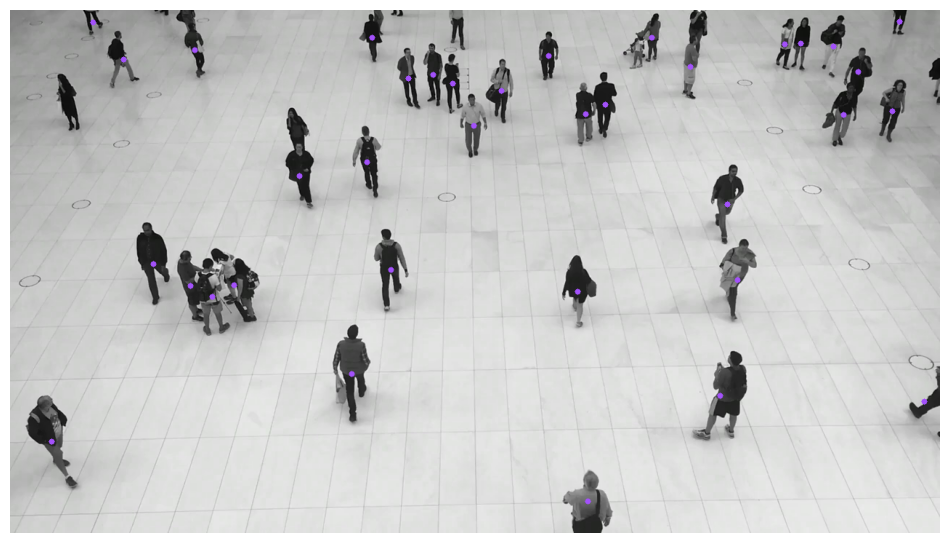{ align=center width="800" }
|
||||
|
||||
</div>
|
||||
|
||||
=== "Ellipse"
|
||||
|
||||
```python
|
||||
@@ -145,6 +166,27 @@
|
||||
|
||||
</div>
|
||||
|
||||
=== "Polygon"
|
||||
|
||||
```python
|
||||
>>> import supervision as sv
|
||||
|
||||
>>> image = ...
|
||||
>>> detections = sv.Detections(...)
|
||||
|
||||
>>> polygon_annotator = sv.PolygonAnnotator()
|
||||
>>> annotated_frame = polygon_annotator.annotate(
|
||||
... scene=image.copy(),
|
||||
... detections=detections
|
||||
... )
|
||||
```
|
||||
|
||||
<div class="result" markdown>
|
||||
|
||||
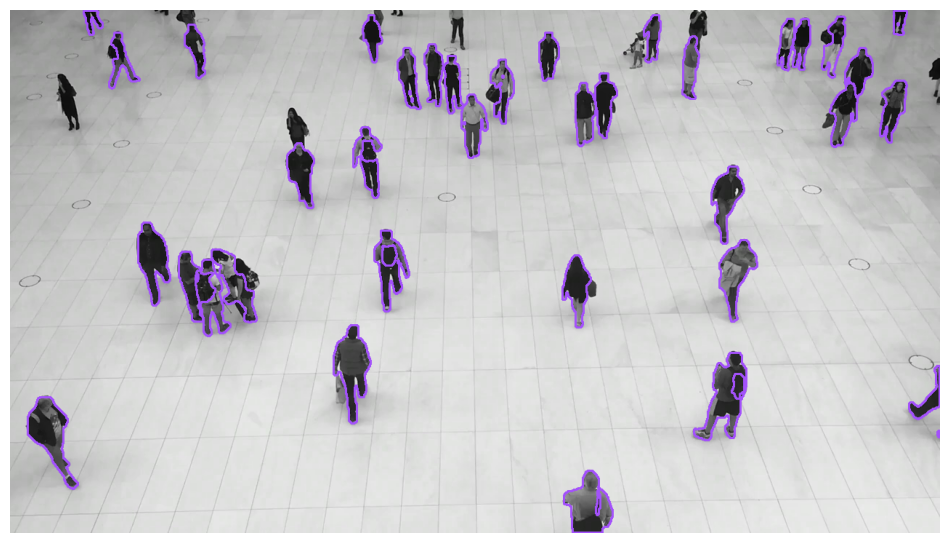{ align=center width="800" }
|
||||
|
||||
</div>
|
||||
|
||||
=== "Label"
|
||||
|
||||
```python
|
||||
@@ -191,15 +233,25 @@
|
||||
|
||||
```python
|
||||
>>> import supervision as sv
|
||||
>>> from ultralytics import YOLO
|
||||
|
||||
>>> image = ...
|
||||
>>> detections = sv.Detections(...)
|
||||
>>> model = YOLO('yolov8x.pt')
|
||||
|
||||
>>> trace_annotator = sv.TraceAnnotator()
|
||||
>>> annotated_frame = trace_annotator.annotate(
|
||||
... scene=image.copy(),
|
||||
... detections=detections
|
||||
... )
|
||||
|
||||
>>> video_info = sv.VideoInfo.from_video_path(video_path='...')
|
||||
>>> frames_generator = get_video_frames_generator(source_path='...')
|
||||
>>> tracker = sv.ByteTrack()
|
||||
|
||||
>>> with sv.VideoSink(target_path='...', video_info=video_info) as sink:
|
||||
... for frame in frames_generator:
|
||||
... result = model(frame)[0]
|
||||
... detections = sv.Detections.from_ultralytics(result)
|
||||
... detections = tracker.update_with_detections(detections)
|
||||
... annotated_frame = trace_annotator.annotate(
|
||||
... scene=frame.copy(),
|
||||
... detections=detections)
|
||||
... sink.write_frame(frame=annotated_frame)
|
||||
```
|
||||
|
||||
<div class="result" markdown>
|
||||
@@ -208,6 +260,35 @@
|
||||
|
||||
</div>
|
||||
|
||||
=== "HeatMap"
|
||||
|
||||
```python
|
||||
>>> import supervision as sv
|
||||
>>> from ultralytics import YOLO
|
||||
|
||||
>>> model = YOLO('yolov8x.pt')
|
||||
|
||||
>>> heat_map_annotator = sv.HeatMapAnnotator()
|
||||
|
||||
>>> video_info = sv.VideoInfo.from_video_path(video_path='...')
|
||||
>>> frames_generator = get_video_frames_generator(source_path='...')
|
||||
|
||||
>>> with sv.VideoSink(target_path='...', video_info=video_info) as sink:
|
||||
... for frame in frames_generator:
|
||||
... result = model(frame)[0]
|
||||
... detections = sv.Detections.from_ultralytics(result)
|
||||
... annotated_frame = heat_map_annotator.annotate(
|
||||
... scene=frame.copy(),
|
||||
... detections=detections)
|
||||
... sink.write_frame(frame=annotated_frame)
|
||||
```
|
||||
|
||||
<div class="result" markdown>
|
||||
|
||||
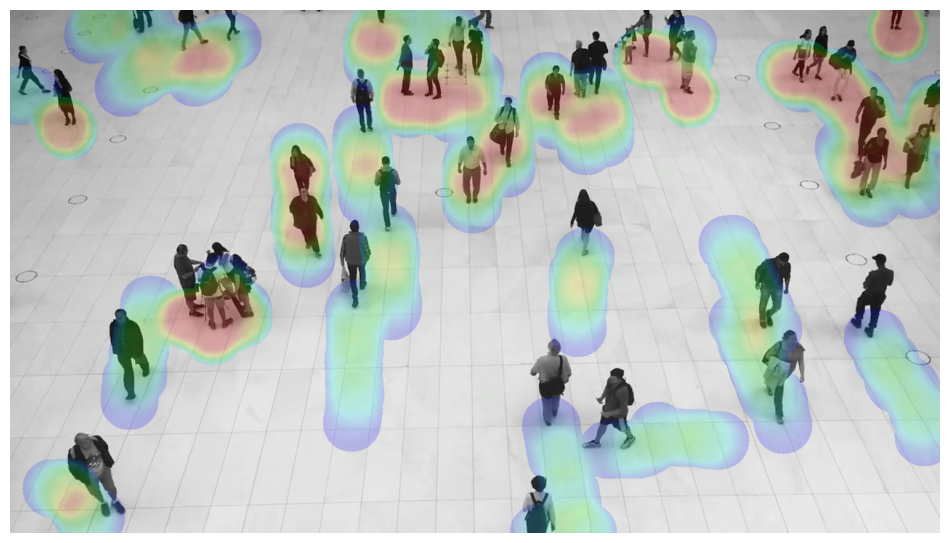{ align=center width="800" }
|
||||
|
||||
</div>
|
||||
|
||||
## BoundingBoxAnnotator
|
||||
|
||||
:::supervision.annotators.core.BoundingBoxAnnotator
|
||||
@@ -224,6 +305,10 @@
|
||||
|
||||
:::supervision.annotators.core.CircleAnnotator
|
||||
|
||||
## DotAnnotator
|
||||
|
||||
:::supervision.annotators.core.DotAnnotator
|
||||
|
||||
## EllipseAnnotator
|
||||
|
||||
:::supervision.annotators.core.EllipseAnnotator
|
||||
@@ -232,10 +317,18 @@
|
||||
|
||||
:::supervision.annotators.core.HaloAnnotator
|
||||
|
||||
## HeatMapAnnotator
|
||||
|
||||
:::supervision.annotators.core.HeatMapAnnotator
|
||||
|
||||
## MaskAnnotator
|
||||
|
||||
:::supervision.annotators.core.MaskAnnotator
|
||||
|
||||
## PolygonAnnotator
|
||||
|
||||
:::supervision.annotators.core.PolygonAnnotator
|
||||
|
||||
## LabelAnnotator
|
||||
|
||||
:::supervision.annotators.core.LabelAnnotator
|
||||
@@ -247,3 +340,7 @@
|
||||
## TraceAnnotator
|
||||
|
||||
:::supervision.annotators.core.TraceAnnotator
|
||||
|
||||
## ColorLookup
|
||||
|
||||
:::supervision.annotators.utils.ColorLookup
|
||||
|
||||
@@ -0,0 +1,21 @@
|
||||
Supervision offers an assets download utility that allows you to download video files
|
||||
that you can use in your demos.
|
||||
|
||||
## install extra
|
||||
|
||||
To install the Supervision assets utility, you can use `pip`. This utility is available
|
||||
as an extra within the Supervision package.
|
||||
|
||||
!!! example "pip install"
|
||||
|
||||
```bash
|
||||
pip install supervision[assets]
|
||||
```
|
||||
|
||||
## download_assets
|
||||
|
||||
:::supervision.assets.downloader.download_assets
|
||||
|
||||
## VideoAssets
|
||||
|
||||
:::supervision.assets.list.VideoAssets
|
||||
@@ -1,3 +1,47 @@
|
||||
### 0.16.0 <small>October 19, 2023</small>
|
||||
|
||||
- Added [#422](https://github.com/roboflow/supervision/pull/422): [`sv.BoxMaskAnnotator`](https://supervision.roboflow.com/annotators/#supervision.annotators.core.BoxMaskAnnotator) allowing to annotate images and videos with mox masks.
|
||||
|
||||
- Added [#433](https://github.com/roboflow/supervision/pull/433): [`sv.HaloAnnotator`](https://supervision.roboflow.com/annotators/#supervision.annotators.core.HaloAnnotator) allowing to annotate images and videos with halo effect.
|
||||
|
||||
```python
|
||||
>>> import supervision as sv
|
||||
|
||||
>>> image = ...
|
||||
>>> detections = sv.Detections(...)
|
||||
|
||||
>>> halo_annotator = sv.HaloAnnotator()
|
||||
>>> annotated_frame = halo_annotator.annotate(
|
||||
... scene=image.copy(),
|
||||
... detections=detections
|
||||
... )
|
||||
```
|
||||
|
||||
- Added [#466](https://github.com/roboflow/supervision/pull/466): [`sv.HeatMapAnnotator`](https://supervision.roboflow.com/annotators/#supervision.annotators.core.HeatMapAnnotator) allowing to annotate videos with heat maps.
|
||||
|
||||
- Added [#492](https://github.com/roboflow/supervision/pull/492): [`sv.DotAnnotator`](https://supervision.roboflow.com/annotators/#supervision.annotators.core.DotAnnotator) allowing to annotate images and videos with dots.
|
||||
|
||||
- Added [#449](https://github.com/roboflow/supervision/pull/449): [`sv.draw_image`](https://supervision.roboflow.com/draw/utils/#supervision.draw.utils.draw_image) allowing to draw an image onto a given scene with specified opacity and dimensions.
|
||||
|
||||
- Added [#280](https://github.com/roboflow/supervision/pull/280): [`sv.FPSMonitor`](https://supervision.roboflow.com/utils/video/#supervision.utils.video.FPSMonitor) for monitoring frames per second (FPS) to benchmark latency.
|
||||
|
||||
- Added [#454](https://github.com/roboflow/supervision/pull/454): 🤗 Hugging Face Annotators [space](https://huggingface.co/spaces/Roboflow/Annotators).
|
||||
|
||||
- Changed [#482](https://github.com/roboflow/supervision/pull/482): [`sv.LineZone.tigger`](https://supervision.roboflow.com/detection/tools/line_zone/#supervision.detection.line_counter.LineZone.trigger) now return `Tuple[np.ndarray, np.ndarray]`. The first array indicates which detections have crossed the line from outside to inside. The second array indicates which detections have crossed the line from inside to outside.
|
||||
|
||||
- Changed [#465](https://github.com/roboflow/supervision/pull/465): Annotator argument name from `color_map: str` to `color_lookup: ColorLookup` enum to increase type safety.
|
||||
|
||||
- Changed [#426](https://github.com/roboflow/supervision/pull/426): [`sv.MaskAnnotator`](https://supervision.roboflow.com/annotators/#supervision.annotators.core.MaskAnnotator) allowing 2x faster annotation.
|
||||
|
||||
- Fixed [#477](https://github.com/roboflow/supervision/pull/477): Poetry env definition allowing proper local installation.
|
||||
|
||||
- Fixed [#430](https://github.com/roboflow/supervision/pull/430): [`sv.ByteTrack`](https://supervision.roboflow.com/trackers/#supervision.tracker.byte_tracker.core.ByteTrack) to return `np.array([], dtype=int)` when `svDetections` is empty.
|
||||
|
||||
!!! warning
|
||||
|
||||
`sv.Detections.from_yolov8` and `sv.Classifications.from_yolov8` as those are now replaced by [`sv.Detections.from_ultralytics`](https://supervision.roboflow.com/detection/core/#supervision.detection.core.Detections.from_ultralytics) and [`sv.Classifications.from_ultralytics`](https://supervision.roboflow.com/classification/core/#supervision.classification.core.Classifications.from_ultralytics).
|
||||
|
||||
|
||||
### 0.15.0 <small>October 5, 2023</small>
|
||||
|
||||
- Added [#170](https://github.com/roboflow/supervision/pull/170): [`sv.BoundingBoxAnnotator`](https://supervision.roboflow.com/annotators/#supervision.annotators.core.BoundingBoxAnnotator) allowing to annotate images and videos with bounding boxes.
|
||||
|
||||
@@ -0,0 +1,3 @@
|
||||
## LineZone
|
||||
|
||||
:::supervision.detection.line_counter.LineZone
|
||||
@@ -0,0 +1,7 @@
|
||||
## Color
|
||||
|
||||
:::supervision.draw.color.Color
|
||||
|
||||
## ColorPalette
|
||||
|
||||
:::supervision.draw.color.ColorPalette
|
||||
@@ -17,3 +17,7 @@
|
||||
## draw_text
|
||||
|
||||
:::supervision.draw.utils.draw_text
|
||||
|
||||
## draw_image
|
||||
|
||||
:::supervision.draw.utils.draw_image
|
||||
|
||||
@@ -1 +1,78 @@
|
||||
🚧 Page under construction.
|
||||
With Supervision, you can easily [annotate](https://supervision.roboflow.com/annotators/) predictions obtained from a variety of object detection and segmentation models. This document outlines how to run inference using the [Ultralytics](https://github.com/ultralytics/ultralytics) YOLOv8 model, load these predictions into Supervision, and annotate the image.
|
||||
|
||||
## Run Inference
|
||||
|
||||
First, you'll need to obtain predictions from your object detection or segmentation model.
|
||||
```python
|
||||
import cv2
|
||||
from ultralytics import YOLO
|
||||
|
||||
model = YOLO("yolov8n.pt")
|
||||
image = cv2.imread("image.jpg")
|
||||
results = model(image)[0]
|
||||
```
|
||||
|
||||
## Load Predictions into Supervision
|
||||
|
||||
Now that we have predictions from a model, we can load them into Supervision. We can do so using the [`sv.Detections.from_ultralytics`](https://supervision.roboflow.com/detection/core/#supervision.detection.core.Detections.from_ultralytics) method, which accepts model results from both detection and segmentation models.
|
||||
|
||||
```python
|
||||
import cv2
|
||||
from ultralytics import YOLO
|
||||
import supervision as sv
|
||||
|
||||
model = YOLO("yolov8n.pt")
|
||||
image = cv2.imread("image.jpg")
|
||||
results = model(image)[0]
|
||||
detections = sv.Detections.from_ultralytics(results)
|
||||
```
|
||||
|
||||
You can conveniently load predictions from other computer vision frameworks and libraries using:
|
||||
|
||||
- [`from_deepsparse`](https://supervision.roboflow.com/detection/core/#supervision.detection.core.Detections.from_deepsparse) ([Deepsparse](https://github.com/neuralmagic/deepsparse))
|
||||
- [`from_detectron2`](https://supervision.roboflow.com/detection/core/#supervision.detection.core.Detections.from_detectron2) ([Detectron2](https://github.com/facebookresearch/detectron2))
|
||||
- [`from_mmdetection`](https://supervision.roboflow.com/detection/core/#supervision.detection.core.Detections.from_mmdetection) ([MMDetection](https://github.com/open-mmlab/mmdetection))
|
||||
- [`from_roboflow`](https://supervision.roboflow.com/detection/core/#supervision.detection.core.Detections.from_roboflow) ([Roboflow Inference](https://github.com/roboflow/inference))
|
||||
- [`from_sam`](https://supervision.roboflow.com/detection/core/#supervision.detection.core.Detections.from_sam) ([Segment Anything Model](https://github.com/facebookresearch/segment-anything))
|
||||
- [`from_transformers`](https://supervision.roboflow.com/detection/core/#supervision.detection.core.Detections.from_transformers) ([HuggingFace Transformers](https://github.com/huggingface/transformers))
|
||||
- [`from_yolo_nas`](https://supervision.roboflow.com/detection/core/#supervision.detection.core.Detections.from_yolo_nas) ([YOLO-NAS](https://github.com/Deci-AI/super-gradients/blob/master/YOLONAS.md))
|
||||
|
||||
|
||||
## Annotate Image
|
||||
|
||||
Finally, we can annotate the image with the predictions. Since we are working with an object detection model, we will use the [`sv.BoundingBoxAnnotator`](https://supervision.roboflow.com/annotators/#supervision.annotators.core.BoundingBoxAnnotator) and [`sv.LabelAnnotator`](https://supervision.roboflow.com/annotators/#supervision.annotators.core.LabelAnnotator) classes. If you are running the segmentation model [`sv.MaskAnnotator`](https://supervision.roboflow.com/annotators/#supervision.annotators.core.MaskAnnotator) is a drop-in replacement for [`sv.BoundingBoxAnnotator`](https://supervision.roboflow.com/annotators/#supervision.annotators.core.BoundingBoxAnnotator) that will allow you to draw masks instead of boxes.
|
||||
|
||||
```python
|
||||
import cv2
|
||||
from ultralytics import YOLO
|
||||
import supervision as sv
|
||||
|
||||
model = YOLO("yolov8n.pt")
|
||||
image = cv2.imread("image.jpg")
|
||||
results = model(image)[0]
|
||||
detections = sv.Detections.from_ultralytics(results)
|
||||
|
||||
bounding_box_annotator = sv.BoundingBoxAnnotator()
|
||||
label_annotator = sv.LabelAnnotator()
|
||||
|
||||
labels = [
|
||||
results.names[class_id]
|
||||
for class_id
|
||||
in detections.class_id
|
||||
]
|
||||
|
||||
annotated_image = bounding_box_annotator.annotate(
|
||||
scene=image, detections=detections)
|
||||
annotated_image = label_annotator.annotate(
|
||||
scene=annotated_image, detections=detections, labels=labels)
|
||||
```
|
||||
|
||||
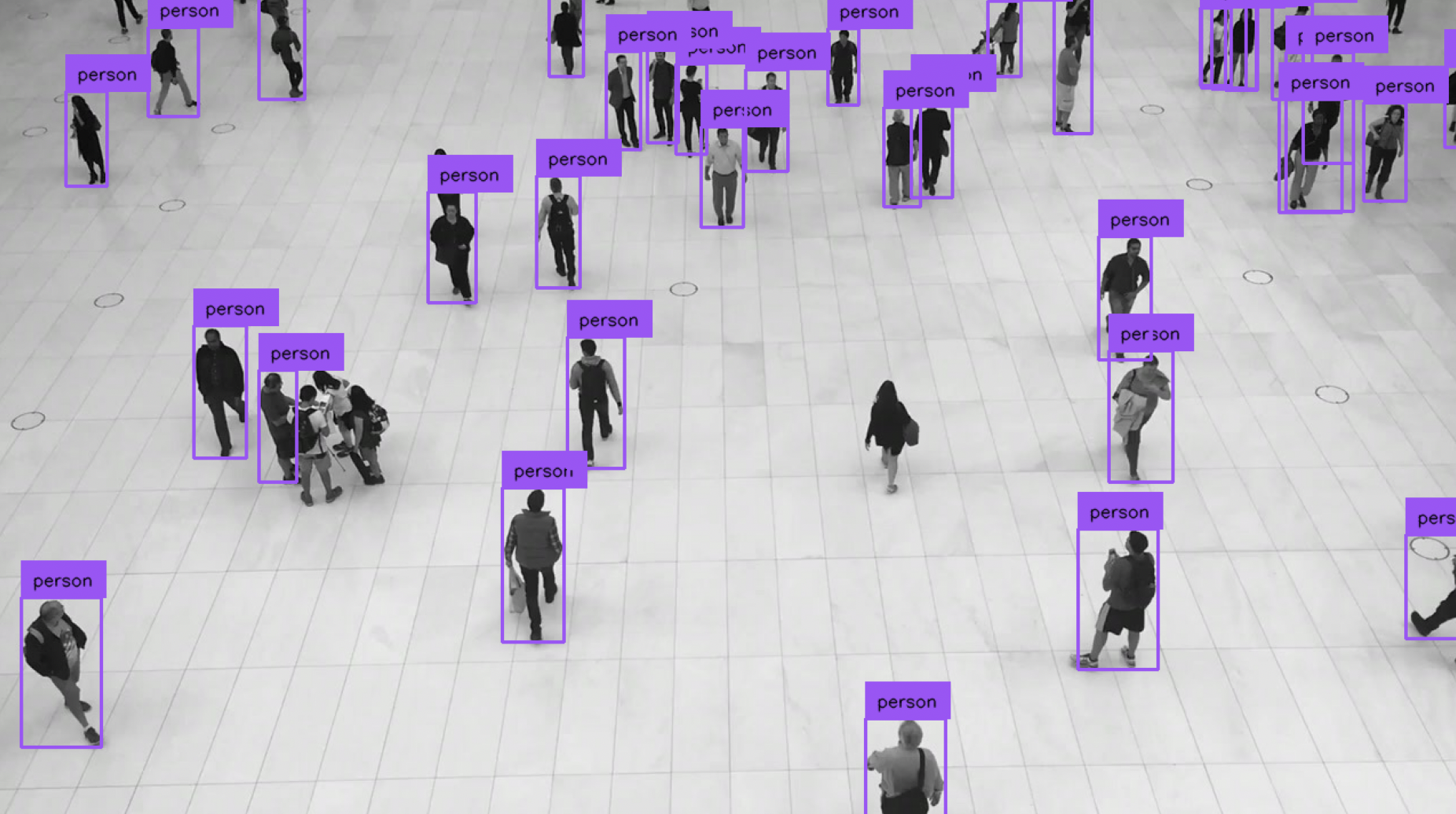
|
||||
|
||||
## Display Annotated Image
|
||||
|
||||
To display the annotated image in Jupyter Notebook or Google Colab, use the [`sv.plot_image`](https://supervision.roboflow.com/utils/notebook/#supervision.utils.notebook.plot_image) function.
|
||||
|
||||
```python
|
||||
sv.plot_image(annotated_image)
|
||||
```
|
||||
|
||||
@@ -1 +1,183 @@
|
||||
🚧 Page under construction.
|
||||
Utilize Supervision to elevate your video analysis capabilities by effortlessly
|
||||
[tracking](https://supervision.roboflow.com/trackers/) objects identified by various
|
||||
object detection and segmentation models. This guide will walk you through the process
|
||||
of running inference using the [Ultralytics](https://github.com/ultralytics/ultralytics)
|
||||
YOLOv8 model, subsequently tracking these objects, and annotating the video.
|
||||
|
||||
To make it easier for you to follow our tutorial download the video we will use as an
|
||||
example. You can do this using
|
||||
[`supervision[assets]`](https://supervision.roboflow.com/assets/) extension.
|
||||
|
||||
```python
|
||||
from supervision.assets import download_assets, VideoAssets
|
||||
|
||||
download_assets(VideoAssets.PEOPLE_WALKING)
|
||||
```
|
||||
|
||||
<video controls>
|
||||
<source src="https://media.roboflow.com/supervision/video-examples/people-walking.mp4" type="video/mp4">
|
||||
</video>
|
||||
|
||||
## Run Inference
|
||||
|
||||
First, you'll need to obtain predictions from your object detection or segmentation
|
||||
model. In this tutorial, we are using the YOLOv8 model as an example. However,
|
||||
Supervision is versatile and compatible with various models. Check this
|
||||
[link](https://supervision.roboflow.com/how_to/detect_and_annotate/#load-predictions-into-supervision)
|
||||
for guidance on how to plug in other models.
|
||||
|
||||
We will define a `callback` function, which will process each frame of the video
|
||||
by obtaining model predictions and then annotating the frame based on these predictions.
|
||||
This `callback` function will be essential in the subsequent steps of the tutorial, as
|
||||
it will be modified to include tracking, labeling, and trace annotations.
|
||||
|
||||
```{ .py }
|
||||
import numpy as np
|
||||
import supervision as sv
|
||||
from ultralytics import YOLO
|
||||
|
||||
model = YOLO("yolov8n.pt")
|
||||
box_annotator = sv.BoundingBoxAnnotator()
|
||||
|
||||
def callback(frame: np.ndarray, _: int) -> np.ndarray:
|
||||
results = model(frame)[0]
|
||||
detections = sv.Detections.from_ultralytics(results)
|
||||
return box_annotator.annotate(frame.copy(), detections=detections)
|
||||
|
||||
sv.process_video(
|
||||
source_path="people-walking.mp4",
|
||||
target_path="result.mp4",
|
||||
callback=callback
|
||||
)
|
||||
```
|
||||
|
||||
<video controls>
|
||||
<source src="https://media.roboflow.com/supervision/video-examples/how-to/track-objects/run-inference.mp4" type="video/mp4">
|
||||
</video>
|
||||
|
||||
## Tracking
|
||||
|
||||
After running inference and obtaining predictions, the next step is to track the
|
||||
detected objects throughout the video. Utilizing Supervision’s
|
||||
[`sv.ByteTrack`](https://supervision.roboflow.com/trackers/#supervision.tracker.byte_tracker.core.ByteTrack)
|
||||
functionality, each detected object is assigned a unique tracker ID,
|
||||
enabling the continuous following of the object's motion path across different frames.
|
||||
|
||||
```{ .py hl_lines="6 12" }
|
||||
import numpy as np
|
||||
import supervision as sv
|
||||
from ultralytics import YOLO
|
||||
|
||||
model = YOLO("yolov8n.pt")
|
||||
tracker = sv.ByteTrack()
|
||||
box_annotator = sv.BoundingBoxAnnotator()
|
||||
|
||||
def callback(frame: np.ndarray, _: int) -> np.ndarray:
|
||||
results = model(frame)[0]
|
||||
detections = sv.Detections.from_ultralytics(results)
|
||||
detections = tracker.update_with_detections(detections)
|
||||
return box_annotator.annotate(frame.copy(), detections=detections)
|
||||
|
||||
sv.process_video(
|
||||
source_path="people-walking.mp4",
|
||||
target_path="result.mp4",
|
||||
callback=callback
|
||||
)
|
||||
```
|
||||
|
||||
## Annotate Video with Tracking IDs
|
||||
|
||||
Annotating the video with tracking IDs helps in distinguishing and following each object
|
||||
distinctly. With the
|
||||
[`sv.LabelAnnotator`](https://supervision.roboflow.com/annotators/#supervision.annotators.core.LabelAnnotator)
|
||||
in Supervision, we can overlay the tracker IDs and class labels on the detected objects,
|
||||
offering a clear visual representation of each object's class and unique identifier.
|
||||
|
||||
```{ .py hl_lines="8 15-19 23-24" }
|
||||
import numpy as np
|
||||
import supervision as sv
|
||||
from ultralytics import YOLO
|
||||
|
||||
model = YOLO("yolov8n.pt")
|
||||
tracker = sv.ByteTrack()
|
||||
box_annotator = sv.BoundingBoxAnnotator()
|
||||
label_annotator = sv.LabelAnnotator()
|
||||
|
||||
def callback(frame: np.ndarray, _: int) -> np.ndarray:
|
||||
results = model(frame)[0]
|
||||
detections = sv.Detections.from_ultralytics(results)
|
||||
detections = tracker.update_with_detections(detections)
|
||||
|
||||
labels = [
|
||||
f"#{tracker_id} {results.names[class_id]}"
|
||||
for class_id, tracker_id
|
||||
in zip(detections.class_id, detections.tracker_id)
|
||||
]
|
||||
|
||||
annotated_frame = box_annotator.annotate(
|
||||
frame.copy(), detections=detections)
|
||||
return label_annotator.annotate(
|
||||
annotated_frame, detections=detections, labels=labels)
|
||||
|
||||
sv.process_video(
|
||||
source_path="people-walking.mp4",
|
||||
target_path="result.mp4",
|
||||
callback=callback
|
||||
)
|
||||
```
|
||||
|
||||
<video controls>
|
||||
<source src="https://media.roboflow.com/supervision/video-examples/how-to/track-objects/annotate-video-with-tracking-ids.mp4" type="video/mp4">
|
||||
</video>
|
||||
|
||||
## Annotate Video with Traces
|
||||
|
||||
Adding traces to the video involves overlaying the historical paths of the detected
|
||||
objects. This feature, powered by the
|
||||
[`sv.TraceAnnotator`](https://supervision.roboflow.com/annotators/#supervision.annotators.core.TraceAnnotator),
|
||||
allows for visualizing the trajectories of objects, helping in understanding the
|
||||
movement patterns and interactions between objects in the video.
|
||||
|
||||
```{ .py hl_lines="9 26-27" }
|
||||
import numpy as np
|
||||
import supervision as sv
|
||||
from ultralytics import YOLO
|
||||
|
||||
model = YOLO("yolov8n.pt")
|
||||
tracker = sv.ByteTrack()
|
||||
box_annotator = sv.BoundingBoxAnnotator()
|
||||
label_annotator = sv.LabelAnnotator()
|
||||
trace_annotator = sv.TraceAnnotator()
|
||||
|
||||
def callback(frame: np.ndarray, _: int) -> np.ndarray:
|
||||
results = model(frame)[0]
|
||||
detections = sv.Detections.from_ultralytics(results)
|
||||
detections = tracker.update_with_detections(detections)
|
||||
|
||||
labels = [
|
||||
f"#{tracker_id} {results.names[class_id]}"
|
||||
for class_id, tracker_id
|
||||
in zip(detections.class_id, detections.tracker_id)
|
||||
]
|
||||
|
||||
annotated_frame = box_annotator.annotate(
|
||||
frame.copy(), detections=detections)
|
||||
annotated_frame = label_annotator.annotate(
|
||||
annotated_frame, detections=detections, labels=labels)
|
||||
return trace_annotator.annotate(
|
||||
annotated_frame, detections=detections)
|
||||
|
||||
sv.process_video(
|
||||
source_path="people-walking.mp4",
|
||||
target_path="result.mp4",
|
||||
callback=callback
|
||||
)
|
||||
```
|
||||
|
||||
<video controls>
|
||||
<source src="https://media.roboflow.com/supervision/video-examples/how-to/track-objects/annotate-video-with-traces.mp4" type="video/mp4">
|
||||
</video>
|
||||
|
||||
This structured walkthrough should give a detailed pathway to annotate videos
|
||||
effectively using Supervision’s various functionalities, including object tracking and
|
||||
trace annotations.
|
||||
|
||||
+2
-1
@@ -46,6 +46,7 @@ You can install `supervision` with pip in a
|
||||
# setup python environment and activate it
|
||||
python3 -m venv venv
|
||||
source venv/bin/activate
|
||||
pip install --upgrade pip
|
||||
|
||||
# headless install
|
||||
pip install -e "."
|
||||
@@ -62,7 +63,7 @@ You can install `supervision` with pip in a
|
||||
cd supervision
|
||||
|
||||
# setup python environment and activate it
|
||||
poetry env use python 3.10
|
||||
poetry env use python3.10
|
||||
poetry shell
|
||||
|
||||
# headless install
|
||||
|
||||
@@ -0,0 +1,10 @@
|
||||
document.addEventListener("DOMContentLoaded", function () {
|
||||
var script = document.createElement("script");
|
||||
script.src = "https://widget.kapa.ai/kapa-widget.bundle.js";
|
||||
script.setAttribute("data-website-id", "e83c5c60-2968-410b-a2da-08fb104f23df");
|
||||
script.setAttribute("data-project-name", "Roboflow");
|
||||
script.setAttribute("data-project-color", "#6405C9");
|
||||
script.setAttribute("data-project-logo", "https://media.roboflow.com/chat.png");
|
||||
script.async = true;
|
||||
document.head.appendChild(script);
|
||||
});
|
||||
@@ -0,0 +1,31 @@
|
||||
## Supervision Examples
|
||||
|
||||
This repository is packed with real-world use-cases, provided through Python scripts or
|
||||
interactive notebooks. Browse through to understand how the Supervision library
|
||||
interfaces with diverse applications.
|
||||
|
||||
| **Title** | **Contributor** |
|
||||
|:--------------------------------------:|:----------------------------------------:|
|
||||
| [Tracking](./tracking) | [@SkalskiP](https://github.com/SkalskiP) |
|
||||
| [Traffic Analysis](./traffic_analysis) | [@SkalskiP](https://github.com/SkalskiP) |
|
||||
|
||||
|
||||
## Guidelines for Contributing
|
||||
|
||||
We welcome contributions from the community in the form of examples, applications, and
|
||||
guides. To contribute, please follow these steps:
|
||||
|
||||
1. Create a pull request (PR) with the `[Example]` prefix in the title, adding your
|
||||
project folder to the `examples/` directory in the repository.
|
||||
2. Confirm your project aligns with the following standards:
|
||||
- Incorporates the `supervision` package.
|
||||
- Provides a `README.md` file, detailing the instructions to execute the project.
|
||||
- Showcases visual results, demonstrating the app's functionality.
|
||||
- Avoids adding large assets or dependencies unless absolutely necessary.
|
||||
- The contributor is expected to provide support for issues related to their
|
||||
examples.
|
||||
- In case the presented model has licensing complications, kindly specify them to
|
||||
circumvent potential misunderstandings.
|
||||
|
||||
For inquiries or concerns about these prerequisites, feel free to raise a PR. We are
|
||||
committed to assist and guide you.
|
||||
+8
-1
@@ -1,5 +1,5 @@
|
||||
site_name: Supervision
|
||||
site_url: https://roboflow.github.io/supervision
|
||||
site_url: https://supervision.roboflow.com/
|
||||
site_author: Roboflow
|
||||
site_description: A set of easy-to-use utils that will come in handy in any Computer Vision project
|
||||
repo_name: roboflow/supervision
|
||||
@@ -39,6 +39,7 @@ nav:
|
||||
- Core: detection/core.md
|
||||
- Utils: detection/utils.md
|
||||
- Tools:
|
||||
- Line Zone: detection/tools/line_zone.md
|
||||
- Polygon Zone: detection/tools/polygon_zone.md
|
||||
- Inference Slicer: detection/tools/inference_slicer.md
|
||||
- Annotators: annotators.md
|
||||
@@ -47,12 +48,14 @@ nav:
|
||||
- Metrics:
|
||||
- Object Detection: metrics/detection.md
|
||||
- Draw:
|
||||
- Color: draw/color.md
|
||||
- Utils: draw/utils.md
|
||||
- Utils:
|
||||
- Video: utils/video.md
|
||||
- Image: utils/image.md
|
||||
- Notebook: utils/notebook.md
|
||||
- File: utils/file.md
|
||||
- Assets: assets.md
|
||||
- Changelog: changelog.md
|
||||
|
||||
theme:
|
||||
@@ -91,3 +94,7 @@ markdown_extensions:
|
||||
alternate_style: true
|
||||
- toc:
|
||||
permalink: true
|
||||
|
||||
extra_javascript:
|
||||
- "https://widget.kapa.ai/kapa-widget.bundle.js"
|
||||
- "javascript/init_kapa_widget.js"
|
||||
|
||||
Generated
+472
-324
File diff suppressed because it is too large
Load Diff
+14
-8
@@ -1,6 +1,6 @@
|
||||
[tool.poetry]
|
||||
name = "supervision"
|
||||
version = "0.16.0rc2"
|
||||
version = "0.17.0rc3"
|
||||
description = "A set of easy-to-use utils that will come in handy in any Computer Vision project"
|
||||
authors = ["Piotr Skalski <piotr.skalski92@gmail.com>"]
|
||||
maintainers = ["Piotr Skalski <piotr.skalski92@gmail.com>"]
|
||||
@@ -43,19 +43,21 @@ pillow = ">=9.4,<11.0"
|
||||
opencv-python = { version = "^4.8.0.74", optional = true }
|
||||
opencv-python-headless = "^4.8.0.74"
|
||||
scipy = "^1.9.0"
|
||||
requests = { version = "^2.31.0", optional = true }
|
||||
tqdm = { version = "^4.66.1", optional = true }
|
||||
|
||||
|
||||
[tool.poetry.extras]
|
||||
desktop = ["opencv-python"]
|
||||
|
||||
assets = ["requests","tqdm"]
|
||||
|
||||
[tool.poetry.group.dev.dependencies]
|
||||
twine = "^4.0.2"
|
||||
pytest = "^7.2.2"
|
||||
wheel = "^0.40.0"
|
||||
notebook = "^6.5.3"
|
||||
build = "^0.10.0"
|
||||
ruff = "^0.0.280"
|
||||
wheel = ">=0.40,<0.42"
|
||||
notebook = ">=6.5.3,<8.0.0"
|
||||
build = ">=0.10,<1.1"
|
||||
ruff = ">=0.0.280,<0.1.6"
|
||||
isort = "^5.12.0"
|
||||
black = "^23.7.0"
|
||||
mypy = "^1.4.1"
|
||||
@@ -65,7 +67,7 @@ flake8 = { version = "*", python = ">=3.8.1,<3.12.0" }
|
||||
|
||||
[tool.poetry.group.docs.dependencies]
|
||||
mkdocs-material = "^9.1.4"
|
||||
mkdocstrings = {extras = ["python"], version = "^0.20.0"}
|
||||
mkdocstrings = {extras = ["python"], version = ">=0.20,<0.25"}
|
||||
|
||||
[tool.flake8]
|
||||
exclude = ".venv"
|
||||
@@ -79,6 +81,7 @@ extend-ignore = """
|
||||
"""
|
||||
per-file-ignores = """
|
||||
__init__.py: F401
|
||||
supervision/assets/list.py: E501
|
||||
"""
|
||||
|
||||
[tool.isort]
|
||||
@@ -149,6 +152,7 @@ exclude = [
|
||||
"yarn-error.log",
|
||||
"yarn.lock",
|
||||
"docs",
|
||||
"supervision/assets/list.py"
|
||||
]
|
||||
|
||||
# Same as Black.
|
||||
@@ -167,6 +171,8 @@ convention = "google"
|
||||
|
||||
[tool.ruff.per-file-ignores]
|
||||
"__init__.py" = ["E402","F401"]
|
||||
"supervision/assets/list.py" = ["E501"]
|
||||
|
||||
|
||||
[tool.ruff.pylint]
|
||||
max-args = 20
|
||||
@@ -176,7 +182,7 @@ max-args = 20
|
||||
include-package-data = false
|
||||
|
||||
[tool.setuptools.packages.find]
|
||||
exclude = ["docs*", "test*"]
|
||||
exclude = ["docs*", "test*","examples*"]
|
||||
|
||||
[build-system]
|
||||
requires = ["poetry-core"]
|
||||
|
||||
+13
-2
@@ -12,13 +12,16 @@ from supervision.annotators.core import (
|
||||
BoxCornerAnnotator,
|
||||
BoxMaskAnnotator,
|
||||
CircleAnnotator,
|
||||
DotAnnotator,
|
||||
EllipseAnnotator,
|
||||
HaloAnnotator,
|
||||
HeatMapAnnotator,
|
||||
LabelAnnotator,
|
||||
MaskAnnotator,
|
||||
PolygonAnnotator,
|
||||
TraceAnnotator,
|
||||
)
|
||||
from supervision.annotators.utils import ColorMap
|
||||
from supervision.annotators.utils import ColorLookup
|
||||
from supervision.classification.core import Classifications
|
||||
from supervision.dataset.core import (
|
||||
BaseDataset,
|
||||
@@ -32,6 +35,7 @@ from supervision.detection.tools.inference_slicer import InferenceSlicer
|
||||
from supervision.detection.tools.polygon_zone import PolygonZone, PolygonZoneAnnotator
|
||||
from supervision.detection.utils import (
|
||||
box_iou_batch,
|
||||
calculate_masks_centroids,
|
||||
filter_polygons_by_area,
|
||||
mask_to_polygons,
|
||||
mask_to_xyxy,
|
||||
@@ -40,7 +44,14 @@ from supervision.detection.utils import (
|
||||
polygon_to_xyxy,
|
||||
)
|
||||
from supervision.draw.color import Color, ColorPalette
|
||||
from supervision.draw.utils import draw_filled_rectangle, draw_polygon, draw_text
|
||||
from supervision.draw.utils import (
|
||||
draw_filled_rectangle,
|
||||
draw_image,
|
||||
draw_line,
|
||||
draw_polygon,
|
||||
draw_rectangle,
|
||||
draw_text,
|
||||
)
|
||||
from supervision.geometry.core import Point, Position, Rect
|
||||
from supervision.geometry.utils import get_polygon_center
|
||||
from supervision.metrics.detection import ConfusionMatrix, MeanAveragePrecision
|
||||
|
||||
+484
-146
File diff suppressed because it is too large
Load Diff
@@ -8,18 +8,29 @@ from supervision.draw.color import Color, ColorPalette
|
||||
from supervision.geometry.core import Position
|
||||
|
||||
|
||||
class ColorMap(Enum):
|
||||
class ColorLookup(Enum):
|
||||
"""
|
||||
Enum for annotator color mapping.
|
||||
Enumeration class to define strategies for mapping colors to annotations.
|
||||
|
||||
This enum supports three different lookup strategies:
|
||||
- `INDEX`: Colors are determined by the index of the detection within the scene.
|
||||
- `CLASS`: Colors are determined by the class label of the detected object.
|
||||
- `TRACK`: Colors are determined by the tracking identifier of the object.
|
||||
"""
|
||||
|
||||
INDEX = "index"
|
||||
CLASS = "class"
|
||||
TRACK = "track"
|
||||
|
||||
@classmethod
|
||||
def list(cls):
|
||||
return list(map(lambda c: c.value, cls))
|
||||
|
||||
|
||||
def resolve_color_idx(
|
||||
detections: Detections, detection_idx: int, color_map: ColorMap = ColorMap.CLASS
|
||||
detections: Detections,
|
||||
detection_idx: int,
|
||||
color_lookup: Union[ColorLookup, np.ndarray] = ColorLookup.CLASS,
|
||||
) -> int:
|
||||
if detection_idx >= len(detections):
|
||||
raise ValueError(
|
||||
@@ -27,16 +38,23 @@ def resolve_color_idx(
|
||||
f"is out of bounds for detections of length {len(detections)}"
|
||||
)
|
||||
|
||||
if color_map == ColorMap.INDEX:
|
||||
if isinstance(color_lookup, np.ndarray):
|
||||
if len(color_lookup) != len(detections):
|
||||
raise ValueError(
|
||||
f"Length of color lookup {len(color_lookup)}"
|
||||
f"does not match length of detections {len(detections)}"
|
||||
)
|
||||
return color_lookup[detection_idx]
|
||||
elif color_lookup == ColorLookup.INDEX:
|
||||
return detection_idx
|
||||
elif color_map == ColorMap.CLASS:
|
||||
elif color_lookup == ColorLookup.CLASS:
|
||||
if detections.class_id is None:
|
||||
raise ValueError(
|
||||
"Could not resolve color by class because"
|
||||
"Detections do not have class_id"
|
||||
)
|
||||
return detections.class_id[detection_idx]
|
||||
elif color_map == ColorMap.TRACK:
|
||||
elif color_lookup == ColorLookup.TRACK:
|
||||
if detections.tracker_id is None:
|
||||
raise ValueError(
|
||||
"Could not resolve color by track because"
|
||||
@@ -45,12 +63,26 @@ def resolve_color_idx(
|
||||
return detections.tracker_id[detection_idx]
|
||||
|
||||
|
||||
def resolve_color(color: Union[Color, ColorPalette], idx: int) -> Color:
|
||||
def get_color_by_index(color: Union[Color, ColorPalette], idx: int) -> Color:
|
||||
if isinstance(color, ColorPalette):
|
||||
return color.by_idx(idx)
|
||||
return color
|
||||
|
||||
|
||||
def resolve_color(
|
||||
color: Union[Color, ColorPalette],
|
||||
detections: Detections,
|
||||
detection_idx: int,
|
||||
color_lookup: Union[ColorLookup, np.ndarray] = ColorLookup.CLASS,
|
||||
) -> Color:
|
||||
idx = resolve_color_idx(
|
||||
detections=detections,
|
||||
detection_idx=detection_idx,
|
||||
color_lookup=color_lookup,
|
||||
)
|
||||
return get_color_by_index(color=color, idx=idx)
|
||||
|
||||
|
||||
class Trace:
|
||||
def __init__(
|
||||
self,
|
||||
@@ -70,7 +102,7 @@ class Trace:
|
||||
frame_id = np.full(len(detections), self.current_frame_id, dtype=int)
|
||||
self.frame_id = np.concatenate([self.frame_id, frame_id])
|
||||
self.xy = np.concatenate(
|
||||
[self.xy, detections.get_anchor_coordinates(self.anchor)]
|
||||
[self.xy, detections.get_anchors_coordinates(self.anchor)]
|
||||
)
|
||||
self.tracker_id = np.concatenate([self.tracker_id, detections.tracker_id])
|
||||
|
||||
|
||||
@@ -0,0 +1,2 @@
|
||||
from supervision.assets.downloader import download_assets
|
||||
from supervision.assets.list import VideoAssets
|
||||
@@ -0,0 +1,94 @@
|
||||
import os
|
||||
from hashlib import md5
|
||||
from pathlib import Path
|
||||
from shutil import copyfileobj
|
||||
from typing import Union
|
||||
|
||||
from supervision.assets.list import VIDEO_ASSETS, VideoAssets
|
||||
|
||||
try:
|
||||
from requests import get
|
||||
from tqdm.auto import tqdm
|
||||
except ImportError:
|
||||
raise ValueError(
|
||||
"\n"
|
||||
"Please install requests and tqdm to download assets \n"
|
||||
"or install supervision with assets \n"
|
||||
"pip install supervision[assets] \n"
|
||||
"\n"
|
||||
)
|
||||
|
||||
|
||||
def is_md5_hash_matching(filename: str, original_md5_hash: str) -> bool:
|
||||
"""
|
||||
Check if the MD5 hash of a file matches the original hash.
|
||||
|
||||
Parameters:
|
||||
filename (str): The path to the file to be checked as a string.
|
||||
original_md5_hash (str): The original MD5 hash to compare against.
|
||||
|
||||
Returns:
|
||||
bool: True if the hashes match, False otherwise.
|
||||
"""
|
||||
if not os.path.exists(filename):
|
||||
return False
|
||||
|
||||
with open(filename, "rb") as file:
|
||||
file_contents = file.read()
|
||||
computed_md5_hash = md5(file_contents).hexdigest()
|
||||
|
||||
return computed_md5_hash == original_md5_hash
|
||||
|
||||
|
||||
def download_assets(asset_name: Union[VideoAssets, str]) -> str:
|
||||
"""
|
||||
Download a specified asset if it doesn't already exist or is corrupted.
|
||||
|
||||
Parameters:
|
||||
asset_name (Union[VideoAssets, str]): The name or type of the asset to be
|
||||
downloaded.
|
||||
|
||||
Returns:
|
||||
str: The filename of the downloaded asset.
|
||||
|
||||
Example:
|
||||
```python
|
||||
>>> from supervision.assets import download_assets, VideoAssets
|
||||
|
||||
>>> download_assets(VideoAssets.VEHICLES)
|
||||
"vehicles.mp4"
|
||||
```
|
||||
"""
|
||||
|
||||
filename = asset_name.value if isinstance(asset_name, VideoAssets) else asset_name
|
||||
|
||||
if not Path(filename).exists() and filename in VIDEO_ASSETS:
|
||||
print(f"Downloading {filename} assets \n")
|
||||
response = get(VIDEO_ASSETS[filename][0], stream=True, allow_redirects=True)
|
||||
response.raise_for_status()
|
||||
|
||||
file_size = int(response.headers.get("Content-Length", 0))
|
||||
folder_path = Path(filename).expanduser().resolve()
|
||||
folder_path.parent.mkdir(parents=True, exist_ok=True)
|
||||
|
||||
with tqdm.wrapattr(
|
||||
response.raw, "read", total=file_size, desc="", colour="#a351fb"
|
||||
) as raw_resp:
|
||||
with folder_path.open("wb") as file:
|
||||
copyfileobj(raw_resp, file)
|
||||
|
||||
elif Path(filename).exists():
|
||||
if not is_md5_hash_matching(filename, VIDEO_ASSETS[filename][1]):
|
||||
print("File corrupted. Re-downloading... \n")
|
||||
os.remove(filename)
|
||||
return download_assets(filename)
|
||||
|
||||
print(f"{filename} asset download complete. \n")
|
||||
|
||||
else:
|
||||
valid_assets = ", ".join(asset.value for asset in VideoAssets)
|
||||
raise ValueError(
|
||||
f"Invalid asset. It should be one of the following: {valid_assets}."
|
||||
)
|
||||
|
||||
return filename
|
||||
@@ -0,0 +1,65 @@
|
||||
from enum import Enum
|
||||
from typing import Dict, Tuple
|
||||
|
||||
BASE_VIDEO_URL = "https://media.roboflow.com/supervision/video-examples/"
|
||||
|
||||
|
||||
class VideoAssets(Enum):
|
||||
"""
|
||||
Each member of this enum represents a video asset. The value associated with each
|
||||
member is the filename of the video.
|
||||
|
||||
| Enum Member | Video Filename | Video URL |
|
||||
|------------------------|----------------------------|---------------------------------------------------------------------------------------|
|
||||
| `VEHICLES` | `vehicles.mp4` | [Link](https://media.roboflow.com/supervision/video-examples/vehicles.mp4) |
|
||||
| `MILK_BOTTLING_PLANT` | `milk-bottling-plant.mp4` | [Link](https://media.roboflow.com/supervision/video-examples/milk-bottling-plant.mp4) |
|
||||
| `VEHICLES_2` | `vehicles-2.mp4` | [Link](https://media.roboflow.com/supervision/video-examples/vehicles-2.mp4) |
|
||||
| `GROCERY_STORE` | `grocery-store.mp4` | [Link](https://media.roboflow.com/supervision/video-examples/grocery-store.mp4) |
|
||||
| `SUBWAY` | `subway.mp4` | [Link](https://media.roboflow.com/supervision/video-examples/subway.mp4) |
|
||||
| `MARKET_SQUARE` | `market-square.mp4` | [Link](https://media.roboflow.com/supervision/video-examples/market-square.mp4) |
|
||||
| `PEOPLE_WALKING` | `people-walking.mp4` | [Link](https://media.roboflow.com/supervision/video-examples/people-walking.mp4) |
|
||||
"""
|
||||
|
||||
VEHICLES = "vehicles.mp4"
|
||||
MILK_BOTTLING_PLANT = "milk-bottling-plant.mp4"
|
||||
VEHICLES_2 = "vehicles-2.mp4"
|
||||
GROCERY_STORE = "grocery-store.mp4"
|
||||
SUBWAY = "subway.mp4"
|
||||
MARKET_SQUARE = "market-square.mp4"
|
||||
PEOPLE_WALKING = "people-walking.mp4"
|
||||
|
||||
@classmethod
|
||||
def list(cls):
|
||||
return list(map(lambda c: c.value, cls))
|
||||
|
||||
|
||||
VIDEO_ASSETS: Dict[str, Tuple[str, str]] = {
|
||||
VideoAssets.VEHICLES.value: (
|
||||
f"{BASE_VIDEO_URL}{VideoAssets.VEHICLES.value}",
|
||||
"8155ff4e4de08cfa25f39de96483f918",
|
||||
),
|
||||
VideoAssets.VEHICLES_2.value: (
|
||||
f"{BASE_VIDEO_URL}{VideoAssets.VEHICLES_2.value}",
|
||||
"830af6fba21ffbf14867a7fea595937b",
|
||||
),
|
||||
VideoAssets.MILK_BOTTLING_PLANT.value: (
|
||||
f"{BASE_VIDEO_URL}{VideoAssets.MILK_BOTTLING_PLANT.value}",
|
||||
"9e8fb6e883f842a38b3d34267290bdc7",
|
||||
),
|
||||
VideoAssets.GROCERY_STORE.value: (
|
||||
f"{BASE_VIDEO_URL}{VideoAssets.GROCERY_STORE.value}",
|
||||
"11402e7b861c1980527d3d74cbe3b366",
|
||||
),
|
||||
VideoAssets.SUBWAY.value: (
|
||||
f"{BASE_VIDEO_URL}{VideoAssets.SUBWAY.value}",
|
||||
"453475750691fb23c56a0cffef089194",
|
||||
),
|
||||
VideoAssets.MARKET_SQUARE.value: (
|
||||
f"{BASE_VIDEO_URL}{VideoAssets.MARKET_SQUARE.value}",
|
||||
"859179bf4a21f80a8baabfdb2ed716dc",
|
||||
),
|
||||
VideoAssets.PEOPLE_WALKING.value: (
|
||||
f"{BASE_VIDEO_URL}{VideoAssets.PEOPLE_WALKING.value}",
|
||||
"0574c053c8686c3f1dc0aa3743e45cb9",
|
||||
),
|
||||
}
|
||||
@@ -149,7 +149,7 @@ def load_yolo_annotations(
|
||||
annotations[image_path] = Detections.empty()
|
||||
continue
|
||||
|
||||
lines = read_txt_file(str(annotation_path))
|
||||
lines = read_txt_file(file_path=annotation_path, skip_empty=True)
|
||||
h, w, _ = image.shape
|
||||
resolution_wh = (w, h)
|
||||
|
||||
|
||||
@@ -6,6 +6,7 @@ from typing import Any, Iterator, List, Optional, Tuple, Union
|
||||
import numpy as np
|
||||
|
||||
from supervision.detection.utils import (
|
||||
calculate_masks_centroids,
|
||||
extract_ultralytics_masks,
|
||||
non_max_suppression,
|
||||
process_roboflow_result,
|
||||
@@ -600,7 +601,7 @@ class Detections:
|
||||
tracker_id=tracker_id,
|
||||
)
|
||||
|
||||
def get_anchor_coordinates(self, anchor: Position) -> np.ndarray:
|
||||
def get_anchors_coordinates(self, anchor: Position) -> np.ndarray:
|
||||
"""
|
||||
Calculates and returns the coordinates of a specific anchor point
|
||||
within the bounding boxes defined by the `xyxy` attribute. The anchor
|
||||
@@ -627,6 +628,12 @@ class Detections:
|
||||
(self.xyxy[:, 1] + self.xyxy[:, 3]) / 2,
|
||||
]
|
||||
).transpose()
|
||||
elif anchor == Position.CENTER_OF_MASS:
|
||||
if self.mask is None:
|
||||
raise ValueError(
|
||||
"Cannot use `Position.CENTER_OF_MASS` without a detection mask."
|
||||
)
|
||||
return calculate_masks_centroids(masks=self.mask)
|
||||
elif anchor == Position.CENTER_LEFT:
|
||||
return np.array(
|
||||
[
|
||||
|
||||
@@ -1,4 +1,4 @@
|
||||
from typing import Dict, Optional
|
||||
from typing import Dict, Optional, Tuple
|
||||
|
||||
import cv2
|
||||
import numpy as np
|
||||
@@ -10,37 +10,54 @@ from supervision.geometry.core import Point, Rect, Vector
|
||||
|
||||
class LineZone:
|
||||
"""
|
||||
Count the number of objects that cross a line.
|
||||
This class is responsible for counting the number of objects that cross a
|
||||
predefined line.
|
||||
|
||||
!!! warning
|
||||
|
||||
LineZone utilizes the `tracker_id`. Read
|
||||
[here](https://supervision.roboflow.com/trackers/) to learn how to plug
|
||||
tracking into your inference pipeline.
|
||||
|
||||
Attributes:
|
||||
in_count (int): The number of objects that have crossed the line from outside
|
||||
to inside.
|
||||
out_count (int): The number of objects that have crossed the line from inside
|
||||
to outside.
|
||||
"""
|
||||
|
||||
def __init__(self, start: Point, end: Point):
|
||||
"""
|
||||
Initialize a LineCounter object.
|
||||
|
||||
Attributes:
|
||||
Args:
|
||||
start (Point): The starting point of the line.
|
||||
end (Point): The ending point of the line.
|
||||
|
||||
"""
|
||||
self.vector = Vector(start=start, end=end)
|
||||
self.tracker_state: Dict[str, bool] = {}
|
||||
self.in_count: int = 0
|
||||
self.out_count: int = 0
|
||||
|
||||
def trigger(self, detections: Detections):
|
||||
def trigger(self, detections: Detections) -> Tuple[np.ndarray, np.ndarray]:
|
||||
"""
|
||||
Update the in_count and out_count for the detections that cross the line.
|
||||
Update the `in_count` and `out_count` based on the objects that cross the line.
|
||||
|
||||
Attributes:
|
||||
detections (Detections): The detections for which to update the counts.
|
||||
Args:
|
||||
detections (Detections): A list of detections for which to update the
|
||||
counts.
|
||||
|
||||
Returns:
|
||||
A tuple of two boolean NumPy arrays. The first array indicates which
|
||||
detections have crossed the line from outside to inside. The second
|
||||
array indicates which detections have crossed the line from inside to
|
||||
outside.
|
||||
"""
|
||||
for xyxy, _, confidence, class_id, tracker_id in detections:
|
||||
# handle detections with no tracker_id
|
||||
crossed_in = np.full(len(detections), False)
|
||||
crossed_out = np.full(len(detections), False)
|
||||
|
||||
for i, (xyxy, _, confidence, class_id, tracker_id) in enumerate(detections):
|
||||
if tracker_id is None:
|
||||
continue
|
||||
|
||||
# we check if all four anchors of bbox are on the same side of vector
|
||||
x1, y1, x2, y2 = xyxy
|
||||
anchors = [
|
||||
Point(x=x1, y=y1),
|
||||
@@ -50,25 +67,27 @@ class LineZone:
|
||||
]
|
||||
triggers = [self.vector.is_in(point=anchor) for anchor in anchors]
|
||||
|
||||
# detection is partially in and partially out
|
||||
if len(set(triggers)) == 2:
|
||||
continue
|
||||
|
||||
tracker_state = triggers[0]
|
||||
# handle new detection
|
||||
|
||||
if tracker_id not in self.tracker_state:
|
||||
self.tracker_state[tracker_id] = tracker_state
|
||||
continue
|
||||
|
||||
# handle detection on the same side of the line
|
||||
if self.tracker_state.get(tracker_id) == tracker_state:
|
||||
continue
|
||||
|
||||
self.tracker_state[tracker_id] = tracker_state
|
||||
if tracker_state:
|
||||
self.in_count += 1
|
||||
crossed_in[i] = True
|
||||
else:
|
||||
self.out_count += 1
|
||||
crossed_out[i] = True
|
||||
|
||||
return crossed_in, crossed_out
|
||||
|
||||
|
||||
class LineZoneAnnotator:
|
||||
|
||||
@@ -56,11 +56,11 @@ class PolygonZone:
|
||||
"""
|
||||
|
||||
clipped_xyxy = clip_boxes(
|
||||
boxes_xyxy=detections.xyxy, frame_resolution_wh=self.frame_resolution_wh
|
||||
xyxy=detections.xyxy, resolution_wh=self.frame_resolution_wh
|
||||
)
|
||||
clipped_detections = replace(detections, xyxy=clipped_xyxy)
|
||||
clipped_anchors = np.ceil(
|
||||
clipped_detections.get_anchor_coordinates(anchor=self.triggering_position)
|
||||
clipped_detections.get_anchors_coordinates(anchor=self.triggering_position)
|
||||
).astype(int)
|
||||
is_in_zone = self.mask[clipped_anchors[:, 1], clipped_anchors[:, 0]]
|
||||
self.current_count = int(np.sum(is_in_zone))
|
||||
|
||||
@@ -110,17 +110,15 @@ def non_max_suppression(
|
||||
return keep[sort_index.argsort()]
|
||||
|
||||
|
||||
def clip_boxes(
|
||||
boxes_xyxy: np.ndarray, frame_resolution_wh: Tuple[int, int]
|
||||
) -> np.ndarray:
|
||||
def clip_boxes(xyxy: np.ndarray, resolution_wh: Tuple[int, int]) -> np.ndarray:
|
||||
"""
|
||||
Clips bounding boxes coordinates to fit within the frame resolution.
|
||||
|
||||
Args:
|
||||
boxes_xyxy (np.ndarray): A numpy array of shape `(N, 4)` where each
|
||||
xyxy (np.ndarray): A numpy array of shape `(N, 4)` where each
|
||||
row corresponds to a bounding box in
|
||||
the format `(x_min, y_min, x_max, y_max)`.
|
||||
frame_resolution_wh (Tuple[int, int]): A tuple of the form `(width, height)`
|
||||
resolution_wh (Tuple[int, int]): A tuple of the form `(width, height)`
|
||||
representing the resolution of the frame.
|
||||
|
||||
Returns:
|
||||
@@ -128,8 +126,8 @@ def clip_boxes(
|
||||
corresponds to a bounding box with coordinates clipped to fit
|
||||
within the frame resolution.
|
||||
"""
|
||||
result = np.copy(boxes_xyxy)
|
||||
width, height = frame_resolution_wh
|
||||
result = np.copy(xyxy)
|
||||
width, height = resolution_wh
|
||||
result[:, [0, 2]] = result[:, [0, 2]].clip(0, width)
|
||||
result[:, [1, 3]] = result[:, [1, 3]].clip(0, height)
|
||||
return result
|
||||
@@ -395,3 +393,33 @@ def move_boxes(xyxy: np.ndarray, offset: np.ndarray) -> np.ndarray:
|
||||
(np.ndarray) repositioned bounding boxes
|
||||
"""
|
||||
return xyxy + np.hstack([offset, offset])
|
||||
|
||||
|
||||
def calculate_masks_centroids(masks: np.ndarray) -> np.ndarray:
|
||||
"""
|
||||
Calculate the centroids of binary masks in a tensor.
|
||||
|
||||
Parameters:
|
||||
masks (np.ndarray): A 3D NumPy array of shape (num_masks, height, width).
|
||||
Each 2D array in the tensor represents a binary mask.
|
||||
|
||||
Returns:
|
||||
A 2D NumPy array of shape (num_masks, 2), where each row contains the x and y
|
||||
coordinates (in that order) of the centroid of the corresponding mask.
|
||||
"""
|
||||
num_masks, height, width = masks.shape
|
||||
total_pixels = masks.sum(axis=(1, 2))
|
||||
|
||||
# offset for 1-based indexing
|
||||
vertical_indices, horizontal_indices = np.indices((height, width)) + 0.5
|
||||
# avoid division by zero for empty masks
|
||||
total_pixels[total_pixels == 0] = 1
|
||||
|
||||
def sum_over_mask(indices: np.ndarray, axis: tuple) -> np.ndarray:
|
||||
return np.tensordot(masks, indices, axes=axis)
|
||||
|
||||
aggregation_axis = ([1, 2], [0, 1])
|
||||
centroid_x = sum_over_mask(horizontal_indices, aggregation_axis) / total_pixels
|
||||
centroid_y = sum_over_mask(vertical_indices, aggregation_axis) / total_pixels
|
||||
|
||||
return np.column_stack((centroid_x, centroid_y)).astype(int)
|
||||
|
||||
+71
-21
@@ -34,21 +34,35 @@ def _validate_color_hex(color_hex: str):
|
||||
|
||||
@dataclass
|
||||
class Color:
|
||||
"""
|
||||
Represents a color in RGB format.
|
||||
|
||||
Attributes:
|
||||
r (int): Red channel.
|
||||
g (int): Green channel.
|
||||
b (int): Blue channel.
|
||||
"""
|
||||
|
||||
r: int
|
||||
g: int
|
||||
b: int
|
||||
|
||||
@classmethod
|
||||
def from_hex(cls, color_hex: str):
|
||||
def from_hex(cls, color_hex: str) -> Color:
|
||||
"""
|
||||
Creates a Color instance from a color hex string
|
||||
Create a Color instance from a hex string.
|
||||
|
||||
:param color_hex: str : The color hex string in the format
|
||||
of "fff", "ffffff", "#fff", or "#ffffff"
|
||||
:return: Color : A Color instance representing the color
|
||||
Args:
|
||||
color_hex (str): Hex string of the color.
|
||||
|
||||
Returns:
|
||||
Color: Instance representing the color.
|
||||
|
||||
Example:
|
||||
color = Color.from_hex('#ff00ff')
|
||||
```
|
||||
>>> Color.from_hex('#ff00ff')
|
||||
Color(r=255, g=0, b=255)
|
||||
```
|
||||
"""
|
||||
_validate_color_hex(color_hex)
|
||||
color_hex = color_hex.lstrip("#")
|
||||
@@ -59,17 +73,31 @@ class Color:
|
||||
|
||||
def as_rgb(self) -> Tuple[int, int, int]:
|
||||
"""
|
||||
Returns the color as a tuple of integers in the RGB format
|
||||
Returns the color as an RGB tuple.
|
||||
|
||||
:return: Tuple[int, int, int] : The color in the RGB format
|
||||
Returns:
|
||||
Tuple[int, int, int]: RGB tuple.
|
||||
|
||||
Example:
|
||||
```
|
||||
>>> color.as_rgb()
|
||||
(255, 0, 255)
|
||||
```
|
||||
"""
|
||||
return self.r, self.g, self.b
|
||||
|
||||
def as_bgr(self) -> Tuple[int, int, int]:
|
||||
"""
|
||||
Returns the color as a tuple of integers in the BGR format
|
||||
Returns the color as a BGR tuple.
|
||||
|
||||
:return: Tuple[int, int, int] : The color in the BGR format
|
||||
Returns:
|
||||
Tuple[int, int, int]: BGR tuple.
|
||||
|
||||
Example:
|
||||
```
|
||||
>>> color.as_bgr()
|
||||
(255, 0, 255)
|
||||
```
|
||||
"""
|
||||
return self.b, self.g, self.r
|
||||
|
||||
@@ -100,33 +128,55 @@ class ColorPalette:
|
||||
|
||||
@classmethod
|
||||
def default(cls) -> ColorPalette:
|
||||
"""
|
||||
Returns a default color palette.
|
||||
|
||||
Returns:
|
||||
ColorPalette: A ColorPalette instance with default colors.
|
||||
|
||||
Example:
|
||||
```
|
||||
>>> ColorPalette.default()
|
||||
ColorPalette(colors=[Color(r=255, g=0, b=0), Color(r=0, g=255, b=0), ...])
|
||||
```
|
||||
"""
|
||||
return ColorPalette.from_hex(color_hex_list=DEFAULT_COLOR_PALETTE)
|
||||
|
||||
@classmethod
|
||||
def from_hex(cls, color_hex_list: List[str]):
|
||||
def from_hex(cls, color_hex_list: List[str]) -> ColorPalette:
|
||||
"""
|
||||
Creates a ColorPalette instance from a list of color hex strings
|
||||
Create a ColorPalette instance from a list of hex strings.
|
||||
|
||||
:param color_hex_list: List[str] : A list of color hex strings in the
|
||||
format of "fff", "ffffff", "#fff", or "#ffffff"
|
||||
:return: ColorPalette : A ColorPalette instance representing the color palette
|
||||
Args:
|
||||
color_hex_list (List[str]): List of color hex strings.
|
||||
|
||||
Returns:
|
||||
ColorPalette: A ColorPalette instance.
|
||||
|
||||
Example:
|
||||
color_palette = ColorPalette.from_hex(['#ff0000', '#00ff00', '#0000ff'])
|
||||
```
|
||||
>>> ColorPalette.from_hex(['#ff0000', '#00ff00', '#0000ff'])
|
||||
ColorPalette(colors=[Color(r=255, g=0, b=0), Color(r=0, g=255, b=0), ...])
|
||||
```
|
||||
"""
|
||||
colors = [Color.from_hex(color_hex) for color_hex in color_hex_list]
|
||||
return cls(colors)
|
||||
|
||||
def by_idx(self, idx: int) -> Color:
|
||||
"""
|
||||
Returns the color at a given index in the color palette.
|
||||
Return the color at a given index in the palette.
|
||||
|
||||
:param idx: int : The index of the color in the color palette
|
||||
:return: Color : The color at the given index
|
||||
Args:
|
||||
idx (int): Index of the color in the palette.
|
||||
|
||||
Returns:
|
||||
Color: Color at the given index.
|
||||
|
||||
Example:
|
||||
color_palette = ColorPalette.from_hex(['#ff0000', '#00ff00', '#0000ff'])
|
||||
color = color_palette.by_idx(1)
|
||||
```
|
||||
>>> color_palette.by_idx(1)
|
||||
Color(r=0, g=255, b=0)
|
||||
```
|
||||
"""
|
||||
if idx < 0:
|
||||
raise ValueError("idx argument should not be negative")
|
||||
|
||||
@@ -1,4 +1,5 @@
|
||||
from typing import Optional
|
||||
import os
|
||||
from typing import Optional, Union
|
||||
|
||||
import cv2
|
||||
import numpy as np
|
||||
@@ -168,3 +169,65 @@ def draw_text(
|
||||
lineType=cv2.LINE_AA,
|
||||
)
|
||||
return scene
|
||||
|
||||
|
||||
def draw_image(
|
||||
scene: np.ndarray, image: Union[str, np.ndarray], opacity: float, rect: Rect
|
||||
) -> np.ndarray:
|
||||
"""
|
||||
Draws an image onto a given scene with specified opacity and dimensions.
|
||||
|
||||
Args:
|
||||
scene (np.ndarray): Background image where the new image will be drawn.
|
||||
image (Union[str, np.ndarray]): Image to draw.
|
||||
opacity (float): Opacity of the image to be drawn.
|
||||
rect (Rect): Rectangle specifying where to draw the image.
|
||||
|
||||
Returns:
|
||||
np.ndarray: The updated scene.
|
||||
|
||||
Raises:
|
||||
FileNotFoundError: If the image path does not exist.
|
||||
ValueError: For invalid opacity or rectangle dimensions.
|
||||
"""
|
||||
|
||||
# Validate and load image
|
||||
if isinstance(image, str):
|
||||
if not os.path.exists(image):
|
||||
raise FileNotFoundError(f"Image path ('{image}') does not exist.")
|
||||
image = cv2.imread(image, cv2.IMREAD_UNCHANGED)
|
||||
|
||||
# Validate opacity
|
||||
if not 0.0 <= opacity <= 1.0:
|
||||
raise ValueError("Opacity must be between 0.0 and 1.0.")
|
||||
|
||||
# Validate rectangle dimensions
|
||||
if (
|
||||
rect.x < 0
|
||||
or rect.y < 0
|
||||
or rect.x + rect.width > scene.shape[1]
|
||||
or rect.y + rect.height > scene.shape[0]
|
||||
):
|
||||
raise ValueError("Invalid rectangle dimensions.")
|
||||
|
||||
# Resize and isolate alpha channel
|
||||
image = cv2.resize(image, (rect.width, rect.height))
|
||||
alpha_channel = (
|
||||
image[:, :, 3]
|
||||
if image.shape[2] == 4
|
||||
else np.ones((rect.height, rect.width), dtype=image.dtype) * 255
|
||||
)
|
||||
alpha_scaled = cv2.convertScaleAbs(alpha_channel * opacity)
|
||||
|
||||
# Perform blending
|
||||
scene_roi = scene[rect.y : rect.y + rect.height, rect.x : rect.x + rect.width]
|
||||
alpha_float = alpha_scaled.astype(np.float32) / 255.0
|
||||
blended_roi = cv2.convertScaleAbs(
|
||||
(1 - alpha_float[..., np.newaxis]) * scene_roi
|
||||
+ alpha_float[..., np.newaxis] * image[:, :, :3]
|
||||
)
|
||||
|
||||
# Update the scene
|
||||
scene[rect.y : rect.y + rect.height, rect.x : rect.x + rect.width] = blended_roi
|
||||
|
||||
return scene
|
||||
|
||||
@@ -19,6 +19,7 @@ class Position(Enum):
|
||||
BOTTOM_LEFT = "BOTTOM_LEFT"
|
||||
BOTTOM_CENTER = "BOTTOM_CENTER"
|
||||
BOTTOM_RIGHT = "BOTTOM_RIGHT"
|
||||
CENTER_OF_MASS = "CENTER_OF_MASS"
|
||||
|
||||
@classmethod
|
||||
def list(cls):
|
||||
|
||||
@@ -1,4 +1,4 @@
|
||||
from typing import List, Optional, Tuple
|
||||
from typing import List, Tuple
|
||||
|
||||
import numpy as np
|
||||
|
||||
@@ -11,7 +11,7 @@ from supervision.tracker.byte_tracker.kalman_filter import KalmanFilter
|
||||
class STrack(BaseTrack):
|
||||
shared_kalman = KalmanFilter()
|
||||
|
||||
def __init__(self, tlwh, score, class_ids, mask: Optional[np.array] = None):
|
||||
def __init__(self, tlwh, score, class_ids):
|
||||
# wait activate
|
||||
self._tlwh = np.asarray(tlwh, dtype=np.float32)
|
||||
self.kalman_filter = None
|
||||
@@ -21,7 +21,6 @@ class STrack(BaseTrack):
|
||||
self.score = score
|
||||
self.class_ids = class_ids
|
||||
self.tracklet_len = 0
|
||||
self.mask = mask
|
||||
|
||||
def predict(self):
|
||||
mean_state = self.mean.copy()
|
||||
@@ -75,7 +74,6 @@ class STrack(BaseTrack):
|
||||
if new_id:
|
||||
self.track_id = self.next_id()
|
||||
self.score = new_track.score
|
||||
self.mask = new_track.mask
|
||||
|
||||
def update(self, new_track, frame_id):
|
||||
"""
|
||||
@@ -97,8 +95,6 @@ class STrack(BaseTrack):
|
||||
|
||||
self.score = new_track.score
|
||||
|
||||
self.mask = new_track.mask
|
||||
|
||||
@property
|
||||
def tlwh(self):
|
||||
"""Get current position in bounding box format `(top left x, top left y,
|
||||
@@ -235,8 +231,9 @@ class ByteTrack:
|
||||
... )
|
||||
```
|
||||
"""
|
||||
|
||||
tracks = self.update_with_tensors(
|
||||
tensors=detections2boxes(detections=detections), masks=detections.mask
|
||||
tensors=detections2boxes(detections=detections)
|
||||
)
|
||||
detections = Detections.empty()
|
||||
if len(tracks) > 0:
|
||||
@@ -252,22 +249,17 @@ class ByteTrack:
|
||||
detections.confidence = np.array(
|
||||
[t.score for t in tracks], dtype=np.float32
|
||||
)
|
||||
detections.mask = np.array([t.mask for t in tracks], dtype=bool)
|
||||
|
||||
else:
|
||||
detections.tracker_id = np.array([], dtype=int)
|
||||
|
||||
return detections
|
||||
|
||||
def update_with_tensors(
|
||||
self, tensors: np.ndarray, masks: Optional[np.array] = None
|
||||
) -> List[STrack]:
|
||||
def update_with_tensors(self, tensors: np.ndarray) -> List[STrack]:
|
||||
"""
|
||||
Updates the tracker with the provided tensors and returns the updated tracks.
|
||||
|
||||
Parameters:
|
||||
tensors: The new tensors to update with.
|
||||
masks: The new masks associated to new tensors
|
||||
|
||||
Returns:
|
||||
List[STrack]: Updated tracks.
|
||||
@@ -289,12 +281,6 @@ class ByteTrack:
|
||||
inds_second = np.logical_and(inds_low, inds_high)
|
||||
dets_second = bboxes[inds_second]
|
||||
dets = bboxes[remain_inds]
|
||||
if masks is not None:
|
||||
masks_keep = masks[remain_inds]
|
||||
masks_second = masks[inds_second]
|
||||
else:
|
||||
masks_keep = np.array([None] * len(remain_inds))
|
||||
masks_second = np.array([None] * len(inds_second))
|
||||
scores_keep = scores[remain_inds]
|
||||
scores_second = scores[inds_second]
|
||||
|
||||
@@ -304,10 +290,8 @@ class ByteTrack:
|
||||
if len(dets) > 0:
|
||||
"""Detections"""
|
||||
detections = [
|
||||
STrack(STrack.tlbr_to_tlwh(tlbr), s, c, m)
|
||||
for (tlbr, s, c, m) in zip(
|
||||
dets, scores_keep, class_ids_keep, masks_keep
|
||||
)
|
||||
STrack(STrack.tlbr_to_tlwh(tlbr), s, c)
|
||||
for (tlbr, s, c) in zip(dets, scores_keep, class_ids_keep)
|
||||
]
|
||||
else:
|
||||
detections = []
|
||||
@@ -347,10 +331,8 @@ class ByteTrack:
|
||||
if len(dets_second) > 0:
|
||||
"""Detections"""
|
||||
detections_second = [
|
||||
STrack(STrack.tlbr_to_tlwh(tlbr), s, c, m)
|
||||
for (tlbr, s, c, m) in zip(
|
||||
dets_second, scores_second, class_ids_second, masks_second
|
||||
)
|
||||
STrack(STrack.tlbr_to_tlwh(tlbr), s, c)
|
||||
for (tlbr, s, c) in zip(dets_second, scores_second, class_ids_second)
|
||||
]
|
||||
else:
|
||||
detections_second = []
|
||||
|
||||
@@ -57,19 +57,24 @@ def list_files_with_extensions(
|
||||
return files_with_extensions
|
||||
|
||||
|
||||
def read_txt_file(file_path: str) -> List[str]:
|
||||
def read_txt_file(file_path: str, skip_empty: bool = False) -> List[str]:
|
||||
"""
|
||||
Read a text file and return a list of strings without newline characters.
|
||||
Optionally skip empty lines.
|
||||
|
||||
Args:
|
||||
file_path (str): The path to the text file.
|
||||
skip_empty (bool): If True, skip lines that are empty or contain only
|
||||
whitespace. Default is False.
|
||||
|
||||
Returns:
|
||||
List[str]: A list of strings representing the lines in the text file.
|
||||
"""
|
||||
with open(file_path, "r") as file:
|
||||
lines = file.readlines()
|
||||
lines = [line.rstrip("\n") for line in lines]
|
||||
if skip_empty:
|
||||
lines = [line.rstrip("\n") for line in file if line.strip()]
|
||||
else:
|
||||
lines = [line.rstrip("\n") for line in file]
|
||||
|
||||
return lines
|
||||
|
||||
|
||||
@@ -1,15 +1,16 @@
|
||||
from contextlib import ExitStack as DoesNotRaise
|
||||
from test.utils import mock_detections
|
||||
from test.test_utils import mock_detections
|
||||
from typing import Optional
|
||||
|
||||
import numpy as np
|
||||
import pytest
|
||||
|
||||
from supervision.annotators.utils import ColorMap, resolve_color_idx
|
||||
from supervision.annotators.utils import ColorLookup, resolve_color_idx
|
||||
from supervision.detection.core import Detections
|
||||
|
||||
|
||||
@pytest.mark.parametrize(
|
||||
"detections, detection_idx, color_map, expected_result, exception",
|
||||
"detections, detection_idx, color_lookup, expected_result, exception",
|
||||
[
|
||||
(
|
||||
mock_detections(
|
||||
@@ -18,10 +19,10 @@ from supervision.detection.core import Detections
|
||||
tracker_id=[2, 6],
|
||||
),
|
||||
0,
|
||||
ColorMap.INDEX,
|
||||
ColorLookup.INDEX,
|
||||
0,
|
||||
DoesNotRaise(),
|
||||
), # multiple detections; index mapping
|
||||
), # multiple detections; index lookup
|
||||
(
|
||||
mock_detections(
|
||||
xyxy=[[10, 10, 20, 20], [20, 20, 30, 30]],
|
||||
@@ -29,10 +30,10 @@ from supervision.detection.core import Detections
|
||||
tracker_id=[2, 6],
|
||||
),
|
||||
0,
|
||||
ColorMap.CLASS,
|
||||
ColorLookup.CLASS,
|
||||
5,
|
||||
DoesNotRaise(),
|
||||
), # multiple detections; class mapping
|
||||
), # multiple detections; class lookup
|
||||
(
|
||||
mock_detections(
|
||||
xyxy=[[10, 10, 20, 20], [20, 20, 30, 30]],
|
||||
@@ -40,17 +41,17 @@ from supervision.detection.core import Detections
|
||||
tracker_id=[2, 6],
|
||||
),
|
||||
0,
|
||||
ColorMap.TRACK,
|
||||
ColorLookup.TRACK,
|
||||
2,
|
||||
DoesNotRaise(),
|
||||
), # multiple detections; track mapping
|
||||
), # multiple detections; track lookup
|
||||
(
|
||||
Detections.empty(),
|
||||
0,
|
||||
ColorMap.INDEX,
|
||||
ColorLookup.INDEX,
|
||||
None,
|
||||
pytest.raises(ValueError),
|
||||
), # no detections; index mapping; out of bounds
|
||||
), # no detections; index lookup; out of bounds
|
||||
(
|
||||
mock_detections(
|
||||
xyxy=[[10, 10, 20, 20], [20, 20, 30, 30]],
|
||||
@@ -58,30 +59,44 @@ from supervision.detection.core import Detections
|
||||
tracker_id=[2, 6],
|
||||
),
|
||||
2,
|
||||
ColorMap.INDEX,
|
||||
ColorLookup.INDEX,
|
||||
None,
|
||||
pytest.raises(ValueError),
|
||||
), # multiple detections; index mapping; out of bounds
|
||||
), # multiple detections; index lookup; out of bounds
|
||||
(
|
||||
mock_detections(xyxy=[[10, 10, 20, 20], [20, 20, 30, 30]]),
|
||||
0,
|
||||
ColorMap.CLASS,
|
||||
ColorLookup.CLASS,
|
||||
None,
|
||||
pytest.raises(ValueError),
|
||||
), # multiple detections; class mapping; no class_id
|
||||
), # multiple detections; class lookup; no class_id
|
||||
(
|
||||
mock_detections(xyxy=[[10, 10, 20, 20], [20, 20, 30, 30]]),
|
||||
0,
|
||||
ColorMap.TRACK,
|
||||
ColorLookup.TRACK,
|
||||
None,
|
||||
pytest.raises(ValueError),
|
||||
), # multiple detections; class mapping; no track_id
|
||||
), # multiple detections; class lookup; no track_id
|
||||
(
|
||||
mock_detections(xyxy=[[10, 10, 20, 20], [20, 20, 30, 30]]),
|
||||
0,
|
||||
np.array([1, 0]),
|
||||
1,
|
||||
DoesNotRaise(),
|
||||
), # multiple detections; custom lookup; correct length
|
||||
(
|
||||
mock_detections(xyxy=[[10, 10, 20, 20], [20, 20, 30, 30]]),
|
||||
0,
|
||||
np.array([1]),
|
||||
None,
|
||||
pytest.raises(ValueError),
|
||||
), # multiple detections; custom lookup; wrong length
|
||||
],
|
||||
)
|
||||
def test_resolve_color_idx(
|
||||
detections: Detections,
|
||||
detection_idx: int,
|
||||
color_map: ColorMap,
|
||||
color_lookup: ColorLookup,
|
||||
expected_result: Optional[int],
|
||||
exception: Exception,
|
||||
) -> None:
|
||||
@@ -89,6 +104,6 @@ def test_resolve_color_idx(
|
||||
result = resolve_color_idx(
|
||||
detections=detections,
|
||||
detection_idx=detection_idx,
|
||||
color_map=color_map,
|
||||
color_lookup=color_lookup,
|
||||
)
|
||||
assert result == expected_result
|
||||
|
||||
@@ -1,6 +1,6 @@
|
||||
import xml.etree.ElementTree as ET
|
||||
from contextlib import ExitStack as DoesNotRaise
|
||||
from test.utils import mock_detections
|
||||
from test.test_utils import mock_detections
|
||||
from typing import List, Optional
|
||||
|
||||
import numpy as np
|
||||
|
||||
@@ -1,5 +1,5 @@
|
||||
from contextlib import ExitStack as DoesNotRaise
|
||||
from test.utils import mock_detections
|
||||
from test.test_utils import mock_detections
|
||||
from typing import List, Optional
|
||||
|
||||
import numpy as np
|
||||
|
||||
@@ -1,5 +1,5 @@
|
||||
from contextlib import ExitStack as DoesNotRaise
|
||||
from test.utils import mock_detections
|
||||
from test.test_utils import mock_detections
|
||||
from typing import Dict, List, Optional, Tuple, TypeVar
|
||||
|
||||
import pytest
|
||||
|
||||
@@ -1,5 +1,5 @@
|
||||
from contextlib import ExitStack as DoesNotRaise
|
||||
from test.utils import mock_detections
|
||||
from test.test_utils import mock_detections
|
||||
from typing import List, Optional, Union
|
||||
|
||||
import numpy as np
|
||||
@@ -270,6 +270,6 @@ def test_get_anchor_coordinates(
|
||||
expected_result: np.ndarray,
|
||||
exception: Exception,
|
||||
) -> None:
|
||||
result = detections.get_anchor_coordinates(anchor)
|
||||
result = detections.get_anchors_coordinates(anchor)
|
||||
with exception:
|
||||
assert np.array_equal(result, expected_result)
|
||||
|
||||
@@ -5,6 +5,7 @@ import numpy as np
|
||||
import pytest
|
||||
|
||||
from supervision.detection.utils import (
|
||||
calculate_masks_centroids,
|
||||
clip_boxes,
|
||||
filter_polygons_by_area,
|
||||
move_boxes,
|
||||
@@ -122,7 +123,7 @@ def test_non_max_suppression(
|
||||
|
||||
|
||||
@pytest.mark.parametrize(
|
||||
"boxes_xyxy, frame_resolution_wh, expected_result",
|
||||
"xyxy, resolution_wh, expected_result",
|
||||
[
|
||||
(
|
||||
np.empty(shape=(0, 4)),
|
||||
@@ -157,11 +158,11 @@ def test_non_max_suppression(
|
||||
],
|
||||
)
|
||||
def test_clip_boxes(
|
||||
boxes_xyxy: np.ndarray,
|
||||
frame_resolution_wh: Tuple[int, int],
|
||||
xyxy: np.ndarray,
|
||||
resolution_wh: Tuple[int, int],
|
||||
expected_result: np.ndarray,
|
||||
) -> None:
|
||||
result = clip_boxes(boxes_xyxy=boxes_xyxy, frame_resolution_wh=frame_resolution_wh)
|
||||
result = clip_boxes(xyxy=xyxy, resolution_wh=resolution_wh)
|
||||
assert np.array_equal(result, expected_result)
|
||||
|
||||
|
||||
@@ -498,5 +499,97 @@ def test_move_boxes(
|
||||
expected_result: np.ndarray,
|
||||
exception: Exception,
|
||||
) -> None:
|
||||
result = move_boxes(xyxy=xyxy, offset=offset)
|
||||
assert np.array_equal(result, expected_result)
|
||||
with exception:
|
||||
result = move_boxes(xyxy=xyxy, offset=offset)
|
||||
assert np.array_equal(result, expected_result)
|
||||
|
||||
|
||||
@pytest.mark.parametrize(
|
||||
"masks, expected_result, exception",
|
||||
[
|
||||
(
|
||||
np.array(
|
||||
[
|
||||
[
|
||||
[0, 0, 0, 0],
|
||||
[0, 0, 0, 0],
|
||||
[0, 0, 0, 0],
|
||||
[0, 0, 0, 0],
|
||||
]
|
||||
]
|
||||
),
|
||||
np.array([[0, 0]]),
|
||||
DoesNotRaise(),
|
||||
), # single mask with all zeros
|
||||
(
|
||||
np.array(
|
||||
[
|
||||
[
|
||||
[1, 1, 1, 1],
|
||||
[1, 1, 1, 1],
|
||||
[1, 1, 1, 1],
|
||||
[1, 1, 1, 1],
|
||||
]
|
||||
]
|
||||
),
|
||||
np.array([[2, 2]]),
|
||||
DoesNotRaise(),
|
||||
), # single mask with all ones
|
||||
(
|
||||
np.array(
|
||||
[
|
||||
[
|
||||
[0, 1, 1, 0],
|
||||
[1, 1, 1, 1],
|
||||
[1, 1, 1, 1],
|
||||
[0, 1, 1, 0],
|
||||
]
|
||||
]
|
||||
),
|
||||
np.array([[2, 2]]),
|
||||
DoesNotRaise(),
|
||||
), # single mask with symmetric ones
|
||||
(
|
||||
np.array(
|
||||
[
|
||||
[
|
||||
[0, 0, 0, 0],
|
||||
[0, 0, 1, 1],
|
||||
[0, 0, 1, 1],
|
||||
[0, 0, 0, 0],
|
||||
]
|
||||
]
|
||||
),
|
||||
np.array([[3, 2]]),
|
||||
DoesNotRaise(),
|
||||
), # single mask with asymmetric ones
|
||||
(
|
||||
np.array(
|
||||
[
|
||||
[
|
||||
[0, 1, 1, 0],
|
||||
[1, 1, 1, 1],
|
||||
[1, 1, 1, 1],
|
||||
[0, 1, 1, 0],
|
||||
],
|
||||
[
|
||||
[0, 0, 0, 0],
|
||||
[0, 0, 1, 1],
|
||||
[0, 0, 1, 1],
|
||||
[0, 0, 0, 0],
|
||||
],
|
||||
]
|
||||
),
|
||||
np.array([[2, 2], [3, 2]]),
|
||||
DoesNotRaise(),
|
||||
), # two masks
|
||||
],
|
||||
)
|
||||
def test_calculate_masks_centroids(
|
||||
masks: np.ndarray,
|
||||
expected_result: np.ndarray,
|
||||
exception: Exception,
|
||||
) -> None:
|
||||
with exception:
|
||||
result = calculate_masks_centroids(masks=masks)
|
||||
assert np.array_equal(result, expected_result)
|
||||
|
||||
@@ -1,5 +1,5 @@
|
||||
from contextlib import ExitStack as DoesNotRaise
|
||||
from test.utils import assert_almost_equal, mock_detections
|
||||
from test.test_utils import assert_almost_equal, mock_detections
|
||||
from typing import Optional, Union
|
||||
|
||||
import numpy as np
|
||||
|
||||
@@ -0,0 +1,64 @@
|
||||
import os
|
||||
from contextlib import ExitStack as DoesNotRaise
|
||||
from typing import List, Optional
|
||||
|
||||
import pytest
|
||||
|
||||
from supervision.utils.file import read_txt_file
|
||||
|
||||
FILE_1_CONTENT = """Line 1
|
||||
Line 2
|
||||
Line 3
|
||||
"""
|
||||
|
||||
FILE_2_CONTENT = """
|
||||
Line 2
|
||||
|
||||
Line 4
|
||||
|
||||
""" # noqa
|
||||
|
||||
FILE_3_CONTENT = """
|
||||
Line 2
|
||||
|
||||
Line 4
|
||||
|
||||
"""
|
||||
|
||||
|
||||
@pytest.fixture(scope="module", autouse=True)
|
||||
def setup_and_teardown_files():
|
||||
with open("file_1.txt", "w") as file:
|
||||
file.write(FILE_1_CONTENT)
|
||||
with open("file_2.txt", "w") as file:
|
||||
file.write(FILE_2_CONTENT)
|
||||
with open("file_3.txt", "w") as file:
|
||||
file.write(FILE_3_CONTENT)
|
||||
|
||||
yield
|
||||
|
||||
os.remove("file_1.txt")
|
||||
os.remove("file_2.txt")
|
||||
os.remove("file_3.txt")
|
||||
|
||||
|
||||
@pytest.mark.parametrize(
|
||||
"file_name, skip_empty, expected_result, exception",
|
||||
[
|
||||
("file_1.txt", False, ["Line 1", "Line 2", "Line 3"], DoesNotRaise()),
|
||||
("file_2.txt", True, ["Line 2", "Line 4"], DoesNotRaise()),
|
||||
("file_2.txt", False, [" ", "Line 2", "", "Line 4", ""], DoesNotRaise()),
|
||||
("file_3.txt", True, ["Line 2", "Line 4"], DoesNotRaise()),
|
||||
("file_3.txt", False, ["", "Line 2", "", "Line 4", ""], DoesNotRaise()),
|
||||
("file_4.txt", True, None, pytest.raises(FileNotFoundError)),
|
||||
],
|
||||
)
|
||||
def test_read_txt_file(
|
||||
file_name: str,
|
||||
skip_empty: bool,
|
||||
expected_result: Optional[List[str]],
|
||||
exception: Exception,
|
||||
):
|
||||
with exception:
|
||||
result = read_txt_file(file_name, skip_empty)
|
||||
assert result == expected_result
|
||||
Reference in New Issue
Block a user