Merge branch 'develop' into asset-addon
This commit is contained in:
 Piotr Skalski
@@ -65,12 +65,12 @@ repos:
|
||||
|
||||
|
||||
- repo: https://github.com/psf/black
|
||||
rev: 23.9.1
|
||||
rev: 23.10.0
|
||||
hooks:
|
||||
- id: black
|
||||
|
||||
- repo: https://github.com/astral-sh/ruff-pre-commit
|
||||
rev: v0.0.292
|
||||
rev: v0.1.1
|
||||
hooks:
|
||||
- id: ruff
|
||||
args: [--fix, --exit-non-zero-on-fix]
|
||||
|
||||
@@ -364,5 +364,4 @@ We love your input! Please see our [contributing guide](https://github.com/robof
|
||||
</a>
|
||||
</a>
|
||||
</div>
|
||||
|
||||
</div>
|
||||
|
||||
Vendored
+2
-2
@@ -226,7 +226,7 @@
|
||||
"output_type": "stream",
|
||||
"text": [
|
||||
"\u001b[?25l \u001b[90m━━━━━━━━━━━━━━━━━━━━━━━━━━━━━━━━━━━━━━━━\u001b[0m \u001b[32m0.0/45.4 kB\u001b[0m \u001b[31m?\u001b[0m eta \u001b[36m-:--:--\u001b[0m\r\u001b[2K \u001b[90m━━━━━━━━━━━━━━━━━━━━━━━━━━━━━━━━━━━━━━━━\u001b[0m \u001b[32m45.4/45.4 kB\u001b[0m \u001b[31m3.4 MB/s\u001b[0m eta \u001b[36m0:00:00\u001b[0m\n",
|
||||
"\u001b[?25h0.15.0\n"
|
||||
"\u001b[?25h0.16.0\n"
|
||||
]
|
||||
}
|
||||
],
|
||||
@@ -540,7 +540,7 @@
|
||||
}
|
||||
],
|
||||
"source": [
|
||||
"mask_annotator = sv.MaskAnnotator(color_map=\"index\")\n",
|
||||
"mask_annotator = sv.MaskAnnotator(color_lookup=sv.ColorLookup.INDEX)\n",
|
||||
"\n",
|
||||
"annotated_image = mask_annotator.annotate(image.copy(), detections=detections)\n",
|
||||
"\n",
|
||||
|
||||
+78
-6
@@ -82,6 +82,27 @@
|
||||
|
||||
</div>
|
||||
|
||||
=== "Dot"
|
||||
|
||||
```python
|
||||
>>> import supervision as sv
|
||||
|
||||
>>> image = ...
|
||||
>>> detections = sv.Detections(...)
|
||||
|
||||
>>> dot_annotator = sv.DotAnnotator()
|
||||
>>> annotated_frame = dot_annotator.annotate(
|
||||
... scene=image.copy(),
|
||||
... detections=detections
|
||||
... )
|
||||
```
|
||||
|
||||
<div class="result" markdown>
|
||||
|
||||
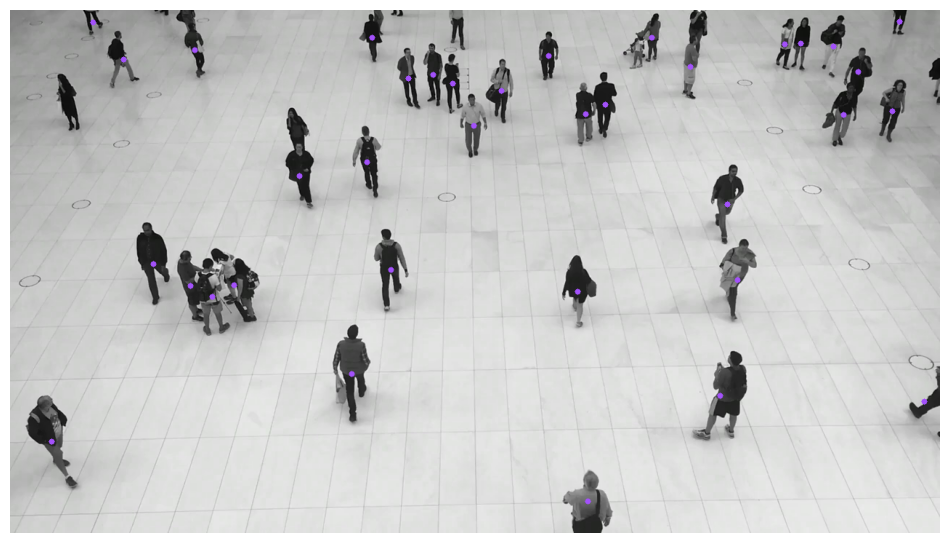{ align=center width="800" }
|
||||
|
||||
</div>
|
||||
|
||||
=== "Ellipse"
|
||||
|
||||
```python
|
||||
@@ -191,15 +212,25 @@
|
||||
|
||||
```python
|
||||
>>> import supervision as sv
|
||||
>>> from ultralytics import YOLO
|
||||
|
||||
>>> image = ...
|
||||
>>> detections = sv.Detections(...)
|
||||
>>> model = YOLO('yolov8x.pt')
|
||||
|
||||
>>> trace_annotator = sv.TraceAnnotator()
|
||||
>>> annotated_frame = trace_annotator.annotate(
|
||||
... scene=image.copy(),
|
||||
... detections=detections
|
||||
... )
|
||||
|
||||
>>> video_info = sv.VideoInfo.from_video_path(video_path='...')
|
||||
>>> frames_generator = get_video_frames_generator(source_path='...')
|
||||
>>> tracker = sv.ByteTrack()
|
||||
|
||||
>>> with sv.VideoSink(target_path='...', video_info=video_info) as sink:
|
||||
... for frame in frames_generator:
|
||||
... result = model(frame)[0]
|
||||
... detections = sv.Detections.from_ultralytics(result)
|
||||
... detections = tracker.update_with_detections(detections)
|
||||
... annotated_frame = trace_annotator.annotate(
|
||||
... scene=frame.copy(),
|
||||
... detections=detections)
|
||||
... sink.write_frame(frame=annotated_frame)
|
||||
```
|
||||
|
||||
<div class="result" markdown>
|
||||
@@ -208,6 +239,35 @@
|
||||
|
||||
</div>
|
||||
|
||||
=== "HeatMap"
|
||||
|
||||
```python
|
||||
>>> import supervision as sv
|
||||
>>> from ultralytics import YOLO
|
||||
|
||||
>>> model = YOLO('yolov8x.pt')
|
||||
|
||||
>>> heat_map_annotator = sv.HeatMapAnnotator()
|
||||
|
||||
>>> video_info = sv.VideoInfo.from_video_path(video_path='...')
|
||||
>>> frames_generator = get_video_frames_generator(source_path='...')
|
||||
|
||||
>>> with sv.VideoSink(target_path='...', video_info=video_info) as sink:
|
||||
... for frame in frames_generator:
|
||||
... result = model(frame)[0]
|
||||
... detections = sv.Detections.from_ultralytics(result)
|
||||
... annotated_frame = heat_map_annotator.annotate(
|
||||
... scene=frame.copy(),
|
||||
... detections=detections)
|
||||
... sink.write_frame(frame=annotated_frame)
|
||||
```
|
||||
|
||||
<div class="result" markdown>
|
||||
|
||||
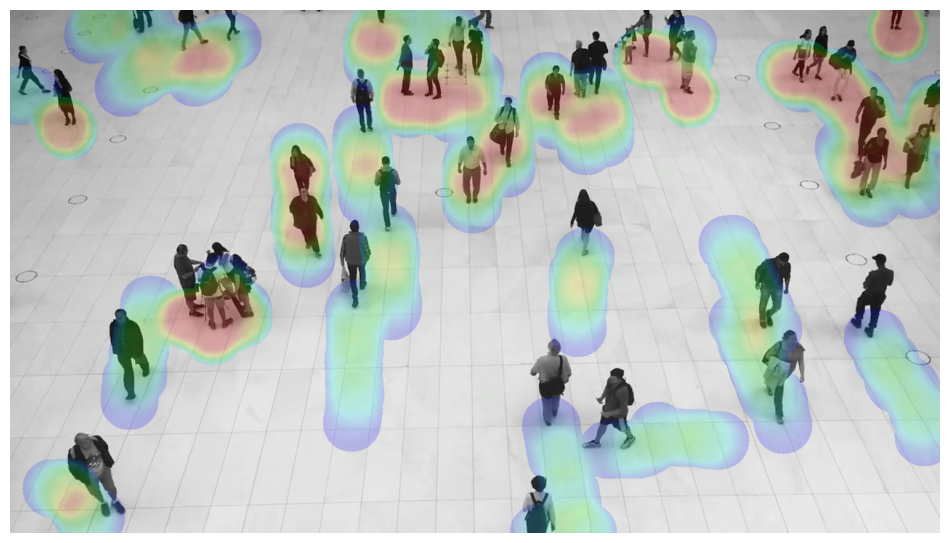{ align=center width="800" }
|
||||
|
||||
</div>
|
||||
|
||||
## BoundingBoxAnnotator
|
||||
|
||||
:::supervision.annotators.core.BoundingBoxAnnotator
|
||||
@@ -224,6 +284,10 @@
|
||||
|
||||
:::supervision.annotators.core.CircleAnnotator
|
||||
|
||||
## DotAnnotator
|
||||
|
||||
:::supervision.annotators.core.DotAnnotator
|
||||
|
||||
## EllipseAnnotator
|
||||
|
||||
:::supervision.annotators.core.EllipseAnnotator
|
||||
@@ -232,6 +296,10 @@
|
||||
|
||||
:::supervision.annotators.core.HaloAnnotator
|
||||
|
||||
## HeatMapAnnotator
|
||||
|
||||
:::supervision.annotators.core.HeatMapAnnotator
|
||||
|
||||
## MaskAnnotator
|
||||
|
||||
:::supervision.annotators.core.MaskAnnotator
|
||||
@@ -247,3 +315,7 @@
|
||||
## TraceAnnotator
|
||||
|
||||
:::supervision.annotators.core.TraceAnnotator
|
||||
|
||||
## ColorLookup
|
||||
|
||||
:::supervision.annotators.utils.ColorLookup
|
||||
|
||||
@@ -1,3 +1,47 @@
|
||||
### 0.16.0 <small>October 19, 2023</small>
|
||||
|
||||
- Added [#422](https://github.com/roboflow/supervision/pull/422): [`sv.BoxMaskAnnotator`](https://supervision.roboflow.com/annotators/#supervision.annotators.core.BoxMaskAnnotator) allowing to annotate images and videos with mox masks.
|
||||
|
||||
- Added [#433](https://github.com/roboflow/supervision/pull/433): [`sv.HaloAnnotator`](https://supervision.roboflow.com/annotators/#supervision.annotators.core.HaloAnnotator) allowing to annotate images and videos with halo effect.
|
||||
|
||||
```python
|
||||
>>> import supervision as sv
|
||||
|
||||
>>> image = ...
|
||||
>>> detections = sv.Detections(...)
|
||||
|
||||
>>> halo_annotator = sv.HaloAnnotator()
|
||||
>>> annotated_frame = halo_annotator.annotate(
|
||||
... scene=image.copy(),
|
||||
... detections=detections
|
||||
... )
|
||||
```
|
||||
|
||||
- Added [#466](https://github.com/roboflow/supervision/pull/466): [`sv.HeatMapAnnotator`](https://supervision.roboflow.com/annotators/#supervision.annotators.core.HeatMapAnnotator) allowing to annotate videos with heat maps.
|
||||
|
||||
- Added [#492](https://github.com/roboflow/supervision/pull/492): [`sv.DotAnnotator`](https://supervision.roboflow.com/annotators/#supervision.annotators.core.DotAnnotator) allowing to annotate images and videos with dots.
|
||||
|
||||
- Added [#449](https://github.com/roboflow/supervision/pull/449): [`sv.draw_image`](https://supervision.roboflow.com/draw/utils/#supervision.draw.utils.draw_image) allowing to draw an image onto a given scene with specified opacity and dimensions.
|
||||
|
||||
- Added [#280](https://github.com/roboflow/supervision/pull/280): [`sv.FPSMonitor`](https://supervision.roboflow.com/utils/video/#supervision.utils.video.FPSMonitor) for monitoring frames per second (FPS) to benchmark latency.
|
||||
|
||||
- Added [#454](https://github.com/roboflow/supervision/pull/454): 🤗 Hugging Face Annotators [space](https://huggingface.co/spaces/Roboflow/Annotators).
|
||||
|
||||
- Changed [#482](https://github.com/roboflow/supervision/pull/482): [`sv.LineZone.tigger`](https://supervision.roboflow.com/detection/tools/line_zone/#supervision.detection.line_counter.LineZone.trigger) now return `Tuple[np.ndarray, np.ndarray]`. The first array indicates which detections have crossed the line from outside to inside. The second array indicates which detections have crossed the line from inside to outside.
|
||||
|
||||
- Changed [#465](https://github.com/roboflow/supervision/pull/465): Annotator argument name from `color_map: str` to `color_lookup: ColorLookup` enum to increase type safety.
|
||||
|
||||
- Changed [#426](https://github.com/roboflow/supervision/pull/426): [`sv.MaskAnnotator`](https://supervision.roboflow.com/annotators/#supervision.annotators.core.MaskAnnotator) allowing 2x faster annotation.
|
||||
|
||||
- Fixed [#477](https://github.com/roboflow/supervision/pull/477): Poetry env definition allowing proper local installation.
|
||||
|
||||
- Fixed [#430](https://github.com/roboflow/supervision/pull/430): [`sv.ByteTrack`](https://supervision.roboflow.com/trackers/#supervision.tracker.byte_tracker.core.ByteTrack) to return `np.array([], dtype=int)` when `svDetections` is empty.
|
||||
|
||||
!!! warning
|
||||
|
||||
`sv.Detections.from_yolov8` and `sv.Classifications.from_yolov8` as those are now replaced by [`sv.Detections.from_ultralytics`](https://supervision.roboflow.com/detection/core/#supervision.detection.core.Detections.from_ultralytics) and [`sv.Classifications.from_ultralytics`](https://supervision.roboflow.com/classification/core/#supervision.classification.core.Classifications.from_ultralytics).
|
||||
|
||||
|
||||
### 0.15.0 <small>October 5, 2023</small>
|
||||
|
||||
- Added [#170](https://github.com/roboflow/supervision/pull/170): [`sv.BoundingBoxAnnotator`](https://supervision.roboflow.com/annotators/#supervision.annotators.core.BoundingBoxAnnotator) allowing to annotate images and videos with bounding boxes.
|
||||
|
||||
@@ -0,0 +1,3 @@
|
||||
## LineZone
|
||||
|
||||
:::supervision.detection.line_counter.LineZone
|
||||
@@ -0,0 +1,7 @@
|
||||
## Color
|
||||
|
||||
:::supervision.draw.color.Color
|
||||
|
||||
## ColorPalette
|
||||
|
||||
:::supervision.draw.color.ColorPalette
|
||||
@@ -17,3 +17,7 @@
|
||||
## draw_text
|
||||
|
||||
:::supervision.draw.utils.draw_text
|
||||
|
||||
## draw_image
|
||||
|
||||
:::supervision.draw.utils.draw_image
|
||||
|
||||
@@ -1 +1,78 @@
|
||||
🚧 Page under construction.
|
||||
With Supervision, you can easily [annotate](https://supervision.roboflow.com/annotators/) predictions obtained from a variety of object detection and segmentation models. This document outlines how to run inference using the [Ultralytics](https://github.com/ultralytics/ultralytics) YOLOv8 model, load these predictions into Supervision, and annotate the image.
|
||||
|
||||
## Run Inference
|
||||
|
||||
First, you'll need to obtain predictions from your object detection or segmentation model.
|
||||
```python
|
||||
import cv2
|
||||
from ultralytics import YOLO
|
||||
|
||||
model = YOLO("yolov8n.pt")
|
||||
image = cv2.imread("image.jpg")
|
||||
results = model(image)[0]
|
||||
```
|
||||
|
||||
## Load Predictions into Supervision
|
||||
|
||||
Now that we have predictions from a model, we can load them into Supervision. We can do so using the [`sv.Detections.from_ultralytics`](https://supervision.roboflow.com/detection/core/#supervision.detection.core.Detections.from_ultralytics) method, which accepts model results from both detection and segmentation models.
|
||||
|
||||
```python
|
||||
import cv2
|
||||
from ultralytics import YOLO
|
||||
import supervision as sv
|
||||
|
||||
model = YOLO("yolov8n.pt")
|
||||
image = cv2.imread("image.jpg")
|
||||
results = model(image)[0]
|
||||
detections = sv.Detections.from_ultralytics(results)
|
||||
```
|
||||
|
||||
You can conveniently load predictions from other computer vision frameworks and libraries using:
|
||||
|
||||
- [`from_deepsparse`](https://supervision.roboflow.com/detection/core/#supervision.detection.core.Detections.from_deepsparse) ([Deepsparse](https://github.com/neuralmagic/deepsparse))
|
||||
- [`from_detectron2`](https://supervision.roboflow.com/detection/core/#supervision.detection.core.Detections.from_detectron2) ([Detectron2](https://github.com/facebookresearch/detectron2))
|
||||
- [`from_mmdetection`](https://supervision.roboflow.com/detection/core/#supervision.detection.core.Detections.from_mmdetection) ([MMDetection](https://github.com/open-mmlab/mmdetection))
|
||||
- [`from_roboflow`](https://supervision.roboflow.com/detection/core/#supervision.detection.core.Detections.from_roboflow) ([Roboflow Inference](https://github.com/roboflow/inference))
|
||||
- [`from_sam`](https://supervision.roboflow.com/detection/core/#supervision.detection.core.Detections.from_sam) ([Segment Anything Model](https://github.com/facebookresearch/segment-anything))
|
||||
- [`from_transformers`](https://supervision.roboflow.com/detection/core/#supervision.detection.core.Detections.from_transformers) ([HuggingFace Transformers](https://github.com/huggingface/transformers))
|
||||
- [`from_yolo_nas`](https://supervision.roboflow.com/detection/core/#supervision.detection.core.Detections.from_yolo_nas) ([YOLO-NAS](https://github.com/Deci-AI/super-gradients/blob/master/YOLONAS.md))
|
||||
|
||||
|
||||
## Annotate Image
|
||||
|
||||
Finally, we can annotate the image with the predictions. Since we are working with an object detection model, we will use the [`sv.BoundingBoxAnnotator`](https://supervision.roboflow.com/annotators/#supervision.annotators.core.BoundingBoxAnnotator) and [`sv.LabelAnnotator`](https://supervision.roboflow.com/annotators/#supervision.annotators.core.LabelAnnotator) classes. If you are running the segmentation model [`sv.MaskAnnotator`](https://supervision.roboflow.com/annotators/#supervision.annotators.core.MaskAnnotator) is a drop-in replacement for [`sv.BoundingBoxAnnotator`](https://supervision.roboflow.com/annotators/#supervision.annotators.core.BoundingBoxAnnotator) that will allow you to draw masks instead of boxes.
|
||||
|
||||
```python
|
||||
import cv2
|
||||
from ultralytics import YOLO
|
||||
import supervision as sv
|
||||
|
||||
model = YOLO("yolov8n.pt")
|
||||
image = cv2.imread("image.jpg")
|
||||
results = model(image)[0]
|
||||
detections = sv.Detections.from_ultralytics(results)
|
||||
|
||||
bounding_box_annotator = sv.BoundingBoxAnnotator()
|
||||
label_annotator = sv.LabelAnnotator()
|
||||
|
||||
labels = [
|
||||
results.names[class_id]
|
||||
for class_id
|
||||
in detections.class_id
|
||||
]
|
||||
|
||||
annotated_image = bounding_box_annotator.annotate(
|
||||
scene=image, detections=detections)
|
||||
annotated_image = label_annotator.annotate(
|
||||
scene=annotated_image, detections=detections, labels=labels)
|
||||
```
|
||||
|
||||
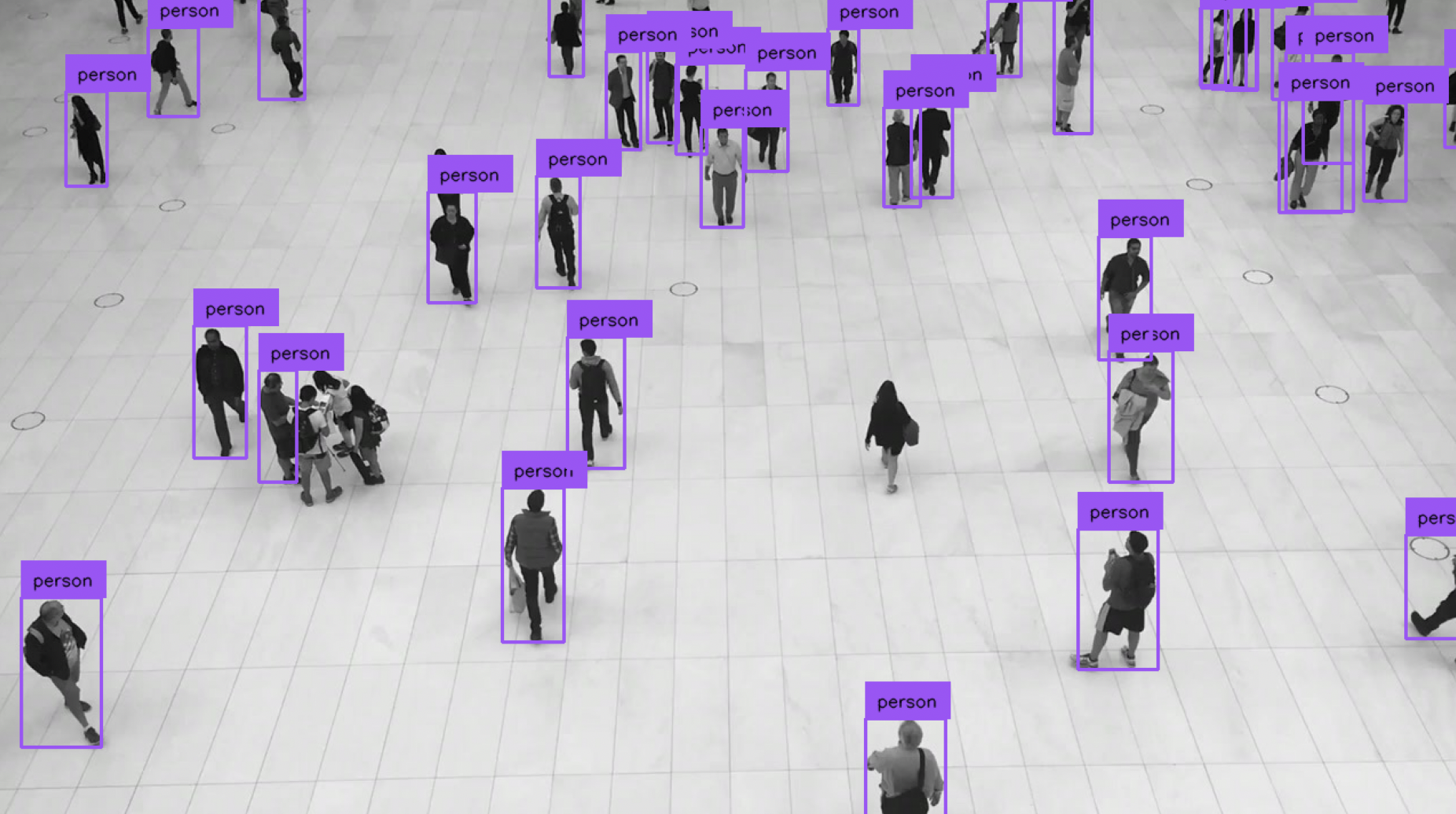
|
||||
|
||||
## Display Annotated Image
|
||||
|
||||
To display the annotated image in Jupyter Notebook or Google Colab, use the [`sv.plot_image`](https://supervision.roboflow.com/utils/notebook/#supervision.utils.notebook.plot_image) function.
|
||||
|
||||
```python
|
||||
sv.plot_image(annotated_image)
|
||||
```
|
||||
|
||||
+1
-1
@@ -63,7 +63,7 @@ You can install `supervision` with pip in a
|
||||
cd supervision
|
||||
|
||||
# setup python environment and activate it
|
||||
poetry env use python 3.10
|
||||
poetry env use python3.10
|
||||
poetry shell
|
||||
|
||||
# headless install
|
||||
|
||||
+3
-1
@@ -1,5 +1,5 @@
|
||||
site_name: Supervision
|
||||
site_url: https://roboflow.github.io/supervision
|
||||
site_url: https://supervision.roboflow.com/
|
||||
site_author: Roboflow
|
||||
site_description: A set of easy-to-use utils that will come in handy in any Computer Vision project
|
||||
repo_name: roboflow/supervision
|
||||
@@ -39,6 +39,7 @@ nav:
|
||||
- Core: detection/core.md
|
||||
- Utils: detection/utils.md
|
||||
- Tools:
|
||||
- Line Zone: detection/tools/line_zone.md
|
||||
- Polygon Zone: detection/tools/polygon_zone.md
|
||||
- Inference Slicer: detection/tools/inference_slicer.md
|
||||
- Annotators: annotators.md
|
||||
@@ -47,6 +48,7 @@ nav:
|
||||
- Metrics:
|
||||
- Object Detection: metrics/detection.md
|
||||
- Draw:
|
||||
- Color: draw/color.md
|
||||
- Utils: draw/utils.md
|
||||
- Utils:
|
||||
- Video: utils/video.md
|
||||
|
||||
Generated
+3
-3
@@ -3354,13 +3354,13 @@ dev = ["flake8", "flake8-annotations", "flake8-bandit", "flake8-bugbear", "flake
|
||||
|
||||
[[package]]
|
||||
name = "urllib3"
|
||||
version = "2.0.6"
|
||||
version = "2.0.7"
|
||||
description = "HTTP library with thread-safe connection pooling, file post, and more."
|
||||
optional = false
|
||||
python-versions = ">=3.7"
|
||||
files = [
|
||||
{file = "urllib3-2.0.6-py3-none-any.whl", hash = "sha256:7a7c7003b000adf9e7ca2a377c9688bbc54ed41b985789ed576570342a375cd2"},
|
||||
{file = "urllib3-2.0.6.tar.gz", hash = "sha256:b19e1a85d206b56d7df1d5e683df4a7725252a964e3993648dd0fb5a1c157564"},
|
||||
{file = "urllib3-2.0.7-py3-none-any.whl", hash = "sha256:fdb6d215c776278489906c2f8916e6e7d4f5a9b602ccbcfdf7f016fc8da0596e"},
|
||||
{file = "urllib3-2.0.7.tar.gz", hash = "sha256:c97dfde1f7bd43a71c8d2a58e369e9b2bf692d1334ea9f9cae55add7d0dd0f84"},
|
||||
]
|
||||
|
||||
[package.extras]
|
||||
|
||||
+10
-1
@@ -12,8 +12,10 @@ from supervision.annotators.core import (
|
||||
BoxCornerAnnotator,
|
||||
BoxMaskAnnotator,
|
||||
CircleAnnotator,
|
||||
DotAnnotator,
|
||||
EllipseAnnotator,
|
||||
HaloAnnotator,
|
||||
HeatMapAnnotator,
|
||||
LabelAnnotator,
|
||||
MaskAnnotator,
|
||||
TraceAnnotator,
|
||||
@@ -40,7 +42,14 @@ from supervision.detection.utils import (
|
||||
polygon_to_xyxy,
|
||||
)
|
||||
from supervision.draw.color import Color, ColorPalette
|
||||
from supervision.draw.utils import draw_filled_rectangle, draw_polygon, draw_text
|
||||
from supervision.draw.utils import (
|
||||
draw_filled_rectangle,
|
||||
draw_image,
|
||||
draw_line,
|
||||
draw_polygon,
|
||||
draw_rectangle,
|
||||
draw_text,
|
||||
)
|
||||
from supervision.geometry.core import Point, Position, Rect
|
||||
from supervision.geometry.utils import get_polygon_center
|
||||
from supervision.metrics.detection import ConfusionMatrix, MeanAveragePrecision
|
||||
|
||||
@@ -602,6 +602,83 @@ class CircleAnnotator(BaseAnnotator):
|
||||
return scene
|
||||
|
||||
|
||||
class DotAnnotator(BaseAnnotator):
|
||||
"""
|
||||
A class for drawing dots on an image at specific coordinates based on provided
|
||||
detections.
|
||||
"""
|
||||
|
||||
def __init__(
|
||||
self,
|
||||
color: Union[Color, ColorPalette] = ColorPalette.default(),
|
||||
radius: int = 4,
|
||||
position: Position = Position.CENTER,
|
||||
color_lookup: ColorLookup = ColorLookup.CLASS,
|
||||
):
|
||||
"""
|
||||
Args:
|
||||
color (Union[Color, ColorPalette]): The color or color palette to use for
|
||||
annotating detections.
|
||||
radius (int): Radius of the drawn dots.
|
||||
position (Position): The anchor position for placing the dot.
|
||||
color_lookup (ColorLookup): Strategy for mapping colors to annotations.
|
||||
Options are `INDEX`, `CLASS`, `TRACE`.
|
||||
"""
|
||||
self.color: Union[Color, ColorPalette] = color
|
||||
self.radius: int = radius
|
||||
self.position: Position = position
|
||||
self.color_lookup: ColorLookup = color_lookup
|
||||
|
||||
def annotate(
|
||||
self,
|
||||
scene: np.ndarray,
|
||||
detections: Detections,
|
||||
custom_color_lookup: Optional[np.ndarray] = None,
|
||||
) -> np.ndarray:
|
||||
"""
|
||||
Annotates the given scene with dots based on the provided detections.
|
||||
|
||||
Args:
|
||||
scene (np.ndarray): The image where dots will be drawn.
|
||||
detections (Detections): Object detections to annotate.
|
||||
custom_color_lookup (Optional[np.ndarray]): Custom color lookup array.
|
||||
Allows to override the default color mapping strategy.
|
||||
|
||||
Returns:
|
||||
np.ndarray: The annotated image.
|
||||
|
||||
Example:
|
||||
```python
|
||||
>>> import supervision as sv
|
||||
|
||||
>>> image = ...
|
||||
>>> detections = sv.Detections(...)
|
||||
|
||||
>>> dot_annotator = sv.DotAnnotator()
|
||||
>>> annotated_frame = dot_annotator.annotate(
|
||||
... scene=image.copy(),
|
||||
... detections=detections
|
||||
... )
|
||||
```
|
||||
|
||||

|
||||
"""
|
||||
xy = detections.get_anchor_coordinates(anchor=self.position)
|
||||
for detection_idx in range(len(detections)):
|
||||
color = resolve_color(
|
||||
color=self.color,
|
||||
detections=detections,
|
||||
detection_idx=detection_idx,
|
||||
color_lookup=self.color_lookup
|
||||
if custom_color_lookup is None
|
||||
else custom_color_lookup,
|
||||
)
|
||||
center = (int(xy[detection_idx, 0]), int(xy[detection_idx, 1]))
|
||||
cv2.circle(scene, center, self.radius, color.as_bgr(), -1)
|
||||
return scene
|
||||
|
||||
|
||||
class LabelAnnotator:
|
||||
"""
|
||||
A class for annotating labels on an image using provided detections.
|
||||
@@ -838,7 +915,7 @@ class TraceAnnotator:
|
||||
def __init__(
|
||||
self,
|
||||
color: Union[Color, ColorPalette] = ColorPalette.default(),
|
||||
position: Optional[Position] = Position.CENTER,
|
||||
position: Position = Position.CENTER,
|
||||
trace_length: int = 30,
|
||||
thickness: int = 2,
|
||||
color_lookup: ColorLookup = ColorLookup.CLASS,
|
||||
@@ -847,7 +924,7 @@ class TraceAnnotator:
|
||||
Args:
|
||||
color (Union[Color, ColorPalette]): The color to draw the trace, can be
|
||||
a single color or a color palette.
|
||||
position (Optional[Position]): The position of the trace.
|
||||
position (Position): The position of the trace.
|
||||
Defaults to `CENTER`.
|
||||
trace_length (int): The maximum length of the trace in terms of historical
|
||||
points. Defaults to `30`.
|
||||
@@ -883,15 +960,25 @@ class TraceAnnotator:
|
||||
Example:
|
||||
```python
|
||||
>>> import supervision as sv
|
||||
>>> from ultralytics import YOLO
|
||||
|
||||
>>> image = ...
|
||||
>>> detections = sv.Detections(...)
|
||||
>>> model = YOLO('yolov8x.pt')
|
||||
|
||||
>>> trace_annotator = sv.TraceAnnotator()
|
||||
>>> annotated_frame = trace_annotator.annotate(
|
||||
... scene=image.copy(),
|
||||
... detections=detections
|
||||
... )
|
||||
|
||||
>>> video_info = sv.VideoInfo.from_video_path(video_path='...')
|
||||
>>> frames_generator = sv.get_video_frames_generator(source_path='...')
|
||||
>>> tracker = sv.ByteTrack()
|
||||
|
||||
>>> with sv.VideoSink(target_path='...', video_info=video_info) as sink:
|
||||
... for frame in frames_generator:
|
||||
... result = model(frame)[0]
|
||||
... detections = sv.Detections.from_ultralytics(result)
|
||||
... detections = tracker.update_with_detections(detections)
|
||||
... annotated_frame = trace_annotator.annotate(
|
||||
... scene=frame.copy(),
|
||||
... detections=detections)
|
||||
... sink.write_frame(frame=annotated_frame)
|
||||
```
|
||||
|
||||

|
||||
return scene
|
||||
|
||||
|
||||
class HeatMapAnnotator:
|
||||
"""
|
||||
A class for drawing heatmaps on an image based on provided detections.
|
||||
Heat accumulates over time and is drawn as a semi-transparent overlay
|
||||
of blurred circles.
|
||||
"""
|
||||
|
||||
def __init__(
|
||||
self,
|
||||
position: Position = Position.BOTTOM_CENTER,
|
||||
opacity: float = 0.2,
|
||||
radius: int = 40,
|
||||
kernel_size: int = 25,
|
||||
top_hue: int = 0,
|
||||
low_hue: int = 125,
|
||||
):
|
||||
"""
|
||||
Args:
|
||||
position (Position): The position of the heatmap. Defaults to
|
||||
`BOTTOM_CENTER`.
|
||||
opacity (float): Opacity of the overlay mask, between 0 and 1.
|
||||
radius (int): Radius of the heat circle.
|
||||
kernel_size (int): Kernel size for blurring the heatmap.
|
||||
top_hue (int): Hue at the top of the heatmap. Defaults to 0 (red).
|
||||
low_hue (int): Hue at the bottom of the heatmap. Defaults to 125 (blue).
|
||||
"""
|
||||
self.position = position
|
||||
self.opacity = opacity
|
||||
self.radius = radius
|
||||
self.kernel_size = kernel_size
|
||||
self.heat_mask = None
|
||||
self.top_hue = top_hue
|
||||
self.low_hue = low_hue
|
||||
|
||||
def annotate(self, scene: np.ndarray, detections: Detections) -> np.ndarray:
|
||||
"""
|
||||
Annotates the scene with a heatmap based on the provided detections.
|
||||
|
||||
Args:
|
||||
scene (np.ndarray): The image where the heatmap will be drawn.
|
||||
detections (Detections): Object detections to annotate.
|
||||
|
||||
Returns:
|
||||
np.ndarray: Annotated image.
|
||||
|
||||
Example:
|
||||
```python
|
||||
>>> import supervision as sv
|
||||
>>> from ultralytics import YOLO
|
||||
|
||||
>>> model = YOLO('yolov8x.pt')
|
||||
|
||||
>>> heat_map_annotator = sv.HeatMapAnnotator()
|
||||
|
||||
>>> video_info = sv.VideoInfo.from_video_path(video_path='...')
|
||||
>>> frames_generator = get_video_frames_generator(source_path='...')
|
||||
|
||||
>>> with sv.VideoSink(target_path='...', video_info=video_info) as sink:
|
||||
... for frame in frames_generator:
|
||||
... result = model(frame)[0]
|
||||
... detections = sv.Detections.from_ultralytics(result)
|
||||
... annotated_frame = heat_map_annotator.annotate(
|
||||
... scene=frame.copy(),
|
||||
... detections=detections)
|
||||
... sink.write_frame(frame=annotated_frame)
|
||||
```
|
||||
|
||||

|
||||
"""
|
||||
|
||||
if self.heat_mask is None:
|
||||
self.heat_mask = np.zeros(scene.shape[:2])
|
||||
mask = np.zeros(scene.shape[:2])
|
||||
for xy in detections.get_anchor_coordinates(self.position):
|
||||
cv2.circle(mask, (int(xy[0]), int(xy[1])), self.radius, 1, -1)
|
||||
self.heat_mask = mask + self.heat_mask
|
||||
temp = self.heat_mask.copy()
|
||||
temp = self.low_hue - temp / temp.max() * (self.low_hue - self.top_hue)
|
||||
temp = temp.astype(np.uint8)
|
||||
if self.kernel_size is not None:
|
||||
temp = cv2.blur(temp, (self.kernel_size, self.kernel_size))
|
||||
hsv = np.zeros(scene.shape)
|
||||
hsv[..., 0] = temp
|
||||
hsv[..., 1] = 255
|
||||
hsv[..., 2] = 255
|
||||
temp = cv2.cvtColor(hsv.astype(np.uint8), cv2.COLOR_HSV2BGR)
|
||||
mask = cv2.cvtColor(self.heat_mask.astype(np.uint8), cv2.COLOR_GRAY2BGR) > 0
|
||||
scene[mask] = cv2.addWeighted(temp, self.opacity, scene, 1 - self.opacity, 0)[
|
||||
mask
|
||||
]
|
||||
return scene
|
||||
|
||||
@@ -10,13 +10,22 @@ from supervision.geometry.core import Position
|
||||
|
||||
class ColorLookup(Enum):
|
||||
"""
|
||||
Enum for annotator color lookup.
|
||||
Enumeration class to define strategies for mapping colors to annotations.
|
||||
|
||||
This enum supports three different lookup strategies:
|
||||
- `INDEX`: Colors are determined by the index of the detection within the scene.
|
||||
- `CLASS`: Colors are determined by the class label of the detected object.
|
||||
- `TRACK`: Colors are determined by the tracking identifier of the object.
|
||||
"""
|
||||
|
||||
INDEX = "index"
|
||||
CLASS = "class"
|
||||
TRACK = "track"
|
||||
|
||||
@classmethod
|
||||
def list(cls):
|
||||
return list(map(lambda c: c.value, cls))
|
||||
|
||||
|
||||
def resolve_color_idx(
|
||||
detections: Detections,
|
||||
|
||||
@@ -1,4 +1,4 @@
|
||||
from typing import Dict, Optional
|
||||
from typing import Dict, Optional, Tuple
|
||||
|
||||
import cv2
|
||||
import numpy as np
|
||||
@@ -10,37 +10,54 @@ from supervision.geometry.core import Point, Rect, Vector
|
||||
|
||||
class LineZone:
|
||||
"""
|
||||
Count the number of objects that cross a line.
|
||||
This class is responsible for counting the number of objects that cross a
|
||||
predefined line.
|
||||
|
||||
!!! warning
|
||||
|
||||
LineZone utilizes the `tracker_id`. Read
|
||||
[here](https://supervision.roboflow.com/trackers/) to learn how to plug
|
||||
tracking into your inference pipeline.
|
||||
|
||||
Attributes:
|
||||
in_count (int): The number of objects that have crossed the line from outside
|
||||
to inside.
|
||||
out_count (int): The number of objects that have crossed the line from inside
|
||||
to outside.
|
||||
"""
|
||||
|
||||
def __init__(self, start: Point, end: Point):
|
||||
"""
|
||||
Initialize a LineCounter object.
|
||||
|
||||
Attributes:
|
||||
Args:
|
||||
start (Point): The starting point of the line.
|
||||
end (Point): The ending point of the line.
|
||||
|
||||
"""
|
||||
self.vector = Vector(start=start, end=end)
|
||||
self.tracker_state: Dict[str, bool] = {}
|
||||
self.in_count: int = 0
|
||||
self.out_count: int = 0
|
||||
|
||||
def trigger(self, detections: Detections):
|
||||
def trigger(self, detections: Detections) -> Tuple[np.ndarray, np.ndarray]:
|
||||
"""
|
||||
Update the in_count and out_count for the detections that cross the line.
|
||||
Update the `in_count` and `out_count` based on the objects that cross the line.
|
||||
|
||||
Attributes:
|
||||
detections (Detections): The detections for which to update the counts.
|
||||
Args:
|
||||
detections (Detections): A list of detections for which to update the
|
||||
counts.
|
||||
|
||||
Returns:
|
||||
A tuple of two boolean NumPy arrays. The first array indicates which
|
||||
detections have crossed the line from outside to inside. The second
|
||||
array indicates which detections have crossed the line from inside to
|
||||
outside.
|
||||
"""
|
||||
for xyxy, _, confidence, class_id, tracker_id in detections:
|
||||
# handle detections with no tracker_id
|
||||
crossed_in = np.full(len(detections), False)
|
||||
crossed_out = np.full(len(detections), False)
|
||||
|
||||
for i, (xyxy, _, confidence, class_id, tracker_id) in enumerate(detections):
|
||||
if tracker_id is None:
|
||||
continue
|
||||
|
||||
# we check if all four anchors of bbox are on the same side of vector
|
||||
x1, y1, x2, y2 = xyxy
|
||||
anchors = [
|
||||
Point(x=x1, y=y1),
|
||||
@@ -50,25 +67,27 @@ class LineZone:
|
||||
]
|
||||
triggers = [self.vector.is_in(point=anchor) for anchor in anchors]
|
||||
|
||||
# detection is partially in and partially out
|
||||
if len(set(triggers)) == 2:
|
||||
continue
|
||||
|
||||
tracker_state = triggers[0]
|
||||
# handle new detection
|
||||
|
||||
if tracker_id not in self.tracker_state:
|
||||
self.tracker_state[tracker_id] = tracker_state
|
||||
continue
|
||||
|
||||
# handle detection on the same side of the line
|
||||
if self.tracker_state.get(tracker_id) == tracker_state:
|
||||
continue
|
||||
|
||||
self.tracker_state[tracker_id] = tracker_state
|
||||
if tracker_state:
|
||||
self.in_count += 1
|
||||
crossed_in[i] = True
|
||||
else:
|
||||
self.out_count += 1
|
||||
crossed_out[i] = True
|
||||
|
||||
return crossed_in, crossed_out
|
||||
|
||||
|
||||
class LineZoneAnnotator:
|
||||
|
||||
+71
-21
@@ -34,21 +34,35 @@ def _validate_color_hex(color_hex: str):
|
||||
|
||||
@dataclass
|
||||
class Color:
|
||||
"""
|
||||
Represents a color in RGB format.
|
||||
|
||||
Attributes:
|
||||
r (int): Red channel.
|
||||
g (int): Green channel.
|
||||
b (int): Blue channel.
|
||||
"""
|
||||
|
||||
r: int
|
||||
g: int
|
||||
b: int
|
||||
|
||||
@classmethod
|
||||
def from_hex(cls, color_hex: str):
|
||||
def from_hex(cls, color_hex: str) -> Color:
|
||||
"""
|
||||
Creates a Color instance from a color hex string
|
||||
Create a Color instance from a hex string.
|
||||
|
||||
:param color_hex: str : The color hex string in the format
|
||||
of "fff", "ffffff", "#fff", or "#ffffff"
|
||||
:return: Color : A Color instance representing the color
|
||||
Args:
|
||||
color_hex (str): Hex string of the color.
|
||||
|
||||
Returns:
|
||||
Color: Instance representing the color.
|
||||
|
||||
Example:
|
||||
color = Color.from_hex('#ff00ff')
|
||||
```
|
||||
>>> Color.from_hex('#ff00ff')
|
||||
Color(r=255, g=0, b=255)
|
||||
```
|
||||
"""
|
||||
_validate_color_hex(color_hex)
|
||||
color_hex = color_hex.lstrip("#")
|
||||
@@ -59,17 +73,31 @@ class Color:
|
||||
|
||||
def as_rgb(self) -> Tuple[int, int, int]:
|
||||
"""
|
||||
Returns the color as a tuple of integers in the RGB format
|
||||
Returns the color as an RGB tuple.
|
||||
|
||||
:return: Tuple[int, int, int] : The color in the RGB format
|
||||
Returns:
|
||||
Tuple[int, int, int]: RGB tuple.
|
||||
|
||||
Example:
|
||||
```
|
||||
>>> color.as_rgb()
|
||||
(255, 0, 255)
|
||||
```
|
||||
"""
|
||||
return self.r, self.g, self.b
|
||||
|
||||
def as_bgr(self) -> Tuple[int, int, int]:
|
||||
"""
|
||||
Returns the color as a tuple of integers in the BGR format
|
||||
Returns the color as a BGR tuple.
|
||||
|
||||
:return: Tuple[int, int, int] : The color in the BGR format
|
||||
Returns:
|
||||
Tuple[int, int, int]: BGR tuple.
|
||||
|
||||
Example:
|
||||
```
|
||||
>>> color.as_bgr()
|
||||
(255, 0, 255)
|
||||
```
|
||||
"""
|
||||
return self.b, self.g, self.r
|
||||
|
||||
@@ -100,33 +128,55 @@ class ColorPalette:
|
||||
|
||||
@classmethod
|
||||
def default(cls) -> ColorPalette:
|
||||
"""
|
||||
Returns a default color palette.
|
||||
|
||||
Returns:
|
||||
ColorPalette: A ColorPalette instance with default colors.
|
||||
|
||||
Example:
|
||||
```
|
||||
>>> ColorPalette.default()
|
||||
ColorPalette(colors=[Color(r=255, g=0, b=0), Color(r=0, g=255, b=0), ...])
|
||||
```
|
||||
"""
|
||||
return ColorPalette.from_hex(color_hex_list=DEFAULT_COLOR_PALETTE)
|
||||
|
||||
@classmethod
|
||||
def from_hex(cls, color_hex_list: List[str]):
|
||||
def from_hex(cls, color_hex_list: List[str]) -> ColorPalette:
|
||||
"""
|
||||
Creates a ColorPalette instance from a list of color hex strings
|
||||
Create a ColorPalette instance from a list of hex strings.
|
||||
|
||||
:param color_hex_list: List[str] : A list of color hex strings in the
|
||||
format of "fff", "ffffff", "#fff", or "#ffffff"
|
||||
:return: ColorPalette : A ColorPalette instance representing the color palette
|
||||
Args:
|
||||
color_hex_list (List[str]): List of color hex strings.
|
||||
|
||||
Returns:
|
||||
ColorPalette: A ColorPalette instance.
|
||||
|
||||
Example:
|
||||
color_palette = ColorPalette.from_hex(['#ff0000', '#00ff00', '#0000ff'])
|
||||
```
|
||||
>>> ColorPalette.from_hex(['#ff0000', '#00ff00', '#0000ff'])
|
||||
ColorPalette(colors=[Color(r=255, g=0, b=0), Color(r=0, g=255, b=0), ...])
|
||||
```
|
||||
"""
|
||||
colors = [Color.from_hex(color_hex) for color_hex in color_hex_list]
|
||||
return cls(colors)
|
||||
|
||||
def by_idx(self, idx: int) -> Color:
|
||||
"""
|
||||
Returns the color at a given index in the color palette.
|
||||
Return the color at a given index in the palette.
|
||||
|
||||
:param idx: int : The index of the color in the color palette
|
||||
:return: Color : The color at the given index
|
||||
Args:
|
||||
idx (int): Index of the color in the palette.
|
||||
|
||||
Returns:
|
||||
Color: Color at the given index.
|
||||
|
||||
Example:
|
||||
color_palette = ColorPalette.from_hex(['#ff0000', '#00ff00', '#0000ff'])
|
||||
color = color_palette.by_idx(1)
|
||||
```
|
||||
>>> color_palette.by_idx(1)
|
||||
Color(r=0, g=255, b=0)
|
||||
```
|
||||
"""
|
||||
if idx < 0:
|
||||
raise ValueError("idx argument should not be negative")
|
||||
|
||||
@@ -1,4 +1,5 @@
|
||||
from typing import Optional
|
||||
import os
|
||||
from typing import Optional, Union
|
||||
|
||||
import cv2
|
||||
import numpy as np
|
||||
@@ -168,3 +169,65 @@ def draw_text(
|
||||
lineType=cv2.LINE_AA,
|
||||
)
|
||||
return scene
|
||||
|
||||
|
||||
def draw_image(
|
||||
scene: np.ndarray, image: Union[str, np.ndarray], opacity: float, rect: Rect
|
||||
) -> np.ndarray:
|
||||
"""
|
||||
Draws an image onto a given scene with specified opacity and dimensions.
|
||||
|
||||
Args:
|
||||
scene (np.ndarray): Background image where the new image will be drawn.
|
||||
image (Union[str, np.ndarray]): Image to draw.
|
||||
opacity (float): Opacity of the image to be drawn.
|
||||
rect (Rect): Rectangle specifying where to draw the image.
|
||||
|
||||
Returns:
|
||||
np.ndarray: The updated scene.
|
||||
|
||||
Raises:
|
||||
FileNotFoundError: If the image path does not exist.
|
||||
ValueError: For invalid opacity or rectangle dimensions.
|
||||
"""
|
||||
|
||||
# Validate and load image
|
||||
if isinstance(image, str):
|
||||
if not os.path.exists(image):
|
||||
raise FileNotFoundError(f"Image path ('{image}') does not exist.")
|
||||
image = cv2.imread(image, cv2.IMREAD_UNCHANGED)
|
||||
|
||||
# Validate opacity
|
||||
if not 0.0 <= opacity <= 1.0:
|
||||
raise ValueError("Opacity must be between 0.0 and 1.0.")
|
||||
|
||||
# Validate rectangle dimensions
|
||||
if (
|
||||
rect.x < 0
|
||||
or rect.y < 0
|
||||
or rect.x + rect.width > scene.shape[1]
|
||||
or rect.y + rect.height > scene.shape[0]
|
||||
):
|
||||
raise ValueError("Invalid rectangle dimensions.")
|
||||
|
||||
# Resize and isolate alpha channel
|
||||
image = cv2.resize(image, (rect.width, rect.height))
|
||||
alpha_channel = (
|
||||
image[:, :, 3]
|
||||
if image.shape[2] == 4
|
||||
else np.ones((rect.height, rect.width), dtype=image.dtype) * 255
|
||||
)
|
||||
alpha_scaled = cv2.convertScaleAbs(alpha_channel * opacity)
|
||||
|
||||
# Perform blending
|
||||
scene_roi = scene[rect.y : rect.y + rect.height, rect.x : rect.x + rect.width]
|
||||
alpha_float = alpha_scaled.astype(np.float32) / 255.0
|
||||
blended_roi = cv2.convertScaleAbs(
|
||||
(1 - alpha_float[..., np.newaxis]) * scene_roi
|
||||
+ alpha_float[..., np.newaxis] * image[:, :, :3]
|
||||
)
|
||||
|
||||
# Update the scene
|
||||
scene[rect.y : rect.y + rect.height, rect.x : rect.x + rect.width] = blended_roi
|
||||
|
||||
return scene
|
||||
|
||||
Reference in New Issue
Block a user