 egolearner
e5ba11b6fe
* feat: add hnsw-rabitq

* undefine transform

* support config rotator type

* support sample_count

* fix ut

* refactor: update interface

* refactor: update interface

* update rabitq index params

* fix interface update

* fix searcher test

* fix streamer test

* streamer support bf and add more ut

* rm env check

* add collection ut

* add schema check

* add rabitq query param binding

* add integration test

* fix local_builder

* cleanup dist calculator

* add RaBitQ-Library submodule

* cleanup rabitq converter/reformer

* add files

* disable build on mac

* disable Feature_Optimize_HNSW_RABITQ

* disable python/tests/test_collection_hnsw_rabitq.py:13

* check avx2/avx512

* fix refine

* fix mac ci

* add dimension check

* fix mac ci

* fix ci

* add missing lib

* fix centroids selection for Cosine/InnerProduct

* rename hnsw-rabitq to hnsw_rabitq

* address comments

* fix compile

* fix rabitqlib name

* fix mac compile

* check avx2/avx512 support

* runtime check again compile-time

* check AUTO_DETECT_ARCH

* rm debug log

* fix

* rabitq use avx2 by default

* add missing file

* fix search_bf/group_by dist

* address comments

* fix typo

* address comments

* rabitq support disable id_map

* address comments






🚀 Quickstart | 🏠 Home | 📚 Docs | 📊 Benchmarks | 🔎 DeepWiki | 🎮 Discord
Zvec is an open-source, in-process vector database — lightweight, lightning-fast, and designed to embed directly into applications. Built on Proxima (Alibaba's battle-tested vector search engine), it delivers production-grade, low-latency, scalable similarity search with minimal setup.
💫 Features
- Blazing Fast: Searches billions of vectors in milliseconds.
- Simple, Just Works: Install and start searching in seconds. No servers, no config, no fuss.
- Dense + Sparse Vectors: Work with both dense and sparse embeddings, with native support for multi-vector queries in a single call.
- Hybrid Search: Combine semantic similarity with structured filters for precise results.
- Runs Anywhere: As an in-process library, Zvec runs wherever your code runs — notebooks, servers, CLI tools, or even edge devices.
📦 Installation
Python
Requirements: Python 3.10 - 3.12
pip install zvec
Node.js
npm install @zvec/zvec
✅ Supported Platforms
- Linux (x86_64, ARM64)
- macOS (ARM64)
🛠️ Building from Source
If you prefer to build Zvec from source, please check the Building from Source guide.
⚡ One-Minute Example
import zvec

# Define collection schema
schema = zvec.CollectionSchema(
    name="example",
    vectors=zvec.VectorSchema("embedding", zvec.DataType.VECTOR_FP32, 4),
)

# Create collection
collection = zvec.create_and_open(path="./zvec_example", schema=schema)

# Insert documents
collection.insert([
    zvec.Doc(id="doc_1", vectors={"embedding": [0.1, 0.2, 0.3, 0.4]}),
    zvec.Doc(id="doc_2", vectors={"embedding": [0.2, 0.3, 0.4, 0.1]}),
])

# Search by vector similarity
results = collection.query(
    zvec.VectorQuery("embedding", vector=[0.4, 0.3, 0.3, 0.1]),
    topk=10
)

# Results: list of {'id': str, 'score': float, ...}, sorted by relevance
print(results)
📈 Performance at Scale
Zvec delivers exceptional speed and efficiency, making it ideal for demanding production workloads.
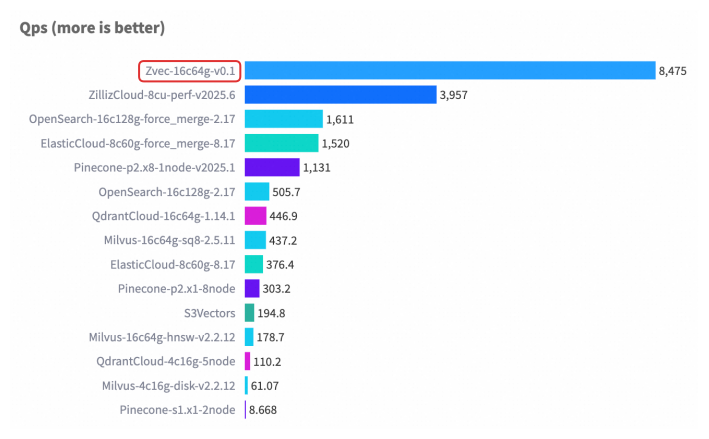
For detailed benchmark methodology, configurations, and complete results, please see our Benchmarks documentation.
🤝 Join Our Community
Stay updated and get support — scan or click:
| 💬 DingTalk | 🎮 Discord | |
|---|---|---|
 |
 |
 |
| Scan to join | Scan to join | Click to join |
❤️ Contributing
We welcome and appreciate contributions from the community! Whether you're fixing a bug, adding a feature, or improving documentation, your help makes Zvec better for everyone.
Check out our Contributing Guide to get started!