 78f08bd0cc
The underly core module only support a fixed-size segment due to the index file format where the section of segments meta limit the max num of data segments. This commit makes the meta section dynamically allocated and organized in a link-table manner to support much more segments. * revert local_builder's meta cap setting * feat: auto scalable segment meta section of mmap files * Revert "feat: auto scalable segment meta section of mmap files" This reverts commit 82c11e451544b912b901be33fae79e964a487b1f. * v2: don't change to absolute offset |
||
|---|---|---|
| .github | ||
| cmake | ||
| examples/c++ | ||
| python | ||
| scripts | ||
| src | ||
| tests | ||
| thirdparty | ||
| tools | ||
| .clang-format | ||
| .gitignore | ||
| .gitmodules | ||
| .pre-commit-config.yaml | ||
| CMakeLists.txt | ||
| CODE_OF_CONDUCT.md | ||
| CONTRIBUTING.md | ||
| LICENSE | ||
| README.md | ||
| pyproject.toml | ||
README.md




🚀 Quickstart | 🏠 Home | 📚 Docs | 📊 Benchmarks | 🎮 Discord | 🐦 X (Twitter)
Zvec is an open-source, in-process vector database — lightweight, lightning-fast, and designed to embed directly into applications. Built on Proxima (Alibaba's battle-tested vector search engine), it delivers production-grade, low-latency, scalable similarity search with minimal setup.
💫 Features
- Blazing Fast: Searches billions of vectors in milliseconds.
- Simple, Just Works: Install with
pip install zvecand start searching in seconds. No servers, no config, no fuss. - Dense + Sparse Vectors: Work with both dense and sparse embeddings, with native support for multi-vector queries in a single call.
- Hybrid Search: Combine semantic similarity with structured filters for precise results.
- Runs Anywhere: As an in-process library, Zvec runs wherever your code runs — notebooks, servers, CLI tools, or even edge devices.
📦 Installation
Install Zvec from PyPI with a single command:
pip install zvec
Requirements:
- Python 3.10 - 3.12
- Supported platforms:
- Linux (x86_64)
- macOS (ARM64)
If you prefer to build Zvec from source, please check the Building from Source guide.
⚡ One-Minute Example
import zvec

# Define collection schema
schema = zvec.CollectionSchema(
    name="example",
    vectors=zvec.VectorSchema("embedding", zvec.DataType.VECTOR_FP32, 4),
)

# Create collection
collection = zvec.create_and_open(path="./zvec_example", schema=schema,)

# Insert documents
collection.insert([
    zvec.Doc(id="doc_1", vectors={"embedding": [0.1, 0.2, 0.3, 0.4]}),
    zvec.Doc(id="doc_2", vectors={"embedding": [0.2, 0.3, 0.4, 0.1]}),
])

# Search by vector similarity
results = collection.query(
    zvec.VectorQuery("embedding", vector=[0.4, 0.3, 0.3, 0.1]),
    topk=10
)

# Results: list of {'id': str, 'score': float, ...}, sorted by relevance
print(results)
📈 Performance at Scale
Zvec delivers exceptional speed and efficiency, making it ideal for demanding production workloads.
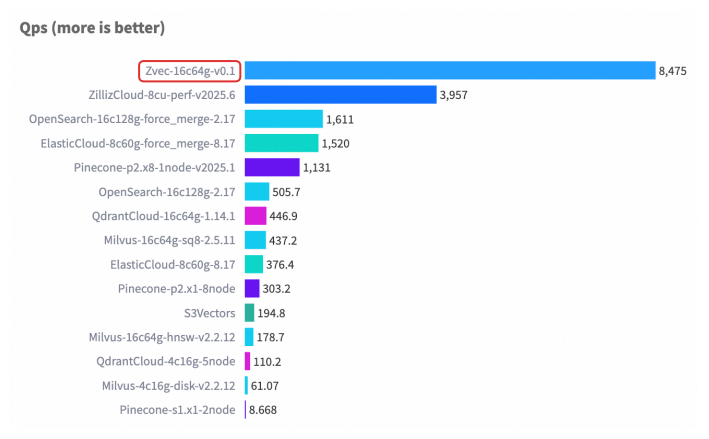
For detailed benchmark methodology, configurations, and complete results, please see our Benchmarks documentation.
🤝 Join Our Community
Stay updated and get support — scan or click:
|
💬 DingTalk

|
📱 WeChat

|
🎮 Discord
Join Server
|
🐦 X (Twitter)
Follow @zvec_ai
|
❤️ Contributing
We welcome and appreciate contributions from the community! Whether you're fixing a bug, adding a feature, or improving documentation, your help makes Zvec better for everyone.
Check out our Contributing Guide to get started!