 08d680bd4f
* fix and refact fetch perf * change git user name |
||
|---|---|---|
| .github | ||
| cmake | ||
| python | ||
| scripts | ||
| src | ||
| tests | ||
| thirdparty | ||
| tools | ||
| .clang-format | ||
| .gitignore | ||
| .gitmodules | ||
| .pre-commit-config.yaml | ||
| CMakeLists.txt | ||
| CODE_OF_CONDUCT.md | ||
| CONTRIBUTING.md | ||
| LICENSE | ||
| README.md | ||
| pyproject.toml | ||
README.md



Zvec
Zvec is an open-source, in-process vector database — lightweight, lightning-fast, and designed to embed directly into applications. Built on Proxima (Alibaba's battle-tested vector search engine), it delivers production-grade, low-latency, scalable similarity search with minimal setup.
📚 Quick Start | 🌐 Website | 📖 Documentation | 📊 Benchmarks | 💜 Discord
💫 Features
- Blazing Fast: Searches billions of vectors in milliseconds.
- Simple, Just Works: Install with
pip install zvecand start searching in seconds. No servers, no config, no fuss. - Dense + Sparse Vectors: Work with both dense and sparse embeddings, with native support for multi-vector queries in a single call.
- Hybrid Search: Combine semantic similarity with structured filters for precise results.
- Runs Anywhere: As an in-process library, Zvec runs wherever your code runs — notebooks, servers, CLI tools, or even edge devices.
📦 Installation
Install Zvec from PyPI with a single command:
pip install zvec
Requirements:
- Python 3.10 - 3.12
- Supported platforms:
- Linux (x86_64)
- macOS (ARM64/x86_64)
If you prefer to build Zvec from source, please check the Building from Source guide.
⚡ One-Minute Example
import zvec

# Define collection schema
schema = zvec.CollectionSchema(
    name="example",
    vectors=zvec.VectorSchema("embedding", zvec.DataType.VECTOR_FP32, 4),
)

# Create collection
collection = zvec.create_and_open(path="./zvec_example", schema=schema,)

# Insert documents
collection.insert([
    zvec.Doc(id="doc_1", vectors={"embedding": [0.1, 0.2, 0.3, 0.4]}),
    zvec.Doc(id="doc_2", vectors={"embedding": [0.2, 0.3, 0.4, 0.1]}),
])

# Search by vector similarity
results = collection.query(
    zvec.VectorQuery("embedding", vector=[0.4, 0.3, 0.3, 0.1]),
    topk=10
)

# Results: list of {'id': str, 'score': float, ...}, sorted by relevance
print(results)
📈 Performance at Scale
Zvec delivers exceptional speed and efficiency, making it ideal for demanding production workloads.
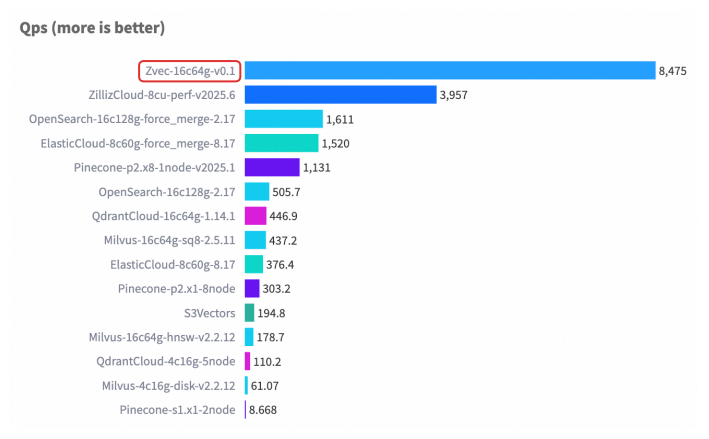
For detailed benchmark methodology, configurations, and complete results, please see our Benchmarks documentation.
❤️ Contributing
We welcome and appreciate contributions from the community! Whether you're fixing a bug, adding a feature, or improving documentation, your help makes Zvec better for everyone.
Check out our Contributing Guide to get started!