455 lines
15 KiB
Markdown
455 lines
15 KiB
Markdown
---
|
|
comments: true
|
|
---
|
|
|
|
With Supervision, you can load and manipulate classification, object detection, and
|
|
segmentation datasets. This tutorial will walk you through how to load, split, merge,
|
|
visualize, and augment datasets in Supervision.
|
|
|
|
## Download Dataset
|
|
|
|
In this tutorial, we will use a dataset from
|
|
[Roboflow Universe](https://universe.roboflow.com/), a public repository of
|
|
thousands of computer vision datasets. If you already have your dataset in
|
|
[COCO](https://roboflow.com/formats/coco-json),
|
|
[YOLO](https://roboflow.com/formats/yolov8-pytorch-txt),
|
|
or [Pascal VOC](https://roboflow.com/formats/pascal-voc-xml) format, you can skip this
|
|
section.
|
|
|
|
```bash
|
|
pip install roboflow
|
|
```
|
|
|
|
Next, log into your Roboflow account and download the dataset of your choice in the
|
|
COCO, YOLO, or Pascal VOC format. You can customize the following code snippet with
|
|
your workspace ID, project ID, and version number.
|
|
|
|
=== "COCO"
|
|
|
|
```python
|
|
import roboflow
|
|
|
|
roboflow.login()
|
|
|
|
rf = roboflow.Roboflow()
|
|
project = rf.workspace('<WORKSPACE_ID>').project('<PROJECT_ID>')
|
|
dataset = project.version('<PROJECT_VERSION>').download("coco")
|
|
```
|
|
|
|
=== "YOLO"
|
|
|
|
```python
|
|
import roboflow
|
|
|
|
roboflow.login()
|
|
|
|
rf = roboflow.Roboflow()
|
|
project = rf.workspace('<WORKSPACE_ID>').project('<PROJECT_ID>')
|
|
dataset = project.version('<PROJECT_VERSION>').download("yolov8")
|
|
```
|
|
|
|
=== "Pascal VOC"
|
|
|
|
```python
|
|
import roboflow
|
|
|
|
roboflow.login()
|
|
|
|
rf = roboflow.Roboflow()
|
|
project = rf.workspace('<WORKSPACE_ID>').project('<PROJECT_ID>')
|
|
dataset = project.version('<PROJECT_VERSION>').download("voc")
|
|
```
|
|
|
|
## Load Dataset
|
|
|
|
The Supervision library provides convenient functions to load datasets in various
|
|
formats. If your dataset is already split into train, test, and valid subsets, you can
|
|
load each of those as separate [`sv.DetectionDataset`](https://supervision.roboflow.com/latest/datasets/core/#supervision.dataset.core.DetectionDataset)
|
|
instances.
|
|
|
|
=== "COCO"
|
|
|
|
We can do so using the [`sv.DetectionDataset.from_coco`](https://supervision.roboflow.com/latest/datasets/core/#supervision.dataset.core.DetectionDataset.from_coco) to load annotations in [COCO](https://roboflow.com/formats/coco-json) format.
|
|
|
|
```python
|
|
import supervision as sv
|
|
|
|
ds_train = sv.DetectionDataset.from_coco(
|
|
images_directory_path=f'{dataset.location}/train',
|
|
annotations_path=f'{dataset.location}/train/_annotations.coco.json',
|
|
)
|
|
ds_valid = sv.DetectionDataset.from_coco(
|
|
images_directory_path=f'{dataset.location}/valid',
|
|
annotations_path=f'{dataset.location}/valid/_annotations.coco.json',
|
|
)
|
|
ds_test = sv.DetectionDataset.from_coco(
|
|
images_directory_path=f'{dataset.location}/test',
|
|
annotations_path=f'{dataset.location}/test/_annotations.coco.json',
|
|
)
|
|
|
|
ds_train.classes
|
|
# ['person', 'bicycle', 'car', ...]
|
|
|
|
len(ds_train), len(ds_valid), len(ds_test)
|
|
# 800, 100, 100
|
|
```
|
|
|
|
=== "YOLO"
|
|
|
|
We can do so using the [`sv.DetectionDataset.from_yolo`](https://supervision.roboflow.com/latest/datasets/core/#supervision.dataset.core.DetectionDataset.from_yolo) to load annotations in [YOLO](https://roboflow.com/formats/yolov8-pytorch-txt) format.
|
|
|
|
```python
|
|
import supervision as sv
|
|
|
|
ds_train = sv.DetectionDataset.from_yolo(
|
|
images_directory_path=f'{dataset.location}/train/images',
|
|
annotations_directory_path=f'{dataset.location}/train/labels',
|
|
data_yaml_path=f'{dataset.location}/data.yaml'
|
|
)
|
|
ds_valid = sv.DetectionDataset.from_yolo(
|
|
images_directory_path=f'{dataset.location}/valid/images',
|
|
annotations_directory_path=f'{dataset.location}/valid/labels',
|
|
data_yaml_path=f'{dataset.location}/data.yaml'
|
|
)
|
|
ds_test = sv.DetectionDataset.from_yolo(
|
|
images_directory_path=f'{dataset.location}/test/images',
|
|
annotations_directory_path=f'{dataset.location}/test/labels',
|
|
data_yaml_path=f'{dataset.location}/data.yaml'
|
|
)
|
|
|
|
ds_train.classes
|
|
# ['person', 'bicycle', 'car', ...]
|
|
|
|
len(ds_train), len(ds_valid), len(ds_test)
|
|
# 800, 100, 100
|
|
```
|
|
|
|
=== "Pascal VOC"
|
|
|
|
We can do so using the [`sv.DetectionDataset.from_pascal_voc`](https://supervision.roboflow.com/latest/datasets/core/#supervision.dataset.core.DetectionDataset.from_pascal_voc) to load annotations in [Pascal VOC](https://roboflow.com/formats/pascal-voc-xml) format.
|
|
|
|
```python
|
|
import supervision as sv
|
|
|
|
ds_train = sv.DetectionDataset.from_pascal_voc(
|
|
images_directory_path=f'{dataset.location}/train/images',
|
|
annotations_directory_path=f'{dataset.location}/train/labels'
|
|
)
|
|
ds_valid = sv.DetectionDataset.from_pascal_voc(
|
|
images_directory_path=f'{dataset.location}/valid/images',
|
|
annotations_directory_path=f'{dataset.location}/valid/labels'
|
|
)
|
|
ds_test = sv.DetectionDataset.from_pascal_voc(
|
|
images_directory_path=f'{dataset.location}/test/images',
|
|
annotations_directory_path=f'{dataset.location}/test/labels'
|
|
)
|
|
|
|
ds_train.classes
|
|
# ['person', 'bicycle', 'car', ...]
|
|
|
|
len(ds_train), len(ds_valid), len(ds_test)
|
|
# 800, 100, 100
|
|
```
|
|
|
|
## Split Dataset
|
|
|
|
If your dataset is not already split into train, test, and valid subsets, you can
|
|
easily do so using the [`sv.DetectionDataset.split`](https://supervision.roboflow.com/latest/datasets/core/#supervision.dataset.core.DetectionDataset.split)
|
|
method. We can split it as follows, ensuring a random shuffle of the data.
|
|
|
|
```python
|
|
import supervision as sv
|
|
|
|
ds = sv.DetectionDataset(...)
|
|
|
|
len(ds)
|
|
# 1000
|
|
|
|
ds_train, ds = ds.split(split_ratio=0.8, shuffle=True)
|
|
ds_valid, ds_test = ds.split(split_ratio=0.5, shuffle=True)
|
|
|
|
len(ds_train), len(ds_valid), len(ds_test)
|
|
# 800, 100, 100
|
|
```
|
|
|
|
## Merge Dataset
|
|
|
|
If you have multiple datasets that you would like to merge, you can do so using the
|
|
[`sv.DetectionDataset.merge`](https://supervision.roboflow.com/latest/datasets/core/#supervision.dataset.core.DetectionDataset.merge)
|
|
method.
|
|
|
|
=== "COCO"
|
|
|
|
```{ .py hl_lines="22-28" }
|
|
import supervision as sv
|
|
|
|
ds_train = sv.DetectionDataset.from_coco(
|
|
images_directory_path=f'{dataset.location}/train',
|
|
annotations_path=f'{dataset.location}/train/_annotations.coco.json',
|
|
)
|
|
ds_valid = sv.DetectionDataset.from_coco(
|
|
images_directory_path=f'{dataset.location}/valid',
|
|
annotations_path=f'{dataset.location}/valid/_annotations.coco.json',
|
|
)
|
|
ds_test = sv.DetectionDataset.from_coco(
|
|
images_directory_path=f'{dataset.location}/test',
|
|
annotations_path=f'{dataset.location}/test/_annotations.coco.json',
|
|
)
|
|
|
|
ds_train.classes
|
|
# ['person', 'bicycle', 'car', ...]
|
|
|
|
len(ds_train), len(ds_valid), len(ds_test)
|
|
# 800, 100, 100
|
|
|
|
ds = sv.DetectionDataset.merge([ds_train, ds_valid, ds_test])
|
|
|
|
ds.classes
|
|
# ['person', 'bicycle', 'car', ...]
|
|
|
|
len(ds)
|
|
# 1000
|
|
```
|
|
|
|
=== "YOLO"
|
|
|
|
```{ .py hl_lines="25-31" }
|
|
import supervision as sv
|
|
|
|
ds_train = sv.DetectionDataset.from_yolo(
|
|
images_directory_path=f'{dataset.location}/train/images',
|
|
annotations_directory_path=f'{dataset.location}/train/labels',
|
|
data_yaml_path=f'{dataset.location}/data.yaml'
|
|
)
|
|
ds_valid = sv.DetectionDataset.from_yolo(
|
|
images_directory_path=f'{dataset.location}/valid/images',
|
|
annotations_directory_path=f'{dataset.location}/valid/labels',
|
|
data_yaml_path=f'{dataset.location}/data.yaml'
|
|
)
|
|
ds_test = sv.DetectionDataset.from_yolo(
|
|
images_directory_path=f'{dataset.location}/test/images',
|
|
annotations_directory_path=f'{dataset.location}/test/labels',
|
|
data_yaml_path=f'{dataset.location}/data.yaml'
|
|
)
|
|
|
|
ds_train.classes
|
|
# ['person', 'bicycle', 'car', ...]
|
|
|
|
len(ds_train), len(ds_valid), len(ds_test)
|
|
# 800, 100, 100
|
|
|
|
ds = sv.DetectionDataset.merge([ds_train, ds_valid, ds_test])
|
|
|
|
ds.classes
|
|
# ['person', 'bicycle', 'car', ...]
|
|
|
|
len(ds)
|
|
# 1000
|
|
```
|
|
|
|
=== "Pascal VOC"
|
|
|
|
```{ .py hl_lines="22-28" }
|
|
import supervision as sv
|
|
|
|
ds_train = sv.DetectionDataset.from_pascal_voc(
|
|
images_directory_path=f'{dataset.location}/train/images',
|
|
annotations_directory_path=f'{dataset.location}/train/labels'
|
|
)
|
|
ds_valid = sv.DetectionDataset.from_pascal_voc(
|
|
images_directory_path=f'{dataset.location}/valid/images',
|
|
annotations_directory_path=f'{dataset.location}/valid/labels'
|
|
)
|
|
ds_test = sv.DetectionDataset.from_pascal_voc(
|
|
images_directory_path=f'{dataset.location}/test/images',
|
|
annotations_directory_path=f'{dataset.location}/test/labels'
|
|
)
|
|
|
|
ds_train.classes
|
|
# ['person', 'bicycle', 'car', ...]
|
|
|
|
len(ds_train), len(ds_valid), len(ds_test)
|
|
# 800, 100, 100
|
|
|
|
ds = sv.DetectionDataset.merge([ds_train, ds_valid, ds_test])
|
|
|
|
ds.classes
|
|
# ['person', 'bicycle', 'car', ...]
|
|
|
|
len(ds)
|
|
# 1000
|
|
```
|
|
|
|
## Iterate over Dataset
|
|
|
|
There are two ways to loop over a `sv.DetectionDataset`: using a direct
|
|
[for loop](https://supervision.roboflow.com/latest/datasets/core/#supervision.dataset.core.DetectionDataset.__iter__)
|
|
called on the `sv.DetectionDataset` instance or loading `sv.DetectionDataset` entries
|
|
[by index](https://supervision.roboflow.com/latest/datasets/core/#supervision.dataset.core.DetectionDataset.__getitem__).
|
|
|
|
```python
|
|
import supervision as sv
|
|
|
|
ds = sv.DetectionDataset(...)
|
|
|
|
# Option 1
|
|
for image_path, image, annotations in ds:
|
|
... # Process each image and its annotations
|
|
|
|
# Option 2
|
|
for idx in range(len(ds)):
|
|
image_path, image, annotations = ds[idx]
|
|
... # Process the image and annotations at index `idx`
|
|
```
|
|
|
|
## Visualize Dataset
|
|
|
|
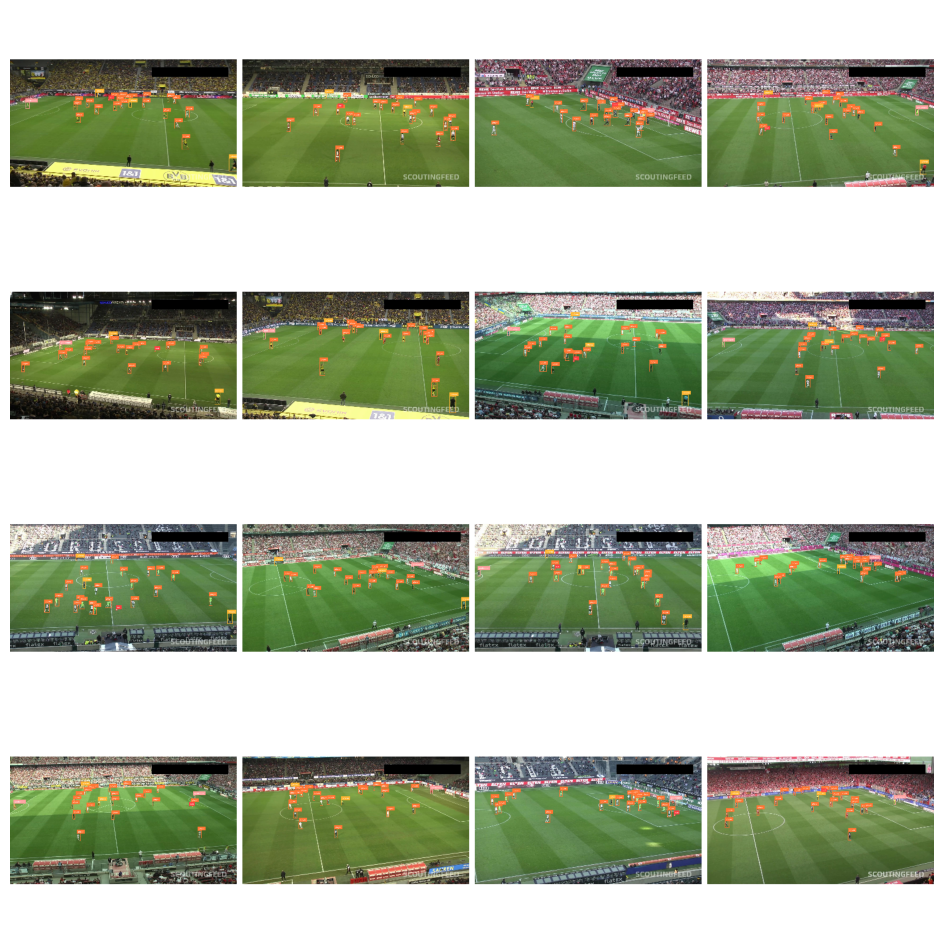
The Supervision library provides tools for easily visualizing your detection dataset.
|
|
You can create a grid of annotated images to quickly inspect your data and labels.
|
|
First, initialize the [`sv.BoxAnnotator`](https://supervision.roboflow.com/latest/detection/annotators/#supervision.annotators.core.BoxAnnotator)
|
|
and [`sv.LabelAnnotator`](https://supervision.roboflow.com/latest/detection/annotators/#supervision.annotators.core.LabelAnnotator).
|
|
Then, iterate through a subset of the dataset (e.g., the first 25 images), drawing
|
|
bounding boxes and class labels on each image. Finally, combine the annotated images
|
|
into a grid for display.
|
|
|
|
```python
|
|
import supervision as sv
|
|
|
|
ds = sv.DetectionDataset(...)
|
|
|
|
box_annotator = sv.BoxAnnotator()
|
|
label_annotator = sv.LabelAnnotator()
|
|
|
|
annotated_images = []
|
|
for i in range(16):
|
|
_, image, annotations = ds[i]
|
|
|
|
labels = [ds.classes[class_id] for class_id in annotations.class_id]
|
|
|
|
annotated_image = image.copy()
|
|
annotated_image = box_annotator.annotate(annotated_image, annotations)
|
|
annotated_image = label_annotator.annotate(annotated_image, annotations, labels)
|
|
annotated_images.append(annotated_image)
|
|
|
|
grid = sv.create_tiles(
|
|
annotated_images,
|
|
grid_size=(4, 4),
|
|
single_tile_size=(400, 400),
|
|
tile_padding_color=sv.Color.WHITE,
|
|
tile_margin_color=sv.Color.WHITE
|
|
)
|
|
```
|
|
|
|
|
|
|
|
## Save Dataset
|
|
|
|
=== "COCO"
|
|
|
|
We can do so using the [`sv.DetectionDataset.as_coco`](https://supervision.roboflow.com/datasets/#supervision.dataset.core.DetectionDataset.as_coco) method to save annotations in [COCO](https://roboflow.com/formats/coco-json) format.
|
|
|
|
```python
|
|
import supervision as sv
|
|
|
|
ds = sv.DetectionDataset(...)
|
|
|
|
ds.as_coco(
|
|
images_directory_path='<IMAGE_DIRECTORY_PATH>',
|
|
annotations_path='<ANNOTATIONS_PATH>'
|
|
)
|
|
```
|
|
|
|
=== "YOLO"
|
|
|
|
We can do so using the [`sv.DetectionDataset.as_yolo`](https://supervision.roboflow.com/datasets/#supervision.dataset.core.DetectionDataset.as_yolo) method to save annotations in [YOLO](https://roboflow.com/formats/yolov8-pytorch-txt) format.
|
|
|
|
```python
|
|
import supervision as sv
|
|
|
|
ds = sv.DetectionDataset(...)
|
|
|
|
ds.as_yolo(
|
|
images_directory_path='<IMAGE_DIRECTORY_PATH>',
|
|
annotations_directory_path='<ANNOTATIONS_DIRECTORY_PATH>',
|
|
data_yaml_path='<DATA_YAML_PATH>'
|
|
)
|
|
```
|
|
|
|
=== "Pascal VOC"
|
|
|
|
We can do so using the [`sv.DetectionDataset.as_pascal_voc`](https://supervision.roboflow.com/datasets/#supervision.dataset.core.DetectionDataset.as_pascal_voc) method to save annotations in [Pascal VOC](https://roboflow.com/formats/pascal-voc-xml) format.
|
|
|
|
```python
|
|
import supervision as sv
|
|
|
|
ds = sv.DetectionDataset(...)
|
|
|
|
ds.as_pascal_voc(
|
|
images_directory_path='<IMAGE_DIRECTORY_PATH>',
|
|
annotations_directory_path='<ANNOTATIONS_DIRECTORY_PATH>'
|
|
)
|
|
```
|
|
|
|
## Augment Dataset
|
|
|
|
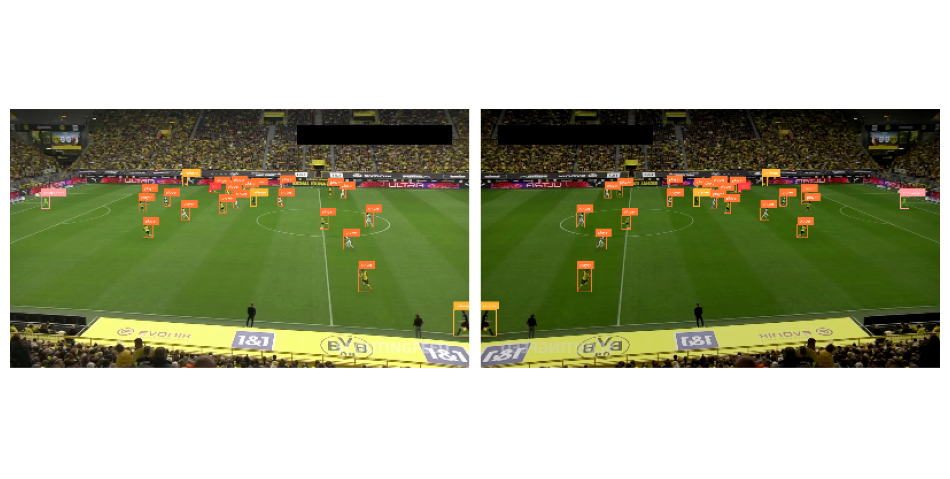
In this section, we'll explore using Supervision in combination with Albumentations to
|
|
augment our dataset. Data augmentation is a common technique in computer vision to
|
|
increase the size and diversity of training datasets, leading to improved model
|
|
performance and generalization.
|
|
|
|
```bash
|
|
pip install augmentation
|
|
```
|
|
|
|
Albumentations provides a flexible and powerful API for image augmentation. The core of
|
|
the library is the [`Compose`](https://albumentations.ai/docs/api_reference/full_reference/?h=compose#albumentations.core.composition.Compose)
|
|
class, which allows you to chain multiple image transformations together. Each
|
|
transformation is defined using a dedicated class, such as
|
|
[`HorizontalFlip`](https://albumentations.ai/docs/api_reference/full_reference/?h=horizontalflip#albumentations.augmentations.geometric.transforms.HorizontalFlip),
|
|
[`RandomBrightnessContrast`](https://albumentations.ai/docs/api_reference/full_reference/?h=horizontalflip#albumentations.augmentations.transforms.RandomBrightnessContrast),
|
|
or [`Perspective`](https://albumentations.ai/docs/api_reference/full_reference/?h=horizontalflip#albumentations.augmentations.geometric.transforms.Perspective).
|
|
|
|
```python
|
|
import albumentations as A
|
|
|
|
augmentation = A.Compose(
|
|
transforms=[
|
|
A.Perspective(p=0.1),
|
|
A.HorizontalFlip(p=0.5),
|
|
A.RandomBrightnessContrast(p=0.5)
|
|
],
|
|
bbox_params=A.BboxParams(
|
|
format='pascal_voc',
|
|
label_fields=['category']
|
|
),
|
|
)
|
|
```
|
|
|
|
The key is to set `format='pascal_voc'`, which corresponds to the
|
|
`[x_min, y_min, x_max, y_max]` bounding box format used in Supervision.
|
|
|
|
```python
|
|
import numpy as np
|
|
import supervision as sv
|
|
from dataclasses import replace
|
|
|
|
ds = sv.DetectionDataset(...)
|
|
|
|
_, original_image, original_annotations = ds[0]
|
|
|
|
output = augmentation(
|
|
image=original_image,
|
|
bboxes=original_annotations.xyxy,
|
|
category=original_annotations.class_id
|
|
)
|
|
|
|
augmented_image = output['image']
|
|
augmented_annotations = replace(
|
|
original_annotations,
|
|
xyxy=np.array(output['bboxes']),
|
|
class_id=np.array(output['category'])
|
|
)
|
|
```
|
|
|
|
|