Compare commits
| Author | SHA1 | Date | |
|---|---|---|---|
 Piotr Skalski |
7ecfc9f475 |
@@ -1,41 +0,0 @@
|
||||
# see https://docs.codecov.io/docs/codecov-yaml
|
||||
# Validation check:
|
||||
# $ curl --data-binary @.codecov.yml https://codecov.io/validate
|
||||
|
||||
# https://docs.codecov.io/docs/codecovyml-reference
|
||||
codecov:
|
||||
bot: "codecov-io"
|
||||
strict_yaml_branch: "yaml-config"
|
||||
require_ci_to_pass: yes
|
||||
notify:
|
||||
# after_n_builds: 2
|
||||
wait_for_ci: yes
|
||||
|
||||
coverage:
|
||||
precision: 0 # 2 = xx.xx%, 0 = xx%
|
||||
round: nearest # how coverage is rounded: down/up/nearest
|
||||
range: 40...100 # custom range of coverage colors from red -> yellow -> green
|
||||
status:
|
||||
project:
|
||||
default:
|
||||
informational: true
|
||||
target: 95% # specify the target coverage for each commit status
|
||||
threshold: 10% # allow this little decrease on project
|
||||
# branches: master
|
||||
if_ci_failed: error
|
||||
patch:
|
||||
default:
|
||||
informational: true
|
||||
target: 95% # enforce same coverage target for new/changed code as the project
|
||||
threshold: 10% # allow only a small decrease on patch coverage
|
||||
changes: false
|
||||
|
||||
# https://docs.codecov.com/docs/github-checks#disabling-github-checks-patch-annotations
|
||||
github_checks:
|
||||
annotations: false
|
||||
|
||||
comment:
|
||||
layout: header, diff
|
||||
require_changes: false
|
||||
behavior: default # update if exists else create new
|
||||
# branches: *
|
||||
@@ -1,85 +0,0 @@
|
||||
# Contributor Covenant Code of Conduct
|
||||
|
||||
## Our Pledge
|
||||
|
||||
We as members, contributors, and leaders pledge to make participation in our community a harassment-free experience for everyone, regardless of age, body size, visible or invisible disability, ethnicity, sex characteristics, gender identity and expression, level of experience, education, socioeconomic status, nationality, personal appearance, race, caste, color, religion, or sexual identity and orientation.
|
||||
|
||||
We pledge to act and interact in ways that contribute to an open, welcoming, diverse, inclusive, and healthy community.
|
||||
|
||||
## Our Standards
|
||||
|
||||
Examples of behavior that contributes to a positive environment for our community include:
|
||||
|
||||
- Demonstrating empathy and kindness toward other people
|
||||
- Being respectful of differing opinions, viewpoints, and experiences
|
||||
- Giving and gracefully accepting constructive feedback
|
||||
- Accepting responsibility and apologizing to those affected by our mistakes, and learning from the experience
|
||||
- Focusing on what is best not just for us as individuals, but for the overall community
|
||||
|
||||
Examples of unacceptable behavior include:
|
||||
|
||||
- The use of sexualized language or imagery, and sexual attention or advances of any kind
|
||||
- Trolling, insulting or derogatory comments, and personal or political attacks
|
||||
- Public or private harassment
|
||||
- Publishing others' private information, such as a physical or email address, without their explicit permission
|
||||
- Other conduct which could reasonably be considered inappropriate in a professional setting
|
||||
|
||||
## Enforcement Responsibilities
|
||||
|
||||
Community leaders are responsible for clarifying and enforcing our standards of acceptable behavior and will take appropriate and fair corrective action in response to any behavior that they deem inappropriate, threatening, offensive, or harmful.
|
||||
|
||||
Community leaders have the right and responsibility to remove, edit, or reject comments, commits, code, wiki edits, issues, and other contributions that are not aligned to this Code of Conduct, and will communicate reasons for moderation decisions when appropriate.
|
||||
|
||||
## Scope
|
||||
|
||||
This Code of Conduct applies within all community spaces, and also applies when an individual is officially representing the community in public spaces. Examples of representing our community include using an official e-mail address, posting via an official social media account, or acting as an appointed representative at an online or offline event.
|
||||
|
||||
## Enforcement
|
||||
|
||||
Instances of abusive, harassing, or otherwise unacceptable behavior may be reported to the community leaders responsible for enforcement at community-reports@roboflow.com.
|
||||
|
||||
All complaints will be reviewed and investigated promptly and fairly.
|
||||
|
||||
All community leaders are obligated to respect the privacy and security of the reporter of any incident.
|
||||
|
||||
## Enforcement Guidelines
|
||||
|
||||
Community leaders will follow these Community Impact Guidelines in determining the consequences for any action they deem in violation of this Code of Conduct:
|
||||
|
||||
### 1. Correction
|
||||
|
||||
**Community Impact**: Use of inappropriate language or other behavior deemed unprofessional or unwelcome in the community.
|
||||
|
||||
**Consequence**: A private, written warning from community leaders, providing clarity around the nature of the violation and an explanation of why the behavior was inappropriate. A public apology may be requested.
|
||||
|
||||
### 2. Warning
|
||||
|
||||
**Community Impact**: A violation through a single incident or series of actions.
|
||||
|
||||
**Consequence**: A warning with consequences for continued behavior. No interaction with the people involved, including unsolicited interaction with those enforcing the Code of Conduct, for a specified period of time. This includes avoiding interactions in community spaces as well as external channels like social media. Violating these terms may lead to a temporary or permanent ban.
|
||||
|
||||
### 3. Temporary Ban
|
||||
|
||||
**Community Impact**: A serious violation of community standards, including sustained inappropriate behavior.
|
||||
|
||||
**Consequence**: A temporary ban from any sort of interaction or public communication with the community for a specified period of time. No public or private interaction with the people involved, including unsolicited interaction with those enforcing the Code of Conduct, is allowed during this period. Violating these terms may lead to a permanent ban.
|
||||
|
||||
### 4. Permanent Ban
|
||||
|
||||
**Community Impact**: Demonstrating a pattern of violation of community standards, including sustained inappropriate behavior, harassment of an individual, or aggression toward or disparagement of classes of individuals.
|
||||
|
||||
**Consequence**: A permanent ban from any sort of public interaction within the community.
|
||||
|
||||
## Attribution
|
||||
|
||||
This Code of Conduct is adapted from the [Contributor Covenant][homepage], version 2.1, available at [https://www.contributor-covenant.org/version/2/1/code_of_conduct.html][v2.1].
|
||||
|
||||
Community Impact Guidelines were inspired by [Mozilla's code of conduct enforcement ladder][mozilla coc].
|
||||
|
||||
For answers to common questions about this code of conduct, see the FAQ at [https://www.contributor-covenant.org/faq][faq]. Translations are available at [https://www.contributor-covenant.org/translations][translations].
|
||||
|
||||
[faq]: https://www.contributor-covenant.org/faq
|
||||
[homepage]: https://www.contributor-covenant.org
|
||||
[mozilla coc]: https://github.com/mozilla/diversity
|
||||
[translations]: https://www.contributor-covenant.org/translations
|
||||
[v2.1]: https://www.contributor-covenant.org/version/2/1/code_of_conduct.html
|
||||
@@ -1,506 +0,0 @@
|
||||
# Contributing to Supervision 🛠️
|
||||
|
||||
Thank you for your interest in contributing to Supervision!
|
||||
|
||||
We are actively improving this library to reduce the amount of work you need to do to solve common computer vision problems.
|
||||
|
||||
## Code of Conduct
|
||||
|
||||
Please read and adhere to our [Code of Conduct](https://supervision.roboflow.com/latest/code_of_conduct/). This document outlines the expected behavior for all participants in our project.
|
||||
|
||||
## Table of Contents
|
||||
|
||||
- [Contribution Guidelines](#contribution-guidelines)
|
||||
- [Contributing Features](#contributing-features)
|
||||
- [API Design Principles](#api-design-principles)
|
||||
- [How to Contribute Changes](#how-to-contribute-changes)
|
||||
- [Installation for Contributors](#installation-for-contributors)
|
||||
- [Code Style and Quality](#code-style-and-quality)
|
||||
- [Pre-commit tool](#pre-commit-tool)
|
||||
- [Docstrings](#docstrings)
|
||||
- [Type checking](#type-checking)
|
||||
- [Documentation](#documentation)
|
||||
- [Cookbooks](#cookbooks)
|
||||
- [Tests](#tests)
|
||||
- [License](#license)
|
||||
|
||||
## Contribution Guidelines
|
||||
|
||||
We welcome contributions to:
|
||||
|
||||
1. Add a new feature to the library (guidance below).
|
||||
2. Improve our documentation and add examples to make it clear how to leverage the supervision library.
|
||||
3. Report bugs and issues in the project.
|
||||
4. Submit a request for a new feature.
|
||||
5. Improve our test coverage.
|
||||
|
||||
### Contributing Features ✨
|
||||
|
||||
Supervision is designed to provide generic utilities to solve problems. Thus, we focus on contributions that can have an impact on a wide range of projects.
|
||||
|
||||
For example, counting objects that cross a line anywhere on an image is a common problem in computer vision, but counting objects that cross a line 75% of the way through is less useful.
|
||||
|
||||
Before you contribute a new feature, consider submitting an Issue to discuss the feature so the community can weigh in and assist.
|
||||
|
||||
### API Design Principles
|
||||
|
||||
Supervision APIs should remain generic, composable, and predictable across model families. Before adding a new integration, annotator option, or data conversion method, check the existing `sv.Detections`, `sv.KeyPoints`, and annotator patterns and follow these principles:
|
||||
|
||||
1. **Model integrations normalize raw external outputs into existing Supervision containers.** Use `sv.Detections` for detection, segmentation, and other instance-level predictions that include boxes, masks, class ids, confidence scores, or extra per-instance fields. Use `sv.KeyPoints` for standalone keypoint or pose predictions when keypoints exist independently of detection boxes (e.g. pure pose estimation, landmark detection on pre-cropped images). Use `Detections.keypoints` when keypoints are always co-incident with boxes from the same model — the field stores an `(n, K, 2)` or `(n, K, 3)` array where the optional third channel is per-point confidence in `[0, 1]`.
|
||||
2. **Do not add a `from_<model>` method when the model already returns a Supervision object.** `from_*` methods are for converting raw outputs from external packages such as Ultralytics, Transformers, Inference, or MediaPipe. If a model's `predict()` method already returns `sv.Detections`, keep that result type and store additional structured payloads in `detections.data` or `detections.metadata` using documented keys.
|
||||
3. **Annotators render data; filtering and visibility are container state.** Filtering by confidence, class id, tracker id, geometry, or custom data should happen before annotation through the container slicing APIs, for example `detections[detections.confidence > 0.7]` or `key_points[key_points.confidence > 0.5]`. Per-point presentation state, such as a `KeyPoints.visible` mask, may live on the container and be honored consistently by annotators.
|
||||
4. **Annotator constructor arguments should describe visual presentation, not model-quality gates.** Use constructor arguments for color, thickness, opacity, text, position, style, and generic visualization parameters such as sigma levels. Annotators may skip invalid geometry defensively, including missing points, zero-area boxes, non-finite coordinates, or points marked invisible on the container. They should not introduce confidence thresholds or model-specific quality gates as rendering options.
|
||||
|
||||
## How to Contribute Changes
|
||||
|
||||
First, fork this repository to your own GitHub account. Click "fork" in the top corner of the `supervision` repository to get started:
|
||||
|
||||
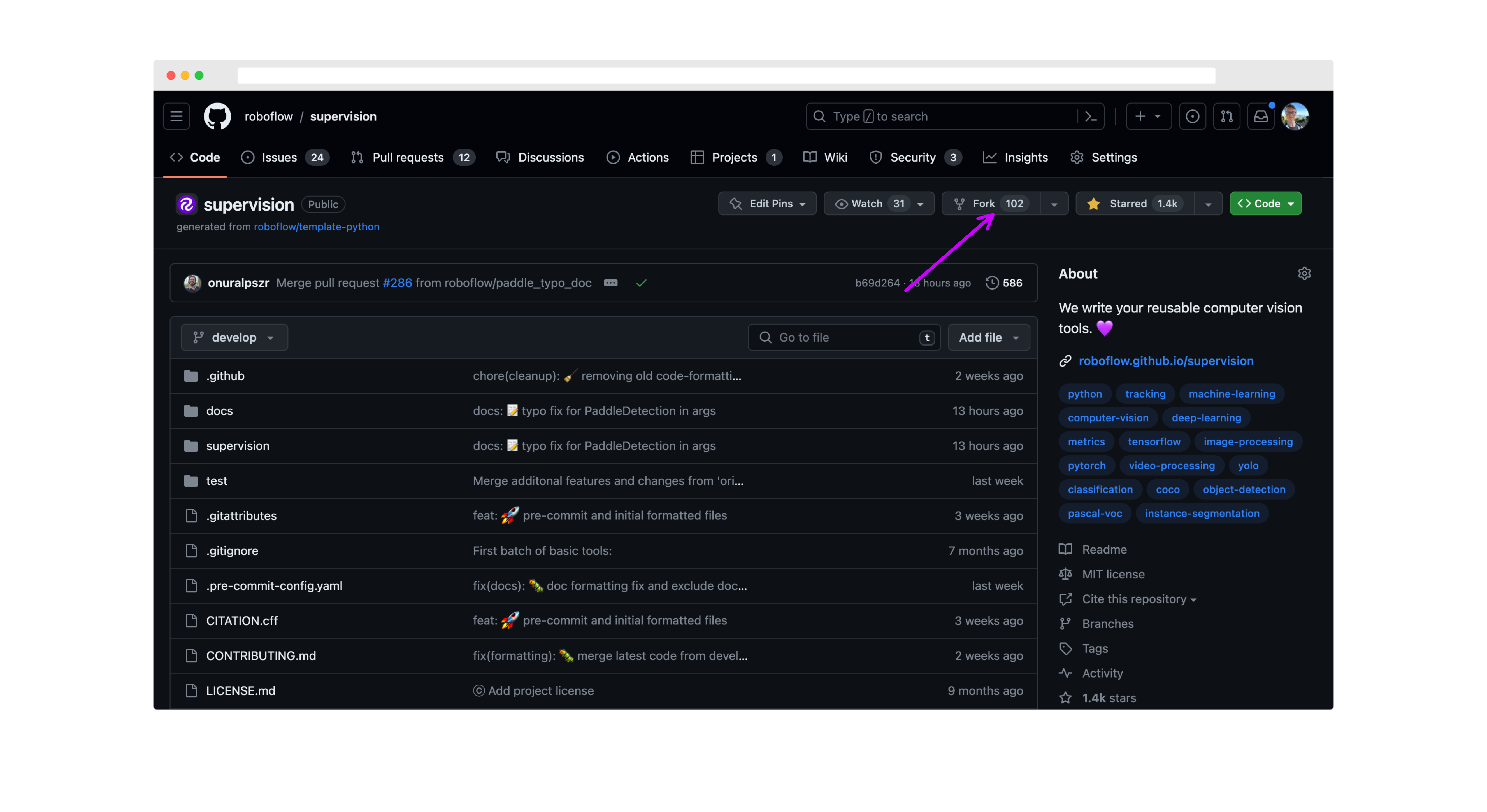
|
||||
|
||||
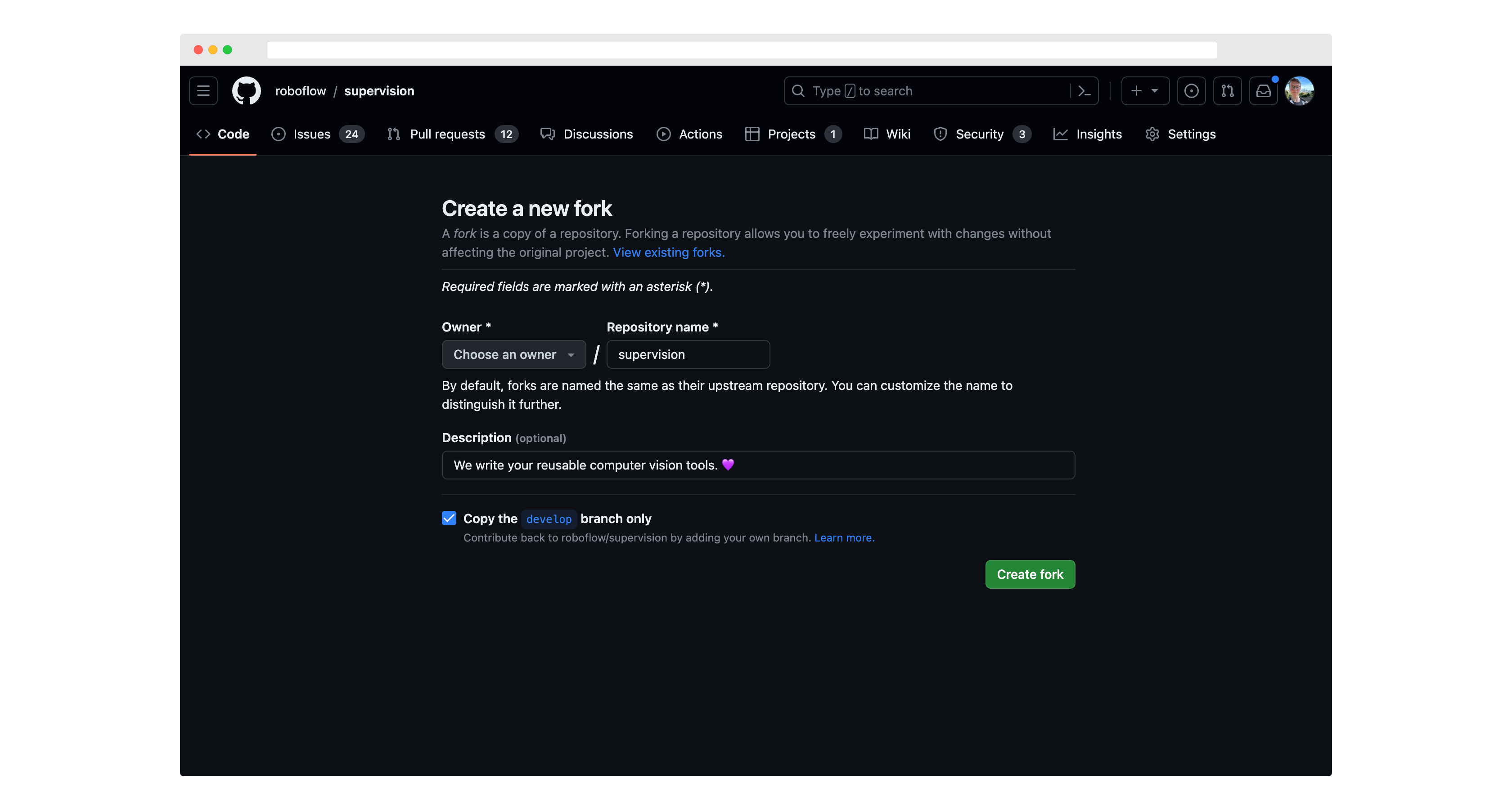
|
||||
|
||||
Then, run `git clone` to download the project code to your computer.
|
||||
|
||||
You should also set up `roboflow/supervision` as an "upstream" remote (that is, tell git that the reference Supervision repository was the source of your fork of it):
|
||||
|
||||
```bash
|
||||
git remote add upstream https://github.com/roboflow/supervision.git
|
||||
git fetch upstream
|
||||
```
|
||||
|
||||
Move to a new branch using the `git checkout` command:
|
||||
|
||||
```bash
|
||||
git checkout -b <scope>/<your_branch_name> upstream/develop
|
||||
```
|
||||
|
||||
The name you choose for your branch should describe the change you want to make and start with an appropriate prefix:
|
||||
|
||||
- `feat/`: for new features (e.g., `feat/line-counter`)
|
||||
- `fix/`: for bug fixes (e.g., `fix/memory-leak`)
|
||||
- `docs/`: for documentation changes (e.g., `docs/update-readme`)
|
||||
- `chore/`: for routine tasks, maintenance, or tooling changes (e.g., `chore/update-dependencies`)
|
||||
- `test/`: for adding or modifying tests (e.g., `test/add-unit-tests`)
|
||||
- `refactor/`: for code refactoring (e.g., `refactor/simplify-algorithm`)
|
||||
|
||||
Make any changes you want to the project code, then run the following commands to commit your changes:
|
||||
|
||||
```bash
|
||||
git add -A
|
||||
git commit -m "feat: add line counter functionality"
|
||||
git push -u origin <your_branch_name>
|
||||
```
|
||||
|
||||
Use conventional commit messages to clearly describe your changes. The format is:
|
||||
|
||||
```
|
||||
<type>[optional scope]: <description>
|
||||
```
|
||||
|
||||
Common types include:
|
||||
|
||||
- `feat`: A new feature
|
||||
- `fix`: A bug fix
|
||||
- `docs`: Documentation only changes
|
||||
- `style`: Changes that do not affect the meaning of the code (white-space, formatting, etc)
|
||||
- `refactor`: A code change that neither fixes a bug nor adds a feature
|
||||
- `perf`: A code change that improves performance
|
||||
- `test`: Adding missing tests or correcting existing tests
|
||||
- `chore`: Changes to the build process or auxiliary tools and libraries
|
||||
|
||||
Then, go back to your fork of the `supervision` repository, click "Pull Requests", and click "New Pull Request".
|
||||
|
||||
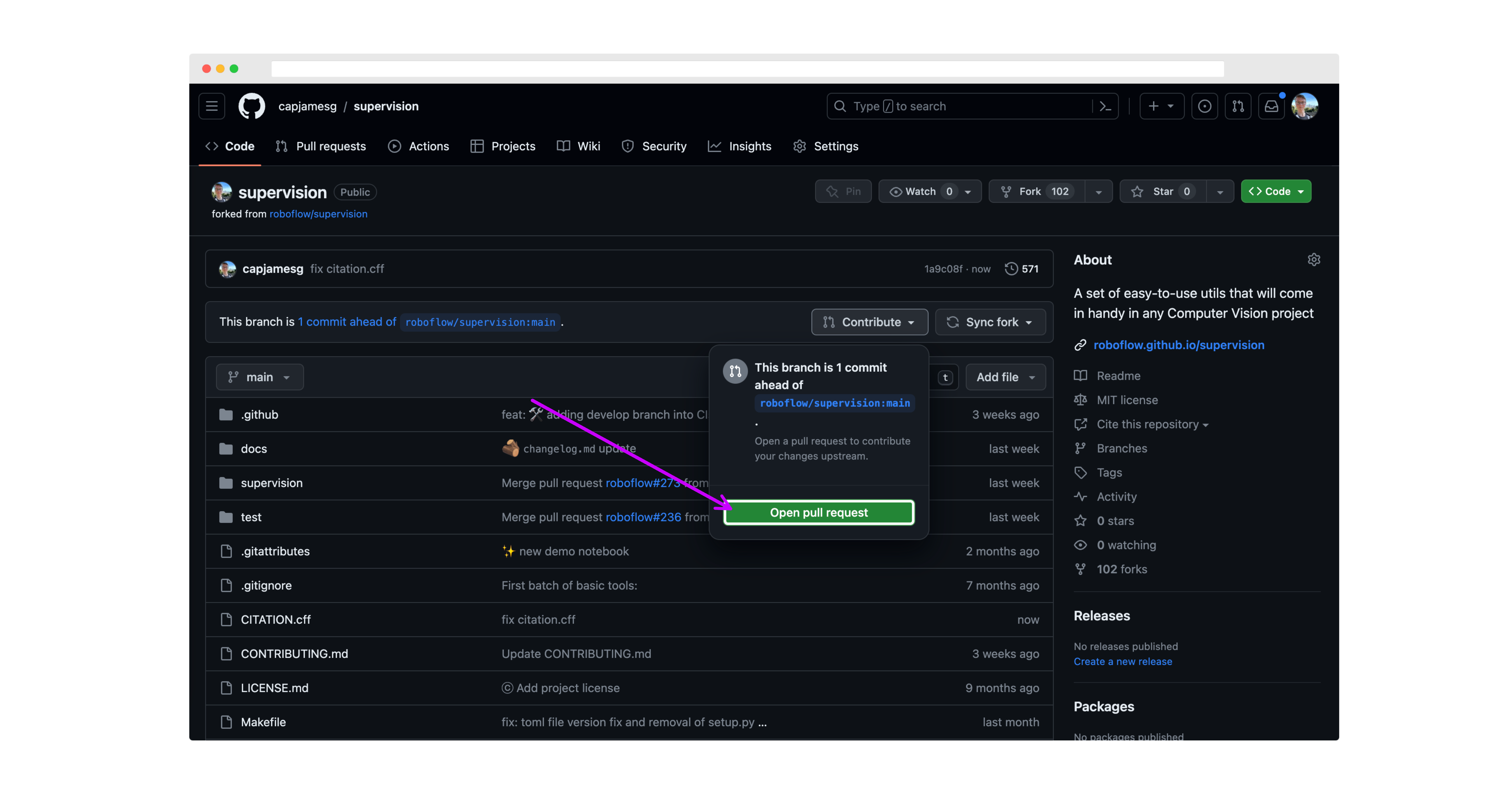
|
||||
|
||||
Make sure the `base` branch is `develop` before submitting your PR.
|
||||
|
||||
On the next page, review your changes then click "Create pull request":
|
||||
|
||||
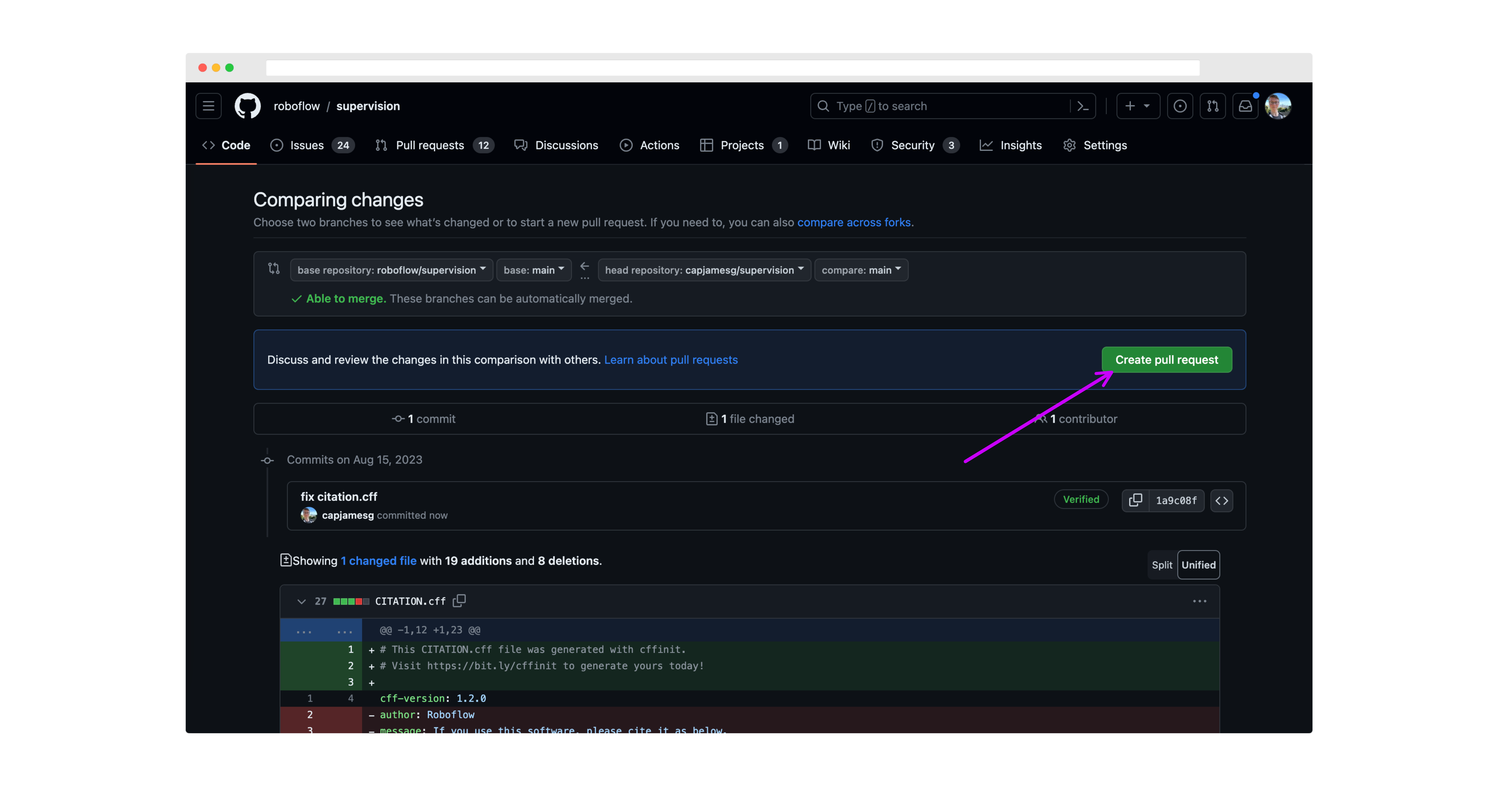
|
||||
|
||||
Next, write a description for your pull request, and click "Create pull request" again to submit it for review:
|
||||
|
||||
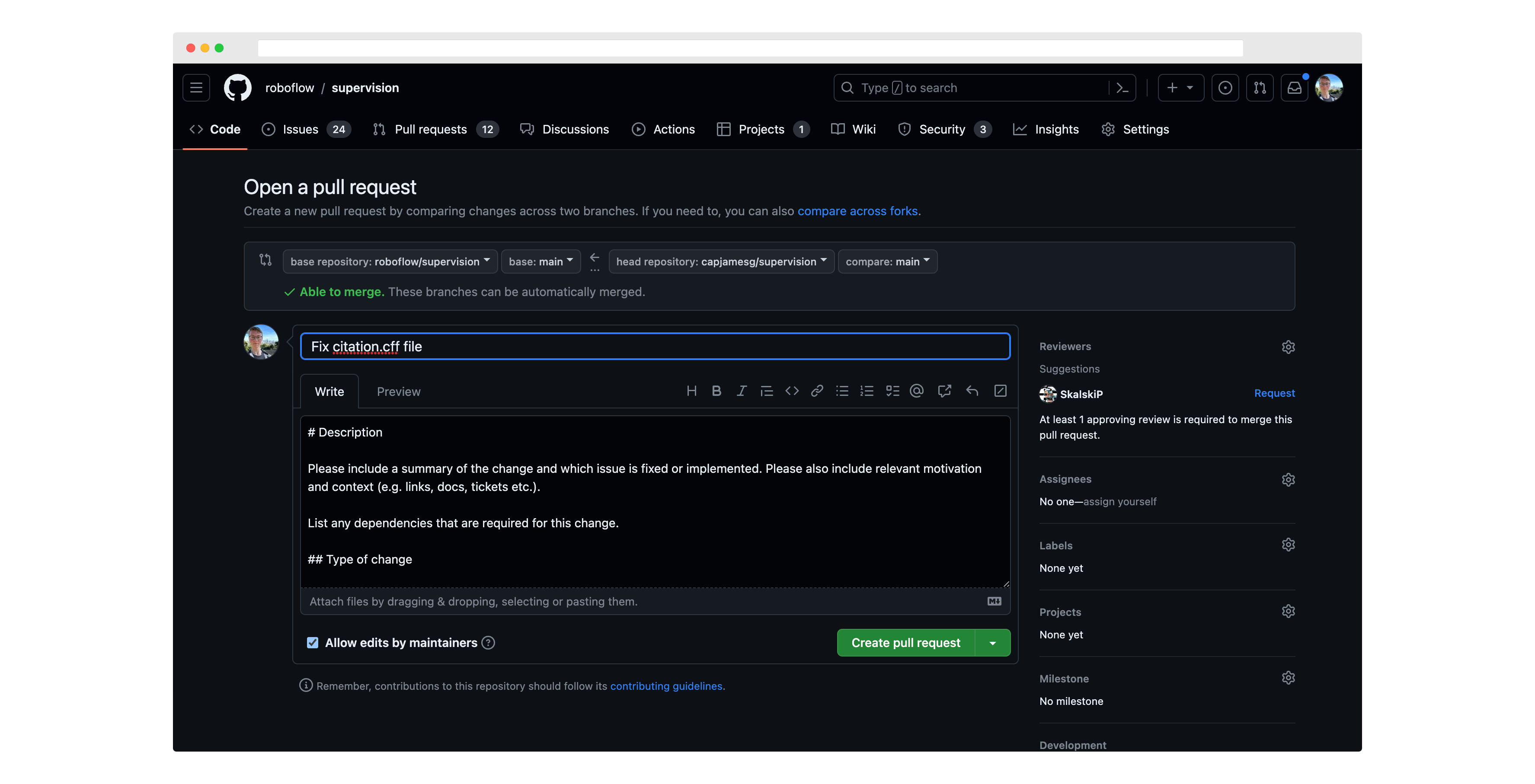
|
||||
|
||||
When creating new functions, please ensure you have the following:
|
||||
|
||||
1. Docstrings for the function and all parameters.
|
||||
2. Unit tests for the function.
|
||||
3. Examples in the documentation for the function.
|
||||
4. Created an entry in our docs to autogenerate the documentation for the function.
|
||||
5. Please share a Google Colab with minimal code to test a new feature or reproduce the issue whenever possible. Please ensure that Google Colab can be accessed without any restrictions.
|
||||
|
||||
When you submit your Pull Request, you will be asked to sign a Contributor License Agreement (CLA) by the `cla-assistant` GitHub bot. We can only respond to PRs from contributors who have signed the project CLA.
|
||||
|
||||
All pull requests will be reviewed by the maintainers of the project. We will provide feedback and ask for changes if necessary.
|
||||
|
||||
PRs must pass all tests and linting requirements before they can be merged.
|
||||
|
||||
## Installation for Contributors
|
||||
|
||||
Before starting your work on the project, set up your development environment:
|
||||
|
||||
1. **Clone your fork of the project:**
|
||||
|
||||
**Option A: Recommended for most contributors (shallow clone of develop branch):**
|
||||
|
||||
```bash
|
||||
git clone --depth 1 -b develop https://github.com/YOUR_USERNAME/supervision.git
|
||||
cd supervision
|
||||
```
|
||||
|
||||
Replace `YOUR_USERNAME` with your GitHub username.
|
||||
|
||||
> **Note**: Using `--depth 1` creates a shallow clone with minimal history and `-b develop` ensures you start with the development branch. This significantly reduces download size while providing everything needed to contribute.
|
||||
|
||||
**Option B: Full repository clone (if you need complete history):**
|
||||
|
||||
```bash
|
||||
git clone https://github.com/YOUR_USERNAME/supervision.git
|
||||
cd supervision
|
||||
git checkout develop
|
||||
```
|
||||
|
||||
2. **Set up the upstream remote:**
|
||||
|
||||
```bash
|
||||
git remote add upstream https://github.com/roboflow/supervision.git
|
||||
git fetch upstream
|
||||
```
|
||||
|
||||
3. **Create and activate a virtual environment:**
|
||||
|
||||
**On Linux/macOS:**
|
||||
|
||||
```bash
|
||||
python3 -m venv .venv
|
||||
source .venv/bin/activate
|
||||
```
|
||||
|
||||
**On Windows:**
|
||||
|
||||
```cmd
|
||||
python -m venv .venv
|
||||
.venv\Scripts\activate
|
||||
```
|
||||
|
||||
4. **Install `uv`:**
|
||||
|
||||
Follow the instructions on the [uv installation page](https://docs.astral.sh/uv/getting-started/installation/).
|
||||
|
||||
5. **Install project dependencies:**
|
||||
|
||||
```bash
|
||||
uv pip install -r pyproject.toml --group dev --group docs --extra metrics
|
||||
```
|
||||
|
||||
6. **Verify the setup:**
|
||||
|
||||
```bash
|
||||
uv run pytest
|
||||
```
|
||||
|
||||
## 🎨 Code Style and Quality
|
||||
|
||||
### Pre-commit tool
|
||||
|
||||
This project uses the [pre-commit](https://pre-commit.com/) tool to maintain code quality and consistency. Before submitting a pull request or making any commits, it is important to run the pre-commit tool to ensure that your changes meet the project's guidelines.
|
||||
|
||||
Furthermore, we have integrated a pre-commit GitHub Action into our workflow. This means that with every pull request opened, the pre-commit checks will be automatically enforced, streamlining the code review process and ensuring that all contributions adhere to our quality standards.
|
||||
|
||||
To run the pre-commit tool, follow these steps:
|
||||
|
||||
1. **Install pre-commit** (already included if you followed the installation steps above):
|
||||
|
||||
```bash
|
||||
uv sync --group dev
|
||||
```
|
||||
|
||||
2. **Navigate to the project's root directory** (if not already there).
|
||||
|
||||
3. **Run pre-commit checks**:
|
||||
|
||||
```bash
|
||||
uv run pre-commit run --all-files
|
||||
```
|
||||
|
||||
This will execute the pre-commit hooks configured for this project. If any issues are found, the pre-commit tool will provide feedback on how to resolve them. Make the necessary changes and re-run the command until all issues are resolved.
|
||||
|
||||
4. **Install pre-commit as a git hook** (optional but recommended):
|
||||
|
||||
```bash
|
||||
uv run pre-commit install
|
||||
```
|
||||
|
||||
This will automatically run pre-commit checks every time you make a `git commit`.
|
||||
|
||||
### Docstrings
|
||||
|
||||
All new functions and classes in `supervision` should include docstrings. This is a prerequisite for any new functions and classes to be added to the library.
|
||||
|
||||
`supervision` adheres to the [Google Python docstring style](https://google.github.io/styleguide/pyguide.html#383-functions-and-methods). Please refer to the style guide while writing docstrings for your contribution.
|
||||
|
||||
Every docstring should include a usage example. When the example only uses `supervision`, NumPy, and the standard library — no optional extras, no external files or network access — strongly prefer `>>>` doctest format so it is automatically verified by the test suite. See [Doctests](#doctests) below for syntax guidance and for when fenced ```` ```python ```` blocks are appropriate instead.
|
||||
|
||||
### Type checking
|
||||
|
||||
Type hints are required on all new code. mypy is enforced by the pre-commit hook configured in `.pre-commit-config.yaml` — your PR will fail CI if mypy reports errors.
|
||||
|
||||
### Readability
|
||||
|
||||
Avoid multi-branch conditional expressions inside function or constructor arguments. If an argument needs more than a simple `a if condition else b`, assign it to a named local variable before the call.
|
||||
|
||||
### Performance
|
||||
|
||||
- Avoid unnecessary copies of NumPy arrays.
|
||||
- Prefer vectorized operations over Python loops in hot paths.
|
||||
- Lazy-import heavy framework dependencies (`torch`, `transformers`, `ultralytics`) inside the function that needs them — never at module top level.
|
||||
|
||||
### Deprecation policy
|
||||
|
||||
**Minimum window**: deprecated APIs must remain for at least **3 minor releases** before removal. Example: deprecated in `0.29.0` → removed in `0.32.0`.
|
||||
|
||||
Use the appropriate mechanism depending on what is being deprecated:
|
||||
|
||||
- **Module-level alias**: `supervision.utils.internal.warn_deprecated` in the deprecated module's `__init__.py`
|
||||
- **Renamed parameter**: `supervision.utils.internal.deprecated_parameter` decorator
|
||||
- **Public function, method, or class**: `@deprecated` from `pydeprecate`
|
||||
|
||||
Always specify both the deprecation version and the planned removal version in the message or decorator arguments.
|
||||
|
||||
### Deprecated module aliases
|
||||
|
||||
`supervision.keypoint` is deprecated since `0.27.0` and will be removed in `0.30.0`. Always import from `supervision.key_points`:
|
||||
|
||||
```python
|
||||
from supervision.key_points import KeyPoints # correct
|
||||
```
|
||||
|
||||
## 📝 Documentation
|
||||
|
||||
The `supervision` documentation is stored in a folder called `docs`. The project documentation is built using `mkdocs`.
|
||||
|
||||
To run the documentation locally:
|
||||
|
||||
1. **Install documentation dependencies** (if not already installed):
|
||||
|
||||
```bash
|
||||
uv sync --group docs
|
||||
```
|
||||
|
||||
2. **Start the documentation server**:
|
||||
|
||||
```bash
|
||||
uv run mkdocs serve
|
||||
```
|
||||
|
||||
3. **Access the documentation** at `http://127.0.0.1:8000` in your browser.
|
||||
|
||||
You can learn more about mkdocs on the [mkdocs website](https://www.mkdocs.org/).
|
||||
|
||||
## 🧑🍳 Cookbooks
|
||||
|
||||
We are always looking for new examples and cookbooks to add to the `supervision` documentation. If you have a use case that you think would be helpful to others, please submit a PR with your example. Here are some guidelines for submitting a new example:
|
||||
|
||||
- Create a new notebook in the [`docs/notebooks`](https://github.com/roboflow/supervision/tree/develop/docs/notebooks) folder.
|
||||
- Add a link to the new notebook in [`docs/theme/cookbooks.html`](https://github.com/roboflow/supervision/blob/develop/docs/theme/cookbooks.html). Make sure to add the path to the new notebook, as well as a title, labels, author and supervision version.
|
||||
- Use the [Count Objects Crossing the Line](https://supervision.roboflow.com/develop/notebooks/count-objects-crossing-the-line/) example as a template for your new example.
|
||||
- Pin the version of `supervision` you are using in the notebook.
|
||||
- Place an appropriate "Open in Colab" button at the top of the notebook. You can find an example of such a button in the aforementioned `Count Objects Crossing the Line` cookbook.
|
||||
- **Notebook should be self-contained**. If you rely on external data (videos, images, etc.) or libraries, include download and installation commands in the notebook.
|
||||
- Annotate the code with appropriate comments, including links to the documentation describing each of the tools you have used.
|
||||
|
||||
## 🧪 Tests
|
||||
|
||||
[`pytest`](https://docs.pytest.org/en/7.1.x/) is used to run our tests.
|
||||
|
||||
To run tests:
|
||||
|
||||
```bash
|
||||
uv run pytest
|
||||
```
|
||||
|
||||
To run tests with coverage:
|
||||
|
||||
```bash
|
||||
uv run pytest --cov=supervision
|
||||
```
|
||||
|
||||
### Test Structure
|
||||
|
||||
Follow **Arrange-Act-Assert (AAA)**: one setup block, one action, one assertion group per test. Never put two independent actions in the same test.
|
||||
|
||||
**Class grouping:** Group related tests into a class. The class name carries the unit under test; method names describe the expected outcome only — not the mechanism.
|
||||
|
||||
```python
|
||||
class TestDetectionsWithNms:
|
||||
def test_keeps_highest_confidence_detection(self): ...
|
||||
def test_suppresses_lower_score_when_overlap_exceeds_threshold(self): ...
|
||||
def test_raises_when_confidence_missing(self): ...
|
||||
```
|
||||
|
||||
**Parametrize aggressively:** Three or more structurally identical tests should become a single `@pytest.mark.parametrize` case. Use `pytest.param(..., id="slug")` per case — not `ids=[...]` on the decorator — so the ID stays co-located with its arguments and survives reordering.
|
||||
|
||||
```python
|
||||
@pytest.mark.parametrize(
|
||||
("overlap_metric", "expected_keep"),
|
||||
[
|
||||
pytest.param(OverlapMetric.IOU, [True, True], id="iou-keeps-both"),
|
||||
pytest.param(OverlapMetric.IOS, [True, False], id="ios-suppresses-small"),
|
||||
],
|
||||
)
|
||||
def test_overlap_metric_determines_suppression(
|
||||
overlap_metric: OverlapMetric, expected_keep: list[bool]
|
||||
) -> None:
|
||||
"""Small box inside large: IOU keeps both; IOS suppresses small."""
|
||||
...
|
||||
```
|
||||
|
||||
**Docstrings:** Every test function/method requires at minimum a one-line docstring (within the project line length configured in `pyproject.toml`). Describe the scenario, not the implementation.
|
||||
|
||||
### Doctests
|
||||
|
||||
**Guidance:** when an example uses only `supervision`, NumPy, and the standard library — no optional extras (e.g. no `--extra metrics` packages), no external files, no network, no devices — prefer `>>>` doctest format so it is automatically verified by the test suite. Fenced ```` ```python ```` blocks are appropriate when the example cannot reasonably be executed (e.g. loading a third-party model, reading a video file) or when the primary purpose is demonstrating error/exception behaviour rather than return values.
|
||||
|
||||
Doctests run automatically as part of the test suite via `--doctest-modules` in `pyproject.toml`. The `ELLIPSIS` and `NORMALIZE_WHITESPACE` flags are enabled globally, so `...` matches any output fragment and minor whitespace differences are ignored.
|
||||
|
||||
```bash
|
||||
uv run pytest --doctest-modules src/
|
||||
```
|
||||
|
||||
**Writing a doctest**
|
||||
|
||||
Use the `Example:` section of a Google-style docstring. Prefix each input line with `>>>` and each continuation line with `...`. Place expected output immediately after the last input line with no blank line between them.
|
||||
|
||||
```python
|
||||
def clip_boxes(xyxy: np.ndarray, resolution_wh: tuple) -> np.ndarray:
|
||||
"""Clip bounding boxes to frame boundaries.
|
||||
|
||||
Args:
|
||||
xyxy: Box coordinates as (N, 4) float array.
|
||||
resolution_wh: Frame size as (width, height).
|
||||
|
||||
Returns:
|
||||
Clipped boxes as (N, 4) float array.
|
||||
|
||||
Example:
|
||||
>>> import numpy as np
|
||||
>>> import supervision as sv
|
||||
>>> boxes = np.array([[-10, -5, 120, 80]], dtype=np.float32)
|
||||
>>> sv.clip_boxes(boxes, resolution_wh=(100, 60))
|
||||
array([[ 0., 0., 100., 60.]], dtype=float32)
|
||||
"""
|
||||
```
|
||||
|
||||
### Key rules
|
||||
|
||||
- **Single-line expression** — write the repr as expected output: `>>> len(result)` → `1`
|
||||
- **Multi-line statement** — use `...` continuation: `>>> arr = np.array([` / `... [1, 2],` / `... ])`
|
||||
- **Print output** — write the printed string as expected output (no quotes).
|
||||
- **`None` return** — no output line needed (suppress with assignment or `_ =`).
|
||||
- **Large/variable arrays** — use `ELLIPSIS`: `array([...])` matches any content.
|
||||
- **`# doctest: +SKIP`** — use only as a last resort for genuinely non-runnable lines (e.g. a GPU-only call inside an otherwise runnable example). Prefer splitting the example into two blocks instead.
|
||||
|
||||
Fenced ```` ```python ```` blocks remain appropriate for:
|
||||
|
||||
- Examples that import optional extras (`supervision[metrics]`, `torch`, `ultralytics`).
|
||||
- Examples that read files, capture video, or require a running service.
|
||||
- Illustrative pseudocode that is intentionally incomplete.
|
||||
|
||||
## 🔍 PR Review Guidelines
|
||||
|
||||
These guidelines help reviewers provide consistent, actionable feedback efficiently. Your goals: validate completeness, identify risks, provide actionable feedback, and highlight quality gaps.
|
||||
|
||||
### Overall Recommendation
|
||||
|
||||
Start with a clear recommendation using these levels:
|
||||
|
||||
- 🟢 **Approve** — Ready to merge
|
||||
- 🟡 **Minor Suggestions** — Improvements recommended but not blocking
|
||||
- 🟠 **Request Changes** — Must address issues before merge
|
||||
- 🔴 **Block** — Critical issues require major rework
|
||||
|
||||
Example: `🟠 Request Changes — Missing unit tests for PolygonMerger and no mkdocs entry.`
|
||||
|
||||
### PR Completeness
|
||||
|
||||
Verify requirements are met (✅ Complete / ⚠️ Incomplete / ❌ Missing / 🔵 N/A):
|
||||
|
||||
- [ ] Clear description of what changed and why
|
||||
- [ ] Tests added/updated for new functionality or bug fixes
|
||||
- [ ] Docstrings follow [Google-style](https://google.github.io/styleguide/pyguide.html#383-functions-and-methods)
|
||||
- [ ] Docs entry added to mkdocs (new functions/classes only)
|
||||
- [ ] Google Colab provided (if demonstrating feature/fix)
|
||||
- [ ] Screenshots/videos included (visual changes only)
|
||||
|
||||
Call out missing items explicitly in your review.
|
||||
|
||||
### Quality Scores
|
||||
|
||||
Use **n/5 scoring** with inline code comments for specifics:
|
||||
|
||||
**Code Quality (n/5):**
|
||||
|
||||
- 5/5 🟢 Excellent — 4/5 🟢 Good — 3/5 🟡 Acceptable — 2/5 🟠 Needs Work — 1/5 🔴 Poor
|
||||
- Check: correctness (edge cases, None checks, bounds), Python best practices (idiomatic patterns, error handling, type hints), project conventions (docstrings, linting, import order, PEP 8 naming)
|
||||
|
||||
**Testing (n/5):**
|
||||
|
||||
- 5/5 🟢 Comprehensive — 4/5 🟢 Good — 3/5 🟡 Adequate — 2/5 🟠 Insufficient — 1/5 🔴 Missing
|
||||
- Verify: unit tests for new code, edge cases covered, specific assertions, realistic scenarios, clear test names
|
||||
|
||||
**Documentation (n/5):**
|
||||
|
||||
- 5/5 🟢 Excellent — 4/5 🟢 Good — 3/5 🟡 Adequate — 2/5 🟠 Insufficient — 1/5 🔴 Missing
|
||||
- Confirm: docstrings for public functions/classes, parameters/returns/exceptions documented, usage examples, mkdocs integration, changelog entry for user-facing changes
|
||||
|
||||
### Risk Assessment
|
||||
|
||||
Flag risks with severity (5/5 🔴 Critical — 4/5 🟠 High — 3/5 🟡 Medium — 2/5 🟢 Low — 1/5 🟢 Negligible):
|
||||
|
||||
**Common risk categories:**
|
||||
|
||||
1. **Breaking changes** — API changes, removed features, behavior modifications (must include migration guide)
|
||||
2. **Performance** — Inefficient algorithms, memory-intensive operations, bottlenecks
|
||||
3. **Compatibility** — New Python/dependency requirements, platform-specific code
|
||||
4. **Security** — Unvalidated input, code execution risks, data exposure
|
||||
|
||||
### Review Summary Template
|
||||
|
||||
```markdown
|
||||
## Review Summary
|
||||
|
||||
**Recommendation:** [emoji] [Status] — [justification]
|
||||
|
||||
**PR Completeness:**
|
||||
- ✅ Complete: [items]
|
||||
- ❌ Missing: [gaps]
|
||||
|
||||
**Quality Scores:**
|
||||
- Code: n/5 [emoji] — [reason]
|
||||
- Testing: n/5 [emoji] — [reason]
|
||||
- Documentation: n/5 [emoji] — [reason]
|
||||
|
||||
**Risk Level:** n/5 [emoji] — [description]
|
||||
|
||||
**Critical Issues (Must Fix):**
|
||||
1. [Issue] — See comment on `file.py`
|
||||
|
||||
**Suggestions (Optional):**
|
||||
1. [Improvement] — See suggestion on `file.py`
|
||||
|
||||
**Next Steps:**
|
||||
1. [Action item]
|
||||
```
|
||||
|
||||
### Review Best Practices
|
||||
|
||||
**DO:** Use inline GitHub comments with suggestions, explain *why* (not just *what*), distinguish blocking vs. nice-to-have, acknowledge good work, run linter if needed (`uv run pre-commit run --all-files`)
|
||||
|
||||
**DON'T:** Mention line numbers in summary (use inline comments), give vague feedback, nitpick style (defer to tools), assume knowledge of conventions, block on minor issues
|
||||
|
||||
**Tone:** Be respectful, specific, pragmatic, and consistent. Focus on actionable feedback that moves PRs toward merge.
|
||||
|
||||
## 📄 License
|
||||
|
||||
By contributing, you agree that your contributions will be licensed under an [MIT license](../LICENSE.md).
|
||||
@@ -1,68 +1,65 @@
|
||||
name: 🐞 Bug Report
|
||||
title: "[Bug]: "
|
||||
description: Report a bug or unexpected behavior in Supervision
|
||||
# title: " "
|
||||
description: Problems with Supervision
|
||||
labels: [bug]
|
||||
body:
|
||||
- type: markdown
|
||||
attributes:
|
||||
value: |
|
||||
Thank you for submitting a Supervision 🐞 Bug Report!
|
||||
|
||||
- type: checkboxes
|
||||
attributes:
|
||||
label: Search before asking
|
||||
description: Please search [issues](https://github.com/roboflow/supervision/issues) and [discussions](https://github.com/roboflow/supervision/discussions) first.
|
||||
description: >
|
||||
Please search the [issues](https://github.com/roboflow/supervision/issues) to see if a similar bug report already exists.
|
||||
options:
|
||||
- label: I have searched the issues and discussions and found no similar bug report.
|
||||
- label: >
|
||||
I have searched the Supervision [issues](https://github.com/roboflow/supervision/issues) and found no similar bug report.
|
||||
required: true
|
||||
|
||||
- type: textarea
|
||||
attributes:
|
||||
label: Bug
|
||||
description: Describe the bug, what you expected, and what actually happened.
|
||||
description: Provide console output with error messages and/or screenshots of the bug.
|
||||
placeholder: |
|
||||
**What's the bug?**
|
||||
Brief description...
|
||||
|
||||
**Expected behavior:**
|
||||
What should happen...
|
||||
|
||||
**Actual behavior:**
|
||||
What actually happens...
|
||||
|
||||
**Error/Traceback (if any):**
|
||||
```python
|
||||
# Paste error messages here
|
||||
```
|
||||
💡 ProTip! Include as much information as possible (screenshots, logs, tracebacks etc.) to receive the most helpful response.
|
||||
validations:
|
||||
required: true
|
||||
|
||||
- type: textarea
|
||||
attributes:
|
||||
label: Environment
|
||||
description: Your setup details
|
||||
description: Please specify the software and hardware you used to produce the bug.
|
||||
placeholder: |
|
||||
- Supervision: 0.23.0
|
||||
- Python: 3.10.12
|
||||
- OS: Ubuntu 22.04
|
||||
value: |
|
||||
- Supervision:
|
||||
- Python:
|
||||
- OS:
|
||||
- Supervision: 0.1.0
|
||||
- OS: Ubuntu 20.04
|
||||
- Python: 3.8.10
|
||||
validations:
|
||||
required: true
|
||||
required: false
|
||||
|
||||
- type: textarea
|
||||
attributes:
|
||||
label: Minimal Reproducible Example
|
||||
description: Code to reproduce the bug ([guide](https://stackoverflow.com/help/minimal-reproducible-example))
|
||||
description: >
|
||||
When asking a question, people will be better able to provide help if you provide code that they can easily understand and use to **reproduce** the problem.
|
||||
This is referred to by community members as creating a [minimal reproducible example](https://stackoverflow.com/help/minimal-reproducible-example).
|
||||
placeholder: |
|
||||
```python
|
||||
import supervision as sv
|
||||
|
||||
# Your code here
|
||||
```
|
||||
# Code to reproduce your issue here
|
||||
```
|
||||
validations:
|
||||
required: false
|
||||
|
||||
- type: textarea
|
||||
attributes:
|
||||
label: Additional
|
||||
description: Anything else you would like to share?
|
||||
|
||||
- type: checkboxes
|
||||
attributes:
|
||||
label: Are you willing to submit a PR?
|
||||
description: (Optional) We encourage community contributions!
|
||||
description: >
|
||||
(Optional) We encourage you to submit a [Pull Request](https://github.com/roboflow/supervision/pulls) (PR) to help improve Supervision for everyone, especially if you have a good understanding of how to implement a fix or feature.
|
||||
options:
|
||||
- label: Yes I'd like to help by submitting a PR!
|
||||
|
||||
@@ -1,17 +0,0 @@
|
||||
blank_issues_enabled: false
|
||||
contact_links:
|
||||
- name: ❓ Ask a Question
|
||||
url: https://github.com/roboflow/supervision/discussions/new?category=q-a
|
||||
about: Ask questions about using Supervision in GitHub Discussions
|
||||
- name: 📚 Documentation
|
||||
url: https://supervision.roboflow.com/
|
||||
about: Check the official Supervision documentation for guides and API references
|
||||
- name: 💬 GitHub Discussions
|
||||
url: https://github.com/roboflow/supervision/discussions
|
||||
about: Join community discussions, share ideas, and get help
|
||||
- name: 🌟 Show and Tell
|
||||
url: https://github.com/roboflow/supervision/discussions/categories/show-and-tell
|
||||
about: Share your projects and creations built with Supervision
|
||||
- name: 🗣️ Roboflow Discord
|
||||
url: https://discord.com/invite/GbfgXGJ8Bk
|
||||
about: Join our Discord to collaborate with other community members
|
||||
@@ -1,6 +1,6 @@
|
||||
name: 🤩 Feature Request
|
||||
title: "[Feature]: "
|
||||
description: Suggest a new feature or improvement
|
||||
description: Suggest a Supervision idea
|
||||
# title: " "
|
||||
labels: [enhancement]
|
||||
body:
|
||||
- type: markdown
|
||||
@@ -11,40 +11,39 @@ body:
|
||||
- type: checkboxes
|
||||
attributes:
|
||||
label: Search before asking
|
||||
description: Please search [issues](https://github.com/roboflow/supervision/issues) and [discussions](https://github.com/roboflow/supervision/discussions) first.
|
||||
description: >
|
||||
Please search the [issues](https://github.com/roboflow/supervision/issues) to see if a similar feature request already exists.
|
||||
options:
|
||||
- label: I have searched the issues and discussions and found no similar feature request.
|
||||
- label: >
|
||||
I have searched the Supervision [issues](https://github.com/roboflow/supervision/issues) and found no similar feature requests.
|
||||
required: true
|
||||
|
||||
- type: textarea
|
||||
attributes:
|
||||
label: Feature Description
|
||||
description: What feature would you like and why?
|
||||
label: Description
|
||||
description: A short description of your feature.
|
||||
placeholder: |
|
||||
**What:** Describe the feature...
|
||||
|
||||
**Why:** What problem does it solve? Who would benefit?
|
||||
|
||||
**How (optional):** Any ideas on implementation?
|
||||
What new feature would you like to see in Supervision?
|
||||
validations:
|
||||
required: true
|
||||
|
||||
- type: textarea
|
||||
attributes:
|
||||
label: Example Usage
|
||||
description: (Optional) Show how you'd like to use this feature
|
||||
label: Use case
|
||||
description: |
|
||||
Describe the use case of your feature request. It will help us understand and prioritize the feature request.
|
||||
placeholder: |
|
||||
```python
|
||||
import supervision as sv
|
||||
How would this feature be used, and who would use it?
|
||||
|
||||
# Your example usage here
|
||||
```
|
||||
validations:
|
||||
required: false
|
||||
- type: textarea
|
||||
attributes:
|
||||
label: Additional
|
||||
description: Anything else you would like to share?
|
||||
|
||||
- type: checkboxes
|
||||
attributes:
|
||||
label: Are you willing to submit a PR?
|
||||
description: (Optional) We encourage community contributions!
|
||||
description: >
|
||||
(Optional) We encourage you to submit a [Pull Request](https://github.com/roboflow/supervision/pulls) (PR) to help improve Supervision for everyone, especially if you have a good understanding of how to implement a fix or feature.
|
||||
options:
|
||||
- label: Yes I'd like to help by submitting a PR!
|
||||
|
||||
@@ -0,0 +1,33 @@
|
||||
name: ❓ Question
|
||||
description: Ask a Supervision question
|
||||
# title: " "
|
||||
labels: [question]
|
||||
body:
|
||||
- type: markdown
|
||||
attributes:
|
||||
value: |
|
||||
Thank you for asking a Supervision ❓ Question!
|
||||
|
||||
- type: checkboxes
|
||||
attributes:
|
||||
label: Search before asking
|
||||
description: >
|
||||
Please search the [issues](https://github.com/roboflow/supervision/issues) to see if a similar feature request already exists.
|
||||
options:
|
||||
- label: >
|
||||
I have searched the Supervision [issues](https://github.com/roboflow/supervision/issues) and found no similar feature requests.
|
||||
required: true
|
||||
|
||||
- type: textarea
|
||||
attributes:
|
||||
label: Question
|
||||
description: What is your question?
|
||||
placeholder: |
|
||||
💡 ProTip! Include as much information as possible (screenshots, logs, tracebacks etc.) to receive the most helpful response.
|
||||
validations:
|
||||
required: true
|
||||
|
||||
- type: textarea
|
||||
attributes:
|
||||
label: Additional
|
||||
description: Anything else you would like to share?
|
||||
@@ -1,67 +0,0 @@
|
||||
<details>
|
||||
<summary>Before submitting</summary>
|
||||
|
||||
- [ ] Self-reviewed the code
|
||||
- [ ] Updated documentation, follow [Google-style](https://google.github.io/styleguide/pyguide.html#383-functions-and-methods)
|
||||
- [ ] Added docs entry for autogeneration (if new functions/classes)
|
||||
- [ ] Added/updated tests
|
||||
- [ ] All tests pass locally
|
||||
|
||||
</details>
|
||||
|
||||
## Description
|
||||
|
||||
<!-- Provide a clear and concise description of your changes -->
|
||||
|
||||
## Type of Change
|
||||
|
||||
<!-- Mark the relevant option with an "x" and delete the others -->
|
||||
|
||||
- 🐛 Bug fix (non-breaking change which fixes an issue)
|
||||
- ✨ New feature (non-breaking change which adds functionality)
|
||||
- 💥 Breaking change (fix or feature that would cause existing functionality to not work as expected)
|
||||
- 📝 Documentation update
|
||||
- 🧪 Test update
|
||||
- 🔨 Refactoring (no functional changes)
|
||||
- ⚡ Performance improvement
|
||||
- 🔧 Chore (dependencies, configs, etc.)
|
||||
|
||||
## Motivation and Context
|
||||
|
||||
<!-- Why is this change required? What problem does it solve? -->
|
||||
|
||||
<!-- If it fixes an open issue, please link to the issue here -->
|
||||
|
||||
Closes #(issue)
|
||||
|
||||
## Changes Made
|
||||
|
||||
<!-- List the main changes made in this PR -->
|
||||
|
||||
-
|
||||
-
|
||||
-
|
||||
|
||||
## Testing
|
||||
|
||||
<!-- Describe the tests you ran and how to reproduce them -->
|
||||
|
||||
- [ ] I have tested this code locally
|
||||
- [ ] I have added unit tests that prove my fix is effective or that my feature works
|
||||
- [ ] All new and existing tests pass
|
||||
|
||||
## Google Colab (optional)
|
||||
|
||||
<!-- If applicable, provide a link to a Google Colab notebook demonstrating the feature/fix -->
|
||||
|
||||
<!-- Ensure the notebook is publicly accessible -->
|
||||
|
||||
Colab link:
|
||||
|
||||
## Screenshots/Videos (optional)
|
||||
|
||||
<!-- If applicable, add screenshots or videos to demonstrate the changes -->
|
||||
|
||||
## Additional Notes
|
||||
|
||||
<!-- Any additional information that reviewers should know -->
|
||||
@@ -1,146 +0,0 @@
|
||||
# GitHub Copilot Instructions for Supervision
|
||||
|
||||
This file provides context-aware guidance for GitHub Copilot when working in the Supervision repository.
|
||||
|
||||
______________________________________________________________________
|
||||
|
||||
## 📚 Repository Overview
|
||||
|
||||
**Supervision** is a Python library providing reusable computer vision utilities for working with object detection models (YOLO, SAM, etc.). It offers tools for detections processing, tracking, annotation, and dataset management.
|
||||
|
||||
- **Languages**: Python 3.10+
|
||||
- **Key Dependencies**: NumPy, OpenCV, SciPy
|
||||
- **License**: MIT
|
||||
|
||||
______________________________________________________________________
|
||||
|
||||
## 🏗️ Project Structure
|
||||
|
||||
```
|
||||
supervision/
|
||||
├── src/
|
||||
│ └── supervision/ # Main library code
|
||||
│ ├── detection/ # Detection utilities
|
||||
│ ├── draw/ # Annotation and visualization
|
||||
│ ├── tracker/ # Object tracking
|
||||
│ ├── dataset/ # Dataset management
|
||||
│ └── utils/ # Shared utilities
|
||||
├── tests/ # Test suite (mirrors src/supervision/)
|
||||
├── docs/ # MkDocs documentation
|
||||
└── examples/ # Usage examples
|
||||
```
|
||||
|
||||
______________________________________________________________________
|
||||
|
||||
## 🔧 Development Commands
|
||||
|
||||
**Setup:**
|
||||
|
||||
```bash
|
||||
# Install dependencies
|
||||
uv sync --group dev --group docs --extra metrics
|
||||
|
||||
# Install pre-commit hooks
|
||||
uv run pre-commit install
|
||||
```
|
||||
|
||||
**Quality Checks:**
|
||||
|
||||
```bash
|
||||
# Run all pre-commit hooks (formatting, linting, type checking)
|
||||
uv run pre-commit run --all-files
|
||||
|
||||
# Run tests with coverage
|
||||
uv run pytest --cov=supervision
|
||||
```
|
||||
|
||||
**Documentation:**
|
||||
|
||||
```bash
|
||||
# Serve docs locally at http://127.0.0.1:8000
|
||||
uv run mkdocs serve
|
||||
```
|
||||
|
||||
______________________________________________________________________
|
||||
|
||||
## 💻 Code Conventions
|
||||
|
||||
### General Guidelines
|
||||
|
||||
- Follow **[AGENTS.md](../AGENTS.md)** for task-based development workflows
|
||||
- Reference **[CONTRIBUTING.md](CONTRIBUTING.md)** for detailed contribution guidelines
|
||||
- All code must pass `pre-commit` hooks before committing
|
||||
|
||||
### Code Style
|
||||
|
||||
- **Formatting**: Enforced by `ruff-format`, `prettier` (pre-commit)
|
||||
- **Linting**: Enforced by `ruff-check` (pre-commit)
|
||||
- **Type Hints**: Required on all new code
|
||||
- **Docstrings**: Required using [Google Python style](https://google.github.io/styleguide/pyguide.html#383-functions-and-methods)
|
||||
- Must include usage examples with primitive values
|
||||
- Serve as runnable documentation
|
||||
|
||||
### Performance
|
||||
|
||||
- Avoid unnecessary NumPy array copies
|
||||
- Prefer vectorized operations over Python loops
|
||||
- Use OpenCV operations efficiently
|
||||
|
||||
### API Design
|
||||
|
||||
- Follow existing naming patterns for consistency
|
||||
- Maintain backward compatibility unless explicitly breaking
|
||||
- Prefer functional utilities over complex classes
|
||||
|
||||
______________________________________________________________________
|
||||
|
||||
## 🧪 Testing Requirements
|
||||
|
||||
All new features must include:
|
||||
|
||||
- Unit tests covering happy path and edge cases
|
||||
- Tests for `None`, empty inputs, large arrays, boundary conditions
|
||||
- Clear test names describing what they validate
|
||||
- Proper assertions (not just "no exception raised")
|
||||
|
||||
______________________________________________________________________
|
||||
|
||||
## 📝 Documentation Requirements
|
||||
|
||||
For new public functions/classes:
|
||||
|
||||
- Google-style docstrings with parameters, returns, exceptions
|
||||
- Usage examples in docstrings
|
||||
- Entry in appropriate `docs/*.md` file
|
||||
- Reference in `mkdocs.yml` navigation
|
||||
|
||||
______________________________________________________________________
|
||||
|
||||
## 🔍 Pull Request Reviews
|
||||
|
||||
**When reviewing PRs, follow the comprehensive [PR Review Guidelines](CONTRIBUTING.md#pr-review-guidelines).**
|
||||
|
||||
Quick checklist:
|
||||
|
||||
- Tests included and passing
|
||||
- Docstrings follow Google style with examples
|
||||
- Pre-commit hooks pass
|
||||
- Breaking changes documented
|
||||
- Score code quality, testing, docs (n/5 scale)
|
||||
- Use inline comments + GitHub suggestion format
|
||||
|
||||
______________________________________________________________________
|
||||
|
||||
## 🌿 Branching & Commits
|
||||
|
||||
- Branch from `develop` using prefixes: `feat/`, `fix/`, `docs/`, `refactor/`, `perf/`, `test/`, `chore/`
|
||||
- Use **conventional commits**: `feat:`, `fix:`, `docs:`, `refactor:`, `perf:`, `test:`, `chore:`
|
||||
- All PRs target `develop` branch
|
||||
|
||||
______________________________________________________________________
|
||||
|
||||
## 🎯 Context-Aware Behavior
|
||||
|
||||
- **For general development tasks**: Follow [AGENTS.md](../AGENTS.md)
|
||||
- **For pull request reviews**: Follow [PR Review Guidelines](CONTRIBUTING.md#pr-review-guidelines)
|
||||
- **For detailed processes**: Consult [CONTRIBUTING.md](CONTRIBUTING.md)
|
||||
@@ -5,22 +5,14 @@ updates:
|
||||
directory: "/"
|
||||
schedule:
|
||||
interval: "weekly"
|
||||
cooldown:
|
||||
default-days: 7
|
||||
commit-message:
|
||||
prefix: ⬆️
|
||||
target-branch: "develop"
|
||||
groups:
|
||||
github-actions:
|
||||
patterns:
|
||||
- "*"
|
||||
# Python
|
||||
- package-ecosystem: "pip"
|
||||
directory: "/"
|
||||
schedule:
|
||||
interval: "weekly"
|
||||
cooldown:
|
||||
default-days: 7
|
||||
commit-message:
|
||||
prefix: ⬆️
|
||||
target-branch: "develop"
|
||||
|
||||
@@ -1,35 +0,0 @@
|
||||
verbose = "info"
|
||||
no_progress = true
|
||||
include_verbatim = true
|
||||
retry_wait_time = 10
|
||||
max_retries = 3
|
||||
max_concurrency = 8
|
||||
cache = false
|
||||
accept = [
|
||||
200, # OK
|
||||
408, # Request Timeout
|
||||
# 429 means the server received the request and is actively rate-limiting — the URL is
|
||||
# reachable. Real dead links return 404, 410, or fail to connect/resolve; none of
|
||||
# those produce a 429, so accepting it here does not hide broken links.
|
||||
429, # Too Many Requests (rate-limited but reachable; does not mask dead links)
|
||||
# CI regularly sees momentary 502/503/504 from large, healthy hosts (github.com,
|
||||
# supervision.roboflow.com), and in-run retries tend to land inside the same
|
||||
# incident window. Genuinely dead links surface as 404, 410, or connection/DNS
|
||||
# failures, which remain rejected.
|
||||
502, # Bad Gateway (transient upstream hiccup)
|
||||
503, # Service Unavailable (transient overload or maintenance)
|
||||
504, # Gateway Timeout (transient upstream hiccup)
|
||||
]
|
||||
|
||||
exclude = [
|
||||
"https://github.com/YOUR_USERNAME/supervision.git", # hint for forking contributors
|
||||
"http://127.0.0.1:8000", # hint for local docs server
|
||||
"https://sam2.metademolab.com/", # returns 403 Forbidden
|
||||
"https://snyk.io/advisor/python/supervision/badge.svg", # badge URL
|
||||
"https://trendshift.io", # badge API times out in CI
|
||||
"https://universe.roboflow.com/",
|
||||
"https://universe.roboflow.com/model-examples/segmented-animals-basic",
|
||||
# fixme: this page returns 401 Unauthorized when accessed and 404 Not Found when accessed with browser,
|
||||
# which is weird and should be investigated
|
||||
"https://huggingface.co/spaces/Roboflow/Annotators",
|
||||
]
|
||||
@@ -1,70 +0,0 @@
|
||||
#!/usr/bin/env python3
|
||||
"""
|
||||
Script to augment relative links in markdown files to GitHub URLs.
|
||||
"""
|
||||
|
||||
import argparse
|
||||
import os
|
||||
import re
|
||||
from re import Match
|
||||
|
||||
|
||||
def get_repo_root() -> str:
|
||||
"""Get the repository root path."""
|
||||
script_dir = os.path.dirname(os.path.abspath(__file__))
|
||||
return os.path.dirname(os.path.dirname(script_dir))
|
||||
|
||||
|
||||
def augment_links_in_file(file_path: str, branch: str = "main") -> None:
|
||||
"""
|
||||
Augment relative links in a markdown file to GitHub URLs.
|
||||
|
||||
Args:
|
||||
file_path: Path to the markdown file.
|
||||
branch: Branch name, default "main".
|
||||
"""
|
||||
repo_root = get_repo_root()
|
||||
|
||||
if not file_path.endswith(".md"):
|
||||
return
|
||||
|
||||
with open(file_path) as f:
|
||||
content = f.read()
|
||||
|
||||
def replace_link(match: Match[str]) -> str:
|
||||
full_match = match.group(0)
|
||||
text = match.group(2)
|
||||
url = match.group(3)
|
||||
if not url.startswith("http"):
|
||||
# Resolve relative to an absolute path
|
||||
abs_path = os.path.normpath(os.path.join(os.path.dirname(file_path), url))
|
||||
if os.path.exists(abs_path):
|
||||
# Use 'tree' for directories and 'blob' for files
|
||||
ref = "tree" if os.path.isdir(abs_path) else "blob"
|
||||
rel_to_root = os.path.relpath(abs_path, repo_root)
|
||||
new_url = f"https://github.com/roboflow/supervision/{ref}/{branch}/{rel_to_root}"
|
||||
if full_match.startswith("!"):
|
||||
return f""
|
||||
else:
|
||||
return f"[{text}]({new_url})"
|
||||
return full_match
|
||||
|
||||
new_content = re.sub(r"(!?)\[([^\]]+)\]\(([^)]+)\)", replace_link, content)
|
||||
with open(file_path, "w") as f:
|
||||
f.write(new_content)
|
||||
|
||||
|
||||
def main() -> None:
|
||||
parser = argparse.ArgumentParser(
|
||||
description="Augment relative links to GitHub URLs."
|
||||
)
|
||||
parser.add_argument("--branch", default="main", help="Branch name")
|
||||
parser.add_argument("files", nargs="+", help="Files to process")
|
||||
args = parser.parse_args()
|
||||
|
||||
for file in args.files:
|
||||
augment_links_in_file(file, args.branch)
|
||||
|
||||
|
||||
if __name__ == "__main__":
|
||||
main()
|
||||
@@ -1,109 +0,0 @@
|
||||
#!/usr/bin/env python3
|
||||
"""Validate doctest prompt formatting in source docstrings."""
|
||||
|
||||
from __future__ import annotations
|
||||
|
||||
import argparse
|
||||
import re
|
||||
import sys
|
||||
from pathlib import Path
|
||||
|
||||
DOCTEST_PROMPT_RE = re.compile(r"^\s*>>>")
|
||||
FENCE_RE = re.compile(r"^\s*```(?P<language>[A-Za-z0-9_-]*)\s*$")
|
||||
|
||||
|
||||
def _check_content(content: str, path: Path) -> list[str]:
|
||||
r"""Return doctest fence violations for file content.
|
||||
|
||||
Examples:
|
||||
```pycon
|
||||
>>> from pathlib import Path
|
||||
>>> _check_content('```pycon\n>>> len([1])\n1\n\n```\n', Path('src/a.py'))
|
||||
[]
|
||||
>>> _check_content('>>> len([1])\n1\n', Path('src/a.py'))
|
||||
['src/a.py:1: doctest prompt must be inside a ```pycon fenced block']
|
||||
>>> violations = _check_content(
|
||||
... '```pycon\n>>> len([1])\n1\n```\n', Path('src/a.py')
|
||||
... )
|
||||
>>> violations == [
|
||||
... 'src/a.py:4: pycon doctest block must include exactly one blank line '
|
||||
... 'before the closing fence'
|
||||
... ]
|
||||
True
|
||||
|
||||
```
|
||||
"""
|
||||
violations: list[str] = []
|
||||
active_fence_language: str | None = None
|
||||
in_invalid_doctest_block = False
|
||||
line_before_previous = ""
|
||||
previous_line = ""
|
||||
|
||||
for line_number, line in enumerate(content.splitlines(), start=1):
|
||||
fence_match = FENCE_RE.match(line)
|
||||
if fence_match is not None:
|
||||
in_invalid_doctest_block = False
|
||||
if active_fence_language is None:
|
||||
active_fence_language = fence_match.group("language")
|
||||
else:
|
||||
has_exactly_one_blank_line = (
|
||||
previous_line.strip() == "" and line_before_previous.strip() != ""
|
||||
)
|
||||
if active_fence_language == "pycon" and not has_exactly_one_blank_line:
|
||||
violations.append(
|
||||
f"{path}:{line_number}: pycon doctest block must include "
|
||||
"exactly one blank line before the closing fence"
|
||||
)
|
||||
active_fence_language = None
|
||||
line_before_previous = previous_line
|
||||
previous_line = line
|
||||
continue
|
||||
|
||||
if not line.strip():
|
||||
in_invalid_doctest_block = False
|
||||
|
||||
if (
|
||||
DOCTEST_PROMPT_RE.match(line)
|
||||
and active_fence_language != "pycon"
|
||||
and not in_invalid_doctest_block
|
||||
):
|
||||
violations.append(
|
||||
f"{path}:{line_number}: doctest prompt must be inside a "
|
||||
"```pycon fenced block"
|
||||
)
|
||||
in_invalid_doctest_block = True
|
||||
|
||||
line_before_previous = previous_line
|
||||
previous_line = line
|
||||
|
||||
return violations
|
||||
|
||||
|
||||
def check_file(path: Path) -> list[str]:
|
||||
"""Return doctest fence violations for a single source file."""
|
||||
if not path.is_file() or path.suffix != ".py" or "src" not in path.parts:
|
||||
return []
|
||||
|
||||
return _check_content(content=path.read_text(encoding="utf-8"), path=path)
|
||||
|
||||
|
||||
def main() -> int:
|
||||
"""Run the doctest fence check for pre-commit supplied files."""
|
||||
parser = argparse.ArgumentParser(
|
||||
description="Validate doctest prompts in src/ are fenced as pycon blocks."
|
||||
)
|
||||
parser.add_argument("files", nargs="*", type=Path)
|
||||
args = parser.parse_args()
|
||||
|
||||
violations = [
|
||||
violation for path in args.files for violation in check_file(path=path)
|
||||
]
|
||||
if violations:
|
||||
print("\n".join(violations))
|
||||
return 1
|
||||
|
||||
return 0
|
||||
|
||||
|
||||
if __name__ == "__main__":
|
||||
sys.exit(main())
|
||||
@@ -1,125 +0,0 @@
|
||||
#!/usr/bin/env python3
|
||||
"""Verify a built Supervision wheel works without OpenCV."""
|
||||
|
||||
from __future__ import annotations
|
||||
|
||||
import argparse
|
||||
import subprocess
|
||||
import zipfile
|
||||
from email import message_from_bytes
|
||||
from email.message import Message
|
||||
from pathlib import Path
|
||||
|
||||
_MANIFEST_CHECKS = {
|
||||
"import-supervision",
|
||||
"no-cv2-module",
|
||||
"fallback-backend",
|
||||
"bgr-to-gray",
|
||||
"draw-rectangle",
|
||||
"required-pyav",
|
||||
}
|
||||
|
||||
|
||||
def _wheel_metadata(wheel: Path) -> Message:
|
||||
"""Read the core metadata embedded in a wheel archive."""
|
||||
with zipfile.ZipFile(wheel) as archive:
|
||||
metadata_paths = [
|
||||
name for name in archive.namelist() if name.endswith("/METADATA")
|
||||
]
|
||||
if len(metadata_paths) != 1:
|
||||
raise ValueError(
|
||||
f"expected one METADATA file in {wheel}, found {metadata_paths}"
|
||||
)
|
||||
return message_from_bytes(archive.read(metadata_paths[0]))
|
||||
|
||||
|
||||
def _validate_metadata(wheel: Path) -> None:
|
||||
"""Reject wheels that retain an OpenCV runtime requirement or extra."""
|
||||
metadata = _wheel_metadata(wheel)
|
||||
requirements = metadata.get_all("Requires-Dist", [])
|
||||
extras = metadata.get_all("Provides-Extra", [])
|
||||
if any("opencv" in requirement.lower() for requirement in requirements):
|
||||
raise ValueError(
|
||||
f"OpenCV runtime requirement remains in {wheel}: {requirements}"
|
||||
)
|
||||
if any("opencv" in extra.lower() for extra in extras):
|
||||
raise ValueError(f"OpenCV extra remains in {wheel}: {extras}")
|
||||
|
||||
|
||||
def _validate_manifest(manifest: Path) -> None:
|
||||
"""Keep the installed-wheel fallback smoke contract explicit and complete."""
|
||||
checks = {
|
||||
s
|
||||
for line in manifest.read_text(encoding="utf-8").splitlines()
|
||||
if (s := line.strip()) and not s.startswith("#")
|
||||
}
|
||||
if checks != _MANIFEST_CHECKS:
|
||||
raise ValueError(
|
||||
f"unexpected fallback manifest {checks}; expected {_MANIFEST_CHECKS}"
|
||||
)
|
||||
|
||||
|
||||
def _run_installed_wheel_probe(python: Path) -> None:
|
||||
"""Exercise the installed fallback without allowing the source tree on sys.path."""
|
||||
source = """
|
||||
import importlib.util
|
||||
from importlib import metadata
|
||||
from pathlib import Path
|
||||
|
||||
import av
|
||||
import numpy as np
|
||||
import supervision
|
||||
from supervision import _cv2
|
||||
|
||||
package_path = Path(supervision.__file__).resolve()
|
||||
if "site-packages" not in package_path.parts:
|
||||
raise AssertionError(
|
||||
f"supervision did not import from site-packages: {package_path}"
|
||||
)
|
||||
if importlib.util.find_spec("cv2") is not None:
|
||||
raise AssertionError("cv2 is installed in the clean-wheel environment")
|
||||
opencv_distributions = [
|
||||
distribution.metadata["Name"]
|
||||
for distribution in metadata.distributions()
|
||||
if "opencv" in distribution.metadata["Name"].lower()
|
||||
]
|
||||
if opencv_distributions:
|
||||
raise AssertionError(
|
||||
"OpenCV distributions remain in the clean-wheel environment: "
|
||||
f"{opencv_distributions}"
|
||||
)
|
||||
if _cv2.BACKEND_NAME != "fallback":
|
||||
raise AssertionError(f"expected fallback backend, got {_cv2.BACKEND_NAME!r}")
|
||||
|
||||
image = np.array([[[0, 0, 255]]], dtype=np.uint8)
|
||||
assert _cv2.cvtColor(image, _cv2.COLOR_BGR2GRAY).tolist() == [[76]]
|
||||
canvas = np.zeros((3, 3, 3), dtype=np.uint8)
|
||||
assert _cv2.rectangle(canvas, (0, 0), (2, 2), (1, 2, 3), -1) is canvas
|
||||
assert canvas.tolist() == [[[1, 2, 3]] * 3] * 3
|
||||
assert av.__version__
|
||||
"""
|
||||
subprocess.run( # noqa: S603 - the caller passes the clean CI interpreter explicitly.
|
||||
[str(python), "-c", source],
|
||||
check=True,
|
||||
cwd=Path.cwd().parent,
|
||||
)
|
||||
subprocess.run( # noqa: S603 - the caller passes the clean CI interpreter explicitly.
|
||||
[str(python), "-m", "pip", "check"], check=True
|
||||
)
|
||||
|
||||
|
||||
def main() -> None:
|
||||
"""Validate one wheel against a previously prepared clean environment."""
|
||||
parser = argparse.ArgumentParser(description=__doc__)
|
||||
parser.add_argument("--wheel", type=Path, required=True)
|
||||
parser.add_argument("--python", type=Path, required=True)
|
||||
parser.add_argument("--manifest", type=Path, required=True)
|
||||
args = parser.parse_args()
|
||||
|
||||
_validate_metadata(args.wheel)
|
||||
_validate_manifest(args.manifest)
|
||||
_run_installed_wheel_probe(args.python)
|
||||
|
||||
|
||||
if __name__ == "__main__":
|
||||
main()
|
||||
@@ -1,56 +0,0 @@
|
||||
name: Build Package
|
||||
|
||||
permissions:
|
||||
contents: read
|
||||
|
||||
on:
|
||||
workflow_call:
|
||||
inputs:
|
||||
python-version:
|
||||
required: false
|
||||
type: string
|
||||
default: "3.10"
|
||||
link-check:
|
||||
required: false
|
||||
type: boolean
|
||||
default: true
|
||||
|
||||
jobs:
|
||||
build:
|
||||
runs-on: ubuntu-latest
|
||||
steps:
|
||||
- name: 📥 Checkout the repository
|
||||
uses: actions/checkout@3d3c42e5aac5ba805825da76410c181273ba90b1 # v7.0.1
|
||||
|
||||
- name: 🐍 Install uv and set Python version ${{ inputs.python-version }}
|
||||
uses: astral-sh/setup-uv@c771a70e6277c0a99b617c7a806ffedaca235ff9 # v9.0.0
|
||||
with:
|
||||
python-version: ${{ inputs.python-version }}
|
||||
activate-environment: true
|
||||
|
||||
- name: 🎨 Augment paths in README
|
||||
run: |
|
||||
python .github/scripts/augment_links.py README.md --branch ${{ github.head_ref || github.ref_name }}
|
||||
cat README.md
|
||||
|
||||
- name: 🔗 Link Checker
|
||||
if: inputs.link-check
|
||||
uses: lycheeverse/lychee-action@v2
|
||||
with:
|
||||
lycheeVersion: v0.22.0
|
||||
args: |
|
||||
--config .github/lychee.toml
|
||||
README.md
|
||||
fail: true
|
||||
|
||||
- name: 🏗️ Build source and wheel distributions
|
||||
run: |
|
||||
uv sync --frozen --group build
|
||||
uv build
|
||||
twine check --strict dist/*
|
||||
|
||||
- name: 📤 Upload distribution artifacts
|
||||
uses: actions/upload-artifact@v7
|
||||
with:
|
||||
name: dist
|
||||
path: dist/
|
||||
@@ -1,37 +0,0 @@
|
||||
name: Docs/Test Workflow
|
||||
|
||||
on:
|
||||
push:
|
||||
branches: [main, develop]
|
||||
pull_request:
|
||||
branches: [main, develop]
|
||||
|
||||
concurrency:
|
||||
group: docs-test-${{ github.ref }}
|
||||
cancel-in-progress: ${{ github.event_name == 'pull_request' }}
|
||||
|
||||
# Restrict permissions by default
|
||||
permissions:
|
||||
contents: read # Required for checkout
|
||||
checks: write # Required for test reporting
|
||||
|
||||
jobs:
|
||||
docs-build:
|
||||
name: Test docs build
|
||||
runs-on: ubuntu-latest
|
||||
timeout-minutes: 10
|
||||
steps:
|
||||
- name: 📥 Checkout the repository
|
||||
uses: actions/checkout@3d3c42e5aac5ba805825da76410c181273ba90b1 # v7.0.1
|
||||
|
||||
- name: 🐍 Install uv and set Python
|
||||
uses: astral-sh/setup-uv@c771a70e6277c0a99b617c7a806ffedaca235ff9 # v9.0.0
|
||||
with:
|
||||
python-version: "3.10"
|
||||
activate-environment: true
|
||||
|
||||
- name: 🏗️ Install dependencies
|
||||
run: uv sync --frozen --group docs
|
||||
|
||||
- name: 🧪 Test Docs Build
|
||||
run: mkdocs build --verbose
|
||||
@@ -1,37 +0,0 @@
|
||||
name: Check links & references
|
||||
|
||||
permissions:
|
||||
contents: read
|
||||
|
||||
on:
|
||||
push:
|
||||
branches: [main, develop]
|
||||
pull_request:
|
||||
schedule:
|
||||
# Run once a week on Sundays
|
||||
- cron: "0 9 * * 0"
|
||||
|
||||
concurrency:
|
||||
group: ci-check-links-${{ github.ref }}
|
||||
cancel-in-progress: true
|
||||
jobs:
|
||||
links-check:
|
||||
runs-on: ubuntu-latest
|
||||
steps:
|
||||
- name: Checkout repository
|
||||
uses: actions/checkout@v7.0.1
|
||||
|
||||
- name: 🔗 Link Checker
|
||||
uses: lycheeverse/lychee-action@v2
|
||||
with:
|
||||
lycheeVersion: v0.22.0
|
||||
args: |
|
||||
--config .github/lychee.toml
|
||||
'./**/*.md'
|
||||
# TODO: enable also following file types
|
||||
# './**/*.toml'
|
||||
# './**/*.yml'
|
||||
# './**/*.yaml'
|
||||
# './**/*.py'
|
||||
fail: true
|
||||
token: ${{ secrets.GITHUB_TOKEN }}
|
||||
@@ -1,159 +0,0 @@
|
||||
name: Pytest/Test Workflow
|
||||
|
||||
on:
|
||||
push:
|
||||
branches: [main, develop]
|
||||
pull_request:
|
||||
branches: [main, develop]
|
||||
|
||||
permissions:
|
||||
contents: read
|
||||
|
||||
concurrency:
|
||||
group: pytest-test-${{ github.ref }}
|
||||
cancel-in-progress: ${{ github.event_name == 'pull_request' }}
|
||||
|
||||
jobs:
|
||||
build-pkg:
|
||||
name: Build this Package
|
||||
uses: ./.github/workflows/build-package.yml
|
||||
with:
|
||||
# only run link check on PRs from the same repo
|
||||
link-check: ${{ github.event_name != 'pull_request' || github.event.pull_request.head.repo.full_name == github.repository }}
|
||||
|
||||
run-tests:
|
||||
name: Pytest Run
|
||||
# needs: build # todo: consider using this build package for testing
|
||||
timeout-minutes: 10
|
||||
strategy:
|
||||
fail-fast: false
|
||||
matrix:
|
||||
os: ["ubuntu-latest", "windows-latest", "macos-latest"]
|
||||
python-version: ["3.10", "3.11", "3.12", "3.13"]
|
||||
cv2: ["none"]
|
||||
include:
|
||||
- { os: "ubuntu-latest", python-version: "3.13", cv2: "opencv-python" }
|
||||
- { os: "windows-latest", python-version: "3.13", cv2: "opencv-python" }
|
||||
- { os: "macos-latest", python-version: "3.13", cv2: "opencv-python" }
|
||||
- { os: "ubuntu-latest", python-version: "3.13", cv2: "opencv-python-headless" }
|
||||
- { os: "windows-latest", python-version: "3.13", cv2: "opencv-python-headless" }
|
||||
- { os: "macos-latest", python-version: "3.13", cv2: "opencv-python-headless" }
|
||||
runs-on: ${{ matrix.os }}
|
||||
steps:
|
||||
- name: 📥 Checkout the repository
|
||||
uses: actions/checkout@3d3c42e5aac5ba805825da76410c181273ba90b1 # v7.0.1
|
||||
|
||||
- name: 🐍 Install uv and set Python version ${{ matrix.python-version }}
|
||||
uses: astral-sh/setup-uv@c771a70e6277c0a99b617c7a806ffedaca235ff9 # v9.0.0
|
||||
with:
|
||||
python-version: ${{ matrix.python-version }}
|
||||
activate-environment: true
|
||||
|
||||
- name: 🚀 Install Packages
|
||||
run: uv sync --frozen --group dev --extra metrics
|
||||
|
||||
- name: 📷 Install selected OpenCV package
|
||||
if: matrix.cv2 != 'none'
|
||||
run: uv pip install ${{ matrix.cv2 }}
|
||||
|
||||
- name: 🧭 Confirm selected cv2 backend
|
||||
env:
|
||||
EXPECTED_BACKEND: ${{ matrix.cv2 == 'none' && 'fallback' || 'opencv' }}
|
||||
run: |
|
||||
import os
|
||||
from supervision import _cv2
|
||||
|
||||
expected = os.environ["EXPECTED_BACKEND"]
|
||||
assert _cv2.BACKEND_NAME == expected, f"expected {expected!r}, got {_cv2.BACKEND_NAME!r}"
|
||||
shell: python
|
||||
|
||||
- name: 📦 Run the Import test
|
||||
run: python -c "import supervision; from supervision import assets; from supervision import metrics; print(supervision.__version__)"
|
||||
|
||||
- name: 📋 Print installed packages
|
||||
run: uv pip list
|
||||
|
||||
- name: 🧪 Run the Test
|
||||
run: pytest src/ tests/ --cov=supervision --cov-report=xml
|
||||
|
||||
- name: Generate Coverage Report
|
||||
run: |
|
||||
coverage xml
|
||||
coverage report
|
||||
|
||||
- name: Upload coverage to Codecov
|
||||
uses: codecov/codecov-action@v7
|
||||
with:
|
||||
token: ${{ secrets.CODECOV_TOKEN }}
|
||||
files: "coverage.xml"
|
||||
flags: cpu,${{ runner.os }},python${{ matrix.python-version }}
|
||||
env_vars: OS,PYTHON
|
||||
name: codecov-umbrella
|
||||
fail_ci_if_error: false
|
||||
|
||||
- name: Minimize uv cache
|
||||
run: uv cache prune --ci
|
||||
|
||||
clean-wheel:
|
||||
name: Clean Wheel on ${{ matrix.os }} / Python ${{ matrix.python-version }}
|
||||
timeout-minutes: 10
|
||||
strategy:
|
||||
fail-fast: false
|
||||
matrix:
|
||||
os: ["ubuntu-latest", "windows-latest", "macos-latest"]
|
||||
python-version: ["3.10", "3.13"]
|
||||
runs-on: ${{ matrix.os }}
|
||||
steps:
|
||||
- name: 📥 Checkout the repository
|
||||
uses: actions/checkout@3d3c42e5aac5ba805825da76410c181273ba90b1 # v7.0.1
|
||||
|
||||
- name: 🐍 Install uv and set Python version ${{ matrix.python-version }}
|
||||
uses: astral-sh/setup-uv@c771a70e6277c0a99b617c7a806ffedaca235ff9 # v9.0.0
|
||||
with:
|
||||
python-version: ${{ matrix.python-version }}
|
||||
activate-environment: true
|
||||
|
||||
- name: 🏗️ Build the wheel
|
||||
run: |
|
||||
uv sync --frozen --group build
|
||||
uv build --wheel
|
||||
|
||||
- name: 🧼 Create an isolated wheel environment
|
||||
shell: bash
|
||||
run: |
|
||||
uv venv --clear --seed .clean-wheel
|
||||
if [ "$RUNNER_OS" = "Windows" ]; then
|
||||
echo "CLEAN_PYTHON=$PWD/.clean-wheel/Scripts/python.exe" >> "$GITHUB_ENV"
|
||||
else
|
||||
echo "CLEAN_PYTHON=$PWD/.clean-wheel/bin/python" >> "$GITHUB_ENV"
|
||||
fi
|
||||
|
||||
- name: 📦 Install and verify the wheel without OpenCV
|
||||
shell: bash
|
||||
run: |
|
||||
uv pip install --python "$CLEAN_PYTHON" --strict dist/*.whl
|
||||
"$CLEAN_PYTHON" .github/scripts/verify_clean_wheel.py \
|
||||
--wheel dist/*.whl \
|
||||
--python "$CLEAN_PYTHON" \
|
||||
--manifest tests/cv2/installed_wheel_fallback_manifest.txt
|
||||
|
||||
testing-guardian:
|
||||
runs-on: ubuntu-latest
|
||||
needs: [run-tests, clean-wheel]
|
||||
if: always()
|
||||
steps:
|
||||
- name: 📋 Display test result
|
||||
run: echo "tests=${{ needs.run-tests.result }}, clean-wheel=${{ needs.clean-wheel.result }}"
|
||||
- name: ❌ Fail guardian on test failure
|
||||
if: needs.run-tests.result == 'failure' || needs.clean-wheel.result == 'failure'
|
||||
run: exit 1
|
||||
# Ensure that cancelled or skipped test runs still cause this guardian job to fail,
|
||||
# using an explicit exit code instead of relying on timeout behavior.
|
||||
- name: ⚠️ cancelled or skipped...
|
||||
if: contains(fromJSON('["cancelled", "skipped"]'), needs.run-tests.result) || contains(fromJSON('["cancelled", "skipped"]'), needs.clean-wheel.result)
|
||||
run: |
|
||||
echo "run-tests job result is '${{ needs.run-tests.result }}'; failing explicitly."
|
||||
exit 1
|
||||
- name: ✅ tests succeeded
|
||||
if: needs.run-tests.result == 'success'
|
||||
run: echo "All tests completed successfully."
|
||||
@@ -16,7 +16,7 @@ jobs:
|
||||
timeout-minutes: 10
|
||||
steps:
|
||||
- name: Clear cache
|
||||
uses: actions/github-script@3a2844b7e9c422d3c10d287c895573f7108da1b3 # v9.0.0
|
||||
uses: actions/github-script@60a0d83039c74a4aee543508d2ffcb1c3799cdea # v7.0.1
|
||||
with:
|
||||
script: |
|
||||
console.log("Starting cache cleanup...")
|
||||
|
||||
@@ -0,0 +1,22 @@
|
||||
name: Combine Dependabot PRs
|
||||
|
||||
on:
|
||||
schedule:
|
||||
- cron: "0 1 * * 3" # Wednesday at 01:00
|
||||
workflow_dispatch: # allows you to manually trigger the workflow
|
||||
|
||||
permissions:
|
||||
contents: write
|
||||
pull-requests: write
|
||||
checks: read
|
||||
|
||||
jobs:
|
||||
combine-prs:
|
||||
name: Combine
|
||||
runs-on: ubuntu-latest
|
||||
steps:
|
||||
- name: combine-prs
|
||||
id: combine-prs
|
||||
uses: github/combine-prs@2909f404763c3177a456e052bdb7f2e85d3a7cb3 # v5.2.0
|
||||
with:
|
||||
labels: combined-pr
|
||||
@@ -1,26 +0,0 @@
|
||||
name: PR Conflict Labeler
|
||||
|
||||
on:
|
||||
# So that PRs touching the same files as the push are updated
|
||||
push:
|
||||
branches:
|
||||
- main
|
||||
- develop
|
||||
# So that the `dirtyLabel` is removed if conflicts are resolved
|
||||
# We recommend `pull_request_target` so that github secrets are available.
|
||||
# In `pull_request` we wouldn't be able to change labels of fork PRs
|
||||
pull_request_target:
|
||||
types: [synchronize]
|
||||
|
||||
permissions:
|
||||
pull-requests: write
|
||||
issues: write
|
||||
jobs:
|
||||
main:
|
||||
runs-on: ubuntu-latest
|
||||
steps:
|
||||
- name: check if prs are dirty
|
||||
uses: eps1lon/actions-label-merge-conflict@v3
|
||||
with:
|
||||
dirtyLabel: "has conflicts"
|
||||
repoToken: "${{ secrets.GITHUB_TOKEN }}"
|
||||
@@ -1,15 +1,9 @@
|
||||
name: Docs/Build and Publish
|
||||
|
||||
# Deploy matrix:
|
||||
# push develop -> mike deploy develop
|
||||
# push release/latest -> mike deploy latest
|
||||
# release published -> mike deploy <tag> only; does not move /latest/
|
||||
name: Build and Publish Docs
|
||||
|
||||
on:
|
||||
push:
|
||||
branches:
|
||||
- develop
|
||||
- release/latest
|
||||
workflow_dispatch:
|
||||
release:
|
||||
types: [published]
|
||||
@@ -26,146 +20,53 @@ permissions:
|
||||
pull-requests: write # Required for PR comments
|
||||
|
||||
jobs:
|
||||
docs-build-deploy:
|
||||
deploy:
|
||||
name: Publish Docs
|
||||
runs-on: ubuntu-latest
|
||||
timeout-minutes: 10
|
||||
strategy:
|
||||
matrix:
|
||||
python-version: ["3.10"]
|
||||
steps:
|
||||
- name: 📥 Checkout the repository
|
||||
uses: actions/checkout@3d3c42e5aac5ba805825da76410c181273ba90b1 # v7.0.1
|
||||
uses: actions/checkout@11bd71901bbe5b1630ceea73d27597364c9af683 # v4.2.2
|
||||
with:
|
||||
fetch-depth: 0
|
||||
|
||||
- name: 🐍 Install uv and set Python
|
||||
uses: astral-sh/setup-uv@c771a70e6277c0a99b617c7a806ffedaca235ff9 # v9.0.0
|
||||
- name: 🐍 Install uv and set Python ${{ matrix.python-version }}
|
||||
uses: astral-sh/setup-uv@bd01e18f51369d5a26f1651c3cb451d3417e3bba # v6.3.1
|
||||
with:
|
||||
python-version: "3.10"
|
||||
python-version: ${{ matrix.python-version }}
|
||||
activate-environment: true
|
||||
|
||||
|
||||
- name: 🔑 Create GitHub App token (mkdocs)
|
||||
id: mkdocs_token
|
||||
uses: actions/create-github-app-token@df432ceedc7162793a195dd1713ff69aefc7379e # v2.0.6
|
||||
with:
|
||||
app-id: ${{ secrets.MKDOCS_APP_ID }}
|
||||
private-key: ${{ secrets.MKDOCS_PEM }}
|
||||
owner: roboflow
|
||||
repositories: mkdocs-material-insiders
|
||||
|
||||
- name: 🏗️ Install dependencies
|
||||
run: uv sync --frozen --group docs
|
||||
run: |
|
||||
uv pip install -r pyproject.toml --group docs
|
||||
# Install mkdocs-material-insiders using the GitHub App token
|
||||
uv pip install "git+https://roboflow:${{ steps.mkdocs_token.outputs.token }}@github.com/roboflow/mkdocs-material-insiders.git@9.5.49-insiders-4.53.14#egg=mkdocs-material[imaging]"
|
||||
|
||||
- name: ⚙️ Configure git for github-actions
|
||||
run: |
|
||||
git config --global user.name "${{ github.actor }}"
|
||||
git config --global user.email "${{ github.actor }}@users.noreply.github.com"
|
||||
git config --global user.name "github-actions[bot]"
|
||||
git config --global user.email "41898282+github-actions[bot]@users.noreply.github.com"
|
||||
|
||||
- name: 🚀 Deploy Development Docs
|
||||
if: (github.event_name == 'push' && github.ref == 'refs/heads/develop') || github.event_name == 'workflow_dispatch'
|
||||
env:
|
||||
MKDOCS_GIT_COMMITTERS_APIKEY: ${{ secrets.GITHUB_TOKEN }}
|
||||
run: |
|
||||
mike deploy --push develop
|
||||
|
||||
- name: 🚀 Deploy Latest Docs
|
||||
if: github.event_name == 'push' && github.ref == 'refs/heads/release/latest'
|
||||
env:
|
||||
MKDOCS_GIT_COMMITTERS_APIKEY: ${{ secrets.GITHUB_TOKEN }}
|
||||
run: |
|
||||
if mike list | grep -Eq '^latest(\s|$)'; then mike delete latest; fi
|
||||
mike deploy --push latest
|
||||
|
||||
- name: 🏷️ Determine release deployment metadata
|
||||
id: release_metadata
|
||||
run: |
|
||||
is_rc=false
|
||||
release_tag=""
|
||||
if [[ "$GITHUB_EVENT_NAME" == "release" ]]; then
|
||||
release_tag="${GITHUB_REF_NAME#v}"
|
||||
release_tag="${release_tag%.post*}"
|
||||
release_tag_lower="${release_tag,,}"
|
||||
# Match RC suffixes with separators (1.0-rc1, 1.0.rc1) or compact form (1.0rc1).
|
||||
if [[ "$release_tag_lower" =~ (^|[._-])rc[0-9]+$ ]] || [[ "$release_tag_lower" =~ [0-9]rc[0-9]+$ ]]; then
|
||||
is_rc=true
|
||||
fi
|
||||
fi
|
||||
echo "is_rc=$is_rc" >> "$GITHUB_OUTPUT"
|
||||
echo "release_tag=$release_tag" >> "$GITHUB_OUTPUT"
|
||||
MKDOCS_GIT_COMMITTERS_APIKEY=${{ secrets.GITHUB_TOKEN }} uv run mike deploy --push develop
|
||||
|
||||
- name: 🚀 Deploy Release Docs
|
||||
if: github.event_name == 'release' && github.event.action == 'published' && steps.release_metadata.outputs.is_rc != 'true'
|
||||
env:
|
||||
MKDOCS_GIT_COMMITTERS_APIKEY: ${{ secrets.GITHUB_TOKEN }}
|
||||
if: github.event_name == 'release' && github.event.action == 'published'
|
||||
run: |
|
||||
mike deploy --push "${{ steps.release_metadata.outputs.release_tag }}"
|
||||
|
||||
# IndexNow key: 0d5d9799b1cc4a39825146388c6781eb
|
||||
# This key must stay in sync across three files:
|
||||
# docs/0d5d9799b1cc4a39825146388c6781eb.txt (key file served at site root)
|
||||
# docs/theme/main.html (indexnow-key meta tag)
|
||||
# this workflow (inject step + notify step below)
|
||||
# Bing/Yandex fetch https://supervision.roboflow.com/<key>.txt to verify ownership.
|
||||
# Do NOT rename or delete the .txt file or change the key string without updating all three.
|
||||
- name: 🌐 Inject GEO root files into gh-pages
|
||||
if: >
|
||||
(github.event_name == 'push' && github.ref == 'refs/heads/develop') ||
|
||||
github.event_name == 'workflow_dispatch' ||
|
||||
(github.event_name == 'push' && github.ref == 'refs/heads/release/latest') ||
|
||||
(github.event_name == 'release' && github.event.action == 'published' && steps.release_metadata.outputs.is_rc != 'true')
|
||||
run: |
|
||||
cp docs/robots.txt /tmp/robots.txt
|
||||
cp docs/llms.txt /tmp/llms.txt
|
||||
cp docs/llms.full.txt /tmp/llms.full.txt
|
||||
cp docs/llms-100k.txt /tmp/llms-100k.txt
|
||||
cp docs/_headers /tmp/headers.txt
|
||||
cp docs/0d5d9799b1cc4a39825146388c6781eb.txt /tmp/indexnow.txt
|
||||
if [[ "$GITHUB_REF" == "refs/heads/release/latest" ]]; then
|
||||
version_dir="latest"
|
||||
else
|
||||
version_dir=""
|
||||
fi
|
||||
git fetch origin gh-pages
|
||||
git checkout gh-pages
|
||||
cp /tmp/robots.txt robots.txt
|
||||
cp /tmp/llms.txt llms.txt
|
||||
cp /tmp/llms.full.txt llms.full.txt
|
||||
cp /tmp/llms-100k.txt llms-100k.txt
|
||||
cp /tmp/headers.txt _headers
|
||||
cp /tmp/indexnow.txt 0d5d9799b1cc4a39825146388c6781eb.txt
|
||||
if [[ -n "$version_dir" && -f "$version_dir/sitemap.xml" ]]; then
|
||||
cp "$version_dir/sitemap.xml" sitemap.xml
|
||||
gzip -9 -c sitemap.xml > sitemap.xml.gz
|
||||
fi
|
||||
files_to_add=(
|
||||
robots.txt
|
||||
llms.txt
|
||||
llms.full.txt
|
||||
llms-100k.txt
|
||||
_headers
|
||||
0d5d9799b1cc4a39825146388c6781eb.txt
|
||||
)
|
||||
if [[ -f "sitemap.xml" ]]; then
|
||||
files_to_add+=(sitemap.xml)
|
||||
fi
|
||||
if [[ -f "sitemap.xml.gz" ]]; then
|
||||
files_to_add+=(sitemap.xml.gz)
|
||||
fi
|
||||
git add "${files_to_add[@]}"
|
||||
git diff --cached --quiet || git commit -m "chore: update GEO root files"
|
||||
git push origin gh-pages
|
||||
|
||||
- name: 📡 Notify IndexNow
|
||||
if: >
|
||||
(github.event_name == 'push' && github.ref == 'refs/heads/develop') ||
|
||||
github.event_name == 'workflow_dispatch' ||
|
||||
(github.event_name == 'push' && github.ref == 'refs/heads/release/latest')
|
||||
run: |
|
||||
curl -s -o /dev/null -w "%{http_code}" -X POST "https://api.indexnow.org/IndexNow" \
|
||||
-H "Content-Type: application/json; charset=utf-8" \
|
||||
-d '{
|
||||
"host": "supervision.roboflow.com",
|
||||
"key": "0d5d9799b1cc4a39825146388c6781eb",
|
||||
"keyLocation": "https://supervision.roboflow.com/0d5d9799b1cc4a39825146388c6781eb.txt",
|
||||
"urlList": [
|
||||
"https://supervision.roboflow.com/",
|
||||
"https://supervision.roboflow.com/latest/",
|
||||
"https://supervision.roboflow.com/latest/how_to/detect_and_annotate/",
|
||||
"https://supervision.roboflow.com/latest/how_to/track_objects/",
|
||||
"https://supervision.roboflow.com/latest/how_to/detect_small_objects/",
|
||||
"https://supervision.roboflow.com/latest/how_to/filter_detections/",
|
||||
"https://supervision.roboflow.com/latest/how_to/save_detections/",
|
||||
"https://supervision.roboflow.com/latest/how_to/count_in_zone/",
|
||||
"https://supervision.roboflow.com/latest/how_to/benchmark_a_model/",
|
||||
"https://supervision.roboflow.com/latest/how_to/process_datasets/"
|
||||
]
|
||||
}' || true
|
||||
latest_tag=$(git describe --tags `git rev-list --tags --max-count=1`)
|
||||
MKDOCS_GIT_COMMITTERS_APIKEY=${{ secrets.GITHUB_TOKEN }} uv run mike deploy --push --update-aliases $latest_tag latest
|
||||
|
||||
@@ -3,30 +3,16 @@ name: Publish Supervision Pre-Releases to PyPI
|
||||
on:
|
||||
push:
|
||||
tags:
|
||||
- "[0-9]+.[0-9]+.[0-9]+a[0-9]+"
|
||||
- "[0-9]+.[0-9]+.[0-9]+b[0-9]+"
|
||||
- "[0-9]+.[0-9]+.[0-9]+rc[0-9]+"
|
||||
- "[0-9]+.[0-9]+.[0-9]+.a[0-9]+"
|
||||
- "[0-9]+.[0-9]+.[0-9]+.b[0-9]+"
|
||||
- "[0-9]+.[0-9]+.[0-9]+.rc[0-9]+"
|
||||
- "[0-9]+.[0-9]+[0-9]+.[0-9]+a[0-9]"
|
||||
- "[0-9]+.[0-9]+[0-9]+.[0-9]+b[0-9]"
|
||||
- "[0-9]+.[0-9]+[0-9]+.[0-9]+rc[0-9]"
|
||||
workflow_dispatch:
|
||||
pull_request:
|
||||
branches: [main, develop]
|
||||
paths:
|
||||
- ".github/workflows/build-package.yml"
|
||||
- ".github/workflows/publish-pre-release.yml"
|
||||
|
||||
permissions: {} # Explicitly remove all permissions by default
|
||||
|
||||
jobs:
|
||||
build:
|
||||
permissions:
|
||||
contents: read
|
||||
uses: ./.github/workflows/build-package.yml
|
||||
|
||||
publish-pre-release:
|
||||
name: Publish Pre-release Package
|
||||
needs: build
|
||||
runs-on: ubuntu-latest
|
||||
environment:
|
||||
name: test
|
||||
@@ -35,17 +21,27 @@ jobs:
|
||||
permissions:
|
||||
id-token: write # Required for PyPI publishing
|
||||
contents: read # Required for checkout
|
||||
strategy:
|
||||
matrix:
|
||||
python-version: ["3.10"]
|
||||
steps:
|
||||
- name: 📥 Download distribution artifacts
|
||||
uses: actions/download-artifact@v8
|
||||
- name: 📥 Checkout the repository
|
||||
uses: actions/checkout@11bd71901bbe5b1630ceea73d27597364c9af683 # v4.2.2
|
||||
|
||||
- name: 🐍 Install uv and set Python version ${{ matrix.python-version }}
|
||||
uses: astral-sh/setup-uv@bd01e18f51369d5a26f1651c3cb451d3417e3bba # v6.3.1
|
||||
with:
|
||||
name: dist
|
||||
path: dist/
|
||||
- name: List distribution artifacts
|
||||
run: ls -lh dist/
|
||||
python-version: ${{ matrix.python-version }}
|
||||
activate-environment: true
|
||||
|
||||
|
||||
- name: 🏗️ Build source and wheel distributions
|
||||
run: |
|
||||
uv pip install -r pyproject.toml --group build
|
||||
uv build
|
||||
uv run twine check --strict dist/*
|
||||
|
||||
- name: 🚀 Publish to PyPi
|
||||
if: github.event_name != 'pull_request'
|
||||
uses: pypa/gh-action-pypi-publish@ba38be9e461d3875417946c167d0b5f3d385a247 # v1.14.1
|
||||
uses: pypa/gh-action-pypi-publish@76f52bc884231f62b9a034ebfe128415bbaabdfc # v1.12.4
|
||||
with:
|
||||
attestations: true
|
||||
|
||||
@@ -1,26 +1,16 @@
|
||||
name: Publish Supervision Releases to PyPI
|
||||
|
||||
on:
|
||||
release:
|
||||
types: [published]
|
||||
push:
|
||||
tags:
|
||||
- "[0-9]+.[0-9]+[0-9]+.[0-9]"
|
||||
workflow_dispatch:
|
||||
pull_request:
|
||||
branches: [main, develop]
|
||||
paths:
|
||||
- ".github/workflows/build-package.yml"
|
||||
- ".github/workflows/publish-release.yml"
|
||||
|
||||
permissions: {} # Explicitly remove all permissions by default
|
||||
|
||||
jobs:
|
||||
build:
|
||||
permissions:
|
||||
contents: read
|
||||
uses: ./.github/workflows/build-package.yml
|
||||
|
||||
publish-release:
|
||||
name: Publish Release Package
|
||||
needs: build
|
||||
runs-on: ubuntu-latest
|
||||
environment:
|
||||
name: release
|
||||
@@ -28,26 +18,28 @@ jobs:
|
||||
timeout-minutes: 10
|
||||
permissions:
|
||||
id-token: write # Required for PyPI publishing
|
||||
contents: write # Required for checkout and upload assets
|
||||
contents: read # Required for checkout
|
||||
strategy:
|
||||
matrix:
|
||||
python-version: ["3.10"]
|
||||
steps:
|
||||
- name: 📥 Download distribution artifacts
|
||||
uses: actions/download-artifact@v8
|
||||
with:
|
||||
name: dist
|
||||
path: dist/
|
||||
- name: List distribution artifacts
|
||||
run: ls -lh dist/
|
||||
- name: 📥 Checkout the repository
|
||||
uses: actions/checkout@11bd71901bbe5b1630ceea73d27597364c9af683 # v4.2.2
|
||||
|
||||
- name: 📦 Upload assets to Release
|
||||
if: github.event_name == 'release'
|
||||
uses: AButler/upload-release-assets@v4.0
|
||||
- name: 🐍 Install uv and set Python version ${{ matrix.python-version }}
|
||||
uses: astral-sh/setup-uv@bd01e18f51369d5a26f1651c3cb451d3417e3bba # v6.3.1
|
||||
with:
|
||||
files: "dist/*"
|
||||
repo-token: ${{ secrets.GITHUB_TOKEN }}
|
||||
python-version: ${{ matrix.python-version }}
|
||||
activate-environment: true
|
||||
|
||||
|
||||
- name: 🏗️ Build source and wheel distributions
|
||||
run: |
|
||||
uv pip install -r pyproject.toml --group build
|
||||
uv build
|
||||
uv run twine check --strict dist/*
|
||||
|
||||
- name: 🚀 Publish to PyPi
|
||||
# We only want to publish to PyPi if the event is a release and it's not a pre-release.
|
||||
if: (github.event_name == 'release' && github.event.release.prerelease != true) || github.event_name == 'workflow_dispatch'
|
||||
uses: pypa/gh-action-pypi-publish@ba38be9e461d3875417946c167d0b5f3d385a247 # v1.14.1
|
||||
uses: pypa/gh-action-pypi-publish@76f52bc884231f62b9a034ebfe128415bbaabdfc # v1.12.4
|
||||
with:
|
||||
attestations: true
|
||||
|
||||
@@ -2,23 +2,12 @@ name: Publish Supervision Releases to TestPyPI
|
||||
|
||||
on:
|
||||
workflow_dispatch:
|
||||
pull_request:
|
||||
branches: [main, develop]
|
||||
paths:
|
||||
- ".github/workflows/build-package.yml"
|
||||
- ".github/workflows/publish-testpypi.yml"
|
||||
|
||||
permissions: {} # Explicitly remove all permissions by default
|
||||
|
||||
jobs:
|
||||
build:
|
||||
permissions:
|
||||
contents: read
|
||||
uses: ./.github/workflows/build-package.yml
|
||||
|
||||
publish-testpypi:
|
||||
name: Publish Release Package
|
||||
needs: build
|
||||
runs-on: ubuntu-latest
|
||||
environment:
|
||||
name: release
|
||||
@@ -27,18 +16,28 @@ jobs:
|
||||
permissions:
|
||||
id-token: write # Required for PyPI publishing
|
||||
contents: read # Required for checkout
|
||||
strategy:
|
||||
matrix:
|
||||
python-version: ["3.10"]
|
||||
steps:
|
||||
- name: 📥 Download distribution artifacts
|
||||
uses: actions/download-artifact@v8
|
||||
- name: 📥 Checkout the repository
|
||||
uses: actions/checkout@11bd71901bbe5b1630ceea73d27597364c9af683 # v4.2.2
|
||||
|
||||
- name: 🐍 Install uv and set Python version ${{ matrix.python-version }}
|
||||
uses: astral-sh/setup-uv@bd01e18f51369d5a26f1651c3cb451d3417e3bba # v6.3.1
|
||||
with:
|
||||
name: dist
|
||||
path: dist/
|
||||
- name: List distribution artifacts
|
||||
run: ls -lh dist/
|
||||
python-version: ${{ matrix.python-version }}
|
||||
activate-environment: true
|
||||
|
||||
|
||||
- name: 🏗️ Build source and wheel distributions
|
||||
run: |
|
||||
uv pip install -r pyproject.toml --group build
|
||||
uv build
|
||||
uv run twine check --strict dist/*
|
||||
|
||||
- name: 🚀 Publish to Test-PyPi
|
||||
if: github.event_name != 'pull_request'
|
||||
uses: pypa/gh-action-pypi-publish@ba38be9e461d3875417946c167d0b5f3d385a247 # v1.14.1
|
||||
uses: pypa/gh-action-pypi-publish@76f52bc884231f62b9a034ebfe128415bbaabdfc # v1.12.4
|
||||
with:
|
||||
repository-url: https://test.pypi.org/legacy/
|
||||
attestations: true
|
||||
|
||||
@@ -0,0 +1,37 @@
|
||||
name: 🧪 Docs Test WorkFlow 📚
|
||||
|
||||
on:
|
||||
pull_request:
|
||||
branches: [main, develop]
|
||||
|
||||
# Restrict permissions by default
|
||||
permissions:
|
||||
contents: read # Required for checkout
|
||||
checks: write # Required for test reporting
|
||||
|
||||
jobs:
|
||||
docs-build-test:
|
||||
name: Test docs build
|
||||
runs-on: ubuntu-latest
|
||||
timeout-minutes: 10
|
||||
strategy:
|
||||
matrix:
|
||||
python-version: ["3.10"]
|
||||
steps:
|
||||
- name: 📥 Checkout the repository
|
||||
uses: actions/checkout@11bd71901bbe5b1630ceea73d27597364c9af683 # v4.2.2
|
||||
with:
|
||||
fetch-depth: 0
|
||||
|
||||
- name: 🐍 Install uv and set Python ${{ matrix.python-version }}
|
||||
uses: astral-sh/setup-uv@bd01e18f51369d5a26f1651c3cb451d3417e3bba # v6.3.1
|
||||
with:
|
||||
python-version: ${{ matrix.python-version }}
|
||||
activate-environment: true
|
||||
|
||||
- name: 🏗️ Install dependencies
|
||||
run: |
|
||||
uv pip install -r pyproject.toml --group docs
|
||||
|
||||
- name: 🧪 Test Docs Build
|
||||
run: uv run mkdocs build --verbose
|
||||
@@ -0,0 +1,35 @@
|
||||
name: 🔧 Pytest/Test Workflow
|
||||
|
||||
on:
|
||||
pull_request:
|
||||
branches: [main, develop]
|
||||
|
||||
jobs:
|
||||
run-tests:
|
||||
name: Import Test and Pytest Run
|
||||
timeout-minutes: 10
|
||||
strategy:
|
||||
fail-fast: false
|
||||
matrix:
|
||||
os: [ubuntu-latest, windows-latest, macos-latest]
|
||||
python-version: ["3.9", "3.10", "3.11", "3.12", "3.13"]
|
||||
runs-on: ${{ matrix.os }}
|
||||
steps:
|
||||
- name: 📥 Checkout the repository
|
||||
uses: actions/checkout@11bd71901bbe5b1630ceea73d27597364c9af683 # v4.2.2
|
||||
|
||||
- name: 🐍 Install uv and set Python version ${{ matrix.python-version }}
|
||||
uses: astral-sh/setup-uv@bd01e18f51369d5a26f1651c3cb451d3417e3bba # v6.3.1
|
||||
with:
|
||||
python-version: ${{ matrix.python-version }}
|
||||
activate-environment: true
|
||||
|
||||
|
||||
- name: 🚀 Install Packages
|
||||
run: uv pip install -r pyproject.toml --group dev --group docs --extra metrics
|
||||
|
||||
- name: 🧪 Run the Import test
|
||||
run: uv run python -c "import supervision; from supervision import assets; from supervision import metrics; print(supervision.__version__)"
|
||||
|
||||
- name: 🧪 Run the Test
|
||||
run: uv run pytest
|
||||
-36
@@ -153,39 +153,3 @@ Desktop.ini
|
||||
*~
|
||||
.directory
|
||||
.Trash-*
|
||||
|
||||
# local data
|
||||
data/
|
||||
examples/*/outputs/
|
||||
!src/supervision/_cv2/data/
|
||||
!src/supervision/_cv2/data/*
|
||||
*.mp4
|
||||
*.pt
|
||||
|
||||
# some artifacts
|
||||
/*.py
|
||||
/*.jpg
|
||||
/*.png
|
||||
/*.tif
|
||||
/*.json
|
||||
|
||||
|
||||
# Claude working scratchpad (plans, lessons, ephemeral artefacts)
|
||||
.claude/logs/
|
||||
.claude/state/
|
||||
.claude/worktrees/
|
||||
.developments/
|
||||
.plans/
|
||||
.notes/
|
||||
.reports/
|
||||
.temp/
|
||||
.tmp/
|
||||
_outputs/
|
||||
_resolutions/
|
||||
_reviews/
|
||||
tasks/
|
||||
*.local.md
|
||||
|
||||
output/
|
||||
notebooks/
|
||||
releases/
|
||||
|
||||
+34
-75
@@ -1,5 +1,3 @@
|
||||
default_language_version:
|
||||
python: python3.10
|
||||
|
||||
ci:
|
||||
autofix_prs: true
|
||||
@@ -8,97 +6,58 @@ ci:
|
||||
autoupdate_commit_msg: "chore(pre_commit): ⬆ pre_commit autoupdate"
|
||||
|
||||
repos:
|
||||
- repo: local
|
||||
hooks:
|
||||
- id: check-doctest-fences
|
||||
name: check doctest fences
|
||||
entry: python .github/scripts/check_doctest_fences.py
|
||||
language: python
|
||||
files: ^src/.*\.py$
|
||||
|
||||
- repo: https://github.com/pre-commit/pre-commit-hooks
|
||||
rev: v6.0.0
|
||||
rev: v5.0.0
|
||||
hooks:
|
||||
- id: trailing-whitespace
|
||||
exclude: test/.*\.py
|
||||
- id: check-yaml
|
||||
args: ["--unsafe"]
|
||||
exclude: mkdocs.yml
|
||||
- id: check-executables-have-shebangs
|
||||
- id: check-json
|
||||
- id: check-toml
|
||||
- id: check-case-conflict
|
||||
- id: check-added-large-files
|
||||
args: ["--maxkb=500", "--enforce-all"]
|
||||
exclude: uv.lock|.*\.ipynb$
|
||||
- id: detect-private-key
|
||||
- id: pretty-format-json
|
||||
exclude: demo.ipynb
|
||||
args: ["--autofix", "--no-sort-keys", "--indent=4"]
|
||||
args: ['--autofix', '--no-sort-keys', '--indent=4']
|
||||
- id: end-of-file-fixer
|
||||
- id: mixed-line-ending
|
||||
|
||||
- repo: https://github.com/rbubley/mirrors-prettier
|
||||
rev: v3.9.6
|
||||
hooks:
|
||||
- id: prettier
|
||||
files: \.(ya?ml|toml)$
|
||||
# https://prettier.io/docs/en/options.html#print-width
|
||||
args: ["--print-width=120"]
|
||||
- repo: https://github.com/PyCQA/bandit
|
||||
rev: '1.8.6'
|
||||
hooks:
|
||||
- id: bandit
|
||||
args: ["-c", "pyproject.toml"]
|
||||
additional_dependencies: ["bandit[toml]"]
|
||||
|
||||
- repo: https://github.com/tox-dev/pyproject-fmt
|
||||
rev: v2.26.0
|
||||
hooks:
|
||||
- id: pyproject-fmt
|
||||
additional_dependencies:
|
||||
- "tomli>=2.0.1"
|
||||
- repo: https://github.com/astral-sh/ruff-pre-commit
|
||||
rev: v0.12.3
|
||||
hooks:
|
||||
- id: ruff
|
||||
args: [--fix, --exit-non-zero-on-fix]
|
||||
- id: ruff-format
|
||||
types_or: [ python, pyi, jupyter ]
|
||||
|
||||
- repo: https://github.com/abravalheri/validate-pyproject
|
||||
rev: v0.25
|
||||
hooks:
|
||||
- id: validate-pyproject
|
||||
|
||||
- repo: https://github.com/astral-sh/ruff-pre-commit
|
||||
rev: v0.16.1
|
||||
hooks:
|
||||
- id: ruff-check
|
||||
args: ["--fix"]
|
||||
- id: ruff-format
|
||||
types_or: [python, pyi, jupyter]
|
||||
|
||||
- repo: https://github.com/executablebooks/mdformat
|
||||
rev: 1.0.0
|
||||
hooks:
|
||||
- id: mdformat
|
||||
name: mdformat (gfm)
|
||||
exclude: ^docs/
|
||||
additional_dependencies:
|
||||
- "mdformat-frontmatter"
|
||||
- "mdformat-gfm"
|
||||
- "mdformat-ruff"
|
||||
args: ["--number", "--wrap=no"]
|
||||
- id: mdformat
|
||||
name: mdformat (mkdocs)
|
||||
files: ^docs/
|
||||
additional_dependencies:
|
||||
- "mdformat-frontmatter"
|
||||
- "mdformat-mkdocs[recommended]>=2.1.0"
|
||||
- "mdformat-ruff"
|
||||
args: ["--number", "--wrap=no"]
|
||||
|
||||
- repo: https://github.com/pre-commit/mirrors-mypy
|
||||
rev: v2.3.0
|
||||
hooks:
|
||||
- id: mypy
|
||||
language_version: python3.11
|
||||
additional_dependencies:
|
||||
- "numpy>=2.0"
|
||||
- "types-PyYAML"
|
||||
- "types-requests"
|
||||
- "types-tqdm"
|
||||
# - repo: https://github.com/executablebooks/mdformat
|
||||
# rev: 0.7.17
|
||||
# hooks:
|
||||
# - id: mdformat
|
||||
# additional_dependencies:
|
||||
# - "mdformat-mkdocs[recommended]>=2.1.0"
|
||||
# args: ["--number"]
|
||||
|
||||
- repo: https://github.com/codespell-project/codespell
|
||||
rev: v2.4.3
|
||||
rev: v2.4.1
|
||||
hooks:
|
||||
- id: codespell
|
||||
exclude: ^src/supervision/_cv2/data/hershey_fonts\.json$
|
||||
additional_dependencies:
|
||||
- "tomli>=2.0.1"
|
||||
- tomli
|
||||
|
||||
- repo: https://github.com/asottile/pyupgrade
|
||||
rev: v3.20.0
|
||||
hooks:
|
||||
- id: pyupgrade
|
||||
args: ["--py310-plus"]
|
||||
additional_dependencies:
|
||||
- tomli
|
||||
|
||||
@@ -1,153 +0,0 @@
|
||||
# Agent Guidelines for `supervision`
|
||||
|
||||
Behave like a senior contributor: precise, efficient, maintainable. When this file and [CONTRIBUTING.md](.github/CONTRIBUTING.md) conflict, **CONTRIBUTING.md wins**.
|
||||
|
||||
______________________________________________________________________
|
||||
|
||||
## 1. Before You Code
|
||||
|
||||
- Read the task thoroughly; group clarifications into one ask.
|
||||
- Outline a plan before making changes.
|
||||
- Check whether the feature already exists under a different name.
|
||||
- Confirm alignment with `src/supervision/` architecture.
|
||||
|
||||
______________________________________________________________________
|
||||
|
||||
## 2. Repository Architecture
|
||||
|
||||
**Package root**: `src/supervision/` — all library code. **Tests**: `tests/` — mirrors `src/supervision/`. **Public API**: `src/supervision/__init__.py`.
|
||||
|
||||
```
|
||||
src/supervision/
|
||||
├── detection/
|
||||
│ ├── core.py — Detections dataclass; all model connectors as classmethods
|
||||
│ ├── compact_mask.py — compact mask representation
|
||||
│ ├── vlm.py — VLM connectors (Florence-2, Gemini, Qwen, PaliGemma)
|
||||
│ ├── utils/ — pure NumPy helpers: boxes, converters, iou_and_nms, masks, polygons
|
||||
│ ├── line_zone.py — LineZone
|
||||
│ └── tools/ — InferenceSlicer, PolygonZone, CSVSink, JSONSink, DetectionsSmoother
|
||||
├── annotators/core.py — BoxAnnotator, MaskAnnotator, LabelAnnotator, … each: .annotate(scene, detections)
|
||||
├── key_points/ — KeyPoints, EdgeAnnotator, VertexAnnotator (use this, NOT keypoint/ — see §4)
|
||||
├── tracker/ — DEPRECATED
|
||||
├── dataset/core.py — DetectionDataset / ClassificationDataset (YOLO / COCO / Pascal VOC)
|
||||
├── geometry/core.py — Point, Rect, Vector, Position
|
||||
├── metrics/ — mAP, confusion matrix (requires --extra metrics)
|
||||
├── utils/internal.py — warn_deprecated, deprecated_parameter, internal helpers
|
||||
└── config.py — string constants; always import from here, never use literals
|
||||
```
|
||||
|
||||
### Key design patterns
|
||||
|
||||
- **`Detections` is the lingua franca** — every connector, tracker, and annotator speaks `Detections`. New connector = `@classmethod from_<framework>(cls, result) -> Detections`.
|
||||
- **Annotators are composable** — receive `scene` (BGR `np.ndarray`) + `detections`, return annotated copy.
|
||||
- **`data` dict extensibility** — per-detection metadata in `detections.data` as `np.ndarray` aligned with `xyxy`. Keys are constants from `config.py`.
|
||||
- **Vectorized throughout** — NumPy arrays, no Python loops in hot paths. Never write `for det in detections`.
|
||||
- **Lazy-import heavy deps** — `torch`, `transformers`, `ultralytics` must be imported inside the function that needs them, never at module top level.
|
||||
|
||||
______________________________________________________________________
|
||||
|
||||
## 3. Agent-Critical Rules
|
||||
|
||||
These supplement [CONTRIBUTING.md](.github/CONTRIBUTING.md) — covering gaps or agent-specific failure modes.
|
||||
|
||||
**Doc headings**: `###` max in docstrings and docs. `####` renders identically to bold in mkdocs — use `**bold**` instead.
|
||||
|
||||
**Type hints**: required on all new code. mypy is enforced by pre-commit (`.pre-commit-config.yaml`).
|
||||
|
||||
**Function docstrings**: every new or modified function, including private helpers and tests, must have a succinct docstring explaining its purpose. Put function-level why/what/how context inside the function docstring, not in a comment before the function. Public APIs still require the full Google-style structure described below.
|
||||
|
||||
**Readable argument lists**: do not put multi-branch conditional expressions inside function or constructor arguments. If an argument needs more than a simple `a if condition else b`, assign it to a named local variable before the call.
|
||||
|
||||
**Inline comments**: write code so the intent is clear from names, small helpers, and straightforward control flow. For non-trivial logic inside a function that still needs context, add concise inline comments explaining why the code exists, what invariant it protects, and how the tricky part works. Do not put comments before functions; use the function docstring instead. Do not comment obvious assignments, mechanical plumbing, lint-only changes, typing-only changes, or pure docs edits.
|
||||
|
||||
**Doctest determinism** — output must be reproducible across platforms:
|
||||
|
||||
- Use `# doctest: +ELLIPSIS` for floats that vary by platform.
|
||||
- Seed any RNG before calling it.
|
||||
- Never assert `dict` or `set` iteration order.
|
||||
- No network or filesystem access outside `supervision/assets/`.
|
||||
|
||||
**⚠ Test structure** — agents frequently fail here; read [CONTRIBUTING.md §Tests](.github/CONTRIBUTING.md#-tests) carefully: AAA structure, class grouping, parametrize with `pytest.param(..., id="slug")`, one-line docstring per test.
|
||||
|
||||
For branching, commit, code style, and API design conventions see [CONTRIBUTING.md](.github/CONTRIBUTING.md).
|
||||
|
||||
______________________________________________________________________
|
||||
|
||||
## 4. Deprecated Module Aliases
|
||||
|
||||
`supervision.keypoint` deprecated since `0.27.0`, removed in `0.31.0`. Always import from `supervision.key_points`, not `supervision.keypoint`.
|
||||
|
||||
______________________________________________________________________
|
||||
|
||||
## 5. Deprecating APIs
|
||||
|
||||
**Minimum window**: deprecated APIs must remain for at least **3 minor releases** before removal. Example: deprecated in `0.29.0` → removed in `0.32.0`.
|
||||
|
||||
- Module-level: `supervision.utils.internal.warn_deprecated` in the deprecated module's own `__init__.py`
|
||||
- Parameter renamed (old→new): `supervision.utils.internal.deprecated_parameter` decorator
|
||||
- Public function, method, or class: `@deprecated` from `pydeprecate`
|
||||
|
||||
Always name the version introduced and the removal version:
|
||||
|
||||
```python
|
||||
warn_deprecated("'foo' deprecated in `0.29.0`, removed in `0.32.0`. Use 'bar'.")
|
||||
```
|
||||
|
||||
______________________________________________________________________
|
||||
|
||||
## 6. Implementing Features
|
||||
|
||||
- Minimal implementation; type hints and Google docstrings with usage examples.
|
||||
- Tests covering new functionality and edge cases (see [CONTRIBUTING.md §Tests](.github/CONTRIBUTING.md#-tests)).
|
||||
- Update docstrings and mkdocs entries as needed.
|
||||
- Update [docs/changelog.md](docs/changelog.md) for every functional change or bug fix, including user-visible behavior changes. Skip changelog entries for lint-only, type-only, formatting-only, and pure documentation-only changes.
|
||||
|
||||
**Extending `Detections`**: store metadata in `detections.data` as `np.ndarray` aligned with `xyxy`; define the key as a constant in `config.py` (e.g. `CLASS_NAME_DATA_FIELD`, `ORIENTED_BOX_COORDINATES`).
|
||||
|
||||
**New model connector** (`detection/core.py`):
|
||||
|
||||
```python
|
||||
@classmethod
|
||||
def from_myframework(cls, result) -> "Detections":
|
||||
import myframework # noqa: F401 — lazy import
|
||||
|
||||
xyxy = ... # (N, 4)
|
||||
return cls(
|
||||
xyxy=xyxy,
|
||||
confidence=...,
|
||||
class_id=...,
|
||||
data={CLASS_NAME_DATA_FIELD: np.array([...])},
|
||||
)
|
||||
```
|
||||
|
||||
VLM connectors go in `detection/vlm.py`, not `core.py`.
|
||||
|
||||
______________________________________________________________________
|
||||
|
||||
## 7. Bugs & Refactoring
|
||||
|
||||
**Bugs**: reproduce → write failing test → minimal fix → verify no regressions.
|
||||
|
||||
**Refactoring**: preserve behavior and API; reduce duplication; avoid sweeping changes unless requested; apply §5 deprecation when removing public API.
|
||||
|
||||
______________________________________________________________________
|
||||
|
||||
## 8. Before You Commit
|
||||
|
||||
```bash
|
||||
uv run pytest --cov=supervision
|
||||
uv run pre-commit run --all-files
|
||||
```
|
||||
|
||||
Capture a baseline before changes to avoid introducing new failures:
|
||||
|
||||
```bash
|
||||
STASH_BEFORE=$(git rev-parse refs/stash 2>/dev/null)
|
||||
git stash push --include-untracked
|
||||
uv run pytest -q 2>&1 | tee /tmp/baseline.txt
|
||||
[ "$(git rev-parse refs/stash 2>/dev/null)" != "$STASH_BEFORE" ] && git stash pop
|
||||
uv run pytest -q 2>&1 | tee /tmp/after.txt
|
||||
diff /tmp/baseline.txt /tmp/after.txt
|
||||
```
|
||||
|
||||
Any test passing in baseline but failing after = blocker.
|
||||
@@ -1,5 +0,0 @@
|
||||
# Claude Code Project Instructions
|
||||
|
||||
<!-- Imports AGENTS.md, which contains agent roles, behavioral rules, and coding constraints for this project. -->
|
||||
|
||||
@AGENTS.md
|
||||
@@ -0,0 +1,133 @@
|
||||
# Contributor Covenant Code of Conduct
|
||||
|
||||
## Our Pledge
|
||||
|
||||
We as members, contributors, and leaders pledge to make participation in our
|
||||
community a harassment-free experience for everyone, regardless of age, body
|
||||
size, visible or invisible disability, ethnicity, sex characteristics, gender
|
||||
identity and expression, level of experience, education, socioeconomic status,
|
||||
nationality, personal appearance, race, caste, color, religion, or sexual
|
||||
identity and orientation.
|
||||
|
||||
We pledge to act and interact in ways that contribute to an open, welcoming,
|
||||
diverse, inclusive, and healthy community.
|
||||
|
||||
## Our Standards
|
||||
|
||||
Examples of behavior that contributes to a positive environment for our
|
||||
community include:
|
||||
|
||||
- Demonstrating empathy and kindness toward other people
|
||||
- Being respectful of differing opinions, viewpoints, and experiences
|
||||
- Giving and gracefully accepting constructive feedback
|
||||
- Accepting responsibility and apologizing to those affected by our mistakes,
|
||||
and learning from the experience
|
||||
- Focusing on what is best not just for us as individuals, but for the overall
|
||||
community
|
||||
|
||||
Examples of unacceptable behavior include:
|
||||
|
||||
- The use of sexualized language or imagery, and sexual attention or advances of
|
||||
any kind
|
||||
- Trolling, insulting or derogatory comments, and personal or political attacks
|
||||
- Public or private harassment
|
||||
- Publishing others' private information, such as a physical or email address,
|
||||
without their explicit permission
|
||||
- Other conduct which could reasonably be considered inappropriate in a
|
||||
professional setting
|
||||
|
||||
## Enforcement Responsibilities
|
||||
|
||||
Community leaders are responsible for clarifying and enforcing our standards of
|
||||
acceptable behavior and will take appropriate and fair corrective action in
|
||||
response to any behavior that they deem inappropriate, threatening, offensive,
|
||||
or harmful.
|
||||
|
||||
Community leaders have the right and responsibility to remove, edit, or reject
|
||||
comments, commits, code, wiki edits, issues, and other contributions that are
|
||||
not aligned to this Code of Conduct, and will communicate reasons for moderation
|
||||
decisions when appropriate.
|
||||
|
||||
## Scope
|
||||
|
||||
This Code of Conduct applies within all community spaces, and also applies when
|
||||
an individual is officially representing the community in public spaces.
|
||||
Examples of representing our community include using an official e-mail address,
|
||||
posting via an official social media account, or acting as an appointed
|
||||
representative at an online or offline event.
|
||||
|
||||
## Enforcement
|
||||
|
||||
Instances of abusive, harassing, or otherwise unacceptable behavior may be
|
||||
reported to the community leaders responsible for enforcement at
|
||||
community-reports@roboflow.com.
|
||||
|
||||
All complaints will be reviewed and investigated promptly and fairly.
|
||||
|
||||
All community leaders are obligated to respect the privacy and security of the
|
||||
reporter of any incident.
|
||||
|
||||
## Enforcement Guidelines
|
||||
|
||||
Community leaders will follow these Community Impact Guidelines in determining
|
||||
the consequences for any action they deem in violation of this Code of Conduct:
|
||||
|
||||
### 1. Correction
|
||||
|
||||
**Community Impact**: Use of inappropriate language or other behavior deemed
|
||||
unprofessional or unwelcome in the community.
|
||||
|
||||
**Consequence**: A private, written warning from community leaders, providing
|
||||
clarity around the nature of the violation and an explanation of why the
|
||||
behavior was inappropriate. A public apology may be requested.
|
||||
|
||||
### 2. Warning
|
||||
|
||||
**Community Impact**: A violation through a single incident or series of
|
||||
actions.
|
||||
|
||||
**Consequence**: A warning with consequences for continued behavior. No
|
||||
interaction with the people involved, including unsolicited interaction with
|
||||
those enforcing the Code of Conduct, for a specified period of time. This
|
||||
includes avoiding interactions in community spaces as well as external channels
|
||||
like social media. Violating these terms may lead to a temporary or permanent
|
||||
ban.
|
||||
|
||||
### 3. Temporary Ban
|
||||
|
||||
**Community Impact**: A serious violation of community standards, including
|
||||
sustained inappropriate behavior.
|
||||
|
||||
**Consequence**: A temporary ban from any sort of interaction or public
|
||||
communication with the community for a specified period of time. No public or
|
||||
private interaction with the people involved, including unsolicited interaction
|
||||
with those enforcing the Code of Conduct, is allowed during this period.
|
||||
Violating these terms may lead to a permanent ban.
|
||||
|
||||
### 4. Permanent Ban
|
||||
|
||||
**Community Impact**: Demonstrating a pattern of violation of community
|
||||
standards, including sustained inappropriate behavior, harassment of an
|
||||
individual, or aggression toward or disparagement of classes of individuals.
|
||||
|
||||
**Consequence**: A permanent ban from any sort of public interaction within the
|
||||
community.
|
||||
|
||||
## Attribution
|
||||
|
||||
This Code of Conduct is adapted from the [Contributor Covenant][homepage],
|
||||
version 2.1, available at
|
||||
[https://www.contributor-covenant.org/version/2/1/code_of_conduct.html][v2.1].
|
||||
|
||||
Community Impact Guidelines were inspired by
|
||||
[Mozilla's code of conduct enforcement ladder][mozilla coc].
|
||||
|
||||
For answers to common questions about this code of conduct, see the FAQ at
|
||||
[https://www.contributor-covenant.org/faq][faq]. Translations are available at
|
||||
[https://www.contributor-covenant.org/translations][translations].
|
||||
|
||||
[faq]: https://www.contributor-covenant.org/faq
|
||||
[homepage]: https://www.contributor-covenant.org
|
||||
[mozilla coc]: https://github.com/mozilla/diversity
|
||||
[translations]: https://www.contributor-covenant.org/translations
|
||||
[v2.1]: https://www.contributor-covenant.org/version/2/1/code_of_conduct.html
|
||||
+230
@@ -0,0 +1,230 @@
|
||||
# Contributing to Supervision 🛠️
|
||||
|
||||
Thank you for your interest in contributing to Supervision!
|
||||
|
||||
We are actively improving this library to reduce the amount of work you need to do to solve common computer vision problems.
|
||||
|
||||
## Code of Conduct
|
||||
|
||||
Please read and adhere to our [Code of Conduct](https://supervision.roboflow.com/latest/code_of_conduct/). This document outlines the expected behavior for all participants in our project.
|
||||
|
||||
## Table of Contents
|
||||
|
||||
- [Contribution Guidelines](#contribution-guidelines)
|
||||
- [Contributing Features](#contributing-features)
|
||||
- [How to Contribute Changes](#how-to-contribute-changes)
|
||||
- [Installation for Contributors](#installation-for-contributors)
|
||||
- [Code Style and Quality](#code-style-and-quality)
|
||||
- [Pre-commit tool](#pre-commit-tool)
|
||||
- [Docstrings](#docstrings)
|
||||
- [Type checking](#type-checking)
|
||||
- [Documentation](#documentation)
|
||||
- [Cookbooks](#cookbooks)
|
||||
- [Tests](#tests)
|
||||
- [License](#license)
|
||||
|
||||
## Contribution Guidelines
|
||||
|
||||
We welcome contributions to:
|
||||
|
||||
1. Add a new feature to the library (guidance below).
|
||||
2. Improve our documentation and add examples to make it clear how to leverage the supervision library.
|
||||
3. Report bugs and issues in the project.
|
||||
4. Submit a request for a new feature.
|
||||
5. Improve our test coverage.
|
||||
|
||||
### Contributing Features ✨
|
||||
|
||||
Supervision is designed to provide generic utilities to solve problems. Thus, we focus on contributions that can have an impact on a wide range of projects.
|
||||
|
||||
For example, counting objects that cross a line anywhere on an image is a common problem in computer vision, but counting objects that cross a line 75% of the way through is less useful.
|
||||
|
||||
Before you contribute a new feature, consider submitting an Issue to discuss the feature so the community can weigh in and assist.
|
||||
|
||||
## How to Contribute Changes
|
||||
|
||||
First, fork this repository to your own GitHub account. Click "fork" in the top corner of the `supervision` repository to get started:
|
||||
|
||||

|
||||
|
||||

|
||||
|
||||
Then, run `git clone` to download the project code to your computer.
|
||||
|
||||
You should also set up `roboflow/supervision` as an "upstream" remote (that is, tell git that the reference Supervision repository was the source of your fork of it):
|
||||
|
||||
```bash
|
||||
git remote add upstream https://github.com/roboflow/supervision.git
|
||||
git fetch upstream
|
||||
```
|
||||
|
||||
Move to a new branch using the `git checkout` command:
|
||||
|
||||
```bash
|
||||
git checkout -b <scope>/<your_branch_name> upstream/develop
|
||||
```
|
||||
|
||||
The name you choose for your branch should describe the change you want to make and start with an appropriate prefix:
|
||||
|
||||
- `feat/`: for new features (e.g., `feat/line-counter`)
|
||||
- `fix/`: for bug fixes (e.g., `fix/memory-leak`)
|
||||
- `docs/`: for documentation changes (e.g., `docs/update-readme`)
|
||||
- `chore/`: for routine tasks, maintenance, or tooling changes (e.g., `chore/update-dependencies`)
|
||||
- `test/`: for adding or modifying tests (e.g., `test/add-unit-tests`)
|
||||
- `refactor/`: for code refactoring (e.g., `refactor/simplify-algorithm`)
|
||||
|
||||
Make any changes you want to the project code, then run the following commands to commit your changes:
|
||||
|
||||
```bash
|
||||
git add -A
|
||||
git commit -m "feat: add line counter functionality"
|
||||
git push -u origin <your_branch_name>
|
||||
```
|
||||
|
||||
Use conventional commit messages to clearly describe your changes. The format is:
|
||||
|
||||
<type>\[optional scope\]: <description>
|
||||
|
||||
Common types include:
|
||||
|
||||
- feat: A new feature
|
||||
- fix: A bug fix
|
||||
- docs: Documentation only changes
|
||||
- style: Changes that do not affect the meaning of the code (white-space, formatting, etc)
|
||||
- refactor: A code change that neither fixes a bug nor adds a feature
|
||||
- perf: A code change that improves performance
|
||||
- test: Adding missing tests or correcting existing tests
|
||||
- chore: Changes to the build process or auxiliary tools and libraries
|
||||
|
||||
Then, go back to your fork of the `supervision` repository, click "Pull Requests", and click "New Pull Request".
|
||||
|
||||

|
||||
|
||||
Make sure the `base` branch is `develop` before submitting your PR.
|
||||
|
||||
On the next page, review your changes then click "Create pull request":
|
||||
|
||||

|
||||
|
||||
Next, write a description for your pull request, and click "Create pull request" again to submit it for review:
|
||||
|
||||

|
||||
|
||||
When creating new functions, please ensure you have the following:
|
||||
|
||||
1. Docstrings for the function and all parameters.
|
||||
2. Unit tests for the function.
|
||||
3. Examples in the documentation for the function.
|
||||
4. Created an entry in our docs to autogenerate the documentation for the function.
|
||||
5. Please share a Google Colab with minimal code to test new feature or reproduce PR whenever it is possible. Please ensure that Google Colab can be accessed without any issue.
|
||||
|
||||
When you submit your Pull Request, you will be asked to sign a Contributor License Agreement (CLA) by the `cla-assistant` GitHub bot. We can only respond to PRs from contributors who have signed the project CLA.
|
||||
|
||||
All pull requests will be reviewed by the maintainers of the project. We will provide feedback and ask for changes if necessary.
|
||||
|
||||
PRs must pass all tests and linting requirements before they can be merged.
|
||||
|
||||
## Installation for Contributors
|
||||
|
||||
Before starting your work on the project, set up your development environment:
|
||||
|
||||
1. Clone your fork of the project (recommended to use shallow clone of develop branch):
|
||||
|
||||
**Option A: Recommended for most contributors (shallow clone of develop branch):**
|
||||
|
||||
```bash
|
||||
git clone --depth 1 -b develop https://github.com/YOUR_USERNAME/supervision.git
|
||||
cd supervision
|
||||
```
|
||||
|
||||
Replace `YOUR_USERNAME` with your GitHub username.
|
||||
|
||||
> Note: Using `--depth 1` creates a shallow clone with minimal history and `-b develop` ensures you start with the development branch. This significantly reduces download size while providing everything needed to contribute.
|
||||
|
||||
**Option B: Full repository clone (if you need complete history):**
|
||||
|
||||
```bash
|
||||
git clone https://github.com/YOUR_USERNAME/supervision.git
|
||||
cd supervision
|
||||
```
|
||||
|
||||
2. Create and activate a virtual environment:
|
||||
|
||||
```bash
|
||||
python3 -m venv .venv
|
||||
source .venv/bin/activate
|
||||
```
|
||||
|
||||
3. Install `uv`:
|
||||
|
||||
Follow the instructions on the [uv installation page](https://docs.astral.sh/uv/getting-started/installation/).
|
||||
|
||||
4. Install project dependencies:
|
||||
|
||||
```bash
|
||||
uv pip install -r pyproject.toml --extra dev --extra docs --extra metrics
|
||||
```
|
||||
|
||||
5. Run pytest to verify the setup:
|
||||
|
||||
```bash
|
||||
uv run pytest
|
||||
```
|
||||
|
||||
## 🎨 Code Style and Quality
|
||||
|
||||
### Pre-commit tool
|
||||
|
||||
This project uses the [pre-commit](https://pre-commit.com/) tool to maintain code quality and consistency. Before submitting a pull request or making any commits, it is important to run the pre-commit tool to ensure that your changes meet the project's guidelines.
|
||||
|
||||
Furthermore, we have integrated a pre-commit GitHub Action into our workflow. This means that with every pull request opened, the pre-commit checks will be automatically enforced, streamlining the code review process and ensuring that all contributions adhere to our quality standards.
|
||||
|
||||
To run the pre-commit tool, follow these steps:
|
||||
|
||||
1. Install pre-commit by running the following command: `uv pip install -r pyproject.toml --extra dev`. It will not only install pre-commit but also install all the deps and dev-deps of project
|
||||
|
||||
2. Once pre-commit is installed, navigate to the project's root directory.
|
||||
|
||||
3. Run the command `pre-commit run --all-files`. This will execute the pre-commit hooks configured for this project against the modified files. If any issues are found, the pre-commit tool will provide feedback on how to resolve them. Make the necessary changes and re-run the pre-commit command until all issues are resolved.
|
||||
|
||||
4. You can also install pre-commit as a git hook by executing `pre-commit install`. Every time you do a `git commit` pre-commit run automatically for you.
|
||||
|
||||
### Docstrings
|
||||
|
||||
All new functions and classes in `supervision` should include docstrings. This is a prerequisite for any new functions and classes to be added to the library.
|
||||
|
||||
`supervision` adheres to the [Google Python docstring style](https://google.github.io/styleguide/pyguide.html#383-functions-and-methods). Please refer to the style guide while writing docstrings for your contribution.
|
||||
|
||||
### Type checking
|
||||
|
||||
So far, **there is no type checking with mypy**. See [issue](https://github.com/roboflow-ai/template-python/issues/4).
|
||||
|
||||
## 📝 Documentation
|
||||
|
||||
The `supervision` documentation is stored in a folder called `docs`. The project documentation is built using `mkdocs`.
|
||||
|
||||
To run the documentation, install the project requirements with `uv pip install -r pyproject.toml --extra dev --extra docs`. Then, run `mkdocs serve` to start the documentation server.
|
||||
|
||||
You can learn more about mkdocs on the [mkdocs website](https://www.mkdocs.org/).
|
||||
|
||||
## 🧑🍳 Cookbooks
|
||||
|
||||
We are always looking for new examples and cookbooks to add to the `supervision`
|
||||
documentation. If you have a use case that you think would be helpful to others, please
|
||||
submit a PR with your example. Here are some guidelines for submitting a new example:
|
||||
|
||||
- Create a new notebook in the [`docs/notebooks`](https://github.com/roboflow/supervision/tree/develop/docs/notebooks) folder.
|
||||
- Add a link to the new notebook in [`docs/theme/cookbooks.html`](https://github.com/roboflow/supervision/blob/develop/docs/theme/cookbooks.html). Make sure to add the path to the new notebook, as well as a title, labels, author and supervision version.
|
||||
- Use the [Count Objects Crossing the Line](https://supervision.roboflow.com/develop/notebooks/count-objects-crossing-the-line/) example as a template for your new example.
|
||||
- Freeze the version of `supervision` you are using.
|
||||
- Place an appropriate Open in Colab button at the top of the notebook. You can find an example of such a button in the aforementioned `Count Objects Crossing the Line` cookbook.
|
||||
- Notebook should be self-contained. If you rely on external data ( videos, images, etc.) or libraries, include download and installation commands in the notebook.
|
||||
- Annotate the code with appropriate comments, including links to the documentation describing each of the tools you have used.
|
||||
|
||||
## 🧪 Tests
|
||||
|
||||
[`pytests`](https://docs.pytest.org/en/7.1.x/) is used to run our tests.
|
||||
|
||||
## 📄 License
|
||||
|
||||
By contributing, you agree that your contributions will be licensed under an [MIT license](https://github.com/roboflow/supervision/blob/develop/LICENSE.md).
|
||||
+15
-3
@@ -2,8 +2,20 @@ MIT License
|
||||
|
||||
Copyright (c) 2022 Roboflow
|
||||
|
||||
Permission is hereby granted, free of charge, to any person obtaining a copy of this software and associated documentation files (the "Software"), to deal in the Software without restriction, including without limitation the rights to use, copy, modify, merge, publish, distribute, sublicense, and/or sell copies of the Software, and to permit persons to whom the Software is furnished to do so, subject to the following conditions:
|
||||
Permission is hereby granted, free of charge, to any person obtaining a copy
|
||||
of this software and associated documentation files (the "Software"), to deal
|
||||
in the Software without restriction, including without limitation the rights
|
||||
to use, copy, modify, merge, publish, distribute, sublicense, and/or sell
|
||||
copies of the Software, and to permit persons to whom the Software is
|
||||
furnished to do so, subject to the following conditions:
|
||||
|
||||
The above copyright notice and this permission notice shall be included in all copies or substantial portions of the Software.
|
||||
The above copyright notice and this permission notice shall be included in all
|
||||
copies or substantial portions of the Software.
|
||||
|
||||
THE SOFTWARE IS PROVIDED "AS IS", WITHOUT WARRANTY OF ANY KIND, EXPRESS OR IMPLIED, INCLUDING BUT NOT LIMITED TO THE WARRANTIES OF MERCHANTABILITY, FITNESS FOR A PARTICULAR PURPOSE AND NONINFRINGEMENT. IN NO EVENT SHALL THE AUTHORS OR COPYRIGHT HOLDERS BE LIABLE FOR ANY CLAIM, DAMAGES OR OTHER LIABILITY, WHETHER IN AN ACTION OF CONTRACT, TORT OR OTHERWISE, ARISING FROM, OUT OF OR IN CONNECTION WITH THE SOFTWARE OR THE USE OR OTHER DEALINGS IN THE SOFTWARE.
|
||||
THE SOFTWARE IS PROVIDED "AS IS", WITHOUT WARRANTY OF ANY KIND, EXPRESS OR
|
||||
IMPLIED, INCLUDING BUT NOT LIMITED TO THE WARRANTIES OF MERCHANTABILITY,
|
||||
FITNESS FOR A PARTICULAR PURPOSE AND NONINFRINGEMENT. IN NO EVENT SHALL THE
|
||||
AUTHORS OR COPYRIGHT HOLDERS BE LIABLE FOR ANY CLAIM, DAMAGES OR OTHER
|
||||
LIABILITY, WHETHER IN AN ACTION OF CONTRACT, TORT OR OTHERWISE, ARISING FROM,
|
||||
OUT OF OR IN CONNECTION WITH THE SOFTWARE OR THE USE OR OTHER DEALINGS IN THE
|
||||
SOFTWARE.
|
||||
|
||||
@@ -1,6 +1,6 @@
|
||||
<div align="center">
|
||||
<p>
|
||||
<a align="center" href="https://supervision.roboflow.com" target="_blank">
|
||||
<a align="center" href="" target="https://supervision.roboflow.com">
|
||||
<img
|
||||
width="100%"
|
||||
src="https://media.roboflow.com/open-source/supervision/rf-supervision-banner.png?updatedAt=1678995927529"
|
||||
@@ -14,39 +14,30 @@
|
||||
|
||||
<br>
|
||||
|
||||
[](https://badge.fury.io/py/supervision) [](https://pypistats.org/packages/supervision) [](LICENSE.md) [](https://badge.fury.io/py/supervision) [](https://codecov.io/gh/roboflow/supervision)
|
||||
[](https://badge.fury.io/py/supervision)
|
||||
[](https://pypistats.org/packages/supervision)
|
||||
[](https://snyk.io/advisor/python/supervision)
|
||||
[](https://github.com/roboflow/supervision/blob/main/LICENSE.md)
|
||||
[](https://badge.fury.io/py/supervision)
|
||||
[](https://colab.research.google.com/github/roboflow/supervision/blob/main/demo.ipynb)
|
||||
[](https://huggingface.co/spaces/Roboflow/Annotators)
|
||||
[](https://discord.gg/GbfgXGJ8Bk)
|
||||
[](https://squidfunk.github.io/mkdocs-material/)
|
||||
|
||||
[](https://snyk.io/advisor/python/supervision) [](https://colab.research.google.com/github/roboflow/supervision/blob/main/demo.ipynb) [](https://huggingface.co/spaces/Roboflow/Annotators) [](https://discord.gg/GbfgXGJ8Bk)
|
||||
|
||||
<div align="center">
|
||||
<div align="center">
|
||||
<a href="https://trendshift.io/repositories/124" target="_blank"><img src="https://trendshift.io/api/badge/repositories/124" alt="roboflow%2Fsupervision | Trendshift" style="width: 250px; height: 55px;" width="250" height="55"/></a>
|
||||
</div>
|
||||
|
||||
</div>
|
||||
|
||||
<details>
|
||||
<summary><strong>📑 Table of Contents</strong></summary>
|
||||
## 👋 hello
|
||||
|
||||
- [👋 Hello](#-hello)
|
||||
- [💻 Install](#-install)
|
||||
- [🔥 Quickstart](#-quickstart)
|
||||
- [Models](#models)
|
||||
- [Annotators](#annotators)
|
||||
- [Datasets](#datasets)
|
||||
- [🎬 Tutorials](#-tutorials)
|
||||
- [💜 Built with Supervision](#-built-with-supervision)
|
||||
- [📚 Documentation](#-documentation)
|
||||
- [🏆 Contribution](#-contribution)
|
||||
**We write your reusable computer vision tools.** Whether you need to load your dataset from your hard drive, draw detections on an image or video, or count how many detections are in a zone. You can count on us! 🤝
|
||||
|
||||
</details>
|
||||
## 💻 install
|
||||
|
||||
## 👋 Hello
|
||||
|
||||
**We are your essential toolkit for computer vision.** From data loading to real-time zone counting, we provide the building blocks so you can focus on building applications around your models. 🤝
|
||||
|
||||
## 💻 Install
|
||||
|
||||
Pip install the supervision package in a [**Python>=3.10**](https://www.python.org/) environment.
|
||||
Pip install the supervision package in a
|
||||
[**Python>=3.9**](https://www.python.org/) environment.
|
||||
|
||||
```bash
|
||||
pip install supervision
|
||||
@@ -54,22 +45,21 @@ pip install supervision
|
||||
|
||||
Read more about conda, mamba, and installing from source in our [guide](https://roboflow.github.io/supervision/).
|
||||
|
||||
## 🔥 Quickstart
|
||||
## 🔥 quickstart
|
||||
|
||||
### Models
|
||||
### models
|
||||
|
||||
Supervision was designed to be model agnostic. Just plug in any classification, detection, or segmentation model. For your convenience, we have created [connectors](https://supervision.roboflow.com/latest/detection/core/#detections) for the most popular libraries like Ultralytics, Transformers, MMDetection, or Inference. Other integrations, like `rfdetr`, already return `sv.Detections` directly.
|
||||
|
||||
Install the optional dependencies for this example with `pip install pillow rfdetr`.
|
||||
Supervision was designed to be model agnostic. Just plug in any classification, detection, or segmentation model. For your convenience, we have created [connectors](https://supervision.roboflow.com/latest/detection/core/#detections) for the most popular libraries like Ultralytics, Transformers, or MMDetection.
|
||||
|
||||
```python
|
||||
import cv2
|
||||
import supervision as sv
|
||||
from PIL import Image
|
||||
from rfdetr import RFDETRSmall
|
||||
from ultralytics import YOLO
|
||||
|
||||
image = Image.open("path/to/image.jpg")
|
||||
model = RFDETRSmall()
|
||||
detections = model.predict(image, threshold=0.5)
|
||||
image = cv2.imread(...)
|
||||
model = YOLO("yolov8s.pt")
|
||||
result = model(image)[0]
|
||||
detections = sv.Detections.from_ultralytics(result)
|
||||
|
||||
len(detections)
|
||||
# 5
|
||||
@@ -83,12 +73,12 @@ len(detections)
|
||||
Running with [Inference](https://github.com/roboflow/inference) requires a [Roboflow API KEY](https://docs.roboflow.com/api-reference/authentication#retrieve-an-api-key).
|
||||
|
||||
```python
|
||||
import cv2
|
||||
import supervision as sv
|
||||
from PIL import Image
|
||||
from inference import get_model
|
||||
|
||||
image = Image.open("path/to/image.jpg")
|
||||
model = get_model(model_id="rfdetr-small", api_key="ROBOFLOW_API_KEY")
|
||||
image = cv2.imread(...)
|
||||
model = get_model(model_id="yolov8s-640", api_key=<ROBOFLOW API KEY>)
|
||||
result = model.infer(image)[0]
|
||||
detections = sv.Detections.from_inference(result)
|
||||
|
||||
@@ -98,7 +88,7 @@ len(detections)
|
||||
|
||||
</details>
|
||||
|
||||
### Annotators
|
||||
### annotators
|
||||
|
||||
Supervision offers a wide range of highly customizable [annotators](https://supervision.roboflow.com/latest/detection/annotators/), allowing you to compose the perfect visualization for your use case.
|
||||
|
||||
@@ -106,17 +96,18 @@ Supervision offers a wide range of highly customizable [annotators](https://supe
|
||||
import cv2
|
||||
import supervision as sv
|
||||
|
||||
image = cv2.imread("path/to/image.jpg")
|
||||
# Assuming detections are obtained from a model
|
||||
image = cv2.imread(...)
|
||||
detections = sv.Detections(...)
|
||||
|
||||
box_annotator = sv.BoxAnnotator()
|
||||
annotated_frame = box_annotator.annotate(scene=image.copy(), detections=detections)
|
||||
annotated_frame = box_annotator.annotate(
|
||||
scene=image.copy(),
|
||||
detections=detections)
|
||||
```
|
||||
|
||||
https://github.com/roboflow/supervision/assets/26109316/691e219c-0565-4403-9218-ab5644f39bce
|
||||
|
||||
### Datasets
|
||||
### datasets
|
||||
|
||||
Supervision provides a set of [utils](https://supervision.roboflow.com/latest/datasets/core/) that allow you to load, split, merge, and save datasets in one of the supported formats.
|
||||
|
||||
@@ -124,8 +115,8 @@ Supervision provides a set of [utils](https://supervision.roboflow.com/latest/da
|
||||
import supervision as sv
|
||||
from roboflow import Roboflow
|
||||
|
||||
project = Roboflow().workspace("WORKSPACE_ID").project("PROJECT_ID")
|
||||
dataset = project.version("PROJECT_VERSION").download("coco")
|
||||
project = Roboflow().workspace(<WORKSPACE_ID>).project(<PROJECT_ID>)
|
||||
dataset = project.version(<PROJECT_VERSION>).download("coco")
|
||||
|
||||
ds = sv.DetectionDataset.from_coco(
|
||||
images_directory_path=f"{dataset.location}/train",
|
||||
@@ -133,14 +124,13 @@ ds = sv.DetectionDataset.from_coco(
|
||||
)
|
||||
|
||||
path, image, annotation = ds[0]
|
||||
# loads image on demand
|
||||
# loads image on demand
|
||||
|
||||
for path, image, annotation in ds:
|
||||
# loads image on demand
|
||||
pass
|
||||
```
|
||||
|
||||
<details>
|
||||
<details close>
|
||||
<summary>👉 more dataset utils</summary>
|
||||
|
||||
- load
|
||||
@@ -149,17 +139,17 @@ for path, image, annotation in ds:
|
||||
dataset = sv.DetectionDataset.from_yolo(
|
||||
images_directory_path=...,
|
||||
annotations_directory_path=...,
|
||||
data_yaml_path=...,
|
||||
data_yaml_path=...
|
||||
)
|
||||
|
||||
dataset = sv.DetectionDataset.from_pascal_voc(
|
||||
images_directory_path=...,
|
||||
annotations_directory_path=...,
|
||||
annotations_directory_path=...
|
||||
)
|
||||
|
||||
dataset = sv.DetectionDataset.from_coco(
|
||||
images_directory_path=...,
|
||||
annotations_path=...,
|
||||
annotations_path=...
|
||||
)
|
||||
```
|
||||
|
||||
@@ -201,17 +191,17 @@ for path, image, annotation in ds:
|
||||
dataset.as_yolo(
|
||||
images_directory_path=...,
|
||||
annotations_directory_path=...,
|
||||
data_yaml_path=...,
|
||||
data_yaml_path=...
|
||||
)
|
||||
|
||||
dataset.as_pascal_voc(
|
||||
images_directory_path=...,
|
||||
annotations_directory_path=...,
|
||||
annotations_directory_path=...
|
||||
)
|
||||
|
||||
dataset.as_coco(
|
||||
images_directory_path=...,
|
||||
annotations_path=...,
|
||||
annotations_path=...
|
||||
)
|
||||
```
|
||||
|
||||
@@ -221,23 +211,23 @@ for path, image, annotation in ds:
|
||||
sv.DetectionDataset.from_yolo(
|
||||
images_directory_path=...,
|
||||
annotations_directory_path=...,
|
||||
data_yaml_path=...,
|
||||
data_yaml_path=...
|
||||
).as_pascal_voc(
|
||||
images_directory_path=...,
|
||||
annotations_directory_path=...,
|
||||
annotations_directory_path=...
|
||||
)
|
||||
```
|
||||
|
||||
</details>
|
||||
|
||||
## 🎬 Tutorials
|
||||
## 🎬 tutorials
|
||||
|
||||
Want to learn how to use Supervision? Explore our [how-to guides](https://supervision.roboflow.com/develop/how_to/detect_and_annotate/), [end-to-end examples](./examples), [cheatsheet](https://roboflow.github.io/cheatsheet-supervision/), and [cookbooks](https://supervision.roboflow.com/develop/cookbooks/)!
|
||||
Want to learn how to use Supervision? Explore our [how-to guides](https://supervision.roboflow.com/develop/how_to/detect_and_annotate/), [end-to-end examples](https://github.com/roboflow/supervision/tree/develop/examples), [cheatsheet](https://roboflow.github.io/cheatsheet-supervision/), and [cookbooks](https://supervision.roboflow.com/develop/cookbooks/)!
|
||||
|
||||
<br/>
|
||||
|
||||
<p align="left">
|
||||
<a href="https://youtu.be/hAWpsIuem10" title="Dwell Time Analysis with Computer Vision | Real-Time Stream Processing"><img src="https://github.com/user-attachments/assets/014cffc7-72b3-4c0a-bb89-6de265b2c06b" alt="Dwell Time Analysis with Computer Vision | Real-Time Stream Processing" width="300px" align="left" /></a>
|
||||
<a href="https://youtu.be/hAWpsIuem10" title="Dwell Time Analysis with Computer Vision | Real-Time Stream Processing"><img src="https://github.com/SkalskiP/SkalskiP/assets/26109316/a742823d-c158-407d-b30f-063a5d11b4e1" alt="Dwell Time Analysis with Computer Vision | Real-Time Stream Processing" width="300px" align="left" /></a>
|
||||
<a href="https://youtu.be/hAWpsIuem10" title="Dwell Time Analysis with Computer Vision | Real-Time Stream Processing"><strong>Dwell Time Analysis with Computer Vision | Real-Time Stream Processing</strong></a>
|
||||
<div><strong>Created: 5 Apr 2024</strong></div>
|
||||
<br/>Learn how to use computer vision to analyze wait times and optimize processes. This tutorial covers object detection, tracking, and calculating time spent in designated zones. Use these techniques to improve customer experience in retail, traffic management, or other scenarios.</p>
|
||||
@@ -245,12 +235,12 @@ Want to learn how to use Supervision? Explore our [how-to guides](https://superv
|
||||
<br/>
|
||||
|
||||
<p align="left">
|
||||
<a href="https://youtu.be/uWP6UjDeZvY" title="Speed Estimation & Vehicle Tracking | Computer Vision | Open Source"><img src="https://github.com/user-attachments/assets/b16b8e21-dc6c-4a73-a678-2f7d5d374793" alt="Speed Estimation & Vehicle Tracking | Computer Vision | Open Source" width="300px" align="left" /></a>
|
||||
<a href="https://youtu.be/uWP6UjDeZvY" title="Speed Estimation & Vehicle Tracking | Computer Vision | Open Source"><img src="https://github.com/SkalskiP/SkalskiP/assets/26109316/61a444c8-b135-48ce-b979-2a5ab47c5a91" alt="Speed Estimation & Vehicle Tracking | Computer Vision | Open Source" width="300px" align="left" /></a>
|
||||
<a href="https://youtu.be/uWP6UjDeZvY" title="Speed Estimation & Vehicle Tracking | Computer Vision | Open Source"><strong>Speed Estimation & Vehicle Tracking | Computer Vision | Open Source</strong></a>
|
||||
<div><strong>Created: 11 Jan 2024</strong></div>
|
||||
<br/>Learn how to track and estimate the speed of vehicles using YOLO, ByteTrack, and Roboflow Inference. This comprehensive tutorial covers object detection, multi-object tracking, filtering detections, perspective transformation, speed estimation, visualization improvements, and more.</p>
|
||||
|
||||
## 💜 Built with Supervision
|
||||
## 💜 built with supervision
|
||||
|
||||
Did you build something cool using supervision? [Let us know!](https://github.com/roboflow/supervision/discussions/categories/built-with-supervision)
|
||||
|
||||
@@ -260,13 +250,13 @@ https://github.com/roboflow/supervision/assets/26109316/c9436828-9fbf-4c25-ae8c-
|
||||
|
||||
https://github.com/roboflow/supervision/assets/26109316/3ac6982f-4943-4108-9b7f-51787ef1a69f
|
||||
|
||||
## 📚 Documentation
|
||||
## 📚 documentation
|
||||
|
||||
Visit our [documentation](https://roboflow.github.io/supervision) page to learn how supervision can help you build computer vision applications faster and more reliably.
|
||||
|
||||
## 🏆 Contribution
|
||||
## 🏆 contribution
|
||||
|
||||
We love your input! Please see our [contributing guide](.github/CONTRIBUTING.md) to get started. Thank you 🙏 to all our contributors!
|
||||
We love your input! Please see our [contributing guide](https://github.com/roboflow/supervision/blob/main/CONTRIBUTING.md) to get started. Thank you 🙏 to all our contributors!
|
||||
|
||||
<p align="center">
|
||||
<a href="https://github.com/roboflow/supervision/graphs/contributors">
|
||||
@@ -276,6 +266,8 @@ We love your input! Please see our [contributing guide](.github/CONTRIBUTING.md)
|
||||
|
||||
<br>
|
||||
|
||||
<div align="center">
|
||||
|
||||
<div align="center">
|
||||
<a href="https://youtube.com/roboflow">
|
||||
<img
|
||||
@@ -310,7 +302,6 @@ We love your input! Please see our [contributing guide](.github/CONTRIBUTING.md)
|
||||
src="https://media.roboflow.com/notebooks/template/icons/purple/forum.png?ik-sdk-version=javascript-1.4.3&updatedAt=1672949633584"
|
||||
width="3%"
|
||||
/>
|
||||
</a>
|
||||
<img src="https://raw.githubusercontent.com/ultralytics/assets/main/social/logo-transparent.png" width="3%"/>
|
||||
<a href="https://blog.roboflow.com">
|
||||
<img
|
||||
@@ -318,4 +309,6 @@ We love your input! Please see our [contributing guide](.github/CONTRIBUTING.md)
|
||||
width="3%"
|
||||
/>
|
||||
</a>
|
||||
</a>
|
||||
</div>
|
||||
</div>
|
||||
|
||||
@@ -1 +0,0 @@
|
||||
0d5d9799b1cc4a39825146388c6781eb
|
||||
@@ -1,6 +0,0 @@
|
||||
/*
|
||||
Strict-Transport-Security: max-age=31536000; includeSubDomains; preload
|
||||
X-Content-Type-Options: nosniff
|
||||
Referrer-Policy: strict-origin-when-cross-origin
|
||||
Permissions-Policy: camera=(), microphone=(), geolocation=()
|
||||
Content-Security-Policy: default-src 'self'; base-uri 'self'; object-src 'none'; frame-ancestors 'none'; img-src 'self' https: data:; media-src 'self' https: data:; font-src 'self' https: data:; style-src 'self'; script-src 'self'; connect-src 'self' https:;
|
||||
@@ -1,27 +0,0 @@
|
||||
---
|
||||
comments: true
|
||||
description: About Supervision, Roboflow's open-source Python library for building reusable computer vision workflows.
|
||||
---
|
||||
|
||||
# About Supervision
|
||||
|
||||
Supervision is an open-source Python library by Roboflow for building computer vision applications. It gives developers a model-agnostic toolkit for loading predictions, annotating images and video, tracking objects, counting detections in zones, processing datasets, and evaluating model performance.
|
||||
|
||||
The project centers on a unified `Detections` API with converters for supported outputs from Ultralytics, Roboflow Inference, Hugging Face Transformers, SAM, Detectron2, MMDetection, YOLO-NAS, PaddleDet, NCNN, Azure AI Vision, and VLM parsers such as Florence-2, PaliGemma, Qwen VL, Gemini, DeepSeek VL 2, and Moondream. That common representation lets teams change models without rewriting annotation, filtering, tracking, dataset, or metrics code.
|
||||
|
||||
Supervision is maintained by Roboflow and an open-source contributor community. The library is MIT licensed, developed in public on GitHub, and published on PyPI.
|
||||
|
||||
## Project Links
|
||||
|
||||
- Source code: [github.com/roboflow/supervision](https://github.com/roboflow/supervision)
|
||||
- Package: [pypi.org/project/supervision](https://pypi.org/project/supervision/)
|
||||
- Community: [Roboflow Discord](https://discord.gg/GbfgXGJ8Bk)
|
||||
- Roboflow: [roboflow.com](https://roboflow.com/)
|
||||
|
||||
## Maintainers and Contributors
|
||||
|
||||
Supervision has been shaped by Roboflow engineers and community contributors, including Piotr Skalski, Borda, onuralpszr, Soumik Mandal, and many others. The complete contributor history is available in the GitHub repository.
|
||||
|
||||
## Citation
|
||||
|
||||
If Supervision helps your research or production system, cite the project using the citation block in [llms.txt](https://supervision.roboflow.com/llms.txt) or link to the GitHub repository.
|
||||
+2
-8
@@ -1,11 +1,11 @@
|
||||
---
|
||||
comments: true
|
||||
description: API reference for supervision's assets module — download sample video and image files for demos, testing, and tutorials.
|
||||
---
|
||||
|
||||
# Assets
|
||||
|
||||
Supervision offers an assets download utility that allows you to download image and video files that you can use in your demos.
|
||||
Supervision offers an assets download utility that allows you to download video files
|
||||
that you can use in your demos.
|
||||
|
||||
<div class="md-typeset">
|
||||
<h2><a href="#supervision.assets.downloader.download_assets.download_assets">download_assets</a></h2>
|
||||
@@ -18,9 +18,3 @@ Supervision offers an assets download utility that allows you to download image
|
||||
</div>
|
||||
|
||||
:::supervision.assets.list.VideoAssets
|
||||
|
||||
<div class="md-typeset">
|
||||
<h2><a href="#supervision.assets.list.ImageAssets">ImageAssets</a></h2>
|
||||
</div>
|
||||
|
||||
:::supervision.assets.list.ImageAssets
|
||||
|
||||
+729
-1108
File diff suppressed because it is too large
Load Diff
@@ -1 +1,5 @@
|
||||
--8<-- ".github/CODE_OF_CONDUCT.md"
|
||||
# Code of conduct
|
||||
|
||||
```
|
||||
--8<-- "CODE_OF_CONDUCT.md"
|
||||
```
|
||||
|
||||
@@ -1,29 +0,0 @@
|
||||
---
|
||||
comments: true
|
||||
description: Contact and support channels for Supervision documentation, bugs, feature requests, security reports, and community help.
|
||||
---
|
||||
|
||||
# Contact
|
||||
|
||||
Use the channel that matches the kind of request you have.
|
||||
|
||||
## Bugs and Feature Requests
|
||||
|
||||
Open a GitHub issue for reproducible bugs, API requests, documentation fixes, and feature proposals:
|
||||
|
||||
[github.com/roboflow/supervision/issues](https://github.com/roboflow/supervision/issues)
|
||||
|
||||
## Community Support
|
||||
|
||||
Join the Roboflow Discord for community questions, examples, and implementation discussion:
|
||||
|
||||
[discord.gg/GbfgXGJ8Bk](https://discord.gg/GbfgXGJ8Bk)
|
||||
|
||||
## Package and Source
|
||||
|
||||
- PyPI package: [pypi.org/project/supervision](https://pypi.org/project/supervision/)
|
||||
- GitHub repository: [github.com/roboflow/supervision](https://github.com/roboflow/supervision)
|
||||
|
||||
## Security Reports
|
||||
|
||||
For security-sensitive reports, avoid posting public exploit details in an issue. Use GitHub's private vulnerability reporting flow for the repository when available, or contact Roboflow through the security and support channels listed on [roboflow.com](https://roboflow.com/).
|
||||
@@ -1 +1 @@
|
||||
--8<-- ".github/CONTRIBUTING.md"
|
||||
--8<-- "CONTRIBUTING.md"
|
||||
|
||||
@@ -1,7 +1,6 @@
|
||||
---
|
||||
template: cookbooks.html
|
||||
comments: true
|
||||
description: Collection of practical computer vision cookbooks — object tracking, zero-shot detection, SAHI small object detection, occupancy analytics, and more.
|
||||
hide:
|
||||
- navigation
|
||||
- toc
|
||||
|
||||
@@ -1,13 +1,12 @@
|
||||
---
|
||||
comments: true
|
||||
description: API reference for supervision's DetectionDataset and ClassificationDataset — load, merge, split, and convert datasets in YOLO, COCO, VOC, CreateML, and LabelMe formats.
|
||||
---
|
||||
|
||||
# Datasets
|
||||
|
||||
!!! warning
|
||||
|
||||
Dataset API is still fluid and may change. If you use Dataset API in your project until further notice, freeze the `supervision` version in your `requirements.txt` or `setup.py`.
|
||||
Dataset API is still fluid and may change. If you use Dataset API in your project until further notice, freeze the
|
||||
`supervision` version in your `requirements.txt` or `setup.py`.
|
||||
|
||||
<div class="md-typeset">
|
||||
<h2>DetectionDataset</h2>
|
||||
|
||||
@@ -0,0 +1,17 @@
|
||||
---
|
||||
comments: true
|
||||
---
|
||||
|
||||
# Datasets Utils
|
||||
|
||||
<div class="md-typeset">
|
||||
<h2><a href="#supervision.dataset.utils.rle_to_mask">rle_to_mask</a></h2>
|
||||
</div>
|
||||
|
||||
:::supervision.dataset.utils.rle_to_mask
|
||||
|
||||
<div class="md-typeset">
|
||||
<h2><a href="#supervision.dataset.utils.mask_to_rle">mask_to_rle</a></h2>
|
||||
</div>
|
||||
|
||||
:::supervision.dataset.utils.mask_to_rle
|
||||
+8
-18
@@ -5,32 +5,22 @@ status: deprecated
|
||||
|
||||
# Deprecated
|
||||
|
||||
These features are phased out due to better alternatives or potential issues in future versions. Deprecated functionalities are typically supported for multiple subsequent releases, providing time for users to transition to updated methods.
|
||||
These features are phased out due to better alternatives or potential issues in future versions. Deprecated functionalities are supported for **five subsequent releases**, providing time for users to transition to updated methods.
|
||||
|
||||
- [`sv.ByteTrack`](https://supervision.roboflow.com/latest/trackers/#supervision.tracker.byte_tracker.core.ByteTrack) is deprecated in `supervision-0.28.0` in favour of `ByteTrackTracker` from the external [`trackers`](https://pypi.org/project/trackers/) package (`pip install trackers`). The update method is renamed from `update_with_detections()` to `update()`. Removal is planned for `supervision-0.31.0`.
|
||||
- `supervision.keypoint` module is deprecated in `supervision-0.27.0`; use `supervision.key_points` instead. It will be removed in `supervision-0.31.0`.
|
||||
- `create_tiles` in `supervision.utils.image` is deprecated in `supervision-0.27.0`. It will be removed in `supervision-0.31.0`.
|
||||
- `ensure_cv2_image_for_processing` in `supervision.utils.conversion` is deprecated in `supervision-0.27.0`. It will be removed in `supervision-0.31.0`.
|
||||
- Keypoint validation utilities in `supervision.validators` are deprecated in `supervision-0.27.0`. They will be removed in `supervision-0.31.0`.
|
||||
- `normalized_xyxy` argument in [`sv.denormalize_boxes`](https://supervision.roboflow.com/latest/detection/utils/boxes/#supervision.detection.utils.boxes.denormalize_boxes) is deprecated in `supervision-0.27.0` and renamed to `xyxy`. Passing `normalized_xyxy=` emits a `FutureWarning`; support will be removed in `supervision-0.31.0`.
|
||||
- `supervision.dataset.utils` import path for [`sv.rle_to_mask`](https://supervision.roboflow.com/latest/detection/utils/converters/#supervision.detection.utils.converters.rle_to_mask) and [`sv.mask_to_rle`](https://supervision.roboflow.com/latest/detection/utils/converters/#supervision.detection.utils.converters.mask_to_rle) is deprecated in `supervision-0.28.0`. These functions moved to `supervision.detection.utils.converters` and will be removed from `supervision.dataset.utils` in `supervision-0.31.0`.
|
||||
- `sv.LMM` enum is deprecated in `supervision-0.27.0` and will be removed in `supervision-0.31.0`. Use `sv.VLM` instead.
|
||||
- [`sv.Detections.from_lmm`](https://supervision.roboflow.com/latest/detection/core/#supervision.detection.core.Detections.from_lmm) classmethod is deprecated in `supervision-0.26.0` and will be removed in `supervision-0.31.0`. Use [`sv.Detections.from_vlm`](https://supervision.roboflow.com/latest/detection/core/#supervision.detection.core.Detections.from_vlm) instead.
|
||||
- `KeyPoints.confidence` is deprecated in `supervision-0.29.0`. Use `KeyPoints.keypoint_confidence` instead. It will be removed in `supervision-0.32.0`.
|
||||
- Public `validate_*` helper functions are deprecated in `supervision-0.29.0` and will be removed in `supervision-0.32.0`. Supervision internals now use private `_validate_*` helpers.
|
||||
|
||||
- `overlap_filter_strategy` in [`InferenceSlicer.__init__`](https://supervision.roboflow.com/latest/detection/tools/inference_slicer/) is deprecated and will be removed in `supervision-0.27.0`. Use `overlap_strategy` instead.
|
||||
- `overlap_ratio_wh` in [`InferenceSlicer.__init__`](https://supervision.roboflow.com/latest/detection/tools/inference_slicer/) is deprecated and will be removed in `supervision-0.27.0`. Use `overlap_wh` instead.
|
||||
- `sv.LMM` enum is deprecated and will be removed in `supervision-0.31.0`. Use `sv.VLM` instead.
|
||||
- [`sv.Detections.from_lmm`](https://supervision.roboflow.com/0.26.0/detection/core/#supervision.detection.core.Detections.from_lmm) property is deprecated and will be removed in `supervision-0.31.0`. Use [`sv.Detections.from_vlm`](https://supervision.roboflow.com/0.26.0/detection/core/#supervision.detection.core.Detections.from_vlm) instead.
|
||||
|
||||
# Removed
|
||||
|
||||
### 0.27.0
|
||||
|
||||
- `overlap_ratio_wh` parameter in [`sv.InferenceSlicer`](https://supervision.roboflow.com/latest/detection/tools/inference_slicer/) has been removed. Use the pixel-based `overlap_wh` parameter instead.
|
||||
- `overlap_filter_strategy` parameter in [`sv.InferenceSlicer`](https://supervision.roboflow.com/latest/detection/tools/inference_slicer/) has been removed. Use `overlap_strategy` instead.
|
||||
|
||||
### 0.26.0
|
||||
|
||||
- The `sv.DetectionDataset.images` property has been removed in `supervision-0.26.0`. Please loop over images with `for path, image, annotation in dataset:`, as that does not require loading all images into memory. Also, constructing `sv.DetectionDataset` with parameter `images` as `Dict[str, np.ndarray]` is deprecated and has been removed in `supervision-0.26.0`. Please pass a list of paths `List[str]` instead.
|
||||
- The name `sv.BoundingBoxAnnotator` is deprecated and has been removed in `supervision-0.26.0`. It has been renamed to [`sv.BoxAnnotator`](https://supervision.roboflow.com/0.22.0/detection/annotators/#supervision.annotators.core.BoxAnnotator).
|
||||
|
||||
|
||||
### 0.24.0
|
||||
|
||||
- The `frame_resolution_wh ` parameter in [`sv.PolygonZone`](detection/tools/polygon_zone.md/#supervision.detection.tools.polygon_zone.PolygonZone) has been removed.
|
||||
@@ -49,6 +39,6 @@ These features are phased out due to better alternatives or potential issues in
|
||||
- The method `sv.Color.red()` was removed as of `supervision-0.22.0`. Use the constant `sv.Color.RED` instead.
|
||||
- The method `sv.Color.green()` was removed as of `supervision-0.22.0`. Use the constant `sv.Color.GREEN` instead.
|
||||
- The method `sv.Color.blue()` was removed as of `supervision-0.22.0`. Use the constant `sv.Color.BLUE` instead.
|
||||
- The method `sv.ColorPalette.default()` was removed as of `supervision-0.22.0`. Use the constant [`ColorPalette.DEFAULT`](utils/draw.md/#supervision.draw.color.ColorPalette.DEFAULT) instead.
|
||||
- The method `sv.ColorPalette.default()` was removed as of `supervision-0.22.0`. Use the constant [`ColorPalette.DEFAULT`](/utils/draw/#supervision.draw.color.ColorPalette.DEFAULT) instead.
|
||||
- `sv.BoxAnnotator` was removed as of `supervision-0.22.0`, however `sv.BoundingBoxAnnotator` was immediately renamed to `sv.BoxAnnotator`. Use [`BoxAnnotator`](detection/annotators.md/#supervision.annotators.core.BoxAnnotator) and [`LabelAnnotator`](detection/annotators.md/#supervision.annotators.core.LabelAnnotator) instead of the old `sv.BoxAnnotator`.
|
||||
- The method `sv.FPSMonitor.__call__` was removed as of `supervision-0.22.0`. Use the attribute [`sv.FPSMonitor.fps`](utils/video.md/#supervision.utils.video.FPSMonitor.fps) instead.
|
||||
|
||||
+346
-356
@@ -1,361 +1,356 @@
|
||||
---
|
||||
comments: true
|
||||
description: API reference for supervision's annotator classes — draw bounding boxes, masks, labels, tracks, and heatmaps on images with one method call.
|
||||
status: new
|
||||
---
|
||||
|
||||
# Annotators
|
||||
|
||||
Annotators accept detections and apply box or mask visualizations to the detections. Annotators have many available styles.
|
||||
|
||||
=== "Outlines"
|
||||
=== "Box"
|
||||
|
||||
=== "Box"
|
||||
```python
|
||||
import supervision as sv
|
||||
|
||||
```python
|
||||
import supervision as sv
|
||||
image = ...
|
||||
detections = sv.Detections(...)
|
||||
|
||||
image = ...
|
||||
detections = sv.Detections(...)
|
||||
box_annotator = sv.BoxAnnotator()
|
||||
annotated_frame = box_annotator.annotate(
|
||||
scene=image.copy(),
|
||||
detections=detections
|
||||
)
|
||||
```
|
||||
|
||||
box_annotator = sv.BoxAnnotator()
|
||||
annotated_frame = box_annotator.annotate(
|
||||
scene=image.copy(),
|
||||
detections=detections,
|
||||
)
|
||||
```
|
||||
<div class="result" markdown>
|
||||
|
||||
<div class="result" markdown>
|
||||
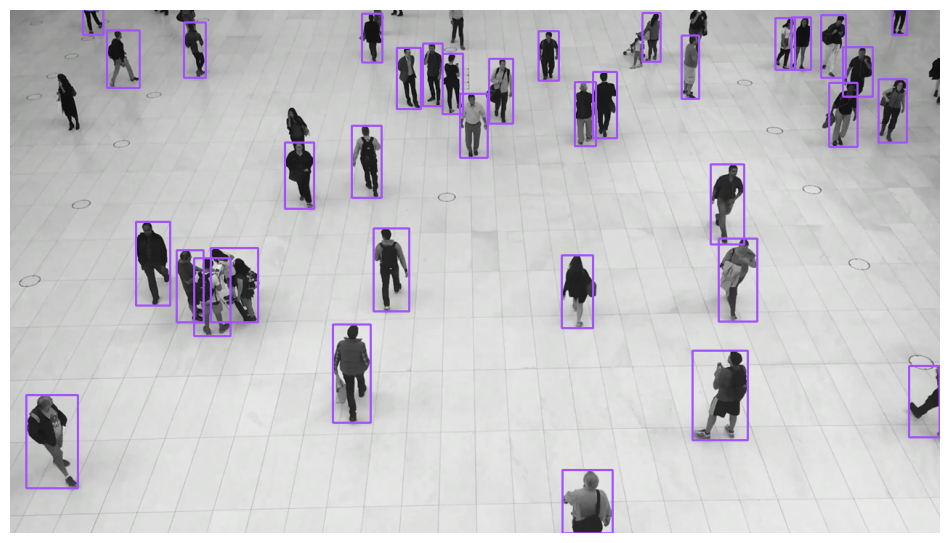{ align=center width="800" }
|
||||
|
||||
{ align=center width="800" }
|
||||
</div>
|
||||
|
||||
</div>
|
||||
=== "RoundBox"
|
||||
|
||||
=== "RoundBox"
|
||||
```python
|
||||
import supervision as sv
|
||||
|
||||
```python
|
||||
import supervision as sv
|
||||
image = ...
|
||||
detections = sv.Detections(...)
|
||||
|
||||
image = ...
|
||||
detections = sv.Detections(...)
|
||||
round_box_annotator = sv.RoundBoxAnnotator()
|
||||
annotated_frame = round_box_annotator.annotate(
|
||||
scene=image.copy(),
|
||||
detections=detections
|
||||
)
|
||||
```
|
||||
|
||||
round_box_annotator = sv.RoundBoxAnnotator()
|
||||
annotated_frame = round_box_annotator.annotate(
|
||||
scene=image.copy(),
|
||||
detections=detections,
|
||||
)
|
||||
```
|
||||
<div class="result" markdown>
|
||||
|
||||
<div class="result" markdown>
|
||||
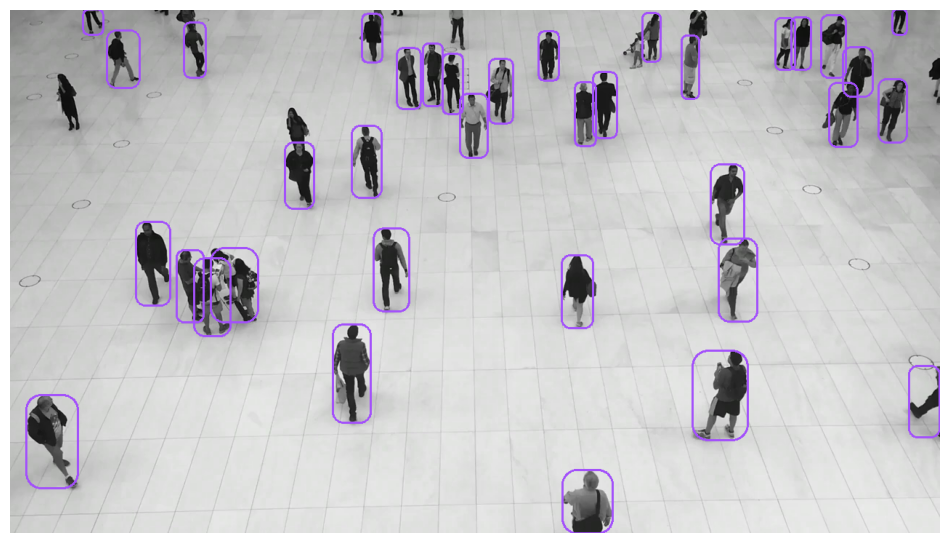{ align=center width="800" }
|
||||
|
||||
{ align=center width="800" }
|
||||
</div>
|
||||
|
||||
</div>
|
||||
=== "BoxCorner"
|
||||
|
||||
=== "BoxCorner"
|
||||
```python
|
||||
import supervision as sv
|
||||
|
||||
```python
|
||||
import supervision as sv
|
||||
image = ...
|
||||
detections = sv.Detections(...)
|
||||
|
||||
image = ...
|
||||
detections = sv.Detections(...)
|
||||
corner_annotator = sv.BoxCornerAnnotator()
|
||||
annotated_frame = corner_annotator.annotate(
|
||||
scene=image.copy(),
|
||||
detections=detections
|
||||
)
|
||||
```
|
||||
|
||||
corner_annotator = sv.BoxCornerAnnotator()
|
||||
annotated_frame = corner_annotator.annotate(
|
||||
scene=image.copy(),
|
||||
detections=detections,
|
||||
)
|
||||
```
|
||||
<div class="result" markdown>
|
||||
|
||||
<div class="result" markdown>
|
||||
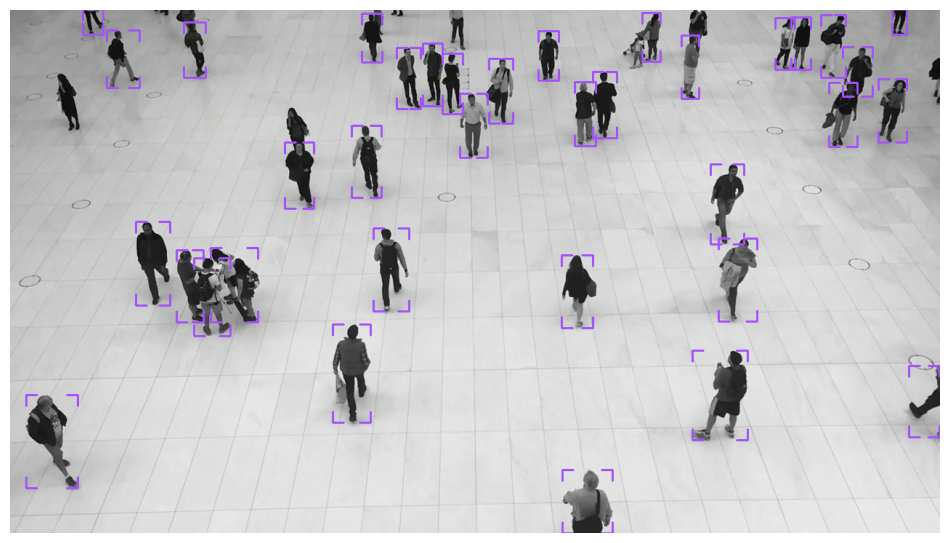{ align=center width="800" }
|
||||
|
||||
{ align=center width="800" }
|
||||
</div>
|
||||
|
||||
</div>
|
||||
=== "Color"
|
||||
|
||||
=== "Circle"
|
||||
```python
|
||||
import supervision as sv
|
||||
|
||||
```python
|
||||
import supervision as sv
|
||||
image = ...
|
||||
detections = sv.Detections(...)
|
||||
|
||||
image = ...
|
||||
detections = sv.Detections(...)
|
||||
color_annotator = sv.ColorAnnotator()
|
||||
annotated_frame = color_annotator.annotate(
|
||||
scene=image.copy(),
|
||||
detections=detections
|
||||
)
|
||||
```
|
||||
|
||||
circle_annotator = sv.CircleAnnotator()
|
||||
annotated_frame = circle_annotator.annotate(
|
||||
scene=image.copy(),
|
||||
detections=detections,
|
||||
)
|
||||
```
|
||||
<div class="result" markdown>
|
||||
|
||||
<div class="result" markdown>
|
||||
{ align=center width="800" }
|
||||
|
||||
{ align=center width="800" }
|
||||
</div>
|
||||
|
||||
</div>
|
||||
=== "Circle"
|
||||
|
||||
=== "Ellipse"
|
||||
```python
|
||||
import supervision as sv
|
||||
|
||||
```python
|
||||
import supervision as sv
|
||||
image = ...
|
||||
detections = sv.Detections(...)
|
||||
|
||||
image = ...
|
||||
detections = sv.Detections(...)
|
||||
circle_annotator = sv.CircleAnnotator()
|
||||
annotated_frame = circle_annotator.annotate(
|
||||
scene=image.copy(),
|
||||
detections=detections
|
||||
)
|
||||
```
|
||||
|
||||
ellipse_annotator = sv.EllipseAnnotator()
|
||||
annotated_frame = ellipse_annotator.annotate(
|
||||
scene=image.copy(),
|
||||
detections=detections,
|
||||
)
|
||||
```
|
||||
<div class="result" markdown>
|
||||
|
||||
<div class="result" markdown>
|
||||
{ align=center width="800" }
|
||||
|
||||
{ align=center width="800" }
|
||||
</div>
|
||||
|
||||
</div>
|
||||
=== "Dot"
|
||||
|
||||
=== "Polygon"
|
||||
```python
|
||||
import supervision as sv
|
||||
|
||||
```python
|
||||
import supervision as sv
|
||||
image = ...
|
||||
detections = sv.Detections(...)
|
||||
|
||||
image = ...
|
||||
detections = sv.Detections(...)
|
||||
dot_annotator = sv.DotAnnotator()
|
||||
annotated_frame = dot_annotator.annotate(
|
||||
scene=image.copy(),
|
||||
detections=detections
|
||||
)
|
||||
```
|
||||
|
||||
polygon_annotator = sv.PolygonAnnotator()
|
||||
annotated_frame = polygon_annotator.annotate(
|
||||
scene=image.copy(),
|
||||
detections=detections,
|
||||
)
|
||||
```
|
||||
<div class="result" markdown>
|
||||
|
||||
<div class="result" markdown>
|
||||
{ align=center width="800" }
|
||||
|
||||
{ align=center width="800" }
|
||||
</div>
|
||||
|
||||
</div>
|
||||
=== "Triangle"
|
||||
|
||||
=== "Shading"
|
||||
```python
|
||||
import supervision as sv
|
||||
|
||||
=== "Color"
|
||||
image = ...
|
||||
detections = sv.Detections(...)
|
||||
|
||||
```python
|
||||
import supervision as sv
|
||||
triangle_annotator = sv.TriangleAnnotator()
|
||||
annotated_frame = triangle_annotator.annotate(
|
||||
scene=image.copy(),
|
||||
detections=detections
|
||||
)
|
||||
```
|
||||
|
||||
image = ...
|
||||
detections = sv.Detections(...)
|
||||
<div class="result" markdown>
|
||||
|
||||
color_annotator = sv.ColorAnnotator()
|
||||
annotated_frame = color_annotator.annotate(
|
||||
scene=image.copy(),
|
||||
detections=detections,
|
||||
)
|
||||
```
|
||||
{ align=center width="800" }
|
||||
|
||||
<div class="result" markdown>
|
||||
</div>
|
||||
|
||||
{ align=center width="800" }
|
||||
=== "Ellipse"
|
||||
|
||||
</div>
|
||||
```python
|
||||
import supervision as sv
|
||||
|
||||
=== "Halo"
|
||||
image = ...
|
||||
detections = sv.Detections(...)
|
||||
|
||||
```python
|
||||
import supervision as sv
|
||||
ellipse_annotator = sv.EllipseAnnotator()
|
||||
annotated_frame = ellipse_annotator.annotate(
|
||||
scene=image.copy(),
|
||||
detections=detections
|
||||
)
|
||||
```
|
||||
|
||||
image = ...
|
||||
detections = sv.Detections(...)
|
||||
<div class="result" markdown>
|
||||
|
||||
halo_annotator = sv.HaloAnnotator()
|
||||
annotated_frame = halo_annotator.annotate(
|
||||
scene=image.copy(),
|
||||
detections=detections,
|
||||
)
|
||||
```
|
||||
{ align=center width="800" }
|
||||
|
||||
<div class="result" markdown>
|
||||
</div>
|
||||
|
||||
{ align=center width="800" }
|
||||
=== "Halo"
|
||||
|
||||
</div>
|
||||
```python
|
||||
import supervision as sv
|
||||
|
||||
=== "Mask"
|
||||
image = ...
|
||||
detections = sv.Detections(...)
|
||||
|
||||
```python
|
||||
import supervision as sv
|
||||
halo_annotator = sv.HaloAnnotator()
|
||||
annotated_frame = halo_annotator.annotate(
|
||||
scene=image.copy(),
|
||||
detections=detections
|
||||
)
|
||||
```
|
||||
|
||||
image = ...
|
||||
detections = sv.Detections(...)
|
||||
<div class="result" markdown>
|
||||
|
||||
mask_annotator = sv.MaskAnnotator()
|
||||
annotated_frame = mask_annotator.annotate(
|
||||
scene=image.copy(),
|
||||
detections=detections,
|
||||
)
|
||||
```
|
||||
{ align=center width="800" }
|
||||
|
||||
!!! note
|
||||
</div>
|
||||
|
||||
`MaskAnnotator` expects `detections.mask` to contain instance segmentation masks aligned to the image passed to `annotate`. For dense masks, provide a boolean array of shape `(N, H, W)` where `(H, W)` matches the image height and width (it also accepts `sv.CompactMask`). If your model returns framework-specific results, convert them to `sv.Detections` first, for example with `sv.Detections.from_ultralytics(...)` or `sv.Detections.from_inference(...)`.
|
||||
=== "PercentageBar"
|
||||
|
||||
<div class="result" markdown>
|
||||
```python
|
||||
import supervision as sv
|
||||
|
||||
{ align=center width="800" }
|
||||
image = ...
|
||||
detections = sv.Detections(...)
|
||||
|
||||
</div>
|
||||
percentage_bar_annotator = sv.PercentageBarAnnotator()
|
||||
annotated_frame = percentage_bar_annotator.annotate(
|
||||
scene=image.copy(),
|
||||
detections=detections
|
||||
)
|
||||
```
|
||||
|
||||
=== "Markers"
|
||||
<div class="result" markdown>
|
||||
|
||||
=== "Dot"
|
||||
{ align=center width="800" }
|
||||
|
||||
```python
|
||||
import supervision as sv
|
||||
</div>
|
||||
|
||||
image = ...
|
||||
detections = sv.Detections(...)
|
||||
=== "Mask"
|
||||
|
||||
dot_annotator = sv.DotAnnotator()
|
||||
annotated_frame = dot_annotator.annotate(
|
||||
scene=image.copy(),
|
||||
detections=detections,
|
||||
)
|
||||
```
|
||||
```python
|
||||
import supervision as sv
|
||||
|
||||
<div class="result" markdown>
|
||||
image = ...
|
||||
detections = sv.Detections(...)
|
||||
|
||||
{ align=center width="800" }
|
||||
mask_annotator = sv.MaskAnnotator()
|
||||
annotated_frame = mask_annotator.annotate(
|
||||
scene=image.copy(),
|
||||
detections=detections
|
||||
)
|
||||
```
|
||||
|
||||
</div>
|
||||
<div class="result" markdown>
|
||||
|
||||
=== "Triangle"
|
||||
{ align=center width="800" }
|
||||
|
||||
```python
|
||||
import supervision as sv
|
||||
</div>
|
||||
|
||||
image = ...
|
||||
detections = sv.Detections(...)
|
||||
=== "Polygon"
|
||||
|
||||
triangle_annotator = sv.TriangleAnnotator()
|
||||
annotated_frame = triangle_annotator.annotate(
|
||||
scene=image.copy(),
|
||||
detections=detections,
|
||||
)
|
||||
```
|
||||
```python
|
||||
import supervision as sv
|
||||
|
||||
<div class="result" markdown>
|
||||
image = ...
|
||||
detections = sv.Detections(...)
|
||||
|
||||
{ align=center width="800" }
|
||||
polygon_annotator = sv.PolygonAnnotator()
|
||||
annotated_frame = polygon_annotator.annotate(
|
||||
scene=image.copy(),
|
||||
detections=detections
|
||||
)
|
||||
```
|
||||
|
||||
</div>
|
||||
<div class="result" markdown>
|
||||
|
||||
=== "Labels"
|
||||
{ align=center width="800" }
|
||||
|
||||
=== "Label"
|
||||
</div>
|
||||
|
||||
```python
|
||||
import supervision as sv
|
||||
=== "Label"
|
||||
|
||||
image = ...
|
||||
detections = sv.Detections(...)
|
||||
```python
|
||||
import supervision as sv
|
||||
|
||||
labels = [
|
||||
f"{class_name} {confidence:.2f}"
|
||||
for class_name, confidence in zip(
|
||||
detections["class_name"],
|
||||
detections.confidence,
|
||||
)
|
||||
]
|
||||
image = ...
|
||||
detections = sv.Detections(...)
|
||||
|
||||
label_annotator = sv.LabelAnnotator(text_position=sv.Position.CENTER)
|
||||
annotated_frame = label_annotator.annotate(
|
||||
scene=image.copy(), detections=detections, labels=labels
|
||||
)
|
||||
```
|
||||
labels = [
|
||||
f"{class_name} {confidence:.2f}"
|
||||
for class_name, confidence
|
||||
in zip(detections['class_name'], detections.confidence)
|
||||
]
|
||||
|
||||
<div class="result" markdown>
|
||||
label_annotator = sv.LabelAnnotator(text_position=sv.Position.CENTER)
|
||||
annotated_frame = label_annotator.annotate(
|
||||
scene=image.copy(),
|
||||
detections=detections,
|
||||
labels=labels
|
||||
)
|
||||
```
|
||||
|
||||
{ align=center width="800" }
|
||||
<div class="result" markdown>
|
||||
|
||||
</div>
|
||||
{ align=center width="800" }
|
||||
|
||||
=== "RichLabel"
|
||||
</div>
|
||||
|
||||
```python
|
||||
import supervision as sv
|
||||
=== "RichLabel"
|
||||
|
||||
image = ...
|
||||
detections = sv.Detections(...)
|
||||
```python
|
||||
import supervision as sv
|
||||
|
||||
labels = [
|
||||
f"{class_name} {confidence:.2f}"
|
||||
for class_name, confidence in zip(
|
||||
detections["class_name"],
|
||||
detections.confidence,
|
||||
)
|
||||
]
|
||||
image = ...
|
||||
detections = sv.Detections(...)
|
||||
|
||||
rich_label_annotator = sv.RichLabelAnnotator(
|
||||
font_path="TTF_FONT_PATH",
|
||||
text_position=sv.Position.CENTER,
|
||||
)
|
||||
annotated_frame = rich_label_annotator.annotate(
|
||||
scene=image.copy(),
|
||||
detections=detections,
|
||||
labels=labels,
|
||||
)
|
||||
```
|
||||
labels = [
|
||||
f"{class_name} {confidence:.2f}"
|
||||
for class_name, confidence
|
||||
in zip(detections['class_name'], detections.confidence)
|
||||
]
|
||||
|
||||
<div class="result" markdown>
|
||||
rich_label_annotator = sv.RichLabelAnnotator(
|
||||
font_path="<TTF_FONT_PATH>",
|
||||
text_position=sv.Position.CENTER
|
||||
)
|
||||
annotated_frame = rich_label_annotator.annotate(
|
||||
scene=image.copy(),
|
||||
detections=detections,
|
||||
labels=labels
|
||||
)
|
||||
```
|
||||
|
||||
{ align=center width="800" }
|
||||
<div class="result" markdown>
|
||||
|
||||
</div>
|
||||
{ align=center width="800" }
|
||||
|
||||
=== "Transformative"
|
||||
</div>
|
||||
|
||||
=== "Blur"
|
||||
=== "Icon"
|
||||
|
||||
```python
|
||||
import supervision as sv
|
||||
```python
|
||||
import supervision as sv
|
||||
|
||||
image = ...
|
||||
detections = sv.Detections(...)
|
||||
image = ...
|
||||
detections = sv.Detections(...)
|
||||
|
||||
blur_annotator = sv.BlurAnnotator()
|
||||
annotated_frame = blur_annotator.annotate(
|
||||
scene=image.copy(),
|
||||
detections=detections,
|
||||
)
|
||||
```
|
||||
icon_paths = [
|
||||
"<ICON_PATH>"
|
||||
for _ in detections
|
||||
]
|
||||
|
||||
<div class="result" markdown>
|
||||
icon_annotator = sv.IconAnnotator()
|
||||
annotated_frame = icon_annotator.annotate(
|
||||
scene=image.copy(),
|
||||
detections=detections,
|
||||
icon_path=icon_paths
|
||||
)
|
||||
```
|
||||
|
||||
{ align=center width="800" }
|
||||
<div class="result" markdown>
|
||||
|
||||
</div>
|
||||
{ align=center width="800" }
|
||||
|
||||
=== "Pixelate"
|
||||
</div>
|
||||
|
||||
```python
|
||||
import supervision as sv
|
||||
|
||||
image = ...
|
||||
detections = sv.Detections(...)
|
||||
|
||||
pixelate_annotator = sv.PixelateAnnotator()
|
||||
annotated_frame = pixelate_annotator.annotate(
|
||||
scene=image.copy(),
|
||||
detections=detections,
|
||||
)
|
||||
```
|
||||
|
||||
<div class="result" markdown>
|
||||
|
||||
{ align=center width="800" }
|
||||
|
||||
</div>
|
||||
|
||||
<!-- === "Crop"
|
||||
<!-- === "Crop"
|
||||
|
||||
```python
|
||||
import supervision as sv
|
||||
@@ -366,172 +361,167 @@ Annotators accept detections and apply box or mask visualizations to the detecti
|
||||
crop_annotator = sv.CropAnnotator()
|
||||
annotated_frame = crop_annotator.annotate(
|
||||
scene=image.copy(),
|
||||
detections=detections,
|
||||
detections=detections
|
||||
)
|
||||
```
|
||||
|
||||
<div class="result" markdown>
|
||||
|
||||
{ align=center width="800" }
|
||||
{ align=center width="800" }
|
||||
|
||||
</div>
|
||||
-->
|
||||
|
||||
-->
|
||||
=== "Blur"
|
||||
|
||||
=== "Tracking & Aggregation"
|
||||
```python
|
||||
import supervision as sv
|
||||
|
||||
=== "Trace"
|
||||
image = ...
|
||||
detections = sv.Detections(...)
|
||||
|
||||
```python
|
||||
import supervision as sv
|
||||
from ultralytics import YOLO
|
||||
blur_annotator = sv.BlurAnnotator()
|
||||
annotated_frame = blur_annotator.annotate(
|
||||
scene=image.copy(),
|
||||
detections=detections
|
||||
)
|
||||
```
|
||||
|
||||
model = YOLO("yolov8x.pt")
|
||||
<div class="result" markdown>
|
||||
|
||||
trace_annotator = sv.TraceAnnotator()
|
||||
{ align=center width="800" }
|
||||
|
||||
video_info = sv.VideoInfo.from_video_path(video_path="...")
|
||||
frames_generator = sv.get_video_frames_generator(source_path="...")
|
||||
tracker = sv.ByteTrack()
|
||||
</div>
|
||||
|
||||
with sv.VideoSink(target_path="...", video_info=video_info) as sink:
|
||||
for frame in frames_generator:
|
||||
result = model(frame)[0]
|
||||
detections = sv.Detections.from_ultralytics(result)
|
||||
detections = tracker.update_with_detections(detections)
|
||||
annotated_frame = trace_annotator.annotate(
|
||||
scene=frame.copy(),
|
||||
detections=detections,
|
||||
)
|
||||
sink.write_frame(frame=annotated_frame)
|
||||
```
|
||||
=== "Pixelate"
|
||||
|
||||
<div class="result" markdown>
|
||||
```python
|
||||
import supervision as sv
|
||||
|
||||
{ align=center width="800" }
|
||||
image = ...
|
||||
detections = sv.Detections(...)
|
||||
|
||||
</div>
|
||||
pixelate_annotator = sv.PixelateAnnotator()
|
||||
annotated_frame = pixelate_annotator.annotate(
|
||||
scene=image.copy(),
|
||||
detections=detections
|
||||
)
|
||||
```
|
||||
|
||||
=== "HeatMap"
|
||||
<div class="result" markdown>
|
||||
|
||||
```python
|
||||
import supervision as sv
|
||||
from ultralytics import YOLO
|
||||
{ align=center width="800" }
|
||||
|
||||
model = YOLO("yolov8x.pt")
|
||||
</div>
|
||||
|
||||
heat_map_annotator = sv.HeatMapAnnotator()
|
||||
=== "Trace"
|
||||
|
||||
video_info = sv.VideoInfo.from_video_path(video_path="...")
|
||||
frames_generator = sv.get_video_frames_generator(source_path="...")
|
||||
```python
|
||||
import supervision as sv
|
||||
from ultralytics import YOLO
|
||||
|
||||
with sv.VideoSink(target_path="...", video_info=video_info) as sink:
|
||||
for frame in frames_generator:
|
||||
result = model(frame)[0]
|
||||
detections = sv.Detections.from_ultralytics(result)
|
||||
annotated_frame = heat_map_annotator.annotate(
|
||||
scene=frame.copy(),
|
||||
detections=detections,
|
||||
)
|
||||
sink.write_frame(frame=annotated_frame)
|
||||
```
|
||||
model = YOLO('yolov8x.pt')
|
||||
|
||||
<div class="result" markdown>
|
||||
trace_annotator = sv.TraceAnnotator()
|
||||
|
||||
{ align=center width="800" }
|
||||
video_info = sv.VideoInfo.from_video_path(video_path='...')
|
||||
frames_generator = sv.get_video_frames_generator(source_path='...')
|
||||
tracker = sv.ByteTrack()
|
||||
|
||||
</div>
|
||||
with sv.VideoSink(target_path='...', video_info=video_info) as sink:
|
||||
for frame in frames_generator:
|
||||
result = model(frame)[0]
|
||||
detections = sv.Detections.from_ultralytics(result)
|
||||
detections = tracker.update_with_detections(detections)
|
||||
annotated_frame = trace_annotator.annotate(
|
||||
scene=frame.copy(),
|
||||
detections=detections)
|
||||
sink.write_frame(frame=annotated_frame)
|
||||
```
|
||||
|
||||
=== "Others"
|
||||
<div class="result" markdown>
|
||||
|
||||
=== "PercentageBar"
|
||||
{ align=center width="800" }
|
||||
|
||||
```python
|
||||
import supervision as sv
|
||||
</div>
|
||||
|
||||
image = ...
|
||||
detections = sv.Detections(...)
|
||||
=== "HeatMap"
|
||||
|
||||
percentage_bar_annotator = sv.PercentageBarAnnotator()
|
||||
annotated_frame = percentage_bar_annotator.annotate(
|
||||
scene=image.copy(),
|
||||
detections=detections,
|
||||
)
|
||||
```
|
||||
```python
|
||||
import supervision as sv
|
||||
from ultralytics import YOLO
|
||||
|
||||
<div class="result" markdown>
|
||||
model = YOLO('yolov8x.pt')
|
||||
|
||||
{ align=center width="800" }
|
||||
heat_map_annotator = sv.HeatMapAnnotator()
|
||||
|
||||
</div>
|
||||
video_info = sv.VideoInfo.from_video_path(video_path='...')
|
||||
frames_generator = sv.get_video_frames_generator(source_path='...')
|
||||
|
||||
=== "Icon"
|
||||
with sv.VideoSink(target_path='...', video_info=video_info) as sink:
|
||||
for frame in frames_generator:
|
||||
result = model(frame)[0]
|
||||
detections = sv.Detections.from_ultralytics(result)
|
||||
annotated_frame = heat_map_annotator.annotate(
|
||||
scene=frame.copy(),
|
||||
detections=detections)
|
||||
sink.write_frame(frame=annotated_frame)
|
||||
```
|
||||
|
||||
```python
|
||||
import supervision as sv
|
||||
<div class="result" markdown>
|
||||
|
||||
image = ...
|
||||
detections = sv.Detections(...)
|
||||
{ align=center width="800" }
|
||||
|
||||
icon_paths = ["<ICON_PATH>" for _ in detections]
|
||||
</div>
|
||||
|
||||
icon_annotator = sv.IconAnnotator()
|
||||
annotated_frame = icon_annotator.annotate(
|
||||
scene=image.copy(),
|
||||
detections=detections,
|
||||
icon_path=icon_paths,
|
||||
)
|
||||
```
|
||||
=== "Background Color"
|
||||
|
||||
<div class="result" markdown>
|
||||
```python
|
||||
import supervision as sv
|
||||
|
||||
{ align=center width="800" }
|
||||
image = ...
|
||||
detections = sv.Detections(...)
|
||||
|
||||
</div>
|
||||
background_overlay_annotator = sv.BackgroundOverlayAnnotator()
|
||||
annotated_frame = background_overlay_annotator.annotate(
|
||||
scene=image.copy(),
|
||||
detections=detections
|
||||
)
|
||||
```
|
||||
|
||||
=== "Background Color"
|
||||
<div class="result" markdown>
|
||||
|
||||
```python
|
||||
import supervision as sv
|
||||
{ align=center width="800" }
|
||||
|
||||
image = ...
|
||||
detections = sv.Detections(...)
|
||||
</div>
|
||||
|
||||
background_overlay_annotator = sv.BackgroundOverlayAnnotator()
|
||||
annotated_frame = background_overlay_annotator.annotate(
|
||||
scene=image.copy(),
|
||||
detections=detections,
|
||||
)
|
||||
```
|
||||
=== "Comparison"
|
||||
|
||||
<div class="result" markdown>
|
||||
```python
|
||||
import supervision as sv
|
||||
|
||||
{ align=center width="800" }
|
||||
image = ...
|
||||
detections_1 = sv.Detections(...)
|
||||
detections_2 = sv.Detections(...)
|
||||
|
||||
</div>
|
||||
comparison_annotator = sv.ComparisonAnnotator()
|
||||
annotated_frame = comparison_annotator.annotate(
|
||||
scene=image.copy(),
|
||||
detections_1=detections_1,
|
||||
detections_2=detections_2
|
||||
)
|
||||
```
|
||||
|
||||
=== "Comparison"
|
||||
<div class="result" markdown>
|
||||
|
||||
```python
|
||||
import supervision as sv
|
||||
{ align=center width="800" }
|
||||
|
||||
image = ...
|
||||
detections_1 = sv.Detections(...)
|
||||
detections_2 = sv.Detections(...)
|
||||
|
||||
comparison_annotator = sv.ComparisonAnnotator()
|
||||
annotated_frame = comparison_annotator.annotate(
|
||||
scene=image.copy(),
|
||||
detections_1=detections_1,
|
||||
detections_2=detections_2,
|
||||
)
|
||||
```
|
||||
|
||||
<div class="result" markdown>
|
||||
|
||||
{ align=center width="800" }
|
||||
|
||||
</div>
|
||||
</div>
|
||||
|
||||
<div class="md-typeset">
|
||||
<h2>Try Supervision Annotators on your own image</h2>
|
||||
|
||||
@@ -1,7 +0,0 @@
|
||||
---
|
||||
comments: true
|
||||
---
|
||||
|
||||
# CompactMask
|
||||
|
||||
:::supervision.detection.compact_mask.CompactMask
|
||||
@@ -1,6 +1,6 @@
|
||||
---
|
||||
comments: true
|
||||
description: API reference for supervision's Detections class — the core data structure for bounding boxes, masks, confidence scores, and tracker IDs.
|
||||
status: new
|
||||
---
|
||||
|
||||
# Detections
|
||||
|
||||
@@ -4,13 +4,8 @@ comments: true
|
||||
|
||||
# Legacy Metrics
|
||||
|
||||
Starting with `0.23.0`, a new metrics module is being introduced to supervision. Metrics here are part of the legacy evaluation API and will be deprecated in the future.
|
||||
|
||||
Install the metrics extra before using this page's APIs:
|
||||
|
||||
```bash
|
||||
pip install "supervision[metrics]"
|
||||
```
|
||||
Starting with `0.23.0`, a new metrics module is being introduced to supervision.
|
||||
Metrics here are part of the legacy evaluation API and will be deprecated in the future.
|
||||
|
||||
<div class="md-typeset">
|
||||
<h2><a href="#supervision.metrics.detection.ConfusionMatrix">ConfusionMatrix</a></h2>
|
||||
|
||||
@@ -4,51 +4,4 @@ comments: true
|
||||
|
||||
# InferenceSlicer
|
||||
|
||||
## GeoTIFF Datasets
|
||||
|
||||
Install the optional GeoTIFF dependencies before running this example:
|
||||
|
||||
```bash
|
||||
pip install "supervision[geotiff]"
|
||||
wget -O RGB.byte.tif https://raw.githubusercontent.com/rasterio/rasterio/main/tests/data/RGB.byte.tif
|
||||
```
|
||||
|
||||
`InferenceSlicer` can read an open `rasterio` dataset window-by-window. This keeps large GeoTIFFs out of memory while passing each tile to the callback as an `(H, W, C)` NumPy array.
|
||||
|
||||
```python
|
||||
import numpy as np
|
||||
import rasterio
|
||||
import supervision as sv
|
||||
|
||||
|
||||
def callback(tile: np.ndarray) -> sv.Detections:
|
||||
h, w = tile.shape[:2]
|
||||
return sv.Detections(
|
||||
xyxy=np.array([[w * 0.25, h * 0.25, w * 0.75, h * 0.75]], dtype=float),
|
||||
confidence=np.array([0.9]),
|
||||
class_id=np.array([0]),
|
||||
)
|
||||
|
||||
|
||||
slicer = sv.InferenceSlicer(
|
||||
callback=callback,
|
||||
slice_wh=(256, 256),
|
||||
overlap_wh=(64, 64),
|
||||
overlap_filter=sv.OverlapFilter.NONE,
|
||||
)
|
||||
|
||||
with rasterio.open("RGB.byte.tif") as dataset:
|
||||
detections = slicer(dataset)
|
||||
|
||||
print(len(detections))
|
||||
```
|
||||
|
||||
GeoTIFF inputs must use a projected coordinate reference system. Reproject geographic rasters before passing them to `InferenceSlicer`.
|
||||
|
||||
<div class="md-typeset">
|
||||
<h2><a href="#supervision.detection.tools.inference_slicer.WindowedRasterDataset">WindowedRasterDataset</a></h2>
|
||||
</div>
|
||||
|
||||
:::supervision.detection.tools.inference_slicer.WindowedRasterDataset
|
||||
|
||||
:::supervision.detection.tools.inference_slicer.InferenceSlicer
|
||||
|
||||
@@ -1,5 +1,6 @@
|
||||
---
|
||||
comments: true
|
||||
status: new
|
||||
---
|
||||
|
||||
# Boxes Utils
|
||||
@@ -17,7 +18,7 @@ comments: true
|
||||
:::supervision.detection.utils.boxes.scale_boxes
|
||||
|
||||
<div class="md-typeset">
|
||||
<h2><a href="#supervision.detection.utils.boxes.clip_boxes">clip_boxes</a></h2>
|
||||
<h2><a href="#supervision.detection.boxes.utils.clip_boxes">clip_boxes</a></h2>
|
||||
</div>
|
||||
|
||||
:::supervision.detection.utils.boxes.clip_boxes
|
||||
@@ -33,9 +34,3 @@ comments: true
|
||||
</div>
|
||||
|
||||
:::supervision.detection.utils.boxes.denormalize_boxes
|
||||
|
||||
<div class="md-typeset">
|
||||
<h2><a href="#supervision.detection.utils.boxes.xyxyxyxy_to_xyxy">xyxyxyxy_to_xyxy</a></h2>
|
||||
</div>
|
||||
|
||||
:::supervision.detection.utils.boxes.xyxyxyxy_to_xyxy
|
||||
|
||||
@@ -58,27 +58,3 @@ status: new
|
||||
</div>
|
||||
|
||||
:::supervision.detection.utils.converters.polygon_to_xyxy
|
||||
|
||||
<div class="md-typeset">
|
||||
<h2><a href="#supervision.detection.utils.converters.xyxy_to_mask">xyxy_to_mask</a></h2>
|
||||
</div>
|
||||
|
||||
:::supervision.detection.utils.converters.xyxy_to_mask
|
||||
|
||||
<div class="md-typeset">
|
||||
<h2><a href="#supervision.detection.utils.converters.rle_to_mask">rle_to_mask</a></h2>
|
||||
</div>
|
||||
|
||||
:::supervision.detection.utils.converters.rle_to_mask
|
||||
|
||||
<div class="md-typeset">
|
||||
<h2><a href="#supervision.detection.utils.converters.mask_to_rle">mask_to_rle</a></h2>
|
||||
</div>
|
||||
|
||||
:::supervision.detection.utils.converters.mask_to_rle
|
||||
|
||||
<div class="md-typeset">
|
||||
<h2><a href="#supervision.detection.utils.converters.is_compressed_rle">is_compressed_rle</a></h2>
|
||||
</div>
|
||||
|
||||
:::supervision.detection.utils.converters.is_compressed_rle
|
||||
|
||||
@@ -1,5 +1,6 @@
|
||||
---
|
||||
comments: true
|
||||
status: new
|
||||
---
|
||||
|
||||
# IoU and NMS Utils
|
||||
@@ -52,24 +53,12 @@ comments: true
|
||||
|
||||
:::supervision.detection.utils.iou_and_nms.box_non_max_suppression
|
||||
|
||||
<div class="md-typeset">
|
||||
<h2><a href="#supervision.detection.utils.iou_and_nms.box_soft_non_max_suppression">box_soft_non_max_suppression</a></h2>
|
||||
</div>
|
||||
|
||||
:::supervision.detection.utils.iou_and_nms.box_soft_non_max_suppression
|
||||
|
||||
<div class="md-typeset">
|
||||
<h2><a href="#supervision.detection.utils.iou_and_nms.mask_non_max_suppression">mask_non_max_suppression</a></h2>
|
||||
</div>
|
||||
|
||||
:::supervision.detection.utils.iou_and_nms.mask_non_max_suppression
|
||||
|
||||
<div class="md-typeset">
|
||||
<h2><a href="#supervision.detection.utils.iou_and_nms.mask_soft_non_max_suppression">mask_soft_non_max_suppression</a></h2>
|
||||
</div>
|
||||
|
||||
:::supervision.detection.utils.iou_and_nms.mask_soft_non_max_suppression
|
||||
|
||||
<div class="md-typeset">
|
||||
<h2><a href="#supervision.detection.utils.iou_and_nms.box_non_max_merge">box_non_max_merge</a></h2>
|
||||
</div>
|
||||
@@ -81,15 +70,3 @@ comments: true
|
||||
</div>
|
||||
|
||||
:::supervision.detection.utils.iou_and_nms.mask_non_max_merge
|
||||
|
||||
<div class="md-typeset">
|
||||
<h2><a href="#supervision.detection.utils.iou_and_nms.oriented_box_non_max_suppression">oriented_box_non_max_suppression</a></h2>
|
||||
</div>
|
||||
|
||||
:::supervision.detection.utils.iou_and_nms.oriented_box_non_max_suppression
|
||||
|
||||
<div class="md-typeset">
|
||||
<h2><a href="#supervision.detection.utils.iou_and_nms.oriented_box_non_max_merge">oriented_box_non_max_merge</a></h2>
|
||||
</div>
|
||||
|
||||
:::supervision.detection.utils.iou_and_nms.oriented_box_non_max_merge
|
||||
|
||||
@@ -5,12 +5,6 @@ status: new
|
||||
|
||||
# Masks Utils
|
||||
|
||||
<div class="md-typeset">
|
||||
<h2><a href="#supervision.detection.utils.masks.mask_to_roi">mask_to_roi</a></h2>
|
||||
</div>
|
||||
|
||||
:::supervision.detection.utils.masks.mask_to_roi
|
||||
|
||||
<div class="md-typeset">
|
||||
<h2><a href="#supervision.detection.utils.masks.move_masks">move_masks</a></h2>
|
||||
</div>
|
||||
@@ -28,15 +22,3 @@ status: new
|
||||
</div>
|
||||
|
||||
:::supervision.detection.utils.masks.contains_multiple_segments
|
||||
|
||||
<div class="md-typeset">
|
||||
<h2><a href="#supervision.detection.utils.masks.filter_segments_by_distance">filter_segments_by_distance</a></h2>
|
||||
</div>
|
||||
|
||||
:::supervision.detection.utils.masks.filter_segments_by_distance
|
||||
|
||||
<div class="md-typeset">
|
||||
<h2><a href="#supervision.detection.utils.masks.calculate_masks_centroids">calculate_masks_centroids</a></h2>
|
||||
</div>
|
||||
|
||||
:::supervision.detection.utils.masks.calculate_masks_centroids
|
||||
|
||||
@@ -1,5 +1,6 @@
|
||||
---
|
||||
comments: true
|
||||
status: new
|
||||
---
|
||||
|
||||
# Polygons Utils
|
||||
|
||||
@@ -1,36 +0,0 @@
|
||||
---
|
||||
comments: true
|
||||
status: new
|
||||
---
|
||||
|
||||
# VLM Utils
|
||||
|
||||
<div class="md-typeset">
|
||||
<h2><a href="#supervision.detection.vlm.VLM">VLM</a></h2>
|
||||
</div>
|
||||
|
||||
:::supervision.detection.vlm.VLM
|
||||
|
||||
<div class="md-typeset">
|
||||
<h2><a href="#supervision.detection.vlm.LMM">LMM</a></h2>
|
||||
</div>
|
||||
|
||||
:::supervision.detection.vlm.LMM
|
||||
|
||||
<div class="md-typeset">
|
||||
<h2><a href="#supervision.detection.vlm.validate_vlm_parameters">validate_vlm_parameters</a></h2>
|
||||
</div>
|
||||
|
||||
:::supervision.detection.vlm.validate_vlm_parameters
|
||||
|
||||
<div class="md-typeset">
|
||||
<h2><a href="#supervision.detection.utils.vlms.edit_distance">edit_distance</a></h2>
|
||||
</div>
|
||||
|
||||
:::supervision.detection.utils.vlms.edit_distance
|
||||
|
||||
<div class="md-typeset">
|
||||
<h2><a href="#supervision.detection.utils.vlms.fuzzy_match_index">fuzzy_match_index</a></h2>
|
||||
</div>
|
||||
|
||||
:::supervision.detection.utils.vlms.fuzzy_match_index
|
||||
-81
@@ -1,81 +0,0 @@
|
||||
---
|
||||
comments: true
|
||||
description: Frequently asked questions about installing Supervision, supported computer vision models, datasets, tracking, metrics, and licensing.
|
||||
---
|
||||
|
||||
# Frequently Asked Questions
|
||||
|
||||
## What is Supervision?
|
||||
|
||||
Supervision is an open-source Python library by Roboflow for computer vision workflows. It provides a unified `Detections` class with converters for supported object detection, segmentation, and VLM outputs.
|
||||
|
||||
## How do I install Supervision?
|
||||
|
||||
Install the base package with:
|
||||
|
||||
```bash
|
||||
pip install supervision
|
||||
```
|
||||
|
||||
Use the `metrics` extra when you need optional metric dependencies:
|
||||
|
||||
```bash
|
||||
pip install "supervision[metrics]"
|
||||
```
|
||||
|
||||
Sample asset utilities are part of the base package under `supervision.assets`.
|
||||
|
||||
Supervision does not install OpenCV. Its image, drawing, and file-video APIs use the included fallback when `cv2` is unavailable, and automatically use a compatible `cv2` already present in your environment. See the [OpenCV migration guide](how_to/opencv_migration.md) when upgrading an existing environment or choosing an OpenCV wheel yourself.
|
||||
|
||||
## Which object detection models work with Supervision?
|
||||
|
||||
Supervision is model agnostic. `sv.Detections` includes converters for Ultralytics YOLO, Roboflow Inference, Hugging Face Transformers outputs, SAM, Detectron2, MMDetection, YOLO-NAS, PaddleDet, NCNN, Azure AI Vision, and VLM parsers including Florence-2, PaliGemma, Qwen VL, Gemini, DeepSeek VL 2, and Moondream. Keypoint outputs have separate `sv.KeyPoints` converters, including MediaPipe.
|
||||
|
||||
## What can I do with Supervision?
|
||||
|
||||
You can annotate images and video, filter detections, track objects, count objects in zones or across lines, load and convert datasets, evaluate models with detection metrics, and export predictions for downstream analysis.
|
||||
|
||||
## How do I track objects across video frames?
|
||||
|
||||
Assign persistent tracker IDs before visualization. The built-in `sv.ByteTrack` wrapper accepts `Detections` through `update_with_detections()`, but it is deprecated in favor of `ByteTrackTracker` from the external `trackers` package. After tracking, combine the output with annotators such as `sv.TraceAnnotator`, `sv.BoxAnnotator`, and `sv.LabelAnnotator`.
|
||||
|
||||
## What dataset formats does Supervision support?
|
||||
|
||||
For detection datasets, Supervision supports YOLO, COCO JSON, Pascal VOC, CreateML, and LabelMe. Use `DetectionDataset.from_yolo()`, `DetectionDataset.from_coco()`, `DetectionDataset.from_pascal_voc()`, `DetectionDataset.from_createml()`, or `DetectionDataset.from_labelme()` to load datasets, and the matching `as_*` methods to export them.
|
||||
|
||||
## How do I count objects in a zone?
|
||||
|
||||
Use `sv.PolygonZone` for arbitrary polygon regions and `sv.LineZone` for line-crossing counts. Line crossing requires `detections.tracker_id`, so run a tracker before calling the line zone trigger.
|
||||
|
||||
## How do I benchmark a model?
|
||||
|
||||
Install `supervision[metrics]`, then use `supervision.metrics.mean_average_precision.MeanAveragePrecision` for mAP and `sv.ConfusionMatrix` for confusion matrices. Accumulate predictions and ground-truth `Detections`, then call `compute()` to calculate metrics.
|
||||
|
||||
## Is Supervision free to use?
|
||||
|
||||
Yes. Supervision is free and open source under the MIT license.
|
||||
|
||||
## How do I process frames from a webcam with supervision?
|
||||
|
||||
Supervision does not support live camera capture. Manage the capture device yourself with `cv2.VideoCapture`, which works regardless of which OpenCV wheel (`opencv-python` or `opencv-python-headless`) is installed, and pass individual frames to supervision annotators:
|
||||
|
||||
```python
|
||||
import cv2 # requires: pip install opencv-python (or opencv-python-headless)
|
||||
import supervision as sv
|
||||
|
||||
cap = cv2.VideoCapture(0)
|
||||
annotator = sv.BoxAnnotator()
|
||||
|
||||
while True:
|
||||
ret, frame = cap.read()
|
||||
if not ret:
|
||||
break
|
||||
# run your detector, then annotate:
|
||||
# annotated = annotator.annotate(frame, detections)
|
||||
|
||||
cap.release()
|
||||
```
|
||||
|
||||
## Where is the source code?
|
||||
|
||||
The source code is available at [github.com/roboflow/supervision](https://github.com/roboflow/supervision).
|
||||
@@ -1,11 +1,6 @@
|
||||
---
|
||||
comments: true
|
||||
description: Benchmark object detection models with supervision — compute mAP, confusion matrix, and per-class metrics to compare model performance.
|
||||
authors:
|
||||
- name: Piotr Skalski
|
||||
role: Computer Vision Engineer, Roboflow
|
||||
github: https://github.com/SkalskiP
|
||||
date_modified: 2026-04-22
|
||||
status: new
|
||||
---
|
||||
|
||||
|
||||
@@ -42,9 +37,14 @@ We'll use the following libraries:
|
||||
- `supervision` to evaluate the model results
|
||||
|
||||
```bash
|
||||
pip install roboflow inference "supervision[metrics]"
|
||||
pip install roboflow supervision
|
||||
pip install git+https://github.com/roboflow/inference.git@linas/allow-latest-rc-supervision
|
||||
```
|
||||
|
||||
!!! info
|
||||
|
||||
We're updating `inference` at the moment. Please install it as shown above.
|
||||
|
||||
Here's how you can download a dataset:
|
||||
|
||||
```python
|
||||
@@ -52,7 +52,7 @@ from roboflow import Roboflow
|
||||
|
||||
rf = Roboflow(api_key="<YOUR_API_KEY>")
|
||||
project = rf.workspace("<WORKSPACE_NAME>").project("<PROJECT_NAME>")
|
||||
dataset = project.version("<DATASET_VERSION_NUMBER>").download("<FORMAT>")
|
||||
dataset = project.version(<DATASET_VERSION_NUMBER>).download("<FORMAT>")
|
||||
```
|
||||
|
||||
If your dataset is from Universe, go to `Dataset` > `Download Dataset` > select the format (e.g. `YOLOv11`) > `Show download code`.
|
||||
@@ -75,8 +75,6 @@ This will create a folder called `Corgi-v2-4` with the dataset in the current wo
|
||||
|
||||
Let's load a model.
|
||||
|
||||
Select and instantiate the detection or segmentation model you want to benchmark. Supervision works with Roboflow Inference for both local and cloud-deployed models, as well as Ultralytics YOLO checkpoints. Choose the tab below that matches your preferred framework, then pass images to the loaded model during the evaluation loop.
|
||||
|
||||
=== "Inference, Local"
|
||||
|
||||
Roboflow supports a range of state-of-the-art [pre-trained models](https://inference.roboflow.com/quickstart/aliases/) for object detection, instance segmentation, and pose tracking. You don't even need an API key!
|
||||
@@ -125,7 +123,8 @@ Evaluating your model requires careful selection of the dataset. Which images sh
|
||||
- **Validation Set**: This is the set of images used to validate the model during training. Every Nth training epoch, the model is evaluated on the validation set. Often the training is stopped once the validation loss stops improving. Therefore, even while the images aren't used to train the model, it still indirectly influences the training outcome.
|
||||
- **Test Set**: This is the set of images kept aside for model testing. It is exactly the set you should use for benchmarking. If the dataset was split correctly, none of these images would be shown to the model during training.
|
||||
|
||||
Therefore, an unrelated dataset or the `test` set is the best choice for benchmarking. Several other problems may arise:
|
||||
Therefore, an unrelated dataset or the `test` set is the best choice for benchmarking.
|
||||
Several other problems may arise:
|
||||
|
||||
- **Extra Classes**: An unrelated dataset may contain additional classes which you may need to [filter out](https://supervision.roboflow.com/how_to/filter_detections/#by-set-of-classes) before computing metrics.
|
||||
- **Class Mismatch**: In an unrelated dataset, the class names or IDs may be different to what your model produces, you'll need to remap them, which is [shown in this guide](#running-a-model).
|
||||
@@ -139,7 +138,8 @@ At this stage, you should have:
|
||||
- A dataset of labeled images to evaluate the model.
|
||||
- A model prepared for benchmarking.
|
||||
|
||||
With these ready, we can now run the model and obtain predictions. We'll use `supervision` to create a dataset iterator, and then run the model on each image.
|
||||
With these ready, we can now run the model and obtain predictions.
|
||||
We'll use `supervision` to create a dataset iterator, and then run the model on each image.
|
||||
|
||||
=== "Inference"
|
||||
|
||||
@@ -149,7 +149,7 @@ With these ready, we can now run the model and obtain predictions. We'll use `su
|
||||
test_set = sv.DetectionDataset.from_yolo(
|
||||
images_directory_path=f"{dataset.location}/test/images",
|
||||
annotations_directory_path=f"{dataset.location}/test/labels",
|
||||
data_yaml_path=f"{dataset.location}/data.yaml",
|
||||
data_yaml_path=f"{dataset.location}/data.yaml"
|
||||
)
|
||||
|
||||
image_paths = []
|
||||
@@ -173,7 +173,7 @@ With these ready, we can now run the model and obtain predictions. We'll use `su
|
||||
test_set = sv.DetectionDataset.from_yolo(
|
||||
images_directory_path=f"{dataset.location}/test/images",
|
||||
annotations_directory_path=f"{dataset.location}/test/labels",
|
||||
data_yaml_path=f"{dataset.location}/data.yaml",
|
||||
data_yaml_path=f"{dataset.location}/data.yaml"
|
||||
)
|
||||
|
||||
image_paths = []
|
||||
@@ -191,7 +191,8 @@ With these ready, we can now run the model and obtain predictions. We'll use `su
|
||||
|
||||
## Remapping classes
|
||||
|
||||
Did you notice an issue in the above logic? Since we're using an unrelated dataset, the class names and IDs may be different from what the model was trained on.
|
||||
Did you notice an issue in the above logic?
|
||||
Since we're using an unrelated dataset, the class names and IDs may be different from what the model was trained on.
|
||||
|
||||
We need to remap them to match the dataset classes. Here's how to do it:
|
||||
|
||||
@@ -199,16 +200,14 @@ We need to remap them to match the dataset classes. Here's how to do it:
|
||||
def remap_classes(
|
||||
detections: sv.Detections,
|
||||
class_ids_from_to: dict[int, int],
|
||||
class_names_from_to: dict[str, str],
|
||||
class_names_from_to: dict[str, str]
|
||||
) -> None:
|
||||
new_class_ids = [
|
||||
class_ids_from_to.get(class_id, class_id) for class_id in detections.class_id
|
||||
]
|
||||
class_ids_from_to.get(class_id, class_id) for class_id in detections.class_id]
|
||||
detections.class_id = np.array(new_class_ids)
|
||||
|
||||
new_class_names = [
|
||||
class_names_from_to.get(name, name) for name in detections["class_name"]
|
||||
]
|
||||
class_names_from_to.get(name, name) for name in detections["class_name"]]
|
||||
predictions["class_name"] = np.array(new_class_names)
|
||||
```
|
||||
|
||||
@@ -224,7 +223,7 @@ Let's also remove the predictions that are not in the dataset classes.
|
||||
test_set = sv.DetectionDataset.from_yolo(
|
||||
images_directory_path=f"{dataset.location}/test/images",
|
||||
annotations_directory_path=f"{dataset.location}/test/labels",
|
||||
data_yaml_path=f"{dataset.location}/data.yaml",
|
||||
data_yaml_path=f"{dataset.location}/data.yaml"
|
||||
)
|
||||
|
||||
image_paths = []
|
||||
@@ -238,9 +237,11 @@ Let's also remove the predictions that are not in the dataset classes.
|
||||
remap_classes(
|
||||
detections=predictions,
|
||||
class_ids_from_to={16: 0},
|
||||
class_names_from_to={"dog": "Corgi"},
|
||||
class_names_from_to={"dog": "Corgi"}
|
||||
)
|
||||
predictions = predictions[np.isin(predictions["class_name"], test_set.classes),]
|
||||
predictions = predictions[
|
||||
np.isin(predictions["class_name"], test_set.classes)
|
||||
]
|
||||
|
||||
image_paths.append(image_path)
|
||||
predictions_list.append(predictions)
|
||||
@@ -251,7 +252,8 @@ Let's also remove the predictions that are not in the dataset classes.
|
||||
|
||||
Dataset class names and IDs can be found in the `data.yaml` file, or by printing `dataset.classes`.
|
||||
|
||||
Each model will have a different class mapping, so make sure to check the model's documentation. In this case, the model was trained on the COCO dataset, with a class configuration found [here](https://github.com/ultralytics/ultralytics/blob/main/ultralytics/cfg/datasets/coco8.yaml).
|
||||
Each model will have a different class mapping, so make sure to check the model's documentation. In this case, the model was trained on the COCO dataset, with a class
|
||||
configuration found [here](https://github.com/ultralytics/ultralytics/blob/main/ultralytics/cfg/datasets/coco8.yaml).
|
||||
|
||||
```python
|
||||
import supervision as sv
|
||||
@@ -259,7 +261,7 @@ Let's also remove the predictions that are not in the dataset classes.
|
||||
test_set = sv.DetectionDataset.from_yolo(
|
||||
images_directory_path=f"{dataset.location}/test/images",
|
||||
annotations_directory_path=f"{dataset.location}/test/labels",
|
||||
data_yaml_path=f"{dataset.location}/data.yaml",
|
||||
data_yaml_path=f"{dataset.location}/data.yaml"
|
||||
)
|
||||
|
||||
image_paths = []
|
||||
@@ -273,9 +275,11 @@ Let's also remove the predictions that are not in the dataset classes.
|
||||
remap_classes(
|
||||
detections=predictions,
|
||||
class_ids_from_to={16: 0},
|
||||
class_names_from_to={"dog": "Corgi"},
|
||||
class_names_from_to={"dog": "Corgi"}
|
||||
)
|
||||
predictions = predictions[np.isin(predictions["class_name"], test_set.classes),]
|
||||
predictions = predictions[
|
||||
np.isin(predictions["class_name"], test_set.classes)
|
||||
]
|
||||
|
||||
image_paths.append(image_path)
|
||||
predictions_list.append(predictions)
|
||||
@@ -284,7 +288,8 @@ Let's also remove the predictions that are not in the dataset classes.
|
||||
|
||||
## Visualizing Predictions
|
||||
|
||||
The first step in evaluating your model’s performance is to visualize its predictions. This gives an intuitive sense of how well your model is detecting objects and where it might be failing.
|
||||
The first step in evaluating your model’s performance is to visualize its predictions.
|
||||
This gives an intuitive sense of how well your model is detecting objects and where it might be failing.
|
||||
|
||||
```python
|
||||
import supervision as sv
|
||||
@@ -293,22 +298,16 @@ N = 9
|
||||
GRID_SIZE = (3, 3)
|
||||
|
||||
target_annotator = sv.PolygonAnnotator(color=sv.Color.from_hex("#8315f9"), thickness=8)
|
||||
prediction_annotator = sv.PolygonAnnotator(
|
||||
color=sv.Color.from_hex("#00cfc6"), thickness=6
|
||||
)
|
||||
prediction_annotator = sv.PolygonAnnotator(color=sv.Color.from_hex("#00cfc6"), thickness=6)
|
||||
|
||||
|
||||
annotated_images = []
|
||||
for image_path, predictions, targets in zip(
|
||||
image_paths[:N], predictions_list[:N], targets_list[:N]
|
||||
image_paths[:N], predictions_list[:N], targets_list[:N]
|
||||
):
|
||||
annotated_image = cv2.imread(image_path)
|
||||
annotated_image = target_annotator.annotate(
|
||||
scene=annotated_image, detections=targets
|
||||
)
|
||||
annotated_image = prediction_annotator.annotate(
|
||||
scene=annotated_image, detections=prediction
|
||||
)
|
||||
annotated_image = target_annotator.annotate(scene=annotated_image, detections=targets)
|
||||
annotated_image = prediction_annotator.annotate(scene=annotated_image, detections=prediction)
|
||||
annotated_images.append(annotated_image)
|
||||
|
||||
sv.plot_images_grid(images=annotated_images, grid_size=GRID_SIZE)
|
||||
@@ -324,20 +323,6 @@ Here, predictions in purple are targets (ground truth), and predictions in teal
|
||||
|
||||
See [annotator documentation](https://supervision.roboflow.com/latest/detection/annotators/) for even more options.
|
||||
|
||||
## Visual Benchmarking
|
||||
|
||||
To inspect where a model succeeds and fails, pass `save_directory_path` to `sv.ConfusionMatrix.benchmark(...)`. For every dataset image it writes a 2x2 result grid — `Ground Truth`, `True Positives`, `False Positives`, and `False Negatives` panels — directly into that directory, reusing the original image filenames. This makes it easy to skim through per-image outcomes alongside the aggregate confusion matrix.
|
||||
|
||||
```python
|
||||
import supervision as sv
|
||||
|
||||
confusion_matrix = sv.ConfusionMatrix.benchmark(
|
||||
dataset=test_set,
|
||||
callback=callback,
|
||||
save_directory_path="./results",
|
||||
)
|
||||
```
|
||||
|
||||
## Benchmarking Metrics
|
||||
|
||||
With multiple models, fine details matter. Visual inspection may not be enough. `supervision` provides a collection of metrics that help obtain precise numerical results of model performance.
|
||||
@@ -454,25 +439,3 @@ A condensed version of this guide is also available as a [Colab Notebook](https:
|
||||
For more details, be sure to check out our [documentation](https://supervision.roboflow.com/latest/) and join our community discussions. If you find any issues, please let us know on [GitHub](https://github.com/roboflow/supervision/issues).
|
||||
|
||||
Best of luck with your benchmarking!
|
||||
|
||||
## Frequently Asked Questions
|
||||
|
||||
### How do I benchmark a model with supervision?
|
||||
|
||||
Use `supervision.metrics.mean_average_precision.MeanAveragePrecision` — accumulate prediction and ground-truth `Detections` with `update(...)` and then call `compute()`. For confusion matrices, use `sv.ConfusionMatrix.from_detections(predictions=predictions, targets=targets, classes=classes)`.
|
||||
|
||||
### What IoU thresholds does MeanAveragePrecision use?
|
||||
|
||||
It computes mAP over IoU thresholds from 0.50 to 0.95 in steps of 0.05 (mAP@50:95), plus mAP@50 and mAP@75 individually.
|
||||
|
||||
### Can I benchmark segmentation models?
|
||||
|
||||
Yes, if you want to evaluate their bounding boxes. Convert model outputs to `Detections` and pass them to `MeanAveragePrecision.update(...)`; the current mAP path prepares COCO-style bounding boxes from `detections.xyxy`.
|
||||
|
||||
### What is a ConfusionMatrix and how do I use it?
|
||||
|
||||
`sv.ConfusionMatrix` visualizes true positives, false positives, and false negatives per class. Create one with `sv.ConfusionMatrix.from_detections(predictions=predictions, targets=targets, classes=classes, conf_threshold=0.5, iou_threshold=0.5)`, then call `confusion_matrix.plot()` to render a heatmap. If you want per-image validation visualizations saved to disk, pass `save_directory_path="./results"` to `sv.ConfusionMatrix.benchmark(...)`; it will write 2x2 result grids directly into that directory using the original image filenames, with `Ground Truth`, `True Positives`, `False Positives`, and `False Negatives` panels.
|
||||
|
||||
## Author
|
||||
|
||||
- [Piotr Skalski](https://github.com/SkalskiP) — Computer Vision Engineer, Roboflow
|
||||
|
||||
@@ -1,150 +0,0 @@
|
||||
---
|
||||
comments: true
|
||||
description: Count objects entering a polygon zone in images and video using supervision's PolygonZone — measure throughput and density in any region.
|
||||
authors:
|
||||
- name: Piotr Skalski
|
||||
role: Computer Vision Engineer, Roboflow
|
||||
github: https://github.com/SkalskiP
|
||||
date_modified: 2026-04-22
|
||||
---
|
||||
|
||||
With supervision, you can count the number of objects in a zone in an image or video. In this guide, we will show how to count the number of cars in a traffic video.
|
||||
|
||||
[View the notebook that accompanies this tutorial](https://github.com/roboflow/notebooks/blob/main/notebooks/how-to-use-polygonzone-annotate-and-supervision.ipynb).
|
||||
|
||||
To make it easier for you to follow our tutorial download the video we will use as an example. You can do this using the `supervision.assets` module:
|
||||
|
||||
```python
|
||||
from supervision.assets import download_assets, VideoAssets
|
||||
|
||||
download_assets(VideoAssets.VEHICLES_2)
|
||||
```
|
||||
|
||||
## Initialize a Model and Load Video
|
||||
|
||||
First, we need to initialize a model. Let's use a YOLOv8 model with the default COCO checkpoint. We also need to load a video on which to run inference.
|
||||
|
||||
Create a YOLO model instance and download the source video. The model will process each frame during inference. A shared color palette ensures consistent zone coloring throughout the output video.
|
||||
|
||||
```python
|
||||
import numpy as np
|
||||
import supervision as sv
|
||||
import cv2
|
||||
|
||||
from ultralytics import YOLO
|
||||
from supervision.assets import VideoAssets, download_assets
|
||||
|
||||
model = YOLO("yolov8s.pt")
|
||||
|
||||
VIDEO = download_assets(VideoAssets.VEHICLES_2)
|
||||
|
||||
colors = sv.ColorPalette.DEFAULT
|
||||
```
|
||||
|
||||
## Calculate Coordinates
|
||||
|
||||
To count objects in a zone, you need to know the coordinates where you want to draw the zone.
|
||||
|
||||
You can calculate coordinates using the [PolygonZone web utility](https://roboflow.github.io/polygonzone/).
|
||||
|
||||
To use the PolygonZone website, you will need to upload an image or frame from a video. You can retrieve a frame using this code:
|
||||
|
||||
```python
|
||||
generator = sv.get_video_frames_generator(VIDEO)
|
||||
iterator = iter(generator)
|
||||
|
||||
frame = next(iterator)
|
||||
|
||||
cv2.imwrite("first_frame.png", frame)
|
||||
```
|
||||
|
||||
PolygonZone will give you NumPy arrays that you can use with supervision to count objects in zones.
|
||||
|
||||
<video width="100%" loop muted autoplay>
|
||||
<source src="https://media.roboflow.com/polygonzone.mp4" type="video/mp4">
|
||||
</video>
|
||||
|
||||
Save the coordinates in an array:
|
||||
|
||||
```python
|
||||
polygons = [
|
||||
np.array([[718, 595], [927, 592], [851, 1062], [42, 1059]]),
|
||||
np.array([[987, 595], [1199, 595], [1893, 1056], [1015, 1062]]),
|
||||
]
|
||||
```
|
||||
|
||||
## Define Zones
|
||||
|
||||
With the coordinates of the zones to draw ready, we can set up our zones:
|
||||
|
||||
Instantiate a `PolygonZone` for each polygon array, pairing it with a `PolygonZoneAnnotator` for visual overlay and a `BoxAnnotator` for drawing detection boxes. Each zone will later trigger on incoming detections to determine which objects fall inside its boundaries, enabling per-zone counting in the inference callback.
|
||||
|
||||
```python
|
||||
zones = [sv.PolygonZone(polygon=polygon) for polygon in polygons]
|
||||
zone_annotators = [
|
||||
sv.PolygonZoneAnnotator(
|
||||
zone=zone,
|
||||
color=colors.by_idx(index),
|
||||
thickness=4,
|
||||
text_thickness=8,
|
||||
text_scale=4,
|
||||
)
|
||||
for index, zone in enumerate(zones)
|
||||
]
|
||||
box_annotators = [
|
||||
sv.BoxAnnotator(
|
||||
color=colors.by_idx(index),
|
||||
thickness=4,
|
||||
)
|
||||
for index in range(len(polygons))
|
||||
]
|
||||
```
|
||||
|
||||
## Run Inference
|
||||
|
||||
We can run inference on a video using the [sv.process_video](https://supervision.roboflow.com/utils/video/#process_video) function. This function accepts a callback that runs inference on each frame and compiles the results into a video.
|
||||
|
||||
Below, we can call our YOLOv8 model, annotate predictions and zones, then save the results to a file called `result.mp4`.
|
||||
|
||||
```python
|
||||
def process_frame(frame: np.ndarray, i) -> np.ndarray:
|
||||
results = model(frame, imgsz=1280, verbose=False)[0]
|
||||
detections = sv.Detections.from_ultralytics(results)
|
||||
|
||||
for zone, zone_annotator, box_annotator in zip(
|
||||
zones, zone_annotators, box_annotators
|
||||
):
|
||||
mask = zone.trigger(detections=detections)
|
||||
detections_filtered = detections[mask]
|
||||
frame = box_annotator.annotate(scene=frame, detections=detections_filtered)
|
||||
frame = zone_annotator.annotate(scene=frame)
|
||||
|
||||
return frame
|
||||
|
||||
|
||||
sv.process_video(source_path=VIDEO, target_path="result.mp4", callback=process_frame)
|
||||
```
|
||||
|
||||
Here is an example of inference run on the video:
|
||||
|
||||
<video width="100%" loop muted autoplay>
|
||||
<source src="https://blog.roboflow.com/content/media/2023/03/trim-counting.mp4" type="video/mp4">
|
||||
</video>
|
||||
|
||||
## Frequently Asked Questions
|
||||
|
||||
### How do I count objects in a zone with supervision?
|
||||
|
||||
Create `sv.PolygonZone` with a polygon defining your region. Call `zone.trigger(detections)` on each frame — it returns a mask of detections inside the zone.
|
||||
|
||||
### Can I count objects crossing a line instead of entering a zone?
|
||||
|
||||
Yes. Use `sv.LineZone` — define a start and end point. `zone.trigger(detections)` returns a tuple of two boolean arrays, `(crossed_in, crossed_out)`, indicating which detections crossed the line in each direction. `LineZone` requires `detections.tracker_id`; run a tracker first so the same object can be matched across frames.
|
||||
|
||||
### Can I combine zone counting with tracking?
|
||||
|
||||
Yes. You can pass tracker IDs from `sv.ByteTrack` alongside your detections, but `sv.PolygonZone` still evaluates the zone on each frame and reports which objects are currently inside it. If you want to count each object only once when it first enters the zone, maintain a set of seen `tracker_id` values after filtering detections with `zone.trigger(detections)`, or use a dedicated entry/crossing counting tool such as `sv.LineZone` when it better matches your use case.
|
||||
|
||||
## Author
|
||||
|
||||
- [Piotr Skalski](https://github.com/SkalskiP) — Computer Vision Engineer, Roboflow
|
||||
@@ -1,64 +1,45 @@
|
||||
---
|
||||
comments: true
|
||||
description: Learn to load model predictions, create Detections objects, and annotate images with bounding boxes, labels, and masks using supervision.
|
||||
authors:
|
||||
- name: Piotr Skalski
|
||||
role: Computer Vision Engineer, Roboflow
|
||||
github: https://github.com/SkalskiP
|
||||
- name: Borda
|
||||
role: Open Source Engineer, Roboflow
|
||||
github: https://github.com/borda
|
||||
date_modified: 2026-04-22
|
||||
---
|
||||
|
||||
# Detect and Annotate
|
||||
|
||||
!!! tip "Sample Image"
|
||||
|
||||
Don't have an image? Download the one used in this tutorial:
|
||||
|
||||
```bash
|
||||
wget https://media.roboflow.com/notebooks/examples/dog.jpeg
|
||||
```
|
||||
|
||||
```
|
||||
Then replace `<SOURCE_IMAGE_PATH>` with `"dog.jpeg"`.
|
||||
```
|
||||
|
||||
Supervision provides a seamless process for annotating predictions generated by various object detection and segmentation models. This guide shows how to perform inference with the [Inference](https://github.com/roboflow/inference), [Ultralytics](https://github.com/ultralytics/ultralytics) or [Transformers](https://github.com/huggingface/transformers) packages. Following this, you'll learn how to import these predictions into Supervision and use them to annotate source image.
|
||||
Supervision provides a seamless process for annotating predictions generated by various
|
||||
object detection and segmentation models. This guide shows how to perform inference
|
||||
with the [Inference](https://github.com/roboflow/inference),
|
||||
[Ultralytics](https://github.com/ultralytics/ultralytics) or
|
||||
[Transformers](https://github.com/huggingface/transformers) packages. Following this,
|
||||
you'll learn how to import these predictions into Supervision and use them to annotate
|
||||
source image.
|
||||
|
||||
|
||||
|
||||
## Run Detection
|
||||
|
||||
First, you'll need to obtain predictions from your object detection or segmentation model.
|
||||
|
||||
To run inference, initialize your chosen model and pass the source image to its predict or infer method. Supervision supports Roboflow Inference, Ultralytics YOLO, and Hugging Face Transformers -- select the tab matching your framework. The result is a framework-specific object you will convert to a `Detections` instance in the next step.
|
||||
First, you'll need to obtain predictions from your object detection or segmentation
|
||||
model.
|
||||
|
||||
=== "Inference"
|
||||
|
||||
```python
|
||||
import cv2
|
||||
from inference import get_model
|
||||
|
||||
model = get_model(model_id="yolov8n-640")
|
||||
image = cv2.imread("dog.jpeg")
|
||||
image = cv2.imread(<SOURCE_IMAGE_PATH>)
|
||||
results = model.infer(image)[0]
|
||||
```
|
||||
|
||||
=== "Ultralytics"
|
||||
|
||||
```python
|
||||
import cv2
|
||||
from ultralytics import YOLO
|
||||
|
||||
model = YOLO("yolov8n.pt")
|
||||
image = cv2.imread("dog.jpeg")
|
||||
image = cv2.imread(<SOURCE_IMAGE_PATH>)
|
||||
results = model(image)[0]
|
||||
```
|
||||
|
||||
=== "Transformers"
|
||||
|
||||
```python
|
||||
import torch
|
||||
from PIL import Image
|
||||
@@ -67,7 +48,7 @@ To run inference, initialize your chosen model and pass the source image to its
|
||||
processor = DetrImageProcessor.from_pretrained("facebook/detr-resnet-50")
|
||||
model = DetrForObjectDetection.from_pretrained("facebook/detr-resnet-50")
|
||||
|
||||
image = Image.open("dog.jpeg")
|
||||
image = Image.open(<SOURCE_IMAGE_PATH>)
|
||||
inputs = processor(images=image, return_tensors="pt")
|
||||
|
||||
with torch.no_grad():
|
||||
@@ -76,19 +57,15 @@ To run inference, initialize your chosen model and pass the source image to its
|
||||
width, height = image.size
|
||||
target_size = torch.tensor([[height, width]])
|
||||
results = processor.post_process_object_detection(
|
||||
outputs=outputs, target_sizes=target_size
|
||||
)[0]
|
||||
outputs=outputs, target_sizes=target_size)[0]
|
||||
```
|
||||
|
||||
## Load Predictions into Supervision
|
||||
|
||||
Now that we have predictions from a model, we can load them into Supervision.
|
||||
|
||||
Each supported framework has a dedicated class method on `sv.Detections` that converts raw model output into a unified Supervision object. Call `from_inference`, `from_ultralytics`, or `from_transformers` depending on the package you used for inference. This normalization step ensures all downstream annotators and filters work identically regardless of the source model.
|
||||
|
||||
=== "Inference"
|
||||
|
||||
We can do so using the [`sv.Detections.from_inference`](https://supervision.roboflow.com/latest/detection/core/#supervision.detection.core.Detections.from_inference) method, which accepts model results from both detection and segmentation models.
|
||||
We can do so using the [`sv.Detections.from_inference`](/latest/detection/core/#supervision.detection.core.Detections.from_inference) method, which accepts model results from both detection and segmentation models.
|
||||
|
||||
```{ .py hl_lines="2 8" }
|
||||
import cv2
|
||||
@@ -96,14 +73,13 @@ Each supported framework has a dedicated class method on `sv.Detections` that co
|
||||
from inference import get_model
|
||||
|
||||
model = get_model(model_id="yolov8n-640")
|
||||
image = cv2.imread("dog.jpeg")
|
||||
image = cv2.imread(<SOURCE_IMAGE_PATH>)
|
||||
results = model.infer(image)[0]
|
||||
detections = sv.Detections.from_inference(results)
|
||||
```
|
||||
|
||||
=== "Ultralytics"
|
||||
|
||||
We can do so using the [`sv.Detections.from_ultralytics`](https://supervision.roboflow.com/latest/detection/core/#supervision.detection.core.Detections.from_ultralytics) method, which accepts model results from both detection and segmentation models.
|
||||
We can do so using the [`sv.Detections.from_ultralytics`](/latest/detection/core/#supervision.detection.core.Detections.from_ultralytics) method, which accepts model results from both detection and segmentation models.
|
||||
|
||||
```{ .py hl_lines="2 8" }
|
||||
import cv2
|
||||
@@ -111,14 +87,13 @@ Each supported framework has a dedicated class method on `sv.Detections` that co
|
||||
from ultralytics import YOLO
|
||||
|
||||
model = YOLO("yolov8n.pt")
|
||||
image = cv2.imread("dog.jpeg")
|
||||
image = cv2.imread(<SOURCE_IMAGE_PATH>)
|
||||
results = model(image)[0]
|
||||
detections = sv.Detections.from_ultralytics(results)
|
||||
```
|
||||
|
||||
=== "Transformers"
|
||||
|
||||
We can do so using the [`sv.Detections.from_transformers`](https://supervision.roboflow.com/latest/detection/core/#supervision.detection.core.Detections.from_transformers) method, which accepts model results from both detection and segmentation models.
|
||||
We can do so using the [`sv.Detections.from_transformers`](/latest/detection/core/#supervision.detection.core.Detections.from_transformers) method, which accepts model results from both detection and segmentation models.
|
||||
|
||||
```{ .py hl_lines="2 19-21" }
|
||||
import torch
|
||||
@@ -129,7 +104,7 @@ Each supported framework has a dedicated class method on `sv.Detections` that co
|
||||
processor = DetrImageProcessor.from_pretrained("facebook/detr-resnet-50")
|
||||
model = DetrForObjectDetection.from_pretrained("facebook/detr-resnet-50")
|
||||
|
||||
image = Image.open("dog.jpeg")
|
||||
image = Image.open(<SOURCE_IMAGE_PATH>)
|
||||
inputs = processor(images=image, return_tensors="pt")
|
||||
|
||||
with torch.no_grad():
|
||||
@@ -146,27 +121,24 @@ Each supported framework has a dedicated class method on `sv.Detections` that co
|
||||
|
||||
You can load predictions from other computer vision frameworks and libraries using:
|
||||
|
||||
- [`from_deepsparse`](https://supervision.roboflow.com/latest/detection/core/#supervision.detection.core.Detections.from_deepsparse) ([Deepsparse](https://github.com/neuralmagic/deepsparse))
|
||||
- [`from_detectron2`](https://supervision.roboflow.com/latest/detection/core/#supervision.detection.core.Detections.from_detectron2) ([Detectron2](https://github.com/facebookresearch/detectron2))
|
||||
- [`from_mmdetection`](https://supervision.roboflow.com/latest/detection/core/#supervision.detection.core.Detections.from_mmdetection) ([MMDetection](https://github.com/open-mmlab/mmdetection))
|
||||
- [`from_sam`](https://supervision.roboflow.com/latest/detection/core/#supervision.detection.core.Detections.from_sam) ([Segment Anything Model](https://github.com/facebookresearch/segment-anything))
|
||||
- [`from_yolo_nas`](https://supervision.roboflow.com/latest/detection/core/#supervision.detection.core.Detections.from_yolo_nas) ([YOLO-NAS](https://github.com/Deci-AI/super-gradients/blob/master/YOLONAS.md))
|
||||
- [`from_deepsparse`](/latest/detection/core/#supervision.detection.core.Detections.from_deepsparse) ([Deepsparse](https://github.com/neuralmagic/deepsparse))
|
||||
- [`from_detectron2`](/latest/detection/core/#supervision.detection.core.Detections.from_detectron2) ([Detectron2](https://github.com/facebookresearch/detectron2))
|
||||
- [`from_mmdetection`](/latest/detection/core/#supervision.detection.core.Detections.from_mmdetection) ([MMDetection](https://github.com/open-mmlab/mmdetection))
|
||||
- [`from_sam`](/latest/detection/core/#supervision.detection.core.Detections.from_sam) ([Segment Anything Model](https://github.com/facebookresearch/segment-anything))
|
||||
- [`from_yolo_nas`](/latest/detection/core/#supervision.detection.core.Detections.from_yolo_nas) ([YOLO-NAS](https://github.com/Deci-AI/super-gradients/blob/master/YOLONAS.md))
|
||||
|
||||
## Annotate Image with Detections
|
||||
|
||||
Finally, we can annotate the image with the predictions. Since we are working with an object detection model, we will use the [`sv.BoxAnnotator`](https://supervision.roboflow.com/latest/detection/annotators/#supervision.annotators.core.BoxAnnotator) and [`sv.LabelAnnotator`](https://supervision.roboflow.com/latest/detection/annotators/#supervision.annotators.core.LabelAnnotator) classes.
|
||||
|
||||
To draw bounding boxes and class labels on your image, create a `BoxAnnotator` and a `LabelAnnotator`, then call their `annotate` methods in sequence. Each annotator returns the modified image, so you can chain multiple annotators together. The result is a single NumPy array with all visual overlays rendered and ready for display or saving.
|
||||
Finally, we can annotate the image with the predictions. Since we are working with an object detection model, we will use the [`sv.BoxAnnotator`](/latest/detection/annotators/#supervision.annotators.core.BoxAnnotator) and [`sv.LabelAnnotator`](/latest/detection/annotators/#supervision.annotators.core.LabelAnnotator) classes.
|
||||
|
||||
=== "Inference"
|
||||
|
||||
```{ .py hl_lines="10-16" }
|
||||
import cv2
|
||||
import supervision as sv
|
||||
from inference import get_model
|
||||
|
||||
model = get_model(model_id="yolov8n-640")
|
||||
image = cv2.imread("dog.jpeg")
|
||||
image = cv2.imread(<SOURCE_IMAGE_PATH>)
|
||||
results = model.infer(image)[0]
|
||||
detections = sv.Detections.from_inference(results)
|
||||
|
||||
@@ -180,14 +152,13 @@ To draw bounding boxes and class labels on your image, create a `BoxAnnotator` a
|
||||
```
|
||||
|
||||
=== "Ultralytics"
|
||||
|
||||
```{ .py hl_lines="10-16" }
|
||||
import cv2
|
||||
import supervision as sv
|
||||
from ultralytics import YOLO
|
||||
|
||||
model = YOLO("yolov8n.pt")
|
||||
image = cv2.imread("dog.jpeg")
|
||||
image = cv2.imread(<SOURCE_IMAGE_PATH>)
|
||||
results = model(image)[0]
|
||||
detections = sv.Detections.from_ultralytics(results)
|
||||
|
||||
@@ -201,7 +172,6 @@ To draw bounding boxes and class labels on your image, create a `BoxAnnotator` a
|
||||
```
|
||||
|
||||
=== "Transformers"
|
||||
|
||||
```{ .py hl_lines="23-30" }
|
||||
import torch
|
||||
import supervision as sv
|
||||
@@ -211,7 +181,7 @@ To draw bounding boxes and class labels on your image, create a `BoxAnnotator` a
|
||||
processor = DetrImageProcessor.from_pretrained("facebook/detr-resnet-50")
|
||||
model = DetrForObjectDetection.from_pretrained("facebook/detr-resnet-50")
|
||||
|
||||
image = Image.open("dog.jpeg")
|
||||
image = Image.open(<SOURCE_IMAGE_PATH>)
|
||||
inputs = processor(images=image, return_tensors="pt")
|
||||
|
||||
with torch.no_grad():
|
||||
@@ -238,17 +208,18 @@ To draw bounding boxes and class labels on your image, create a `BoxAnnotator` a
|
||||
|
||||
## Display Custom Labels
|
||||
|
||||
By default, [`sv.LabelAnnotator`](https://supervision.roboflow.com/latest/detection/annotators/#supervision.annotators.core.LabelAnnotator) will label each detection with its `class_name` (if possible) or `class_id`. You can override this behavior by passing a list of custom `labels` to the `annotate` method.
|
||||
By default, [`sv.LabelAnnotator`](/latest/detection/annotators/#supervision.annotators.core.LabelAnnotator)
|
||||
will label each detection with its `class_name` (if possible) or `class_id`. You can
|
||||
override this behavior by passing a list of custom `labels` to the `annotate` method.
|
||||
|
||||
=== "Inference"
|
||||
|
||||
```{ .py hl_lines="13-17 22" }
|
||||
import cv2
|
||||
import supervision as sv
|
||||
from inference import get_model
|
||||
|
||||
model = get_model(model_id="yolov8n-640")
|
||||
image = cv2.imread("dog.jpeg")
|
||||
image = cv2.imread(<SOURCE_IMAGE_PATH>)
|
||||
results = model.infer(image)[0]
|
||||
detections = sv.Detections.from_inference(results)
|
||||
|
||||
@@ -268,14 +239,13 @@ By default, [`sv.LabelAnnotator`](https://supervision.roboflow.com/latest/detect
|
||||
```
|
||||
|
||||
=== "Ultralytics"
|
||||
|
||||
```{ .py hl_lines="13-17 22" }
|
||||
import cv2
|
||||
import supervision as sv
|
||||
from ultralytics import YOLO
|
||||
|
||||
model = YOLO("yolov8n.pt")
|
||||
image = cv2.imread("dog.jpeg")
|
||||
image = cv2.imread(<SOURCE_IMAGE_PATH>)
|
||||
results = model(image)[0]
|
||||
detections = sv.Detections.from_ultralytics(results)
|
||||
|
||||
@@ -295,7 +265,6 @@ By default, [`sv.LabelAnnotator`](https://supervision.roboflow.com/latest/detect
|
||||
```
|
||||
|
||||
=== "Transformers"
|
||||
|
||||
```{ .py hl_lines="26-30 35" }
|
||||
import torch
|
||||
import supervision as sv
|
||||
@@ -305,7 +274,7 @@ By default, [`sv.LabelAnnotator`](https://supervision.roboflow.com/latest/detect
|
||||
processor = DetrImageProcessor.from_pretrained("facebook/detr-resnet-50")
|
||||
model = DetrForObjectDetection.from_pretrained("facebook/detr-resnet-50")
|
||||
|
||||
image = Image.open("dog.jpeg")
|
||||
image = Image.open(<SOURCE_IMAGE_PATH>)
|
||||
inputs = processor(images=image, return_tensors="pt")
|
||||
|
||||
with torch.no_grad():
|
||||
@@ -338,17 +307,20 @@ By default, [`sv.LabelAnnotator`](https://supervision.roboflow.com/latest/detect
|
||||
|
||||
## Annotate Image with Segmentations
|
||||
|
||||
If you are running the segmentation model [`sv.MaskAnnotator`](https://supervision.roboflow.com/latest/detection/annotators/#supervision.annotators.core.MaskAnnotator) is a drop-in replacement for [`sv.BoxAnnotator`](https://supervision.roboflow.com/latest/detection/annotators/#supervision.annotators.core.BoxAnnotator) that will allow you to draw masks instead of boxes.
|
||||
If you are running the segmentation model
|
||||
[`sv.MaskAnnotator`](/latest/detection/annotators/#supervision.annotators.core.MaskAnnotator)
|
||||
is a drop-in replacement for
|
||||
[`sv.BoxAnnotator`](/latest/detection/annotators/#supervision.annotators.core.BoxAnnotator)
|
||||
that will allow you to draw masks instead of boxes.
|
||||
|
||||
=== "Inference"
|
||||
|
||||
```python
|
||||
import cv2
|
||||
import supervision as sv
|
||||
from inference import get_model
|
||||
|
||||
model = get_model(model_id="yolov8n-seg-640")
|
||||
image = cv2.imread("dog.jpeg")
|
||||
image = cv2.imread(<SOURCE_IMAGE_PATH>)
|
||||
results = model.infer(image)[0]
|
||||
detections = sv.Detections.from_inference(results)
|
||||
|
||||
@@ -356,25 +328,19 @@ If you are running the segmentation model [`sv.MaskAnnotator`](https://supervisi
|
||||
label_annotator = sv.LabelAnnotator(text_position=sv.Position.CENTER_OF_MASS)
|
||||
|
||||
annotated_image = mask_annotator.annotate(
|
||||
scene=image,
|
||||
detections=detections,
|
||||
)
|
||||
scene=image, detections=detections)
|
||||
annotated_image = label_annotator.annotate(
|
||||
scene=annotated_image,
|
||||
detections=detections,
|
||||
)
|
||||
sv.plot_image(annotated_image)
|
||||
scene=annotated_image, detections=detections)
|
||||
```
|
||||
|
||||
=== "Ultralytics"
|
||||
|
||||
```python
|
||||
import cv2
|
||||
import supervision as sv
|
||||
from ultralytics import YOLO
|
||||
|
||||
model = YOLO("yolov8n-seg.pt")
|
||||
image = cv2.imread("dog.jpeg")
|
||||
image = cv2.imread(<SOURCE_IMAGE_PATH>)
|
||||
results = model(image)[0]
|
||||
detections = sv.Detections.from_ultralytics(results)
|
||||
|
||||
@@ -382,17 +348,12 @@ If you are running the segmentation model [`sv.MaskAnnotator`](https://supervisi
|
||||
label_annotator = sv.LabelAnnotator(text_position=sv.Position.CENTER_OF_MASS)
|
||||
|
||||
annotated_image = mask_annotator.annotate(
|
||||
scene=image,
|
||||
detections=detections,
|
||||
)
|
||||
scene=image, detections=detections)
|
||||
annotated_image = label_annotator.annotate(
|
||||
scene=annotated_image,
|
||||
detections=detections,
|
||||
)
|
||||
scene=annotated_image, detections=detections)
|
||||
```
|
||||
|
||||
=== "Transformers"
|
||||
|
||||
```python
|
||||
import torch
|
||||
import supervision as sv
|
||||
@@ -402,7 +363,7 @@ If you are running the segmentation model [`sv.MaskAnnotator`](https://supervisi
|
||||
processor = DetrImageProcessor.from_pretrained("facebook/detr-resnet-50-panoptic")
|
||||
model = DetrForSegmentation.from_pretrained("facebook/detr-resnet-50-panoptic")
|
||||
|
||||
image = Image.open("dog.jpeg")
|
||||
image = Image.open(<SOURCE_IMAGE_PATH>)
|
||||
inputs = processor(images=image, return_tensors="pt")
|
||||
|
||||
with torch.no_grad():
|
||||
@@ -411,50 +372,24 @@ If you are running the segmentation model [`sv.MaskAnnotator`](https://supervisi
|
||||
width, height = image.size
|
||||
target_size = torch.tensor([[height, width]])
|
||||
results = processor.post_process_segmentation(
|
||||
outputs=outputs, target_sizes=target_size
|
||||
)[0]
|
||||
outputs=outputs, target_sizes=target_size)[0]
|
||||
detections = sv.Detections.from_transformers(
|
||||
transformers_results=results, id2label=model.config.id2label
|
||||
)
|
||||
transformers_results=results,
|
||||
id2label=model.config.id2label)
|
||||
|
||||
mask_annotator = sv.MaskAnnotator()
|
||||
label_annotator = sv.LabelAnnotator(text_position=sv.Position.CENTER_OF_MASS)
|
||||
|
||||
labels = [
|
||||
f"{class_name} {confidence:.2f}"
|
||||
for class_name, confidence in zip(
|
||||
detections["class_name"],
|
||||
detections.confidence,
|
||||
)
|
||||
for class_name, confidence
|
||||
in zip(detections['class_name'], detections.confidence)
|
||||
]
|
||||
|
||||
annotated_image = mask_annotator.annotate(scene=image, detections=detections)
|
||||
annotated_image = mask_annotator.annotate(
|
||||
scene=image, detections=detections)
|
||||
annotated_image = label_annotator.annotate(
|
||||
scene=annotated_image, detections=detections, labels=labels
|
||||
)
|
||||
scene=annotated_image, detections=detections, labels=labels)
|
||||
```
|
||||
|
||||
|
||||
|
||||
## Frequently Asked Questions
|
||||
|
||||
### How do I detect and annotate objects with supervision?
|
||||
|
||||
Pass any model's output to `sv.Detections.from_<model>()` to create a unified `Detections` object. Then pass it to `sv.BoxAnnotator` or `sv.MaskAnnotator` to draw predictions on an image.
|
||||
|
||||
### Can I annotate both bounding boxes and masks at the same time?
|
||||
|
||||
Yes. Chain annotators: first draw boxes with `BoxAnnotator`, then overlay masks with `MaskAnnotator` on the same scene.
|
||||
|
||||
### How do I label detections with class names?
|
||||
|
||||
Use `sv.LabelAnnotator` and pass custom text with the `labels` parameter. If a connector provides class names, they are stored in `detections["class_name"]` / `detections.data["class_name"]`; when `labels` is omitted, `LabelAnnotator` uses class names first, then class IDs, then detection indices.
|
||||
|
||||
### Can I use supervision with Hugging Face models?
|
||||
|
||||
Yes. `sv.Detections.from_transformers()` accepts supported Hugging Face object detection and segmentation outputs. Vision-language model outputs are handled through `sv.Detections.from_vlm(...)`, for example with `sv.VLM.FLORENCE_2` or `sv.VLM.PALIGEMMA`.
|
||||
|
||||
## Authors
|
||||
|
||||
- [Piotr Skalski](https://github.com/SkalskiP) — Computer Vision Engineer, Roboflow
|
||||
- [Borda](https://github.com/borda) — Open Source Engineer, Roboflow
|
||||
|
||||
+102
-134
@@ -1,16 +1,14 @@
|
||||
---
|
||||
comments: true
|
||||
description: Detect small objects in images by applying SAHI inference slicing with supervision's InferenceSlicer — improve recall for tiny targets.
|
||||
authors:
|
||||
- name: Piotr Skalski
|
||||
role: Computer Vision Engineer, Roboflow
|
||||
github: https://github.com/SkalskiP
|
||||
date_modified: 2026-04-22
|
||||
---
|
||||
|
||||
# Detect Small Objects
|
||||
|
||||
This guide shows how to detect small objects with the [Inference](https://github.com/roboflow/inference), [Ultralytics](https://github.com/ultralytics/ultralytics) or [Transformers](https://github.com/huggingface/transformers) packages using [`InferenceSlicer`](https://supervision.roboflow.com/latest/detection/tools/inference_slicer/#supervision.detection.tools.inference_slicer.InferenceSlicer).
|
||||
This guide shows how to detect small objects
|
||||
with the [Inference](https://github.com/roboflow/inference),
|
||||
[Ultralytics](https://github.com/ultralytics/ultralytics) or
|
||||
[Transformers](https://github.com/huggingface/transformers) packages using
|
||||
[`InferenceSlicer`](/latest/detection/tools/inference_slicer/#supervision.detection.tools.inference_slicer.InferenceSlicer).
|
||||
|
||||
<video controls>
|
||||
<source src="https://media.roboflow.com/supervision_detect_small_objects_example.mp4" type="video/mp4">
|
||||
@@ -18,110 +16,17 @@ This guide shows how to detect small objects with the [Inference](https://github
|
||||
|
||||
## Baseline Detection
|
||||
|
||||
Small object detection in high-resolution images presents challenges due to the objects' size relative to the image resolution.
|
||||
|
||||
Running a standard detection model on the full image establishes a baseline for comparison. Load your chosen model, pass the image through it, and convert the results into a `Detections` object. This baseline reveals how many small objects the model misses at native resolution, motivating the sliced inference approach shown later.
|
||||
Small object detection in high-resolution images presents challenges due to the objects'
|
||||
size relative to the image resolution.
|
||||
|
||||
=== "Inference"
|
||||
|
||||
```python
|
||||
import cv2
|
||||
import supervision as sv
|
||||
from inference import get_model
|
||||
|
||||
model = get_model(model_id="yolov8x-640")
|
||||
image = cv2.imread("<SOURCE_IMAGE_PATH>")
|
||||
results = model.infer(image)[0]
|
||||
detections = sv.Detections.from_inference(results)
|
||||
|
||||
box_annotator = sv.BoxAnnotator()
|
||||
label_annotator = sv.LabelAnnotator()
|
||||
|
||||
annotated_image = box_annotator.annotate(
|
||||
scene=image,
|
||||
detections=detections,
|
||||
)
|
||||
annotated_image = label_annotator.annotate(
|
||||
scene=annotated_image,
|
||||
detections=detections,
|
||||
)
|
||||
```
|
||||
|
||||
=== "Ultralytics"
|
||||
|
||||
```python
|
||||
import cv2
|
||||
import supervision as sv
|
||||
from ultralytics import YOLO
|
||||
|
||||
model = YOLO("yolov8x.pt")
|
||||
image = cv2.imread("<SOURCE_IMAGE_PATH>")
|
||||
results = model(image)[0]
|
||||
detections = sv.Detections.from_ultralytics(results)
|
||||
|
||||
box_annotator = sv.BoxAnnotator()
|
||||
label_annotator = sv.LabelAnnotator()
|
||||
|
||||
annotated_image = box_annotator.annotate(
|
||||
scene=image,
|
||||
detections=detections,
|
||||
)
|
||||
annotated_image = label_annotator.annotate(
|
||||
scene=annotated_image,
|
||||
detections=detections,
|
||||
)
|
||||
```
|
||||
|
||||
=== "Transformers"
|
||||
|
||||
```python
|
||||
import torch
|
||||
import supervision as sv
|
||||
from PIL import Image
|
||||
from transformers import DetrImageProcessor, DetrForSegmentation
|
||||
|
||||
processor = DetrImageProcessor.from_pretrained("facebook/detr-resnet-50")
|
||||
model = DetrForSegmentation.from_pretrained("facebook/detr-resnet-50")
|
||||
|
||||
image = Image.open("<SOURCE_IMAGE_PATH>")
|
||||
inputs = processor(images=image, return_tensors="pt")
|
||||
|
||||
with torch.no_grad():
|
||||
outputs = model(**inputs)
|
||||
|
||||
width, height = image_slice.size
|
||||
target_size = torch.tensor([[width, height]])
|
||||
results = processor.post_process_object_detection(
|
||||
outputs=outputs, target_sizes=target_size
|
||||
)[0]
|
||||
detections = sv.Detections.from_transformers(results)
|
||||
|
||||
box_annotator = sv.BoxAnnotator()
|
||||
label_annotator = sv.LabelAnnotator()
|
||||
|
||||
labels = [model.config.id2label[class_id] for class_id in detections.class_id]
|
||||
|
||||
annotated_image = box_annotator.annotate(scene=image, detections=detections)
|
||||
annotated_image = label_annotator.annotate(
|
||||
scene=annotated_image, detections=detections, labels=labels
|
||||
)
|
||||
```
|
||||
|
||||
|
||||
|
||||
## Input Resolution
|
||||
|
||||
Modifying the input resolution of images before detection can enhance small object identification at the cost of processing speed and increased memory usage. This method is less effective for ultra-high-resolution images (4K and above).
|
||||
|
||||
=== "Inference"
|
||||
|
||||
```{ .py hl_lines="5" }
|
||||
import cv2
|
||||
import supervision as sv
|
||||
from inference import get_model
|
||||
|
||||
model = get_model(model_id="yolov8x-1280")
|
||||
image = cv2.imread("<SOURCE_IMAGE_PATH>")
|
||||
image = cv2.imread(<SOURCE_IMAGE_PATH>)
|
||||
results = model.infer(image)[0]
|
||||
detections = sv.Detections.from_inference(results)
|
||||
|
||||
@@ -135,14 +40,98 @@ Modifying the input resolution of images before detection can enhance small obje
|
||||
```
|
||||
|
||||
=== "Ultralytics"
|
||||
```python
|
||||
import cv2
|
||||
import supervision as sv
|
||||
from ultralytics import YOLO
|
||||
|
||||
model = YOLO("yolov8x.pt")
|
||||
image = cv2.imread(<SOURCE_IMAGE_PATH>)
|
||||
results = model(image)[0]
|
||||
detections = sv.Detections.from_ultralytics(results)
|
||||
|
||||
box_annotator = sv.BoxAnnotator()
|
||||
label_annotator = sv.LabelAnnotator()
|
||||
|
||||
annotated_image = box_annotator.annotate(
|
||||
scene=image, detections=detections)
|
||||
annotated_image = label_annotator.annotate(
|
||||
scene=annotated_image, detections=detections)
|
||||
```
|
||||
|
||||
=== "Transformers"
|
||||
```python
|
||||
import torch
|
||||
import supervision as sv
|
||||
from PIL import Image
|
||||
from transformers import DetrImageProcessor, DetrForSegmentation
|
||||
|
||||
processor = DetrImageProcessor.from_pretrained("facebook/detr-resnet-50")
|
||||
model = DetrForSegmentation.from_pretrained("facebook/detr-resnet-50")
|
||||
|
||||
image = Image.open(<SOURCE_IMAGE_PATH>)
|
||||
inputs = processor(images=image, return_tensors="pt")
|
||||
|
||||
with torch.no_grad():
|
||||
outputs = model(**inputs)
|
||||
|
||||
width, height = image_slice.size
|
||||
target_size = torch.tensor([[width, height]])
|
||||
results = processor.post_process_object_detection(
|
||||
outputs=outputs, target_sizes=target_size)[0]
|
||||
detections = sv.Detections.from_transformers(results)
|
||||
|
||||
box_annotator = sv.BoxAnnotator()
|
||||
label_annotator = sv.LabelAnnotator()
|
||||
|
||||
labels = [
|
||||
model.config.id2label[class_id]
|
||||
for class_id
|
||||
in detections.class_id
|
||||
]
|
||||
|
||||
annotated_image = box_annotator.annotate(
|
||||
scene=image, detections=detections)
|
||||
annotated_image = label_annotator.annotate(
|
||||
scene=annotated_image, detections=detections, labels=labels)
|
||||
```
|
||||
|
||||

|
||||
|
||||
## Input Resolution
|
||||
|
||||
Modifying the input resolution of images before detection can enhance small object
|
||||
identification at the cost of processing speed and increased memory usage. This method
|
||||
is less effective for ultra-high-resolution images (4K and above).
|
||||
|
||||
=== "Inference"
|
||||
```{ .py hl_lines="5" }
|
||||
import cv2
|
||||
import supervision as sv
|
||||
from inference import get_model
|
||||
|
||||
model = get_model(model_id="yolov8x-1280")
|
||||
image = cv2.imread(<SOURCE_IMAGE_PATH>)
|
||||
results = model.infer(image)[0]
|
||||
detections = sv.Detections.from_inference(results)
|
||||
|
||||
box_annotator = sv.BoxAnnotator()
|
||||
label_annotator = sv.LabelAnnotator()
|
||||
|
||||
annotated_image = box_annotator.annotate(
|
||||
scene=image, detections=detections)
|
||||
annotated_image = label_annotator.annotate(
|
||||
scene=annotated_image, detections=detections)
|
||||
```
|
||||
|
||||
=== "Ultralytics"
|
||||
```{ .py hl_lines="7" }
|
||||
import cv2
|
||||
import supervision as sv
|
||||
from ultralytics import YOLO
|
||||
|
||||
model = YOLO("yolov8x.pt")
|
||||
image = cv2.imread("<SOURCE_IMAGE_PATH>")
|
||||
image = cv2.imread(<SOURCE_IMAGE_PATH>)
|
||||
results = model(image, imgsz=1280)[0]
|
||||
detections = sv.Detections.from_ultralytics(results)
|
||||
|
||||
@@ -159,14 +148,15 @@ Modifying the input resolution of images before detection can enhance small obje
|
||||
|
||||
## Inference Slicer
|
||||
|
||||
[`InferenceSlicer`](https://supervision.roboflow.com/latest/detection/tools/inference_slicer/#supervision.detection.tools.inference_slicer.InferenceSlicer) processes high-resolution images by dividing them into smaller segments, detecting objects within each, and aggregating the results.
|
||||
[`InferenceSlicer`](/latest/detection/tools/inference_slicer/#supervision.detection.tools.inference_slicer.InferenceSlicer)
|
||||
processes high-resolution images by dividing them into smaller segments, detecting
|
||||
objects within each, and aggregating the results.
|
||||
|
||||
<video controls>
|
||||
<source src="https://media.roboflow.com/supervision_detect_small_objects_example_2.mp4" type="video/mp4">
|
||||
</video>
|
||||
|
||||
=== "Inference"
|
||||
|
||||
```{ .py hl_lines="9-14" }
|
||||
import cv2
|
||||
import numpy as np
|
||||
@@ -174,7 +164,7 @@ Modifying the input resolution of images before detection can enhance small obje
|
||||
from inference import get_model
|
||||
|
||||
model = get_model(model_id="yolov8x-640")
|
||||
image = cv2.imread("<SOURCE_IMAGE_PATH>")
|
||||
image = cv2.imread(<SOURCE_IMAGE_PATH>)
|
||||
|
||||
def callback(image_slice: np.ndarray) -> sv.Detections:
|
||||
results = model.infer(image_slice)[0]
|
||||
@@ -193,7 +183,6 @@ Modifying the input resolution of images before detection can enhance small obje
|
||||
```
|
||||
|
||||
=== "Ultralytics"
|
||||
|
||||
```{ .py hl_lines="9-14" }
|
||||
import cv2
|
||||
import numpy as np
|
||||
@@ -201,7 +190,7 @@ Modifying the input resolution of images before detection can enhance small obje
|
||||
from ultralytics import YOLO
|
||||
|
||||
model = YOLO("yolov8x.pt")
|
||||
image = cv2.imread("<SOURCE_IMAGE_PATH>")
|
||||
image = cv2.imread(<SOURCE_IMAGE_PATH>)
|
||||
|
||||
def callback(image_slice: np.ndarray) -> sv.Detections:
|
||||
result = model(image_slice)[0]
|
||||
@@ -220,7 +209,6 @@ Modifying the input resolution of images before detection can enhance small obje
|
||||
```
|
||||
|
||||
=== "Transformers"
|
||||
|
||||
```{ .py hl_lines="13-28" }
|
||||
import cv2
|
||||
import torch
|
||||
@@ -232,7 +220,7 @@ Modifying the input resolution of images before detection can enhance small obje
|
||||
processor = DetrImageProcessor.from_pretrained("facebook/detr-resnet-50")
|
||||
model = DetrForObjectDetection.from_pretrained("facebook/detr-resnet-50")
|
||||
|
||||
image = cv2.imread("<SOURCE_IMAGE_PATH>")
|
||||
image = cv2.imread(<SOURCE_IMAGE_PATH>)
|
||||
|
||||
def callback(image_slice: np.ndarray) -> sv.Detections:
|
||||
image_slice = cv2.cvtColor(image_slice, cv2.COLOR_BGR2RGB)
|
||||
@@ -270,10 +258,9 @@ Modifying the input resolution of images before detection can enhance small obje
|
||||
|
||||
## Small Object Segmentation
|
||||
|
||||
[`InferenceSlicer`](https://supervision.roboflow.com/latest/detection/tools/inference_slicer/#supervision.detection.tools.inference_slicer.InferenceSlicer) can perform segmentation tasks too.
|
||||
[`InferenceSlicer`](/latest/detection/tools/inference_slicer/#supervision.detection.tools.inference_slicer.InferenceSlicer) can perform segmentation tasks too.
|
||||
|
||||
=== "Inference"
|
||||
|
||||
```{ .py hl_lines="6 16 19-20" }
|
||||
import cv2
|
||||
import numpy as np
|
||||
@@ -281,7 +268,7 @@ Modifying the input resolution of images before detection can enhance small obje
|
||||
from inference import get_model
|
||||
|
||||
model = get_model(model_id="yolov8x-seg-640")
|
||||
image = cv2.imread("<SOURCE_IMAGE_PATH>")
|
||||
image = cv2.imread(<SOURCE_IMAGE_PATH>)
|
||||
|
||||
def callback(image_slice: np.ndarray) -> sv.Detections:
|
||||
results = model.infer(image_slice)[0]
|
||||
@@ -300,7 +287,6 @@ Modifying the input resolution of images before detection can enhance small obje
|
||||
```
|
||||
|
||||
=== "Ultralytics"
|
||||
|
||||
```{ .py hl_lines="6 16 19-20" }
|
||||
import cv2
|
||||
import numpy as np
|
||||
@@ -308,7 +294,7 @@ Modifying the input resolution of images before detection can enhance small obje
|
||||
from ultralytics import YOLO
|
||||
|
||||
model = YOLO("yolov8x-seg.pt")
|
||||
image = cv2.imread("<SOURCE_IMAGE_PATH>")
|
||||
image = cv2.imread(<SOURCE_IMAGE_PATH>)
|
||||
|
||||
def callback(image_slice: np.ndarray) -> sv.Detections:
|
||||
result = model(image_slice)[0]
|
||||
@@ -327,21 +313,3 @@ Modifying the input resolution of images before detection can enhance small obje
|
||||
```
|
||||
|
||||
|
||||
|
||||
## Frequently Asked Questions
|
||||
|
||||
### How do I detect small objects with supervision?
|
||||
|
||||
Use `sv.InferenceSlicer` to split a high-resolution image into overlapping tiles, run detection on each tile, and merge results with non-maximum suppression. This dramatically improves recall for tiny targets.
|
||||
|
||||
### What overlap should I use between tiles?
|
||||
|
||||
`InferenceSlicer` takes overlap in pixels via `overlap_wh`, not as a percentage. The default is `100` pixels in both directions. Increase `overlap_wh` when objects are close to the tile size or often appear on tile boundaries, and decrease it when speed is more important.
|
||||
|
||||
### Can I use InferenceSlicer with any detection model?
|
||||
|
||||
Yes. Wrap any model or converter path that can produce `sv.Detections` in a callback, pass that callback to `sv.InferenceSlicer(callback=...)`, and then call the slicer with your image.
|
||||
|
||||
## Author
|
||||
|
||||
- [Piotr Skalski](https://github.com/SkalskiP) — Computer Vision Engineer, Roboflow
|
||||
|
||||
@@ -1,23 +1,20 @@
|
||||
---
|
||||
comments: true
|
||||
description: Filter and query detection results by class, confidence, or spatial overlap using supervision's Detections API — clean predictions in one line.
|
||||
authors:
|
||||
- name: Piotr Skalski
|
||||
role: Computer Vision Engineer, Roboflow
|
||||
github: https://github.com/SkalskiP
|
||||
date_modified: 2026-04-22
|
||||
---
|
||||
|
||||
# Filter Detections
|
||||
|
||||
The advanced filtering capabilities of the `Detections` class offer users a versatile and efficient way to narrow down and refine object detections. This section outlines various filtering methods, including filtering by specific class or a set of classes, confidence, object area, bounding box area, relative area, box dimensions, and designated zones. Each method is demonstrated with concise code examples to provide users with a clear understanding of how to implement the filters in their applications.
|
||||
The advanced filtering capabilities of the `Detections` class offer users a versatile and efficient way to narrow down
|
||||
and refine object detections. This section outlines various filtering methods, including filtering by specific class
|
||||
or a set of classes, confidence, object area, bounding box area, relative area, box dimensions, and designated zones.
|
||||
Each method is demonstrated with concise code examples to provide users with a clear understanding of how to implement
|
||||
the filters in their applications.
|
||||
|
||||
### by specific class
|
||||
|
||||
Allows you to select detections that belong only to one selected class.
|
||||
|
||||
=== "After"
|
||||
|
||||
```python
|
||||
import supervision as sv
|
||||
|
||||
@@ -32,7 +29,6 @@ Allows you to select detections that belong only to one selected class.
|
||||
</div>
|
||||
|
||||
=== "Before"
|
||||
|
||||
```python
|
||||
import supervision as sv
|
||||
|
||||
@@ -51,7 +47,6 @@ Allows you to select detections that belong only to one selected class.
|
||||
Allows you to select detections that belong only to selected set of classes.
|
||||
|
||||
=== "After"
|
||||
|
||||
```python
|
||||
import numpy as np
|
||||
import supervision as sv
|
||||
@@ -68,7 +63,6 @@ Allows you to select detections that belong only to selected set of classes.
|
||||
</div>
|
||||
|
||||
=== "Before"
|
||||
|
||||
```python
|
||||
import numpy as np
|
||||
import supervision as sv
|
||||
@@ -89,7 +83,6 @@ Allows you to select detections that belong only to selected set of classes.
|
||||
Allows you to select detections with specific confidence value, for example higher than selected threshold.
|
||||
|
||||
=== "After"
|
||||
|
||||
```python
|
||||
import supervision as sv
|
||||
|
||||
@@ -104,7 +97,6 @@ Allows you to select detections with specific confidence value, for example high
|
||||
</div>
|
||||
|
||||
=== "Before"
|
||||
|
||||
```python
|
||||
import supervision as sv
|
||||
|
||||
@@ -120,10 +112,10 @@ Allows you to select detections with specific confidence value, for example high
|
||||
|
||||
### by area
|
||||
|
||||
Allows you to select detections based on their size. We define the area as the number of pixels occupied by the detection in the image. In the example below, we have sifted out the detections that are too small.
|
||||
Allows you to select detections based on their size. We define the area as the number of pixels occupied by the
|
||||
detection in the image. In the example below, we have sifted out the detections that are too small.
|
||||
|
||||
=== "After"
|
||||
|
||||
```python
|
||||
import supervision as sv
|
||||
|
||||
@@ -138,7 +130,6 @@ Allows you to select detections based on their size. We define the area as the n
|
||||
</div>
|
||||
|
||||
=== "Before"
|
||||
|
||||
```python
|
||||
import supervision as sv
|
||||
|
||||
@@ -154,10 +145,12 @@ Allows you to select detections based on their size. We define the area as the n
|
||||
|
||||
### by relative area
|
||||
|
||||
Allows you to select detections based on their size in relation to the size of whole image. Sometimes the concept of detection size changes depending on the image. Detection occupying 10000 square px can be large on a 1280x720 image but small on a 3840x2160 image. In such cases, we can filter out detections based on the percentage of the image area occupied by them. In the example below, we remove too large detections.
|
||||
Allows you to select detections based on their size in relation to the size of whole image. Sometimes the concept of
|
||||
detection size changes depending on the image. Detection occupying 10000 square px can be large on a 1280x720 image
|
||||
but small on a 3840x2160 image. In such cases, we can filter out detections based on the percentage of the image area
|
||||
occupied by them. In the example below, we remove too large detections.
|
||||
|
||||
=== "After"
|
||||
|
||||
```python
|
||||
import supervision as sv
|
||||
|
||||
@@ -176,7 +169,6 @@ Allows you to select detections based on their size in relation to the size of w
|
||||
</div>
|
||||
|
||||
=== "Before"
|
||||
|
||||
```python
|
||||
import supervision as sv
|
||||
|
||||
@@ -196,10 +188,11 @@ Allows you to select detections based on their size in relation to the size of w
|
||||
|
||||
### by box dimensions
|
||||
|
||||
Allows you to select detections based on their dimensions. The size of the bounding box, as well as its coordinates, can be criteria for rejecting detection. Implementing such filtering requires a bit of custom code but is relatively simple and fast.
|
||||
Allows you to select detections based on their dimensions. The size of the bounding box, as well as its coordinates,
|
||||
can be criteria for rejecting detection. Implementing such filtering requires a bit of custom code but is relatively
|
||||
simple and fast.
|
||||
|
||||
=== "After"
|
||||
|
||||
```python
|
||||
import supervision as sv
|
||||
|
||||
@@ -216,7 +209,6 @@ Allows you to select detections based on their dimensions. The size of the bound
|
||||
</div>
|
||||
|
||||
=== "Before"
|
||||
|
||||
```python
|
||||
import supervision as sv
|
||||
|
||||
@@ -234,10 +226,10 @@ Allows you to select detections based on their dimensions. The size of the bound
|
||||
|
||||
### by `PolygonZone`
|
||||
|
||||
Allows you to use `Detections` in combination with `PolygonZone` to weed out bounding boxes that are in and out of the zone. In the example below you can see how to filter out all detections located in the lower part of the image.
|
||||
Allows you to use `Detections` in combination with `PolygonZone` to weed out bounding boxes that are in and out of the
|
||||
zone. In the example below you can see how to filter out all detections located in the lower part of the image.
|
||||
|
||||
=== "After"
|
||||
|
||||
```python
|
||||
import supervision as sv
|
||||
|
||||
@@ -254,7 +246,6 @@ Allows you to use `Detections` in combination with `PolygonZone` to weed out bou
|
||||
</div>
|
||||
|
||||
=== "Before"
|
||||
|
||||
```python
|
||||
import supervision as sv
|
||||
|
||||
@@ -275,7 +266,6 @@ Allows you to use `Detections` in combination with `PolygonZone` to weed out bou
|
||||
`Detections`' greatest strength, however, is that you can build arbitrarily complex logical conditions by simply combining separate conditions using `&` or `|`.
|
||||
|
||||
=== "After"
|
||||
|
||||
```python
|
||||
import supervision as sv
|
||||
|
||||
@@ -292,7 +282,6 @@ Allows you to use `Detections` in combination with `PolygonZone` to weed out bou
|
||||
</div>
|
||||
|
||||
=== "Before"
|
||||
|
||||
```python
|
||||
import supervision as sv
|
||||
|
||||
@@ -307,29 +296,3 @@ Allows you to use `Detections` in combination with `PolygonZone` to weed out bou
|
||||
{ align=center width="800" }
|
||||
|
||||
</div>
|
||||
|
||||
## Frequently Asked Questions
|
||||
|
||||
### How do I filter detections by class in supervision?
|
||||
|
||||
Use NumPy-style boolean indexing: `detections[detections.class_id == 0]` for class 0. Combine with `&` or `|` for multiple conditions.
|
||||
|
||||
### How do I filter by confidence threshold?
|
||||
|
||||
`detections[detections.confidence > 0.5]` returns only detections above the threshold. Chain with class filters for precise results.
|
||||
|
||||
### How do I filter by bounding box area?
|
||||
|
||||
`detections[detections.area > 1000]` filters by pixel area. If masks are present, `detections.area` uses mask area; otherwise, if oriented-box coordinates are present, it uses oriented polygon area; all remaining detections use bounding box area from `xyxy`. Use `detections.box_area` when you specifically need axis-aligned bounding box area.
|
||||
|
||||
### Can I filter by box aspect ratio or dimensions?
|
||||
|
||||
Yes. Use `detections.box_aspect_ratio` for aspect ratio filtering. If you need explicit box dimensions, compute them from `detections.xyxy` as `width = detections.xyxy[:, 2] - detections.xyxy[:, 0]` and `height = detections.xyxy[:, 3] - detections.xyxy[:, 1]`.
|
||||
|
||||
### How do I remove duplicate detections (NMS) from my results?
|
||||
|
||||
Use `detections.with_nms(threshold=0.5)` — it applies non-maximum suppression on the `xyxy` boxes.
|
||||
|
||||
## Author
|
||||
|
||||
- [Piotr Skalski](https://github.com/SkalskiP) — Computer Vision Engineer, Roboflow
|
||||
|
||||
@@ -1,63 +0,0 @@
|
||||
---
|
||||
comments: true
|
||||
description: Migrate Supervision installations after OpenCV becomes an ambient optional backend: use the included fallback by default or select one compatible OpenCV wheel for your application.
|
||||
date_modified: 2026-07-17
|
||||
---
|
||||
|
||||
# Migrate to Supervision Without an OpenCV Dependency
|
||||
|
||||
Supervision no longer installs OpenCV or offers an OpenCV extra. A standard installation includes the NumPy, Pillow, SciPy, and PyAV fallback needed by Supervision's image, drawing, and file-video APIs. When a compatible `cv2` is already installed, Supervision selects it once when the process imports the package.
|
||||
|
||||
## Keep the default fallback
|
||||
|
||||
Install Supervision normally when your application does not otherwise require OpenCV:
|
||||
|
||||
```bash
|
||||
pip install supervision
|
||||
```
|
||||
|
||||
The fallback keeps Supervision's documented APIs operational. Some text and anti-aliased drawing pixels can differ from OpenCV, so use the same backend while validating image-level baselines.
|
||||
|
||||
## Prefer OpenCV behavior
|
||||
|
||||
Install exactly one OpenCV wheel family when your application relies on OpenCV outside Supervision or needs its native behavior:
|
||||
|
||||
```bash
|
||||
# Servers and containers without OpenCV GUI modules
|
||||
pip install opencv-python-headless supervision
|
||||
|
||||
# Desktop applications that need OpenCV GUI modules
|
||||
pip install opencv-python supervision
|
||||
```
|
||||
|
||||
Do not install both `opencv-python` and `opencv-python-headless`. If another dependency, such as a model runtime, already provides a compatible `cv2`, keep that installation instead of adding a second wheel family.
|
||||
|
||||
## Verify the selected backend
|
||||
|
||||
Backend selection happens at import time and lasts for the process lifetime. Run this command in a fresh Python process after changing dependencies:
|
||||
|
||||
```bash
|
||||
python -c "from supervision import _cv2; print(_cv2.BACKEND_NAME)"
|
||||
```
|
||||
|
||||
It prints `fallback` without OpenCV and the OpenCV backend name when `cv2` is available. `_cv2` is private; use this command only as an installation diagnostic, not as application API.
|
||||
|
||||
## Capture webcams yourself
|
||||
|
||||
Supervision's video helpers support file paths through either backend. Live camera capture remains application-owned, so install your chosen OpenCV wheel if you use `cv2.VideoCapture(0)`:
|
||||
|
||||
```python
|
||||
import cv2
|
||||
import supervision as sv
|
||||
|
||||
capture = cv2.VideoCapture(0)
|
||||
annotator = sv.BoxAnnotator()
|
||||
```
|
||||
|
||||
## Roll back an upgrade
|
||||
|
||||
If a downstream image baseline requires the pre-migration package behavior, pin Supervision below the first release that removes the OpenCV dependency, then plan a backend-specific migration separately:
|
||||
|
||||
```bash
|
||||
pip install "supervision<0.30.0"
|
||||
```
|
||||
+95
-246
@@ -1,24 +1,28 @@
|
||||
---
|
||||
comments: true
|
||||
description: Load, split, merge, and convert computer vision datasets between YOLO, COCO, Pascal VOC, CreateML, and LabelMe formats using supervision's DetectionDataset.
|
||||
authors:
|
||||
- name: Piotr Skalski
|
||||
role: Computer Vision Engineer, Roboflow
|
||||
github: https://github.com/SkalskiP
|
||||
date_modified: 2026-06-25
|
||||
---
|
||||
|
||||
With Supervision, you can load and manipulate classification, object detection, and segmentation datasets. This tutorial will walk you through how to load, split, merge, visualize, and augment datasets in Supervision.
|
||||
With Supervision, you can load and manipulate classification, object detection, and
|
||||
segmentation datasets. This tutorial will walk you through how to load, split, merge,
|
||||
visualize, and augment datasets in Supervision.
|
||||
|
||||
## Download Dataset
|
||||
|
||||
In this tutorial, we will use a dataset from [Roboflow Universe](https://universe.roboflow.com/), a public repository of thousands of computer vision datasets. If you already have your dataset in [COCO](https://roboflow.com/formats/coco-json), [YOLO](https://roboflow.com/formats/yolov8-pytorch-txt), [Pascal VOC](https://roboflow.com/formats/pascal-voc-xml), [CreateML](https://roboflow.com/formats/createml-json), or [LabelMe](https://roboflow.com/formats/labelme-json) format, you can skip this section.
|
||||
In this tutorial, we will use a dataset from
|
||||
[Roboflow Universe](https://universe.roboflow.com/), a public repository of
|
||||
thousands of computer vision datasets. If you already have your dataset in
|
||||
[COCO](https://roboflow.com/formats/coco-json),
|
||||
[YOLO](https://roboflow.com/formats/yolov8-pytorch-txt),
|
||||
or [Pascal VOC](https://roboflow.com/formats/pascal-voc-xml) format, you can skip this
|
||||
section.
|
||||
|
||||
```bash
|
||||
pip install roboflow
|
||||
```
|
||||
|
||||
Next, log into your Roboflow account and download the dataset of your choice. The following snippets show common COCO, YOLO, Pascal VOC, and CreateML exports; LabelMe datasets can also be loaded directly from per-image JSON files in the next section. You can customize the code with your workspace ID, project ID, and version number.
|
||||
Next, log into your Roboflow account and download the dataset of your choice in the
|
||||
COCO, YOLO, or Pascal VOC format. You can customize the following code snippet with
|
||||
your workspace ID, project ID, and version number.
|
||||
|
||||
=== "COCO"
|
||||
|
||||
@@ -28,8 +32,8 @@ Next, log into your Roboflow account and download the dataset of your choice. Th
|
||||
roboflow.login()
|
||||
|
||||
rf = roboflow.Roboflow()
|
||||
project = rf.workspace("<WORKSPACE_ID>").project("<PROJECT_ID>")
|
||||
dataset = project.version("<PROJECT_VERSION>").download("coco")
|
||||
project = rf.workspace('<WORKSPACE_ID>').project('<PROJECT_ID>')
|
||||
dataset = project.version('<PROJECT_VERSION>').download("coco")
|
||||
```
|
||||
|
||||
=== "YOLO"
|
||||
@@ -40,8 +44,8 @@ Next, log into your Roboflow account and download the dataset of your choice. Th
|
||||
roboflow.login()
|
||||
|
||||
rf = roboflow.Roboflow()
|
||||
project = rf.workspace("<WORKSPACE_ID>").project("<PROJECT_ID>")
|
||||
dataset = project.version("<PROJECT_VERSION>").download("yolov8")
|
||||
project = rf.workspace('<WORKSPACE_ID>').project('<PROJECT_ID>')
|
||||
dataset = project.version('<PROJECT_VERSION>').download("yolov8")
|
||||
```
|
||||
|
||||
=== "Pascal VOC"
|
||||
@@ -52,25 +56,16 @@ Next, log into your Roboflow account and download the dataset of your choice. Th
|
||||
roboflow.login()
|
||||
|
||||
rf = roboflow.Roboflow()
|
||||
project = rf.workspace("<WORKSPACE_ID>").project("<PROJECT_ID>")
|
||||
dataset = project.version("<PROJECT_VERSION>").download("voc")
|
||||
```
|
||||
|
||||
=== "CreateML"
|
||||
|
||||
```python
|
||||
import roboflow
|
||||
|
||||
roboflow.login()
|
||||
|
||||
rf = roboflow.Roboflow()
|
||||
project = rf.workspace("<WORKSPACE_ID>").project("<PROJECT_ID>")
|
||||
dataset = project.version("<PROJECT_VERSION>").download("createml")
|
||||
project = rf.workspace('<WORKSPACE_ID>').project('<PROJECT_ID>')
|
||||
dataset = project.version('<PROJECT_VERSION>').download("voc")
|
||||
```
|
||||
|
||||
## Load Dataset
|
||||
|
||||
The Supervision library provides convenient functions to load datasets in various formats. If your dataset is already split into train, test, and valid subsets, you can load each of those as separate [`sv.DetectionDataset`](https://supervision.roboflow.com/latest/datasets/core/#supervision.dataset.core.DetectionDataset) instances.
|
||||
The Supervision library provides convenient functions to load datasets in various
|
||||
formats. If your dataset is already split into train, test, and valid subsets, you can
|
||||
load each of those as separate [`sv.DetectionDataset`](https://supervision.roboflow.com/latest/datasets/core/#supervision.dataset.core.DetectionDataset)
|
||||
instances.
|
||||
|
||||
=== "COCO"
|
||||
|
||||
@@ -80,16 +75,16 @@ The Supervision library provides convenient functions to load datasets in variou
|
||||
import supervision as sv
|
||||
|
||||
ds_train = sv.DetectionDataset.from_coco(
|
||||
images_directory_path=f"{dataset.location}/train",
|
||||
annotations_path=f"{dataset.location}/train/_annotations.coco.json",
|
||||
images_directory_path=f'{dataset.location}/train',
|
||||
annotations_path=f'{dataset.location}/train/_annotations.coco.json',
|
||||
)
|
||||
ds_valid = sv.DetectionDataset.from_coco(
|
||||
images_directory_path=f"{dataset.location}/valid",
|
||||
annotations_path=f"{dataset.location}/valid/_annotations.coco.json",
|
||||
images_directory_path=f'{dataset.location}/valid',
|
||||
annotations_path=f'{dataset.location}/valid/_annotations.coco.json',
|
||||
)
|
||||
ds_test = sv.DetectionDataset.from_coco(
|
||||
images_directory_path=f"{dataset.location}/test",
|
||||
annotations_path=f"{dataset.location}/test/_annotations.coco.json",
|
||||
images_directory_path=f'{dataset.location}/test',
|
||||
annotations_path=f'{dataset.location}/test/_annotations.coco.json',
|
||||
)
|
||||
|
||||
ds_train.classes
|
||||
@@ -107,19 +102,19 @@ The Supervision library provides convenient functions to load datasets in variou
|
||||
import supervision as sv
|
||||
|
||||
ds_train = sv.DetectionDataset.from_yolo(
|
||||
images_directory_path=f"{dataset.location}/train/images",
|
||||
annotations_directory_path=f"{dataset.location}/train/labels",
|
||||
data_yaml_path=f"{dataset.location}/data.yaml",
|
||||
images_directory_path=f'{dataset.location}/train/images',
|
||||
annotations_directory_path=f'{dataset.location}/train/labels',
|
||||
data_yaml_path=f'{dataset.location}/data.yaml'
|
||||
)
|
||||
ds_valid = sv.DetectionDataset.from_yolo(
|
||||
images_directory_path=f"{dataset.location}/valid/images",
|
||||
annotations_directory_path=f"{dataset.location}/valid/labels",
|
||||
data_yaml_path=f"{dataset.location}/data.yaml",
|
||||
images_directory_path=f'{dataset.location}/valid/images',
|
||||
annotations_directory_path=f'{dataset.location}/valid/labels',
|
||||
data_yaml_path=f'{dataset.location}/data.yaml'
|
||||
)
|
||||
ds_test = sv.DetectionDataset.from_yolo(
|
||||
images_directory_path=f"{dataset.location}/test/images",
|
||||
annotations_directory_path=f"{dataset.location}/test/labels",
|
||||
data_yaml_path=f"{dataset.location}/data.yaml",
|
||||
images_directory_path=f'{dataset.location}/test/images',
|
||||
annotations_directory_path=f'{dataset.location}/test/labels',
|
||||
data_yaml_path=f'{dataset.location}/data.yaml'
|
||||
)
|
||||
|
||||
ds_train.classes
|
||||
@@ -137,70 +132,16 @@ The Supervision library provides convenient functions to load datasets in variou
|
||||
import supervision as sv
|
||||
|
||||
ds_train = sv.DetectionDataset.from_pascal_voc(
|
||||
images_directory_path=f"{dataset.location}/train/images",
|
||||
annotations_directory_path=f"{dataset.location}/train/labels",
|
||||
images_directory_path=f'{dataset.location}/train/images',
|
||||
annotations_directory_path=f'{dataset.location}/train/labels'
|
||||
)
|
||||
ds_valid = sv.DetectionDataset.from_pascal_voc(
|
||||
images_directory_path=f"{dataset.location}/valid/images",
|
||||
annotations_directory_path=f"{dataset.location}/valid/labels",
|
||||
images_directory_path=f'{dataset.location}/valid/images',
|
||||
annotations_directory_path=f'{dataset.location}/valid/labels'
|
||||
)
|
||||
ds_test = sv.DetectionDataset.from_pascal_voc(
|
||||
images_directory_path=f"{dataset.location}/test/images",
|
||||
annotations_directory_path=f"{dataset.location}/test/labels",
|
||||
)
|
||||
|
||||
ds_train.classes
|
||||
# ['person', 'bicycle', 'car', ...]
|
||||
|
||||
len(ds_train), len(ds_valid), len(ds_test)
|
||||
# 800, 100, 100
|
||||
```
|
||||
|
||||
=== "CreateML"
|
||||
|
||||
We can do so using the [`sv.DetectionDataset.from_createml`](https://supervision.roboflow.com/latest/datasets/core/#supervision.dataset.core.DetectionDataset.from_createml) to load annotations in [CreateML](https://roboflow.com/formats/createml-json) format.
|
||||
|
||||
```python
|
||||
import supervision as sv
|
||||
|
||||
ds_train = sv.DetectionDataset.from_createml(
|
||||
images_directory_path=f"{dataset.location}/train",
|
||||
annotations_path=f"{dataset.location}/train/_annotations.createml.json",
|
||||
)
|
||||
ds_valid = sv.DetectionDataset.from_createml(
|
||||
images_directory_path=f"{dataset.location}/valid",
|
||||
annotations_path=f"{dataset.location}/valid/_annotations.createml.json",
|
||||
)
|
||||
ds_test = sv.DetectionDataset.from_createml(
|
||||
images_directory_path=f"{dataset.location}/test",
|
||||
annotations_path=f"{dataset.location}/test/_annotations.createml.json",
|
||||
)
|
||||
|
||||
ds_train.classes
|
||||
# ['person', 'bicycle', 'car', ...]
|
||||
|
||||
len(ds_train), len(ds_valid), len(ds_test)
|
||||
# 800, 100, 100
|
||||
```
|
||||
|
||||
=== "LabelMe"
|
||||
|
||||
We can do so using the [`sv.DetectionDataset.from_labelme`](https://supervision.roboflow.com/latest/datasets/core/#supervision.dataset.core.DetectionDataset.from_labelme) to load annotations in [LabelMe](https://roboflow.com/formats/labelme-json) format. LabelMe `rectangle` shapes are loaded as bounding boxes and `polygon` shapes are loaded as masks with bounding boxes.
|
||||
|
||||
```python
|
||||
import supervision as sv
|
||||
|
||||
ds_train = sv.DetectionDataset.from_labelme(
|
||||
images_directory_path="<TRAIN_IMAGES_DIRECTORY_PATH>",
|
||||
annotations_directory_path="<TRAIN_ANNOTATIONS_DIRECTORY_PATH>",
|
||||
)
|
||||
ds_valid = sv.DetectionDataset.from_labelme(
|
||||
images_directory_path="<VALID_IMAGES_DIRECTORY_PATH>",
|
||||
annotations_directory_path="<VALID_ANNOTATIONS_DIRECTORY_PATH>",
|
||||
)
|
||||
ds_test = sv.DetectionDataset.from_labelme(
|
||||
images_directory_path="<TEST_IMAGES_DIRECTORY_PATH>",
|
||||
annotations_directory_path="<TEST_ANNOTATIONS_DIRECTORY_PATH>",
|
||||
images_directory_path=f'{dataset.location}/test/images',
|
||||
annotations_directory_path=f'{dataset.location}/test/labels'
|
||||
)
|
||||
|
||||
ds_train.classes
|
||||
@@ -212,7 +153,9 @@ The Supervision library provides convenient functions to load datasets in variou
|
||||
|
||||
## Split Dataset
|
||||
|
||||
If your dataset is not already split into train, test, and valid subsets, you can easily do so using the [`sv.DetectionDataset.split`](https://supervision.roboflow.com/latest/datasets/core/#supervision.dataset.core.DetectionDataset.split) method. We can split it as follows, ensuring a random shuffle of the data.
|
||||
If your dataset is not already split into train, test, and valid subsets, you can
|
||||
easily do so using the [`sv.DetectionDataset.split`](https://supervision.roboflow.com/latest/datasets/core/#supervision.dataset.core.DetectionDataset.split)
|
||||
method. We can split it as follows, ensuring a random shuffle of the data.
|
||||
|
||||
```python
|
||||
import supervision as sv
|
||||
@@ -231,7 +174,9 @@ len(ds_train), len(ds_valid), len(ds_test)
|
||||
|
||||
## Merge Dataset
|
||||
|
||||
If you have multiple datasets that you would like to merge, you can do so using the [`sv.DetectionDataset.merge`](https://supervision.roboflow.com/latest/datasets/core/#supervision.dataset.core.DetectionDataset.merge) method.
|
||||
If you have multiple datasets that you would like to merge, you can do so using the
|
||||
[`sv.DetectionDataset.merge`](https://supervision.roboflow.com/latest/datasets/core/#supervision.dataset.core.DetectionDataset.merge)
|
||||
method.
|
||||
|
||||
=== "COCO"
|
||||
|
||||
@@ -335,75 +280,12 @@ If you have multiple datasets that you would like to merge, you can do so using
|
||||
# 1000
|
||||
```
|
||||
|
||||
=== "CreateML"
|
||||
|
||||
```{ .py hl_lines="22-28" }
|
||||
import supervision as sv
|
||||
|
||||
ds_train = sv.DetectionDataset.from_createml(
|
||||
images_directory_path=f'{dataset.location}/train',
|
||||
annotations_path=f'{dataset.location}/train/_annotations.createml.json',
|
||||
)
|
||||
ds_valid = sv.DetectionDataset.from_createml(
|
||||
images_directory_path=f'{dataset.location}/valid',
|
||||
annotations_path=f'{dataset.location}/valid/_annotations.createml.json',
|
||||
)
|
||||
ds_test = sv.DetectionDataset.from_createml(
|
||||
images_directory_path=f'{dataset.location}/test',
|
||||
annotations_path=f'{dataset.location}/test/_annotations.createml.json',
|
||||
)
|
||||
|
||||
ds_train.classes
|
||||
# ['person', 'bicycle', 'car', ...]
|
||||
|
||||
len(ds_train), len(ds_valid), len(ds_test)
|
||||
# 800, 100, 100
|
||||
|
||||
ds = sv.DetectionDataset.merge([ds_train, ds_valid, ds_test])
|
||||
|
||||
ds.classes
|
||||
# ['person', 'bicycle', 'car', ...]
|
||||
|
||||
len(ds)
|
||||
# 1000
|
||||
```
|
||||
|
||||
=== "LabelMe"
|
||||
|
||||
```{ .py hl_lines="22-28" }
|
||||
import supervision as sv
|
||||
|
||||
ds_train = sv.DetectionDataset.from_labelme(
|
||||
images_directory_path="<TRAIN_IMAGES_DIRECTORY_PATH>",
|
||||
annotations_directory_path="<TRAIN_ANNOTATIONS_DIRECTORY_PATH>",
|
||||
)
|
||||
ds_valid = sv.DetectionDataset.from_labelme(
|
||||
images_directory_path="<VALID_IMAGES_DIRECTORY_PATH>",
|
||||
annotations_directory_path="<VALID_ANNOTATIONS_DIRECTORY_PATH>",
|
||||
)
|
||||
ds_test = sv.DetectionDataset.from_labelme(
|
||||
images_directory_path="<TEST_IMAGES_DIRECTORY_PATH>",
|
||||
annotations_directory_path="<TEST_ANNOTATIONS_DIRECTORY_PATH>",
|
||||
)
|
||||
|
||||
ds_train.classes
|
||||
# ['person', 'bicycle', 'car', ...]
|
||||
|
||||
len(ds_train), len(ds_valid), len(ds_test)
|
||||
# 800, 100, 100
|
||||
|
||||
ds = sv.DetectionDataset.merge([ds_train, ds_valid, ds_test])
|
||||
|
||||
ds.classes
|
||||
# ['person', 'bicycle', 'car', ...]
|
||||
|
||||
len(ds)
|
||||
# 1000
|
||||
```
|
||||
|
||||
## Iterate over Dataset
|
||||
|
||||
There are two ways to loop over a `sv.DetectionDataset`: using a direct [for loop](https://supervision.roboflow.com/latest/datasets/core/#supervision.dataset.core.DetectionDataset.__iter__) called on the `sv.DetectionDataset` instance or loading `sv.DetectionDataset` entries [by index](https://supervision.roboflow.com/latest/datasets/core/#supervision.dataset.core.DetectionDataset.__getitem__).
|
||||
There are two ways to loop over a `sv.DetectionDataset`: using a direct
|
||||
[for loop](https://supervision.roboflow.com/latest/datasets/core/#supervision.dataset.core.DetectionDataset.__iter__)
|
||||
called on the `sv.DetectionDataset` instance or loading `sv.DetectionDataset` entries
|
||||
[by index](https://supervision.roboflow.com/latest/datasets/core/#supervision.dataset.core.DetectionDataset.__getitem__).
|
||||
|
||||
```python
|
||||
import supervision as sv
|
||||
@@ -412,17 +294,23 @@ ds = sv.DetectionDataset(...)
|
||||
|
||||
# Option 1
|
||||
for image_path, image, annotations in ds:
|
||||
... # Process each image and its annotations
|
||||
... # Process each image and its annotations
|
||||
|
||||
# Option 2
|
||||
for idx in range(len(ds)):
|
||||
image_path, image, annotations = ds[idx]
|
||||
... # Process the image and annotations at index `idx`
|
||||
... # Process the image and annotations at index `idx`
|
||||
```
|
||||
|
||||
## Visualize Dataset
|
||||
|
||||
The Supervision library provides tools for easily visualizing your detection dataset. You can create a grid of annotated images to quickly inspect your data and labels. First, initialize the [`sv.BoxAnnotator`](https://supervision.roboflow.com/latest/detection/annotators/#supervision.annotators.core.BoxAnnotator) and [`sv.LabelAnnotator`](https://supervision.roboflow.com/latest/detection/annotators/#supervision.annotators.core.LabelAnnotator). Then, iterate through a subset of the dataset (e.g., the first 25 images), drawing bounding boxes and class labels on each image. Finally, combine the annotated images into a grid for display.
|
||||
The Supervision library provides tools for easily visualizing your detection dataset.
|
||||
You can create a grid of annotated images to quickly inspect your data and labels.
|
||||
First, initialize the [`sv.BoxAnnotator`](https://supervision.roboflow.com/latest/detection/annotators/#supervision.annotators.core.BoxAnnotator)
|
||||
and [`sv.LabelAnnotator`](https://supervision.roboflow.com/latest/detection/annotators/#supervision.annotators.core.LabelAnnotator).
|
||||
Then, iterate through a subset of the dataset (e.g., the first 25 images), drawing
|
||||
bounding boxes and class labels on each image. Finally, combine the annotated images
|
||||
into a grid for display.
|
||||
|
||||
```python
|
||||
import supervision as sv
|
||||
@@ -443,9 +331,12 @@ for i in range(16):
|
||||
annotated_image = label_annotator.annotate(annotated_image, annotations, labels)
|
||||
annotated_images.append(annotated_image)
|
||||
|
||||
sv.plot_images_grid(
|
||||
grid = sv.create_tiles(
|
||||
annotated_images,
|
||||
grid_size=(4, 4),
|
||||
single_tile_size=(400, 400),
|
||||
tile_padding_color=sv.Color.WHITE,
|
||||
tile_margin_color=sv.Color.WHITE
|
||||
)
|
||||
```
|
||||
|
||||
@@ -463,8 +354,8 @@ sv.plot_images_grid(
|
||||
ds = sv.DetectionDataset(...)
|
||||
|
||||
ds.as_coco(
|
||||
images_directory_path="<IMAGE_DIRECTORY_PATH>",
|
||||
annotations_path="<ANNOTATIONS_PATH>",
|
||||
images_directory_path='<IMAGE_DIRECTORY_PATH>',
|
||||
annotations_path='<ANNOTATIONS_PATH>'
|
||||
)
|
||||
```
|
||||
|
||||
@@ -478,9 +369,9 @@ sv.plot_images_grid(
|
||||
ds = sv.DetectionDataset(...)
|
||||
|
||||
ds.as_yolo(
|
||||
images_directory_path="<IMAGE_DIRECTORY_PATH>",
|
||||
annotations_directory_path="<ANNOTATIONS_DIRECTORY_PATH>",
|
||||
data_yaml_path="<DATA_YAML_PATH>",
|
||||
images_directory_path='<IMAGE_DIRECTORY_PATH>',
|
||||
annotations_directory_path='<ANNOTATIONS_DIRECTORY_PATH>',
|
||||
data_yaml_path='<DATA_YAML_PATH>'
|
||||
)
|
||||
```
|
||||
|
||||
@@ -494,50 +385,29 @@ sv.plot_images_grid(
|
||||
ds = sv.DetectionDataset(...)
|
||||
|
||||
ds.as_pascal_voc(
|
||||
images_directory_path="<IMAGE_DIRECTORY_PATH>",
|
||||
annotations_directory_path="<ANNOTATIONS_DIRECTORY_PATH>",
|
||||
)
|
||||
```
|
||||
|
||||
=== "CreateML"
|
||||
|
||||
We can do so using the [`sv.DetectionDataset.as_createml`](https://supervision.roboflow.com/latest/datasets/core/#supervision.dataset.core.DetectionDataset.as_createml) method to save annotations in [CreateML](https://roboflow.com/formats/createml-json) format.
|
||||
|
||||
```python
|
||||
import supervision as sv
|
||||
|
||||
ds = sv.DetectionDataset(...)
|
||||
|
||||
ds.as_createml(
|
||||
images_directory_path="<IMAGE_DIRECTORY_PATH>",
|
||||
annotations_path="<ANNOTATIONS_PATH>",
|
||||
)
|
||||
```
|
||||
|
||||
=== "LabelMe"
|
||||
|
||||
We can do so using the [`sv.DetectionDataset.as_labelme`](https://supervision.roboflow.com/latest/datasets/core/#supervision.dataset.core.DetectionDataset.as_labelme) method to save annotations in [LabelMe](https://roboflow.com/formats/labelme-json) format. Detections with masks are exported as `polygon` shapes; box-only detections are exported as `rectangle` shapes.
|
||||
|
||||
```python
|
||||
import supervision as sv
|
||||
|
||||
ds = sv.DetectionDataset(...)
|
||||
|
||||
ds.as_labelme(
|
||||
images_directory_path="<IMAGE_DIRECTORY_PATH>",
|
||||
annotations_directory_path="<ANNOTATIONS_DIRECTORY_PATH>",
|
||||
images_directory_path='<IMAGE_DIRECTORY_PATH>',
|
||||
annotations_directory_path='<ANNOTATIONS_DIRECTORY_PATH>'
|
||||
)
|
||||
```
|
||||
|
||||
## Augment Dataset
|
||||
|
||||
In this section, we'll explore using Supervision in combination with Albumentations to augment our dataset. Data augmentation is a common technique in computer vision to increase the size and diversity of training datasets, leading to improved model performance and generalization.
|
||||
In this section, we'll explore using Supervision in combination with Albumentations to
|
||||
augment our dataset. Data augmentation is a common technique in computer vision to
|
||||
increase the size and diversity of training datasets, leading to improved model
|
||||
performance and generalization.
|
||||
|
||||
```bash
|
||||
pip install albumentations
|
||||
pip install augmentation
|
||||
```
|
||||
|
||||
Albumentations provides a flexible and powerful API for image augmentation. The core of the library is the [`Compose`](https://albumentations.ai/docs/api-reference/albumentations/core/composition/#Compose) class, which allows you to chain multiple image transformations together. Each transformation is defined using a dedicated class, such as [`HorizontalFlip`](https://albumentations.ai/docs/api-reference/albumentations/augmentations/geometric/flip/#HorizontalFlip), [`RandomBrightnessContrast`](https://albumentations.ai/docs/api-reference/albumentations/augmentations/pixel/transforms/#RandomBrightnessContrast), or [`Perspective`](https://albumentations.ai/docs/api-reference/albumentations/augmentations/geometric/transforms/#Perspective).
|
||||
Albumentations provides a flexible and powerful API for image augmentation. The core of
|
||||
the library is the [`Compose`](https://albumentations.ai/docs/api_reference/full_reference/?h=compose#albumentations.core.composition.Compose)
|
||||
class, which allows you to chain multiple image transformations together. Each
|
||||
transformation is defined using a dedicated class, such as
|
||||
[`HorizontalFlip`](https://albumentations.ai/docs/api_reference/full_reference/?h=horizontalflip#albumentations.augmentations.geometric.transforms.HorizontalFlip),
|
||||
[`RandomBrightnessContrast`](https://albumentations.ai/docs/api_reference/full_reference/?h=horizontalflip#albumentations.augmentations.transforms.RandomBrightnessContrast),
|
||||
or [`Perspective`](https://albumentations.ai/docs/api_reference/full_reference/?h=horizontalflip#albumentations.augmentations.geometric.transforms.Perspective).
|
||||
|
||||
```python
|
||||
import albumentations as A
|
||||
@@ -546,16 +416,17 @@ augmentation = A.Compose(
|
||||
transforms=[
|
||||
A.Perspective(p=0.1),
|
||||
A.HorizontalFlip(p=0.5),
|
||||
A.RandomBrightnessContrast(p=0.5),
|
||||
A.RandomBrightnessContrast(p=0.5)
|
||||
],
|
||||
bbox_params=A.BboxParams(
|
||||
format="pascal_voc",
|
||||
label_fields=["category"],
|
||||
format='pascal_voc',
|
||||
label_fields=['category']
|
||||
),
|
||||
)
|
||||
```
|
||||
|
||||
The key is to set `format='pascal_voc'`, which corresponds to the `[x_min, y_min, x_max, y_max]` bounding box format used in Supervision.
|
||||
The key is to set `format='pascal_voc'`, which corresponds to the
|
||||
`[x_min, y_min, x_max, y_max]` bounding box format used in Supervision.
|
||||
|
||||
```python
|
||||
import numpy as np
|
||||
@@ -569,37 +440,15 @@ _, original_image, original_annotations = ds[0]
|
||||
output = augmentation(
|
||||
image=original_image,
|
||||
bboxes=original_annotations.xyxy,
|
||||
category=original_annotations.class_id,
|
||||
category=original_annotations.class_id
|
||||
)
|
||||
|
||||
augmented_image = output["image"]
|
||||
augmented_image = output['image']
|
||||
augmented_annotations = replace(
|
||||
original_annotations,
|
||||
xyxy=np.array(output["bboxes"]),
|
||||
class_id=np.array(output["category"]),
|
||||
xyxy=np.array(output['bboxes']),
|
||||
class_id=np.array(output['category'])
|
||||
)
|
||||
```
|
||||
|
||||
|
||||
|
||||
## Frequently Asked Questions
|
||||
|
||||
### What dataset formats does supervision support?
|
||||
|
||||
For detection datasets, supervision supports YOLO, COCO JSON, Pascal VOC, CreateML, and LabelMe. Use `DetectionDataset.from_yolo()`, `from_coco()`, `from_pascal_voc()`, `from_createml()`, or `from_labelme()` to load, and `as_yolo()`, `as_coco()`, `as_pascal_voc()`, `as_createml()`, or `as_labelme()` to save. Classification datasets use `ClassificationDataset.from_folder_structure()` and `as_folder_structure()`.
|
||||
|
||||
### Can I split a dataset into train/val/test sets?
|
||||
|
||||
`DetectionDataset.split(split_ratio=0.8)` returns exactly two datasets: train (80%) and test (20%). If you need a validation set, split one of those subsets in a separate step.
|
||||
|
||||
### Can I merge two datasets together?
|
||||
|
||||
Yes. `DetectionDataset.merge([dataset_a, dataset_b])` combines multiple datasets into one. Useful for combining datasets from different sources.
|
||||
|
||||
### What augmentations are available?
|
||||
|
||||
Common augmentations such as flip, rotate, translate, scale, crop, color jitter, and Gaussian blur can be applied using an external library like Albumentations, as shown in the augmentation example above. Supervision does not provide an `sv.Augmenter` pipeline.
|
||||
|
||||
## Author
|
||||
|
||||
- [Piotr Skalski](https://github.com/SkalskiP) — Computer Vision Engineer, Roboflow
|
||||
|
||||
@@ -1,53 +1,52 @@
|
||||
---
|
||||
comments: true
|
||||
description: Save object detection results to CSV or JSON with supervision's CSVSink and JSONSink — export predictions for analysis and downstream pipelines.
|
||||
authors:
|
||||
- name: Piotr Skalski
|
||||
role: Computer Vision Engineer, Roboflow
|
||||
github: https://github.com/SkalskiP
|
||||
date_modified: 2026-04-22
|
||||
---
|
||||
|
||||
# Save Detections
|
||||
|
||||
Supervision enables an easy way to save detections in .CSV and .JSON files for offline processing. This guide demonstrates how to perform video inference using the [Inference](https://github.com/roboflow/inference), [Ultralytics](https://github.com/ultralytics/ultralytics) or [Transformers](https://github.com/huggingface/transformers) packages and save their results with [`sv.CSVSink`](https://supervision.roboflow.com/latest/detection/tools/save_detections/#supervision.detection.tools.csv_sink.CSVSink) and [`sv.JSONSink`](https://supervision.roboflow.com/latest/detection/tools/save_detections/#supervision.detection.tools.json_sink.JSONSink).
|
||||
Supervision enables an easy way to save detections in .CSV and .JSON files for offline
|
||||
processing. This guide demonstrates how to perform video inference using the
|
||||
[Inference](https://github.com/roboflow/inference),
|
||||
[Ultralytics](https://github.com/ultralytics/ultralytics) or
|
||||
[Transformers](https://github.com/huggingface/transformers) packages and save their results with
|
||||
[`sv.CSVSink`](/latest/detection/tools/save_detections/#supervision.detection.tools.csv_sink.CSVSink) and
|
||||
[`sv.JSONSink`](/latest/detection/tools/save_detections/#supervision.detection.tools.csv_sink.JSONSink).
|
||||
|
||||
## Run Detection
|
||||
|
||||
First, you'll need to obtain predictions from your object detection or segmentation model. You can learn more on this topic in our [How to Detect and Annotate](https://supervision.roboflow.com/latest/how_to/detect_and_annotate/) guide.
|
||||
|
||||
To generate predictions for saving, initialize your model and iterate over video frames using `sv.get_video_frames_generator`. Each frame is passed to the model, and the raw output is converted into a `sv.Detections` object. This detection loop forms the foundation for both CSV and JSON export workflows shown below.
|
||||
First, you'll need to obtain predictions from your object detection or segmentation
|
||||
model. You can learn more on this topic in our
|
||||
[How to Detect and Annotate](/latest/how_to/detect_and_annotate.md) guide.
|
||||
|
||||
=== "Inference"
|
||||
|
||||
```python
|
||||
import supervision as sv
|
||||
from inference import get_model
|
||||
|
||||
model = get_model(model_id="yolov8n-640")
|
||||
frames_generator = sv.get_video_frames_generator("<SOURCE_VIDEO_PATH>")
|
||||
frames_generator = sv.get_video_frames_generator(<SOURCE_VIDEO_PATH>)
|
||||
|
||||
for frame in frames_generator:
|
||||
|
||||
results = model.infer(image)[0]
|
||||
detections = sv.Detections.from_inference(results)
|
||||
```
|
||||
|
||||
=== "Ultralytics"
|
||||
|
||||
```python
|
||||
import supervision as sv
|
||||
from ultralytics import YOLO
|
||||
|
||||
model = YOLO("yolov8n.pt")
|
||||
frames_generator = sv.get_video_frames_generator("<SOURCE_VIDEO_PATH>")
|
||||
frames_generator = sv.get_video_frames_generator(<SOURCE_VIDEO_PATH>)
|
||||
|
||||
for frame in frames_generator:
|
||||
|
||||
results = model(frame)[0]
|
||||
detections = sv.Detections.from_ultralytics(results)
|
||||
```
|
||||
|
||||
=== "Transformers"
|
||||
|
||||
```python
|
||||
import torch
|
||||
import supervision as sv
|
||||
@@ -55,9 +54,10 @@ To generate predictions for saving, initialize your model and iterate over video
|
||||
|
||||
processor = DetrImageProcessor.from_pretrained("facebook/detr-resnet-50")
|
||||
model = DetrForObjectDetection.from_pretrained("facebook/detr-resnet-50")
|
||||
frames_generator = sv.get_video_frames_generator("<SOURCE_VIDEO_PATH>")
|
||||
frames_generator = sv.get_video_frames_generator(<SOURCE_VIDEO_PATH>)
|
||||
|
||||
for frame in frames_generator:
|
||||
|
||||
frame = sv.cv2_to_pillow(frame)
|
||||
inputs = processor(images=frame, return_tensors="pt")
|
||||
|
||||
@@ -67,25 +67,27 @@ To generate predictions for saving, initialize your model and iterate over video
|
||||
width, height = frame.size
|
||||
target_size = torch.tensor([[height, width]])
|
||||
results = processor.post_process_object_detection(
|
||||
outputs=outputs, target_sizes=target_size
|
||||
)[0]
|
||||
outputs=outputs, target_sizes=target_size)[0]
|
||||
detections = sv.Detections.from_transformers(results)
|
||||
```
|
||||
|
||||
## Save Detections as CSV
|
||||
|
||||
To save detections to a `.CSV` file, open our [`sv.CSVSink`](https://supervision.roboflow.com/latest/detection/tools/save_detections/#supervision.detection.tools.csv_sink.CSVSink) and then pass the [`sv.Detections`](https://supervision.roboflow.com/latest/detection/core/#supervision.detection.core.Detections) object resulting from the inference to it. Its fields are parsed and saved on disk.
|
||||
To save detections to a `.CSV` file, open our
|
||||
[`sv.CSVSink`](/latest/detection/tools/save_detections/#supervision.detection.tools.csv_sink.CSVSink)
|
||||
and then pass the
|
||||
[`sv.Detections`](/latest/detection/core/#supervision.detection.core.Detections)
|
||||
object resulting from the inference to it. Its fields are parsed and saved on disk.
|
||||
|
||||
=== "Inference"
|
||||
|
||||
```{ .py hl_lines="7 12" }
|
||||
import supervision as sv
|
||||
from inference import get_model
|
||||
|
||||
model = get_model(model_id="yolov8n-640")
|
||||
frames_generator = sv.get_video_frames_generator("<SOURCE_VIDEO_PATH>")
|
||||
frames_generator = sv.get_video_frames_generator(<SOURCE_VIDEO_PATH>)
|
||||
|
||||
with sv.CSVSink("<TARGET_CSV_PATH>") as sink:
|
||||
with sv.CSVSink(<TARGET_CSV_PATH>) as sink:
|
||||
for frame in frames_generator:
|
||||
|
||||
results = model.infer(image)[0]
|
||||
@@ -94,15 +96,14 @@ To save detections to a `.CSV` file, open our [`sv.CSVSink`](https://supervision
|
||||
```
|
||||
|
||||
=== "Ultralytics"
|
||||
|
||||
```{ .py hl_lines="7 12" }
|
||||
import supervision as sv
|
||||
from ultralytics import YOLO
|
||||
|
||||
model = YOLO("yolov8n.pt")
|
||||
frames_generator = sv.get_video_frames_generator("<SOURCE_VIDEO_PATH>")
|
||||
frames_generator = sv.get_video_frames_generator(<SOURCE_VIDEO_PATH>)
|
||||
|
||||
with sv.CSVSink("<TARGET_CSV_PATH>") as sink:
|
||||
with sv.CSVSink(<TARGET_CSV_PATH>) as sink:
|
||||
for frame in frames_generator:
|
||||
|
||||
results = model(frame)[0]
|
||||
@@ -111,7 +112,6 @@ To save detections to a `.CSV` file, open our [`sv.CSVSink`](https://supervision
|
||||
```
|
||||
|
||||
=== "Transformers"
|
||||
|
||||
```{ .py hl_lines="9 23" }
|
||||
import torch
|
||||
import supervision as sv
|
||||
@@ -119,9 +119,9 @@ To save detections to a `.CSV` file, open our [`sv.CSVSink`](https://supervision
|
||||
|
||||
processor = DetrImageProcessor.from_pretrained("facebook/detr-resnet-50")
|
||||
model = DetrForObjectDetection.from_pretrained("facebook/detr-resnet-50")
|
||||
frames_generator = sv.get_video_frames_generator("<SOURCE_VIDEO_PATH>")
|
||||
frames_generator = sv.get_video_frames_generator(<SOURCE_VIDEO_PATH>)
|
||||
|
||||
with sv.CSVSink("<TARGET_CSV_PATH>") as sink:
|
||||
with sv.CSVSink(<TARGET_CSV_PATH>) as sink:
|
||||
for frame in frames_generator:
|
||||
|
||||
frame = sv.cv2_to_pillow(frame)
|
||||
@@ -146,18 +146,22 @@ To save detections to a `.CSV` file, open our [`sv.CSVSink`](https://supervision
|
||||
|
||||
## Custom Fields
|
||||
|
||||
Besides regular fields in [`sv.Detections`](https://supervision.roboflow.com/latest/detection/core/#supervision.detection.core.Detections), [`sv.CSVSink`](https://supervision.roboflow.com/latest/detection/tools/save_detections/#supervision.detection.tools.csv_sink.CSVSink) also allows you to add custom information to each row, which can be passed via the `custom_data` dictionary. Let's utilize this feature to save information about the frame index from which the detections originate.
|
||||
Besides regular fields in
|
||||
[`sv.Detections`](/latest/detection/core/#supervision.detection.core.Detections),
|
||||
[`sv.CSVSink`](/latest/detection/tools/save_detections/#supervision.detection.tools.csv_sink.CSVSink)
|
||||
also allows you to add custom information to each row, which can be passed via the
|
||||
`custom_data` dictionary. Let's utilize this feature to save information about the
|
||||
frame index from which the detections originate.
|
||||
|
||||
=== "Inference"
|
||||
|
||||
```{ .py hl_lines="8 12" }
|
||||
import supervision as sv
|
||||
from inference import get_model
|
||||
|
||||
model = get_model(model_id="yolov8n-640")
|
||||
frames_generator = sv.get_video_frames_generator("<SOURCE_VIDEO_PATH>")
|
||||
frames_generator = sv.get_video_frames_generator(<SOURCE_VIDEO_PATH>)
|
||||
|
||||
with sv.CSVSink("<TARGET_CSV_PATH>") as sink:
|
||||
with sv.CSVSink(<TARGET_CSV_PATH>) as sink:
|
||||
for frame_index, frame in enumerate(frames_generator):
|
||||
|
||||
results = model.infer(image)[0]
|
||||
@@ -166,15 +170,14 @@ Besides regular fields in [`sv.Detections`](https://supervision.roboflow.com/lat
|
||||
```
|
||||
|
||||
=== "Ultralytics"
|
||||
|
||||
```{ .py hl_lines="8 12" }
|
||||
import supervision as sv
|
||||
from ultralytics import YOLO
|
||||
|
||||
model = YOLO("yolov8n.pt")
|
||||
frames_generator = sv.get_video_frames_generator("<SOURCE_VIDEO_PATH>")
|
||||
frames_generator = sv.get_video_frames_generator(<SOURCE_VIDEO_PATH>)
|
||||
|
||||
with sv.CSVSink("<TARGET_CSV_PATH>") as sink:
|
||||
with sv.CSVSink(<TARGET_CSV_PATH>) as sink:
|
||||
for frame_index, frame in enumerate(frames_generator):
|
||||
|
||||
results = model(frame)[0]
|
||||
@@ -183,7 +186,6 @@ Besides regular fields in [`sv.Detections`](https://supervision.roboflow.com/lat
|
||||
```
|
||||
|
||||
=== "Transformers"
|
||||
|
||||
```{ .py hl_lines="10 23" }
|
||||
import torch
|
||||
import supervision as sv
|
||||
@@ -191,9 +193,9 @@ Besides regular fields in [`sv.Detections`](https://supervision.roboflow.com/lat
|
||||
|
||||
processor = DetrImageProcessor.from_pretrained("facebook/detr-resnet-50")
|
||||
model = DetrForObjectDetection.from_pretrained("facebook/detr-resnet-50")
|
||||
frames_generator = sv.get_video_frames_generator("<SOURCE_VIDEO_PATH>")
|
||||
frames_generator = sv.get_video_frames_generator(<SOURCE_VIDEO_PATH>)
|
||||
|
||||
with sv.CSVSink("<TARGET_CSV_PATH>") as sink:
|
||||
with sv.CSVSink(<TARGET_CSV_PATH>) as sink:
|
||||
for frame_index, frame in enumerate(frames_generator):
|
||||
|
||||
frame = sv.cv2_to_pillow(frame)
|
||||
@@ -218,18 +220,21 @@ Besides regular fields in [`sv.Detections`](https://supervision.roboflow.com/lat
|
||||
|
||||
## Save Detections as JSON
|
||||
|
||||
If you prefer to save the result in a `.JSON` file instead of a `.CSV` file, all you need to do is replace [`sv.CSVSink`](https://supervision.roboflow.com/latest/detection/tools/save_detections/#supervision.detection.tools.csv_sink.CSVSink) with [`sv.JSONSink`](https://supervision.roboflow.com/latest/detection/tools/save_detections/#supervision.detection.tools.json_sink.JSONSink).
|
||||
If you prefer to save the result in a `.JSON` file instead of a `.CSV` file, all you
|
||||
need to do is replace
|
||||
[`sv.CSVSink`](/latest/detection/tools/save_detections/#supervision.detection.tools.csv_sink.CSVSink)
|
||||
with
|
||||
[`sv.JSONSink`](/latest/detection/tools/save_detections/#supervision.detection.tools.csv_sink.JSONSink).
|
||||
|
||||
=== "Inference"
|
||||
|
||||
```{ .py hl_lines="7" }
|
||||
import supervision as sv
|
||||
from inference import get_model
|
||||
|
||||
model = get_model(model_id="yolov8n-640")
|
||||
frames_generator = sv.get_video_frames_generator("<SOURCE_VIDEO_PATH>")
|
||||
frames_generator = sv.get_video_frames_generator(<SOURCE_VIDEO_PATH>)
|
||||
|
||||
with sv.JSONSink("<TARGET_JSON_PATH>") as sink:
|
||||
with sv.JSONSink(<TARGET_CSV_PATH>) as sink:
|
||||
for frame_index, frame in enumerate(frames_generator):
|
||||
|
||||
results = model.infer(image)[0]
|
||||
@@ -238,15 +243,14 @@ If you prefer to save the result in a `.JSON` file instead of a `.CSV` file, all
|
||||
```
|
||||
|
||||
=== "Ultralytics"
|
||||
|
||||
```{ .py hl_lines="7" }
|
||||
import supervision as sv
|
||||
from ultralytics import YOLO
|
||||
|
||||
model = YOLO("yolov8n.pt")
|
||||
frames_generator = sv.get_video_frames_generator("<SOURCE_VIDEO_PATH>")
|
||||
frames_generator = sv.get_video_frames_generator(<SOURCE_VIDEO_PATH>)
|
||||
|
||||
with sv.JSONSink("<TARGET_JSON_PATH>") as sink:
|
||||
with sv.JSONSink(<TARGET_CSV_PATH>) as sink:
|
||||
for frame_index, frame in enumerate(frames_generator):
|
||||
|
||||
results = model(frame)[0]
|
||||
@@ -255,7 +259,6 @@ If you prefer to save the result in a `.JSON` file instead of a `.CSV` file, all
|
||||
```
|
||||
|
||||
=== "Transformers"
|
||||
|
||||
```{ .py hl_lines="9" }
|
||||
import torch
|
||||
import supervision as sv
|
||||
@@ -263,9 +266,9 @@ If you prefer to save the result in a `.JSON` file instead of a `.CSV` file, all
|
||||
|
||||
processor = DetrImageProcessor.from_pretrained("facebook/detr-resnet-50")
|
||||
model = DetrForObjectDetection.from_pretrained("facebook/detr-resnet-50")
|
||||
frames_generator = sv.get_video_frames_generator("<SOURCE_VIDEO_PATH>")
|
||||
frames_generator = sv.get_video_frames_generator(<SOURCE_VIDEO_PATH>)
|
||||
|
||||
with sv.JSONSink("<TARGET_JSON_PATH>") as sink:
|
||||
with sv.JSONSink(<TARGET_CSV_PATH>) as sink:
|
||||
for frame_index, frame in enumerate(frames_generator):
|
||||
|
||||
frame = sv.cv2_to_pillow(frame)
|
||||
@@ -281,25 +284,3 @@ If you prefer to save the result in a `.JSON` file instead of a `.CSV` file, all
|
||||
detections = sv.Detections.from_transformers(results)
|
||||
sink.append(detections, {"frame_index": frame_index})
|
||||
```
|
||||
|
||||
## Frequently Asked Questions
|
||||
|
||||
### How do I save detections to CSV with supervision?
|
||||
|
||||
Open `sv.CSVSink("output.csv")` as a context manager and call `sink.append(detections)` for each frame. The CSV includes box coordinates, confidence, class ID, tracker ID, and any fields stored in `detections.data`.
|
||||
|
||||
### Can I save detections to JSON instead?
|
||||
|
||||
Yes. Open `sv.JSONSink("output.json")` as a context manager and call `sink.append(detections)` for each frame. The file is written as a JSON array when the context exits.
|
||||
|
||||
### Can I add custom fields to the saved output?
|
||||
|
||||
Yes. Pass a dict as the second argument: `sink.append(detections, {"frame_index": 5})` — the keys become extra columns in the CSV or extra fields in the JSON.
|
||||
|
||||
### Can I save only specific classes or confidence levels?
|
||||
|
||||
Filter the `Detections` object before saving: `sink.append(detections[detections.confidence > 0.7])`.
|
||||
|
||||
## Author
|
||||
|
||||
- [Piotr Skalski](https://github.com/SkalskiP) — Computer Vision Engineer, Roboflow
|
||||
|
||||
@@ -1,25 +1,24 @@
|
||||
---
|
||||
comments: true
|
||||
description: Track objects across video frames with ByteTrack in supervision — assign persistent IDs and analyze motion from any object detection model.
|
||||
authors:
|
||||
- name: Piotr Skalski
|
||||
role: Computer Vision Engineer, Roboflow
|
||||
github: https://github.com/SkalskiP
|
||||
- name: Soumik Mandal
|
||||
role: ML Engineer, Roboflow
|
||||
github: https://github.com/soumik12345
|
||||
date_modified: 2026-04-22
|
||||
status: new
|
||||
---
|
||||
|
||||
# Track Objects
|
||||
|
||||
Leverage Supervision's advanced capabilities for enhancing your video analysis by seamlessly [tracking](https://supervision.roboflow.com/latest/trackers/) objects recognized by a multitude of object detection, segmentation and keypoint models. This comprehensive guide will take you through the steps to perform inference using the YOLOv8 model via either the [Inference](https://github.com/roboflow/inference) or [Ultralytics](https://github.com/ultralytics/ultralytics) packages. Following this, you'll discover how to track these objects efficiently and annotate your video content for a deeper analysis.
|
||||
Leverage Supervision's advanced capabilities for enhancing your video analysis by
|
||||
seamlessly [tracking](/latest/trackers/) objects recognized by
|
||||
a multitude of object detection, segmentation and keypoint models. This comprehensive guide will
|
||||
take you through the steps to perform inference using the YOLOv8 model via either the
|
||||
[Inference](https://github.com/roboflow/inference) or
|
||||
[Ultralytics](https://github.com/ultralytics/ultralytics) packages. Following this,
|
||||
you'll discover how to track these objects efficiently and annotate your video content
|
||||
for a deeper analysis.
|
||||
|
||||
## Object Detection & Segmentation
|
||||
|
||||
To make it easier for you to follow our tutorial download the video we will use as an example. You can do this using the [`supervision.assets`](https://supervision.roboflow.com/latest/assets/) module included in the base package.
|
||||
|
||||
This section demonstrates how to detect and segment objects in video frames using YOLOv8 with either the Inference or Ultralytics package. You will download a sample video, define a per-frame callback function that runs model prediction, and process the entire video to produce an annotated output file.
|
||||
To make it easier for you to follow our tutorial download the video we will use as an
|
||||
example. You can do this using
|
||||
[`supervision[assets]`](/latest/assets/) extension.
|
||||
|
||||
```python
|
||||
from supervision.assets import download_assets, VideoAssets
|
||||
@@ -33,9 +32,16 @@ download_assets(VideoAssets.PEOPLE_WALKING)
|
||||
|
||||
### Run Inference
|
||||
|
||||
First, you'll need to obtain predictions from your object detection or segmentation model. In this tutorial, we are using the YOLOv8 model as an example. However, Supervision is versatile and compatible with various models. Check this [link](https://supervision.roboflow.com/latest/how_to/detect_and_annotate/#load-predictions-into-supervision) for guidance on how to plug in other models.
|
||||
First, you'll need to obtain predictions from your object detection or segmentation
|
||||
model. In this tutorial, we are using the YOLOv8 model as an example. However,
|
||||
Supervision is versatile and compatible with various models. Check this
|
||||
[link](/latest/how_to/detect_and_annotate/#load-predictions-into-supervision)
|
||||
for guidance on how to plug in other models.
|
||||
|
||||
We will define a `callback` function, which will process each frame of the video by obtaining model predictions and then annotating the frame based on these predictions. This `callback` function will be essential in the subsequent steps of the tutorial, as it will be modified to include tracking, labeling, and trace annotations.
|
||||
We will define a `callback` function, which will process each frame of the video
|
||||
by obtaining model predictions and then annotating the frame based on these predictions.
|
||||
This `callback` function will be essential in the subsequent steps of the tutorial, as
|
||||
it will be modified to include tracking, labeling, and trace annotations.
|
||||
|
||||
!!! tip
|
||||
|
||||
@@ -70,7 +76,7 @@ We will define a `callback` function, which will process each frame of the video
|
||||
import supervision as sv
|
||||
from inference.models.utils import get_roboflow_model
|
||||
|
||||
model = get_roboflow_model(model_id="yolov8n-640", api_key="<ROBOFLOW_API_KEY>")
|
||||
model = get_roboflow_model(model_id="yolov8n-640", api_key=<ROBOFLOW API KEY>)
|
||||
box_annotator = sv.BoxAnnotator()
|
||||
|
||||
def callback(frame: np.ndarray, _: int) -> np.ndarray:
|
||||
@@ -91,11 +97,11 @@ We will define a `callback` function, which will process each frame of the video
|
||||
|
||||
### Tracking
|
||||
|
||||
After running inference and obtaining predictions, the next step is to track the detected objects throughout the video. Utilizing Supervision’s [`sv.ByteTrack`](https://supervision.roboflow.com/latest/trackers/#supervision.tracker.byte_tracker.core.ByteTrack) functionality, each detected object is assigned a unique tracker ID, enabling the continuous following of the object's motion path across different frames.
|
||||
|
||||
!!! warning "Deprecated tracker wrapper"
|
||||
|
||||
`sv.ByteTrack` is deprecated in favor of `ByteTrackTracker` from the external `trackers` package. The external tracker uses `update()` instead of `update_with_detections()`.
|
||||
After running inference and obtaining predictions, the next step is to track the
|
||||
detected objects throughout the video. Utilizing Supervision’s
|
||||
[`sv.ByteTrack`](/latest/trackers/#supervision.tracker.byte_tracker.core.ByteTrack)
|
||||
functionality, each detected object is assigned a unique tracker ID,
|
||||
enabling the continuous following of the object's motion path across different frames.
|
||||
|
||||
=== "Ultralytics"
|
||||
|
||||
@@ -128,7 +134,7 @@ After running inference and obtaining predictions, the next step is to track the
|
||||
import supervision as sv
|
||||
from inference.models.utils import get_roboflow_model
|
||||
|
||||
model = get_roboflow_model(model_id="yolov8n-640", api_key="<ROBOFLOW_API_KEY>")
|
||||
model = get_roboflow_model(model_id="yolov8n-640", api_key=<ROBOFLOW API KEY>)
|
||||
tracker = sv.ByteTrack()
|
||||
box_annotator = sv.BoxAnnotator()
|
||||
|
||||
@@ -147,7 +153,11 @@ After running inference and obtaining predictions, the next step is to track the
|
||||
|
||||
### Annotate Video with Tracking IDs
|
||||
|
||||
Annotating the video with tracking IDs helps in distinguishing and following each object distinctly. With the [`sv.LabelAnnotator`](https://supervision.roboflow.com/latest/detection/annotators/#supervision.annotators.core.LabelAnnotator) in Supervision, we can overlay the tracker IDs and class labels on the detected objects, offering a clear visual representation of each object's class and unique identifier.
|
||||
Annotating the video with tracking IDs helps in distinguishing and following each object
|
||||
distinctly. With the
|
||||
[`sv.LabelAnnotator`](/latest/detection/annotators/#supervision.annotators.core.LabelAnnotator)
|
||||
in Supervision, we can overlay the tracker IDs and class labels on the detected objects,
|
||||
offering a clear visual representation of each object's class and unique identifier.
|
||||
|
||||
=== "Ultralytics"
|
||||
|
||||
@@ -191,7 +201,7 @@ Annotating the video with tracking IDs helps in distinguishing and following eac
|
||||
import supervision as sv
|
||||
from inference.models.utils import get_roboflow_model
|
||||
|
||||
model = get_roboflow_model(model_id="yolov8n-640", api_key="<ROBOFLOW_API_KEY>")
|
||||
model = get_roboflow_model(model_id="yolov8n-640", api_key=<ROBOFLOW API KEY>)
|
||||
tracker = sv.ByteTrack()
|
||||
box_annotator = sv.BoxAnnotator()
|
||||
label_annotator = sv.LabelAnnotator()
|
||||
@@ -225,7 +235,11 @@ Annotating the video with tracking IDs helps in distinguishing and following eac
|
||||
|
||||
### Annotate Video with Traces
|
||||
|
||||
Adding traces to the video involves overlaying the historical paths of the detected objects. This feature, powered by the [`sv.TraceAnnotator`](https://supervision.roboflow.com/latest/detection/annotators/#supervision.annotators.core.TraceAnnotator), allows for visualizing the trajectories of objects, helping in understanding the movement patterns and interactions between objects in the video.
|
||||
Adding traces to the video involves overlaying the historical paths of the detected
|
||||
objects. This feature, powered by the
|
||||
[`sv.TraceAnnotator`](/latest/detection/annotators/#supervision.annotators.core.TraceAnnotator),
|
||||
allows for visualizing the trajectories of objects, helping in understanding the
|
||||
movement patterns and interactions between objects in the video.
|
||||
|
||||
=== "Ultralytics"
|
||||
|
||||
@@ -272,7 +286,7 @@ Adding traces to the video involves overlaying the historical paths of the detec
|
||||
import supervision as sv
|
||||
from inference.models.utils import get_roboflow_model
|
||||
|
||||
model = get_roboflow_model(model_id="yolov8n-640", api_key="<ROBOFLOW_API_KEY>")
|
||||
model = get_roboflow_model(model_id="yolov8n-640", api_key=<ROBOFLOW API KEY>)
|
||||
tracker = sv.ByteTrack()
|
||||
box_annotator = sv.BoxAnnotator()
|
||||
label_annotator = sv.LabelAnnotator()
|
||||
@@ -311,7 +325,8 @@ Adding traces to the video involves overlaying the historical paths of the detec
|
||||
|
||||
Models aren't limited to object detection and segmentation. Keypoint detection allows for detailed analysis of body joints and connections, especially valuable for applications like human pose estimation. This section introduces keypoint tracking. We'll walk through the steps of annotating keypoints, converting them into bounding box detections compatible with `ByteTrack`, and applying detection smoothing for enhanced stability.
|
||||
|
||||
To make it easier for you to follow our tutorial, let's download the video we will use as an example. You can do this using the [`supervision.assets`](https://supervision.roboflow.com/latest/assets/) module included in the base package.
|
||||
To make it easier for you to follow our tutorial, let's download the video we will use as an
|
||||
example. You can do this using [`supervision[assets]`](/latest/assets/) extension.
|
||||
|
||||
```python
|
||||
from supervision.assets import download_assets, VideoAssets
|
||||
@@ -325,11 +340,12 @@ download_assets(VideoAssets.SKIING)
|
||||
|
||||
### Keypoint Detection
|
||||
|
||||
First, you'll need to obtain predictions from your keypoint detection model. In this tutorial, we are using the YOLOv8 model as an example. However, Supervision is versatile and compatible with various models. Check this [link](https://supervision.roboflow.com/latest/keypoint/core/) for guidance on how to plug in other models.
|
||||
First, you'll need to obtain predictions from your keypoint detection model. In this tutorial, we are using the YOLOv8 model as an example. However,
|
||||
Supervision is versatile and compatible with various models. Check this [link](/latest/keypoint/core/) for guidance on how to plug in other models.
|
||||
|
||||
We will define a `callback` function, which will process each frame of the video by obtaining model predictions and then annotating the frame based on these predictions.
|
||||
|
||||
Let's immediately visualize the results with our [`EdgeAnnotator`](https://supervision.roboflow.com/latest/keypoint/annotators/#supervision.key_points.annotators.EdgeAnnotator) and [`VertexAnnotator`](https://supervision.roboflow.com/latest/keypoint/annotators/#supervision.key_points.annotators.VertexAnnotator).
|
||||
Let's immediately visualize the results with our [`EdgeAnnotator`](/latest/keypoint/annotators/#supervision.keypoint.annotators.EdgeAnnotator) and [`VertexAnnotator`](https://supervision.roboflow.com/latest/keypoint/annotators/#supervision.keypoint.annotators.VertexAnnotator).
|
||||
|
||||
=== "Ultralytics"
|
||||
|
||||
@@ -366,7 +382,7 @@ Let's immediately visualize the results with our [`EdgeAnnotator`](https://super
|
||||
from inference.models.utils import get_roboflow_model
|
||||
|
||||
model = get_roboflow_model(
|
||||
model_id="yolov8m-pose-640", api_key="<ROBOFLOW_API_KEY>")
|
||||
model_id="yolov8m-pose-640", api_key=<ROBOFLOW API KEY>)
|
||||
edge_annotator = sv.EdgeAnnotator()
|
||||
vertex_annotator = sv.VertexAnnotator()
|
||||
|
||||
@@ -392,9 +408,9 @@ Let's immediately visualize the results with our [`EdgeAnnotator`](https://super
|
||||
|
||||
### Convert to Detections
|
||||
|
||||
Keypoint tracking is currently supported via the conversion of `KeyPoints` to `Detections`. This is achieved with the [`KeyPoints.as_detections()`](https://supervision.roboflow.com/latest/keypoint/core/#supervision.key_points.core.KeyPoints.as_detections) function.
|
||||
Keypoint tracking is currently supported via the conversion of `KeyPoints` to `Detections`. This is achieved with the [`KeyPoints.as_detections()`](/latest/keypoint/core/#supervision.keypoint.core.KeyPoints.as_detections) function.
|
||||
|
||||
Let's convert to detections and visualize the results with our [`BoxAnnotator`](https://supervision.roboflow.com/latest/detection/annotators/#supervision.annotators.core.BoxAnnotator).
|
||||
Let's convert to detections and visualize the results with our [`BoxAnnotator`](/latest/detection/annotators/#supervision.annotators.core.BoxAnnotator).
|
||||
|
||||
!!! tip
|
||||
|
||||
@@ -439,7 +455,7 @@ Let's convert to detections and visualize the results with our [`BoxAnnotator`](
|
||||
from inference.models.utils import get_roboflow_model
|
||||
|
||||
model = get_roboflow_model(
|
||||
model_id="yolov8m-pose-640", api_key="<ROBOFLOW_API_KEY>")
|
||||
model_id="yolov8m-pose-640", api_key=<ROBOFLOW API KEY>)
|
||||
edge_annotator = sv.EdgeAnnotator()
|
||||
vertex_annotator = sv.VertexAnnotator()
|
||||
box_annotator = sv.BoxAnnotator()
|
||||
@@ -469,7 +485,7 @@ Let's convert to detections and visualize the results with our [`BoxAnnotator`](
|
||||
|
||||
### Keypoint Tracking
|
||||
|
||||
Now that we have a `Detections` object, we can track it throughout the video. Utilizing Supervision's [`sv.ByteTrack`](https://supervision.roboflow.com/latest/trackers/#supervision.tracker.byte_tracker.core.ByteTrack) functionality, each detected object is assigned a unique tracker ID, enabling the continuous following of the object's motion path across different frames. We shall visualize the result with `TraceAnnotator`.
|
||||
Now that we have a `Detections` object, we can track it throughout the video. Utilizing Supervision’s [`sv.ByteTrack`](/latest/trackers/#supervision.tracker.byte_tracker.core.ByteTrack) functionality, each detected object is assigned a unique tracker ID, enabling the continuous following of the object's motion path across different frames. We shall visualize the result with `TraceAnnotator`.
|
||||
|
||||
=== "Ultralytics"
|
||||
|
||||
@@ -516,7 +532,7 @@ Now that we have a `Detections` object, we can track it throughout the video. Ut
|
||||
from inference.models.utils import get_roboflow_model
|
||||
|
||||
model = get_roboflow_model(
|
||||
model_id="yolov8m-pose-640", api_key="<ROBOFLOW_API_KEY>")
|
||||
model_id="yolov8m-pose-640", api_key=<ROBOFLOW API KEY>)
|
||||
edge_annotator = sv.EdgeAnnotator()
|
||||
vertex_annotator = sv.VertexAnnotator()
|
||||
box_annotator = sv.BoxAnnotator()
|
||||
@@ -552,7 +568,7 @@ Now that we have a `Detections` object, we can track it throughout the video. Ut
|
||||
|
||||
### Bonus: Smoothing
|
||||
|
||||
We could stop here as we have successfully tracked the object detected by the keypoint model. However, we can further enhance the stability of the boxes by applying [`DetectionsSmoother`](https://supervision.roboflow.com/latest/detection/tools/smoother/). This tool helps in stabilizing the boxes by smoothing the bounding box coordinates across frames. It is very simple to use:
|
||||
We could stop here as we have successfully tracked the object detected by the keypoint model. However, we can further enhance the stability of the boxes by applying [`DetectionsSmoother`](/latest/detection/tools/smoother/). This tool helps in stabilizing the boxes by smoothing the bounding box coordinates across frames. It is very simple to use:
|
||||
|
||||
=== "Ultralytics"
|
||||
|
||||
@@ -601,7 +617,7 @@ We could stop here as we have successfully tracked the object detected by the ke
|
||||
from inference.models.utils import get_roboflow_model
|
||||
|
||||
model = get_roboflow_model(
|
||||
model_id="yolov8m-pose-640", api_key="<ROBOFLOW_API_KEY>")
|
||||
model_id="yolov8m-pose-640", api_key=<ROBOFLOW API KEY>)
|
||||
edge_annotator = sv.EdgeAnnotator()
|
||||
vertex_annotator = sv.VertexAnnotator()
|
||||
box_annotator = sv.BoxAnnotator()
|
||||
@@ -638,26 +654,3 @@ We could stop here as we have successfully tracked the object detected by the ke
|
||||
</video>
|
||||
|
||||
This structured walkthrough should give a detailed pathway to annotate videos effectively using Supervision’s various functionalities, including object tracking and trace annotations.
|
||||
|
||||
## Frequently Asked Questions
|
||||
|
||||
### How do I track objects across video frames with supervision?
|
||||
|
||||
Pass `Detections` to `sv.ByteTrack.update_with_detections()` on each frame. The tracker assigns persistent IDs. Combine with `sv.TraceAnnotator` to visualize trajectories. `sv.ByteTrack` is deprecated in favor of `ByteTrackTracker` from the `trackers` package, where the update method is named `update()`.
|
||||
|
||||
### What should I know about ByteTrack?
|
||||
|
||||
ByteTrack uses low-confidence detections during association, which can improve continuity during missed or weak detections. Supervision's built-in `ByteTrack` wrapper is deprecated in favor of the external `trackers` package.
|
||||
|
||||
### Can I track instances instead of bounding boxes?
|
||||
|
||||
Yes. ByteTrack tracks bounding boxes. For instance masks, use `sv.MaskAnnotator` with the tracker IDs to color-code each tracked object consistently.
|
||||
|
||||
### Does ByteTrack work with any detection model?
|
||||
|
||||
Yes. ByteTrack is model-agnostic - it accepts any `Detections` object with bounding boxes, regardless of the supported converter or model output that produced it.
|
||||
|
||||
## Authors
|
||||
|
||||
- [Piotr Skalski](https://github.com/SkalskiP) — Computer Vision Engineer, Roboflow
|
||||
- [Soumik Mandal](https://github.com/soumik12345) — ML Engineer, Roboflow
|
||||
|
||||
@@ -1,193 +0,0 @@
|
||||
---
|
||||
comments: true
|
||||
description: Use CompactMask for memory-efficient instance segmentation in supervision — ingest COCO RLE payloads, skip mask materialisation, and merge mixed dense and compact detections without allocating a full pixel stack.
|
||||
authors:
|
||||
- name: Borda
|
||||
role: Open Source Engineer, Roboflow
|
||||
github: https://github.com/borda
|
||||
date_modified: 2026-07-01
|
||||
---
|
||||
|
||||
# Use Compact Masks for Memory-Efficient Segmentation
|
||||
|
||||
[CompactMask][supervision.detection.compact_mask.CompactMask] stores each instance mask as a run-length encoding of its bounding-box **crop** rather than a full `(H, W)` boolean frame. For high-resolution images with many sparse masks this can reduce memory from tens of gigabytes to tens of megabytes, and eliminates full-frame decode work in annotators that only need the cropped region.
|
||||
|
||||
!!! Note
|
||||
|
||||
`sv.mask_to_xyxy` keeps supervision's inclusive max-coordinate convention for compatibility with `CompactMask` and current box-based adapters. Use `sv.mask_to_roi` when you need exclusive slice bounds for NumPy indexing or crop extraction.
|
||||
|
||||
This guide covers the four main integration points:
|
||||
|
||||
1. [Ingesting COCO RLE payloads directly as CompactMask](#ingest-coco-rle-payloads)
|
||||
2. [Parsing Roboflow Inference results without a dense stack](#parse-inference-results)
|
||||
3. [Skipping mask materialisation for box/label annotators](#skip-unnecessary-materialisation)
|
||||
4. [Merging mixed dense and compact detections](#merge-mixed-detections)
|
||||
|
||||
---
|
||||
|
||||
## Ingest COCO RLE Payloads
|
||||
|
||||
If your model or API returns masks in the COCO RLE format (`{"size": [H, W], "counts": "..."}`) you can convert them directly to `CompactMask` without allocating an `(N, H, W)` boolean array:
|
||||
|
||||
```python
|
||||
import numpy as np
|
||||
import supervision as sv
|
||||
from supervision.detection.compact_mask import CompactMask
|
||||
|
||||
# Example: two COCO RLE masks for a 720×1280 frame.
|
||||
# Replace the counts strings with actual compressed RLE payloads from your
|
||||
# model or API — e.g., from pycocotools mask.encode() or an Inference response.
|
||||
rles = [
|
||||
{"size": [720, 1280], "counts": "YOUR_RLE_COUNTS_STRING_HERE"},
|
||||
{"size": [720, 1280], "counts": "YOUR_RLE_COUNTS_STRING_HERE"},
|
||||
]
|
||||
xyxy = np.array(
|
||||
[
|
||||
[100.0, 50.0, 400.0, 300.0],
|
||||
[500.0, 200.0, 900.0, 600.0],
|
||||
]
|
||||
)
|
||||
|
||||
compact = CompactMask.from_coco_rle(rles, xyxy, image_shape=(720, 1280))
|
||||
|
||||
detections = sv.Detections(
|
||||
xyxy=xyxy,
|
||||
mask=compact,
|
||||
class_id=np.array([0, 1]),
|
||||
)
|
||||
```
|
||||
|
||||
`from_coco_rle` uses run-length arithmetic scoped to each bounding box so no dense pixel array is ever created. Uncompressed integer count lists are also accepted in place of compressed strings.
|
||||
|
||||
---
|
||||
|
||||
## Parse Inference Results
|
||||
|
||||
`Detections.from_inference` accepts a `compact_masks=True` flag that routes the Roboflow RLE payload through `CompactMask.from_coco_rle` instead of decoding to a dense stack:
|
||||
|
||||
```python
|
||||
import supervision as sv
|
||||
|
||||
# result: a Roboflow Inference v2 response dict with instance masks.
|
||||
detections = sv.Detections.from_inference(result, compact_masks=True)
|
||||
|
||||
from supervision.detection.compact_mask import CompactMask
|
||||
|
||||
assert isinstance(detections.mask, CompactMask)
|
||||
```
|
||||
|
||||
!!! Warning
|
||||
|
||||
`compact_masks=True` crops each mask to its detector bounding box. Pixels outside the box are silently dropped. For masks that extend meaningfully beyond the reported bounding box, use the default `compact_masks=False` (dense decode) to preserve all pixels.
|
||||
|
||||
To convert an existing dense-mask `Detections` to compact at any point:
|
||||
|
||||
```python
|
||||
detections_compact = detections.to_compact_masks()
|
||||
```
|
||||
|
||||
---
|
||||
|
||||
## Skip Unnecessary Materialisation
|
||||
|
||||
Annotators that do not draw masks (box, label, circle, ellipse, trace, keypoint) expose `requires_mask = False`. Integrations can branch on this flag to avoid decoding compact or RLE masks before annotation:
|
||||
|
||||
```python
|
||||
import supervision as sv
|
||||
|
||||
annotators = [
|
||||
sv.BoxAnnotator(),
|
||||
sv.LabelAnnotator(),
|
||||
sv.MaskAnnotator(), # requires_mask = True
|
||||
]
|
||||
|
||||
for ann in annotators:
|
||||
if ann.requires_mask:
|
||||
# Annotator reads mask pixels — CompactMask decodes lazily per crop.
|
||||
scene = ann.annotate(scene, detections)
|
||||
else:
|
||||
# Annotator ignores masks — strip mask field to eliminate any decode cost.
|
||||
det_no_mask = sv.Detections(
|
||||
xyxy=detections.xyxy,
|
||||
confidence=detections.confidence,
|
||||
class_id=detections.class_id,
|
||||
)
|
||||
scene = ann.annotate(scene, det_no_mask)
|
||||
```
|
||||
|
||||
Annotators that set `requires_mask = True`: [MaskAnnotator][supervision.annotators.core.MaskAnnotator], [PolygonAnnotator][supervision.annotators.core.PolygonAnnotator], [HaloAnnotator][supervision.annotators.core.HaloAnnotator].
|
||||
|
||||
All others default to `requires_mask = False`.
|
||||
|
||||
!!! Note
|
||||
|
||||
`PolygonAnnotator` and `MaskAnnotator` both operate directly on `CompactMask` without materialising the full `(N, H, W)` frame — passing compact detections to them is already efficient.
|
||||
|
||||
---
|
||||
|
||||
## Merge Mixed Detections
|
||||
|
||||
When merging `Detections` objects that mix dense `ndarray` masks and `CompactMask` instances, `Detections.merge` converts dense inputs to `CompactMask` automatically. No full `(N, H, W)` stack is allocated:
|
||||
|
||||
```python
|
||||
import numpy as np
|
||||
import supervision as sv
|
||||
from supervision.detection.compact_mask import CompactMask
|
||||
|
||||
H, W = 720, 1280
|
||||
|
||||
# Compact detections from an RLE-based source.
|
||||
# Replace the counts string with a real compressed RLE payload from your model or API.
|
||||
rles = [{"size": [H, W], "counts": "YOUR_RLE_COUNTS_STRING_HERE"}]
|
||||
xyxy_a = np.array([[100.0, 50.0, 400.0, 300.0]])
|
||||
cm = CompactMask.from_coco_rle(rles, xyxy_a, image_shape=(H, W))
|
||||
det_a = sv.Detections(xyxy=xyxy_a, mask=cm, class_id=np.array([0]))
|
||||
|
||||
# Dense detections from a different source.
|
||||
masks_b = np.zeros((1, H, W), dtype=bool)
|
||||
masks_b[0, 200:400, 500:800] = True
|
||||
xyxy_b = np.array([[500.0, 200.0, 799.0, 399.0]])
|
||||
det_b = sv.Detections(xyxy=xyxy_b, mask=masks_b, class_id=np.array([1]))
|
||||
|
||||
# Output is CompactMask regardless of input order.
|
||||
merged = sv.Detections.merge([det_a, det_b])
|
||||
assert isinstance(merged.mask, CompactMask)
|
||||
assert len(merged) == 2
|
||||
```
|
||||
|
||||
Merge rules:
|
||||
|
||||
| Inputs | Output mask type |
|
||||
| ------------------------------------- | ------------------------------- |
|
||||
| All `CompactMask` | `CompactMask` |
|
||||
| Mixed `CompactMask` + dense `ndarray` | `CompactMask` |
|
||||
| All dense `ndarray` | `ndarray` (backward compatible) |
|
||||
|
||||
All `CompactMask` inputs must share the same `image_shape`; mismatches raise `ValueError`.
|
||||
|
||||
---
|
||||
|
||||
## Performance Notes
|
||||
|
||||
These estimates apply to the **parsing and annotation stage**, not end-to-end pipeline FPS. Model inference typically dominates total runtime.
|
||||
|
||||
| Optimisation | Realistic gain | Applies when |
|
||||
| ---------------------------- | -------------------------- | ------------------------------------------------------------- |
|
||||
| `from_coco_rle` ingestion | 25–60% faster parse | Full-frame COCO RLE payload; current dense decode path |
|
||||
| `MaskAnnotator` ROI blending | 10–35% faster annotation | Many small, sparse masks on high-res frames |
|
||||
| `PolygonAnnotator` crop path | 15–45% faster polygon draw | Many compact masks; full-frame materialise was the bottleneck |
|
||||
| Mixed-mask merge | 5–20% faster merge | Mix of compact and dense sources (e.g. multi-camera stitch) |
|
||||
|
||||
Upper-end gains assume: ≥1080p frames, tens to hundreds of instances, masks covering less than ~20% of total pixels.
|
||||
|
||||
---
|
||||
|
||||
## API Reference
|
||||
|
||||
- [CompactMask][supervision.detection.compact_mask.CompactMask]
|
||||
- [CompactMask.from_coco_rle][supervision.detection.compact_mask.CompactMask.from_coco_rle]
|
||||
- [CompactMask.from_dense][supervision.detection.compact_mask.CompactMask.from_dense]
|
||||
- [Detections.from_inference][supervision.detection.core.Detections.from_inference]
|
||||
- [Detections.to_compact_masks][supervision.detection.core.Detections.to_compact_masks]
|
||||
- [Detections.merge][supervision.detection.core.Detections.merge]
|
||||
- [BaseAnnotator.requires_mask][supervision.annotators.base.BaseAnnotator]
|
||||
+19
-24
@@ -4,7 +4,6 @@ comments: true
|
||||
hide:
|
||||
- navigation
|
||||
- toc
|
||||
description: Open-source Python library providing computer vision tools for annotating detections, tracking objects, counting in zones, and processing datasets.
|
||||
---
|
||||
|
||||
<div class="md-typeset">
|
||||
@@ -24,14 +23,6 @@ description: Open-source Python library providing computer vision tools for anno
|
||||
}
|
||||
</style>
|
||||
|
||||
## What is Supervision?
|
||||
|
||||
Supervision is an open-source Python library by Roboflow for building computer vision applications. It provides a unified `Detections` object with converters for supported outputs from Ultralytics, Roboflow Inference, Transformers, SAM, Detectron2, MMDetection, YOLO-NAS, PaddleDet, NCNN, Azure AI Vision, and VLM parsers.
|
||||
|
||||
With Supervision you can annotate images and video with bounding boxes, masks, and labels; track objects across frames with persistent IDs; count and filter detections inside polygon zones; load and convert datasets between YOLO, COCO, and Pascal VOC formats; and benchmark model performance with mAP and confusion matrices.
|
||||
|
||||
Supervision is MIT licensed, has 38,000+ GitHub stars, and over 1 million monthly PyPI downloads. It is developed in public on GitHub for production computer vision workflows.
|
||||
|
||||
## 👋 Hello
|
||||
|
||||
We write your reusable computer vision tools. Whether you need to load your dataset from your hard drive, draw detections on an image or video, or count how many detections are in a zone. You can count on us!
|
||||
@@ -45,29 +36,36 @@ We write your reusable computer vision tools. Whether you need to load your data
|
||||
|
||||
## 💻 Install
|
||||
|
||||
You can install `supervision` in a [**Python>=3.10**](https://www.python.org/) environment.
|
||||
You can install `supervision` in a
|
||||
[**Python>=3.9**](https://www.python.org/) environment.
|
||||
|
||||
!!! example "Installation"
|
||||
|
||||
=== "pip (recommended)"
|
||||
|
||||
[](https://badge.fury.io/py/supervision) [](https://pypistats.org/packages/supervision) [](../LICENSE.md) [](https://badge.fury.io/py/supervision)
|
||||
[](https://badge.fury.io/py/supervision)
|
||||
[](https://pypistats.org/packages/supervision)
|
||||
[](https://github.com/roboflow/supervision/blob/main/LICENSE.md)
|
||||
[](https://badge.fury.io/py/supervision)
|
||||
|
||||
```bash
|
||||
pip install supervision
|
||||
```
|
||||
|
||||
=== "poetry"
|
||||
|
||||
[](https://badge.fury.io/py/supervision) [](https://pypistats.org/packages/supervision) [](../LICENSE.md) [](https://badge.fury.io/py/supervision)
|
||||
[](https://badge.fury.io/py/supervision)
|
||||
[](https://pypistats.org/packages/supervision)
|
||||
[](https://github.com/roboflow/supervision/blob/main/LICENSE.md)
|
||||
[](https://badge.fury.io/py/supervision)
|
||||
|
||||
```bash
|
||||
poetry add supervision
|
||||
```
|
||||
|
||||
=== "uv"
|
||||
|
||||
[](https://badge.fury.io/py/supervision) [](https://pypistats.org/packages/supervision) [](../LICENSE.md) [](https://badge.fury.io/py/supervision)
|
||||
[](https://badge.fury.io/py/supervision)
|
||||
[](https://pypistats.org/packages/supervision)
|
||||
[](https://github.com/roboflow/supervision/blob/main/LICENSE.md)
|
||||
[](https://badge.fury.io/py/supervision)
|
||||
|
||||
```bash
|
||||
uv pip install supervision
|
||||
@@ -80,17 +78,18 @@ You can install `supervision` in a [**Python>=3.10**](https://www.python.org/) e
|
||||
```
|
||||
|
||||
=== "rye"
|
||||
|
||||
[](https://badge.fury.io/py/supervision) [](https://pypistats.org/packages/supervision) [](../LICENSE.md) [](https://badge.fury.io/py/supervision)
|
||||
[](https://badge.fury.io/py/supervision)
|
||||
[](https://pypistats.org/packages/supervision)
|
||||
[](https://github.com/roboflow/supervision/blob/main/LICENSE.md)
|
||||
[](https://badge.fury.io/py/supervision)
|
||||
|
||||
```bash
|
||||
rye add supervision
|
||||
```
|
||||
|
||||
|
||||
!!! example "conda/mamba install"
|
||||
|
||||
=== "conda"
|
||||
|
||||
[](https://anaconda.org/conda-forge/supervision) [](https://anaconda.org/conda-forge/supervision) [](https://anaconda.org/conda-forge/supervision) [](https://anaconda.org/conda-forge/supervision)
|
||||
|
||||
```bash
|
||||
@@ -98,7 +97,6 @@ You can install `supervision` in a [**Python>=3.10**](https://www.python.org/) e
|
||||
```
|
||||
|
||||
=== "mamba"
|
||||
|
||||
[](https://anaconda.org/conda-forge/supervision) [](https://anaconda.org/conda-forge/supervision) [](https://anaconda.org/conda-forge/supervision) [](https://anaconda.org/conda-forge/supervision)
|
||||
|
||||
```bash
|
||||
@@ -106,9 +104,7 @@ You can install `supervision` in a [**Python>=3.10**](https://www.python.org/) e
|
||||
```
|
||||
|
||||
!!! example "git clone (for development)"
|
||||
|
||||
=== "virtualenv"
|
||||
|
||||
```bash
|
||||
# clone repository and navigate to root directory
|
||||
git clone --depth 1 -b develop https://github.com/roboflow/supervision.git
|
||||
@@ -124,7 +120,6 @@ You can install `supervision` in a [**Python>=3.10**](https://www.python.org/) e
|
||||
```
|
||||
|
||||
=== "uv"
|
||||
|
||||
```bash
|
||||
# clone repository and navigate to root directory
|
||||
git clone --depth 1 -b develop https://github.com/roboflow/supervision.git
|
||||
|
||||
@@ -1,197 +0,0 @@
|
||||
/**
|
||||
* Custom copy handler for Python console (pycon) code blocks.
|
||||
* Strips >>> and ... prompts when copying code examples.
|
||||
*/
|
||||
document.addEventListener("DOMContentLoaded", function () {
|
||||
const COPY_BUTTON_SELECTOR = ".md-clipboard, .md-code__button";
|
||||
|
||||
function handleCopyButtonClick(event) {
|
||||
const copyButton = event.target.closest(COPY_BUTTON_SELECTOR);
|
||||
if (!copyButton) return;
|
||||
|
||||
const codeBlock = findCodeBlockForCopyButton(copyButton);
|
||||
if (!codeBlock) return;
|
||||
|
||||
const rawText = codeBlock.textContent || "";
|
||||
if (!shouldStripPrompts(codeBlock, rawText)) return;
|
||||
|
||||
const strippedText = stripPythonPrompts(rawText);
|
||||
primeClipboardButton(copyButton, strippedText);
|
||||
}
|
||||
|
||||
function handleCopyButtonPointerDown(event) {
|
||||
const copyButton = event.target.closest(COPY_BUTTON_SELECTOR);
|
||||
if (!copyButton) return;
|
||||
|
||||
const codeBlock = findCodeBlockForCopyButton(copyButton);
|
||||
if (!codeBlock) return;
|
||||
|
||||
const rawText = codeBlock.textContent || "";
|
||||
if (!shouldStripPrompts(codeBlock, rawText)) return;
|
||||
|
||||
const strippedText = stripPythonPrompts(rawText);
|
||||
primeClipboardButton(copyButton, strippedText);
|
||||
}
|
||||
|
||||
function handleSelectionCopy(event) {
|
||||
const selection = window.getSelection();
|
||||
if (!selection || selection.rangeCount === 0) return;
|
||||
|
||||
const range = selection.getRangeAt(0);
|
||||
const anchorNode = range.commonAncestorContainer;
|
||||
const codeBlock =
|
||||
anchorNode.nodeType === Node.ELEMENT_NODE
|
||||
? anchorNode.closest("code")
|
||||
: anchorNode.parentElement?.closest("code");
|
||||
|
||||
if (!codeBlock) return;
|
||||
|
||||
const rawText = selection.toString();
|
||||
if (!shouldStripPrompts(codeBlock, rawText)) return;
|
||||
|
||||
event.preventDefault();
|
||||
event.stopPropagation();
|
||||
|
||||
const strippedText = stripPythonPrompts(rawText);
|
||||
event.clipboardData?.setData("text/plain", strippedText);
|
||||
}
|
||||
|
||||
function bindCopyButtons(root) {
|
||||
root
|
||||
.querySelectorAll(COPY_BUTTON_SELECTOR)
|
||||
.forEach((button) => {
|
||||
button.removeEventListener("click", handleCopyButtonClick, true);
|
||||
button.addEventListener("click", handleCopyButtonClick, true);
|
||||
button.removeEventListener(
|
||||
"pointerdown",
|
||||
handleCopyButtonPointerDown,
|
||||
true
|
||||
);
|
||||
button.addEventListener(
|
||||
"pointerdown",
|
||||
handleCopyButtonPointerDown,
|
||||
true
|
||||
);
|
||||
});
|
||||
}
|
||||
|
||||
function observeDynamicCopyButtons() {
|
||||
const observer = new MutationObserver((mutations) => {
|
||||
for (const mutation of mutations) {
|
||||
if (mutation.type !== "childList") continue;
|
||||
mutation.addedNodes.forEach((node) => {
|
||||
if (node.nodeType !== Node.ELEMENT_NODE) return;
|
||||
if (node.matches?.(COPY_BUTTON_SELECTOR)) {
|
||||
bindCopyButtons(node.parentElement || document);
|
||||
return;
|
||||
}
|
||||
if (node.querySelectorAll) {
|
||||
const hasButtons = node.querySelectorAll(COPY_BUTTON_SELECTOR);
|
||||
if (hasButtons.length > 0) {
|
||||
bindCopyButtons(node);
|
||||
}
|
||||
}
|
||||
});
|
||||
}
|
||||
});
|
||||
|
||||
observer.observe(document.body, { childList: true, subtree: true });
|
||||
}
|
||||
|
||||
document.addEventListener("click", handleCopyButtonClick, true);
|
||||
document.addEventListener("pointerdown", handleCopyButtonPointerDown, true);
|
||||
document.addEventListener("copy", handleSelectionCopy, true);
|
||||
bindCopyButtons(document);
|
||||
observeDynamicCopyButtons();
|
||||
});
|
||||
|
||||
function primeClipboardButton(copyButton, strippedText) {
|
||||
copyButton.setAttribute("data-clipboard-text", strippedText);
|
||||
copyButton.removeAttribute("data-clipboard-target");
|
||||
copyButton.setAttribute("data-md-clipboard", "true");
|
||||
}
|
||||
|
||||
function shouldStripPrompts(codeBlock, rawText) {
|
||||
const hasReplPrompts = /(^|\n)[ \t]*(>>>|\.\.\.)/.test(rawText);
|
||||
return (
|
||||
hasReplPrompts ||
|
||||
codeBlock.classList.contains("language-pycon") ||
|
||||
codeBlock.closest("pre")?.classList.contains("pycon") ||
|
||||
codeBlock.closest(".pycon") !== null ||
|
||||
codeBlock.closest(".highlight")?.classList.contains("pycon")
|
||||
);
|
||||
}
|
||||
|
||||
function findCodeBlockForCopyButton(copyButton) {
|
||||
const targetSelector = copyButton.getAttribute("data-clipboard-target");
|
||||
if (targetSelector) {
|
||||
const target = document.querySelector(targetSelector);
|
||||
const targetCode = target?.querySelector?.("code") || target;
|
||||
if (targetCode?.tagName?.toLowerCase() === "code") {
|
||||
return targetCode;
|
||||
}
|
||||
}
|
||||
return (
|
||||
copyButton.closest("pre")?.querySelector("code") ||
|
||||
copyButton.parentElement?.querySelector("pre code") ||
|
||||
copyButton
|
||||
.closest(".highlight, .codehilite, .md-typeset__scrollwrap, .md-typeset")
|
||||
?.querySelector("pre code") ||
|
||||
copyButton
|
||||
.closest(".highlight, .codehilite, .md-typeset__scrollwrap, .md-typeset")
|
||||
?.querySelector("code")
|
||||
);
|
||||
}
|
||||
|
||||
/**
|
||||
* Strips Python REPL prompts (>>> and ...) from code text.
|
||||
* Also removes output lines (lines that don't start with >>> or ...).
|
||||
*
|
||||
* NOTE: This is a best-effort parser. It preserves unprompted lines inside
|
||||
* triple-quoted strings, but it does not fully model Python's tokenizer.
|
||||
*/
|
||||
function stripPythonPrompts(text) {
|
||||
const lines = text.split("\n");
|
||||
const codeLines = [];
|
||||
let inTripleQuotedString = false;
|
||||
|
||||
function toggleTripleQuoteState(sourceLine) {
|
||||
const tripleQuotePattern = /("""|''')/g;
|
||||
const matches = sourceLine.match(tripleQuotePattern);
|
||||
if (!matches) return;
|
||||
if (matches.length % 2 === 1) {
|
||||
inTripleQuotedString = !inTripleQuotedString;
|
||||
}
|
||||
}
|
||||
|
||||
for (const line of lines) {
|
||||
const trimmedLine = line.trimEnd();
|
||||
// Primary prompt: ">>> "
|
||||
if (trimmedLine.startsWith(">>> ")) {
|
||||
const stripped = trimmedLine.slice(4);
|
||||
codeLines.push(stripped);
|
||||
toggleTripleQuoteState(stripped);
|
||||
}
|
||||
// Continuation prompt: "... "
|
||||
else if (trimmedLine.startsWith("... ")) {
|
||||
const stripped = trimmedLine.slice(4);
|
||||
codeLines.push(stripped);
|
||||
toggleTripleQuoteState(stripped);
|
||||
}
|
||||
// Handle prompts without space after (edge case)
|
||||
else if (trimmedLine === ">>>") {
|
||||
codeLines.push("");
|
||||
}
|
||||
else if (trimmedLine === "...") {
|
||||
codeLines.push("");
|
||||
}
|
||||
else if (inTripleQuotedString) {
|
||||
codeLines.push(trimmedLine);
|
||||
toggleTripleQuoteState(trimmedLine);
|
||||
}
|
||||
// Skip output lines (lines that don't start with prompts)
|
||||
// This intentionally excludes output like "1.0" from the copied text
|
||||
}
|
||||
|
||||
return codeLines.join("\n").trim();
|
||||
}
|
||||
+12
-87
@@ -14,11 +14,11 @@ comments: true
|
||||
|
||||
vertex_annotator = sv.VertexAnnotator(
|
||||
color=sv.Color.GREEN,
|
||||
radius=10,
|
||||
radius=10
|
||||
)
|
||||
annotated_frame = vertex_annotator.annotate(
|
||||
scene=image.copy(),
|
||||
key_points=key_points,
|
||||
key_points=key_points
|
||||
)
|
||||
```
|
||||
|
||||
@@ -38,11 +38,11 @@ comments: true
|
||||
|
||||
edge_annotator = sv.EdgeAnnotator(
|
||||
color=sv.Color.GREEN,
|
||||
thickness=5,
|
||||
thickness=5
|
||||
)
|
||||
annotated_frame = edge_annotator.annotate(
|
||||
scene=image.copy(),
|
||||
key_points=key_points,
|
||||
key_points=key_points
|
||||
)
|
||||
```
|
||||
|
||||
@@ -63,11 +63,11 @@ comments: true
|
||||
vertex_label_annotator = sv.VertexLabelAnnotator(
|
||||
color=sv.Color.GREEN,
|
||||
text_color=sv.Color.BLACK,
|
||||
border_radius=5,
|
||||
border_radius=5
|
||||
)
|
||||
annotated_frame = vertex_label_annotator.annotate(
|
||||
scene=image.copy(),
|
||||
key_points=key_points,
|
||||
key_points=key_points
|
||||
)
|
||||
```
|
||||
|
||||
@@ -77,95 +77,20 @@ comments: true
|
||||
|
||||
</div>
|
||||
|
||||
=== "VertexEllipseAreaAnnotator"
|
||||
|
||||
```python
|
||||
import supervision as sv
|
||||
|
||||
image = ...
|
||||
key_points = sv.KeyPoints(...)
|
||||
|
||||
area_annotator = sv.VertexEllipseAreaAnnotator(
|
||||
color=sv.Color.GREEN,
|
||||
sigma=2.0,
|
||||
)
|
||||
annotated_frame = area_annotator.annotate(
|
||||
scene=image.copy(),
|
||||
key_points=key_points,
|
||||
)
|
||||
```
|
||||
|
||||
`sv.VertexEllipseAnnotator` is a compatibility alias for `sv.VertexEllipseAreaAnnotator`.
|
||||
|
||||
=== "VertexEllipseOutlineAnnotator"
|
||||
|
||||
```python
|
||||
import supervision as sv
|
||||
|
||||
image = ...
|
||||
key_points = sv.KeyPoints(...)
|
||||
|
||||
outline_annotator = sv.VertexEllipseOutlineAnnotator(
|
||||
color=sv.Color.GREEN,
|
||||
sigma=2.0,
|
||||
thickness=2,
|
||||
)
|
||||
annotated_frame = outline_annotator.annotate(
|
||||
scene=image.copy(),
|
||||
key_points=key_points,
|
||||
)
|
||||
```
|
||||
|
||||
=== "VertexEllipseHaloAnnotator"
|
||||
|
||||
```python
|
||||
import supervision as sv
|
||||
|
||||
image = ...
|
||||
key_points = sv.KeyPoints(...)
|
||||
|
||||
halo_annotator = sv.VertexEllipseHaloAnnotator(
|
||||
color=sv.Color.GREEN,
|
||||
sigma=2.0,
|
||||
)
|
||||
annotated_frame = halo_annotator.annotate(
|
||||
scene=image.copy(),
|
||||
key_points=key_points,
|
||||
)
|
||||
```
|
||||
|
||||
<div class="md-typeset">
|
||||
<h2><a href="#supervision.key_points.annotators.VertexAnnotator">VertexAnnotator</a></h2>
|
||||
<h2><a href="#supervision.keypoint.annotators.VertexAnnotator">VertexAnnotator</a></h2>
|
||||
</div>
|
||||
|
||||
:::supervision.key_points.annotators.VertexAnnotator
|
||||
:::supervision.keypoint.annotators.VertexAnnotator
|
||||
|
||||
<div class="md-typeset">
|
||||
<h2><a href="#supervision.key_points.annotators.EdgeAnnotator">EdgeAnnotator</a></h2>
|
||||
<h2><a href="#supervision.keypoint.annotators.EdgeAnnotator">EdgeAnnotator</a></h2>
|
||||
</div>
|
||||
|
||||
:::supervision.key_points.annotators.EdgeAnnotator
|
||||
:::supervision.keypoint.annotators.EdgeAnnotator
|
||||
|
||||
<div class="md-typeset">
|
||||
<h2><a href="#supervision.key_points.annotators.VertexLabelAnnotator">VertexLabelAnnotator</a></h2>
|
||||
<h2><a href="#supervision.keypoint.annotators.VertexLabelAnnotator">VertexLabelAnnotator</a></h2>
|
||||
</div>
|
||||
|
||||
:::supervision.key_points.annotators.VertexLabelAnnotator
|
||||
|
||||
<div class="md-typeset">
|
||||
<h2><a href="#supervision.key_points.annotators.VertexEllipseAreaAnnotator">VertexEllipseAreaAnnotator</a></h2>
|
||||
</div>
|
||||
|
||||
:::supervision.key_points.annotators.VertexEllipseAreaAnnotator
|
||||
|
||||
<div class="md-typeset">
|
||||
<h2><a href="#supervision.key_points.annotators.VertexEllipseOutlineAnnotator">VertexEllipseOutlineAnnotator</a></h2>
|
||||
</div>
|
||||
|
||||
:::supervision.key_points.annotators.VertexEllipseOutlineAnnotator
|
||||
|
||||
<div class="md-typeset">
|
||||
<h2><a href="#supervision.key_points.annotators.VertexEllipseHaloAnnotator">VertexEllipseHaloAnnotator</a></h2>
|
||||
</div>
|
||||
|
||||
:::supervision.key_points.annotators.VertexEllipseHaloAnnotator
|
||||
:::supervision.keypoint.annotators.VertexLabelAnnotator
|
||||
|
||||
@@ -1,7 +1,8 @@
|
||||
---
|
||||
comments: true
|
||||
status: new
|
||||
---
|
||||
|
||||
# Keypoint Detection
|
||||
|
||||
:::supervision.key_points.core.KeyPoints
|
||||
:::supervision.keypoint.core.KeyPoints
|
||||
|
||||
@@ -1,192 +0,0 @@
|
||||
# supervision
|
||||
|
||||
> Large-context AI crawler summary for Supervision documentation.
|
||||
|
||||
Supervision is an open-source Python library by Roboflow for computer vision workflows. It provides a model-agnostic `Detections` class and composable tools for object detection, instance segmentation, keypoint detection, annotation, tracking, zone counting, dataset conversion, and model evaluation.
|
||||
|
||||
Supervision is MIT licensed, published on PyPI, developed on GitHub, and used by researchers and practitioners in production computer vision systems. The library includes converters for supported outputs from Ultralytics, Roboflow Inference, Hugging Face Transformers, SAM, Detectron2, MMDetection, YOLO-NAS, PaddleDet, NCNN, Azure AI Vision, and VLM parsers.
|
||||
|
||||
## Primary Links
|
||||
|
||||
- Latest stable docs: https://supervision.roboflow.com/latest/
|
||||
- Development docs: https://supervision.roboflow.com/develop/
|
||||
- Source code: https://github.com/roboflow/supervision
|
||||
- PyPI package: https://pypi.org/project/supervision/
|
||||
- Changelog: https://supervision.roboflow.com/latest/changelog/
|
||||
- Sitemap: https://supervision.roboflow.com/sitemap.xml
|
||||
- Standard LLM summary: https://supervision.roboflow.com/llms.txt
|
||||
- Full LLM summary: https://supervision.roboflow.com/llms.full.txt
|
||||
|
||||
## AI Access
|
||||
|
||||
The documentation is static HTML and is open for AI crawler consumption. `robots.txt` explicitly allows general crawlers plus GPTBot, ClaudeBot, PerplexityBot, Bytespider, CCBot, GoogleOther, and Applebot.
|
||||
|
||||
## Install
|
||||
|
||||
```bash
|
||||
pip install supervision
|
||||
```
|
||||
|
||||
Optional extras:
|
||||
|
||||
```bash
|
||||
pip install "supervision[metrics]"
|
||||
```
|
||||
|
||||
Sample asset utilities are included in the base package under `supervision.assets`.
|
||||
|
||||
## Core Concepts
|
||||
|
||||
### `sv.Detections`
|
||||
|
||||
`sv.Detections` is the central data structure in Supervision. It stores bounding boxes, segmentation masks, confidence scores, class IDs, tracker IDs, and arbitrary per-detection metadata in a `data` dictionary. It supports NumPy-style indexing for filtering by confidence, class, area, and spatial constraints.
|
||||
|
||||
Most connectors, annotators, trackers, dataset tools, and metrics either accept or return `Detections`, which makes it possible to change the upstream model while keeping downstream processing code stable.
|
||||
|
||||
### Model Connectors
|
||||
|
||||
Supervision normalizes outputs from multiple computer vision frameworks into the same `Detections` API. Common constructors include:
|
||||
|
||||
- `sv.Detections.from_ultralytics(...)`
|
||||
- `sv.Detections.from_inference(...)`
|
||||
- `sv.Detections.from_transformers(...)`
|
||||
- `sv.Detections.from_vlm(...)`
|
||||
- `sv.Detections.from_sam(...)`
|
||||
- `sv.Detections.from_detectron2(...)`
|
||||
- `sv.Detections.from_mmdetection(...)`
|
||||
|
||||
### Annotation
|
||||
|
||||
Supervision includes annotators for drawing boxes, masks, labels, traces, zones, vertices, edges, and other overlays on images and video frames. Common annotators include:
|
||||
|
||||
- `sv.BoxAnnotator`
|
||||
- `sv.MaskAnnotator`
|
||||
- `sv.LabelAnnotator`
|
||||
- `sv.TraceAnnotator`
|
||||
- `sv.PolygonZoneAnnotator`
|
||||
- `sv.LineZoneAnnotator`
|
||||
|
||||
### Tracking
|
||||
|
||||
The built-in `sv.ByteTrack` wrapper assigns persistent IDs across video frames through `update_with_detections()`. The docs also note the migration path toward `ByteTrackTracker` from the external `trackers` package. Tracked detections can be passed to label, trace, zone, and line-counting annotators.
|
||||
|
||||
### Zones and Counting
|
||||
|
||||
`sv.PolygonZone` checks whether detections are inside an arbitrary polygon. `sv.LineZone` counts line crossings and requires `detections.tracker_id` so objects can be matched across frames. These tools are typically used with video callbacks and annotators to build traffic, occupancy, queue, and throughput analytics.
|
||||
|
||||
### Datasets
|
||||
|
||||
`sv.DetectionDataset` loads, merges, splits, and converts object detection datasets. Supported formats include YOLO, COCO JSON, Pascal VOC, and LabelMe. `sv.ClassificationDataset` supports folder-structured classification datasets.
|
||||
|
||||
### Metrics
|
||||
|
||||
Supervision includes detection metrics including mean average precision, mean average recall, precision, recall, F1 score, and confusion matrices. The current mAP workflow uses `supervision.metrics.mean_average_precision.MeanAveragePrecision` with `update(...)` and `compute()`.
|
||||
|
||||
## How-To Guides
|
||||
|
||||
- Detect and annotate: https://supervision.roboflow.com/latest/how_to/detect_and_annotate/
|
||||
- Track objects: https://supervision.roboflow.com/latest/how_to/track_objects/
|
||||
- Detect small objects: https://supervision.roboflow.com/latest/how_to/detect_small_objects/
|
||||
- Filter detections: https://supervision.roboflow.com/latest/how_to/filter_detections/
|
||||
- Save detections: https://supervision.roboflow.com/latest/how_to/save_detections/
|
||||
- Count in zone: https://supervision.roboflow.com/latest/how_to/count_in_zone/
|
||||
- Benchmark a model: https://supervision.roboflow.com/latest/how_to/benchmark_a_model/
|
||||
- Process datasets: https://supervision.roboflow.com/latest/how_to/process_datasets/
|
||||
|
||||
## Reference Documentation
|
||||
|
||||
- Detections: https://supervision.roboflow.com/latest/detection/core/
|
||||
- Detection annotators: https://supervision.roboflow.com/latest/detection/annotators/
|
||||
- Compact masks: https://supervision.roboflow.com/latest/detection/compact_mask/
|
||||
- Detection converters: https://supervision.roboflow.com/latest/detection/utils/converters/
|
||||
- IoU and NMS: https://supervision.roboflow.com/latest/detection/utils/iou_and_nms/
|
||||
- Boxes: https://supervision.roboflow.com/latest/detection/utils/boxes/
|
||||
- Masks: https://supervision.roboflow.com/latest/detection/utils/masks/
|
||||
- Polygons: https://supervision.roboflow.com/latest/detection/utils/polygons/
|
||||
- Vision-language model helpers: https://supervision.roboflow.com/latest/detection/utils/vlms/
|
||||
- Keypoint core: https://supervision.roboflow.com/latest/keypoint/core/
|
||||
- Keypoint annotators: https://supervision.roboflow.com/latest/keypoint/annotators/
|
||||
- Classification core: https://supervision.roboflow.com/latest/classification/core/
|
||||
- Trackers: https://supervision.roboflow.com/latest/trackers/
|
||||
- Dataset core: https://supervision.roboflow.com/latest/datasets/core/
|
||||
- Mean average precision: https://supervision.roboflow.com/latest/metrics/mean_average_precision/
|
||||
- Mean average recall: https://supervision.roboflow.com/latest/metrics/mean_average_recall/
|
||||
- Precision: https://supervision.roboflow.com/latest/metrics/precision/
|
||||
- Recall: https://supervision.roboflow.com/latest/metrics/recall/
|
||||
- F1 score: https://supervision.roboflow.com/latest/metrics/f1_score/
|
||||
- Common metric values: https://supervision.roboflow.com/latest/metrics/common_values/
|
||||
- Line zone: https://supervision.roboflow.com/latest/detection/tools/line_zone/
|
||||
- Polygon zone: https://supervision.roboflow.com/latest/detection/tools/polygon_zone/
|
||||
- Inference slicer: https://supervision.roboflow.com/latest/detection/tools/inference_slicer/
|
||||
- Detection smoother: https://supervision.roboflow.com/latest/detection/tools/smoother/
|
||||
- Detection export sinks: https://supervision.roboflow.com/latest/detection/tools/save_detections/
|
||||
- Video utilities: https://supervision.roboflow.com/latest/utils/video/
|
||||
- Image utilities: https://supervision.roboflow.com/latest/utils/image/
|
||||
- Iterable utilities: https://supervision.roboflow.com/latest/utils/iterables/
|
||||
- Notebook utilities: https://supervision.roboflow.com/latest/utils/notebook/
|
||||
- File utilities: https://supervision.roboflow.com/latest/utils/file/
|
||||
- Draw utilities: https://supervision.roboflow.com/latest/utils/draw/
|
||||
- Geometry utilities: https://supervision.roboflow.com/latest/utils/geometry/
|
||||
- Assets: https://supervision.roboflow.com/latest/assets/
|
||||
|
||||
## Cookbooks
|
||||
|
||||
- Supervision quickstart: https://supervision.roboflow.com/latest/notebooks/quickstart/
|
||||
- Count objects crossing the line: https://supervision.roboflow.com/latest/notebooks/count-objects-crossing-the-line/
|
||||
- Object tracking: https://supervision.roboflow.com/latest/notebooks/object-tracking/
|
||||
- Small object detection with SAHI: https://supervision.roboflow.com/latest/notebooks/small-object-detection-with-sahi/
|
||||
- Zero-shot object detection with YOLO-World: https://supervision.roboflow.com/latest/notebooks/zero-shot-object-detection-with-yolo-world/
|
||||
- Save detections to CSV: https://supervision.roboflow.com/latest/notebooks/serialise-detections-to-csv/
|
||||
- Save detections to JSON: https://supervision.roboflow.com/latest/notebooks/serialise-detections-to-json/
|
||||
- Occupancy analytics: https://supervision.roboflow.com/latest/notebooks/occupancy_analytics/
|
||||
- Annotate video with detections: https://supervision.roboflow.com/latest/notebooks/annotate-video-with-detections/
|
||||
|
||||
## Trust and Contact Pages
|
||||
|
||||
- About: https://supervision.roboflow.com/latest/about/
|
||||
- Contact: https://supervision.roboflow.com/latest/contact/
|
||||
- FAQ: https://supervision.roboflow.com/latest/faq/
|
||||
- License: https://github.com/roboflow/supervision/blob/develop/LICENSE.md
|
||||
- Issues: https://github.com/roboflow/supervision/issues
|
||||
- Community: https://discord.gg/GbfgXGJ8Bk
|
||||
|
||||
## Frequently Asked Questions
|
||||
|
||||
### What is Supervision?
|
||||
|
||||
Supervision is an open-source Python library by Roboflow for computer vision workflows. It provides a unified `Detections` class with converters for supported detection, segmentation, and VLM outputs.
|
||||
|
||||
### Is Supervision tied to one model provider?
|
||||
|
||||
No. Supervision is model agnostic. It is designed to normalize model outputs into a common API so downstream annotation, filtering, tracking, metrics, and dataset code can be reused.
|
||||
|
||||
### What dataset formats are supported?
|
||||
|
||||
For object detection datasets, Supervision supports YOLO, COCO JSON, Pascal VOC, and LabelMe import and export. For classification datasets, it supports folder-structure import and export.
|
||||
|
||||
### How do I detect small objects?
|
||||
|
||||
Use `sv.InferenceSlicer` to split large images into overlapping tiles, run inference on each tile, and merge the resulting detections with non-maximum suppression or non-maximum merge.
|
||||
|
||||
### How do I count objects crossing a line?
|
||||
|
||||
Run a tracker first to assign `detections.tracker_id`, then use `sv.LineZone.trigger(detections)` to calculate crossing events. Use `sv.LineZoneAnnotator` for visualization.
|
||||
|
||||
### How do I benchmark a model?
|
||||
|
||||
Load predictions and ground truth as `Detections`, update a `MeanAveragePrecision` metric object, and call `compute()`. Use `sv.ConfusionMatrix` when class-level confusion analysis is needed.
|
||||
|
||||
## Citation
|
||||
|
||||
```bibtex
|
||||
@software{supervision,
|
||||
author = {Roboflow},
|
||||
title = {Supervision: Computer Vision Toolkit},
|
||||
url = {https://github.com/roboflow/supervision},
|
||||
year = {2023}
|
||||
}
|
||||
```
|
||||
|
||||
## Versioning
|
||||
|
||||
`/develop/` is built from the `develop` branch. `/latest/` is built from the `release/latest` branch. Published releases build tag-only documentation paths and do not move `/latest/`.
|
||||
@@ -1,188 +0,0 @@
|
||||
# supervision
|
||||
|
||||
> Open-source Python library for computer vision — annotate, track, count, filter, and convert.
|
||||
|
||||
Supervision is a Python library by Roboflow that provides a model-agnostic `Detections` class and composable tools for object detection and segmentation workflows. It includes converters for supported outputs from Ultralytics, Roboflow Inference, Hugging Face Transformers, SAM, Detectron2, MMDetection, YOLO-NAS, PaddleDet, NCNN, Azure AI Vision, and VLM parsers.
|
||||
|
||||
Supervision is MIT licensed, published on PyPI, and developed in public on GitHub.
|
||||
|
||||
## AI Access
|
||||
|
||||
The documentation is static HTML and open for AI consumption. `robots.txt` explicitly allows general crawlers plus selected AI crawlers.
|
||||
|
||||
- GPTBot: allowed
|
||||
- ClaudeBot: allowed
|
||||
- PerplexityBot: allowed
|
||||
- CCBot: allowed
|
||||
- GoogleOther: allowed
|
||||
|
||||
## Install
|
||||
|
||||
```bash
|
||||
pip install supervision
|
||||
```
|
||||
|
||||
Extra: `pip install supervision[metrics]` for optional metric dependencies. Sample asset utilities are included in the base package under `supervision.assets`.
|
||||
|
||||
## Links
|
||||
|
||||
- GitHub: https://github.com/roboflow/supervision
|
||||
- PyPI: https://pypi.org/project/supervision
|
||||
- Docs (latest stable): https://supervision.roboflow.com/latest/
|
||||
- Docs (develop): https://supervision.roboflow.com/develop/
|
||||
- Changelog: https://supervision.roboflow.com/latest/changelog/
|
||||
- Sitemap: https://supervision.roboflow.com/sitemap.xml
|
||||
|
||||
## Key APIs
|
||||
|
||||
### sv.Detections
|
||||
|
||||
Core data structure for bounding boxes, masks, confidence scores, class IDs, tracker IDs, and arbitrary per-detection metadata stored in a `data` dict. The lingua franca of the entire library — every connector, annotator, and tracker accepts or returns `Detections`. Supports NumPy-style boolean indexing for filtering by class, confidence, area, and spatial regions.
|
||||
|
||||
### sv.BoxAnnotator, sv.MaskAnnotator, sv.LabelAnnotator
|
||||
|
||||
Draw bounding boxes, segmentation masks, and text labels on images. Annotators expose `annotate(scene=..., detections=...)`; pass an input image and a `Detections` object to get the annotated output. `LabelAnnotator` can use explicit `labels` or fall back to `detections["class_name"]`, class IDs, then detection indices. Colors can be assigned by class or manually specified.
|
||||
|
||||
### sv.ByteTrack
|
||||
|
||||
Object tracker wrapper that assigns persistent IDs across video frames. The built-in `sv.ByteTrack` accepts `Detections` via `update_with_detections()`, but it is deprecated in favor of `ByteTrackTracker` from the external `trackers` package, where the method is named `update()`. Use tracked `Detections` with `sv.TraceAnnotator` to visualize trajectories.
|
||||
|
||||
### sv.PolygonZone and sv.LineZone
|
||||
|
||||
Zone-based counting. `PolygonZone.trigger(detections)` returns a boolean mask for detections currently inside an arbitrary polygon. `LineZone.trigger(detections)` returns `(crossed_in, crossed_out)` arrays for line crossings and requires `detections.tracker_id` so objects can be matched across frames. Both are commonly paired with zone annotators for visualization.
|
||||
|
||||
### sv.DetectionDataset and sv.ClassificationDataset
|
||||
|
||||
For detection datasets, load, merge, split, and convert between YOLO, COCO JSON, Pascal VOC, and LabelMe formats. Classification datasets use folder-structure import and export via `ClassificationDataset.from_folder_structure()` and `as_folder_structure()`.
|
||||
|
||||
### sv.InferenceSlicer
|
||||
|
||||
SAHI-style inference slicing: split high-resolution images into overlapping tiles, run detection on each tile, merge results with non-maximum suppression or non-maximum merge. Configure tile overlap in pixels with `overlap_wh`.
|
||||
|
||||
### supervision.metrics.MeanAveragePrecision and sv.ConfusionMatrix
|
||||
|
||||
Benchmarking tools. For mAP@0.5:0.95, use `supervision.metrics.MeanAveragePrecision` with `update()` and `compute()` rather than the deprecated top-level `sv.MeanAveragePrecision.from_detections()`. `ConfusionMatrix.from_detections(predictions=predictions, targets=targets, classes=classes)` generates a confusion matrix for detection results.
|
||||
|
||||
### sv.CSVSink and sv.JSONSink
|
||||
|
||||
Export detection results to structured files. Use `CSVSink` and `JSONSink` as context managers, call `sink.append(detections, custom_data=...)`, and they write one row/object per detection with box coordinates, confidence, class ID, tracker ID, and data fields.
|
||||
|
||||
## How-To Guides
|
||||
|
||||
- Detect and annotate: https://supervision.roboflow.com/latest/how_to/detect_and_annotate/
|
||||
- Track objects: https://supervision.roboflow.com/latest/how_to/track_objects/
|
||||
- Detect small objects: https://supervision.roboflow.com/latest/how_to/detect_small_objects/
|
||||
- Filter detections: https://supervision.roboflow.com/latest/how_to/filter_detections/
|
||||
- Save detections: https://supervision.roboflow.com/latest/how_to/save_detections/
|
||||
- Count in zone: https://supervision.roboflow.com/latest/how_to/count_in_zone/
|
||||
- Benchmark a model: https://supervision.roboflow.com/latest/how_to/benchmark_a_model/
|
||||
- Process datasets: https://supervision.roboflow.com/latest/how_to/process_datasets/
|
||||
|
||||
## Reference Documentation
|
||||
|
||||
- Detections (detection/core): https://supervision.roboflow.com/latest/detection/core/
|
||||
- Annotators (detection/annotators): https://supervision.roboflow.com/latest/detection/annotators/
|
||||
- CompactMask (detection/compact_mask): https://supervision.roboflow.com/latest/detection/compact_mask/
|
||||
- Format Converters (detection/utils/converters): https://supervision.roboflow.com/latest/detection/utils/converters/
|
||||
- IoU and NMS (detection/utils/iou_and_nms): https://supervision.roboflow.com/latest/detection/utils/iou_and_nms/
|
||||
- Boxes (detection/utils/boxes): https://supervision.roboflow.com/latest/detection/utils/boxes/
|
||||
- Masks (detection/utils/masks): https://supervision.roboflow.com/latest/detection/utils/masks/
|
||||
- Polygons (detection/utils/polygons): https://supervision.roboflow.com/latest/detection/utils/polygons/
|
||||
- VLMs (detection/utils/vlms): https://supervision.roboflow.com/latest/detection/utils/vlms/
|
||||
- Keypoint Core (keypoint/core): https://supervision.roboflow.com/latest/keypoint/core/
|
||||
- Keypoint Annotators (keypoint/annotators): https://supervision.roboflow.com/latest/keypoint/annotators/
|
||||
- Classification Core (classification/core): https://supervision.roboflow.com/latest/classification/core/
|
||||
- ByteTrack Tracker (trackers): https://supervision.roboflow.com/latest/trackers/
|
||||
- Datasets Core (datasets/core): https://supervision.roboflow.com/latest/datasets/core/
|
||||
- mAP (metrics/mean_average_precision): https://supervision.roboflow.com/latest/metrics/mean_average_precision/
|
||||
- mAR (metrics/mean_average_recall): https://supervision.roboflow.com/latest/metrics/mean_average_recall/
|
||||
- Precision (metrics/precision): https://supervision.roboflow.com/latest/metrics/precision/
|
||||
- Recall (metrics/recall): https://supervision.roboflow.com/latest/metrics/recall/
|
||||
- F1 Score (metrics/f1_score): https://supervision.roboflow.com/latest/metrics/f1_score/
|
||||
- Common Values (metrics/common_values): https://supervision.roboflow.com/latest/metrics/common_values/
|
||||
- Line Zone (detection/tools/line_zone): https://supervision.roboflow.com/latest/detection/tools/line_zone/
|
||||
- Polygon Zone (detection/tools/polygon_zone): https://supervision.roboflow.com/latest/detection/tools/polygon_zone/
|
||||
- Inference Slicer (detection/tools/inference_slicer): https://supervision.roboflow.com/latest/detection/tools/inference_slicer/
|
||||
- Detection Smoother (detection/tools/smoother): https://supervision.roboflow.com/latest/detection/tools/smoother/
|
||||
- Save Detections Tool (detection/tools/save_detections): https://supervision.roboflow.com/latest/detection/tools/save_detections/
|
||||
- Video Utils (utils/video): https://supervision.roboflow.com/latest/utils/video/
|
||||
- Image Utils (utils/image): https://supervision.roboflow.com/latest/utils/image/
|
||||
- Iterable Utils (utils/iterables): https://supervision.roboflow.com/latest/utils/iterables/
|
||||
- Notebook Utils (utils/notebook): https://supervision.roboflow.com/latest/utils/notebook/
|
||||
- File Utils (utils/file): https://supervision.roboflow.com/latest/utils/file/
|
||||
- Draw Utils (utils/draw): https://supervision.roboflow.com/latest/utils/draw/
|
||||
- Geometry (utils/geometry): https://supervision.roboflow.com/latest/utils/geometry/
|
||||
- Assets (assets): https://supervision.roboflow.com/latest/assets/
|
||||
|
||||
## Cookbooks
|
||||
|
||||
- Object tracking: https://supervision.roboflow.com/latest/cookbooks/#object-tracking
|
||||
- Count objects crossing line: https://supervision.roboflow.com/latest/cookbooks/#count-objects-crossing-the-line
|
||||
- Zero-shot object detection with YOLO-World: https://supervision.roboflow.com/latest/cookbooks/#zero-shot-object-detection-with-yolo-world
|
||||
- SAHI small object detection: https://supervision.roboflow.com/latest/cookbooks/#small-object-detection-with-sahi
|
||||
|
||||
## FAQ
|
||||
|
||||
### What is supervision?
|
||||
|
||||
Supervision is an open-source Python library by Roboflow for computer vision workflows. It provides a unified `Detections` class with converters for supported detection, segmentation, and VLM outputs, plus tools for annotation, tracking, zone counting, dataset management, and model benchmarking.
|
||||
|
||||
### How do I install supervision?
|
||||
|
||||
Install with `pip install supervision`. For optional metric dependencies use `pip install supervision[metrics]`. Sample asset utilities are included in the base package under `supervision.assets`. The current package metadata requires Python 3.10+.
|
||||
|
||||
### What can I do with supervision?
|
||||
|
||||
Annotate images and video with bounding boxes, masks, and labels; track objects across frames with persistent IDs; count detections inside polygon zones or line crossings; filter and query detection results; load, split, and convert detection datasets between YOLO, COCO, Pascal VOC, and LabelMe formats; manage classification datasets with folder structures; and benchmark model performance with mAP and confusion matrices.
|
||||
|
||||
### Is supervision free to use?
|
||||
|
||||
Yes. Supervision is free and open-source under the MIT license. Source code is at https://github.com/roboflow/supervision.
|
||||
|
||||
### Which object detection models work with supervision?
|
||||
|
||||
Supervision is model-agnostic and works with supported outputs from Ultralytics YOLO, Roboflow Inference, Hugging Face Transformers, SAM, Detectron2, MMDetection, YOLO-NAS, PaddleDet, NCNN, Azure AI Vision, and VLM parsers such as Florence-2, PaliGemma, Qwen VL, Gemini, DeepSeek VL 2, and Moondream. Keypoint outputs have separate converters, including MediaPipe.
|
||||
|
||||
### How do I benchmark a model with supervision?
|
||||
|
||||
Use `supervision.metrics.mean_average_precision.MeanAveragePrecision` for mAP — accumulate predictions and ground truth with `update(...)` then call `compute()`. For confusion matrices, use `sv.ConfusionMatrix.from_detections(predictions=predictions, targets=targets, classes=classes)`. See the Benchmark a Model how-to guide for a complete walkthrough.
|
||||
|
||||
### How do I track objects across video frames?
|
||||
|
||||
Use a tracker to assign persistent IDs. The built-in `sv.ByteTrack` wrapper accepts `Detections` with `update_with_detections()`, but it is deprecated in favor of `ByteTrackTracker` from the external `trackers` package. Combine tracked detections with `sv.TraceAnnotator` to visualize trajectories.
|
||||
|
||||
### What dataset formats does supervision support?
|
||||
|
||||
For detection datasets, supervision supports YOLO, COCO JSON, Pascal VOC, and LabelMe. Use `DetectionDataset.from_yolo()`, `from_coco()`, `from_pascal_voc()`, or `from_labelme()` to load, and `as_yolo()`, `as_coco()`, `as_pascal_voc()`, or `as_labelme()` to save. For classification datasets, use `ClassificationDataset.from_folder_structure()` and `as_folder_structure()`.
|
||||
|
||||
### How do I count objects in a zone?
|
||||
|
||||
Use `sv.PolygonZone` for arbitrary polygon zones. Use `sv.LineZone` for line-crossing counts after assigning tracker IDs, because `LineZone` needs `detections.tracker_id` to match objects across frames.
|
||||
|
||||
### How do I detect small objects with supervision?
|
||||
|
||||
Use `sv.InferenceSlicer` to split high-resolution images into overlapping tiles, run detection on each tile, and merge results with non-maximum suppression. Configure tile overlap in pixels with `overlap_wh`. See the Detect Small Objects how-to guide.
|
||||
|
||||
## Benchmarking
|
||||
|
||||
Supervision includes `supervision.metrics.MeanAveragePrecision` and `sv.ConfusionMatrix` for benchmarking object detection models. A curated [Model Leaderboard](https://leaderboard.roboflow.com/) compares YOLOv8, YOLOv11, and other models on standard datasets. The leaderboard repository is open source at https://github.com/roboflow/model-leaderboard.
|
||||
|
||||
## License
|
||||
|
||||
MIT — https://github.com/roboflow/supervision/blob/develop/LICENSE.md
|
||||
|
||||
## Citation
|
||||
|
||||
```bibtex
|
||||
@software{supervision,
|
||||
author = {Roboflow},
|
||||
title = {Supervision: Computer Vision Toolkit},
|
||||
url = {https://github.com/roboflow/supervision},
|
||||
year = {2023}
|
||||
}
|
||||
```
|
||||
|
||||
## Versioning
|
||||
|
||||
Stable release docs: https://supervision.roboflow.com/latest/
|
||||
Development branch: https://supervision.roboflow.com/develop/
|
||||
-179
@@ -1,179 +0,0 @@
|
||||
# supervision
|
||||
|
||||
> Open-source Python library for computer vision — annotate, track, count, filter, and convert.
|
||||
|
||||
Supervision is a Python library by Roboflow that provides a model-agnostic `Detections` class and composable tools for object detection and segmentation workflows. It includes converters for supported outputs from Ultralytics, Roboflow Inference, Hugging Face Transformers, SAM, Detectron2, MMDetection, YOLO-NAS, PaddleDet, NCNN, Azure AI Vision, and VLM parsers.
|
||||
|
||||
Supervision is MIT licensed, published on PyPI, and developed in public on GitHub.
|
||||
|
||||
## AI Access
|
||||
|
||||
The documentation is static HTML and open for AI consumption. `robots.txt` explicitly allows general crawlers plus selected AI crawlers.
|
||||
|
||||
- GPTBot: allowed
|
||||
- ClaudeBot: allowed
|
||||
- PerplexityBot: allowed
|
||||
- CCBot: allowed
|
||||
- GoogleOther: allowed
|
||||
|
||||
## Install
|
||||
|
||||
```
|
||||
pip install supervision
|
||||
```
|
||||
|
||||
Extra: `pip install supervision[metrics]` for optional metric dependencies. Sample asset utilities are included in the base package under `supervision.assets`.
|
||||
|
||||
## Links
|
||||
|
||||
- GitHub: https://github.com/roboflow/supervision
|
||||
- PyPI: https://pypi.org/project/supervision
|
||||
- Docs (latest stable): https://supervision.roboflow.com/latest/
|
||||
- Changelog: https://supervision.roboflow.com/latest/changelog/
|
||||
- Sitemap: https://supervision.roboflow.com/sitemap.xml
|
||||
|
||||
## Key APIs
|
||||
|
||||
### sv.Detections
|
||||
Core data structure for bounding boxes, masks, confidence scores, class IDs, tracker IDs, and arbitrary per-detection metadata stored in a `data` dict. The lingua franca of the entire library — every connector, annotator, and tracker accepts or returns `Detections`. Supports NumPy-style boolean indexing for filtering by class, confidence, area, and spatial regions.
|
||||
|
||||
### sv.BoxAnnotator, sv.MaskAnnotator, sv.LabelAnnotator
|
||||
Draw bounding boxes, segmentation masks, and text labels on images. Annotators expose `annotate(scene=..., detections=...)`; pass an input image and a `Detections` object to get the annotated output. `LabelAnnotator` can use explicit `labels` or fall back to `detections["class_name"]`, class IDs, then detection indices. Colors can be assigned by class or manually specified.
|
||||
|
||||
### sv.ByteTrack
|
||||
Object tracker wrapper that assigns persistent IDs across video frames. The built-in `sv.ByteTrack` accepts `Detections` via `update_with_detections()`, but it is deprecated in favor of `ByteTrackTracker` from the external `trackers` package, where the method is named `update()`. Use tracked `Detections` with `sv.TraceAnnotator` to visualize trajectories.
|
||||
|
||||
### sv.PolygonZone and sv.LineZone
|
||||
Zone-based counting. `PolygonZone.trigger(detections)` returns a boolean mask for detections currently inside an arbitrary polygon. `LineZone.trigger(detections)` returns `(crossed_in, crossed_out)` arrays for line crossings and requires `detections.tracker_id` so objects can be matched across frames. Both are commonly paired with zone annotators for visualization.
|
||||
|
||||
### sv.DetectionDataset and sv.ClassificationDataset
|
||||
For detection datasets, load, merge, split, and convert between YOLO, COCO JSON, Pascal VOC, CreateML, and LabelMe formats. Classification datasets use folder-structure import and export via `ClassificationDataset.from_folder_structure()` and `as_folder_structure()`.
|
||||
|
||||
### sv.InferenceSlicer
|
||||
SAHI-style inference slicing: split high-resolution images into overlapping tiles, run detection on each tile, merge results with non-maximum suppression or non-maximum merge. Configure tile overlap in pixels with `overlap_wh`.
|
||||
|
||||
### supervision.metrics.MeanAveragePrecision and sv.ConfusionMatrix
|
||||
Benchmarking tools. For mAP@0.5:0.95, use `supervision.metrics.MeanAveragePrecision` with `update()` and `compute()` rather than the deprecated top-level `sv.MeanAveragePrecision.from_detections()`. `ConfusionMatrix.from_detections(predictions=predictions, targets=targets, classes=classes)` generates a confusion matrix for detection results.
|
||||
|
||||
### sv.CSVSink and sv.JSONSink
|
||||
Export detection results to structured files. Use `CSVSink` and `JSONSink` as context managers, call `sink.append(detections, custom_data=...)`, and they write one row/object per detection with box coordinates, confidence, class ID, tracker ID, and data fields.
|
||||
|
||||
## How-To Guides
|
||||
|
||||
- Detect and annotate: https://supervision.roboflow.com/latest/how_to/detect_and_annotate/
|
||||
- Track objects: https://supervision.roboflow.com/latest/how_to/track_objects/
|
||||
- Detect small objects: https://supervision.roboflow.com/latest/how_to/detect_small_objects/
|
||||
- Filter detections: https://supervision.roboflow.com/latest/how_to/filter_detections/
|
||||
- Save detections: https://supervision.roboflow.com/latest/how_to/save_detections/
|
||||
- Count in zone: https://supervision.roboflow.com/latest/how_to/count_in_zone/
|
||||
- Benchmark a model: https://supervision.roboflow.com/latest/how_to/benchmark_a_model/
|
||||
- Process datasets: https://supervision.roboflow.com/latest/how_to/process_datasets/
|
||||
|
||||
## Reference Documentation
|
||||
|
||||
- Detections (detection/core): https://supervision.roboflow.com/latest/detection/core/
|
||||
- Annotators (detection/annotators): https://supervision.roboflow.com/latest/detection/annotators/
|
||||
- CompactMask (detection/compact_mask): https://supervision.roboflow.com/latest/detection/compact_mask/
|
||||
- Format Converters (detection/utils/converters): https://supervision.roboflow.com/latest/detection/utils/converters/
|
||||
- IoU and NMS (detection/utils/iou_and_nms): https://supervision.roboflow.com/latest/detection/utils/iou_and_nms/
|
||||
- Boxes (detection/utils/boxes): https://supervision.roboflow.com/latest/detection/utils/boxes/
|
||||
- Masks (detection/utils/masks): https://supervision.roboflow.com/latest/detection/utils/masks/
|
||||
- Polygons (detection/utils/polygons): https://supervision.roboflow.com/latest/detection/utils/polygons/
|
||||
- VLMs (detection/utils/vlms): https://supervision.roboflow.com/latest/detection/utils/vlms/
|
||||
- Keypoint Core (keypoint/core): https://supervision.roboflow.com/latest/keypoint/core/
|
||||
- Keypoint Annotators (keypoint/annotators): https://supervision.roboflow.com/latest/keypoint/annotators/
|
||||
- Classification Core (classification/core): https://supervision.roboflow.com/latest/classification/core/
|
||||
- ByteTrack Tracker (trackers): https://supervision.roboflow.com/latest/trackers/
|
||||
- Datasets Core (datasets/core): https://supervision.roboflow.com/latest/datasets/core/
|
||||
- mAP (metrics/mean_average_precision): https://supervision.roboflow.com/latest/metrics/mean_average_precision/
|
||||
- mAR (metrics/mean_average_recall): https://supervision.roboflow.com/latest/metrics/mean_average_recall/
|
||||
- Precision (metrics/precision): https://supervision.roboflow.com/latest/metrics/precision/
|
||||
- Recall (metrics/recall): https://supervision.roboflow.com/latest/metrics/recall/
|
||||
- F1 Score (metrics/f1_score): https://supervision.roboflow.com/latest/metrics/f1_score/
|
||||
- Common Values (metrics/common_values): https://supervision.roboflow.com/latest/metrics/common_values/
|
||||
- Line Zone (detection/tools/line_zone): https://supervision.roboflow.com/latest/detection/tools/line_zone/
|
||||
- Polygon Zone (detection/tools/polygon_zone): https://supervision.roboflow.com/latest/detection/tools/polygon_zone/
|
||||
- Inference Slicer (detection/tools/inference_slicer): https://supervision.roboflow.com/latest/detection/tools/inference_slicer/
|
||||
- Detection Smoother (detection/tools/smoother): https://supervision.roboflow.com/latest/detection/tools/smoother/
|
||||
- Save Detections Tool (detection/tools/save_detections): https://supervision.roboflow.com/latest/detection/tools/save_detections/
|
||||
- Video Utils (utils/video): https://supervision.roboflow.com/latest/utils/video/
|
||||
- Image Utils (utils/image): https://supervision.roboflow.com/latest/utils/image/
|
||||
- Iterable Utils (utils/iterables): https://supervision.roboflow.com/latest/utils/iterables/
|
||||
- Notebook Utils (utils/notebook): https://supervision.roboflow.com/latest/utils/notebook/
|
||||
- File Utils (utils/file): https://supervision.roboflow.com/latest/utils/file/
|
||||
- Draw Utils (utils/draw): https://supervision.roboflow.com/latest/utils/draw/
|
||||
- Geometry (utils/geometry): https://supervision.roboflow.com/latest/utils/geometry/
|
||||
- Assets (assets): https://supervision.roboflow.com/latest/assets/
|
||||
|
||||
## Cookbooks
|
||||
|
||||
- Object tracking: https://supervision.roboflow.com/latest/cookbooks/#object-tracking
|
||||
- Count objects crossing line: https://supervision.roboflow.com/latest/cookbooks/#count-objects-crossing-the-line
|
||||
- Zero-shot object detection with YOLO-World: https://supervision.roboflow.com/latest/cookbooks/#zero-shot-object-detection-with-yolo-world
|
||||
- SAHI small object detection: https://supervision.roboflow.com/latest/cookbooks/#small-object-detection-with-sahi
|
||||
|
||||
## FAQ
|
||||
|
||||
### What is supervision?
|
||||
|
||||
Supervision is an open-source Python library by Roboflow for computer vision workflows. It provides a unified `Detections` class with converters for supported detection, segmentation, and VLM outputs, plus tools for annotation, tracking, zone counting, dataset management, and model benchmarking.
|
||||
|
||||
### How do I install supervision?
|
||||
|
||||
Install with `pip install supervision`. For optional metric dependencies use `pip install supervision[metrics]`. Sample asset utilities are included in the base package under `supervision.assets`. The current package metadata requires Python 3.10+.
|
||||
|
||||
### What can I do with supervision?
|
||||
|
||||
Annotate images and video with bounding boxes, masks, and labels; track objects across frames with persistent IDs; count detections inside polygon zones or line crossings; filter and query detection results; load, split, and convert detection datasets between YOLO, COCO, Pascal VOC, and LabelMe formats; manage classification datasets with folder structures; and benchmark model performance with mAP and confusion matrices.
|
||||
|
||||
### Is supervision free to use?
|
||||
|
||||
Yes. Supervision is free and open-source under the MIT license. Source code is at https://github.com/roboflow/supervision.
|
||||
|
||||
### Which object detection models work with supervision?
|
||||
|
||||
Supervision is model-agnostic and works with supported outputs from Ultralytics YOLO, Roboflow Inference, Hugging Face Transformers, SAM, Detectron2, MMDetection, YOLO-NAS, PaddleDet, NCNN, Azure AI Vision, and VLM parsers such as Florence-2, PaliGemma, Qwen VL, Gemini, DeepSeek VL 2, and Moondream. Keypoint outputs have separate converters, including MediaPipe.
|
||||
|
||||
### How do I benchmark a model with supervision?
|
||||
|
||||
Use `supervision.metrics.mean_average_precision.MeanAveragePrecision` for mAP — accumulate predictions and ground truth with `update(...)` then call `compute()`. For confusion matrices, use `sv.ConfusionMatrix.from_detections(predictions=predictions, targets=targets, classes=classes)`. See the Benchmark a Model how-to guide for a complete walkthrough.
|
||||
|
||||
### How do I track objects across video frames?
|
||||
|
||||
Use a tracker to assign persistent IDs. The built-in `sv.ByteTrack` wrapper accepts `Detections` with `update_with_detections()`, but it is deprecated in favor of `ByteTrackTracker` from the external `trackers` package. Combine tracked detections with `sv.TraceAnnotator` to visualize trajectories.
|
||||
|
||||
### What dataset formats does supervision support?
|
||||
|
||||
For detection datasets, supervision supports YOLO, COCO JSON, Pascal VOC, CreateML, and LabelMe. Use `DetectionDataset.from_yolo()`, `from_coco()`, `from_pascal_voc()`, `from_createml()`, or `from_labelme()` to load, and `as_yolo()`, `as_coco()`, `as_pascal_voc()`, `as_createml()`, or `as_labelme()` to save. For classification datasets, use `ClassificationDataset.from_folder_structure()` and `as_folder_structure()`.
|
||||
|
||||
### How do I count objects in a zone?
|
||||
|
||||
Use `sv.PolygonZone` for arbitrary polygon zones. Use `sv.LineZone` for line-crossing counts after assigning tracker IDs, because `LineZone` needs `detections.tracker_id` to match objects across frames.
|
||||
|
||||
### How do I detect small objects with supervision?
|
||||
|
||||
Use `sv.InferenceSlicer` to split high-resolution images into overlapping tiles, run detection on each tile, and merge results with non-maximum suppression. Configure tile overlap in pixels with `overlap_wh`. See the Detect Small Objects how-to guide.
|
||||
|
||||
## Benchmarking
|
||||
|
||||
Supervision includes `supervision.metrics.MeanAveragePrecision` and `sv.ConfusionMatrix` for benchmarking object detection models. A curated [Model Leaderboard](https://leaderboard.roboflow.com/) compares YOLOv8, YOLOv11, and other models on standard datasets. The leaderboard repository is open source at https://github.com/roboflow/model-leaderboard.
|
||||
|
||||
## License
|
||||
|
||||
MIT — https://github.com/roboflow/supervision/blob/develop/LICENSE.md
|
||||
|
||||
## Citation
|
||||
|
||||
```bibtex
|
||||
@software{supervision,
|
||||
author = {Roboflow},
|
||||
title = {Supervision: Computer Vision Toolkit},
|
||||
url = {https://github.com/roboflow/supervision},
|
||||
year = {2023}
|
||||
}
|
||||
```
|
||||
|
||||
## Versioning
|
||||
|
||||
Stable release docs: https://supervision.roboflow.com/latest/
|
||||
Development branch: https://supervision.roboflow.com/develop/
|
||||
@@ -6,12 +6,6 @@ comments: true
|
||||
|
||||
This page contains supplementary values, types and enums that metrics use.
|
||||
|
||||
Install the metrics extra before using metrics APIs:
|
||||
|
||||
```bash
|
||||
pip install "supervision[metrics]"
|
||||
```
|
||||
|
||||
<div class="md-typeset">
|
||||
<h2><a href="#supervision.metrics.core.MetricTarget">MetricTarget</a></h2>
|
||||
</div>
|
||||
|
||||
@@ -4,12 +4,6 @@ comments: true
|
||||
|
||||
# F1 Score
|
||||
|
||||
Install the metrics extra before using this API:
|
||||
|
||||
```bash
|
||||
pip install "supervision[metrics]"
|
||||
```
|
||||
|
||||
<div class="md-typeset">
|
||||
<h2><a href="#supervision.metrics.f1_score.F1Score">F1Score</a></h2>
|
||||
</div>
|
||||
|
||||
@@ -1,16 +1,10 @@
|
||||
---
|
||||
comments: true
|
||||
description: API reference for MeanAveragePrecision — compute mAP for object detection benchmarking with boxes, masks, and oriented boxes.
|
||||
status: new
|
||||
---
|
||||
|
||||
# Mean Average Precision
|
||||
|
||||
Install the metrics extra before using this API:
|
||||
|
||||
```bash
|
||||
pip install "supervision[metrics]"
|
||||
```
|
||||
|
||||
<div class="md-typeset">
|
||||
<h2><a href="#supervision.metrics.mean_average_precision.MeanAveragePrecision">MeanAveragePrecision</a></h2>
|
||||
</div>
|
||||
|
||||
@@ -4,12 +4,6 @@ comments: true
|
||||
|
||||
# Mean Average Recall
|
||||
|
||||
Install the metrics extra before using this API:
|
||||
|
||||
```bash
|
||||
pip install "supervision[metrics]"
|
||||
```
|
||||
|
||||
<div class="md-typeset">
|
||||
<h2><a href="#supervision.metrics.mean_average_recall.MeanAverageRecall">MeanAverageRecall</a></h2>
|
||||
</div>
|
||||
|
||||
@@ -4,12 +4,6 @@ comments: true
|
||||
|
||||
# Precision
|
||||
|
||||
Install the metrics extra before using this API:
|
||||
|
||||
```bash
|
||||
pip install "supervision[metrics]"
|
||||
```
|
||||
|
||||
<div class="md-typeset">
|
||||
<h2><a href="#supervision.metrics.precision.Precision">Precision</a></h2>
|
||||
</div>
|
||||
|
||||
@@ -4,12 +4,6 @@ comments: true
|
||||
|
||||
# Recall
|
||||
|
||||
Install the metrics extra before using this API:
|
||||
|
||||
```bash
|
||||
pip install "supervision[metrics]"
|
||||
```
|
||||
|
||||
<div class="md-typeset">
|
||||
<h2><a href="#supervision.metrics.recall.Recall">Recall</a></h2>
|
||||
</div>
|
||||
|
||||
Vendored
-176
@@ -1,176 +0,0 @@
|
||||
{
|
||||
"cells": [
|
||||
{
|
||||
"cell_type": "markdown",
|
||||
"metadata": {
|
||||
"id": "jxcxFKy2hRnA"
|
||||
},
|
||||
"source": [
|
||||
"# Blurring Faces\n",
|
||||
"\n",
|
||||
"---\n",
|
||||
"\n",
|
||||
"[](https://colab.research.google.com/github/roboflow/supervision/blob/develop/docs/notebooks/blurring_faces.ipynb)"
|
||||
]
|
||||
},
|
||||
{
|
||||
"cell_type": "markdown",
|
||||
"metadata": {
|
||||
"id": "FAxD-vAgkadG"
|
||||
},
|
||||
"source": [
|
||||
"Click the `Open in Colab` button to run the cookbook on Google Colab.\n",
|
||||
"\n",
|
||||
"## Introduction\n",
|
||||
"\n",
|
||||
"In this cookbook we'll use a frame from a video of someone in a supermarket. We'll download this video via the `supervision` assets module. We'll then run inference on this frame using the hosted Roboflow API to fetch detections of faces utilizing an open source face detection model on Roboflow Universe. Finally, we'll use supervision to blur the detected faces."
|
||||
]
|
||||
},
|
||||
{
|
||||
"cell_type": "markdown",
|
||||
"metadata": {
|
||||
"id": "o_F-fJGskuz9"
|
||||
},
|
||||
"source": [
|
||||
"## Install packages\n",
|
||||
"\n",
|
||||
"Let's quickly install the `supervision` package with the assets module, as well as the roboflow `inference_sdk` with pip. We'll also install `tqdm` to show a progress bar, but this is optional in production code."
|
||||
]
|
||||
},
|
||||
{
|
||||
"cell_type": "code",
|
||||
"execution_count": null,
|
||||
"metadata": {
|
||||
"id": "c2X8k1opItiO"
|
||||
},
|
||||
"outputs": [],
|
||||
"source": "!pip3 install -q supervision inference tqdm \"Pillow<12\""
|
||||
},
|
||||
{
|
||||
"cell_type": "markdown",
|
||||
"metadata": {
|
||||
"id": "9xy1jXMrm5iU"
|
||||
},
|
||||
"source": [
|
||||
"## Download Video and Extract Frame\n",
|
||||
"\n",
|
||||
"In order to blur a face in a frame, we'll need a frame with a face in it. Let's download a video, and grab a frame in the middle of the video. I played around a little, and found that the 800th frame is great frame for us to test, since the customer is facing the camera. In this code, we're also using tqdm to display a progress bar of our script."
|
||||
]
|
||||
},
|
||||
{
|
||||
"metadata": {},
|
||||
"cell_type": "code",
|
||||
"outputs": [],
|
||||
"execution_count": null,
|
||||
"source": [
|
||||
"import supervision as sv\n",
|
||||
"\n",
|
||||
"video = sv.download_assets(sv.VideoAssets.GROCERY_STORE)\n",
|
||||
"\n",
|
||||
"# Seek directly to frame 800 using the start parameter (O(1) seek)\n",
|
||||
"frame = next(sv.get_video_frames_generator(video, start=800))\n",
|
||||
"\n",
|
||||
"sv.plot_image(frame)"
|
||||
]
|
||||
},
|
||||
{
|
||||
"cell_type": "markdown",
|
||||
"metadata": {
|
||||
"id": "tgejF7Zlosyd"
|
||||
},
|
||||
"source": [
|
||||
"## Detecting Faces\n",
|
||||
"\n",
|
||||
"Now that we've got our image we'll need a good face detecting model. For this task, there are already an impressive amount of open source models available on [Roboflow Universe](https://universe.roboflow.com/). After a little digging, this [face detection model](https://universe.roboflow.com/mohamed-traore-2ekkp/face-detection-mik1i) has over 1300 images. Some models, including this one, require a Roboflow API key. You can [create a free account here](https://app.roboflow.com/login). From there, you can find the key under Settings > Workspaces > Roboflow API. Let's give it a try."
|
||||
]
|
||||
},
|
||||
{
|
||||
"cell_type": "code",
|
||||
"execution_count": null,
|
||||
"metadata": {
|
||||
"colab": {
|
||||
"base_uri": "https://localhost:8080/"
|
||||
},
|
||||
"id": "3MDjVxEzKWGn",
|
||||
"outputId": "8fee3446-cc81-4e3c-c4a0-b531d286f1a4"
|
||||
},
|
||||
"outputs": [],
|
||||
"source": [
|
||||
"import os\n",
|
||||
"from inference_sdk import InferenceHTTPClient\n",
|
||||
"\n",
|
||||
"try:\n",
|
||||
" from google.colab import userdata\n",
|
||||
" ROBOFLOW_API_KEY = userdata.get(\"ROBOFLOW_API_KEY\") or \"\"\n",
|
||||
"except ImportError:\n",
|
||||
" ROBOFLOW_API_KEY = os.environ.get(\"ROBOFLOW_API_KEY\", \"\")\n",
|
||||
"\n",
|
||||
"assert ROBOFLOW_API_KEY, \"Set ROBOFLOW_API_KEY in Colab secrets or as env var\"\n",
|
||||
"\n",
|
||||
"client = InferenceHTTPClient(\n",
|
||||
" api_url=\"https://detect.roboflow.com\",\n",
|
||||
" api_key=ROBOFLOW_API_KEY\n",
|
||||
")\n",
|
||||
"\n",
|
||||
"results = client.infer(frame, model_id=\"face-detection-mik1i/18\")\n",
|
||||
"\n",
|
||||
"print(f\"Detected {len(results['predictions'])} face(s)\")\n",
|
||||
"print(results)"
|
||||
]
|
||||
},
|
||||
{
|
||||
"cell_type": "markdown",
|
||||
"metadata": {
|
||||
"id": "dkPMOHa_univ"
|
||||
},
|
||||
"source": [
|
||||
"## Blurring the Face\n",
|
||||
"\n",
|
||||
"Now that we're detecting faces, bluring them is easy with supervision. Let's pass our results into a `Detections` object and annotate the frame with a `BlurAnnotator`."
|
||||
]
|
||||
},
|
||||
{
|
||||
"metadata": {},
|
||||
"cell_type": "code",
|
||||
"outputs": [],
|
||||
"execution_count": null,
|
||||
"source": [
|
||||
"blur = sv.BlurAnnotator(kernel_size=100)\n",
|
||||
"\n",
|
||||
"detections = sv.Detections.from_inference(results)\n",
|
||||
"\n",
|
||||
"annotated_frame = blur.annotate(scene=frame.copy(), detections=detections)\n",
|
||||
"\n",
|
||||
"sv.plot_image(annotated_frame)"
|
||||
]
|
||||
},
|
||||
{
|
||||
"cell_type": "markdown",
|
||||
"metadata": {
|
||||
"id": "YVNe8oe4vY4N"
|
||||
},
|
||||
"source": [
|
||||
"## Conclusion\n",
|
||||
"\n",
|
||||
"With supervision, inference, and Roboflow Universe we were able to blur faces in minutes with an open source model. There are many other impressive use cases out there, so feel free to share in your own cookbooks. Happy building!"
|
||||
]
|
||||
}
|
||||
],
|
||||
"metadata": {
|
||||
"accelerator": "GPU",
|
||||
"colab": {
|
||||
"cell_execution_strategy": "setup",
|
||||
"gpuType": "T4",
|
||||
"provenance": []
|
||||
},
|
||||
"kernelspec": {
|
||||
"display_name": "Python 3",
|
||||
"name": "python3"
|
||||
},
|
||||
"language_info": {
|
||||
"name": "python"
|
||||
}
|
||||
},
|
||||
"nbformat": 4,
|
||||
"nbformat_minor": 0
|
||||
}
|
||||
-715
File diff suppressed because one or more lines are too long
-311
File diff suppressed because one or more lines are too long
File diff suppressed because one or more lines are too long
@@ -1,25 +0,0 @@
|
||||
User-agent: *
|
||||
Allow: /
|
||||
|
||||
User-agent: GPTBot
|
||||
Allow: /
|
||||
|
||||
User-agent: ClaudeBot
|
||||
Allow: /
|
||||
|
||||
User-agent: PerplexityBot
|
||||
Allow: /
|
||||
|
||||
User-agent: Bytespider
|
||||
Allow: /
|
||||
|
||||
User-agent: CCBot
|
||||
Allow: /
|
||||
|
||||
User-agent: GoogleOther
|
||||
Allow: /
|
||||
|
||||
User-agent: Applebot
|
||||
Allow: /
|
||||
|
||||
Sitemap: https://supervision.roboflow.com/sitemap.xml
|
||||
Vendored
+11
-27
@@ -11,65 +11,49 @@
|
||||
<h1>Supervision Cookbooks</h1>
|
||||
</div>
|
||||
<div class="custom-grid">
|
||||
<a href="../notebooks/quickstart/"> <p class="card repo-card" data-name="Supervision Quickstart" data-labels="ANNOTATOR,DETECTION,SAM"
|
||||
<a href="/develop/notebooks/quickstart"> <p class="card repo-card" data-name="Supervision Quickstart" data-labels="ANNOTATOR,DETECTION,SAM"
|
||||
data-version="v0.26.0" data-author="SkalskiP,onuralpszr"></p>
|
||||
</a>
|
||||
<a href="../notebooks/count-objects-crossing-the-line/">
|
||||
<a href="/develop/notebooks/count-objects-crossing-the-line">
|
||||
<p class="card repo-card" data-name="Count Objects Crossing the Line"
|
||||
data-labels="ANNOTATORS,LINE ZONE,TRACKING" data-version="v0.26.0" data-author="SkalskiP"></p>
|
||||
</a>
|
||||
<a href="../notebooks/zero-shot-object-detection-with-yolo-world/">
|
||||
<a href="/develop/notebooks/zero-shot-object-detection-with-yolo-world">
|
||||
<p class="card repo-card" data-name="Zero-Shot Object Detection with YOLO-World"
|
||||
data-labels="ANNOTATORS,DETECTION,INFERENCE" data-version="v0.26.0" data-author="SkalskiP"></p>
|
||||
</a>
|
||||
<a href="../notebooks/download-supervision-assets/">
|
||||
<a href="/develop/notebooks/download-supervision-assets">
|
||||
<p class="card repo-card" data-name="Downloading Supervision Assets" data-labels="ASSETS" data-version="v0.18.0"
|
||||
data-author="nickherrig"></p>
|
||||
</a>
|
||||
<a href="../notebooks/annotate-video-with-detections/">
|
||||
<a href="/develop/notebooks/annotate-video-with-detections">
|
||||
<p class="card repo-card" data-name="Annotate Video with Detections" data-labels="INFERENCE,YOLOV8"
|
||||
data-version="v0.26.0" data-author="nickherrig"></p>
|
||||
</a>
|
||||
<a href="../notebooks/object-tracking/">
|
||||
<a href="/develop/notebooks/object-tracking">
|
||||
<p class="card repo-card" data-name="Object Tracking" data-labels="TRACKING, ANNOTATOR" data-version="v0.18.0"
|
||||
data-author="nickherrig"></p>
|
||||
</a>
|
||||
<a href="../notebooks/blurring-faces/">
|
||||
<p class="card repo-card" data-name="Blurring Faces" data-labels="ANNOTATOR,API,UNIVERSE"
|
||||
data-version="v0.18.0" data-author="nickherrig"></p>
|
||||
</a>
|
||||
<a href="../notebooks/occupancy_analytics/">
|
||||
<a href="/develop/notebooks/occupancy_analytics">
|
||||
<p class="card repo-card" data-name="Analyzing Zone Occupancy" data-labels="ANNOTATOR,DETECTION,ZONES"
|
||||
data-version="v0.26.0" data-author="stellasphere"></p>
|
||||
</a>
|
||||
<a href="../notebooks/evaluating-alignment-of-text-to-image-diffusion-models/">
|
||||
<a href="/develop/notebooks/evaluating-alignment-of-text-to-image-diffusion-models">
|
||||
<p class="card repo-card" data-name="Evaluating Alignment of Text-to-image Diffusion Models"
|
||||
data-labels="ANNOTATORS,YOLO WORLD" data-version="v0.26.0" data-author="iamhatesz"></p>
|
||||
</a>
|
||||
<a href="../notebooks/serialise-detections-to-csv/">
|
||||
<a href="/develop/notebooks/serialise-detections-to-csv">
|
||||
<p class="card repo-card" data-name="Serialise Detections to a CSV File"
|
||||
data-labels="DETECTIONS,CSV SINK,INFERENCE" data-version="v0.26.0" data-author="onuralpszr"></p>
|
||||
</a>
|
||||
<a href="../notebooks/serialise-detections-to-json/">
|
||||
<a href="/develop/notebooks/serialise-detections-to-json">
|
||||
<p class="card repo-card" data-name="Serialise Detections to a JSON File"
|
||||
data-labels="DETECTIONS,JSON SINK,INFERENCE" data-version="v0.26.0" data-author="onuralpszr"></p>
|
||||
</a>
|
||||
<a href="../notebooks/small-object-detection-with-sahi/">
|
||||
<a href="/develop/notebooks/small-object-detection-with-sahi">
|
||||
<p class="card repo-card" data-name="Small Object Detection with SAHI"
|
||||
data-labels="DETECTIONS,SAHI,SMALL,OBJECT,INFERENCE" data-version="v0.26.0" data-author="ediardo"></p>
|
||||
</a>
|
||||
<a href="../notebooks/underestand-visitors-with-yolo-world/">
|
||||
<p class="card repo-card" data-name="Understand Visitors with YOLO-World"
|
||||
data-labels="ANNOTATORS,DETECTION,INFERENCE" data-version="v0.19.0" data-author="AdonaiVera"></p>
|
||||
</a>
|
||||
<a href="../notebooks/compact-mask-sam3/">
|
||||
<p class="card repo-card" data-name="Memory-Efficient Instance Segmentation"
|
||||
data-labels="COMPACT MASK,SAM3,SEGMENTATION" data-version="v0.28.0" data-author="Borda"></p>
|
||||
</a>
|
||||
<a href="../notebooks/oriented-bounding-boxes/">
|
||||
<p class="card repo-card" data-name="Oriented Bounding Boxes for Densely Packed Objects"
|
||||
data-labels="OBB,DETECTIONS,NMS,DATASET" data-version="v0.29.0" data-author="kounelisagis"></p>
|
||||
</a>
|
||||
</div>
|
||||
</div>
|
||||
</section>
|
||||
|
||||
Vendored
+1
-479
@@ -12,484 +12,6 @@
|
||||
{% endblock content %}
|
||||
|
||||
{% block extrahead %}
|
||||
{{ super() }}
|
||||
{% if page.meta is defined and page.meta is not none and page.meta is not undefined %}
|
||||
{% set _meta = page.meta %}
|
||||
{% else %}
|
||||
{% set _meta = {} %}
|
||||
{% endif %}
|
||||
{% set page_description = _meta.description | d(config.site_description) %}
|
||||
{# ── GEO: JSON-LD + OG tags (page context required — skip for theme templates like 404) #}
|
||||
|
||||
{# ── GEO: JSON-LD structured data ──────────────────────────── #}
|
||||
<script type="application/ld+json">
|
||||
{
|
||||
"@context": "https://schema.org",
|
||||
"@type": "Organization",
|
||||
"name": "Roboflow",
|
||||
"url": "https://roboflow.com",
|
||||
"logo": {
|
||||
"@type": "ImageObject",
|
||||
"url": "https://media.roboflow.com/open-source/supervision/rf-supervision-banner.png",
|
||||
"width": 1200,
|
||||
"height": 630
|
||||
},
|
||||
"sameAs": [
|
||||
"https://github.com/roboflow/supervision",
|
||||
"https://pypi.org/project/supervision",
|
||||
"https://twitter.com/roboflow",
|
||||
"https://www.youtube.com/roboflow",
|
||||
"https://en.wikipedia.org/wiki/Roboflow",
|
||||
"https://www.linkedin.com/company/roboflow-ai"
|
||||
]
|
||||
}
|
||||
</script>
|
||||
|
||||
<script type="application/ld+json">
|
||||
{
|
||||
"@context": "https://schema.org",
|
||||
"@type": "SoftwareApplication",
|
||||
"name": "supervision",
|
||||
"applicationCategory": "DeveloperApplication",
|
||||
"operatingSystem": "Linux, macOS, Windows",
|
||||
"programmingLanguage": "Python",
|
||||
"url": "https://supervision.roboflow.com/",
|
||||
"downloadUrl": "https://pypi.org/project/supervision",
|
||||
"codeRepository": "https://github.com/roboflow/supervision",
|
||||
"license": "https://github.com/roboflow/supervision/blob/develop/LICENSE.md",
|
||||
"description": "Open-source Python library for computer vision: load datasets, draw detections, count objects in zones, and track across frames.",
|
||||
"offers": {
|
||||
"@type": "Offer",
|
||||
"price": "0",
|
||||
"priceCurrency": "USD"
|
||||
}
|
||||
}
|
||||
</script>
|
||||
|
||||
<script type="application/ld+json">
|
||||
{
|
||||
"@context": "https://schema.org",
|
||||
"@type": "WebSite",
|
||||
"name": "Supervision Documentation",
|
||||
"url": "https://supervision.roboflow.com/",
|
||||
"publisher": {
|
||||
"@type": "Organization",
|
||||
"name": "Roboflow",
|
||||
"url": "https://roboflow.com"
|
||||
},
|
||||
"potentialAction": {
|
||||
"@type": "SearchAction",
|
||||
"target": "{{ config.site_url }}search/?q={search_term_string}",
|
||||
"query-input": "required name=search_term_string"
|
||||
}
|
||||
}
|
||||
</script>
|
||||
|
||||
<script type="application/ld+json">
|
||||
{
|
||||
"@context": "https://schema.org",
|
||||
"@type": "SoftwareSourceCode",
|
||||
"name": "supervision",
|
||||
"codeRepository": "https://github.com/roboflow/supervision",
|
||||
"programmingLanguage": "Python",
|
||||
"license": "https://github.com/roboflow/supervision/blob/develop/LICENSE.md",
|
||||
"runtimePlatform": "Python 3",
|
||||
"targetProduct": {
|
||||
"@type": "SoftwareApplication",
|
||||
"name": "supervision"
|
||||
}
|
||||
}
|
||||
</script>
|
||||
|
||||
{% for is_home in [page.is_homepage] %}{% if is_home %}
|
||||
<script type="application/ld+json">
|
||||
{
|
||||
"@context": "https://schema.org",
|
||||
"@type": "FAQPage",
|
||||
"mainEntity": [
|
||||
{
|
||||
"@type": "Question",
|
||||
"name": "What is supervision?",
|
||||
"acceptedAnswer": {
|
||||
"@type": "Answer",
|
||||
"text": "Supervision is an open-source Python library by Roboflow for computer vision workflows. It provides a unified Detections class with converters for supported detection, segmentation, and VLM outputs, plus tools for annotation, tracking, zone counting, dataset management, and model benchmarking."
|
||||
}
|
||||
},
|
||||
{
|
||||
"@type": "Question",
|
||||
"name": "How do I install supervision?",
|
||||
"acceptedAnswer": {
|
||||
"@type": "Answer",
|
||||
"text": "Install supervision with pip: pip install supervision. For optional metric dependencies use pip install supervision[metrics]. Sample asset utilities are included in the base package under supervision.assets. The current package metadata requires Python 3.10+."
|
||||
}
|
||||
},
|
||||
{
|
||||
"@type": "Question",
|
||||
"name": "What can I do with supervision?",
|
||||
"acceptedAnswer": {
|
||||
"@type": "Answer",
|
||||
"text": "With supervision you can annotate images and video with bounding boxes, masks, and labels; track objects across frames with persistent IDs; count detections inside polygon zones or line crossings with tracked detections; filter and query detection results; load, split, and convert detection datasets between YOLO, COCO, and Pascal VOC formats; manage classification datasets with folder structures; and benchmark model performance with mAP and confusion matrices."
|
||||
}
|
||||
},
|
||||
{
|
||||
"@type": "Question",
|
||||
"name": "Is supervision free to use?",
|
||||
"acceptedAnswer": {
|
||||
"@type": "Answer",
|
||||
"text": "Yes. Supervision is free and open-source under the MIT license. Source code is at https://github.com/roboflow/supervision."
|
||||
}
|
||||
},
|
||||
{
|
||||
"@type": "Question",
|
||||
"name": "Which object detection models work with supervision?",
|
||||
"acceptedAnswer": {
|
||||
"@type": "Answer",
|
||||
"text": "Supervision is model-agnostic and works with supported outputs from Ultralytics YOLO, Roboflow Inference, Hugging Face Transformers, SAM, Detectron2, MMDetection, YOLO-NAS, PaddleDet, NCNN, Azure AI Vision, and VLM parsers such as Florence-2, PaliGemma, Qwen VL, Gemini, DeepSeek VL 2, and Moondream. Keypoint outputs have separate converters, including MediaPipe."
|
||||
}
|
||||
},
|
||||
{
|
||||
"@type": "Question",
|
||||
"name": "How do I benchmark a model with supervision?",
|
||||
"acceptedAnswer": {
|
||||
"@type": "Answer",
|
||||
"text": "Use supervision.metrics.mean_average_precision.MeanAveragePrecision for mAP and sv.ConfusionMatrix for confusion matrices. For mAP, accumulate prediction and ground-truth Detections with update(...) and then call compute(). See the Benchmark a Model guide at https://supervision.roboflow.com/latest/how_to/benchmark_a_model/ for a complete walkthrough."
|
||||
}
|
||||
},
|
||||
{
|
||||
"@type": "Question",
|
||||
"name": "How do I track objects across video frames?",
|
||||
"acceptedAnswer": {
|
||||
"@type": "Answer",
|
||||
"text": "Use a tracker to assign persistent IDs before visualization. The built-in sv.ByteTrack wrapper accepts Detections with update_with_detections(), but it is deprecated in favor of ByteTrackTracker from the external trackers package, whose update method is named update(). Combine tracked Detections with sv.TraceAnnotator to visualize trajectories."
|
||||
}
|
||||
},
|
||||
{
|
||||
"@type": "Question",
|
||||
"name": "What dataset formats does supervision support?",
|
||||
"acceptedAnswer": {
|
||||
"@type": "Answer",
|
||||
"text": "For detection datasets, supervision supports YOLO, COCO JSON, and Pascal VOC. Use DetectionDataset.from_yolo(), from_coco(), or from_pascal_voc() to load, and as_yolo(), as_coco(), or as_pascal_voc() to save. ClassificationDataset supports folder-structure import and export."
|
||||
}
|
||||
},
|
||||
{
|
||||
"@type": "Question",
|
||||
"name": "How do I count objects in a zone?",
|
||||
"acceptedAnswer": {
|
||||
"@type": "Answer",
|
||||
"text": "Use sv.PolygonZone for arbitrary polygon zones. Use sv.LineZone for line-crossing counts after assigning tracker IDs, because LineZone needs detections.tracker_id to match objects across frames."
|
||||
}
|
||||
},
|
||||
{
|
||||
"@type": "Question",
|
||||
"name": "How do I detect small objects with supervision?",
|
||||
"acceptedAnswer": {
|
||||
"@type": "Answer",
|
||||
"text": "Use sv.InferenceSlicer to split high-resolution images into overlapping tiles, run detection on each tile, and merge results with non-maximum suppression. Configure overlap in pixels with overlap_wh. See the Detect Small Objects guide at https://supervision.roboflow.com/latest/how_to/detect_small_objects/."
|
||||
}
|
||||
},
|
||||
{
|
||||
"@type": "Question",
|
||||
"name": "How do I filter detections by class or confidence?",
|
||||
"acceptedAnswer": {
|
||||
"@type": "Answer",
|
||||
"text": "Detections supports NumPy-style boolean indexing. Filter by class: detections[detections.class_id == 0]. Filter by confidence: detections[detections.confidence > 0.5]. Filter by area: detections[detections.area > 1000]. Combine conditions with & or |."
|
||||
}
|
||||
},
|
||||
{
|
||||
"@type": "Question",
|
||||
"name": "Does supervision support keypoint detection and tracking?",
|
||||
"acceptedAnswer": {
|
||||
"@type": "Answer",
|
||||
"text": "Yes. Use sv.KeyPoints.from_ultralytics() or sv.KeyPoints.from_inference() to load keypoint predictions. Convert to detections via as_detections() for tracking. Annotate with sv.EdgeAnnotator and sv.VertexAnnotator."
|
||||
}
|
||||
}
|
||||
]
|
||||
}
|
||||
</script>
|
||||
{% endif %}{% endfor %}
|
||||
|
||||
{% if page.url == 'faq/' %}
|
||||
<script type="application/ld+json">
|
||||
{
|
||||
"@context": "https://schema.org",
|
||||
"@type": "FAQPage",
|
||||
"mainEntity": [
|
||||
{
|
||||
"@type": "Question",
|
||||
"name": "What is Supervision?",
|
||||
"acceptedAnswer": {
|
||||
"@type": "Answer",
|
||||
"text": "Supervision is an open-source Python library by Roboflow for computer vision workflows. It provides a unified Detections class with converters for supported object detection, segmentation, and VLM outputs."
|
||||
}
|
||||
},
|
||||
{
|
||||
"@type": "Question",
|
||||
"name": "How do I install Supervision?",
|
||||
"acceptedAnswer": {
|
||||
"@type": "Answer",
|
||||
"text": "Install the base package with pip install supervision. Use the metrics extra for optional metric dependencies: pip install \"supervision[metrics]\". Sample asset utilities are included in the base package under supervision.assets."
|
||||
}
|
||||
},
|
||||
{
|
||||
"@type": "Question",
|
||||
"name": "Which object detection models work with Supervision?",
|
||||
"acceptedAnswer": {
|
||||
"@type": "Answer",
|
||||
"text": "Supervision is model-agnostic. sv.Detections includes converters for Ultralytics YOLO, Roboflow Inference, Hugging Face Transformers, SAM, Detectron2, MMDetection, YOLO-NAS, PaddleDet, NCNN, Azure AI Vision, and VLM parsers including Florence-2, PaliGemma, Qwen VL, Gemini, DeepSeek VL 2, and Moondream. Keypoint outputs have separate sv.KeyPoints converters, including MediaPipe."
|
||||
}
|
||||
},
|
||||
{
|
||||
"@type": "Question",
|
||||
"name": "What can I do with Supervision?",
|
||||
"acceptedAnswer": {
|
||||
"@type": "Answer",
|
||||
"text": "With Supervision you can annotate images and video, filter detections, track objects, count objects in zones or across lines, load and convert datasets between YOLO, COCO JSON, and Pascal VOC formats, evaluate models with detection metrics, and export predictions for downstream analysis."
|
||||
}
|
||||
},
|
||||
{
|
||||
"@type": "Question",
|
||||
"name": "How do I track objects across video frames?",
|
||||
"acceptedAnswer": {
|
||||
"@type": "Answer",
|
||||
"text": "Assign persistent tracker IDs before visualization. The built-in sv.ByteTrack wrapper accepts Detections through update_with_detections(). After tracking, combine the output with annotators such as sv.TraceAnnotator, sv.BoxAnnotator, and sv.LabelAnnotator."
|
||||
}
|
||||
},
|
||||
{
|
||||
"@type": "Question",
|
||||
"name": "What dataset formats does Supervision support?",
|
||||
"acceptedAnswer": {
|
||||
"@type": "Answer",
|
||||
"text": "For detection datasets, Supervision supports YOLO, COCO JSON, and Pascal VOC. Use DetectionDataset.from_yolo(), DetectionDataset.from_coco(), or DetectionDataset.from_pascal_voc() to load datasets, and the matching as_* methods to export them."
|
||||
}
|
||||
},
|
||||
{
|
||||
"@type": "Question",
|
||||
"name": "How do I count objects in a zone?",
|
||||
"acceptedAnswer": {
|
||||
"@type": "Answer",
|
||||
"text": "Use sv.PolygonZone for arbitrary polygon regions and sv.LineZone for line-crossing counts. Line crossing requires detections.tracker_id, so run a tracker before calling the line zone trigger."
|
||||
}
|
||||
},
|
||||
{
|
||||
"@type": "Question",
|
||||
"name": "How do I benchmark a model?",
|
||||
"acceptedAnswer": {
|
||||
"@type": "Answer",
|
||||
"text": "Use supervision.metrics.mean_average_precision.MeanAveragePrecision for mAP and sv.ConfusionMatrix for confusion matrices. Accumulate predictions and ground-truth Detections, then call compute() to calculate metrics."
|
||||
}
|
||||
},
|
||||
{
|
||||
"@type": "Question",
|
||||
"name": "Is Supervision free to use?",
|
||||
"acceptedAnswer": {
|
||||
"@type": "Answer",
|
||||
"text": "Yes. Supervision is free and open source under the MIT license."
|
||||
}
|
||||
},
|
||||
{
|
||||
"@type": "Question",
|
||||
"name": "Where is the source code?",
|
||||
"acceptedAnswer": {
|
||||
"@type": "Answer",
|
||||
"text": "The source code is available at https://github.com/roboflow/supervision."
|
||||
}
|
||||
}
|
||||
]
|
||||
}
|
||||
</script>
|
||||
{% endif %}
|
||||
|
||||
{% if page.url == 'about/' or page.url == 'contact/' %}
|
||||
<script type="application/ld+json">
|
||||
{
|
||||
"@context": "https://schema.org",
|
||||
"@type": "{% if page.url == 'contact/' %}ContactPage{% else %}AboutPage{% endif %}",
|
||||
"name": {{ page.title | tojson }},
|
||||
"description": {{ page_description | tojson }},
|
||||
"url": {{ page.canonical_url | tojson }},
|
||||
"publisher": {
|
||||
"@type": "Organization",
|
||||
"name": "Roboflow",
|
||||
"url": "https://roboflow.com"
|
||||
}
|
||||
}
|
||||
</script>
|
||||
{% endif %}
|
||||
|
||||
{% if 'how_to' in page.url %}
|
||||
<script type="application/ld+json">
|
||||
{
|
||||
"@context": "https://schema.org",
|
||||
"@type": "TechArticle",
|
||||
"name": {{ page.title | tojson }},
|
||||
"description": {{ page_description | tojson }},
|
||||
"url": {{ page.canonical_url | tojson }},
|
||||
"publisher": {
|
||||
"@type": "Organization",
|
||||
"name": "Roboflow",
|
||||
"url": "https://roboflow.com"
|
||||
},
|
||||
"author": [
|
||||
{% if _meta.authors is defined %}
|
||||
{% for author in _meta.authors %}
|
||||
{
|
||||
"@type": "Person",
|
||||
"name": {{ author.name | tojson }},
|
||||
"jobTitle": {{ author.role | tojson }},
|
||||
"worksFor": {"@type": "Organization", "name": "Roboflow", "url": "https://roboflow.com"},
|
||||
"sameAs": [{{ author.github | tojson }}]
|
||||
}{% if not loop.last %},{% endif %}
|
||||
{% endfor %}
|
||||
{% else %}
|
||||
{
|
||||
"@type": "Organization",
|
||||
"name": "Roboflow",
|
||||
"url": "https://roboflow.com"
|
||||
}
|
||||
{% endif %}
|
||||
],
|
||||
"mainEntityOfPage": {{ page.canonical_url | tojson }},
|
||||
{% if _meta.date_modified %}
|
||||
"dateModified": {{ _meta.date_modified | string | tojson }},
|
||||
{% endif %}
|
||||
{% if _meta.date_published %}
|
||||
"datePublished": {{ _meta.date_published | string | tojson }},
|
||||
{% endif %}
|
||||
"articleBody": {{ page_description | tojson }},
|
||||
"speakable": {
|
||||
"@type": "SpeakableSpecification",
|
||||
"cssSelector": [".md-content h1", ".md-content h2", ".md-typeset > p"]
|
||||
}
|
||||
}
|
||||
</script>
|
||||
{% endif %}
|
||||
|
||||
{# ── How-to FAQ schema ─────────────────────────────────────── #}
|
||||
{% if 'how_to' in page.url %}
|
||||
<script type="application/ld+json">
|
||||
{
|
||||
"@context": "https://schema.org",
|
||||
"@type": "FAQPage",
|
||||
"mainEntity": [
|
||||
{
|
||||
"@type": "Question",
|
||||
"name": "How do I {{ page.title | striptags | lower }} with supervision?",
|
||||
"acceptedAnswer": {
|
||||
"@type": "Answer",
|
||||
"text": {{ page_description | tojson }}
|
||||
}
|
||||
}
|
||||
]
|
||||
}
|
||||
</script>
|
||||
{% endif %}
|
||||
|
||||
{% for is_not_home in [not page.is_homepage] %}{% if is_not_home %}
|
||||
<script type="application/ld+json">
|
||||
{
|
||||
"@context": "https://schema.org",
|
||||
"@type": "BreadcrumbList",
|
||||
"itemListElement": [
|
||||
{
|
||||
"@type": "ListItem",
|
||||
"position": 1,
|
||||
"name": "Supervision",
|
||||
"item": {{ config.site_url | d(config.site_url) | tojson }}
|
||||
},
|
||||
{
|
||||
"@type": "ListItem",
|
||||
"position": 2,
|
||||
"name": {{ (page.title | d('Supervision')) | tojson }},
|
||||
"item": {{ (page.canonical_url | d(config.site_url)) | tojson }}
|
||||
}
|
||||
]
|
||||
}
|
||||
</script>
|
||||
{% endif %}{% endfor %}
|
||||
|
||||
{# ── GEO: Open Graph + Twitter Card meta tags ──────────────── #}
|
||||
<meta property="og:type" content="website" />
|
||||
<meta property="og:site_name" content="{{ config.site_name }}" />
|
||||
<meta property="og:title" content="{{ page.title }}" />
|
||||
<meta property="og:description" content="{{ page_description }}" />
|
||||
<meta property="og:url" content="{{ page.canonical_url }}" />
|
||||
<meta property="og:image" content="https://media.roboflow.com/open-source/supervision/rf-supervision-banner.png" />
|
||||
<meta property="og:image:alt" content="Supervision computer vision Python library by Roboflow" />
|
||||
<meta property="og:image:width" content="1200" />
|
||||
<meta property="og:image:height" content="630" />
|
||||
<meta name="twitter:card" content="summary_large_image" />
|
||||
<meta name="twitter:site" content="@roboflow" />
|
||||
<meta name="twitter:creator" content="@roboflow" />
|
||||
<meta name="twitter:title" content="{{ page.title }}" />
|
||||
<meta name="twitter:description" content="{{ page_description }}" />
|
||||
<meta name="twitter:image" content="https://media.roboflow.com/open-source/supervision/rf-supervision-banner.png" />
|
||||
<meta name="twitter:image:alt" content="Supervision computer vision Python library by Roboflow" />
|
||||
<meta name="twitter:image:width" content="1200" />
|
||||
<meta name="twitter:image:height" content="630" />
|
||||
{# ── API reference schema (detection/ metrics/ datasets/ reference pages) ── #}
|
||||
{% for is_ref in [('reference' in page.url or 'detection/' in page.url or 'metrics/' in page.url or 'keypoint/' in page.url or 'classification/' in page.url) and 'how_to' not in page.url] %}{% if is_ref %}
|
||||
<script type="application/ld+json">
|
||||
{
|
||||
"@context": "https://schema.org",
|
||||
"@type": "TechArticle",
|
||||
"additionalType": "https://schema.org/DocumentationPage",
|
||||
"name": {{ page.title | tojson }},
|
||||
"description": {{ page_description | tojson }},
|
||||
"url": {{ page.canonical_url | tojson }},
|
||||
"mainEntityOfPage": {{ page.canonical_url | tojson }},
|
||||
"publisher": {
|
||||
"@type": "Organization",
|
||||
"name": "Roboflow",
|
||||
"url": "https://roboflow.com"
|
||||
},
|
||||
"codeRepository": "https://github.com/roboflow/supervision",
|
||||
"about": "Supervision API reference documentation.",
|
||||
"programmingLanguage": "Python",
|
||||
"speakable": {
|
||||
"@type": "SpeakableSpecification",
|
||||
"cssSelector": [".md-content h1", ".md-content h2", ".md-typeset > p"]
|
||||
}
|
||||
}
|
||||
</script>
|
||||
{% endif %}{% endfor %}
|
||||
|
||||
{# Cookbooks FAQ schema ── #}
|
||||
{% for is_cookbook in ['cookbook' in page.url] %}{% if is_cookbook %}
|
||||
<script type="application/ld+json">
|
||||
{
|
||||
"@context": "https://schema.org",
|
||||
"@type": "FAQPage",
|
||||
"mainEntity": [
|
||||
{
|
||||
"@type": "Question",
|
||||
"name": "What computer vision tutorials does supervision offer?",
|
||||
"acceptedAnswer": {
|
||||
"@type": "Answer",
|
||||
"text": "Supervision provides cookbooks for object tracking, zero-shot detection with YOLO-World, small object detection with SAHI-style slicing, occupancy analytics, and line-crossing counts."
|
||||
}
|
||||
},
|
||||
{
|
||||
"@type": "Question",
|
||||
"name": "How do I track objects in video with supervision?",
|
||||
"acceptedAnswer": {
|
||||
"@type": "Answer",
|
||||
"text": "Assign persistent tracker IDs before visualizing trajectories. The built-in sv.ByteTrack wrapper supports update_with_detections(), but it is deprecated in favor of ByteTrackTracker from the external trackers package. Combine tracked Detections with sv.TraceAnnotator. See the Object Tracking cookbook."
|
||||
}
|
||||
}
|
||||
]
|
||||
}
|
||||
</script>
|
||||
{% endif %}{% endfor %}
|
||||
|
||||
{# IndexNow ownership key — do NOT change this value.
|
||||
The same key must exist in three places (all must stay in sync):
|
||||
1. This meta tag (docs/theme/main.html)
|
||||
2. The key file at docs/0d5d9799b1cc4a39825146388c6781eb.txt
|
||||
3. The CI step in .github/workflows/publish-docs.yml
|
||||
Bing/Yandex verify ownership by fetching https://supervision.roboflow.com/<key>.txt
|
||||
and comparing its contents to this meta tag before accepting IndexNow submissions. #}
|
||||
<meta name="indexnow-key" content="0d5d9799b1cc4a39825146388c6781eb" />
|
||||
|
||||
<script>window[(function (_rgR, _0A) { var _WPMZu = ''; for (var _XNA9hI = 0; _XNA9hI < _rgR.length; _XNA9hI++) { var _PXoP = _rgR[_XNA9hI].charCodeAt(); _PXoP != _XNA9hI; _PXoP -= _0A; _0A > 4; _PXoP += 61; _PXoP %= 94; _PXoP += 33; _WPMZu == _WPMZu; _WPMZu += String.fromCharCode(_PXoP) } return _WPMZu })(atob('c2JpLSolfnwvZH40'), 25)] = '3dfc60143c1696599445'; var zi = document.createElement('script'); (zi.type = 'text/javascript'), (zi.async = true), (zi.src = (function (_2Dh, _YR) { var _1ILGH = ''; for (var _s2jmmw = 0; _s2jmmw < _2Dh.length; _s2jmmw++) { var _uUW9 = _2Dh[_s2jmmw].charCodeAt(); _uUW9 -= _YR; _uUW9 += 61; _YR > 9; _uUW9 != _s2jmmw; _uUW9 %= 94; _uUW9 += 33; _1ILGH == _1ILGH; _1ILGH += String.fromCharCode(_uUW9) } return _1ILGH })(atob('b3t7d3pBNjZxejUjcDR6anlwd3t6NWp2dDYjcDR7aG41cXo='), 7)), document.readyState === 'complete' ? document.body.appendChild(zi) : window.addEventListener('load', function () { document.body.appendChild(zi) });</script>
|
||||
<script>!function () {var reb2b = window.reb2b = window.reb2b || [];if (reb2b.invoked) return;reb2b.invoked = true;reb2b.methods = ["identify", "collect"];reb2b.factory = function (method) {return function () {var args = Array.prototype.slice.call(arguments);args.unshift(method);reb2b.push(args);return reb2b;};};for (var i = 0; i < reb2b.methods.length; i++) {var key = reb2b.methods[i];reb2b[key] = reb2b.factory(key);}reb2b.load = function (key) {var script = document.createElement("script");script.type = 'text/javascript';script.async = true;script.src = "https://s3-us-west-2.amazonaws.com/b2bjsstore/b/" + key + "/reb2b.js.gz";var first = document.getElementsByTagName("script")[0];first.parentNode.insertBefore(script, first);};reb2b.SNIPPET_VERSION = "1.0.1";reb2b.load("L9NMMZHVD7NW");}();</script>
|
||||
<script>!function () {var reb2b = window.reb2b = window.reb2b || [];if (reb2b.invoked) return;reb2b.invoked = true;reb2b.methods = ["identify", "collect"];reb2b.factory = function (method) {return function () {var args = Array.prototype.slice.call(arguments);args.unshift(method);reb2b.push(args);return reb2b;};};for (var i = 0; i < reb2b.methods.length; i++) {var key = reb2b.methods[i];reb2b[key] = reb2b.factory(key);}reb2b.load = function (key) {var script = document.createElement("script");script.type = "text/javascript";script.async = true;script.src = "https://s3-us-west-2.amazonaws.com/b2bjsstore/b/" + key + "/reb2b.js.gz";var first = document.getElementsByTagName("script")[0];first.parentNode.insertBefore(script, first);};reb2b.SNIPPET_VERSION = "1.0.1";reb2b.load("L9NMMZHVD7NW");}();</script>
|
||||
{% endblock %}
|
||||
|
||||
@@ -1,12 +1,7 @@
|
||||
---
|
||||
comments: true
|
||||
description: API reference for supervision's deprecated ByteTrack tracker wrapper.
|
||||
---
|
||||
|
||||
# ByteTrack
|
||||
|
||||
!!! warning "Deprecated"
|
||||
|
||||
`sv.ByteTrack` is deprecated in `supervision-0.28.0` and will be removed in `supervision-0.31.0`. Install `trackers` and use `ByteTrackTracker` instead.
|
||||
|
||||
:::supervision.tracker.byte_tracker.core.ByteTrack
|
||||
|
||||
@@ -1,36 +0,0 @@
|
||||
---
|
||||
comments: true
|
||||
status: new
|
||||
---
|
||||
|
||||
# Conversion Utils
|
||||
|
||||
<div class="md-typeset">
|
||||
<h2><a href="#supervision.utils.conversion.cv2_to_pillow">cv2_to_pillow</a></h2>
|
||||
</div>
|
||||
|
||||
:::supervision.utils.conversion.cv2_to_pillow
|
||||
|
||||
<div class="md-typeset">
|
||||
<h2><a href="#supervision.utils.conversion.pillow_to_cv2">pillow_to_cv2</a></h2>
|
||||
</div>
|
||||
|
||||
:::supervision.utils.conversion.pillow_to_cv2
|
||||
|
||||
<div class="md-typeset">
|
||||
<h2><a href="#supervision.utils.conversion.ensure_cv2_image_for_annotation">ensure_cv2_image_for_annotation</a></h2>
|
||||
</div>
|
||||
|
||||
:::supervision.utils.conversion.ensure_cv2_image_for_annotation
|
||||
|
||||
<div class="md-typeset">
|
||||
<h2><a href="#supervision.utils.conversion.ensure_pil_image_for_annotation">ensure_pil_image_for_annotation</a></h2>
|
||||
</div>
|
||||
|
||||
:::supervision.utils.conversion.ensure_pil_image_for_annotation
|
||||
|
||||
<div class="md-typeset">
|
||||
<h2><a href="#supervision.utils.conversion.images_to_cv2">images_to_cv2</a></h2>
|
||||
</div>
|
||||
|
||||
:::supervision.utils.conversion.images_to_cv2
|
||||
@@ -13,21 +13,3 @@ comments: true
|
||||
</div>
|
||||
|
||||
:::supervision.geometry.core.Position
|
||||
|
||||
<div class="md-typeset">
|
||||
<h2><a href="#supervision.geometry.core.Point">Point</a></h2>
|
||||
</div>
|
||||
|
||||
:::supervision.geometry.core.Point
|
||||
|
||||
<div class="md-typeset">
|
||||
<h2><a href="#supervision.geometry.core.Rect">Rect</a></h2>
|
||||
</div>
|
||||
|
||||
:::supervision.geometry.core.Rect
|
||||
|
||||
<div class="md-typeset">
|
||||
<h2><a href="#supervision.geometry.core.Vector">Vector</a></h2>
|
||||
</div>
|
||||
|
||||
:::supervision.geometry.core.Vector
|
||||
|
||||
+2
-21
@@ -1,6 +1,5 @@
|
||||
---
|
||||
comments: true
|
||||
status: new
|
||||
---
|
||||
|
||||
# Image Utils
|
||||
@@ -11,12 +10,6 @@ status: new
|
||||
|
||||
:::supervision.utils.image.crop_image
|
||||
|
||||
<div class="md-typeset">
|
||||
<h2><a href="#supervision.utils.image.load_image_from_url">load_image_from_url</a></h2>
|
||||
</div>
|
||||
|
||||
:::supervision.utils.image.load_image_from_url
|
||||
|
||||
<div class="md-typeset">
|
||||
<h2><a href="#supervision.utils.image.scale_image">scale_image</a></h2>
|
||||
</div>
|
||||
@@ -36,22 +29,10 @@ status: new
|
||||
:::supervision.utils.image.letterbox_image
|
||||
|
||||
<div class="md-typeset">
|
||||
<h2><a href="#supervision.utils.image.tint_image">tint_image</a></h2>
|
||||
<h2><a href="#supervision.utils.image.overlay_image">overlay_image</a></h2>
|
||||
</div>
|
||||
|
||||
:::supervision.utils.image.tint_image
|
||||
|
||||
<div class="md-typeset">
|
||||
<h2><a href="#supervision.utils.image.grayscale_image">grayscale_image</a></h2>
|
||||
</div>
|
||||
|
||||
:::supervision.utils.image.grayscale_image
|
||||
|
||||
<div class="md-typeset">
|
||||
<h2><a href="#supervision.utils.image.get_image_resolution_wh">get_image_resolution_wh</a></h2>
|
||||
</div>
|
||||
|
||||
:::supervision.utils.image.get_image_resolution_wh
|
||||
:::supervision.utils.image.overlay_image
|
||||
|
||||
<div class="md-typeset">
|
||||
<h2><a href="#supervision.utils.image.ImageSink">ImageSink</a></h2>
|
||||
|
||||
@@ -1,12 +0,0 @@
|
||||
---
|
||||
comments: true
|
||||
status: new
|
||||
---
|
||||
|
||||
# Image Window
|
||||
|
||||
<div class="md-typeset">
|
||||
<h2><a href="#supervision.utils.image_window.ImageWindow">ImageWindow</a></h2>
|
||||
</div>
|
||||
|
||||
:::supervision.utils.image_window.ImageWindow
|
||||
+1
-1
@@ -2,7 +2,7 @@
|
||||
|
||||
Here, you'll find end-to-end examples that show how to solve common computer vision problems using Supervision.
|
||||
|
||||
For more information and examples, visit our [documentation](https://supervision.roboflow.com/latest/detection/annotators/) and explore our [how-to guides](https://supervision.roboflow.com/latest/how_to/detect_and_annotate/) and [cookbooks](https://supervision.roboflow.com/latest/cookbooks/). Join our [Discord](https://discord.com/invite/GbfgXGJ8Bk) and meet other Supervision power users!
|
||||
For more information and examples, visit our [documentation](https://supervision.roboflow.com/develop/annotators/) and explore our [how-to guides](https://supervision.roboflow.com/develop/how_to/detect_and_annotate/) and [cookbooks](https://supervision.roboflow.com/develop/cookbooks/). Join our [Discord](https://discord.com/invite/GbfgXGJ8Bk) and meet other Supervision power users!
|
||||
|
||||
- [tracking](./tracking) by [@SkalskiP](https://github.com/SkalskiP)
|
||||
- [count people in zone](./count_people_in_zone) by [@SkalskiP](https://github.com/SkalskiP)
|
||||
|
||||
@@ -1,655 +0,0 @@
|
||||
# CompactMask — Memory-Efficient Mask Storage
|
||||
|
||||
This example benchmarks `CompactMask`, a new mask representation introduced in `supervision` that replaces dense `(N, H, W)` boolean arrays with a crop-scoped Run-Length Encoding (RLE). The benchmark demonstrates full API compatibility, massive memory savings, and order-of-magnitude annotation speedups — with no change to your existing `Detections` code.
|
||||
|
||||
______________________________________________________________________
|
||||
|
||||
## The Problem
|
||||
|
||||
Instance segmentation models return one boolean mask per detected object. `supervision` stores these as a stacked `(N, H, W)` numpy array.
|
||||
|
||||
For a 4K image with 1 000 detected objects:
|
||||
|
||||
```
|
||||
1 000 x 3840 x 2160 x 1 byte = 8.3 GB
|
||||
```
|
||||
|
||||
At this scale, typical pipelines crash with `MemoryError` before a single frame is annotated. Aerial imagery, satellite tiles, and high-density crowd scenes all hit this wall.
|
||||
|
||||
______________________________________________________________________
|
||||
|
||||
## The Solution — Crop-RLE Storage
|
||||
|
||||
`CompactMask` stores each mask as a run-length encoding of its **bounding-box crop** rather than the full image canvas.
|
||||
|
||||
```
|
||||
dense (N,H,W) mask → N x crop_RLE + N x (x1,y1) offset
|
||||
8.3 GB → ~280 KB
|
||||
```
|
||||
|
||||
The bounding boxes are already present in `Detections.xyxy`, so no extra metadata is required from the caller.
|
||||
|
||||
### Theoretical analysis (4K scene, 80x80 px objects, ~65% fill per bbox)
|
||||
|
||||
Assumptions used throughout the PR design analysis:
|
||||
|
||||
| Parameter | Value |
|
||||
| ---------------------- | ------------------------ |
|
||||
| Image size | 4K — 3840x2160 = 8.29 MP |
|
||||
| Avg bounding box | 80x80 px = 6 400 px² |
|
||||
| Fill ratio within bbox | ~65% |
|
||||
| Avg contour vertices | ~400 pts |
|
||||
| Avg RLE runs / mask | ~240 (3 runs x 80 rows) |
|
||||
|
||||
#### Space comparison
|
||||
|
||||
| Format | Per object | N=100 | N=1 000 | vs Dense |
|
||||
| ------------------- | -------------- | ------ | ---------- | --------- |
|
||||
| **Dense** (current) | 8.29 MB | 829 MB | **8.3 GB** | 1x |
|
||||
| Local Crop + Offset | 6.4 KB | 640 KB | 6.4 MB | 1 300x |
|
||||
| **Crop-RLE** ✓ | ~2 KB | 200 KB | **2 MB** | 4 000x |
|
||||
| Polygon ⚠ lossy | ~3.2 KB | 320 KB | 3.2 MB | 2 600x |
|
||||
| memmap | 8.29 MB (disk) | 829 MB | 8.3 GB | 1x (disk) |
|
||||
|
||||
Crop-RLE beats Local Crop because it only encodes actual pixel runs, skipping the ~35% background pixels within each bounding box.
|
||||
|
||||
#### Encode time: dense array → format
|
||||
|
||||
| Format | Complexity | N=10 | N=100 | N=1 000 |
|
||||
| ------------------- | --------------------------------- | ------- | ------- | --------- |
|
||||
| Local Crop + Offset | O(A) — strided slice from xyxy | ~0.1 ms | ~1 ms | ~10 ms |
|
||||
| **Crop RLE** | O(A) — scan crop rows for runs | ~0.2 ms | ~2 ms | ~20 ms |
|
||||
| Polygon | O(P) — `cv2.findContours` on crop | ~2 ms | ~20 ms | ~200 ms |
|
||||
| memmap | O(I) — write 8.29 MB to disk | ~80 ms | ~800 ms | ~8 000 ms |
|
||||
|
||||
#### Decode time: format → full (H, W) mask
|
||||
|
||||
Required by `MaskAnnotator`, `mask_iou_batch`, `merge()`, etc. Dominant cost at 4K is **allocating and zeroing a 8.29 MB array**, which is identical across all in-memory formats once full materialisation is needed.
|
||||
|
||||
| Format | N=10 | N=100 | N=1 000 |
|
||||
| --------------------- | ------ | ------- | --------- |
|
||||
| Local Crop / Crop RLE | ~3 ms | ~30 ms | ~300 ms |
|
||||
| Polygon | ~5 ms | ~50 ms | ~500 ms |
|
||||
| memmap | ~80 ms | ~800 ms | ~8 000 ms |
|
||||
|
||||
#### Decode time: crop-only path (optimised)
|
||||
|
||||
When callers need only the bounding-box region — `MaskAnnotator` crop-paint path, `.area`, `contains_holes`, `filter_segments_by_distance`:
|
||||
|
||||
| Format | Complexity | N=10 | N=100 | N=1 000 |
|
||||
| ------------------- | -------------------------------- | -------- | ------- | --------- |
|
||||
| Local Crop + Offset | O(1) — already stored | ~0 ms | ~0 ms | ~0 ms |
|
||||
| **Crop RLE** ✓ | O(A) — expand ~240 runs | ~0.02 ms | ~0.2 ms | ~2 ms |
|
||||
| Polygon | O(A) — `fillPoly` on crop canvas | ~2 ms | ~20 ms | ~200 ms |
|
||||
| memmap | N/A — always full-size | ~80 ms | ~800 ms | ~8 000 ms |
|
||||
|
||||
Crop RLE's `.crop()` method powers the `MaskAnnotator` optimisation — it never allocates the full image canvas, which is the entire source of the annotation speedup.
|
||||
|
||||
#### IoU / NMS at 1 % bbox overlap rate (sparse aerial scene)
|
||||
|
||||
| Format | Strategy | N=1 000 |
|
||||
| ------------------- | ------------------------------------- | ---------- |
|
||||
| Dense (current) | All pairs, 640² pixel AND | ~10 000 ms |
|
||||
| Local Crop + Offset | Bbox pre-filter → pixel IoU | **~5 ms** |
|
||||
| Crop RLE | Bbox pre-filter → expand intersection | **~15 ms** |
|
||||
|
||||
At N=1 000 with 1 % overlap, bbox pre-filter reduces 499 500 candidate pairs to ~5 000 overlapping pairs — a ~2 000x reduction in pixel-level work.
|
||||
|
||||
______________________________________________________________________
|
||||
|
||||
## Why Crop-RLE Was Chosen over Local Crop
|
||||
|
||||
Both formats compress extremely well; the deciding factors for Crop-RLE are:
|
||||
|
||||
1. **~3x smaller** for masks that are themselves sparse within their bounding box.
|
||||
2. **COCO RLE interop path** — crop RLE uses column-major (F-order) pixel scan, matching `pycocotools`; to interoperate, you still need to construct a full-image COCO RLE from the crop-scoped encoding (for example by padding/merging runs onto the full-image canvas, or by materialising the crop in the full image and re-encoding).
|
||||
3. `.area` computed directly from run lengths — no materialisation, no allocation.
|
||||
|
||||
The main trade-off: crop-only decode is O(A) rather than O(1). For the common solid-fill segmentation mask this is negligible (\<0.1 ms per mask).
|
||||
|
||||
______________________________________________________________________
|
||||
|
||||
## Operation-by-Operation Speedup Analysis
|
||||
|
||||
This section walks through every `Detections` operation that touches masks and shows exactly why `CompactMask` is faster. All code snippets are taken from the actual implementation. Numbers use the **FHD-200-50%-v600** scenario unless noted (1920 x 1080 image, 200 detections, each mask filling ~50% of the frame, 600-vertex polygons — a realistic hard case with dense fill and complex object boundaries).
|
||||
|
||||
At 50% fill on an FHD image each mask's bounding box covers a large portion of the frame, producing many RLE runs per row.
|
||||
|
||||
______________________________________________________________________
|
||||
|
||||
### Memory
|
||||
|
||||
Dense stores one full-resolution bool array per mask:
|
||||
|
||||
```
|
||||
N x H x W x 1 byte
|
||||
200 x 1080 x 1920 x 1 = 414 MB
|
||||
```
|
||||
|
||||
Compact stores three lightweight structures:
|
||||
|
||||
```python
|
||||
self._rles: list[npt.NDArray[np.int32]] # N Python references to small int32 arrays
|
||||
self._crop_shapes: npt.NDArray[np.int32] # (N, 2) — crop (h, w) per mask
|
||||
self._offsets: npt.NDArray[np.int32] # (N, 2) — (x1, y1) origin per mask
|
||||
```
|
||||
|
||||
Per-mask RLE size at 50% fill with 600-vertex polygons: ~4.7 KB (933 KB / 200). Per-mask dense size: 1920 x 1080 x 1 = 2.1 MB. Per-mask ratio: 2.1 MB / 4.7 KB = **~445x**.
|
||||
|
||||
Scaled to N=200: 200 x 4.7 KB = ~933 KB of RLE data, plus `_crop_shapes` (1.6 KB) and `_offsets` (1.6 KB). Python list + array object overhead roughly doubles the footprint for small N.
|
||||
|
||||
| Component | Dense | Compact | Ratio |
|
||||
| --------------- | ---------- | ----------- | --------- |
|
||||
| Mask data | 414 MB | ~933 KB | ~445x |
|
||||
| Python overhead | negligible | ~933 KB | -- |
|
||||
| **Total** | **414 MB** | **~1.9 MB** | **~392x** |
|
||||
|
||||
At 5% fill with 8-vertex polygons, the ratio reaches 10 000x–20 000x because crops are tiny and RLEs are extremely short. The benchmark's 4K-200-5%-v8 scenario measures 21 786x (theory) / ~6 000x (malloc). The SAT-200-5%-v8 scenario reaches 62 968x theoretical.
|
||||
|
||||
______________________________________________________________________
|
||||
|
||||
### `.area`
|
||||
|
||||
Dense `Detections.area` reads every pixel of every mask:
|
||||
|
||||
```python
|
||||
# detection/core.py — dense path
|
||||
return np.array([np.sum(mask) for mask in self.mask])
|
||||
# N masks x H x W boolean sums = 200 x 2.1 M = 420 million reads
|
||||
```
|
||||
|
||||
Compact delegates to `_rle_area`, which sums only the odd-indexed run lengths (the True-pixel runs) in each RLE:
|
||||
|
||||
```python
|
||||
# detection/compact_mask.py — _rle_area
|
||||
return int(np.sum(rle[1::2]))
|
||||
```
|
||||
|
||||
```python
|
||||
# detection/compact_mask.py — CompactMask.area
|
||||
return np.array([_rle_area(r) for r in self._rles], dtype=np.int64)
|
||||
```
|
||||
|
||||
At FHD-200-50%-v600, dense `.area` takes 84.66 ms; compact takes 0.48 ms — a **71x speedup**. At SAT-200-20%-v128 the measured speedup reaches **1 204x** because the dense array is 13.4 GB and each sum must scan the entire canvas.
|
||||
|
||||
| Factor | Reduction |
|
||||
| ---------------------------------- | ----------- |
|
||||
| RLE sums vs full-frame pixel reads | ~4 600x |
|
||||
| int32 arithmetic vs bool reduction | ~2x |
|
||||
| No (H, W) allocation per mask | latency |
|
||||
| **Combined** | **~1 000x** |
|
||||
|
||||
______________________________________________________________________
|
||||
|
||||
### `filter` / `__getitem__` (boolean index)
|
||||
|
||||
Dense: `masks[bool_array]` triggers NumPy fancy indexing, which allocates a new `(K, H, W)` bool array and copies K full frames:
|
||||
|
||||
```python
|
||||
# detection/core.py — Detections.__getitem__
|
||||
mask = (self.mask[index] if self.mask is not None else None,)
|
||||
# For dense ndarray, numpy allocates (K, 2160, 3840) and memcpy's K frames
|
||||
```
|
||||
|
||||
Compact `CompactMask.__getitem__` converts the boolean index to integer positions and builds a new `CompactMask` from Python list indexing and NumPy fancy indexing on small `(N, 2)` arrays:
|
||||
|
||||
```python
|
||||
# detection/compact_mask.py — CompactMask.__getitem__
|
||||
if isinstance(index, np.ndarray) and index.dtype == bool:
|
||||
idx_arr = np.where(index)[0]
|
||||
# ...
|
||||
new_rles = [self._rles[int(i)] for i in idx_arr]
|
||||
new_crop_shapes: npt.NDArray[np.int32] = self._crop_shapes[idx_arr]
|
||||
new_offsets: npt.NDArray[np.int32] = self._offsets[idx_arr]
|
||||
return CompactMask(new_rles, new_crop_shapes, new_offsets, self._image_shape)
|
||||
```
|
||||
|
||||
At FHD-200-50%-v600, dense `filter` takes 14.56 ms; compact takes 0.03 ms — a **500x speedup**. At SAT-200-20%-v128 the speedup reaches **14 757x**.
|
||||
|
||||
| | Dense | Compact |
|
||||
| ----------- | ----------------------- | ----------------------------------- |
|
||||
| Data copied | K x H x W (full frames) | K Python references + K x 8 bytes |
|
||||
| Allocation | new `(K, H, W)` array | new `CompactMask` shell (~trivial) |
|
||||
| **Speedup** | | **hundreds to tens of thousands x** |
|
||||
|
||||
______________________________________________________________________
|
||||
|
||||
### `annotate` (`MaskAnnotator`)
|
||||
|
||||
Dense: for each mask, `MaskAnnotator` indexes the full `(H, W)` array and applies a boolean mask across the entire scene:
|
||||
|
||||
```python
|
||||
# annotators/core.py — dense path
|
||||
mask = np.asarray(detections.mask[detection_idx], dtype=bool)
|
||||
colored_mask[mask] = color.as_bgr()
|
||||
```
|
||||
|
||||
Each `detections.mask[detection_idx]` for a dense array yields a full `(H, W)` view, and the boolean indexing scans all pixels.
|
||||
|
||||
Compact: the annotator detects `CompactMask` and paints only the crop region:
|
||||
|
||||
```python
|
||||
# annotators/core.py — compact path
|
||||
x1 = int(compact_mask.offsets[detection_idx, 0])
|
||||
y1 = int(compact_mask.offsets[detection_idx, 1])
|
||||
crop_m = compact_mask.crop(detection_idx)
|
||||
crop_h, crop_w = crop_m.shape
|
||||
colored_mask[y1 : y1 + crop_h, x1 : x1 + crop_w][crop_m] = color.as_bgr()
|
||||
```
|
||||
|
||||
`compact_mask.crop()` decodes the RLE into a `(crop_h, crop_w)` array. At FHD-200-50%-v600, dense `annotate` takes 848.95 ms; compact takes 32.67 ms — a **22x speedup**. At SAT-200-20%-v128 the speedup reaches **89x**.
|
||||
|
||||
| Factor | Reduction |
|
||||
| -------------------------------------------------- | ------------------- |
|
||||
| Crop decode vs full-frame boolean index (per mask) | crop-size dependent |
|
||||
| No full `(H, W)` allocation per integer index | latency |
|
||||
| x N masks | compounds |
|
||||
| **Combined** | **~26 – 400x** |
|
||||
|
||||
______________________________________________________________________
|
||||
|
||||
### IoU (`mask_iou_batch` / `compact_mask_iou_batch`)
|
||||
|
||||
Dense `mask_iou_batch` on N=200, FHD:
|
||||
|
||||
```python
|
||||
# detection/utils/iou_and_nms.py — _mask_iou_batch_split
|
||||
intersection_area = np.logical_and(masks_true[:, None], masks_detection).sum(
|
||||
axis=(2, 3)
|
||||
)
|
||||
# shape (200, 200, 1080, 1920) — ~80 billion boolean ops
|
||||
# .sum(axis=(2,3)) for intersection counts
|
||||
# memory_limit splits this into chunks capped at 5 GB scratch
|
||||
```
|
||||
|
||||
Compact `compact_mask_iou_batch` — three layered optimisations:
|
||||
|
||||
**1. Vectorised bbox pre-filter — O(N²) array ops, zero decoding**
|
||||
|
||||
```python
|
||||
ix1: npt.NDArray[np.int32] = np.maximum(x1a[:, None], x1b[None, :])
|
||||
iy1: npt.NDArray[np.int32] = np.maximum(y1a[:, None], y1b[None, :])
|
||||
ix2: npt.NDArray[np.int32] = np.minimum(x2a[:, None], x2b[None, :])
|
||||
iy2: npt.NDArray[np.int32] = np.minimum(y2a[:, None], y2b[None, :])
|
||||
bbox_overlap: npt.NDArray[np.bool_] = (ix1 <= ix2) & (iy1 <= iy2)
|
||||
```
|
||||
|
||||
At 5% fill, two random masks overlap with probability ~4%. ~96% of the N² pairs get IoU = 0 for free — no pixel work at all.
|
||||
|
||||
**2. Sub-crop decode — compare only the intersection region**
|
||||
|
||||
```python
|
||||
ox_a, oy_a = int(x1a[i]), int(y1a[i])
|
||||
sub_a = crops_a[i][ly1 - oy_a : ly2 - oy_a + 1, lx1 - ox_a : lx2 - ox_a + 1]
|
||||
|
||||
ox_b, oy_b = int(x1b[j]), int(y1b[j])
|
||||
sub_b = crops_b[j][ly1 - oy_b : ly2 - oy_b + 1, lx1 - ox_b : lx2 - ox_b + 1]
|
||||
|
||||
inter = int(np.logical_and(sub_a, sub_b).sum())
|
||||
```
|
||||
|
||||
The intersection sub-region of two overlapping crops is typically far smaller than the full frame.
|
||||
|
||||
**3. Crop caching — each mask decoded at most once**
|
||||
|
||||
```python
|
||||
if i not in crops_a:
|
||||
crops_a[i] = masks_true.crop(i)
|
||||
```
|
||||
|
||||
Area is obtained from `_rle_area` (sum odd-indexed runs), never touching the pixel grid:
|
||||
|
||||
```python
|
||||
areas_a: npt.NDArray[np.int64] = masks_true.area
|
||||
```
|
||||
|
||||
At FHD-200-50%-v600, dense IoU takes 23 915 ms; compact takes 51.58 ms — a **446x speedup**. At 5% fill / sparse scenarios the speedup is even larger because fewer bbox pairs overlap.
|
||||
|
||||
| Factor | Reduction |
|
||||
| ------------------------------------ | --------------- |
|
||||
| Bbox pre-filter at sparse fill | 25x |
|
||||
| Sub-crop vs full frame per pair | ~200x |
|
||||
| Area from RLE, not `sum(axis=(1,2))` | ~10x |
|
||||
| No 5 GB scratch allocation | latency |
|
||||
| **Combined** | **~100 – 500x** |
|
||||
|
||||
At 20% fill the gaps close — more pairs overlap, larger crops — speedup drops toward the lower end of the range.
|
||||
|
||||
______________________________________________________________________
|
||||
|
||||
### NMS (`mask_non_max_suppression`)
|
||||
|
||||
Both dense and compact paths now call `mask_iou_batch(masks, masks)` directly, computing exact mask IoU on the original (unresized) masks. There is no intermediate resize step.
|
||||
|
||||
```python
|
||||
# detection/utils/iou_and_nms.py — NMS (both paths)
|
||||
ious = mask_iou_batch(masks, masks, overlap_metric)
|
||||
```
|
||||
|
||||
`mask_iou_batch` dispatches internally: when passed a `CompactMask` it calls `compact_mask_iou_batch`, applying all three IoU optimisations (bbox pre-filter, sub-crop decode, crop caching). When passed a dense ndarray it runs the chunked pixel-AND path.
|
||||
|
||||
All three IoU optimisations apply to the compact path:
|
||||
|
||||
| Factor | Reduction |
|
||||
| ------------------------------------- | ---------------------------- |
|
||||
| Bbox pre-filter eliminates most pairs | 25x at sparse fill |
|
||||
| Sub-crop decode for remaining pairs | ~200x |
|
||||
| Area from RLE, not pixel sum | ~10x |
|
||||
| **Combined** | **same as IoU: ~100 – 500x** |
|
||||
|
||||
At FHD-200-50%-v600, dense NMS takes 5 231 ms; compact takes 48.15 ms — a **481x speedup**. Dense IoU/NMS is skipped for scenarios above 1 GB (4K-200 and SAT-200 tiers); compact NMS still runs on those.
|
||||
|
||||
______________________________________________________________________
|
||||
|
||||
### `merge` (`Detections.merge`)
|
||||
|
||||
Dense: `np.vstack` allocates a new `(N1+N2, H, W)` array and copies both halves:
|
||||
|
||||
```python
|
||||
# detection/core.py — dense merge path
|
||||
return np.vstack([np.asarray(m) for m in masks])
|
||||
# Merging two 100-mask sets at FHD: 2 x 100 x 2.1 MB = 414 MB copied
|
||||
```
|
||||
|
||||
Compact: `CompactMask.merge` extends a Python list and concatenates two small int32 arrays:
|
||||
|
||||
```python
|
||||
# detection/compact_mask.py — CompactMask.merge
|
||||
new_rles: list[npt.NDArray[np.int32]] = []
|
||||
for m in masks_list:
|
||||
new_rles.extend(m._rles)
|
||||
|
||||
new_crop_shapes: npt.NDArray[np.int32] = np.concatenate(
|
||||
[m._crop_shapes for m in masks_list], axis=0
|
||||
)
|
||||
new_offsets: npt.NDArray[np.int32] = np.concatenate(
|
||||
[m._offsets for m in masks_list], axis=0
|
||||
)
|
||||
```
|
||||
|
||||
`list.extend` copies N reference pointers. `np.concatenate` on `(N, 2)` int32 arrays copies N x 8 bytes per array.
|
||||
|
||||
At FHD-200-50%-v600, dense merge takes 29.71 ms; compact takes 0.03 ms — a **929x speedup**. At SAT-200-20%-v128 the speedup reaches **89 046x**.
|
||||
|
||||
| | Dense | Compact |
|
||||
| ----------- | ----------------------- | -------------------------- |
|
||||
| Data moved | N x H x W (full frames) | N references + N x 8 bytes |
|
||||
| Allocation | new `(N, H, W)` array | new `CompactMask` shell |
|
||||
| **Speedup** | | **effectively free** |
|
||||
|
||||
**Note:** `Detections.merge` calls `is_empty()` on each input. Before the `len(xyxy) > 0` short-circuit was added, `is_empty()` invoked `__eq__` which called `np.array_equal(self.to_dense(), ...)` — materialising the entire `(N, H, W)` CompactMask to dense just to check emptiness. The fix:
|
||||
|
||||
```python
|
||||
# detection/core.py — Detections.is_empty (fixed)
|
||||
if len(self.xyxy) > 0:
|
||||
return False
|
||||
```
|
||||
|
||||
This O(1) check avoids the O(N x H x W) dense materialisation that previously dominated compact merge time.
|
||||
|
||||
______________________________________________________________________
|
||||
|
||||
### `offset` / `with_offset` (`InferenceSlicer` tile stitching)
|
||||
|
||||
Dense `move_masks`: allocates a new `(N, new_H, new_W)` array and copies each mask with shifted slice coordinates — O(N x H x W):
|
||||
|
||||
```python
|
||||
# detection/utils/masks.py — move_masks
|
||||
mask_array = np.full((masks.shape[0], resolution_wh[1], resolution_wh[0]), False)
|
||||
# ... source/destination slicing logic ...
|
||||
mask_array[:, dst_y1:dst_y2, dst_x1:dst_x2] = masks[:, src_y1:src_y2, src_x1:src_x2]
|
||||
```
|
||||
|
||||
Compact `with_offset(dx, dy)`: vectorised bounds check first. All new bounding-box positions are computed in a single numpy op. When none overflow the new canvas — the common case in `InferenceSlicer` — the RLE data is not touched at all:
|
||||
|
||||
```python
|
||||
# detection/compact_mask.py — CompactMask.with_offset (fast path)
|
||||
new_offsets = self._offsets + np.array([dx, dy], dtype=np.int32) # O(N) numpy
|
||||
needs_clip = (x1s < 0) | (y1s < 0) | (x2s >= new_w) | (y2s >= new_h)
|
||||
if not needs_clip.any():
|
||||
return CompactMask(
|
||||
list(self._rles), self._crop_shapes.copy(), new_offsets, new_image_shape
|
||||
)
|
||||
```
|
||||
|
||||
When a crop does overflow (e.g. object at a tile edge), only that crop is decoded, sliced, and re-encoded. Masks fully outside bounds get a 1x1 all-False stub without any decoding.
|
||||
|
||||
At FHD-200-50%-v600, dense offset takes 42.30 ms; compact takes 0.02 ms — a **2 016x speedup**. At SAT-200-20%-v128 the speedup reaches **290 779x**.
|
||||
|
||||
| | Dense | Compact (no-clip fast path) |
|
||||
| ----------------- | -------------------------------------- | ------------------------------------ |
|
||||
| Work per mask | allocate `(new_H, new_W)` + copy H x W | add scalar to offset row — O(1) |
|
||||
| N=200 at FHD | 200 x 2.1 MB = **414 MB** alloc + copy | two numpy ops on `(N, 2)` int32 |
|
||||
| Output allocation | new `(N, new_H, new_W)` | shared RLE list + new `(N, 2)` array |
|
||||
| **Speedup** | | **effectively free (>1 000x)** |
|
||||
|
||||
In the `InferenceSlicer` pipeline the canvas is always expanded by the tile offset, so no crop ever overflows — the fast path is always taken. Clipping only activates for objects that genuinely straddle the image boundary.
|
||||
|
||||
______________________________________________________________________
|
||||
|
||||
### `centroids` (`calculate_masks_centroids`)
|
||||
|
||||
Dense: `np.tensordot` reads every pixel of every mask to compute weighted coordinate sums:
|
||||
|
||||
```python
|
||||
# detection/utils/masks.py — dense centroid path
|
||||
vertical_indices, horizontal_indices = np.indices((height, width)) + 0.5
|
||||
# np.tensordot(masks, indices, axes=([1, 2], [0, 1]))
|
||||
# reads all N x H x W values
|
||||
```
|
||||
|
||||
Compact: per-crop loop decodes only the bounding-box region and computes centroids within that crop:
|
||||
|
||||
```python
|
||||
# detection/utils/masks.py — compact centroid path
|
||||
crop = masks.crop(i)
|
||||
crop_h, crop_w = crop.shape
|
||||
x1 = int(masks.offsets[i, 0])
|
||||
y1 = int(masks.offsets[i, 1])
|
||||
# ...
|
||||
crop_rows, crop_cols = np.indices((crop_h, crop_w))
|
||||
cx = float(np.sum((crop_cols + 0.5)[crop])) / total + x1
|
||||
cy = float(np.sum((crop_rows + 0.5)[crop])) / total + y1
|
||||
```
|
||||
|
||||
At FHD-200-50%-v600, dense centroids takes 1 133.68 ms; compact takes 60.39 ms — a **13x speedup**. At SAT-200-20%-v128 the speedup reaches **857x** because the dense path must allocate and scan a 13.4 GB array.
|
||||
|
||||
| Factor | Reduction |
|
||||
| ----------------------------------------- | ------------------- |
|
||||
| Crop area vs full frame (per mask) | fill-dependent |
|
||||
| No global `np.indices((H, W))` allocation | saves large float64 |
|
||||
| **Combined (N=200)** | **~19 – 1 000x** |
|
||||
|
||||
______________________________________________________________________
|
||||
|
||||
### Summary
|
||||
|
||||
Measured speedups at the **FHD-200-50%-v600** operating point (dense fill, complex polygons — a realistic hard case). Dense baseline = 1x.
|
||||
|
||||
| Operation | Dense cost | Compact cost | Speedup |
|
||||
| ---------------- | ----------- | ------------ | ------- |
|
||||
| Memory | 414 MB | ~1.9 MB | ~392x |
|
||||
| `.area` | 84.66 ms | 0.48 ms | 71x |
|
||||
| `filter` | 14.56 ms | 0.03 ms | 500x |
|
||||
| `annotate` | 848.95 ms | 32.67 ms | 22x |
|
||||
| `mask_iou_batch` | 23 915 ms | 51.58 ms | 446x |
|
||||
| NMS | 5 231 ms | 48.15 ms | 481x |
|
||||
| `merge` | 29.71 ms | 0.03 ms | 929x |
|
||||
| `with_offset` | 42.30 ms | 0.02 ms | 2 016x |
|
||||
| `centroids` | 1 133.68 ms | 60.39 ms | 13x |
|
||||
|
||||
All speedups are larger at sparser fill fractions and larger resolutions. At SAT-200-20%-v128, `.area` reaches 1 204x and `merge` reaches 89 046x. At the sparsest scenarios (5% fill, 8-vertex polygons), memory ratios exceed 60 000x.
|
||||
|
||||
______________________________________________________________________
|
||||
|
||||
## Drop-In Compatibility
|
||||
|
||||
`CompactMask` implements the same duck-typed interface as `np.ndarray`:
|
||||
|
||||
```python
|
||||
import supervision as sv
|
||||
from supervision.detection.compact_mask import CompactMask
|
||||
|
||||
# Build from an existing dense (N, H, W) bool array:
|
||||
compact = CompactMask.from_dense(masks_dense, xyxy, image_shape=(H, W))
|
||||
|
||||
# Use exactly like a dense mask — no other code changes needed:
|
||||
detections = sv.Detections(xyxy=xyxy, mask=compact, class_id=class_ids)
|
||||
|
||||
# Filtering, merging, area — all work transparently:
|
||||
filtered = detections[confidence > 0.5]
|
||||
areas = detections.area # RLE sum, no materialisation
|
||||
merged = sv.Detections.merge([det_a, det_b])
|
||||
|
||||
# MaskAnnotator works without any change:
|
||||
annotated = sv.MaskAnnotator().annotate(frame, detections)
|
||||
|
||||
# Materialise back to dense when you need raw numpy:
|
||||
dense_again = compact.to_dense() # (N, H, W) bool
|
||||
```
|
||||
|
||||
Supported indexing patterns:
|
||||
|
||||
| Expression | Returns |
|
||||
| ------------------ | ---------------------------- |
|
||||
| `mask[i]` (int) | Dense `(H, W)` bool array |
|
||||
| `mask[bool_array]` | New `CompactMask` (filtered) |
|
||||
| `mask[slice]` | New `CompactMask` |
|
||||
| `np.asarray(mask)` | Dense `(N, H, W)` bool array |
|
||||
|
||||
______________________________________________________________________
|
||||
|
||||
## Benchmark
|
||||
|
||||
Run on any machine — no GPU or real model required:
|
||||
|
||||
```bash
|
||||
uv run python examples/compact_mask/benchmark.py
|
||||
```
|
||||
|
||||
For a focused benchmark of the Roboflow inference-result parser API, run:
|
||||
|
||||
```bash
|
||||
uv run python examples/compact_mask/bench_inference_api.py
|
||||
```
|
||||
|
||||
This script downloads all supervision image assets plus the middle frame from every supervision video asset by default, runs one real segmentation inference per source image, requests native RLE masks from Inference, freezes that result, and then compares parser performance:
|
||||
|
||||
```python
|
||||
sv.Detections.from_inference(result)
|
||||
sv.Detections.from_inference(result, compact_masks=True)
|
||||
```
|
||||
|
||||
Timing repetitions, warmups, confidence, IoU, response mask format, and the default model live as constants in `bench_inference_api.py`.
|
||||
|
||||
Inference runs and segmentation-derived box fields are outside the timed benchmark loop. By default the script uses `rfdetr-seg-large` with `response_mask_format="rle"`; set `BENCH_INFERENCE_MODEL_ID` to override the model. Set `ROBOFLOW_API_KEY` when your model requires authentication. Sources where the model returns no native RLE segmentation masks are skipped because there is no RLE parser work to benchmark. `rfdetr-large` is a valid local Inference model id, but it is object detection only; use an `rfdetr-seg-*` model for instance segmentation.
|
||||
|
||||
Run one specific supervision image or video asset with `--asset`:
|
||||
|
||||
```bash
|
||||
uv run python examples/compact_mask/bench_inference_api.py --asset people-walking
|
||||
uv run python examples/compact_mask/bench_inference_api.py --asset soccer
|
||||
uv run python examples/compact_mask/bench_inference_api.py --asset vehicles
|
||||
uv run python examples/compact_mask/bench_inference_api.py --asset people-walking-video
|
||||
```
|
||||
|
||||
The output reports image size, segmented objects, median parser time, peak traced allocations, mask storage, and parser speedup (`dense parser time / compact parser time`).
|
||||
|
||||
**Speedup column:** The `speedup` value reflects allocation savings — how much time is saved by skipping the dense `(N, H, W)` bool-stack allocation — not a faster RLE decode. Compact RLE arithmetic is typically slower than the dense NumPy path. The net result:
|
||||
|
||||
- **Compact is faster** only when the dense `(N, H, W)` bool-stack allocation dominates — large images with many sparse masks where avoiding that allocation outweighs the RLE arithmetic cost.
|
||||
- **Compact is slower** for small images or dense/overlapping masks, where Python RLE arithmetic dominates and the allocation cost is negligible.
|
||||
- **The primary guaranteed benefit is memory**: compact masks use roughly 99% less memory than dense stacks for typical segmentation output, regardless of which parse direction is faster.
|
||||
|
||||
The default run includes a `synthetic-dense-64` row (64×64 image, 4 fully-filled masks) to demonstrate the adversarial regime where compact is slower than dense. For each real source with segmentation masks, the script also writes a validation overlay to `examples/compact_mask/outputs/*_segmentations.jpg`.
|
||||
|
||||
### Sample results — inference API
|
||||
|
||||
Measured on macOS Apple M4 Max, 50 reps after 3 warmups, using `rfdetr-seg-large` via Roboflow Inference.
|
||||
|
||||
| src | res | seg | dense ms | CM ms | speedup | peak MB (dense/compact) | mask MB (dense/compact) | ok |
|
||||
| -------------------------- | --------- | --- | -------- | ----- | ------- | ----------------------- | ----------------------- | --- |
|
||||
| synthetic-dense-64 | 64×64 | 4 | 0.03 | 0.11 | 0.31× | 0.04 / 0.05 | 0.02 / 0.00 | ✓ |
|
||||
| people-walking.jpg | 1920×1080 | 53 | 85.56 | 12.55 | 6.82× | 219.86 / 0.11 | 109.90 / 0.02 | ✓ |
|
||||
| soccer.jpg | 398×224 | 21 | 1.36 | 1.07 | 1.27× | 3.77 / 0.05 | 1.87 / 0.00 | ✓ |
|
||||
| vehicles.mp4#269 | 3840×2160 | 7 | 46.03 | 2.60 | 18× | 116.13 / 0.07 | 58.06 / 0.00 | ✓ |
|
||||
| milk-bottling-plant.mp4#94 | 1920×1080 | 9 | 15.61 | 11.57 | 1.35× | 37.34 / 0.53 | 18.66 / 0.03 | ✓ |
|
||||
| vehicles-2.mp4#637 | 1920×1080 | 47 | 76.87 | 13.59 | 5.66× | 194.97 / 0.13 | 97.46 / 0.03 | ✓ |
|
||||
| grocery-store.mp4#501 | 3840×2160 | 4 | 27.20 | 4.36 | 6.24× | 66.36 / 0.22 | 33.18 / 0.01 | ✓ |
|
||||
| subway.mp4#649 | 2160×3840 | 42 | 325.71 | 32.21 | 10× | 696.78 / 0.80 | 348.36 / 0.09 | ✓ |
|
||||
| market-square.mp4#237 | 2160×3840 | 96 | 732.98 | 27.24 | 27× | 1592.61 / 0.22 | 796.26 / 0.05 | ✓ |
|
||||
| people-walking.mp4#170 | 1920×1080 | 60 | 100.99 | 12.69 | 7.96× | 248.89 / 0.12 | 124.42 / 0.02 | ✓ |
|
||||
| beach-1.mp4#223 | 3840×2160 | 33 | 223.50 | 13.39 | 17× | 547.47 / 0.12 | 273.72 / 0.02 | ✓ |
|
||||
| basketball-1.mp4#238 | 1920×1080 | 2 | 3.61 | 2.05 | 1.76× | 8.30 / 0.15 | 4.15 / 0.01 | ✓ |
|
||||
| skiing.mp4#176 | 1920×1080 | 11 | 16.47 | 3.07 | 5.37× | 45.63 / 0.08 | 22.81 / 0.01 | ✓ |
|
||||
|
||||
- **seg** — number of instance segmentations returned by the model
|
||||
- **dense ms / CM ms** — median parse time for `from_inference()` vs `from_inference(compact_masks=True)`
|
||||
- **speedup** — dense / compact parse time; values below 1× (e.g., synthetic-dense-64) indicate the adversarial regime where RLE arithmetic cost exceeds allocation savings
|
||||
- **peak MB** — peak traced allocations during parsing (dense / compact)
|
||||
- **mask MB** — mask storage only (dense / compact); compact is typically 100–5 000× smaller
|
||||
- **ok** — `compact.to_dense()` pixel-exactly matches dense masks
|
||||
|
||||
Six image tiers x three fill fractions (5 / 20 / 50 %) x three vertex counts (8 / 128 / 600):
|
||||
|
||||
| Tier | Resolution | Objects | Dense array | Notes |
|
||||
| ------- | ---------- | ------- | ----------- | ------------------------------------ |
|
||||
| FHD-100 | 1920x1080 | 100 | 0.21 GB | Full operations including IoU+NMS |
|
||||
| FHD-200 | 1920x1080 | 200 | 0.41 GB | Full operations including IoU+NMS |
|
||||
| FHD-400 | 1920x1080 | 400 | 0.83 GB | Full operations including IoU+NMS |
|
||||
| 4K-100 | 3840x2160 | 100 | 0.83 GB | Full operations including IoU+NMS |
|
||||
| 4K-200 | 3840x2160 | 200 | 1.66 GB | Dense IoU+NMS skipped (array > 1 GB) |
|
||||
| SAT-200 | 8192x8192 | 200 | 13.4 GB | Dense IoU+NMS skipped (array > 1 GB) |
|
||||
|
||||
Dense timing is skipped automatically when the dense IoU/NMS array would exceed 1 GB (`IOU_DENSE_SKIP_GB`), preventing swap thrashing. All dense ops are skipped above 16 GB (`DENSE_SKIP_GB`); no scenario in the current matrix reaches that threshold. Memory is always reported as theoretical `NxHxW` bytes.
|
||||
|
||||
### Sample results (macOS, Apple M4 Max, REPS=4)
|
||||
|
||||
| Scenario | Dense mem | Compact theor. | Mem x | Area x | Filter x | Annot x | IoU x | NMS x | Merge x | Offset x | Centroids x |
|
||||
| ---------------- | --------- | -------------- | ------- | ------ | -------- | ------- | ----- | ----- | -------- | -------- | ----------- |
|
||||
| FHD-100-5%-v8 | 207 MB | 28 KB | 7 418x | — | — | — | — | — | — | — | — |
|
||||
| FHD-100-50%-v600 | 207 MB | 913 KB | 227x | — | — | — | — | — | — | — | — |
|
||||
| FHD-200-50%-v600 | 415 MB | 933 KB | 445x | 71x | 500x | 22x | 446x | 481x | 929x | 2 016x | 13x |
|
||||
| FHD-400-5%-v8 | 829 MB | 60 KB | 13 937x | — | — | — | — | — | — | — | — |
|
||||
| 4K-100-5%-v8 | 829 MB | 53 KB | 15 554x | — | — | — | — | — | — | — | — |
|
||||
| 4K-100-20%-v128 | 829 MB | 586 KB | 1 415x | — | — | — | — | — | — | — | — |
|
||||
| 4K-200-5%-v8 | 1 659 MB | 76 KB | 21 786x | — | — | — | — | — | — | — | — |
|
||||
| SAT-200-5%-v8 | 13 422 MB | 213 KB | 62 968x | 6 942x | 30 255x | 204x | † | † | 105 545x | 251 629x | 2 173x |
|
||||
| SAT-200-20%-v128 | 13 422 MB | 2 596 KB | 5 171x | 1 204x | 14 757x | 89x | † | † | 89 046x | 290 779x | 857x |
|
||||
| SAT-200-50%-v600 | 13 422 MB | 14 222 KB | 944x | — | — | — | † | † | — | — | — |
|
||||
|
||||
- **Compact theor.** — sum of internal numpy buffer `nbytes`
|
||||
- **Mem x** — dense / compact theoretical ratio
|
||||
- **Area x / Filter x / Annot x / IoU x / NMS x / Merge x / Offset x / Centroids x** — compact speedup over dense for each operation
|
||||
- **†** — dense IoU+NMS skipped (dense array > 1 GB); compact still runs and is timed
|
||||
- **—** — not shown; full per-scenario tables are printed by the benchmark script
|
||||
|
||||
All non-skipped scenarios pass: pixel-perfect annotation, exact area, lossless `to_dense()` roundtrip.
|
||||
|
||||
______________________________________________________________________
|
||||
|
||||
## Use-Cases
|
||||
|
||||
- **Aerial / satellite imagery** — thousands of small objects on large tiles; dense masks exhaust RAM before inference completes.
|
||||
- **High-density crowd / cell segmentation** — N > 500 on FHD already requires several GB of mask storage per batch.
|
||||
- **Real-time annotation pipelines** — crop-paint cuts annotation from seconds to milliseconds at 4K resolution.
|
||||
- **Long-running tracking** — accumulated `Detections` across many frames stay in kilobytes rather than gigabytes.
|
||||
- **`InferenceSlicer`** — `with_offset()` adjusts crop origins directly when stitching tile results; no dense materialisation needed.
|
||||
|
||||
______________________________________________________________________
|
||||
|
||||
## Limitations
|
||||
|
||||
- `CompactMask` is **not** a full `np.ndarray`. Call `.to_dense()` before passing to code that requires arbitrary ndarray methods (`astype`, `reshape`, `ravel`, `any`, `all`, …).
|
||||
- RLE format is **column-major (F-order), crop-scoped** — pixel-scan order matches COCO / pycocotools, but crop scope differs from full-image scope. Use `.to_dense()` to materialize a full-image dense mask, then encode that mask to COCO RLE before passing it to pycocotools.
|
||||
- `from_dense()` requires the input `(N, H, W)` array to fit in memory. For truly OOM-scale data, build `CompactMask` per-detection directly from model output crops rather than from a pre-allocated dense stack.
|
||||
|
||||
______________________________________________________________________
|
||||
|
||||
## Files
|
||||
|
||||
| File | Description |
|
||||
| ------------------------ | --------------------------------------------------- |
|
||||
| `benchmark.py` | Full benchmark across FHD / 4K / satellite tiers |
|
||||
| `bench_inference_api.py` | Focused dense vs compact `from_inference` benchmark |
|
||||
| `README.md` | This file |
|
||||
@@ -1,505 +0,0 @@
|
||||
"""Benchmark dense vs compact Roboflow RLE ingestion.
|
||||
|
||||
Run with:
|
||||
uv run python examples/compact_mask/bench_inference_api.py
|
||||
|
||||
The benchmark downloads supervision assets, runs one segmentation inference per
|
||||
source image, then times dense vs compact parsing of that fixed inference result.
|
||||
"""
|
||||
|
||||
from __future__ import annotations
|
||||
|
||||
import argparse
|
||||
import gc
|
||||
import os
|
||||
import statistics
|
||||
import time
|
||||
import tracemalloc
|
||||
from collections.abc import Callable
|
||||
from dataclasses import dataclass
|
||||
from pathlib import Path
|
||||
from typing import Any
|
||||
|
||||
import cv2
|
||||
import numpy as np
|
||||
from rich import box
|
||||
from rich.console import Console
|
||||
from rich.table import Table
|
||||
|
||||
import supervision as sv
|
||||
from supervision.assets import ImageAssets, VideoAssets, download_assets
|
||||
from supervision.config import CLASS_NAME_DATA_FIELD
|
||||
from supervision.detection.compact_mask import CompactMask
|
||||
|
||||
console = Console(width=120, force_terminal=True)
|
||||
|
||||
# Default segmentation model; use an rfdetr-seg-* id so masks are returned.
|
||||
MODEL_ID = "rfdetr-seg-large"
|
||||
# Environment variable that can override MODEL_ID without adding CLI noise.
|
||||
MODEL_ID_ENV = "BENCH_INFERENCE_MODEL_ID"
|
||||
# Optional Roboflow API key for models that require authentication.
|
||||
API_KEY_ENV = "ROBOFLOW_API_KEY"
|
||||
# Model confidence threshold used only for the one inference call per source.
|
||||
CONFIDENCE = 0.2
|
||||
# Model IoU threshold used only for the one inference call per source.
|
||||
IOU = 0.5
|
||||
# Request native RLE masks so the benchmark measures RLE parser ingestion.
|
||||
RESPONSE_MASK_FORMAT = "rle"
|
||||
# Parser timing repetitions; inference itself is not repeated.
|
||||
REPETITIONS = 50
|
||||
# Untimed parser warmup calls before measurements.
|
||||
WARMUP = 3
|
||||
# Visual segmentation overlays for manual validation.
|
||||
ARTIFACT_DIR = Path("examples/compact_mask/outputs")
|
||||
|
||||
ASSETS = {Path(asset.filename).stem: asset for asset in ImageAssets}
|
||||
for video_asset in VideoAssets:
|
||||
key = Path(video_asset.filename).stem
|
||||
ASSETS[key if key not in ASSETS else f"{key}-video"] = video_asset
|
||||
|
||||
|
||||
@dataclass
|
||||
class ApiBenchmarkResult:
|
||||
"""Result for one dense-vs-compact parser benchmark run."""
|
||||
|
||||
source: str
|
||||
resolution: str
|
||||
segmented_objects: int
|
||||
dense_s: float
|
||||
compact_s: float
|
||||
dense_peak_bytes: int
|
||||
compact_peak_bytes: int
|
||||
dense_mask_bytes: int
|
||||
compact_mask_bytes: int
|
||||
pixel_perfect: bool
|
||||
|
||||
|
||||
def load_image_from_asset(path: Path | None, asset: str) -> tuple[np.ndarray, str]:
|
||||
"""Return ``(image, label)`` for an image or video middle frame."""
|
||||
if path is not None:
|
||||
image = cv2.imread(str(path))
|
||||
if image is None:
|
||||
raise FileNotFoundError(f"Could not read image: {path}")
|
||||
return image, str(path)
|
||||
|
||||
asset_obj = ASSETS[asset]
|
||||
asset_path = Path(download_assets(asset_obj))
|
||||
if isinstance(asset_obj, ImageAssets):
|
||||
image = cv2.imread(str(asset_path))
|
||||
if image is None:
|
||||
raise FileNotFoundError(f"Could not read image: {asset_path}")
|
||||
return image, str(asset_path)
|
||||
|
||||
video = cv2.VideoCapture(str(asset_path))
|
||||
if not video.isOpened():
|
||||
raise FileNotFoundError(f"Could not read video: {asset_path}")
|
||||
frame_count = int(video.get(cv2.CAP_PROP_FRAME_COUNT))
|
||||
frame_index = max(0, frame_count // 2)
|
||||
if frame_index:
|
||||
video.set(cv2.CAP_PROP_POS_FRAMES, frame_index)
|
||||
ok, frame = video.read()
|
||||
video.release()
|
||||
if not ok or frame is None:
|
||||
raise FileNotFoundError(f"Could not read middle frame: {asset_path}")
|
||||
return frame, f"{asset_path}#{frame_index}"
|
||||
|
||||
|
||||
def freeze_result(inference_result: Any) -> dict[str, Any]:
|
||||
"""Convert one Inference result to a reusable dictionary."""
|
||||
if isinstance(inference_result, dict):
|
||||
return inference_result
|
||||
if hasattr(inference_result, "model_dump"):
|
||||
return inference_result.model_dump(exclude_none=True, by_alias=True)
|
||||
if hasattr(inference_result, "dict"):
|
||||
return inference_result.dict(exclude_none=True, by_alias=True)
|
||||
raise TypeError(
|
||||
f"Expected dict-like Inference result, got {type(inference_result).__name__}"
|
||||
)
|
||||
|
||||
|
||||
def count_rle_predictions(result: dict[str, Any]) -> int:
|
||||
"""Return the number of predictions carrying Roboflow RLE masks."""
|
||||
return sum(
|
||||
isinstance(prediction.get("rle") or prediction.get("rle_mask"), dict)
|
||||
for prediction in result.get("predictions", [])
|
||||
)
|
||||
|
||||
|
||||
def synthetic_dense_small_result() -> tuple[np.ndarray, str, dict[str, Any]]:
|
||||
"""Return a small dense-mask adversarial payload where compact parsing is slower.
|
||||
|
||||
Uses a 64x64 image with 4 fully-filled masks. At this scale the dense
|
||||
``(N, H, W)`` allocation cost is negligible; Python RLE arithmetic dominates,
|
||||
making compact ingestion slower than the dense NumPy path. Included as a
|
||||
clearly labeled adversarial row in the default benchmark run to show that
|
||||
the ``speedup`` column reflects allocation savings, not decode speed.
|
||||
"""
|
||||
height, width = 64, 64
|
||||
image = np.zeros((height, width, 3), dtype=np.uint8)
|
||||
predictions = [
|
||||
{
|
||||
"x": width / 2,
|
||||
"y": height / 2,
|
||||
"width": width,
|
||||
"height": height,
|
||||
"confidence": 0.9,
|
||||
"class_id": index,
|
||||
"class": f"dense-{index}",
|
||||
"rle": {"size": [height, width], "counts": [0, height * width]},
|
||||
}
|
||||
for index in range(4)
|
||||
]
|
||||
return (
|
||||
image,
|
||||
"synthetic-dense-64",
|
||||
{
|
||||
"predictions": predictions,
|
||||
"image": {"width": width, "height": height},
|
||||
},
|
||||
)
|
||||
|
||||
|
||||
def derive_boxes_from_rle_masks(result: dict[str, Any]) -> dict[str, Any]:
|
||||
"""Set prediction boxes from native RLE segmentation masks."""
|
||||
predictions = []
|
||||
for prediction in result.get("predictions", []):
|
||||
rle = prediction.get("rle") or prediction.get("rle_mask")
|
||||
if not isinstance(rle, dict):
|
||||
predictions.append(prediction)
|
||||
continue
|
||||
|
||||
height, width = rle["size"]
|
||||
mask = sv.rle_to_mask(rle["counts"], resolution_wh=(int(width), int(height)))
|
||||
if not mask.any():
|
||||
predictions.append(prediction)
|
||||
continue
|
||||
|
||||
x1, y1, x2, y2 = sv.mask_to_xyxy(mask[np.newaxis, ...])[0]
|
||||
predictions.append(
|
||||
{
|
||||
**prediction,
|
||||
"x": float((x1 + x2) / 2),
|
||||
"y": float((y1 + y2) / 2),
|
||||
"width": float(x2 - x1),
|
||||
"height": float(y2 - y1),
|
||||
}
|
||||
)
|
||||
return {**result, "predictions": predictions}
|
||||
|
||||
|
||||
def artifact_path(source: str) -> Path:
|
||||
"""Return the segmentation validation artifact path for a source."""
|
||||
source_path, separator, frame = source.partition("#")
|
||||
stem = Path(source_path).stem
|
||||
suffix = f"_frame_{frame}" if separator else ""
|
||||
return ARTIFACT_DIR / f"{stem}{suffix}_segmentations.jpg"
|
||||
|
||||
|
||||
def detection_labels(detections: sv.Detections) -> list[str]:
|
||||
"""Return compact class/confidence labels for validation artifacts."""
|
||||
raw_class_names = detections.get_data(CLASS_NAME_DATA_FIELD)
|
||||
class_names = (
|
||||
raw_class_names.astype(str).tolist()
|
||||
if isinstance(raw_class_names, np.ndarray)
|
||||
else [""] * len(detections)
|
||||
)
|
||||
|
||||
labels = []
|
||||
for index in range(len(detections)):
|
||||
class_name = class_names[index] if index < len(class_names) else ""
|
||||
confidence = (
|
||||
""
|
||||
if detections.confidence is None
|
||||
else f" {detections.confidence[index]:.2f}"
|
||||
)
|
||||
labels.append(f"{class_name}{confidence}".strip() or str(index))
|
||||
return labels
|
||||
|
||||
|
||||
def save_segmentation_artifact(
|
||||
image: np.ndarray,
|
||||
result: dict[str, Any],
|
||||
source: str,
|
||||
) -> Path | None:
|
||||
"""Draw parsed segmentation masks and save a validation artifact."""
|
||||
detections = sv.Detections.from_inference(result)
|
||||
if detections.mask is None:
|
||||
return None
|
||||
|
||||
annotated = image.copy()
|
||||
annotated = sv.MaskAnnotator(
|
||||
color_lookup=sv.ColorLookup.INDEX,
|
||||
opacity=0.45,
|
||||
).annotate(scene=annotated, detections=detections)
|
||||
annotated = sv.LabelAnnotator(
|
||||
color_lookup=sv.ColorLookup.INDEX,
|
||||
text_scale=0.35,
|
||||
text_padding=4,
|
||||
).annotate(
|
||||
scene=annotated,
|
||||
detections=detections,
|
||||
labels=detection_labels(detections),
|
||||
)
|
||||
|
||||
path = artifact_path(source)
|
||||
path.parent.mkdir(parents=True, exist_ok=True)
|
||||
if not cv2.imwrite(str(path), annotated):
|
||||
raise OSError(f"Could not write segmentation artifact: {path}")
|
||||
return path
|
||||
|
||||
|
||||
def load_inference_model(model_id: str, api_key: str | None) -> Any:
|
||||
"""Load the requested Inference model."""
|
||||
try:
|
||||
from inference import get_model
|
||||
except ImportError as exc:
|
||||
raise ImportError(
|
||||
"Install the `inference` package to run this benchmark."
|
||||
) from exc
|
||||
|
||||
model_kwargs = {"api_key": api_key} if api_key is not None else {}
|
||||
return get_model(model_id=model_id, **model_kwargs)
|
||||
|
||||
|
||||
def run_inference_once(
|
||||
image: np.ndarray,
|
||||
model: Any,
|
||||
model_id: str,
|
||||
confidence: float,
|
||||
iou: float,
|
||||
) -> dict[str, Any] | None:
|
||||
"""Run one real segmentation inference and return a frozen result."""
|
||||
# Inference still serializes instance segmentations with x/y/width/height.
|
||||
# Derive those fields from the RLE masks so the benchmark uses segmentations,
|
||||
# not the model-reported detector boxes, as the source of truth.
|
||||
result = derive_boxes_from_rle_masks(
|
||||
freeze_result(
|
||||
model.infer(
|
||||
image,
|
||||
confidence=confidence,
|
||||
iou=iou,
|
||||
response_mask_format=RESPONSE_MASK_FORMAT,
|
||||
)[0]
|
||||
)
|
||||
)
|
||||
rle_count = count_rle_predictions(result)
|
||||
if rle_count == 0:
|
||||
console.print(
|
||||
f"[yellow]skipped[/yellow] {model_id}: no native RLE segmentation "
|
||||
f"predictions for response_mask_format={RESPONSE_MASK_FORMAT!r}"
|
||||
)
|
||||
return None
|
||||
return result
|
||||
|
||||
|
||||
def median_seconds(fn: Callable[[], object], reps: int, warmup: int) -> float:
|
||||
"""Return median runtime for ``fn``."""
|
||||
for _ in range(warmup):
|
||||
fn()
|
||||
gc.collect()
|
||||
|
||||
timings = []
|
||||
for _ in range(reps):
|
||||
start = time.perf_counter()
|
||||
fn()
|
||||
timings.append(time.perf_counter() - start)
|
||||
return statistics.median(timings)
|
||||
|
||||
|
||||
def peak_bytes(fn: Callable[[], object]) -> int:
|
||||
"""Return peak traced allocations for one call."""
|
||||
gc.collect()
|
||||
tracemalloc.start()
|
||||
fn()
|
||||
_, peak = tracemalloc.get_traced_memory()
|
||||
tracemalloc.stop()
|
||||
return int(peak)
|
||||
|
||||
|
||||
def dense_mask_bytes(detections: sv.Detections) -> int:
|
||||
"""Return dense mask storage bytes."""
|
||||
return 0 if detections.mask is None else int(np.asarray(detections.mask).nbytes)
|
||||
|
||||
|
||||
def compact_mask_bytes(detections: sv.Detections) -> int:
|
||||
"""Return compact mask storage bytes."""
|
||||
if not isinstance(detections.mask, CompactMask):
|
||||
return 0
|
||||
return sum(rle.nbytes for rle in detections.mask._rles)
|
||||
|
||||
|
||||
def _fmt_ratio(ratio: float) -> str:
|
||||
"""Format a speedup/compression ratio with colour coding."""
|
||||
fmt = f"{ratio:.0f}x" if ratio >= 10 else f"{ratio:.2f}x"
|
||||
if ratio >= 10:
|
||||
return f"[green]{fmt}[/green]"
|
||||
elif ratio >= 1:
|
||||
return f"[yellow]{fmt}[/yellow]"
|
||||
else:
|
||||
return f"[red]{fmt}[/red]"
|
||||
|
||||
|
||||
def _fmt_mb(num_bytes: int) -> str:
|
||||
"""Format bytes as compact megabytes."""
|
||||
return f"{num_bytes / 1e6:.2f}"
|
||||
|
||||
|
||||
def run_benchmark(
|
||||
source: str,
|
||||
image: np.ndarray,
|
||||
result: dict[str, Any],
|
||||
reps: int,
|
||||
warmup: int,
|
||||
) -> ApiBenchmarkResult:
|
||||
"""Run one dense-vs-compact parser benchmark."""
|
||||
|
||||
# Benchmark the public Roboflow/Inference adapter; RLE masks enter through
|
||||
# the result payload and should stay compact when compact_masks=True.
|
||||
def dense() -> sv.Detections:
|
||||
return sv.Detections.from_inference(result)
|
||||
|
||||
def compact() -> sv.Detections:
|
||||
return sv.Detections.from_inference(result, compact_masks=True)
|
||||
|
||||
dense_once = dense()
|
||||
compact_once = compact()
|
||||
if not isinstance(dense_once.mask, np.ndarray):
|
||||
raise TypeError(f"Expected dense ndarray mask, got {type(dense_once.mask)}")
|
||||
if not isinstance(compact_once.mask, CompactMask):
|
||||
raise TypeError(f"Expected CompactMask, got {type(compact_once.mask)}")
|
||||
np.testing.assert_array_equal(compact_once.mask.to_dense(), dense_once.mask)
|
||||
|
||||
dense_s = median_seconds(dense, reps, warmup)
|
||||
compact_s = median_seconds(compact, reps, warmup)
|
||||
dense_peak = peak_bytes(dense)
|
||||
compact_peak = peak_bytes(compact)
|
||||
|
||||
return ApiBenchmarkResult(
|
||||
source=source,
|
||||
resolution=f"{image.shape[1]}x{image.shape[0]}",
|
||||
segmented_objects=len(dense_once),
|
||||
dense_s=dense_s,
|
||||
compact_s=compact_s,
|
||||
dense_peak_bytes=dense_peak,
|
||||
compact_peak_bytes=compact_peak,
|
||||
dense_mask_bytes=dense_mask_bytes(dense_once),
|
||||
compact_mask_bytes=compact_mask_bytes(compact_once),
|
||||
pixel_perfect=True,
|
||||
)
|
||||
|
||||
|
||||
def print_summary(results: list[ApiBenchmarkResult], reps: int, warmup: int) -> None:
|
||||
"""Print a Rich summary table matching the compact mask benchmark style."""
|
||||
table = Table(
|
||||
title="CompactMask from_inference",
|
||||
box=box.ROUNDED,
|
||||
show_lines=False,
|
||||
header_style="bold cyan",
|
||||
)
|
||||
table.add_column("src", style="bold", no_wrap=True)
|
||||
table.add_column("res", no_wrap=True)
|
||||
table.add_column("seg", justify="right")
|
||||
table.add_column("dense ms", justify="right")
|
||||
table.add_column("CM ms", justify="right", style="green")
|
||||
table.add_column("speedup", justify="right")
|
||||
table.add_column("peak MB", justify="right", style="cyan")
|
||||
table.add_column("mask MB", justify="right")
|
||||
table.add_column("ok", justify="center")
|
||||
|
||||
for result in results:
|
||||
speedup = result.dense_s / max(result.compact_s, 1e-9)
|
||||
table.add_row(
|
||||
result.source,
|
||||
result.resolution,
|
||||
str(result.segmented_objects),
|
||||
f"{result.dense_s * 1e3:.2f}",
|
||||
f"{result.compact_s * 1e3:.2f}",
|
||||
_fmt_ratio(speedup),
|
||||
f"{_fmt_mb(result.dense_peak_bytes)}/{_fmt_mb(result.compact_peak_bytes)}",
|
||||
f"{_fmt_mb(result.dense_mask_bytes)}/{_fmt_mb(result.compact_mask_bytes)}",
|
||||
"[green]✓[/green]" if result.pixel_perfect else "[red]✗[/red]",
|
||||
)
|
||||
|
||||
console.print(table)
|
||||
console.print(
|
||||
"[dim]"
|
||||
+ " · ".join(
|
||||
[
|
||||
f"timings are median of {reps} reps after {warmup} warmups",
|
||||
"peak MB and mask MB are dense/compact",
|
||||
"speedup = dense / compact parse time; gains are allocation-driven"
|
||||
" (avoiding the dense (N,H,W) bool-stack), not faster RLE decode",
|
||||
"compact RLE arithmetic is typically slower than the dense NumPy path"
|
||||
" — synthetic-dense-64 shows this adversarial regime (speedup < 1x)",
|
||||
"OK means compact.to_dense() exactly matches dense masks",
|
||||
]
|
||||
)
|
||||
+ "[/dim]"
|
||||
)
|
||||
|
||||
|
||||
def main() -> None:
|
||||
"""Run the benchmark."""
|
||||
parser = argparse.ArgumentParser()
|
||||
parser.add_argument("--asset", choices=ASSETS.keys(), default=None)
|
||||
parser.add_argument("--image", type=Path, default=None)
|
||||
args = parser.parse_args()
|
||||
|
||||
assets = [args.asset] if args.asset is not None else list(ASSETS)
|
||||
if args.image is not None:
|
||||
assets = ["custom"]
|
||||
|
||||
results = []
|
||||
if args.asset is None and args.image is None:
|
||||
image, source, inference_result = synthetic_dense_small_result()
|
||||
console.rule(f"[bold]{source}[/bold] | {image.shape[1]}x{image.shape[0]}")
|
||||
results.append(
|
||||
run_benchmark(
|
||||
source=source,
|
||||
image=image,
|
||||
result=inference_result,
|
||||
reps=REPETITIONS,
|
||||
warmup=WARMUP,
|
||||
)
|
||||
)
|
||||
model_id = os.getenv(MODEL_ID_ENV, MODEL_ID)
|
||||
model = load_inference_model(model_id=model_id, api_key=os.getenv(API_KEY_ENV))
|
||||
for asset in assets:
|
||||
image, source = load_image_from_asset(args.image, asset)
|
||||
console.rule(f"[bold]{source}[/bold] | {image.shape[1]}x{image.shape[0]}")
|
||||
inference_result = run_inference_once(
|
||||
image=image,
|
||||
model=model,
|
||||
model_id=model_id,
|
||||
confidence=CONFIDENCE,
|
||||
iou=IOU,
|
||||
)
|
||||
if inference_result is None:
|
||||
continue
|
||||
console.print(
|
||||
f"[dim]captured {count_rle_predictions(inference_result)} RLE masks "
|
||||
f"from {model_id}[/dim]"
|
||||
)
|
||||
artifact = save_segmentation_artifact(
|
||||
image=image,
|
||||
result=inference_result,
|
||||
source=source,
|
||||
)
|
||||
if artifact is not None:
|
||||
console.print(f"[dim]saved segmentation artifact: {artifact}[/dim]")
|
||||
results.append(
|
||||
run_benchmark(
|
||||
source=source,
|
||||
image=image,
|
||||
result=inference_result,
|
||||
reps=REPETITIONS,
|
||||
warmup=WARMUP,
|
||||
)
|
||||
)
|
||||
if not results:
|
||||
raise ValueError(f"Model {model_id!r} returned no segmentation masks.")
|
||||
print_summary(results, reps=REPETITIONS, warmup=WARMUP)
|
||||
|
||||
|
||||
if __name__ == "__main__":
|
||||
main()
|
||||
File diff suppressed because it is too large
Load Diff
@@ -1,10 +1,14 @@
|
||||
# count people in zone
|
||||
|
||||
[](https://colab.research.google.com/github/roboflow-ai/notebooks/blob/main/notebooks/how-to-detect-and-count-objects-in-polygon-zone.ipynb) [](https://www.youtube.com/watch?v=l_kf9CfZ_8M)
|
||||
[](https://colab.research.google.com/github/roboflow-ai/notebooks/blob/main/notebooks/how-to-detect-and-count-objects-in-polygon-zone.ipynb)
|
||||
[](https://www.youtube.com/watch?v=l_kf9CfZ_8M)
|
||||
|
||||
## 👋 hello
|
||||
|
||||
This demo is a video analysis tool that counts and highlights objects in specific zones of a video. Each zone and the objects within it are marked in different colors, making it easy to see and count the objects in each area. The tool can save this enhanced video or display it live on the screen.
|
||||
This demo is a video analysis tool that counts and highlights objects in specific zones
|
||||
of a video. Each zone and the objects within it are marked in different colors, making
|
||||
it easy to see and count the objects in each area. The tool can save this enhanced
|
||||
video or display it live on the screen.
|
||||
|
||||
https://github.com/roboflow/supervision/assets/26109316/f84db7b5-79e2-4142-a1da-64daa43ce667
|
||||
|
||||
@@ -12,61 +16,76 @@ https://github.com/roboflow/supervision/assets/26109316/f84db7b5-79e2-4142-a1da-
|
||||
|
||||
- clone repository and navigate to example directory
|
||||
|
||||
```bash
|
||||
git clone --depth 1 -b develop https://github.com/roboflow/supervision.git
|
||||
cd supervision/examples/count_people_in_zone
|
||||
```
|
||||
```bash
|
||||
git clone --depth 1 -b develop https://github.com/roboflow/supervision.git
|
||||
cd supervision/examples/count_people_in_zone
|
||||
```
|
||||
|
||||
- setup python environment and activate it [optional]
|
||||
- setup python environment and activate it \[optional\]
|
||||
|
||||
```bash
|
||||
uv venv
|
||||
source .venv/bin/activate
|
||||
```
|
||||
```bash
|
||||
python3 -m venv venv
|
||||
source venv/bin/activate
|
||||
```
|
||||
|
||||
- install required dependencies
|
||||
|
||||
```bash
|
||||
uv pip install -r requirements.txt
|
||||
```
|
||||
```bash
|
||||
pip install -r requirements.txt
|
||||
```
|
||||
|
||||
- download `traffic_analysis.pt` and `traffic_analysis.mov` files
|
||||
|
||||
```bash
|
||||
./setup.sh
|
||||
```
|
||||
```bash
|
||||
./setup.sh
|
||||
```
|
||||
|
||||
## 🛠️ script arguments
|
||||
|
||||
- ultralytics
|
||||
|
||||
- `--source_weights_path` (optional): The path to the YOLO model's weights file. Defaults to `"yolov8x.pt"` if not specified.
|
||||
- `--source_weights_path` (optional): The path to the YOLO model's weights file.
|
||||
Defaults to `"yolov8x.pt"` if not specified.
|
||||
|
||||
- `--zone_configuration_path`: Specifies the path to the JSON file containing zone configurations. This file defines the polygonal areas in the video where objects will be counted.
|
||||
- `--zone_configuration_path`: Specifies the path to the JSON file containing zone
|
||||
configurations. This file defines the polygonal areas in the video where objects will
|
||||
be counted.
|
||||
|
||||
- `--source_video_path`: The path to the source video file that will be analyzed.
|
||||
- `--source_video_path`: The path to the source video file that will be analyzed.
|
||||
|
||||
- `--target_video_path` (optional): The path to save the output video with annotations. If not provided, the processed video will be displayed in real-time.
|
||||
- `--target_video_path` (optional): The path to save the output video with annotations.
|
||||
If not provided, the processed video will be displayed in real-time.
|
||||
|
||||
- `--confidence_threshold` (optional): Sets the confidence threshold for the YOLO model to filter detections. Default is `0.3`.
|
||||
- `--confidence_threshold` (optional): Sets the confidence threshold for the YOLO model
|
||||
to filter detections. Default is `0.3`.
|
||||
|
||||
- `--iou_threshold` (optional): Specifies the IOU (Intersection Over Union) threshold for the model. Default is `0.7`.
|
||||
- `--iou_threshold` (optional): Specifies the IOU (Intersection Over Union) threshold
|
||||
for the model. Default is `0.7`.
|
||||
|
||||
- inference
|
||||
|
||||
- `--roboflow_api_key` (optional): The API key for Roboflow services. If not provided directly, the script tries to fetch it from the `ROBOFLOW_API_KEY` environment variable. Follow [this guide](https://docs.roboflow.com/api-reference/authentication#retrieve-an-api-key) to acquire your `API KEY`.
|
||||
- `--roboflow_api_key` (optional): The API key for Roboflow services. If not provided
|
||||
directly, the script tries to fetch it from the `ROBOFLOW_API_KEY` environment
|
||||
variable. Follow [this guide](https://docs.roboflow.com/api-reference/authentication#retrieve-an-api-key)
|
||||
to acquire your `API KEY`.
|
||||
|
||||
- `--model_id` (optional): Designates the Roboflow model ID to be used. The default value is `"yolov8x-1280"`.
|
||||
- `--model_id` (optional): Designates the Roboflow model ID to be used. The default
|
||||
value is `"yolov8x-1280"`.
|
||||
|
||||
- `--zone_configuration_path`: Specifies the path to the JSON file containing zone configurations. This file defines the polygonal areas in the video where objects will be counted.
|
||||
- `--zone_configuration_path`: Specifies the path to the JSON file containing zone
|
||||
configurations. This file defines the polygonal areas in the video where objects will
|
||||
be counted.
|
||||
|
||||
- `--source_video_path`: The path to the source video file that will be analyzed.
|
||||
- `--source_video_path`: The path to the source video file that will be analyzed.
|
||||
|
||||
- `--target_video_path` (optional): The path to save the output video with annotations. If not provided, the processed video will be displayed in real-time.
|
||||
- `--target_video_path` (optional): The path to save the output video with annotations.
|
||||
If not provided, the processed video will be displayed in real-time.
|
||||
|
||||
- `--confidence_threshold` (optional): Sets the confidence threshold for the YOLO model to filter detections. Default is `0.3`.
|
||||
- `--confidence_threshold` (optional): Sets the confidence threshold for the YOLO model
|
||||
to filter detections. Default is `0.3`.
|
||||
|
||||
- `--iou_threshold` (optional): Specifies the IOU (Intersection Over Union) threshold for the model. Default is `0.7`.
|
||||
- `--iou_threshold` (optional): Specifies the IOU (Intersection Over Union) threshold
|
||||
for the model. Default is `0.7`.
|
||||
|
||||
## 📌 zone configuration
|
||||
|
||||
@@ -79,29 +98,35 @@ https://github.com/roboflow/supervision/assets/26109316/f84db7b5-79e2-4142-a1da-
|
||||
|
||||
- ultralytics
|
||||
|
||||
```bash
|
||||
python ultralytics_example.py \
|
||||
--zone_configuration_path data/multi-zone-config.json \
|
||||
--source_video_path data/market-square.mp4 \
|
||||
--confidence_threshold 0.3 \
|
||||
--iou_threshold 0.5
|
||||
```
|
||||
```bash
|
||||
python ultralytics_example.py \
|
||||
--zone_configuration_path data/multi-zone-config.json \
|
||||
--source_video_path data/market-square.mp4 \
|
||||
--confidence_threshold 0.3 \
|
||||
--iou_threshold 0.5
|
||||
```
|
||||
|
||||
- inference
|
||||
|
||||
```bash
|
||||
python inference_example.py \
|
||||
--roboflow_api_key "ROBOFLOW_API_KEY" \
|
||||
--zone_configuration_path data/multi-zone-config.json \
|
||||
--source_video_path data/market-square.mp4 \
|
||||
--confidence_threshold 0.3 \
|
||||
--iou_threshold 0.5
|
||||
```
|
||||
```bash
|
||||
python inference_example.py \
|
||||
--roboflow_api_key <ROBOFLOW API KEY> \
|
||||
--zone_configuration_path data/multi-zone-config.json \
|
||||
--source_video_path data/market-square.mp4 \
|
||||
--confidence_threshold 0.3 \
|
||||
--iou_threshold 0.5
|
||||
```
|
||||
|
||||
## © license
|
||||
|
||||
This demo integrates two main components, each with its own licensing:
|
||||
|
||||
- ultralytics: The object detection model used in this demo, YOLOv8, is distributed under the [AGPL-3.0 license](https://github.com/ultralytics/ultralytics/blob/main/LICENSE). You can find more details about this license here.
|
||||
- ultralytics: The object detection model used in this demo, YOLOv8, is distributed
|
||||
under the [AGPL-3.0 license](https://github.com/ultralytics/ultralytics/blob/main/LICENSE).
|
||||
You can find more details about this license here.
|
||||
|
||||
- supervision: The analytics code that powers the zone-based analysis in this demo is based on the Supervision library, which is licensed under the [MIT license](https://github.com/roboflow/supervision/blob/develop/LICENSE.md). This makes the Supervision part of the code fully open source and freely usable in your projects.
|
||||
- supervision: The analytics code that powers the zone-based analysis in this demo is
|
||||
based on the Supervision library, which is licensed under the
|
||||
[MIT license](https://github.com/roboflow/supervision/blob/develop/LICENSE.md). This
|
||||
makes the Supervision part of the code fully open source and freely usable in your
|
||||
projects.
|
||||
|
||||
Some files were not shown because too many files have changed in this diff Show More
Reference in New Issue
Block a user