Merge branch 'develop' into add-azure-analyze-image
This commit is contained in:
 SkalskiP
@@ -0,0 +1,16 @@
|
||||
version: 2
|
||||
updates:
|
||||
# GitHub Actions
|
||||
- package-ecosystem: "github-actions"
|
||||
directory: "/"
|
||||
schedule:
|
||||
interval: "daily"
|
||||
commit-message:
|
||||
prefix: ⬆️
|
||||
# Python
|
||||
- package-ecosystem: "pip"
|
||||
directory: "/"
|
||||
schedule:
|
||||
interval: "daily"
|
||||
commit-message:
|
||||
prefix: ⬆️
|
||||
@@ -0,0 +1,27 @@
|
||||
attrs==23.1.0
|
||||
certifi==2023.7.22
|
||||
charset-normalizer==2.0.12
|
||||
cycler==0.12.1
|
||||
exceptiongroup==1.1.3
|
||||
fonttools==4.43.1
|
||||
idna==3.4
|
||||
iniconfig==2.0.0
|
||||
kiwisolver==1.4.5
|
||||
matplotlib==3.5.0
|
||||
numpy==1.24.4
|
||||
opencv-python==4.5.5.64
|
||||
packaging==23.2
|
||||
Pillow==10.1.0
|
||||
pluggy==1.3.0
|
||||
pyparsing==3.1.1
|
||||
pytest==7.2.0
|
||||
python-dateutil==2.8.2
|
||||
PyYAML==5.3
|
||||
requests==2.26.0
|
||||
scipy==1.9.0
|
||||
setuptools-scm==8.0.4
|
||||
six==1.16.0
|
||||
tomli==2.0.1
|
||||
tqdm==4.62.3
|
||||
typing_extensions==4.8.0
|
||||
urllib3==1.26.18
|
||||
@@ -14,7 +14,7 @@ jobs:
|
||||
runs-on: ubuntu-latest
|
||||
steps:
|
||||
- name: Clear cache
|
||||
uses: actions/github-script@v6
|
||||
uses: actions/github-script@v7
|
||||
with:
|
||||
script: |
|
||||
console.log("About to clear")
|
||||
|
||||
@@ -6,14 +6,21 @@ on:
|
||||
- master
|
||||
- main
|
||||
- develop
|
||||
|
||||
permissions:
|
||||
contents: write
|
||||
pages: write
|
||||
pull-requests: write
|
||||
|
||||
jobs:
|
||||
deploy:
|
||||
runs-on: ubuntu-latest
|
||||
steps:
|
||||
- uses: actions/checkout@v3
|
||||
- uses: actions/checkout@v4
|
||||
- uses: actions/setup-python@v4
|
||||
with:
|
||||
python-version: 3.x
|
||||
- run: pip install mkdocs-material
|
||||
- run: pip install "mkdocstrings[python]"
|
||||
- run: pip install "mkdocs-material[imaging]"
|
||||
- run: mkdocs gh-deploy --force
|
||||
|
||||
@@ -16,7 +16,7 @@ jobs:
|
||||
|
||||
steps:
|
||||
- name: Checkout source
|
||||
uses: actions/checkout@v3
|
||||
uses: actions/checkout@v4
|
||||
|
||||
- name: 🐍 Set up Python 3.8 environment for build
|
||||
uses: actions/setup-python@v4
|
||||
|
||||
@@ -17,7 +17,7 @@ jobs:
|
||||
python-version: [3.8]
|
||||
steps:
|
||||
- name: 🛎️ Checkout
|
||||
uses: actions/checkout@v3
|
||||
uses: actions/checkout@v4
|
||||
with:
|
||||
ref: ${{ github.head_ref }}
|
||||
- name: 🐍 Set up Python ${{ matrix.python-version }}
|
||||
|
||||
@@ -0,0 +1,32 @@
|
||||
name: Python 3.8 - Min Dep Test WorkFlow
|
||||
|
||||
on:
|
||||
pull_request:
|
||||
branches: [main, develop]
|
||||
|
||||
jobs:
|
||||
build-min-dep-test:
|
||||
runs-on: ubuntu-latest
|
||||
strategy:
|
||||
matrix:
|
||||
python-version: ["3.8"]
|
||||
steps:
|
||||
- name: 🛎️ Checkout
|
||||
uses: actions/checkout@v4
|
||||
- name: 🐍 Set up Python ${{ matrix.python-version }}
|
||||
uses: actions/setup-python@v4
|
||||
# id based on python version
|
||||
id: python-setup
|
||||
with:
|
||||
python-version: ${{ matrix.python-version }}
|
||||
check-latest: true
|
||||
cache: 'pip'
|
||||
cache-dependency-path: '**/requirements-dev-min.txt'
|
||||
|
||||
- name: 📦 Install dependencies
|
||||
run: |
|
||||
python -m pip install --upgrade pip
|
||||
pip install -r .github/requirements-dev-min.txt
|
||||
|
||||
- name: 🧪 Test
|
||||
run: "python -m pytest ./test"
|
||||
@@ -5,14 +5,14 @@ on:
|
||||
branches: [main, develop]
|
||||
|
||||
jobs:
|
||||
build:
|
||||
build-dev-test:
|
||||
runs-on: ubuntu-latest
|
||||
strategy:
|
||||
matrix:
|
||||
python-version: ["3.8", "3.9", "3.10","3.11"]
|
||||
steps:
|
||||
- name: 🛎️ Checkout
|
||||
uses: actions/checkout@v3
|
||||
uses: actions/checkout@v4
|
||||
- name: 🐍 Set up Python ${{ matrix.python-version }}
|
||||
uses: actions/setup-python@v4
|
||||
# id based on python version
|
||||
|
||||
@@ -11,7 +11,7 @@ jobs:
|
||||
name: 👋 Welcome
|
||||
runs-on: ubuntu-latest
|
||||
steps:
|
||||
- uses: actions/first-interaction@v1.1.1
|
||||
- uses: actions/first-interaction@v1.3.0
|
||||
with:
|
||||
repo-token: ${{ secrets.GITHUB_TOKEN }}
|
||||
issue-message: "Hello there, thank you for opening an Issue ! 🙏🏻 The team was notified and they will get back to you asap."
|
||||
|
||||
@@ -11,6 +11,7 @@ repos:
|
||||
hooks:
|
||||
- id: end-of-file-fixer
|
||||
- id: trailing-whitespace
|
||||
exclude: test/.*\.py
|
||||
- id: check-yaml
|
||||
- id: check-docstring-first
|
||||
- id: check-executables-have-shebangs
|
||||
@@ -65,12 +66,12 @@ repos:
|
||||
|
||||
|
||||
- repo: https://github.com/psf/black
|
||||
rev: 23.9.1
|
||||
rev: 23.11.0
|
||||
hooks:
|
||||
- id: black
|
||||
|
||||
- repo: https://github.com/astral-sh/ruff-pre-commit
|
||||
rev: v0.0.292
|
||||
rev: v0.1.6
|
||||
hooks:
|
||||
- id: ruff
|
||||
args: [--fix, --exit-non-zero-on-fix]
|
||||
|
||||
@@ -24,10 +24,6 @@
|
||||
|
||||
</div>
|
||||
|
||||
<a href="https://github.com/roboflow/supervision/issues?q=is%3Aissue+label%3Ahacktoberfest+">
|
||||
<img width="100%" src="https://media.roboflow.com/open-source/supervision/hacktoberfest-banner-3.png">
|
||||
</a>
|
||||
|
||||
## 👋 hello
|
||||
|
||||
**We write your reusable computer vision tools.** Whether you need to load your dataset from your hard drive, draw detections on an image or video, or count how many detections are in a zone. You can count on us! 🤝
|
||||
@@ -45,66 +41,55 @@ Read more about desktop, headless, and local installation in our [guide](https:/
|
||||
|
||||
## 🔥 quickstart
|
||||
|
||||
### [detections processing](https://roboflow.github.io/supervision/detection/core/)
|
||||
### models
|
||||
|
||||
Supervision was designed to be model agnostic. Just plug in any classification, detection, or segmentation model. For your convenience, we have created [connectors](https://supervision.roboflow.com/detection/core/#detections) for the most popular libraries like Ultralytics, Transformers, or MMDetection.
|
||||
|
||||
```python
|
||||
>>> import cv2
|
||||
>>> import supervision as sv
|
||||
>>> from ultralytics import YOLO
|
||||
|
||||
>>> image = cv2.imread(...)
|
||||
>>> model = YOLO('yolov8s.pt')
|
||||
>>> result = model(IMAGE)[0]
|
||||
>>> result = model(image)[0]
|
||||
>>> detections = sv.Detections.from_ultralytics(result)
|
||||
|
||||
>>> len(detections)
|
||||
5
|
||||
```
|
||||
|
||||
<details close>
|
||||
<summary>👉 more detections utils</summary>
|
||||
### annotators
|
||||
|
||||
- Easily switch inference pipeline between supported object detection/instance segmentation models
|
||||
Supervision offers a wide range of highly customizable [annotators](https://supervision.roboflow.com/annotators/), allowing you to compose the perfect visualization for your use case.
|
||||
|
||||
```python
|
||||
>>> import supervision as sv
|
||||
>>> from segment_anything import sam_model_registry, SamAutomaticMaskGenerator
|
||||
```python
|
||||
>>> import cv2
|
||||
>>> import supervision as sv
|
||||
|
||||
>>> sam = sam_model_registry[MODEL_TYPE](checkpoint=CHECKPOINT_PATH).to(device=DEVICE)
|
||||
>>> mask_generator = SamAutomaticMaskGenerator(sam)
|
||||
>>> sam_result = mask_generator.generate(IMAGE)
|
||||
>>> detections = sv.Detections.from_sam(sam_result=sam_result)
|
||||
```
|
||||
>>> image = cv2.imread(...)
|
||||
>>> detections = sv.Detections(...)
|
||||
|
||||
- [Advanced filtering](https://roboflow.github.io/supervision/quickstart/detections/)
|
||||
>>> bounding_box_annotator = sv.BoundingBoxAnnotator()
|
||||
>>> annotated_frame = bounding_box_annotator.annotate(
|
||||
... scene=image.copy(),
|
||||
... detections=detections
|
||||
... )
|
||||
```
|
||||
|
||||
```python
|
||||
>>> detections = detections[detections.class_id == 0]
|
||||
>>> detections = detections[detections.confidence > 0.5]
|
||||
>>> detections = detections[detections.area > 1000]
|
||||
```
|
||||
https://github.com/roboflow/supervision/assets/26109316/691e219c-0565-4403-9218-ab5644f39bce
|
||||
|
||||
- Image annotation
|
||||
### datasets
|
||||
|
||||
```python
|
||||
>>> import supervision as sv
|
||||
|
||||
>>> box_annotator = sv.BoxAnnotator()
|
||||
>>> annotated_frame = box_annotator.annotate(
|
||||
... scene=IMAGE,
|
||||
... detections=detections
|
||||
... )
|
||||
```
|
||||
|
||||
</details>
|
||||
|
||||
### [datasets processing](https://roboflow.github.io/supervision/dataset/core/)
|
||||
Supervision provides a set of [utils](https://supervision.roboflow.com/datasets/) that allow you to load, split, merge, and save datasets in one of the supported formats.
|
||||
|
||||
```python
|
||||
>>> import supervision as sv
|
||||
|
||||
>>> dataset = sv.DetectionDataset.from_yolo(
|
||||
... images_directory_path='...',
|
||||
... annotations_directory_path='...',
|
||||
... data_yaml_path='...'
|
||||
... images_directory_path=...,
|
||||
... annotations_directory_path=...,
|
||||
... data_yaml_path=...
|
||||
... )
|
||||
|
||||
>>> dataset.classes
|
||||
@@ -117,38 +102,27 @@ Read more about desktop, headless, and local installation in our [guide](https:/
|
||||
<details close>
|
||||
<summary>👉 more dataset utils</summary>
|
||||
|
||||
- Load object detection/instance segmentation datasets in one of the supported formats
|
||||
- load
|
||||
|
||||
```python
|
||||
>>> dataset = sv.DetectionDataset.from_yolo(
|
||||
... images_directory_path='...',
|
||||
... annotations_directory_path='...',
|
||||
... data_yaml_path='...'
|
||||
... images_directory_path=...,
|
||||
... annotations_directory_path=...,
|
||||
... data_yaml_path=...
|
||||
... )
|
||||
|
||||
>>> dataset = sv.DetectionDataset.from_pascal_voc(
|
||||
... images_directory_path='...',
|
||||
... annotations_directory_path='...'
|
||||
... images_directory_path=...,
|
||||
... annotations_directory_path=...
|
||||
... )
|
||||
|
||||
>>> dataset = sv.DetectionDataset.from_coco(
|
||||
... images_directory_path='...',
|
||||
... annotations_path='...'
|
||||
... images_directory_path=...,
|
||||
... annotations_path=...
|
||||
... )
|
||||
```
|
||||
|
||||
- Loop over dataset entries
|
||||
|
||||
```python
|
||||
>>> for name, image, labels in dataset:
|
||||
... print(labels.xyxy)
|
||||
|
||||
array([[404. , 719. , 538. , 884.5 ],
|
||||
[155. , 497. , 404. , 833.5 ],
|
||||
[ 20.154999, 347.825 , 416.125 , 915.895 ]], dtype=float32)
|
||||
```
|
||||
|
||||
- Split dataset for training, testing, and validation
|
||||
- split
|
||||
|
||||
```python
|
||||
>>> train_dataset, test_dataset = dataset.split(split_ratio=0.7)
|
||||
@@ -158,7 +132,7 @@ Read more about desktop, headless, and local installation in our [guide](https:/
|
||||
(700, 150, 150)
|
||||
```
|
||||
|
||||
- Merge multiple datasets
|
||||
- merge
|
||||
|
||||
```python
|
||||
>>> ds_1 = sv.DetectionDataset(...)
|
||||
@@ -180,103 +154,39 @@ Read more about desktop, headless, and local installation in our [guide](https:/
|
||||
['cat', 'dog', 'person']
|
||||
```
|
||||
|
||||
- Save object detection/instance segmentation datasets in one of the supported formats
|
||||
- save
|
||||
|
||||
```python
|
||||
>>> dataset.as_yolo(
|
||||
... images_directory_path='...',
|
||||
... annotations_directory_path='...',
|
||||
... data_yaml_path='...'
|
||||
... images_directory_path=...,
|
||||
... annotations_directory_path=...,
|
||||
... data_yaml_path=...
|
||||
... )
|
||||
|
||||
>>> dataset.as_pascal_voc(
|
||||
... images_directory_path='...',
|
||||
... annotations_directory_path='...'
|
||||
... images_directory_path=...,
|
||||
... annotations_directory_path=...
|
||||
... )
|
||||
|
||||
>>> dataset.as_coco(
|
||||
... images_directory_path='...',
|
||||
... annotations_path='...'
|
||||
... images_directory_path=...,
|
||||
... annotations_path=...
|
||||
... )
|
||||
```
|
||||
|
||||
- Convert labels between supported formats
|
||||
- convert
|
||||
|
||||
```python
|
||||
>>> sv.DetectionDataset.from_yolo(
|
||||
... images_directory_path='...',
|
||||
... annotations_directory_path='...',
|
||||
... data_yaml_path='...'
|
||||
... images_directory_path=...,
|
||||
... annotations_directory_path=...,
|
||||
... data_yaml_path=...
|
||||
... ).as_pascal_voc(
|
||||
... images_directory_path='...',
|
||||
... annotations_directory_path='...'
|
||||
... images_directory_path=...,
|
||||
... annotations_directory_path=...
|
||||
... )
|
||||
```
|
||||
|
||||
- Load classification datasets in one of the supported formats
|
||||
|
||||
```python
|
||||
>>> cs = sv.ClassificationDataset.from_folder_structure(
|
||||
... root_directory_path='...'
|
||||
... )
|
||||
```
|
||||
|
||||
- Save classification datasets in one of the supported formats
|
||||
|
||||
```python
|
||||
>>> cs.as_folder_structure(
|
||||
... root_directory_path='...'
|
||||
... )
|
||||
```
|
||||
|
||||
</details>
|
||||
|
||||
### [model evaluation](https://roboflow.github.io/supervision/metrics/detection/)
|
||||
|
||||
```python
|
||||
>>> import supervision as sv
|
||||
|
||||
>>> dataset = sv.DetectionDataset.from_yolo(...)
|
||||
|
||||
>>> def callback(image: np.ndarray) -> sv.Detections:
|
||||
... ...
|
||||
|
||||
>>> confusion_matrix = sv.ConfusionMatrix.benchmark(
|
||||
... dataset = dataset,
|
||||
... callback = callback
|
||||
... )
|
||||
|
||||
>>> confusion_matrix.matrix
|
||||
array([
|
||||
[0., 0., 0., 0.],
|
||||
[0., 1., 0., 1.],
|
||||
[0., 1., 1., 0.],
|
||||
[1., 1., 0., 0.]
|
||||
])
|
||||
```
|
||||
|
||||
<details close>
|
||||
<summary>👉 more metrics</summary>
|
||||
|
||||
- Mean average precision (mAP) for object detection tasks.
|
||||
|
||||
```python
|
||||
>>> import supervision as sv
|
||||
|
||||
>>> dataset = sv.DetectionDataset.from_yolo(...)
|
||||
|
||||
>>> def callback(image: np.ndarray) -> sv.Detections:
|
||||
... ...
|
||||
|
||||
>>> mean_average_precision = sv.MeanAveragePrecision.benchmark(
|
||||
... dataset = dataset,
|
||||
... callback = callback
|
||||
... )
|
||||
|
||||
>>> mean_average_precision.map50_95
|
||||
0.433
|
||||
```
|
||||
|
||||
</details>
|
||||
|
||||
## 🎬 tutorials
|
||||
|
||||
Vendored
+2
-2
@@ -226,7 +226,7 @@
|
||||
"output_type": "stream",
|
||||
"text": [
|
||||
"\u001b[?25l \u001b[90m━━━━━━━━━━━━━━━━━━━━━━━━━━━━━━━━━━━━━━━━\u001b[0m \u001b[32m0.0/45.4 kB\u001b[0m \u001b[31m?\u001b[0m eta \u001b[36m-:--:--\u001b[0m\r\u001b[2K \u001b[90m━━━━━━━━━━━━━━━━━━━━━━━━━━━━━━━━━━━━━━━━\u001b[0m \u001b[32m45.4/45.4 kB\u001b[0m \u001b[31m3.4 MB/s\u001b[0m eta \u001b[36m0:00:00\u001b[0m\n",
|
||||
"\u001b[?25h0.15.0\n"
|
||||
"\u001b[?25h0.16.0\n"
|
||||
]
|
||||
}
|
||||
],
|
||||
@@ -540,7 +540,7 @@
|
||||
}
|
||||
],
|
||||
"source": [
|
||||
"mask_annotator = sv.MaskAnnotator(color_map=\"index\")\n",
|
||||
"mask_annotator = sv.MaskAnnotator(color_lookup=sv.ColorLookup.INDEX)\n",
|
||||
"\n",
|
||||
"annotated_image = mask_annotator.annotate(image.copy(), detections=detections)\n",
|
||||
"\n",
|
||||
|
||||
+55
-5
@@ -40,7 +40,7 @@
|
||||
|
||||
</div>
|
||||
|
||||
=== "BoxMask"
|
||||
=== "Color"
|
||||
|
||||
```python
|
||||
>>> import supervision as sv
|
||||
@@ -48,8 +48,8 @@
|
||||
>>> image = ...
|
||||
>>> detections = sv.Detections(...)
|
||||
|
||||
>>> box_mask_annotator = sv.BoxMaskAnnotator()
|
||||
>>> annotated_frame = box_mask_annotator.annotate(
|
||||
>>> color_annotator = sv.ColorAnnotator()
|
||||
>>> annotated_frame = color_annotator.annotate(
|
||||
... scene=image.copy(),
|
||||
... detections=detections
|
||||
... )
|
||||
@@ -166,6 +166,27 @@
|
||||
|
||||
</div>
|
||||
|
||||
=== "Polygon"
|
||||
|
||||
```python
|
||||
>>> import supervision as sv
|
||||
|
||||
>>> image = ...
|
||||
>>> detections = sv.Detections(...)
|
||||
|
||||
>>> polygon_annotator = sv.PolygonAnnotator()
|
||||
>>> annotated_frame = polygon_annotator.annotate(
|
||||
... scene=image.copy(),
|
||||
... detections=detections
|
||||
... )
|
||||
```
|
||||
|
||||
<div class="result" markdown>
|
||||
|
||||
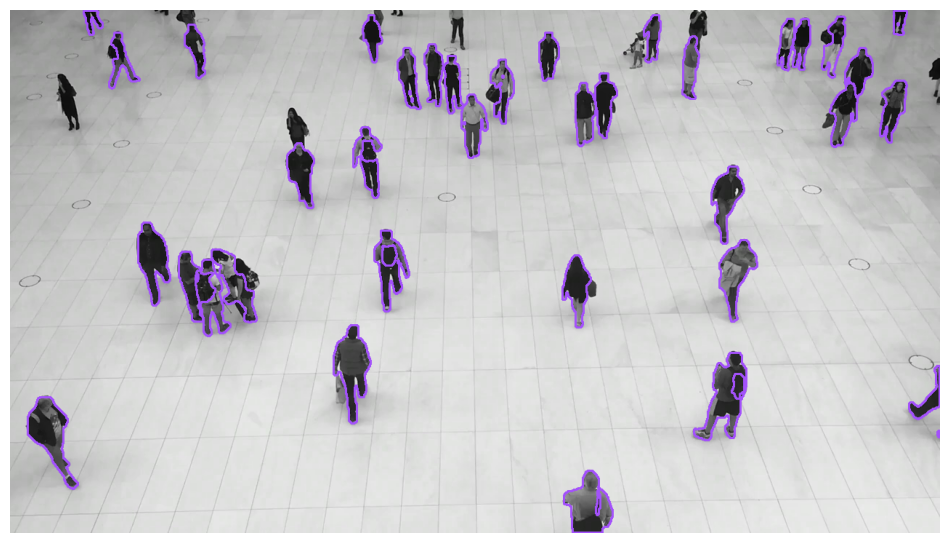{ align=center width="800" }
|
||||
|
||||
</div>
|
||||
|
||||
=== "Label"
|
||||
|
||||
```python
|
||||
@@ -208,6 +229,27 @@
|
||||
|
||||
</div>
|
||||
|
||||
=== "Pixelate"
|
||||
|
||||
```python
|
||||
>>> import supervision as sv
|
||||
|
||||
>>> image = ...
|
||||
>>> detections = sv.Detections(...)
|
||||
|
||||
>>> pixelate_annotator = sv.PixelateAnnotator()
|
||||
>>> annotated_frame = pixelate_annotator.annotate(
|
||||
... scene=image.copy(),
|
||||
... detections=detections
|
||||
... )
|
||||
```
|
||||
|
||||
<div class="result" markdown>
|
||||
|
||||
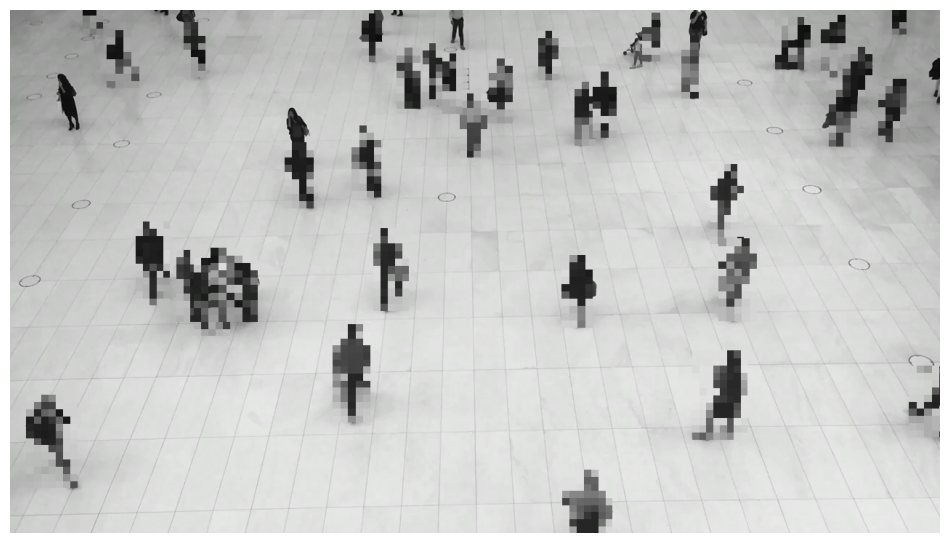{ align=center width="800" }
|
||||
|
||||
</div>
|
||||
|
||||
=== "Trace"
|
||||
|
||||
```python
|
||||
@@ -276,9 +318,9 @@
|
||||
|
||||
:::supervision.annotators.core.BoxCornerAnnotator
|
||||
|
||||
## BoxMaskAnnotator
|
||||
## ColorAnnotator
|
||||
|
||||
:::supervision.annotators.core.BoxMaskAnnotator
|
||||
:::supervision.annotators.core.ColorAnnotator
|
||||
|
||||
## CircleAnnotator
|
||||
|
||||
@@ -304,6 +346,10 @@
|
||||
|
||||
:::supervision.annotators.core.MaskAnnotator
|
||||
|
||||
## PolygonAnnotator
|
||||
|
||||
:::supervision.annotators.core.PolygonAnnotator
|
||||
|
||||
## LabelAnnotator
|
||||
|
||||
:::supervision.annotators.core.LabelAnnotator
|
||||
@@ -312,6 +358,10 @@
|
||||
|
||||
:::supervision.annotators.core.BlurAnnotator
|
||||
|
||||
## PixelateAnnotator
|
||||
|
||||
:::supervision.annotators.core.PixelateAnnotator
|
||||
|
||||
## TraceAnnotator
|
||||
|
||||
:::supervision.annotators.core.TraceAnnotator
|
||||
|
||||
@@ -0,0 +1,21 @@
|
||||
Supervision offers an assets download utility that allows you to download video files
|
||||
that you can use in your demos.
|
||||
|
||||
## install extra
|
||||
|
||||
To install the Supervision assets utility, you can use `pip`. This utility is available
|
||||
as an extra within the Supervision package.
|
||||
|
||||
!!! example "pip install"
|
||||
|
||||
```bash
|
||||
pip install supervision[assets]
|
||||
```
|
||||
|
||||
## download_assets
|
||||
|
||||
:::supervision.assets.downloader.download_assets
|
||||
|
||||
## VideoAssets
|
||||
|
||||
:::supervision.assets.list.VideoAssets
|
||||

Binary file not shown.
|
After Width: | Height: | Size: 19 KiB |
@@ -21,3 +21,11 @@
|
||||
## draw_image
|
||||
|
||||
:::supervision.draw.utils.draw_image
|
||||
|
||||
## calculate_dynamic_font_scale
|
||||
|
||||
:::supervision.draw.utils.calculate_dynamic_text_scale
|
||||
|
||||
## calculate_dynamic_line_thickness
|
||||
|
||||
:::supervision.draw.utils.calculate_dynamic_line_thickness
|
||||
|
||||
@@ -1 +1,183 @@
|
||||
🚧 Page under construction.
|
||||
Utilize Supervision to elevate your video analysis capabilities by effortlessly
|
||||
[tracking](https://supervision.roboflow.com/trackers/) objects identified by various
|
||||
object detection and segmentation models. This guide will walk you through the process
|
||||
of running inference using the [Ultralytics](https://github.com/ultralytics/ultralytics)
|
||||
YOLOv8 model, subsequently tracking these objects, and annotating the video.
|
||||
|
||||
To make it easier for you to follow our tutorial download the video we will use as an
|
||||
example. You can do this using
|
||||
[`supervision[assets]`](https://supervision.roboflow.com/assets/) extension.
|
||||
|
||||
```python
|
||||
from supervision.assets import download_assets, VideoAssets
|
||||
|
||||
download_assets(VideoAssets.PEOPLE_WALKING)
|
||||
```
|
||||
|
||||
<video controls>
|
||||
<source src="https://media.roboflow.com/supervision/video-examples/people-walking.mp4" type="video/mp4">
|
||||
</video>
|
||||
|
||||
## Run Inference
|
||||
|
||||
First, you'll need to obtain predictions from your object detection or segmentation
|
||||
model. In this tutorial, we are using the YOLOv8 model as an example. However,
|
||||
Supervision is versatile and compatible with various models. Check this
|
||||
[link](https://supervision.roboflow.com/how_to/detect_and_annotate/#load-predictions-into-supervision)
|
||||
for guidance on how to plug in other models.
|
||||
|
||||
We will define a `callback` function, which will process each frame of the video
|
||||
by obtaining model predictions and then annotating the frame based on these predictions.
|
||||
This `callback` function will be essential in the subsequent steps of the tutorial, as
|
||||
it will be modified to include tracking, labeling, and trace annotations.
|
||||
|
||||
```{ .py }
|
||||
import numpy as np
|
||||
import supervision as sv
|
||||
from ultralytics import YOLO
|
||||
|
||||
model = YOLO("yolov8n.pt")
|
||||
box_annotator = sv.BoundingBoxAnnotator()
|
||||
|
||||
def callback(frame: np.ndarray, _: int) -> np.ndarray:
|
||||
results = model(frame)[0]
|
||||
detections = sv.Detections.from_ultralytics(results)
|
||||
return box_annotator.annotate(frame.copy(), detections=detections)
|
||||
|
||||
sv.process_video(
|
||||
source_path="people-walking.mp4",
|
||||
target_path="result.mp4",
|
||||
callback=callback
|
||||
)
|
||||
```
|
||||
|
||||
<video controls>
|
||||
<source src="https://media.roboflow.com/supervision/video-examples/how-to/track-objects/run-inference.mp4" type="video/mp4">
|
||||
</video>
|
||||
|
||||
## Tracking
|
||||
|
||||
After running inference and obtaining predictions, the next step is to track the
|
||||
detected objects throughout the video. Utilizing Supervision’s
|
||||
[`sv.ByteTrack`](https://supervision.roboflow.com/trackers/#supervision.tracker.byte_tracker.core.ByteTrack)
|
||||
functionality, each detected object is assigned a unique tracker ID,
|
||||
enabling the continuous following of the object's motion path across different frames.
|
||||
|
||||
```{ .py hl_lines="6 12" }
|
||||
import numpy as np
|
||||
import supervision as sv
|
||||
from ultralytics import YOLO
|
||||
|
||||
model = YOLO("yolov8n.pt")
|
||||
tracker = sv.ByteTrack()
|
||||
box_annotator = sv.BoundingBoxAnnotator()
|
||||
|
||||
def callback(frame: np.ndarray, _: int) -> np.ndarray:
|
||||
results = model(frame)[0]
|
||||
detections = sv.Detections.from_ultralytics(results)
|
||||
detections = tracker.update_with_detections(detections)
|
||||
return box_annotator.annotate(frame.copy(), detections=detections)
|
||||
|
||||
sv.process_video(
|
||||
source_path="people-walking.mp4",
|
||||
target_path="result.mp4",
|
||||
callback=callback
|
||||
)
|
||||
```
|
||||
|
||||
## Annotate Video with Tracking IDs
|
||||
|
||||
Annotating the video with tracking IDs helps in distinguishing and following each object
|
||||
distinctly. With the
|
||||
[`sv.LabelAnnotator`](https://supervision.roboflow.com/annotators/#supervision.annotators.core.LabelAnnotator)
|
||||
in Supervision, we can overlay the tracker IDs and class labels on the detected objects,
|
||||
offering a clear visual representation of each object's class and unique identifier.
|
||||
|
||||
```{ .py hl_lines="8 15-19 23-24" }
|
||||
import numpy as np
|
||||
import supervision as sv
|
||||
from ultralytics import YOLO
|
||||
|
||||
model = YOLO("yolov8n.pt")
|
||||
tracker = sv.ByteTrack()
|
||||
box_annotator = sv.BoundingBoxAnnotator()
|
||||
label_annotator = sv.LabelAnnotator()
|
||||
|
||||
def callback(frame: np.ndarray, _: int) -> np.ndarray:
|
||||
results = model(frame)[0]
|
||||
detections = sv.Detections.from_ultralytics(results)
|
||||
detections = tracker.update_with_detections(detections)
|
||||
|
||||
labels = [
|
||||
f"#{tracker_id} {results.names[class_id]}"
|
||||
for class_id, tracker_id
|
||||
in zip(detections.class_id, detections.tracker_id)
|
||||
]
|
||||
|
||||
annotated_frame = box_annotator.annotate(
|
||||
frame.copy(), detections=detections)
|
||||
return label_annotator.annotate(
|
||||
annotated_frame, detections=detections, labels=labels)
|
||||
|
||||
sv.process_video(
|
||||
source_path="people-walking.mp4",
|
||||
target_path="result.mp4",
|
||||
callback=callback
|
||||
)
|
||||
```
|
||||
|
||||
<video controls>
|
||||
<source src="https://media.roboflow.com/supervision/video-examples/how-to/track-objects/annotate-video-with-tracking-ids.mp4" type="video/mp4">
|
||||
</video>
|
||||
|
||||
## Annotate Video with Traces
|
||||
|
||||
Adding traces to the video involves overlaying the historical paths of the detected
|
||||
objects. This feature, powered by the
|
||||
[`sv.TraceAnnotator`](https://supervision.roboflow.com/annotators/#supervision.annotators.core.TraceAnnotator),
|
||||
allows for visualizing the trajectories of objects, helping in understanding the
|
||||
movement patterns and interactions between objects in the video.
|
||||
|
||||
```{ .py hl_lines="9 26-27" }
|
||||
import numpy as np
|
||||
import supervision as sv
|
||||
from ultralytics import YOLO
|
||||
|
||||
model = YOLO("yolov8n.pt")
|
||||
tracker = sv.ByteTrack()
|
||||
box_annotator = sv.BoundingBoxAnnotator()
|
||||
label_annotator = sv.LabelAnnotator()
|
||||
trace_annotator = sv.TraceAnnotator()
|
||||
|
||||
def callback(frame: np.ndarray, _: int) -> np.ndarray:
|
||||
results = model(frame)[0]
|
||||
detections = sv.Detections.from_ultralytics(results)
|
||||
detections = tracker.update_with_detections(detections)
|
||||
|
||||
labels = [
|
||||
f"#{tracker_id} {results.names[class_id]}"
|
||||
for class_id, tracker_id
|
||||
in zip(detections.class_id, detections.tracker_id)
|
||||
]
|
||||
|
||||
annotated_frame = box_annotator.annotate(
|
||||
frame.copy(), detections=detections)
|
||||
annotated_frame = label_annotator.annotate(
|
||||
annotated_frame, detections=detections, labels=labels)
|
||||
return trace_annotator.annotate(
|
||||
annotated_frame, detections=detections)
|
||||
|
||||
sv.process_video(
|
||||
source_path="people-walking.mp4",
|
||||
target_path="result.mp4",
|
||||
callback=callback
|
||||
)
|
||||
```
|
||||
|
||||
<video controls>
|
||||
<source src="https://media.roboflow.com/supervision/video-examples/how-to/track-objects/annotate-video-with-traces.mp4" type="video/mp4">
|
||||
</video>
|
||||
|
||||
This structured walkthrough should give a detailed pathway to annotate videos
|
||||
effectively using Supervision’s various functionalities, including object tracking and
|
||||
trace annotations.
|
||||
|
||||
@@ -0,0 +1,10 @@
|
||||
document.addEventListener("DOMContentLoaded", function () {
|
||||
var script = document.createElement("script");
|
||||
script.src = "https://widget.kapa.ai/kapa-widget.bundle.js";
|
||||
script.setAttribute("data-website-id", "e83c5c60-2968-410b-a2da-08fb104f23df");
|
||||
script.setAttribute("data-project-name", "Roboflow");
|
||||
script.setAttribute("data-project-color", "#6405C9");
|
||||
script.setAttribute("data-project-logo", "https://media.roboflow.com/chat.png");
|
||||
script.async = true;
|
||||
document.head.appendChild(script);
|
||||
});
|
||||
+13
-3
@@ -1,7 +1,7 @@
|
||||
site_name: Supervision
|
||||
site_url: https://supervision.roboflow.com/
|
||||
site_author: Roboflow
|
||||
site_description: A set of easy-to-use utils that will come in handy in any Computer Vision project
|
||||
site_description: A set of easy-to-use utilities that will come in handy in any computer vision project.
|
||||
repo_name: roboflow/supervision
|
||||
repo_url: https://github.com/roboflow/supervision
|
||||
edit_uri: https://github.com/roboflow/supervision/tree/main/docs
|
||||
@@ -55,12 +55,13 @@ nav:
|
||||
- Image: utils/image.md
|
||||
- Notebook: utils/notebook.md
|
||||
- File: utils/file.md
|
||||
- Assets: assets.md
|
||||
- Changelog: changelog.md
|
||||
|
||||
theme:
|
||||
name: 'material'
|
||||
logo: https://media.roboflow.com/open-source/supervision/supervision-lenny.png
|
||||
favicon: https://media.roboflow.com/open-source/supervision/supervision-lenny.png
|
||||
logo: assets/supervision-lenny.png
|
||||
favicon: assets/supervision-lenny.png
|
||||
palette:
|
||||
# Palette for light mode
|
||||
- scheme: default
|
||||
@@ -78,10 +79,15 @@ theme:
|
||||
font:
|
||||
text: Roboto
|
||||
code: Roboto Mono
|
||||
features:
|
||||
- content.code.copy
|
||||
|
||||
plugins:
|
||||
- mkdocstrings
|
||||
- search
|
||||
- social:
|
||||
cards_layout_dir: docs/layouts
|
||||
cards_layout: custom
|
||||
|
||||
markdown_extensions:
|
||||
- admonition
|
||||
@@ -93,3 +99,7 @@ markdown_extensions:
|
||||
alternate_style: true
|
||||
- toc:
|
||||
permalink: true
|
||||
|
||||
extra_javascript:
|
||||
- "https://widget.kapa.ai/kapa-widget.bundle.js"
|
||||
- "javascript/init_kapa_widget.js"
|
||||
|
||||
Generated
+1439
-1184
File diff suppressed because it is too large
Load Diff
+20
-14
@@ -1,6 +1,6 @@
|
||||
[tool.poetry]
|
||||
name = "supervision"
|
||||
version = "0.16.0"
|
||||
version = "0.17.0rc7"
|
||||
description = "A set of easy-to-use utils that will come in handy in any Computer Vision project"
|
||||
authors = ["Piotr Skalski <piotr.skalski92@gmail.com>"]
|
||||
maintainers = ["Piotr Skalski <piotr.skalski92@gmail.com>"]
|
||||
@@ -36,26 +36,28 @@ classifiers=[
|
||||
|
||||
[tool.poetry.dependencies]
|
||||
python = ">=3.8,<3.12.0"
|
||||
numpy = "^1.20.0"
|
||||
matplotlib = "^3.7.1"
|
||||
pyyaml = "^6.0"
|
||||
pillow = ">=9.4,<11.0"
|
||||
opencv-python = { version = "^4.8.0.74", optional = true }
|
||||
opencv-python-headless = "^4.8.0.74"
|
||||
scipy = "^1.9.0"
|
||||
numpy = ">=1.20.0"
|
||||
matplotlib = ">=3.5.0"
|
||||
pyyaml = ">=5.3,<=6.0.1"
|
||||
pillow = ">=9.4"
|
||||
opencv-python = { version = ">=4.5.5.64,<=4.8.1.78", optional = true }
|
||||
opencv-python-headless = ">=4.5.5.64,<=4.8.1.78"
|
||||
scipy = ">=1.9.0,<=2.0.0"
|
||||
requests = { version = ">=2.26.0,<=2.31.0", optional = true }
|
||||
tqdm = { version = ">=4.62.3,<=4.66.1", optional = true }
|
||||
|
||||
|
||||
[tool.poetry.extras]
|
||||
desktop = ["opencv-python"]
|
||||
|
||||
assets = ["requests","tqdm"]
|
||||
|
||||
[tool.poetry.group.dev.dependencies]
|
||||
twine = "^4.0.2"
|
||||
pytest = "^7.2.2"
|
||||
wheel = "^0.40.0"
|
||||
notebook = "^6.5.3"
|
||||
build = "^0.10.0"
|
||||
ruff = "^0.0.280"
|
||||
wheel = ">=0.40,<0.42"
|
||||
notebook = ">=6.5.3,<8.0.0"
|
||||
build = ">=0.10,<1.1"
|
||||
ruff = ">=0.0.280,<0.1.7"
|
||||
isort = "^5.12.0"
|
||||
black = "^23.7.0"
|
||||
mypy = "^1.4.1"
|
||||
@@ -65,7 +67,7 @@ flake8 = { version = "*", python = ">=3.8.1,<3.12.0" }
|
||||
|
||||
[tool.poetry.group.docs.dependencies]
|
||||
mkdocs-material = "^9.1.4"
|
||||
mkdocstrings = {extras = ["python"], version = "^0.20.0"}
|
||||
mkdocstrings = {extras = ["python"], version = ">=0.20,<0.25"}
|
||||
|
||||
[tool.flake8]
|
||||
exclude = ".venv"
|
||||
@@ -79,6 +81,7 @@ extend-ignore = """
|
||||
"""
|
||||
per-file-ignores = """
|
||||
__init__.py: F401
|
||||
supervision/assets/list.py: E501
|
||||
"""
|
||||
|
||||
[tool.isort]
|
||||
@@ -149,6 +152,7 @@ exclude = [
|
||||
"yarn-error.log",
|
||||
"yarn.lock",
|
||||
"docs",
|
||||
"supervision/assets/list.py"
|
||||
]
|
||||
|
||||
# Same as Black.
|
||||
@@ -167,6 +171,8 @@ convention = "google"
|
||||
|
||||
[tool.ruff.per-file-ignores]
|
||||
"__init__.py" = ["E402","F401"]
|
||||
"supervision/assets/list.py" = ["E501"]
|
||||
|
||||
|
||||
[tool.ruff.pylint]
|
||||
max-args = 20
|
||||
|
||||
@@ -10,14 +10,16 @@ from supervision.annotators.core import (
|
||||
BlurAnnotator,
|
||||
BoundingBoxAnnotator,
|
||||
BoxCornerAnnotator,
|
||||
BoxMaskAnnotator,
|
||||
CircleAnnotator,
|
||||
ColorAnnotator,
|
||||
DotAnnotator,
|
||||
EllipseAnnotator,
|
||||
HaloAnnotator,
|
||||
HeatMapAnnotator,
|
||||
LabelAnnotator,
|
||||
MaskAnnotator,
|
||||
PixelateAnnotator,
|
||||
PolygonAnnotator,
|
||||
TraceAnnotator,
|
||||
)
|
||||
from supervision.annotators.utils import ColorLookup
|
||||
@@ -34,6 +36,7 @@ from supervision.detection.tools.inference_slicer import InferenceSlicer
|
||||
from supervision.detection.tools.polygon_zone import PolygonZone, PolygonZoneAnnotator
|
||||
from supervision.detection.utils import (
|
||||
box_iou_batch,
|
||||
calculate_masks_centroids,
|
||||
filter_polygons_by_area,
|
||||
mask_to_polygons,
|
||||
mask_to_xyxy,
|
||||
@@ -43,6 +46,8 @@ from supervision.detection.utils import (
|
||||
)
|
||||
from supervision.draw.color import Color, ColorPalette
|
||||
from supervision.draw.utils import (
|
||||
calculate_dynamic_line_thickness,
|
||||
calculate_dynamic_text_scale,
|
||||
draw_filled_rectangle,
|
||||
draw_image,
|
||||
draw_line,
|
||||
|
||||
+233
-70
@@ -7,7 +7,9 @@ import numpy as np
|
||||
from supervision.annotators.base import BaseAnnotator
|
||||
from supervision.annotators.utils import ColorLookup, Trace, resolve_color
|
||||
from supervision.detection.core import Detections
|
||||
from supervision.detection.utils import clip_boxes, mask_to_polygons
|
||||
from supervision.draw.color import Color, ColorPalette
|
||||
from supervision.draw.utils import draw_polygon
|
||||
from supervision.geometry.core import Position
|
||||
|
||||
|
||||
@@ -28,7 +30,7 @@ class BoundingBoxAnnotator(BaseAnnotator):
|
||||
annotating detections.
|
||||
thickness (int): Thickness of the bounding box lines.
|
||||
color_lookup (str): Strategy for mapping colors to annotations.
|
||||
Options are `INDEX`, `CLASS`, `TRACE`.
|
||||
Options are `INDEX`, `CLASS`, `TRACK`.
|
||||
"""
|
||||
self.color: Union[Color, ColorPalette] = color
|
||||
self.thickness: int = thickness
|
||||
@@ -50,7 +52,7 @@ class BoundingBoxAnnotator(BaseAnnotator):
|
||||
Allows to override the default color mapping strategy.
|
||||
|
||||
Returns:
|
||||
np.ndarray: The annotated image.
|
||||
The annotated image.
|
||||
|
||||
Example:
|
||||
```python
|
||||
@@ -92,6 +94,10 @@ class BoundingBoxAnnotator(BaseAnnotator):
|
||||
class MaskAnnotator(BaseAnnotator):
|
||||
"""
|
||||
A class for drawing masks on an image using provided detections.
|
||||
|
||||
!!! warning
|
||||
|
||||
This annotator utilizes the `sv.Detections.mask`.
|
||||
"""
|
||||
|
||||
def __init__(
|
||||
@@ -106,7 +112,7 @@ class MaskAnnotator(BaseAnnotator):
|
||||
annotating detections.
|
||||
opacity (float): Opacity of the overlay mask. Must be between `0` and `1`.
|
||||
color_lookup (str): Strategy for mapping colors to annotations.
|
||||
Options are `INDEX`, `CLASS`, `TRACE`.
|
||||
Options are `INDEX`, `CLASS`, `TRACK`.
|
||||
"""
|
||||
self.color: Union[Color, ColorPalette] = color
|
||||
self.opacity = opacity
|
||||
@@ -128,7 +134,7 @@ class MaskAnnotator(BaseAnnotator):
|
||||
Allows to override the default color mapping strategy.
|
||||
|
||||
Returns:
|
||||
np.ndarray: The annotated image.
|
||||
The annotated image.
|
||||
|
||||
Example:
|
||||
```python
|
||||
@@ -150,6 +156,8 @@ class MaskAnnotator(BaseAnnotator):
|
||||
if detections.mask is None:
|
||||
return scene
|
||||
|
||||
colored_mask = np.array(scene, copy=True, dtype=np.uint8)
|
||||
|
||||
for detection_idx in np.flip(np.argsort(detections.area)):
|
||||
color = resolve_color(
|
||||
color=self.color,
|
||||
@@ -160,16 +168,99 @@ class MaskAnnotator(BaseAnnotator):
|
||||
else custom_color_lookup,
|
||||
)
|
||||
mask = detections.mask[detection_idx]
|
||||
colored_mask = np.zeros_like(scene, dtype=np.uint8)
|
||||
colored_mask[:] = color.as_bgr()
|
||||
scene[mask] = cv2.addWeighted(
|
||||
colored_mask, self.opacity, scene, 1 - self.opacity, 0
|
||||
)[mask]
|
||||
colored_mask[mask] = color.as_bgr()
|
||||
|
||||
scene = cv2.addWeighted(colored_mask, self.opacity, scene, 1 - self.opacity, 0)
|
||||
return scene.astype(np.uint8)
|
||||
|
||||
|
||||
class PolygonAnnotator(BaseAnnotator):
|
||||
"""
|
||||
A class for drawing polygons on an image using provided detections.
|
||||
|
||||
!!! warning
|
||||
|
||||
This annotator utilizes the `sv.Detections.mask`.
|
||||
"""
|
||||
|
||||
def __init__(
|
||||
self,
|
||||
color: Union[Color, ColorPalette] = ColorPalette.default(),
|
||||
thickness: int = 2,
|
||||
color_lookup: ColorLookup = ColorLookup.CLASS,
|
||||
):
|
||||
"""
|
||||
Args:
|
||||
color (Union[Color, ColorPalette]): The color or color palette to use for
|
||||
annotating detections.
|
||||
thickness (int): Thickness of the polygon lines.
|
||||
color_lookup (str): Strategy for mapping colors to annotations.
|
||||
Options are `INDEX`, `CLASS`, `TRACK`.
|
||||
"""
|
||||
self.color: Union[Color, ColorPalette] = color
|
||||
self.thickness: int = thickness
|
||||
self.color_lookup: ColorLookup = color_lookup
|
||||
|
||||
def annotate(
|
||||
self,
|
||||
scene: np.ndarray,
|
||||
detections: Detections,
|
||||
custom_color_lookup: Optional[np.ndarray] = None,
|
||||
) -> np.ndarray:
|
||||
"""
|
||||
Annotates the given scene with polygons based on the provided detections.
|
||||
|
||||
Args:
|
||||
scene (np.ndarray): The image where polygons will be drawn.
|
||||
detections (Detections): Object detections to annotate.
|
||||
custom_color_lookup (Optional[np.ndarray]): Custom color lookup array.
|
||||
Allows to override the default color mapping strategy.
|
||||
|
||||
Returns:
|
||||
The annotated image.
|
||||
|
||||
Example:
|
||||
```python
|
||||
>>> import supervision as sv
|
||||
|
||||
>>> image = ...
|
||||
>>> detections = sv.Detections(...)
|
||||
|
||||
>>> polygon_annotator = sv.PolygonAnnotator()
|
||||
>>> annotated_frame = polygon_annotator.annotate(
|
||||
... scene=image.copy(),
|
||||
... detections=detections
|
||||
... )
|
||||
```
|
||||
|
||||

|
||||
"""
|
||||
if detections.mask is None:
|
||||
return scene
|
||||
|
||||
for detection_idx in range(len(detections)):
|
||||
mask = detections.mask[detection_idx]
|
||||
color = resolve_color(
|
||||
color=self.color,
|
||||
detections=detections,
|
||||
detection_idx=detection_idx,
|
||||
color_lookup=self.color_lookup
|
||||
if custom_color_lookup is None
|
||||
else custom_color_lookup,
|
||||
)
|
||||
for polygon in mask_to_polygons(mask=mask):
|
||||
scene = draw_polygon(
|
||||
scene=scene,
|
||||
polygon=polygon,
|
||||
color=color,
|
||||
thickness=self.thickness,
|
||||
)
|
||||
|
||||
return scene
|
||||
|
||||
|
||||
class BoxMaskAnnotator(BaseAnnotator):
|
||||
class ColorAnnotator(BaseAnnotator):
|
||||
"""
|
||||
A class for drawing box masks on an image using provided detections.
|
||||
"""
|
||||
@@ -186,7 +277,7 @@ class BoxMaskAnnotator(BaseAnnotator):
|
||||
annotating detections.
|
||||
opacity (float): Opacity of the overlay mask. Must be between `0` and `1`.
|
||||
color_lookup (str): Strategy for mapping colors to annotations.
|
||||
Options are `INDEX`, `CLASS`, `TRACE`.
|
||||
Options are `INDEX`, `CLASS`, `TRACK`.
|
||||
"""
|
||||
self.color: Union[Color, ColorPalette] = color
|
||||
self.color_lookup: ColorLookup = color_lookup
|
||||
@@ -208,7 +299,7 @@ class BoxMaskAnnotator(BaseAnnotator):
|
||||
Allows to override the default color mapping strategy.
|
||||
|
||||
Returns:
|
||||
np.ndarray: The annotated image.
|
||||
The annotated image.
|
||||
|
||||
Example:
|
||||
```python
|
||||
@@ -217,8 +308,8 @@ class BoxMaskAnnotator(BaseAnnotator):
|
||||
>>> image = ...
|
||||
>>> detections = sv.Detections(...)
|
||||
|
||||
>>> box_mask_annotator = sv.BoxMaskAnnotator()
|
||||
>>> annotated_frame = box_mask_annotator.annotate(
|
||||
>>> color_annotator = sv.ColorAnnotator()
|
||||
>>> annotated_frame = color_annotator.annotate(
|
||||
... scene=image.copy(),
|
||||
... detections=detections
|
||||
... )
|
||||
@@ -254,6 +345,10 @@ class BoxMaskAnnotator(BaseAnnotator):
|
||||
class HaloAnnotator(BaseAnnotator):
|
||||
"""
|
||||
A class for drawing Halos on an image using provided detections.
|
||||
|
||||
!!! warning
|
||||
|
||||
This annotator utilizes the `sv.Detections.mask`.
|
||||
"""
|
||||
|
||||
def __init__(
|
||||
@@ -271,7 +366,7 @@ class HaloAnnotator(BaseAnnotator):
|
||||
kernel_size (int): The size of the average pooling kernel used for creating
|
||||
the halo.
|
||||
color_lookup (str): Strategy for mapping colors to annotations.
|
||||
Options are `INDEX`, `CLASS`, `TRACE`.
|
||||
Options are `INDEX`, `CLASS`, `TRACK`.
|
||||
"""
|
||||
self.color: Union[Color, ColorPalette] = color
|
||||
self.opacity = opacity
|
||||
@@ -294,7 +389,7 @@ class HaloAnnotator(BaseAnnotator):
|
||||
Allows to override the default color mapping strategy.
|
||||
|
||||
Returns:
|
||||
np.ndarray: The annotated image.
|
||||
The annotated image.
|
||||
|
||||
Example:
|
||||
```python
|
||||
@@ -364,7 +459,7 @@ class EllipseAnnotator(BaseAnnotator):
|
||||
start_angle (int): Starting angle of the ellipse.
|
||||
end_angle (int): Ending angle of the ellipse.
|
||||
color_lookup (str): Strategy for mapping colors to annotations.
|
||||
Options are `INDEX`, `CLASS`, `TRACE`.
|
||||
Options are `INDEX`, `CLASS`, `TRACK`.
|
||||
"""
|
||||
self.color: Union[Color, ColorPalette] = color
|
||||
self.thickness: int = thickness
|
||||
@@ -388,7 +483,7 @@ class EllipseAnnotator(BaseAnnotator):
|
||||
Allows to override the default color mapping strategy.
|
||||
|
||||
Returns:
|
||||
np.ndarray: The annotated image.
|
||||
The annotated image.
|
||||
|
||||
Example:
|
||||
```python
|
||||
@@ -452,7 +547,7 @@ class BoxCornerAnnotator(BaseAnnotator):
|
||||
thickness (int): Thickness of the corner lines.
|
||||
corner_length (int): Length of each corner line.
|
||||
color_lookup (str): Strategy for mapping colors to annotations.
|
||||
Options are `INDEX`, `CLASS`, `TRACE`.
|
||||
Options are `INDEX`, `CLASS`, `TRACK`.
|
||||
"""
|
||||
self.color: Union[Color, ColorPalette] = color
|
||||
self.thickness: int = thickness
|
||||
@@ -475,7 +570,7 @@ class BoxCornerAnnotator(BaseAnnotator):
|
||||
Allows to override the default color mapping strategy.
|
||||
|
||||
Returns:
|
||||
np.ndarray: The annotated image.
|
||||
The annotated image.
|
||||
|
||||
Example:
|
||||
```python
|
||||
@@ -536,7 +631,7 @@ class CircleAnnotator(BaseAnnotator):
|
||||
annotating detections.
|
||||
thickness (int): Thickness of the circle line.
|
||||
color_lookup (str): Strategy for mapping colors to annotations.
|
||||
Options are `INDEX`, `CLASS`, `TRACE`.
|
||||
Options are `INDEX`, `CLASS`, `TRACK`.
|
||||
"""
|
||||
|
||||
self.color: Union[Color, ColorPalette] = color
|
||||
@@ -559,7 +654,7 @@ class CircleAnnotator(BaseAnnotator):
|
||||
Allows to override the default color mapping strategy.
|
||||
|
||||
Returns:
|
||||
np.ndarray: The annotated image.
|
||||
The annotated image.
|
||||
|
||||
Example:
|
||||
```python
|
||||
@@ -622,7 +717,7 @@ class DotAnnotator(BaseAnnotator):
|
||||
radius (int): Radius of the drawn dots.
|
||||
position (Position): The anchor position for placing the dot.
|
||||
color_lookup (ColorLookup): Strategy for mapping colors to annotations.
|
||||
Options are `INDEX`, `CLASS`, `TRACE`.
|
||||
Options are `INDEX`, `CLASS`, `TRACK`.
|
||||
"""
|
||||
self.color: Union[Color, ColorPalette] = color
|
||||
self.radius: int = radius
|
||||
@@ -645,7 +740,7 @@ class DotAnnotator(BaseAnnotator):
|
||||
Allows to override the default color mapping strategy.
|
||||
|
||||
Returns:
|
||||
np.ndarray: The annotated image.
|
||||
The annotated image.
|
||||
|
||||
Example:
|
||||
```python
|
||||
@@ -664,7 +759,7 @@ class DotAnnotator(BaseAnnotator):
|
||||

|
||||
"""
|
||||
xy = detections.get_anchor_coordinates(anchor=self.position)
|
||||
xy = detections.get_anchors_coordinates(anchor=self.position)
|
||||
for detection_idx in range(len(detections)):
|
||||
color = resolve_color(
|
||||
color=self.color,
|
||||
@@ -705,56 +800,53 @@ class LabelAnnotator:
|
||||
text_position (Position): Position of the text relative to the detection.
|
||||
Possible values are defined in the `Position` enum.
|
||||
color_lookup (str): Strategy for mapping colors to annotations.
|
||||
Options are `INDEX`, `CLASS`, `TRACE`.
|
||||
Options are `INDEX`, `CLASS`, `TRACK`.
|
||||
"""
|
||||
self.color: Union[Color, ColorPalette] = color
|
||||
self.text_color: Color = text_color
|
||||
self.text_scale: float = text_scale
|
||||
self.text_thickness: int = text_thickness
|
||||
self.text_padding: int = text_padding
|
||||
self.text_position: Position = text_position
|
||||
self.text_anchor: Position = text_position
|
||||
self.color_lookup: ColorLookup = color_lookup
|
||||
|
||||
@staticmethod
|
||||
def resolve_text_background_xyxy(
|
||||
detection_xyxy: Tuple[int, int, int, int],
|
||||
center_coordinates: Tuple[int, int],
|
||||
text_wh: Tuple[int, int],
|
||||
text_padding: int,
|
||||
position: Position,
|
||||
) -> Tuple[int, int, int, int]:
|
||||
padded_text_wh = (text_wh[0] + 2 * text_padding, text_wh[1] + 2 * text_padding)
|
||||
x1, y1, x2, y2 = detection_xyxy
|
||||
center_x = (x1 + x2) // 2
|
||||
center_y = (y1 + y2) // 2
|
||||
center_x, center_y = center_coordinates
|
||||
text_w, text_h = text_wh
|
||||
|
||||
if position == Position.TOP_LEFT:
|
||||
return x1, y1 - padded_text_wh[1], x1 + padded_text_wh[0], y1
|
||||
return center_x, center_y - text_h, center_x + text_w, center_y
|
||||
elif position == Position.TOP_RIGHT:
|
||||
return x2 - padded_text_wh[0], y1 - padded_text_wh[1], x2, y1
|
||||
return center_x - text_w, center_y - text_h, center_x, center_y
|
||||
elif position == Position.TOP_CENTER:
|
||||
return (
|
||||
center_x - padded_text_wh[0] // 2,
|
||||
y1 - padded_text_wh[1],
|
||||
center_x + padded_text_wh[0] // 2,
|
||||
y1,
|
||||
center_x - text_w // 2,
|
||||
center_y - text_h,
|
||||
center_x + text_w // 2,
|
||||
center_y,
|
||||
)
|
||||
elif position == Position.CENTER:
|
||||
elif position == Position.CENTER or position == Position.CENTER_OF_MASS:
|
||||
return (
|
||||
center_x - padded_text_wh[0] // 2,
|
||||
center_y - padded_text_wh[1] // 2,
|
||||
center_x + padded_text_wh[0] // 2,
|
||||
center_y + padded_text_wh[1] // 2,
|
||||
center_x - text_w // 2,
|
||||
center_y - text_h // 2,
|
||||
center_x + text_w // 2,
|
||||
center_y + text_h // 2,
|
||||
)
|
||||
elif position == Position.BOTTOM_LEFT:
|
||||
return x1, y2, x1 + padded_text_wh[0], y2 + padded_text_wh[1]
|
||||
return center_x, center_y, center_x + text_w, center_y + text_h
|
||||
elif position == Position.BOTTOM_RIGHT:
|
||||
return x2 - padded_text_wh[0], y2, x2, y2 + padded_text_wh[1]
|
||||
return center_x - text_w, center_y, center_x, center_y + text_h
|
||||
elif position == Position.BOTTOM_CENTER:
|
||||
return (
|
||||
center_x - padded_text_wh[0] // 2,
|
||||
y2,
|
||||
center_x + padded_text_wh[0] // 2,
|
||||
y2 + padded_text_wh[1],
|
||||
center_x - text_w // 2,
|
||||
center_y,
|
||||
center_x + text_w // 2,
|
||||
center_y + text_h,
|
||||
)
|
||||
|
||||
def annotate(
|
||||
@@ -775,7 +867,7 @@ class LabelAnnotator:
|
||||
Allows to override the default color mapping strategy.
|
||||
|
||||
Returns:
|
||||
np.ndarray: The annotated image.
|
||||
The annotated image.
|
||||
|
||||
Example:
|
||||
```python
|
||||
@@ -795,8 +887,10 @@ class LabelAnnotator:
|
||||
supervision-annotator-examples/label-annotator-example-purple.png)
|
||||
"""
|
||||
font = cv2.FONT_HERSHEY_SIMPLEX
|
||||
for detection_idx in range(len(detections)):
|
||||
detection_xyxy = detections.xyxy[detection_idx].astype(int)
|
||||
anchors_coordinates = detections.get_anchors_coordinates(
|
||||
anchor=self.text_anchor
|
||||
).astype(int)
|
||||
for detection_idx, center_coordinates in enumerate(anchors_coordinates):
|
||||
color = resolve_color(
|
||||
color=self.color,
|
||||
detections=detections,
|
||||
@@ -810,22 +904,22 @@ class LabelAnnotator:
|
||||
if (labels is None or len(detections) != len(labels))
|
||||
else labels[detection_idx]
|
||||
)
|
||||
text_wh = cv2.getTextSize(
|
||||
text_w, text_h = cv2.getTextSize(
|
||||
text=text,
|
||||
fontFace=font,
|
||||
fontScale=self.text_scale,
|
||||
thickness=self.text_thickness,
|
||||
)[0]
|
||||
|
||||
text_w_padded = text_w + 2 * self.text_padding
|
||||
text_h_padded = text_h + 2 * self.text_padding
|
||||
text_background_xyxy = self.resolve_text_background_xyxy(
|
||||
detection_xyxy=detection_xyxy,
|
||||
text_wh=text_wh,
|
||||
text_padding=self.text_padding,
|
||||
position=self.text_position,
|
||||
center_coordinates=tuple(center_coordinates),
|
||||
text_wh=(text_w_padded, text_h_padded),
|
||||
position=self.text_anchor,
|
||||
)
|
||||
|
||||
text_x = text_background_xyxy[0] + self.text_padding
|
||||
text_y = text_background_xyxy[1] + self.text_padding + text_wh[1]
|
||||
text_y = text_background_xyxy[1] + self.text_padding + text_h
|
||||
|
||||
cv2.rectangle(
|
||||
img=scene,
|
||||
@@ -872,7 +966,7 @@ class BlurAnnotator(BaseAnnotator):
|
||||
detections (Detections): Object detections to annotate.
|
||||
|
||||
Returns:
|
||||
np.ndarray: The annotated image.
|
||||
The annotated image.
|
||||
|
||||
Example:
|
||||
```python
|
||||
@@ -882,7 +976,7 @@ class BlurAnnotator(BaseAnnotator):
|
||||
>>> detections = sv.Detections(...)
|
||||
|
||||
>>> blur_annotator = sv.BlurAnnotator()
|
||||
>>> annotated_frame = blur_annotator.annotate(
|
||||
>>> annotated_frame = circle_annotator.annotate(
|
||||
... scene=image.copy(),
|
||||
... detections=detections
|
||||
... )
|
||||
@@ -891,10 +985,13 @@ class BlurAnnotator(BaseAnnotator):
|
||||

|
||||
"""
|
||||
for detection_idx in range(len(detections)):
|
||||
x1, y1, x2, y2 = detections.xyxy[detection_idx].astype(int)
|
||||
roi = scene[y1:y2, x1:x2]
|
||||
image_height, image_width = scene.shape[:2]
|
||||
clipped_xyxy = clip_boxes(
|
||||
xyxy=detections.xyxy, resolution_wh=(image_width, image_height)
|
||||
).astype(int)
|
||||
|
||||
for x1, y1, x2, y2 in clipped_xyxy:
|
||||
roi = scene[y1:y2, x1:x2]
|
||||
roi = cv2.blur(roi, (self.kernel_size, self.kernel_size))
|
||||
scene[y1:y2, x1:x2] = roi
|
||||
|
||||
@@ -907,7 +1004,7 @@ class TraceAnnotator:
|
||||
|
||||
!!! warning
|
||||
|
||||
This annotator utilizes the `tracker_id`. Read
|
||||
This annotator utilizes the `sv.Detections.tracker_id`. Read
|
||||
[here](https://supervision.roboflow.com/trackers/) to learn how to plug
|
||||
tracking into your inference pipeline.
|
||||
"""
|
||||
@@ -930,7 +1027,7 @@ class TraceAnnotator:
|
||||
points. Defaults to `30`.
|
||||
thickness (int): The thickness of the trace lines. Defaults to `2`.
|
||||
color_lookup (str): Strategy for mapping colors to annotations.
|
||||
Options are `INDEX`, `CLASS`, `TRACE`.
|
||||
Options are `INDEX`, `CLASS`, `TRACK`.
|
||||
"""
|
||||
self.color: Union[Color, ColorPalette] = color
|
||||
self.position = position
|
||||
@@ -955,7 +1052,7 @@ class TraceAnnotator:
|
||||
Allows to override the default color mapping strategy.
|
||||
|
||||
Returns:
|
||||
np.ndarray: The image with the trace paths drawn on it.
|
||||
The annotated image.
|
||||
|
||||
Example:
|
||||
```python
|
||||
@@ -1051,7 +1148,7 @@ class HeatMapAnnotator:
|
||||
detections (Detections): Object detections to annotate.
|
||||
|
||||
Returns:
|
||||
np.ndarray: Annotated image.
|
||||
Annotated image.
|
||||
|
||||
Example:
|
||||
```python
|
||||
@@ -1082,7 +1179,7 @@ class HeatMapAnnotator:
|
||||
if self.heat_mask is None:
|
||||
self.heat_mask = np.zeros(scene.shape[:2])
|
||||
mask = np.zeros(scene.shape[:2])
|
||||
for xy in detections.get_anchor_coordinates(self.position):
|
||||
for xy in detections.get_anchors_coordinates(self.position):
|
||||
cv2.circle(mask, (int(xy[0]), int(xy[1])), self.radius, 1, -1)
|
||||
self.heat_mask = mask + self.heat_mask
|
||||
temp = self.heat_mask.copy()
|
||||
@@ -1100,3 +1197,69 @@ class HeatMapAnnotator:
|
||||
mask
|
||||
]
|
||||
return scene
|
||||
|
||||
|
||||
class PixelateAnnotator(BaseAnnotator):
|
||||
"""
|
||||
A class for pixelating regions in an image using provided detections.
|
||||
"""
|
||||
|
||||
def __init__(self, pixel_size: int = 20):
|
||||
"""
|
||||
Args:
|
||||
pixel_size (int): The size of the pixelation.
|
||||
"""
|
||||
self.pixel_size: int = pixel_size
|
||||
|
||||
def annotate(
|
||||
self,
|
||||
scene: np.ndarray,
|
||||
detections: Detections,
|
||||
) -> np.ndarray:
|
||||
"""
|
||||
Annotates the given scene by pixelating regions based on the provided
|
||||
detections.
|
||||
|
||||
Args:
|
||||
scene (np.ndarray): The image where pixelating will be applied.
|
||||
detections (Detections): Object detections to annotate.
|
||||
|
||||
Returns:
|
||||
The annotated image.
|
||||
|
||||
Example:
|
||||
```python
|
||||
>>> import supervision as sv
|
||||
|
||||
>>> image = ...
|
||||
>>> detections = sv.Detections(...)
|
||||
|
||||
>>> pixelate_annotator = sv.PixelateAnnotator()
|
||||
>>> annotated_frame = pixelate_annotator.annotate(
|
||||
... scene=image.copy(),
|
||||
... detections=detections
|
||||
... )
|
||||
```
|
||||
|
||||

|
||||
"""
|
||||
image_height, image_width = scene.shape[:2]
|
||||
clipped_xyxy = clip_boxes(
|
||||
xyxy=detections.xyxy, resolution_wh=(image_width, image_height)
|
||||
).astype(int)
|
||||
|
||||
for x1, y1, x2, y2 in clipped_xyxy:
|
||||
roi = scene[y1:y2, x1:x2]
|
||||
scaled_up_roi = cv2.resize(
|
||||
src=roi, dsize=None, fx=1 / self.pixel_size, fy=1 / self.pixel_size
|
||||
)
|
||||
scaled_down_roi = cv2.resize(
|
||||
src=scaled_up_roi,
|
||||
dsize=(roi.shape[1], roi.shape[0]),
|
||||
interpolation=cv2.INTER_NEAREST,
|
||||
)
|
||||
|
||||
scene[y1:y2, x1:x2] = scaled_down_roi
|
||||
|
||||
return scene
|
||||
|
||||
@@ -102,7 +102,7 @@ class Trace:
|
||||
frame_id = np.full(len(detections), self.current_frame_id, dtype=int)
|
||||
self.frame_id = np.concatenate([self.frame_id, frame_id])
|
||||
self.xy = np.concatenate(
|
||||
[self.xy, detections.get_anchor_coordinates(self.anchor)]
|
||||
[self.xy, detections.get_anchors_coordinates(self.anchor)]
|
||||
)
|
||||
self.tracker_id = np.concatenate([self.tracker_id, detections.tracker_id])
|
||||
|
||||
|
||||
@@ -0,0 +1,2 @@
|
||||
from supervision.assets.downloader import download_assets
|
||||
from supervision.assets.list import VideoAssets
|
||||
@@ -0,0 +1,94 @@
|
||||
import os
|
||||
from hashlib import md5
|
||||
from pathlib import Path
|
||||
from shutil import copyfileobj
|
||||
from typing import Union
|
||||
|
||||
from supervision.assets.list import VIDEO_ASSETS, VideoAssets
|
||||
|
||||
try:
|
||||
from requests import get
|
||||
from tqdm.auto import tqdm
|
||||
except ImportError:
|
||||
raise ValueError(
|
||||
"\n"
|
||||
"Please install requests and tqdm to download assets \n"
|
||||
"or install supervision with assets \n"
|
||||
"pip install supervision[assets] \n"
|
||||
"\n"
|
||||
)
|
||||
|
||||
|
||||
def is_md5_hash_matching(filename: str, original_md5_hash: str) -> bool:
|
||||
"""
|
||||
Check if the MD5 hash of a file matches the original hash.
|
||||
|
||||
Parameters:
|
||||
filename (str): The path to the file to be checked as a string.
|
||||
original_md5_hash (str): The original MD5 hash to compare against.
|
||||
|
||||
Returns:
|
||||
bool: True if the hashes match, False otherwise.
|
||||
"""
|
||||
if not os.path.exists(filename):
|
||||
return False
|
||||
|
||||
with open(filename, "rb") as file:
|
||||
file_contents = file.read()
|
||||
computed_md5_hash = md5(file_contents).hexdigest()
|
||||
|
||||
return computed_md5_hash == original_md5_hash
|
||||
|
||||
|
||||
def download_assets(asset_name: Union[VideoAssets, str]) -> str:
|
||||
"""
|
||||
Download a specified asset if it doesn't already exist or is corrupted.
|
||||
|
||||
Parameters:
|
||||
asset_name (Union[VideoAssets, str]): The name or type of the asset to be
|
||||
downloaded.
|
||||
|
||||
Returns:
|
||||
str: The filename of the downloaded asset.
|
||||
|
||||
Example:
|
||||
```python
|
||||
>>> from supervision.assets import download_assets, VideoAssets
|
||||
|
||||
>>> download_assets(VideoAssets.VEHICLES)
|
||||
"vehicles.mp4"
|
||||
```
|
||||
"""
|
||||
|
||||
filename = asset_name.value if isinstance(asset_name, VideoAssets) else asset_name
|
||||
|
||||
if not Path(filename).exists() and filename in VIDEO_ASSETS:
|
||||
print(f"Downloading {filename} assets \n")
|
||||
response = get(VIDEO_ASSETS[filename][0], stream=True, allow_redirects=True)
|
||||
response.raise_for_status()
|
||||
|
||||
file_size = int(response.headers.get("Content-Length", 0))
|
||||
folder_path = Path(filename).expanduser().resolve()
|
||||
folder_path.parent.mkdir(parents=True, exist_ok=True)
|
||||
|
||||
with tqdm.wrapattr(
|
||||
response.raw, "read", total=file_size, desc="", colour="#a351fb"
|
||||
) as raw_resp:
|
||||
with folder_path.open("wb") as file:
|
||||
copyfileobj(raw_resp, file)
|
||||
|
||||
elif Path(filename).exists():
|
||||
if not is_md5_hash_matching(filename, VIDEO_ASSETS[filename][1]):
|
||||
print("File corrupted. Re-downloading... \n")
|
||||
os.remove(filename)
|
||||
return download_assets(filename)
|
||||
|
||||
print(f"{filename} asset download complete. \n")
|
||||
|
||||
else:
|
||||
valid_assets = ", ".join(asset.value for asset in VideoAssets)
|
||||
raise ValueError(
|
||||
f"Invalid asset. It should be one of the following: {valid_assets}."
|
||||
)
|
||||
|
||||
return filename
|
||||
@@ -0,0 +1,65 @@
|
||||
from enum import Enum
|
||||
from typing import Dict, Tuple
|
||||
|
||||
BASE_VIDEO_URL = "https://media.roboflow.com/supervision/video-examples/"
|
||||
|
||||
|
||||
class VideoAssets(Enum):
|
||||
"""
|
||||
Each member of this enum represents a video asset. The value associated with each
|
||||
member is the filename of the video.
|
||||
|
||||
| Enum Member | Video Filename | Video URL |
|
||||
|------------------------|----------------------------|---------------------------------------------------------------------------------------|
|
||||
| `VEHICLES` | `vehicles.mp4` | [Link](https://media.roboflow.com/supervision/video-examples/vehicles.mp4) |
|
||||
| `MILK_BOTTLING_PLANT` | `milk-bottling-plant.mp4` | [Link](https://media.roboflow.com/supervision/video-examples/milk-bottling-plant.mp4) |
|
||||
| `VEHICLES_2` | `vehicles-2.mp4` | [Link](https://media.roboflow.com/supervision/video-examples/vehicles-2.mp4) |
|
||||
| `GROCERY_STORE` | `grocery-store.mp4` | [Link](https://media.roboflow.com/supervision/video-examples/grocery-store.mp4) |
|
||||
| `SUBWAY` | `subway.mp4` | [Link](https://media.roboflow.com/supervision/video-examples/subway.mp4) |
|
||||
| `MARKET_SQUARE` | `market-square.mp4` | [Link](https://media.roboflow.com/supervision/video-examples/market-square.mp4) |
|
||||
| `PEOPLE_WALKING` | `people-walking.mp4` | [Link](https://media.roboflow.com/supervision/video-examples/people-walking.mp4) |
|
||||
"""
|
||||
|
||||
VEHICLES = "vehicles.mp4"
|
||||
MILK_BOTTLING_PLANT = "milk-bottling-plant.mp4"
|
||||
VEHICLES_2 = "vehicles-2.mp4"
|
||||
GROCERY_STORE = "grocery-store.mp4"
|
||||
SUBWAY = "subway.mp4"
|
||||
MARKET_SQUARE = "market-square.mp4"
|
||||
PEOPLE_WALKING = "people-walking.mp4"
|
||||
|
||||
@classmethod
|
||||
def list(cls):
|
||||
return list(map(lambda c: c.value, cls))
|
||||
|
||||
|
||||
VIDEO_ASSETS: Dict[str, Tuple[str, str]] = {
|
||||
VideoAssets.VEHICLES.value: (
|
||||
f"{BASE_VIDEO_URL}{VideoAssets.VEHICLES.value}",
|
||||
"8155ff4e4de08cfa25f39de96483f918",
|
||||
),
|
||||
VideoAssets.VEHICLES_2.value: (
|
||||
f"{BASE_VIDEO_URL}{VideoAssets.VEHICLES_2.value}",
|
||||
"830af6fba21ffbf14867a7fea595937b",
|
||||
),
|
||||
VideoAssets.MILK_BOTTLING_PLANT.value: (
|
||||
f"{BASE_VIDEO_URL}{VideoAssets.MILK_BOTTLING_PLANT.value}",
|
||||
"9e8fb6e883f842a38b3d34267290bdc7",
|
||||
),
|
||||
VideoAssets.GROCERY_STORE.value: (
|
||||
f"{BASE_VIDEO_URL}{VideoAssets.GROCERY_STORE.value}",
|
||||
"11402e7b861c1980527d3d74cbe3b366",
|
||||
),
|
||||
VideoAssets.SUBWAY.value: (
|
||||
f"{BASE_VIDEO_URL}{VideoAssets.SUBWAY.value}",
|
||||
"453475750691fb23c56a0cffef089194",
|
||||
),
|
||||
VideoAssets.MARKET_SQUARE.value: (
|
||||
f"{BASE_VIDEO_URL}{VideoAssets.MARKET_SQUARE.value}",
|
||||
"859179bf4a21f80a8baabfdb2ed716dc",
|
||||
),
|
||||
VideoAssets.PEOPLE_WALKING.value: (
|
||||
f"{BASE_VIDEO_URL}{VideoAssets.PEOPLE_WALKING.value}",
|
||||
"0574c053c8686c3f1dc0aa3743e45cb9",
|
||||
),
|
||||
}
|
||||
@@ -39,15 +39,58 @@ class Classifications:
|
||||
_validate_class_ids(self.class_id, n)
|
||||
_validate_confidence(self.confidence, n)
|
||||
|
||||
def __len__(self) -> int:
|
||||
"""
|
||||
Returns the number of classifications.
|
||||
"""
|
||||
return len(self.class_id)
|
||||
|
||||
@classmethod
|
||||
def from_clip(cls, clip_results) -> Classifications:
|
||||
"""
|
||||
Creates a Classifications instance from a
|
||||
[clip](https://github.com/openai/clip) inference result.
|
||||
|
||||
Args:
|
||||
clip_results (np.ndarray): The inference result from clip model.
|
||||
|
||||
Returns:
|
||||
Classifications: A new Classifications object.
|
||||
|
||||
Example:
|
||||
```python
|
||||
>>> from PIL import Image
|
||||
>>> import clip
|
||||
>>> import supervision as sv
|
||||
|
||||
>>> model, preprocess = clip.load('ViT-B/32')
|
||||
|
||||
>>> image = cv2.imread(SOURCE_IMAGE_PATH)
|
||||
>>> image = preprocess(image).unsqueeze(0)
|
||||
|
||||
>>> text = clip.tokenize(["a diagram", "a dog", "a cat"])
|
||||
>>> output, _ = model(image, text)
|
||||
>>> classifications = sv.Classifications.from_clip(output)
|
||||
```
|
||||
"""
|
||||
|
||||
confidence = clip_results.softmax(dim=-1).cpu().detach().numpy()[0]
|
||||
|
||||
if len(confidence) == 0:
|
||||
return cls(class_id=np.array([]), confidence=np.array([]))
|
||||
|
||||
class_ids = np.arange(len(confidence))
|
||||
return cls(class_id=class_ids, confidence=confidence)
|
||||
|
||||
@classmethod
|
||||
def from_ultralytics(cls, ultralytics_results) -> Classifications:
|
||||
"""
|
||||
Creates a Classifications instance from a
|
||||
(https://github.com/ultralytics/ultralytics) inference result.
|
||||
[ultralytics](https://github.com/ultralytics/ultralytics) inference result.
|
||||
|
||||
Args:
|
||||
ultralytics_results (ultralytics.engine.results.Results):
|
||||
The output Results instance from ultralytics model
|
||||
The inference result from ultralytics model.
|
||||
|
||||
Returns:
|
||||
Classifications: A new Classifications object.
|
||||
@@ -60,15 +103,57 @@ class Classifications:
|
||||
|
||||
>>> image = cv2.imread(SOURCE_IMAGE_PATH)
|
||||
>>> model = YOLO('yolov8n-cls.pt')
|
||||
>>> model = YOLO('yolov8s-cls.pt')
|
||||
|
||||
>>> result = model(image)[0]
|
||||
>>> classifications = sv.Classifications.from_ultralytics(result)
|
||||
>>> output = model(image)[0]
|
||||
>>> classifications = sv.Classifications.from_ultralytics(output)
|
||||
```
|
||||
"""
|
||||
confidence = ultralytics_results.probs.data.cpu().numpy()
|
||||
return cls(class_id=np.arange(confidence.shape[0]), confidence=confidence)
|
||||
|
||||
@classmethod
|
||||
def from_timm(cls, timm_results) -> Classifications:
|
||||
"""
|
||||
Creates a Classifications instance from a
|
||||
[timm](https://huggingface.co/docs/hub/timm) inference result.
|
||||
|
||||
Args:
|
||||
timm_results: The inference result from timm model.
|
||||
|
||||
Returns:
|
||||
Classifications: A new Classifications object.
|
||||
|
||||
Example:
|
||||
```python
|
||||
>>> from PIL import Image
|
||||
>>> import timm
|
||||
>>> from timm.data import resolve_data_config, create_transform
|
||||
>>> import supervision as sv
|
||||
|
||||
>>> model = timm.create_model(
|
||||
... model_name='hf-hub:nateraw/resnet50-oxford-iiit-pet',
|
||||
... pretrained=True
|
||||
... ).eval()
|
||||
|
||||
>>> config = resolve_data_config({}, model=model)
|
||||
>>> transform = create_transform(**config)
|
||||
|
||||
>>> image = Image.open(SOURCE_IMAGE_PATH).convert('RGB')
|
||||
>>> x = transform(image).unsqueeze(0)
|
||||
|
||||
>>> output = model(x)
|
||||
|
||||
>>> classifications = sv.Classifications.from_timm(output)
|
||||
```
|
||||
"""
|
||||
confidence = timm_results.cpu().detach().numpy()[0]
|
||||
|
||||
if len(confidence) == 0:
|
||||
return cls(class_id=np.array([]), confidence=np.array([]))
|
||||
|
||||
class_id = np.arange(len(confidence))
|
||||
return cls(class_id=class_id, confidence=confidence)
|
||||
|
||||
def get_top_k(self, k: int) -> Tuple[np.ndarray, np.ndarray]:
|
||||
"""
|
||||
Retrieve the top k class IDs and confidences,
|
||||
|
||||
@@ -149,7 +149,7 @@ def load_yolo_annotations(
|
||||
annotations[image_path] = Detections.empty()
|
||||
continue
|
||||
|
||||
lines = read_txt_file(str(annotation_path))
|
||||
lines = read_txt_file(file_path=annotation_path, skip_empty=True)
|
||||
h, w, _ = image.shape
|
||||
resolution_wh = (w, h)
|
||||
|
||||
|
||||
@@ -6,6 +6,7 @@ from typing import Any, Iterator, List, Optional, Tuple, Union
|
||||
import numpy as np
|
||||
|
||||
from supervision.detection.utils import (
|
||||
calculate_masks_centroids,
|
||||
extract_ultralytics_masks,
|
||||
non_max_suppression,
|
||||
process_roboflow_result,
|
||||
@@ -323,7 +324,7 @@ class Detections:
|
||||
|
||||
>>> inferencer = DetInferencer(model_name, checkpoint, device)
|
||||
>>> mmdet_result = inferencer(SOURCE_IMAGE_PATH, out_dir='./output',
|
||||
... return_datasample=True)["predictions"][0]
|
||||
... return_datasamples=True)["predictions"][0]
|
||||
>>> detections = sv.Detections.from_mmdet(mmdet_result)
|
||||
```
|
||||
"""
|
||||
@@ -668,7 +669,7 @@ class Detections:
|
||||
tracker_id=tracker_id,
|
||||
)
|
||||
|
||||
def get_anchor_coordinates(self, anchor: Position) -> np.ndarray:
|
||||
def get_anchors_coordinates(self, anchor: Position) -> np.ndarray:
|
||||
"""
|
||||
Calculates and returns the coordinates of a specific anchor point
|
||||
within the bounding boxes defined by the `xyxy` attribute. The anchor
|
||||
@@ -695,6 +696,12 @@ class Detections:
|
||||
(self.xyxy[:, 1] + self.xyxy[:, 3]) / 2,
|
||||
]
|
||||
).transpose()
|
||||
elif anchor == Position.CENTER_OF_MASS:
|
||||
if self.mask is None:
|
||||
raise ValueError(
|
||||
"Cannot use `Position.CENTER_OF_MASS` without a detection mask."
|
||||
)
|
||||
return calculate_masks_centroids(masks=self.mask)
|
||||
elif anchor == Position.CENTER_LEFT:
|
||||
return np.array(
|
||||
[
|
||||
|
||||
@@ -56,11 +56,11 @@ class PolygonZone:
|
||||
"""
|
||||
|
||||
clipped_xyxy = clip_boxes(
|
||||
boxes_xyxy=detections.xyxy, frame_resolution_wh=self.frame_resolution_wh
|
||||
xyxy=detections.xyxy, resolution_wh=self.frame_resolution_wh
|
||||
)
|
||||
clipped_detections = replace(detections, xyxy=clipped_xyxy)
|
||||
clipped_anchors = np.ceil(
|
||||
clipped_detections.get_anchor_coordinates(anchor=self.triggering_position)
|
||||
clipped_detections.get_anchors_coordinates(anchor=self.triggering_position)
|
||||
).astype(int)
|
||||
is_in_zone = self.mask[clipped_anchors[:, 1], clipped_anchors[:, 0]]
|
||||
self.current_count = int(np.sum(is_in_zone))
|
||||
|
||||
@@ -110,17 +110,15 @@ def non_max_suppression(
|
||||
return keep[sort_index.argsort()]
|
||||
|
||||
|
||||
def clip_boxes(
|
||||
boxes_xyxy: np.ndarray, frame_resolution_wh: Tuple[int, int]
|
||||
) -> np.ndarray:
|
||||
def clip_boxes(xyxy: np.ndarray, resolution_wh: Tuple[int, int]) -> np.ndarray:
|
||||
"""
|
||||
Clips bounding boxes coordinates to fit within the frame resolution.
|
||||
|
||||
Args:
|
||||
boxes_xyxy (np.ndarray): A numpy array of shape `(N, 4)` where each
|
||||
xyxy (np.ndarray): A numpy array of shape `(N, 4)` where each
|
||||
row corresponds to a bounding box in
|
||||
the format `(x_min, y_min, x_max, y_max)`.
|
||||
frame_resolution_wh (Tuple[int, int]): A tuple of the form `(width, height)`
|
||||
resolution_wh (Tuple[int, int]): A tuple of the form `(width, height)`
|
||||
representing the resolution of the frame.
|
||||
|
||||
Returns:
|
||||
@@ -128,8 +126,8 @@ def clip_boxes(
|
||||
corresponds to a bounding box with coordinates clipped to fit
|
||||
within the frame resolution.
|
||||
"""
|
||||
result = np.copy(boxes_xyxy)
|
||||
width, height = frame_resolution_wh
|
||||
result = np.copy(xyxy)
|
||||
width, height = resolution_wh
|
||||
result[:, [0, 2]] = result[:, [0, 2]].clip(0, width)
|
||||
result[:, [1, 3]] = result[:, [1, 3]].clip(0, height)
|
||||
return result
|
||||
@@ -395,3 +393,33 @@ def move_boxes(xyxy: np.ndarray, offset: np.ndarray) -> np.ndarray:
|
||||
(np.ndarray) repositioned bounding boxes
|
||||
"""
|
||||
return xyxy + np.hstack([offset, offset])
|
||||
|
||||
|
||||
def calculate_masks_centroids(masks: np.ndarray) -> np.ndarray:
|
||||
"""
|
||||
Calculate the centroids of binary masks in a tensor.
|
||||
|
||||
Parameters:
|
||||
masks (np.ndarray): A 3D NumPy array of shape (num_masks, height, width).
|
||||
Each 2D array in the tensor represents a binary mask.
|
||||
|
||||
Returns:
|
||||
A 2D NumPy array of shape (num_masks, 2), where each row contains the x and y
|
||||
coordinates (in that order) of the centroid of the corresponding mask.
|
||||
"""
|
||||
num_masks, height, width = masks.shape
|
||||
total_pixels = masks.sum(axis=(1, 2))
|
||||
|
||||
# offset for 1-based indexing
|
||||
vertical_indices, horizontal_indices = np.indices((height, width)) + 0.5
|
||||
# avoid division by zero for empty masks
|
||||
total_pixels[total_pixels == 0] = 1
|
||||
|
||||
def sum_over_mask(indices: np.ndarray, axis: tuple) -> np.ndarray:
|
||||
return np.tensordot(masks, indices, axes=axis)
|
||||
|
||||
aggregation_axis = ([1, 2], [0, 1])
|
||||
centroid_x = sum_over_mask(horizontal_indices, aggregation_axis) / total_pixels
|
||||
centroid_y = sum_over_mask(vertical_indices, aggregation_axis) / total_pixels
|
||||
|
||||
return np.column_stack((centroid_x, centroid_y)).astype(int)
|
||||
|
||||
@@ -71,6 +71,21 @@ class Color:
|
||||
r, g, b = (int(color_hex[i : i + 2], 16) for i in range(0, 6, 2))
|
||||
return cls(r, g, b)
|
||||
|
||||
def as_hex(self) -> str:
|
||||
"""
|
||||
Converts the Color instance to a hex string.
|
||||
|
||||
Returns:
|
||||
str: The hexadecimal color string.
|
||||
|
||||
Example:
|
||||
```
|
||||
>>> Color(r=255, g=0, b=255).as_hex()
|
||||
'#ff00ff'
|
||||
```
|
||||
"""
|
||||
return f"#{self.r:02x}{self.g:02x}{self.b:02x}"
|
||||
|
||||
def as_rgb(self) -> Tuple[int, int, int]:
|
||||
"""
|
||||
Returns the color as an RGB tuple.
|
||||
|
||||
@@ -1,5 +1,5 @@
|
||||
import os
|
||||
from typing import Optional, Union
|
||||
from typing import Optional, Tuple, Union
|
||||
|
||||
import cv2
|
||||
import numpy as np
|
||||
@@ -231,3 +231,41 @@ def draw_image(
|
||||
scene[rect.y : rect.y + rect.height, rect.x : rect.x + rect.width] = blended_roi
|
||||
|
||||
return scene
|
||||
|
||||
|
||||
def calculate_dynamic_text_scale(resolution_wh: Tuple[int, int]) -> float:
|
||||
"""
|
||||
Calculate a dynamic font scale based on the resolution of an image.
|
||||
|
||||
Parameters:
|
||||
resolution_wh (Tuple[int, int]): A tuple representing the width and height
|
||||
of the image.
|
||||
|
||||
Returns:
|
||||
float: The calculated font scale factor.
|
||||
"""
|
||||
return min(resolution_wh) * 1e-3
|
||||
|
||||
|
||||
def calculate_dynamic_line_thickness(resolution_wh: Tuple[int, int]) -> int:
|
||||
"""
|
||||
Calculate a dynamic line thickness based on the resolution of an image.
|
||||
|
||||
Parameters:
|
||||
resolution_wh (Tuple[int, int]): A tuple representing the width and height
|
||||
of the image.
|
||||
|
||||
Returns:
|
||||
int: The calculated line thickness in pixels.
|
||||
"""
|
||||
min_dimension = min(resolution_wh)
|
||||
if min_dimension < 480:
|
||||
return 2
|
||||
if min_dimension < 720:
|
||||
return 2
|
||||
if min_dimension < 1080:
|
||||
return 2
|
||||
if min_dimension < 2160:
|
||||
return 4
|
||||
else:
|
||||
return 4
|
||||
|
||||
@@ -19,6 +19,7 @@ class Position(Enum):
|
||||
BOTTOM_LEFT = "BOTTOM_LEFT"
|
||||
BOTTOM_CENTER = "BOTTOM_CENTER"
|
||||
BOTTOM_RIGHT = "BOTTOM_RIGHT"
|
||||
CENTER_OF_MASS = "CENTER_OF_MASS"
|
||||
|
||||
@classmethod
|
||||
def list(cls):
|
||||
|
||||
@@ -57,19 +57,24 @@ def list_files_with_extensions(
|
||||
return files_with_extensions
|
||||
|
||||
|
||||
def read_txt_file(file_path: str) -> List[str]:
|
||||
def read_txt_file(file_path: str, skip_empty: bool = False) -> List[str]:
|
||||
"""
|
||||
Read a text file and return a list of strings without newline characters.
|
||||
Optionally skip empty lines.
|
||||
|
||||
Args:
|
||||
file_path (str): The path to the text file.
|
||||
skip_empty (bool): If True, skip lines that are empty or contain only
|
||||
whitespace. Default is False.
|
||||
|
||||
Returns:
|
||||
List[str]: A list of strings representing the lines in the text file.
|
||||
"""
|
||||
with open(file_path, "r") as file:
|
||||
lines = file.readlines()
|
||||
lines = [line.rstrip("\n") for line in lines]
|
||||
if skip_empty:
|
||||
lines = [line.rstrip("\n") for line in file if line.strip()]
|
||||
else:
|
||||
lines = [line.rstrip("\n") for line in file]
|
||||
|
||||
return lines
|
||||
|
||||
|
||||
@@ -1,5 +1,5 @@
|
||||
from contextlib import ExitStack as DoesNotRaise
|
||||
from test.utils import mock_detections
|
||||
from test.test_utils import mock_detections
|
||||
from typing import Optional
|
||||
|
||||
import numpy as np
|
||||
|
||||
@@ -1,6 +1,6 @@
|
||||
import xml.etree.ElementTree as ET
|
||||
from contextlib import ExitStack as DoesNotRaise
|
||||
from test.utils import mock_detections
|
||||
from test.test_utils import mock_detections
|
||||
from typing import List, Optional
|
||||
|
||||
import numpy as np
|
||||
|
||||
@@ -1,5 +1,5 @@
|
||||
from contextlib import ExitStack as DoesNotRaise
|
||||
from test.utils import mock_detections
|
||||
from test.test_utils import mock_detections
|
||||
from typing import List, Optional
|
||||
|
||||
import numpy as np
|
||||
|
||||
@@ -1,5 +1,5 @@
|
||||
from contextlib import ExitStack as DoesNotRaise
|
||||
from test.utils import mock_detections
|
||||
from test.test_utils import mock_detections
|
||||
from typing import Dict, List, Optional, Tuple, TypeVar
|
||||
|
||||
import pytest
|
||||
|
||||
@@ -1,5 +1,5 @@
|
||||
from contextlib import ExitStack as DoesNotRaise
|
||||
from test.utils import mock_detections
|
||||
from test.test_utils import mock_detections
|
||||
from typing import List, Optional, Union
|
||||
|
||||
import numpy as np
|
||||
@@ -270,6 +270,6 @@ def test_get_anchor_coordinates(
|
||||
expected_result: np.ndarray,
|
||||
exception: Exception,
|
||||
) -> None:
|
||||
result = detections.get_anchor_coordinates(anchor)
|
||||
result = detections.get_anchors_coordinates(anchor)
|
||||
with exception:
|
||||
assert np.array_equal(result, expected_result)
|
||||
|
||||
@@ -5,6 +5,7 @@ import numpy as np
|
||||
import pytest
|
||||
|
||||
from supervision.detection.utils import (
|
||||
calculate_masks_centroids,
|
||||
clip_boxes,
|
||||
filter_polygons_by_area,
|
||||
move_boxes,
|
||||
@@ -122,7 +123,7 @@ def test_non_max_suppression(
|
||||
|
||||
|
||||
@pytest.mark.parametrize(
|
||||
"boxes_xyxy, frame_resolution_wh, expected_result",
|
||||
"xyxy, resolution_wh, expected_result",
|
||||
[
|
||||
(
|
||||
np.empty(shape=(0, 4)),
|
||||
@@ -157,11 +158,11 @@ def test_non_max_suppression(
|
||||
],
|
||||
)
|
||||
def test_clip_boxes(
|
||||
boxes_xyxy: np.ndarray,
|
||||
frame_resolution_wh: Tuple[int, int],
|
||||
xyxy: np.ndarray,
|
||||
resolution_wh: Tuple[int, int],
|
||||
expected_result: np.ndarray,
|
||||
) -> None:
|
||||
result = clip_boxes(boxes_xyxy=boxes_xyxy, frame_resolution_wh=frame_resolution_wh)
|
||||
result = clip_boxes(xyxy=xyxy, resolution_wh=resolution_wh)
|
||||
assert np.array_equal(result, expected_result)
|
||||
|
||||
|
||||
@@ -498,5 +499,97 @@ def test_move_boxes(
|
||||
expected_result: np.ndarray,
|
||||
exception: Exception,
|
||||
) -> None:
|
||||
result = move_boxes(xyxy=xyxy, offset=offset)
|
||||
assert np.array_equal(result, expected_result)
|
||||
with exception:
|
||||
result = move_boxes(xyxy=xyxy, offset=offset)
|
||||
assert np.array_equal(result, expected_result)
|
||||
|
||||
|
||||
@pytest.mark.parametrize(
|
||||
"masks, expected_result, exception",
|
||||
[
|
||||
(
|
||||
np.array(
|
||||
[
|
||||
[
|
||||
[0, 0, 0, 0],
|
||||
[0, 0, 0, 0],
|
||||
[0, 0, 0, 0],
|
||||
[0, 0, 0, 0],
|
||||
]
|
||||
]
|
||||
),
|
||||
np.array([[0, 0]]),
|
||||
DoesNotRaise(),
|
||||
), # single mask with all zeros
|
||||
(
|
||||
np.array(
|
||||
[
|
||||
[
|
||||
[1, 1, 1, 1],
|
||||
[1, 1, 1, 1],
|
||||
[1, 1, 1, 1],
|
||||
[1, 1, 1, 1],
|
||||
]
|
||||
]
|
||||
),
|
||||
np.array([[2, 2]]),
|
||||
DoesNotRaise(),
|
||||
), # single mask with all ones
|
||||
(
|
||||
np.array(
|
||||
[
|
||||
[
|
||||
[0, 1, 1, 0],
|
||||
[1, 1, 1, 1],
|
||||
[1, 1, 1, 1],
|
||||
[0, 1, 1, 0],
|
||||
]
|
||||
]
|
||||
),
|
||||
np.array([[2, 2]]),
|
||||
DoesNotRaise(),
|
||||
), # single mask with symmetric ones
|
||||
(
|
||||
np.array(
|
||||
[
|
||||
[
|
||||
[0, 0, 0, 0],
|
||||
[0, 0, 1, 1],
|
||||
[0, 0, 1, 1],
|
||||
[0, 0, 0, 0],
|
||||
]
|
||||
]
|
||||
),
|
||||
np.array([[3, 2]]),
|
||||
DoesNotRaise(),
|
||||
), # single mask with asymmetric ones
|
||||
(
|
||||
np.array(
|
||||
[
|
||||
[
|
||||
[0, 1, 1, 0],
|
||||
[1, 1, 1, 1],
|
||||
[1, 1, 1, 1],
|
||||
[0, 1, 1, 0],
|
||||
],
|
||||
[
|
||||
[0, 0, 0, 0],
|
||||
[0, 0, 1, 1],
|
||||
[0, 0, 1, 1],
|
||||
[0, 0, 0, 0],
|
||||
],
|
||||
]
|
||||
),
|
||||
np.array([[2, 2], [3, 2]]),
|
||||
DoesNotRaise(),
|
||||
), # two masks
|
||||
],
|
||||
)
|
||||
def test_calculate_masks_centroids(
|
||||
masks: np.ndarray,
|
||||
expected_result: np.ndarray,
|
||||
exception: Exception,
|
||||
) -> None:
|
||||
with exception:
|
||||
result = calculate_masks_centroids(masks=masks)
|
||||
assert np.array_equal(result, expected_result)
|
||||
|
||||
@@ -30,3 +30,22 @@ def test_color_from_hex(
|
||||
with exception:
|
||||
result = Color.from_hex(color_hex=color_hex)
|
||||
assert result == expected_result
|
||||
|
||||
|
||||
@pytest.mark.parametrize(
|
||||
"color, expected_result, exception",
|
||||
[
|
||||
(Color.white(), "#ffffff", DoesNotRaise()),
|
||||
(Color.black(), "#000000", DoesNotRaise()),
|
||||
(Color.red(), "#ff0000", DoesNotRaise()),
|
||||
(Color.green(), "#00ff00", DoesNotRaise()),
|
||||
(Color.blue(), "#0000ff", DoesNotRaise()),
|
||||
(Color(r=128, g=128, b=0), "#808000", DoesNotRaise()),
|
||||
],
|
||||
)
|
||||
def test_color_as_hex(
|
||||
color: Color, expected_result: Optional[str], exception: Exception
|
||||
) -> None:
|
||||
with exception:
|
||||
result = color.as_hex()
|
||||
assert result == expected_result
|
||||
|
||||
@@ -1,5 +1,5 @@
|
||||
from contextlib import ExitStack as DoesNotRaise
|
||||
from test.utils import assert_almost_equal, mock_detections
|
||||
from test.test_utils import assert_almost_equal, mock_detections
|
||||
from typing import Optional, Union
|
||||
|
||||
import numpy as np
|
||||
|
||||
@@ -0,0 +1,64 @@
|
||||
import os
|
||||
from contextlib import ExitStack as DoesNotRaise
|
||||
from typing import List, Optional
|
||||
|
||||
import pytest
|
||||
|
||||
from supervision.utils.file import read_txt_file
|
||||
|
||||
FILE_1_CONTENT = """Line 1
|
||||
Line 2
|
||||
Line 3
|
||||
"""
|
||||
|
||||
FILE_2_CONTENT = """
|
||||
Line 2
|
||||
|
||||
Line 4
|
||||
|
||||
""" # noqa
|
||||
|
||||
FILE_3_CONTENT = """
|
||||
Line 2
|
||||
|
||||
Line 4
|
||||
|
||||
"""
|
||||
|
||||
|
||||
@pytest.fixture(scope="module", autouse=True)
|
||||
def setup_and_teardown_files():
|
||||
with open("file_1.txt", "w") as file:
|
||||
file.write(FILE_1_CONTENT)
|
||||
with open("file_2.txt", "w") as file:
|
||||
file.write(FILE_2_CONTENT)
|
||||
with open("file_3.txt", "w") as file:
|
||||
file.write(FILE_3_CONTENT)
|
||||
|
||||
yield
|
||||
|
||||
os.remove("file_1.txt")
|
||||
os.remove("file_2.txt")
|
||||
os.remove("file_3.txt")
|
||||
|
||||
|
||||
@pytest.mark.parametrize(
|
||||
"file_name, skip_empty, expected_result, exception",
|
||||
[
|
||||
("file_1.txt", False, ["Line 1", "Line 2", "Line 3"], DoesNotRaise()),
|
||||
("file_2.txt", True, ["Line 2", "Line 4"], DoesNotRaise()),
|
||||
("file_2.txt", False, [" ", "Line 2", "", "Line 4", ""], DoesNotRaise()),
|
||||
("file_3.txt", True, ["Line 2", "Line 4"], DoesNotRaise()),
|
||||
("file_3.txt", False, ["", "Line 2", "", "Line 4", ""], DoesNotRaise()),
|
||||
("file_4.txt", True, None, pytest.raises(FileNotFoundError)),
|
||||
],
|
||||
)
|
||||
def test_read_txt_file(
|
||||
file_name: str,
|
||||
skip_empty: bool,
|
||||
expected_result: Optional[List[str]],
|
||||
exception: Exception,
|
||||
):
|
||||
with exception:
|
||||
result = read_txt_file(file_name, skip_empty)
|
||||
assert result == expected_result
|
||||
Reference in New Issue
Block a user