 2c2d9d7fef
* feat(objects): add checkbox column toggle for object browser - Add objectBrowserShowCheckbox setting (default: false) to EditorSettings - Checkbox column hidden by default; auto-shows when any tables are selected - Toolbar button toggles multi-select mode (active state highlighted in primary color) - Clearing the toggle also clears all selections - Add i18n key objects.toggleCheckbox in en/zh-CN Closes #2748 (part 2) * feat(objects): add grid view mode for object browser - Add objectBrowserViewMode setting (list | grid, default: list) to EditorSettings - Toolbar segmented control toggles between list and grid views, persisted across sessions - Grid view renders cards (icon + name + type + row count) in a responsive auto-fill layout - Reuses existing sort, search, filter, multi-select and context menu - Partition children not expandable in grid mode (minimal version) - Add i18n keys objects.viewList/objects.viewGrid across all locales - Backfill objects.toggleCheckbox in es/it/ja/pt-BR/zh-TW (missed in prior commit) Refs #2748 * fix(objects): redesign grid view cards for visual polish - Center-align content (icon + name + metadata) for a proper tile look - Enlarge type icons (h-7) so color coding is visible at a glance - Merge type label and row count on one line with separator - Reduce internal spacing (gap-1.5) and tighten padding - Replace background hover with border glow + shadow for cleaner feedback - Narrow min card width (150px) for denser grid, add align-content:start - Softer rounded-lg corners Refs #2748 * fix(objects): polish grid view card visual details - Add colored circle background behind icons (type-matched opacity-10) - Increase name font from text-xs to text-sm for better legibility - Separate row count into a primary-tinted badge (only shown when > 0) - Keep type label clean without mixing row count inline Refs #2748 * fix(objects): refine grid card min-width, icon shadow, and type label size * @ feat(object-browser): align tile/grid card metadata with list view columns Add the metadata categories present in the list view but missing from the tile/grid card view (objectBrowserViewMode === "grid"): - Size pill (totalBytes) next to the existing rows pill in the stats row - Timestamps row showing created_at · updated_at (per-row conditional) - Comment row (truncated, per-row conditional, with hover tooltip) Each card now shows: icon, name, type label, rows pill, size pill, timestamps (when present), and comment (when present) — matching the same metadata categories the list view displays across its 8 columns. Also fix a pre-existing bug in the list view where the totalBytes column tooltip (:title) used formatObjectBrowserCount instead of formatObjectBrowserBytes, showing a count-formatted number instead of a byte-formatted size string. @ * @ feat(object-browser): add sort selector in toolbar for grid/list views The list view has column header click-to-sort but the grid/tile view had no way to change sort order. Add a compact sort selector in the toolbar that works identically in both views: - Native <select> dropdown with all 7 sort keys (name, type, rows, size, created, updated, comment) using existing column i18n labels - ArrowUp/ArrowDown direction toggle button with localized tooltip - Positioned between schema selector and view toggle in the toolbar - Shares the existing sortKey/sortDirection/toggleSort logic — list view column headers continue to work as before - Accessible: aria-label on select, title on direction button i18n: added sortAsc/sortDesc/sortBy to en.ts and zh-CN.ts @ * @ fix(object-browser): make sort key options reactive to available data sortKeyOptions was a static array that always included created_at and updated_at even when no row had data for those fields. Sorting by an empty field is a no-op that silently confuses users. Convert to a computed that mirrors the list view column visibility logic (hasCreatedAt / hasUpdatedAt): the two time-based sort options only appear when at least one loaded row has that field populated. Follows design decision: sort selector remains visible in both list and grid views (plan B), acting as a shared sort state indicator. @ * @ fix(object-browser): reset sortKey when selected option disappears from options When sortKeyOptions loses created_at or updated_at (e.g. after a schema switch clears all rows), sortKey could remain set to a key no longer in the dropdown, causing the <select> to show a blank selection. Add a watch on sortKeyOptions that resets sortKey to "name" and sortDirection to "asc" whenever the current key is no longer present. @ * chore(i18n): autofill new translations * perf(object-browser): virtualize tile/grid view with RecycleScroller Replaces the flat v-for over filteredRows with a row-chunked RecycleScroller, matching the list view. Previously, switching to tile mode on a schema with thousands of tables mounted every card and its CustomContextMenu at once, stalling the UI for several seconds. Changes: - gridRows computed: chunks filteredRows into rows of gridColumns cards - ResizeObserver on the grid container drives gridColumns; initial read uses getComputedStyle to match contentRect.width and avoid a 1-frame column jump on mount - objectGridRowHeight computed: item-size adapts to whether the dataset has timestamp/comment rows, minimising wasted row space - watch(gridContainerRef) re-attaches the observer across list<->grid toggles; onBeforeUnmount cleans up - scrollObjectsToTop() resets scroll position on sort, search, object-type filter and view-mode changes - CSS: new .object-browser-grid-wrapper / -scroller / -row classes with will-change / contain parity with the list scroller --------- Co-authored-by: dbx-i18n-bot <github-actions[bot]@users.noreply.github.com> |
||
|---|---|---|
| .cargo | ||
| .github | ||
| .husky | ||
| agents | ||
| apps | ||
| crates | ||
| deploy | ||
| docs | ||
| packages | ||
| plugins | ||
| scripts | ||
| skills/dbx | ||
| src-tauri | ||
| .gitattributes | ||
| .gitignore | ||
| .nvmrc | ||
| .oxfmtrc.json | ||
| CONTRIBUTING.md | ||
| Cargo.lock | ||
| Cargo.toml | ||
| LICENSE | ||
| Makefile | ||
| README-NIX.md | ||
| README.md | ||
| README.zh-CN.md | ||
| SECURITY.md | ||
| flake.lock | ||
| flake.nix | ||
| package.json | ||
| pnpm-lock.yaml | ||
| pnpm-workspace.yaml | ||
| rustfmt.toml | ||
| vitest.config.ts | ||
README.md








Why DBX?
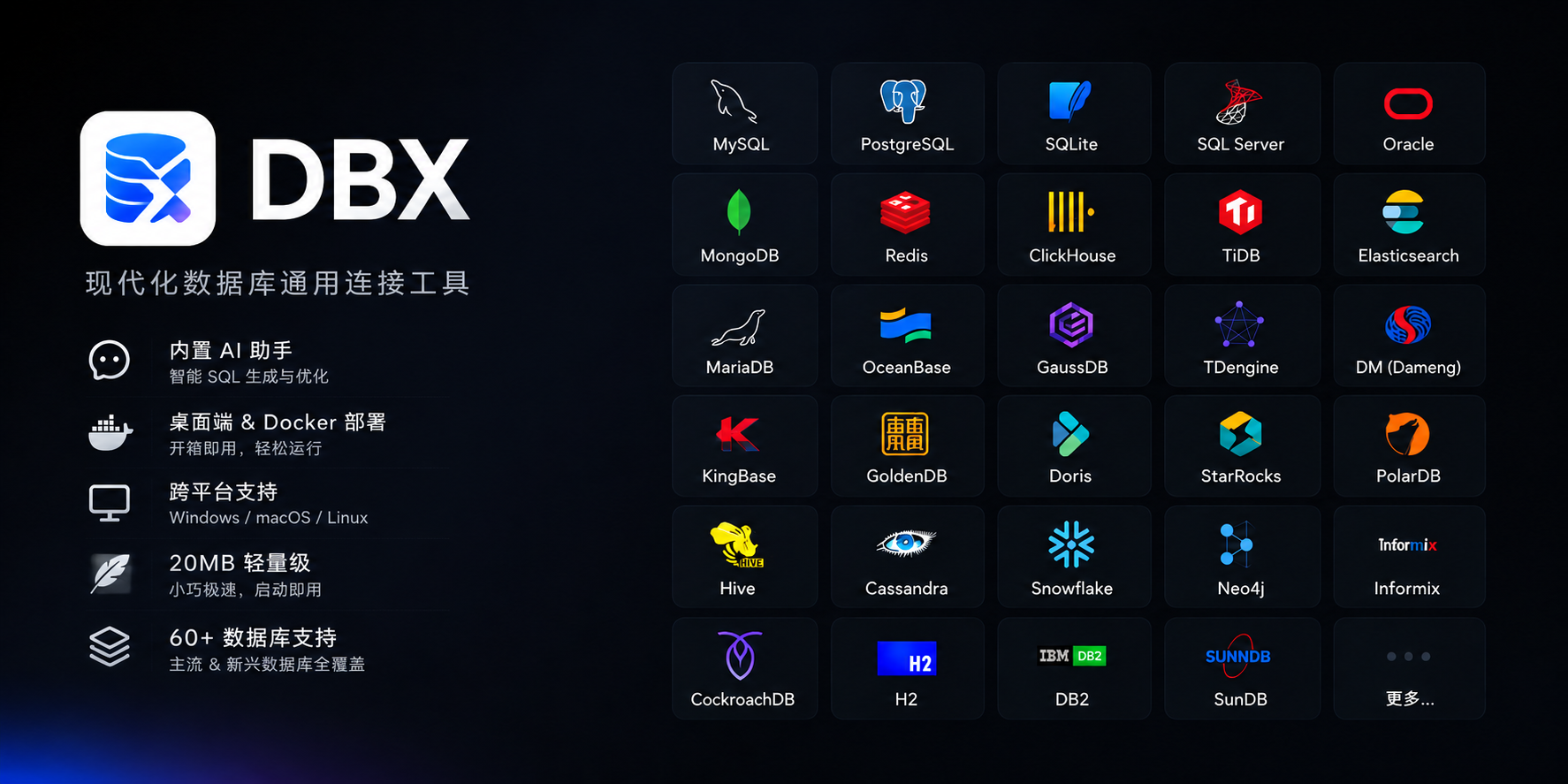
🪶 20 MB, zero runtime bloatNo Java JRE. No Python venv. No bundled Chromium. DBX ships as a single small binary — download, install, connect. DBeaver needs Java; TablePlus is macOS-only. DBX runs everywhere with nothing extra. |
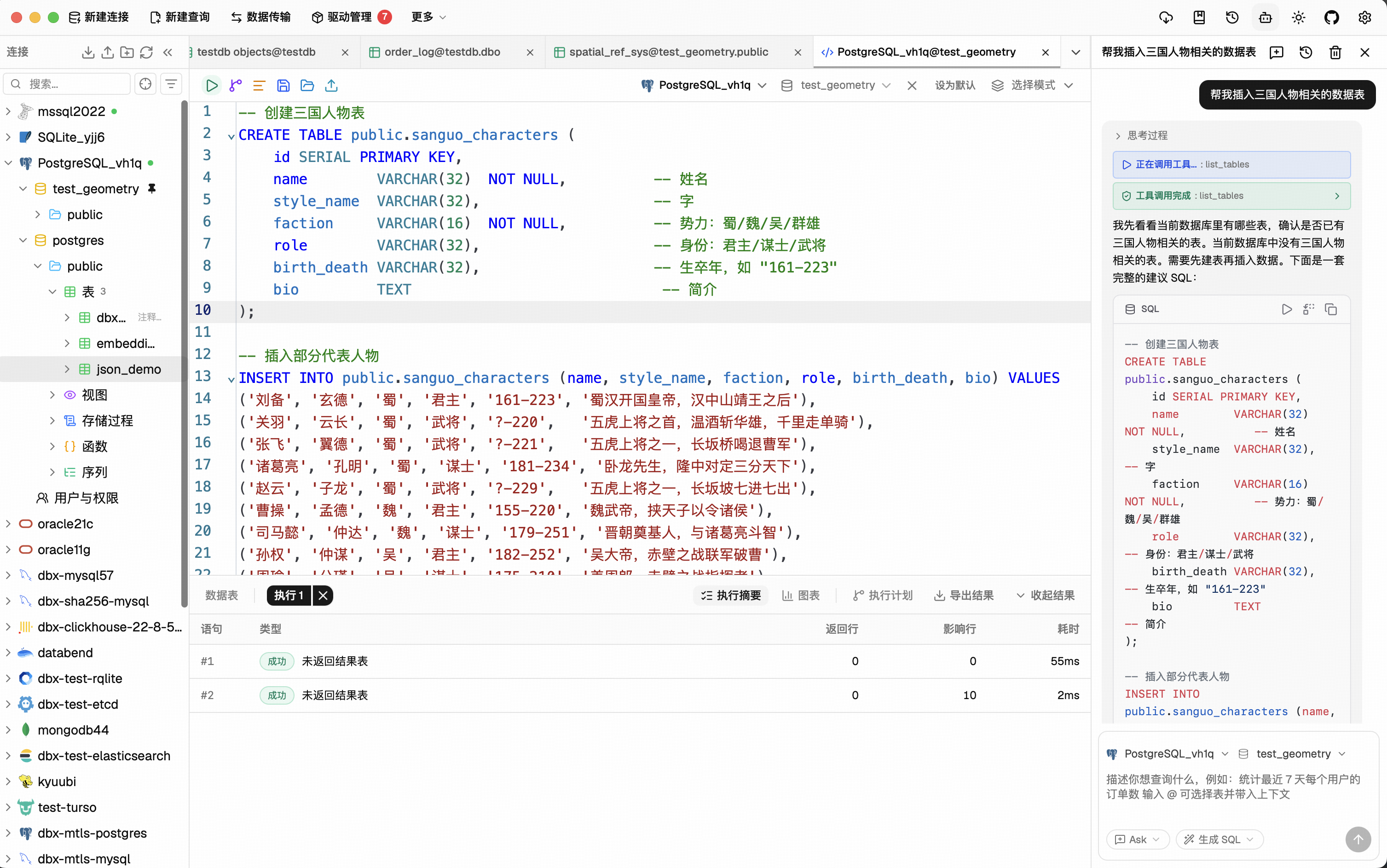
🤖 AI that lives in your editorHighlight a table, describe what you want, get SQL back — no copy-paste between tools. Works with Claude, OpenAI, or local models via Ollama. Built-in safety checks review AI-generated SQL before it runs. |
🔌 MCP: your databases, AI-readyDBX speaks the Model Context Protocol. Claude Code, Cursor, Windsurf, and other AI coding agents can query your databases through connections you already set up. One config, everywhere. |
🌐 Desktop + Docker + WebNative app on macOS, Windows, and Linux. Self-host via Docker for team access. Web version for browser-only environments. Same feature set. Same connections. |
Features
60+ Databases, One Tool
MySQL, PostgreSQL, SQLite, Redis, MongoDB, DuckDB, ClickHouse, SQL Server, Oracle, Elasticsearch, Qdrant, Milvus, Weaviate, MariaDB, TiDB, OceanBase, openGauss, GaussDB, KWDB, KingBase, Vastbase, GoldenDB, Doris, SelectDB, StarRocks, Manticore Search, Redshift, DM, TDengine, XuguDB, CockroachDB, Access, HighGo, and more. Agent/JDBC-oriented profiles extend DBX to H2, Snowflake, Trino, PrestoSQL, Hive, DB2, Informix, Neo4j, Cassandra, BigQuery, Kylin, SunDB, and custom JDBC connections. New native and agent-driven drivers also cover Databricks, SAP HANA, Teradata, Vertica, Firebird, Exasol, YashanDB, GBase 8a/8s, Databend, RQLite, Turso, InfluxDB, QuestDB, IoTDB, etcd, ZooKeeper, Nacos, IRIS, and more. Message queue admin is also available for Pulsar, Kafka, and RocketMQ. All in a single ~20 MB app. No bundled Chromium.
Query Editor
CodeMirror 6 with SQL syntax highlighting, metadata-aware autocomplete, Cmd+Enter execution, selected SQL execution, SQL formatting, diagnostics, and 9 editor themes. Persistent query history, saved SQL snippets, tab restore, and SQL file execution keep repeat work close at hand.
AI SQL Assistant
Describe what you want in plain language — get SQL back. DBX can explain queries, optimize SQL, fix errors, and run AI-generated SQL through built-in safety checks. Works with Claude, OpenAI, local models, or any OpenAI-compatible endpoint.
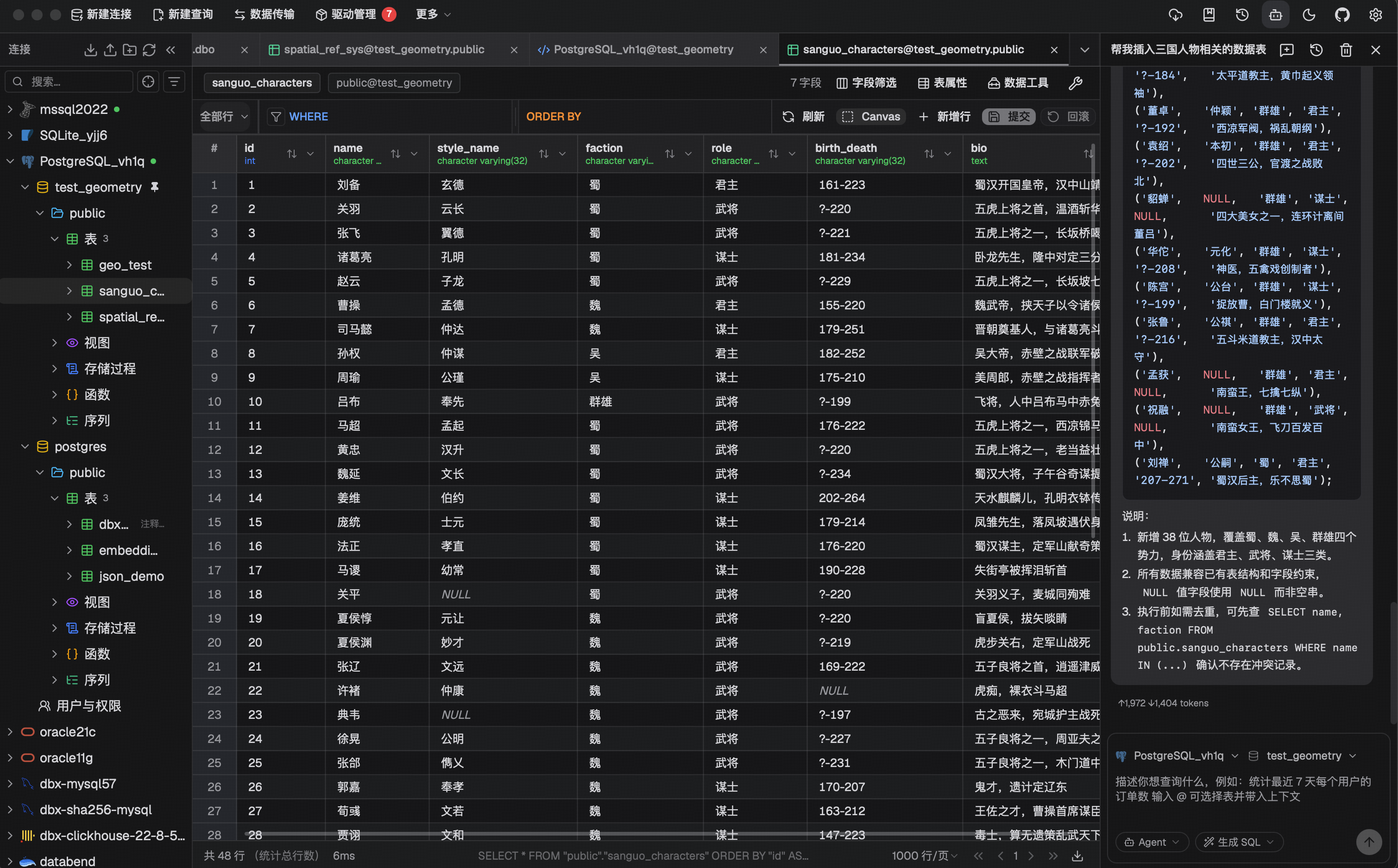
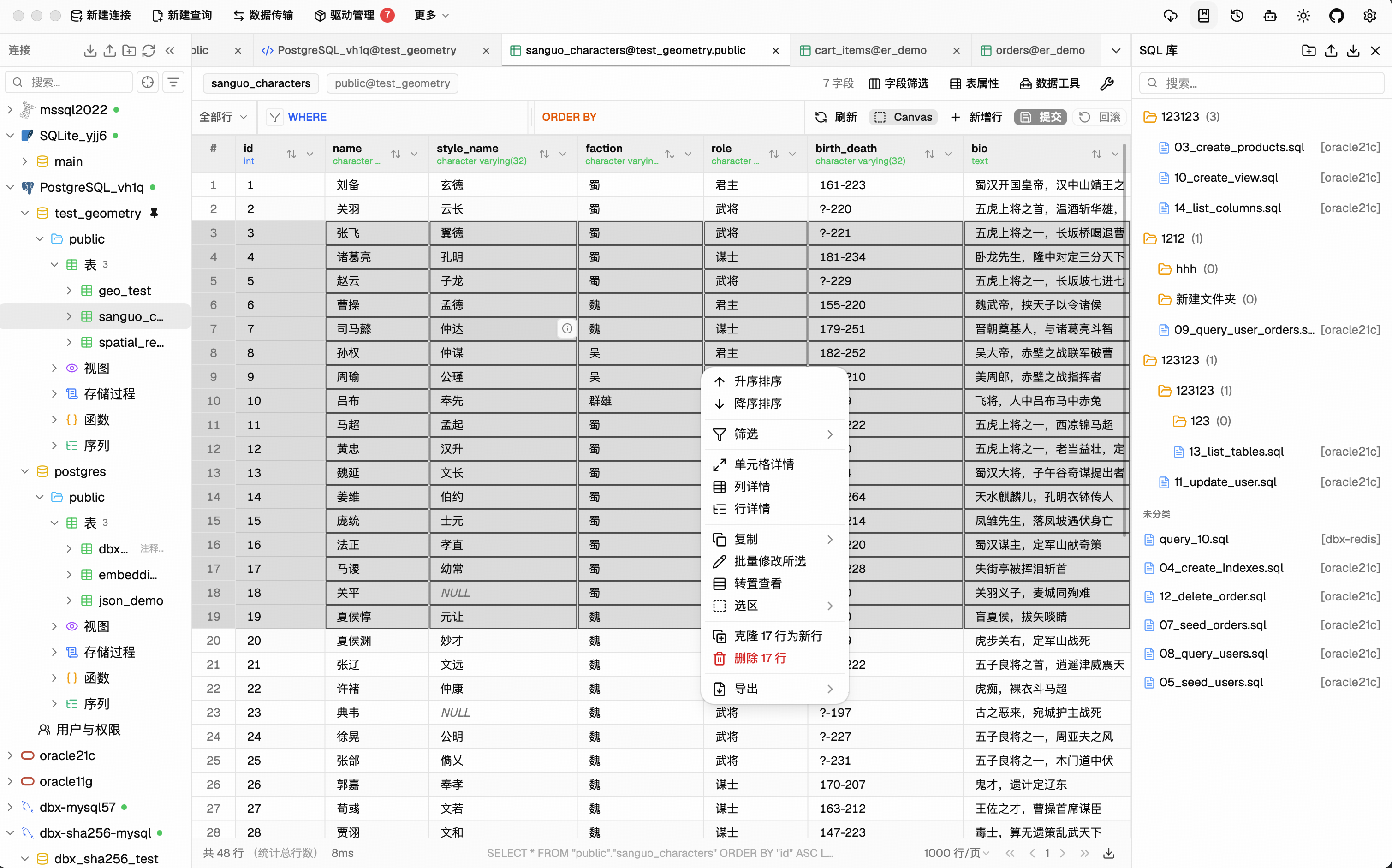
Data Grid
Virtual-scrolled table that handles large result sets. Inline editing, SQL preview before save, WHERE / ORDER BY controls, DataGrip-style filters, LIKE / NOT LIKE context filters, sorting, full-text search, pagination, column resize, auto-fit, row numbers, zebra stripes, and full cell details. Export or copy as CSV, JSON, Markdown, XLSX, or INSERT statements.
Schema Tools
- Schema browser — databases, schemas, tables, columns, indexes, foreign keys, triggers, with sidebar search & pin
- Object browser — grouped procedures, functions, views, and source editing where supported
- Table structure editor — reviewable column and index changes for supported engines
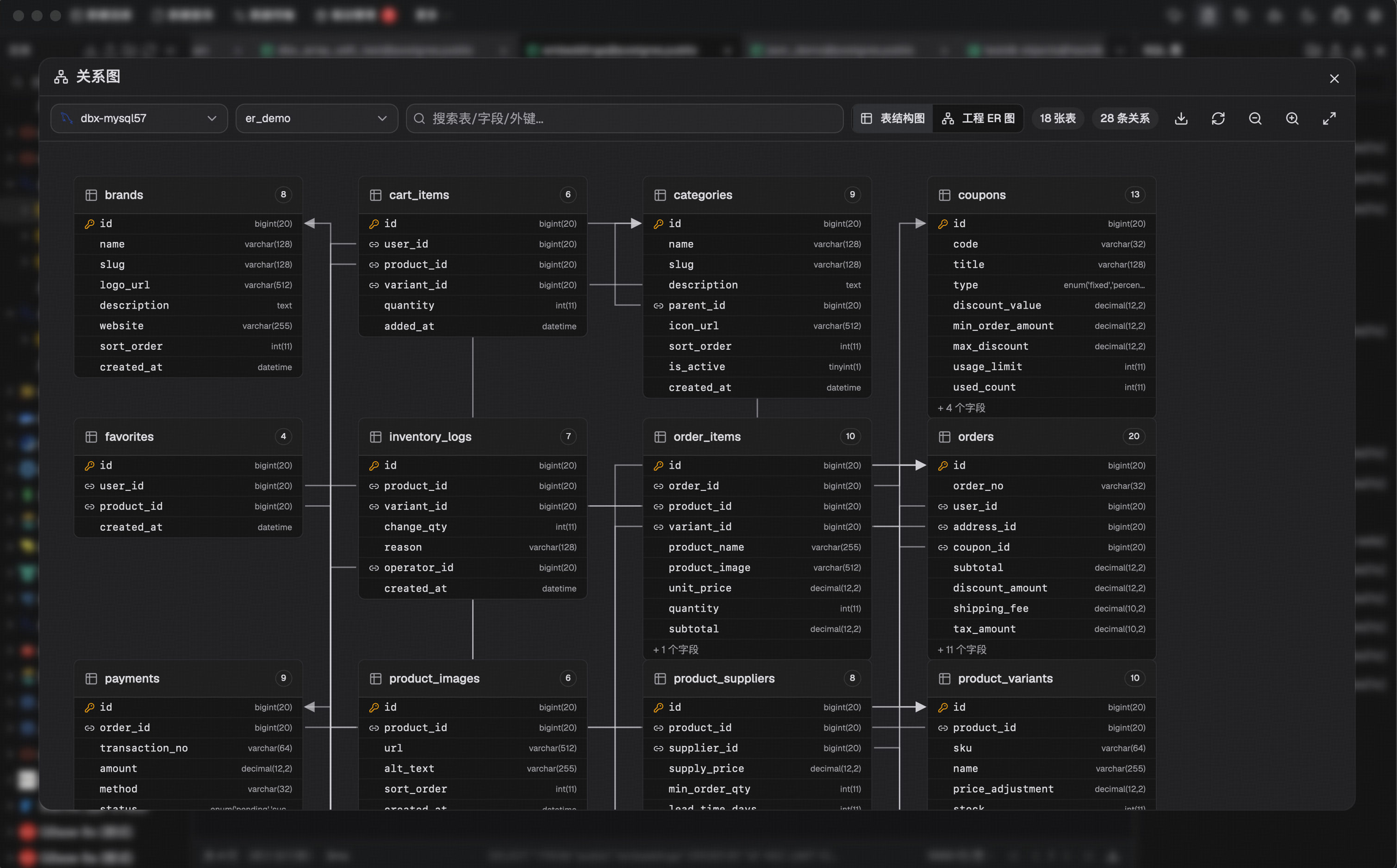
- ER diagram — visualize table relationships
- Schema diff — compare structures across connections
- Explain plan — visual query execution plan
- Field lineage — column-level lineage analysis
- Database search — find objects across large schemas
Data Operations
- Table import — CSV, Excel
- Data transfer — migrate between databases
- Database export — full database dump
- Data compare — compare table data and review synchronization output
- SQL file execution — run
.sqlfiles directly - File preview — drag & drop Parquet, CSV, JSON to preview instantly (powered by DuckDB)
- Connection import — bring connection profiles from DBeaver or Navicat
Specialized Browsers
- Redis — key pattern search, batch key operations, command runner, TTL editing, and all data types (String, Hash, List, Set, ZSet, Stream)
- MongoDB — document CRUD with pagination, Atlas & replica set URL connection
Safety & Connectivity
SSH tunnel (key & password) · database and AI proxy settings · auto-reconnect on connection loss · confirmation dialogs for destructive operations · encrypted config export/import · color-coded connections · driver store and optional JDBC plugin
Polished UI
Dark mode with native title bar sync · 9 editor themes · English, 简体中文 & Español · layout preferences · built-in auto-update
AI Agent Integration (MCP)
DBX provides an MCP server that lets AI coding agents query your databases using connections already configured in DBX.
npx @dbx-app/mcp-server
Add to your .mcp.json:
{
  "mcpServers": {
    "dbx": { "command": "npx", "args": ["-y", "@dbx-app/mcp-server"] }
  }
}
Windows portable builds need DBX_DATA_DIR in the MCP config, pointing to the data directory next to DBX.exe (the folder that contains dbx.db).
For DBX Web or Docker deployments, point the MCP server at the Web backend API. If the Web login page requires a password, set DBX_WEB_PASSWORD to the same password used there:
{
  "mcpServers": {
    "dbx": {
      "command": "npx",
      "args": ["-y", "@dbx-app/mcp-server"],
      "env": {
        "DBX_WEB_URL": "http://localhost:4224",
        "DBX_WEB_PASSWORD": "your-web-login-password"
      }
    }
  }
}
Works with Claude Code, Cursor, Windsurf, and any MCP-compatible agent. Supports listing connections, browsing tables, executing SQL, and opening tables directly in DBX's UI.
DBX also provides a dedicated CLI package for terminal, script, and Codex workflows:
npm install -g @dbx-app/cli
# or via Homebrew
brew tap t8y2/dbx && brew install dbx-cli
dbx connections list --json
dbx query local "select 1" --json
See the MCP server README and CLI README for details.
Install
Download the latest release from the Releases page.
Homebrew (macOS):
brew install --cask dbx
Scoop (Windows):
scoop bucket add dbx https://github.com/t8y2/scoop-bucket
scoop install dbx
WinGet (Windows):
winget install t8y2.dbx
Self-Hosted (Docker)
DBX provides a web version that can be deployed via Docker.
docker run -d --name dbx -p 4224:4224 -v dbx-data:/app/data t8y2/dbx
Or with Docker Compose. A ready-to-use example lives at deploy/docker-compose.yml:
services:
  dbx:
    image: t8y2/dbx
    ports:
      - "4224:4224"
    volumes:
      - dbx-data:/app/data
    restart: unless-stopped

volumes:
  dbx-data:
Open http://localhost:4224 in your browser. Multi-arch images (amd64 / arm64) are available.
To publish DBX under a reverse-proxy context path such as /dbx, set the
runtime base path and proxy the same prefix to the container:
environment:
  - DBX_PUBLIC_BASE_PATH=/dbx
When building the frontend yourself with an absolute asset base, set
VITE_DBX_BASE_PATH=/dbx/ before pnpm build.
Getting Started
Prerequisites
System Dependencies
macOS:
No additional dependencies required.
Linux (Ubuntu/Debian):
sudo apt-get install -y libwebkit2gtk-4.1-dev libgtk-3-dev libappindicator3-dev librsvg2-dev patchelf libssl-dev
NIXOS/NIX :
Windows:
No additional dependencies required.
Development
make
make installs root dependencies when needed and starts the local Tauri desktop development environment.
[!TIP] DuckDB compilation takes a while. If you're not working on DuckDB features, skip it to speed up local builds:
# Fast checks (skip DuckDB)
make cargo-check-fast
make cargo-test-fast

# Tauri dev without DuckDB
make dev-fast
The
--no-default-featuresflag only affects local development. Release builds (pnpm tauri build) always include DuckDB.
Web version:
make dev-web       # frontend
make dev-backend   # backend
Documentation site:
make docs
The official DBX documentation site lives in docs/. If you want to improve the website content or documentation pages, edit the files under docs/ and run make docs to preview the site locally.
JDBC agent driver development projects live in agents/:
cd agents
./gradlew test
Build artifacts from agents/drivers/<db-type>/build/libs/ are picked up by local driver install flows when available.
Build
make package
The installer will be in src-tauri/target/release/bundle/.
Tech Stack
| Layer | Technology |
|---|---|
| Framework | Tauri 2 |
| Frontend | Vue 3 + TypeScript |
| UI | shadcn-vue + Tailwind CSS |
| Editor | CodeMirror 6 |
| Backend | Rust + sqlx / tiberius / redis-rs / mongodb |
Community



