556 lines
16 KiB
Python
556 lines
16 KiB
Python
from __future__ import annotations
|
|
|
|
import os
|
|
import shutil
|
|
|
|
import cv2
|
|
import numpy as np
|
|
import numpy.typing as npt
|
|
|
|
from supervision.annotators.base import ImageType
|
|
from supervision.draw.color import Color, unify_to_bgr
|
|
from supervision.utils.conversion import (
|
|
ensure_cv2_image_for_standalone_function,
|
|
)
|
|
from supervision.utils.internal import deprecated
|
|
|
|
|
|
@ensure_cv2_image_for_standalone_function
|
|
def crop_image(
|
|
image: ImageType,
|
|
xyxy: npt.NDArray[int] | list[int] | tuple[int, int, int, int],
|
|
) -> ImageType:
|
|
"""
|
|
Crop image based on bounding box coordinates.
|
|
|
|
Args:
|
|
image (`numpy.ndarray` or `PIL.Image.Image`): The image to crop.
|
|
xyxy (`numpy.array`, `list[int]`, or `tuple[int, int, int, int]`):
|
|
Bounding box coordinates in `(x_min, y_min, x_max, y_max)` format.
|
|
|
|
Returns:
|
|
(`numpy.ndarray` or `PIL.Image.Image`): Cropped image matching input
|
|
type.
|
|
|
|
Examples:
|
|
```python
|
|
import cv2
|
|
import supervision as sv
|
|
|
|
image = cv2.imread("source.png")
|
|
image.shape
|
|
# (1080, 1920, 3)
|
|
|
|
xyxy = (200, 400, 600, 800)
|
|
cropped_image = sv.crop_image(image=image, xyxy=xyxy)
|
|
cropped_image.shape
|
|
# (400, 400, 3)
|
|
```
|
|
|
|
```python
|
|
from PIL import Image
|
|
import supervision as sv
|
|
|
|
image = Image.open("source.png")
|
|
image.size
|
|
# (1920, 1080)
|
|
|
|
xyxy = (200, 400, 600, 800)
|
|
cropped_image = sv.crop_image(image=image, xyxy=xyxy)
|
|
cropped_image.size
|
|
# (400, 400)
|
|
```
|
|
"""
|
|
if isinstance(xyxy, (list, tuple)):
|
|
xyxy = np.array(xyxy)
|
|
xyxy = np.round(xyxy).astype(int)
|
|
x_min, y_min, x_max, y_max = xyxy.flatten()
|
|
return image[y_min:y_max, x_min:x_max]
|
|
|
|
|
|
@ensure_cv2_image_for_standalone_function
|
|
def scale_image(image: ImageType, scale_factor: float) -> ImageType:
|
|
"""
|
|
Scale image by given factor. Scale factor > 1.0 zooms in, < 1.0 zooms out.
|
|
|
|
Args:
|
|
image (`numpy.ndarray` or `PIL.Image.Image`): The image to scale.
|
|
scale_factor (`float`): Factor by which to scale the image.
|
|
|
|
Returns:
|
|
(`numpy.ndarray` or `PIL.Image.Image`): Scaled image matching input
|
|
type.
|
|
|
|
Raises:
|
|
ValueError: If scale factor is non-positive.
|
|
|
|
Examples:
|
|
```python
|
|
import cv2
|
|
import supervision as sv
|
|
|
|
image = cv2.imread("source.png")
|
|
image.shape
|
|
# (1080, 1920, 3)
|
|
|
|
scaled_image = sv.scale_image(image=image, scale_factor=0.5)
|
|
scaled_image.shape
|
|
# (540, 960, 3)
|
|
```
|
|
|
|
```python
|
|
from PIL import Image
|
|
import supervision as sv
|
|
|
|
image = Image.open("source.png")
|
|
image.size
|
|
# (1920, 1080)
|
|
|
|
scaled_image = sv.scale_image(image=image, scale_factor=0.5)
|
|
scaled_image.size
|
|
# (960, 540)
|
|
```
|
|
"""
|
|
if scale_factor <= 0:
|
|
raise ValueError("Scale factor must be positive.")
|
|
|
|
width_old, height_old = image.shape[1], image.shape[0]
|
|
width_new = int(width_old * scale_factor)
|
|
height_new = int(height_old * scale_factor)
|
|
return cv2.resize(image, (width_new, height_new), interpolation=cv2.INTER_LINEAR)
|
|
|
|
|
|
@ensure_cv2_image_for_standalone_function
|
|
def resize_image(
|
|
image: ImageType,
|
|
resolution_wh: tuple[int, int],
|
|
keep_aspect_ratio: bool = False,
|
|
) -> ImageType:
|
|
"""
|
|
Resize image to specified resolution. Can optionally maintain aspect ratio.
|
|
|
|
Args:
|
|
image (`numpy.ndarray` or `PIL.Image.Image`): The image to resize.
|
|
resolution_wh (`tuple[int, int]`): Target resolution as `(width, height)`.
|
|
keep_aspect_ratio (`bool`): Flag to maintain original aspect ratio.
|
|
Defaults to `False`.
|
|
|
|
Returns:
|
|
(`numpy.ndarray` or `PIL.Image.Image`): Resized image matching input
|
|
type.
|
|
|
|
Examples:
|
|
```python
|
|
import cv2
|
|
import supervision as sv
|
|
|
|
image = cv2.imread("source.png")
|
|
image.shape
|
|
# (1080, 1920, 3)
|
|
|
|
resized_image = sv.resize_image(
|
|
image=image, resolution_wh=(1000, 1000), keep_aspect_ratio=True
|
|
)
|
|
resized_image.shape
|
|
# (562, 1000, 3)
|
|
```
|
|
|
|
```python
|
|
from PIL import Image
|
|
import supervision as sv
|
|
|
|
image = Image.open("source.png")
|
|
image.size
|
|
# (1920, 1080)
|
|
|
|
resized_image = sv.resize_image(
|
|
image=image, resolution_wh=(1000, 1000), keep_aspect_ratio=True
|
|
)
|
|
resized_image.size
|
|
# (1000, 562)
|
|
```
|
|
|
|
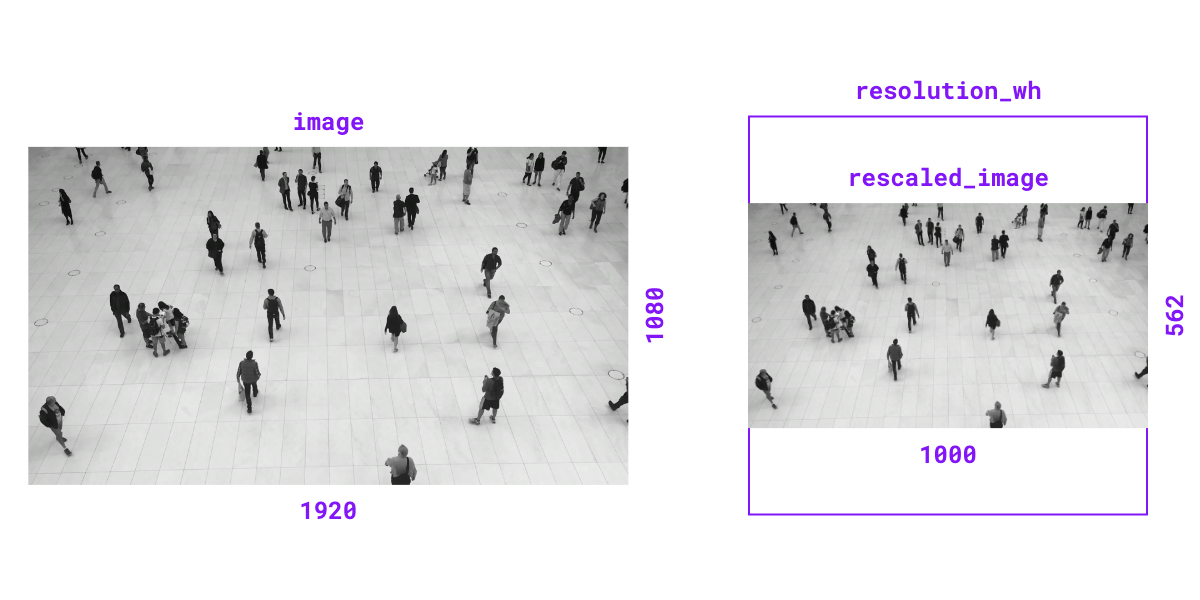{ align=center width="800" }
|
|
""" # noqa E501 // docs
|
|
if keep_aspect_ratio:
|
|
image_ratio = image.shape[1] / image.shape[0]
|
|
target_ratio = resolution_wh[0] / resolution_wh[1]
|
|
if image_ratio >= target_ratio:
|
|
width_new = resolution_wh[0]
|
|
height_new = int(resolution_wh[0] / image_ratio)
|
|
else:
|
|
height_new = resolution_wh[1]
|
|
width_new = int(resolution_wh[1] * image_ratio)
|
|
else:
|
|
width_new, height_new = resolution_wh
|
|
|
|
return cv2.resize(image, (width_new, height_new), interpolation=cv2.INTER_LINEAR)
|
|
|
|
|
|
@ensure_cv2_image_for_standalone_function
|
|
def letterbox_image(
|
|
image: ImageType,
|
|
resolution_wh: tuple[int, int],
|
|
color: tuple[int, int, int] | Color = Color.BLACK,
|
|
) -> ImageType:
|
|
"""
|
|
Resize image and pad with color to achieve desired resolution while
|
|
maintaining aspect ratio.
|
|
|
|
Args:
|
|
image (`numpy.ndarray` or `PIL.Image.Image`): The image to resize and pad.
|
|
resolution_wh (`tuple[int, int]`): Target resolution as `(width, height)`.
|
|
color (`tuple[int, int, int]` or `Color`): Padding color. If tuple, should
|
|
be in BGR format. Defaults to `Color.BLACK`.
|
|
|
|
Returns:
|
|
(`numpy.ndarray` or `PIL.Image.Image`): Letterboxed image matching input
|
|
type.
|
|
|
|
Examples:
|
|
```python
|
|
import cv2
|
|
import supervision as sv
|
|
|
|
image = cv2.imread("source.png")
|
|
image.shape
|
|
# (1080, 1920, 3)
|
|
|
|
letterboxed_image = sv.letterbox_image(
|
|
image=image, resolution_wh=(1000, 1000)
|
|
)
|
|
letterboxed_image.shape
|
|
# (1000, 1000, 3)
|
|
```
|
|
|
|
```python
|
|
from PIL import Image
|
|
import supervision as sv
|
|
|
|
image = Image.open("source.png")
|
|
image.size
|
|
# (1920, 1080)
|
|
|
|
letterboxed_image = sv.letterbox_image(
|
|
image=image, resolution_wh=(1000, 1000)
|
|
)
|
|
letterboxed_image.size
|
|
# (1000, 1000)
|
|
```
|
|
|
|
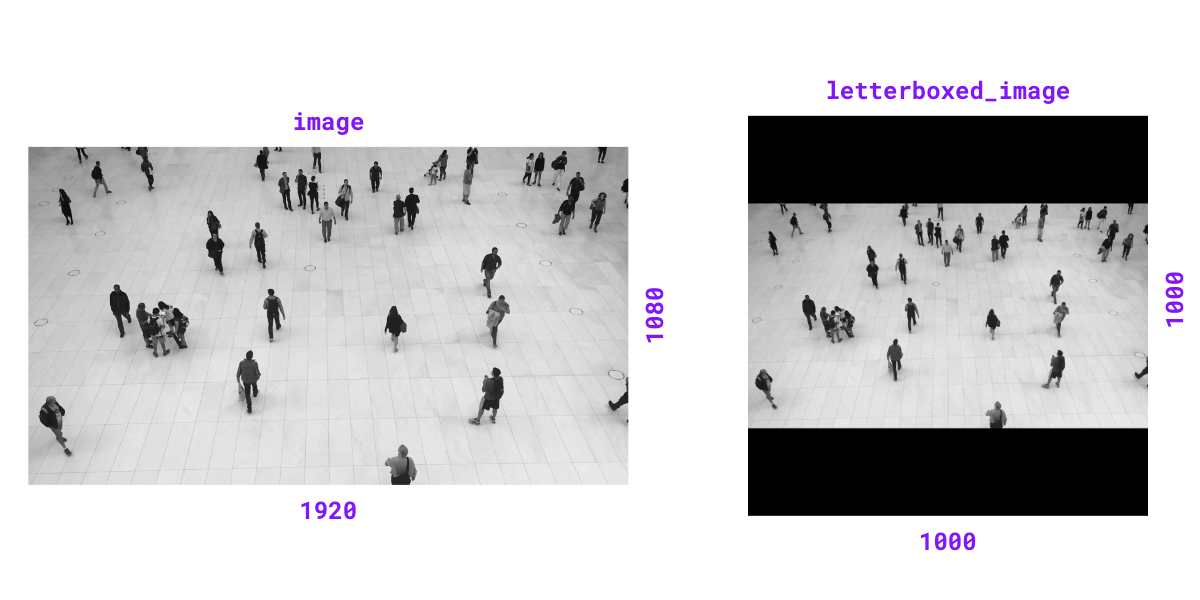{ align=center width="800" }
|
|
""" # noqa E501 // docs
|
|
assert isinstance(image, np.ndarray)
|
|
color = unify_to_bgr(color=color)
|
|
resized_image = resize_image(
|
|
image=image, resolution_wh=resolution_wh, keep_aspect_ratio=True
|
|
)
|
|
height_new, width_new = resized_image.shape[:2]
|
|
padding_top = (resolution_wh[1] - height_new) // 2
|
|
padding_bottom = resolution_wh[1] - height_new - padding_top
|
|
padding_left = (resolution_wh[0] - width_new) // 2
|
|
padding_right = resolution_wh[0] - width_new - padding_left
|
|
image_with_borders = cv2.copyMakeBorder(
|
|
resized_image,
|
|
padding_top,
|
|
padding_bottom,
|
|
padding_left,
|
|
padding_right,
|
|
cv2.BORDER_CONSTANT,
|
|
value=color,
|
|
)
|
|
|
|
if image.shape[2] == 4:
|
|
image[:padding_top, :, 3] = 0
|
|
image[height_new - padding_bottom :, :, 3] = 0
|
|
image[:, :padding_left, 3] = 0
|
|
image[:, width_new - padding_right :, 3] = 0
|
|
|
|
return image_with_borders
|
|
|
|
|
|
@deprecated(
|
|
"`overlay_image` function is deprecated and will be removed in "
|
|
"`supervision-0.32.0`. Use `draw_image` instead."
|
|
)
|
|
def overlay_image(
|
|
image: npt.NDArray[np.uint8],
|
|
overlay: npt.NDArray[np.uint8],
|
|
anchor: tuple[int, int],
|
|
) -> npt.NDArray[np.uint8]:
|
|
"""
|
|
Overlay image onto scene at specified anchor point. Handles cases where
|
|
overlay position is partially or completely outside scene bounds.
|
|
|
|
Args:
|
|
image (`numpy.array`): Background scene with shape `(height, width, 3)`.
|
|
overlay (`numpy.array`): Image to overlay with shape
|
|
`(height, width, 3)` or `(height, width, 4)`.
|
|
anchor (`tuple[int, int]`): Coordinates `(x, y)` where top-left corner
|
|
of overlay will be placed.
|
|
|
|
Returns:
|
|
(`numpy.array`): Scene with overlay applied, shape `(height, width, 3)`.
|
|
|
|
Examples:
|
|
```
|
|
import cv2
|
|
import numpy as np
|
|
import supervision as sv
|
|
|
|
image = cv2.imread("source.png")
|
|
overlay = np.zeros((400, 400, 3), dtype=np.uint8)
|
|
overlay[:] = (0, 255, 0) # Green overlay
|
|
|
|
result_image = sv.overlay_image(
|
|
image=image, overlay=overlay, anchor=(200, 400)
|
|
)
|
|
cv2.imwrite("target.png", result_image)
|
|
```
|
|
|
|
```
|
|
import cv2
|
|
import numpy as np
|
|
import supervision as sv
|
|
|
|
image = cv2.imread("source.png")
|
|
overlay = cv2.imread("overlay.png", cv2.IMREAD_UNCHANGED)
|
|
|
|
result_image = sv.overlay_image(
|
|
image=image, overlay=overlay, anchor=(100, 100)
|
|
)
|
|
cv2.imwrite("target.png", result_image)
|
|
```
|
|
"""
|
|
scene_height, scene_width = image.shape[:2]
|
|
image_height, image_width = overlay.shape[:2]
|
|
anchor_x, anchor_y = anchor
|
|
|
|
is_out_horizontally = anchor_x + image_width <= 0 or anchor_x >= scene_width
|
|
is_out_vertically = anchor_y + image_height <= 0 or anchor_y >= scene_height
|
|
|
|
if is_out_horizontally or is_out_vertically:
|
|
return image
|
|
|
|
x_min = max(anchor_x, 0)
|
|
y_min = max(anchor_y, 0)
|
|
x_max = min(scene_width, anchor_x + image_width)
|
|
y_max = min(scene_height, anchor_y + image_height)
|
|
|
|
crop_x_min = max(-anchor_x, 0)
|
|
crop_y_min = max(-anchor_y, 0)
|
|
crop_x_max = image_width - max((anchor_x + image_width) - scene_width, 0)
|
|
crop_y_max = image_height - max((anchor_y + image_height) - scene_height, 0)
|
|
|
|
if overlay.shape[2] == 4:
|
|
b, g, r, alpha = cv2.split(
|
|
overlay[crop_y_min:crop_y_max, crop_x_min:crop_x_max]
|
|
)
|
|
alpha = alpha[:, :, None] / 255.0
|
|
overlay_color = cv2.merge((b, g, r))
|
|
|
|
roi = image[y_min:y_max, x_min:x_max]
|
|
roi[:] = roi * (1 - alpha) + overlay_color * alpha
|
|
image[y_min:y_max, x_min:x_max] = roi
|
|
else:
|
|
image[y_min:y_max, x_min:x_max] = overlay[
|
|
crop_y_min:crop_y_max, crop_x_min:crop_x_max
|
|
]
|
|
|
|
return image
|
|
|
|
|
|
@ensure_cv2_image_for_standalone_function
|
|
def tint_image(
|
|
image: ImageType,
|
|
color: Color = Color.BLACK,
|
|
opacity: float = 0.5,
|
|
) -> ImageType:
|
|
"""
|
|
Tint image with solid color overlay at specified opacity.
|
|
|
|
Args:
|
|
image (`numpy.ndarray` or `PIL.Image.Image`): The image to tint.
|
|
color (`Color`): Overlay tint color. Defaults to `Color.BLACK`.
|
|
opacity (`float`): Blend ratio between overlay and image (0.0-1.0).
|
|
Defaults to `0.5`.
|
|
|
|
Returns:
|
|
(`numpy.ndarray` or `PIL.Image.Image`): Tinted image matching input
|
|
type.
|
|
|
|
Raises:
|
|
ValueError: If opacity is outside range [0.0, 1.0].
|
|
|
|
Examples:
|
|
```python
|
|
import cv2
|
|
import supervision as sv
|
|
|
|
image = cv2.imread("source.png")
|
|
tinted_image = sv.tint_image(
|
|
image=image, color=sv.Color.BLACK, opacity=0.5
|
|
)
|
|
cv2.imwrite("target.png", tinted_image)
|
|
```
|
|
|
|
```python
|
|
from PIL import Image
|
|
import supervision as sv
|
|
|
|
image = Image.open("source.png")
|
|
tinted_image = sv.tint_image(
|
|
image=image, color=sv.Color.BLACK, opacity=0.5
|
|
)
|
|
tinted_image.save("target.png")
|
|
```
|
|
"""
|
|
if not 0.0 <= opacity <= 1.0:
|
|
raise ValueError("opacity must be between 0.0 and 1.0")
|
|
|
|
overlay = np.full_like(image, fill_value=color.as_bgr(), dtype=image.dtype)
|
|
cv2.addWeighted(
|
|
src1=overlay, alpha=opacity, src2=image, beta=1 - opacity, gamma=0, dst=image
|
|
)
|
|
return image
|
|
|
|
|
|
@ensure_cv2_image_for_standalone_function
|
|
def grayscale_image(image: ImageType) -> ImageType:
|
|
"""
|
|
Convert image to 3-channel grayscale. Luminance channel is broadcast to
|
|
all three channels for compatibility with color-based drawing helpers.
|
|
|
|
Args:
|
|
image (`numpy.ndarray` or `PIL.Image.Image`): The image to convert to
|
|
grayscale.
|
|
|
|
Returns:
|
|
(`numpy.ndarray` or `PIL.Image.Image`): 3-channel grayscale image
|
|
matching input type.
|
|
|
|
Examples:
|
|
```python
|
|
import cv2
|
|
import supervision as sv
|
|
|
|
image = cv2.imread("source.png")
|
|
grayscale_image = sv.grayscale_image(image=image)
|
|
cv2.imwrite("target.png", grayscale_image)
|
|
```
|
|
|
|
```python
|
|
from PIL import Image
|
|
import supervision as sv
|
|
|
|
image = Image.open("source.png")
|
|
grayscale_image = sv.grayscale_image(image=image)
|
|
grayscale_image.save("target.png")
|
|
```
|
|
"""
|
|
grayscaled = cv2.cvtColor(image, cv2.COLOR_BGR2GRAY)
|
|
return cv2.cvtColor(grayscaled, cv2.COLOR_GRAY2BGR)
|
|
|
|
|
|
class ImageSink:
|
|
def __init__(
|
|
self,
|
|
target_dir_path: str,
|
|
overwrite: bool = False,
|
|
image_name_pattern: str = "image_{:05d}.png",
|
|
):
|
|
"""
|
|
Initialize context manager for saving images to directory.
|
|
|
|
Args:
|
|
target_dir_path (`str`): Target directory path where images will be
|
|
saved.
|
|
overwrite (`bool`): Whether to overwrite existing directory.
|
|
Defaults to `False`.
|
|
image_name_pattern (`str`): File name pattern for saved images.
|
|
Defaults to `"image_{:05d}.png"`.
|
|
|
|
Examples:
|
|
```python
|
|
import supervision as sv
|
|
|
|
frames_generator = sv.get_video_frames_generator(
|
|
"source.mp4", stride=2
|
|
)
|
|
|
|
with sv.ImageSink(target_dir_path="output_frames") as sink:
|
|
for image in frames_generator:
|
|
sink.save_image(image=image)
|
|
|
|
# Directory structure:
|
|
# output_frames/
|
|
# ├── image_00000.png
|
|
# ├── image_00001.png
|
|
# ├── image_00002.png
|
|
# └── image_00003.png
|
|
```
|
|
|
|
```python
|
|
import cv2
|
|
import supervision as sv
|
|
|
|
image = cv2.imread("source.png")
|
|
crop_boxes = [
|
|
( 0, 0, 400, 400),
|
|
(400, 0, 800, 400),
|
|
( 0, 400, 400, 800),
|
|
(400, 400, 800, 800)
|
|
]
|
|
|
|
with sv.ImageSink(
|
|
target_dir_path="image_crops",
|
|
overwrite=True
|
|
) as sink:
|
|
for i, xyxy in enumerate(crop_boxes):
|
|
crop = sv.crop_image(image=image, xyxy=xyxy)
|
|
sink.save_image(image=crop, image_name=f"crop_{i}.png")
|
|
|
|
# Directory structure:
|
|
# image_crops/
|
|
# ├── crop_0.png
|
|
# ├── crop_1.png
|
|
# ├── crop_2.png
|
|
# └── crop_3.png
|
|
```
|
|
"""
|
|
self.target_dir_path = target_dir_path
|
|
self.overwrite = overwrite
|
|
self.image_name_pattern = image_name_pattern
|
|
self.image_count = 0
|
|
|
|
def __enter__(self):
|
|
if os.path.exists(self.target_dir_path):
|
|
if self.overwrite:
|
|
shutil.rmtree(self.target_dir_path)
|
|
os.makedirs(self.target_dir_path)
|
|
else:
|
|
os.makedirs(self.target_dir_path)
|
|
|
|
return self
|
|
|
|
def save_image(self, image: np.ndarray, image_name: str | None = None):
|
|
"""
|
|
Save image to target directory with optional custom filename.
|
|
|
|
Args:
|
|
image (`numpy.array`): Image to save with shape `(height, width, 3)`
|
|
in BGR format.
|
|
image_name (`str` or `None`): Custom filename for saved image. If
|
|
`None`, generates name using `image_name_pattern`. Defaults to
|
|
`None`.
|
|
"""
|
|
if image_name is None:
|
|
image_name = self.image_name_pattern.format(self.image_count)
|
|
|
|
image_path = os.path.join(self.target_dir_path, image_name)
|
|
cv2.imwrite(image_path, image)
|
|
self.image_count += 1
|
|
|
|
def __exit__(self, exc_type, exc_value, exc_traceback):
|
|
pass
|